Configuration as code (Terraform)
LumoAuth does not ship a Terraform provider. Everything you can create under Applications & developer tools in the portal is also available through the Admin API (/orgs/{orgId}/api/v1/admin/*), the lumo command-line tool and the generated API clients, so you can keep your organization's configuration in a repository, review it in pull requests and apply it from a pipeline. This page shows how to do that with the tools that exist.
Authenticate
Create an organization API key under Portal → Applications & developer tools → API keys (/orgs/{orgId}/portal/settings/api-keys, Create API key). The form asks for a Name, Description and Expiration, then lets you tick Permissions per area. Grant only the scopes your pipeline needs, for example admin:clients:write, admin:roles:write, admin:permissions:write, admin:webhooks:write and admin:agents:write, plus the matching :read scopes; Read only selects every read scope in one click.
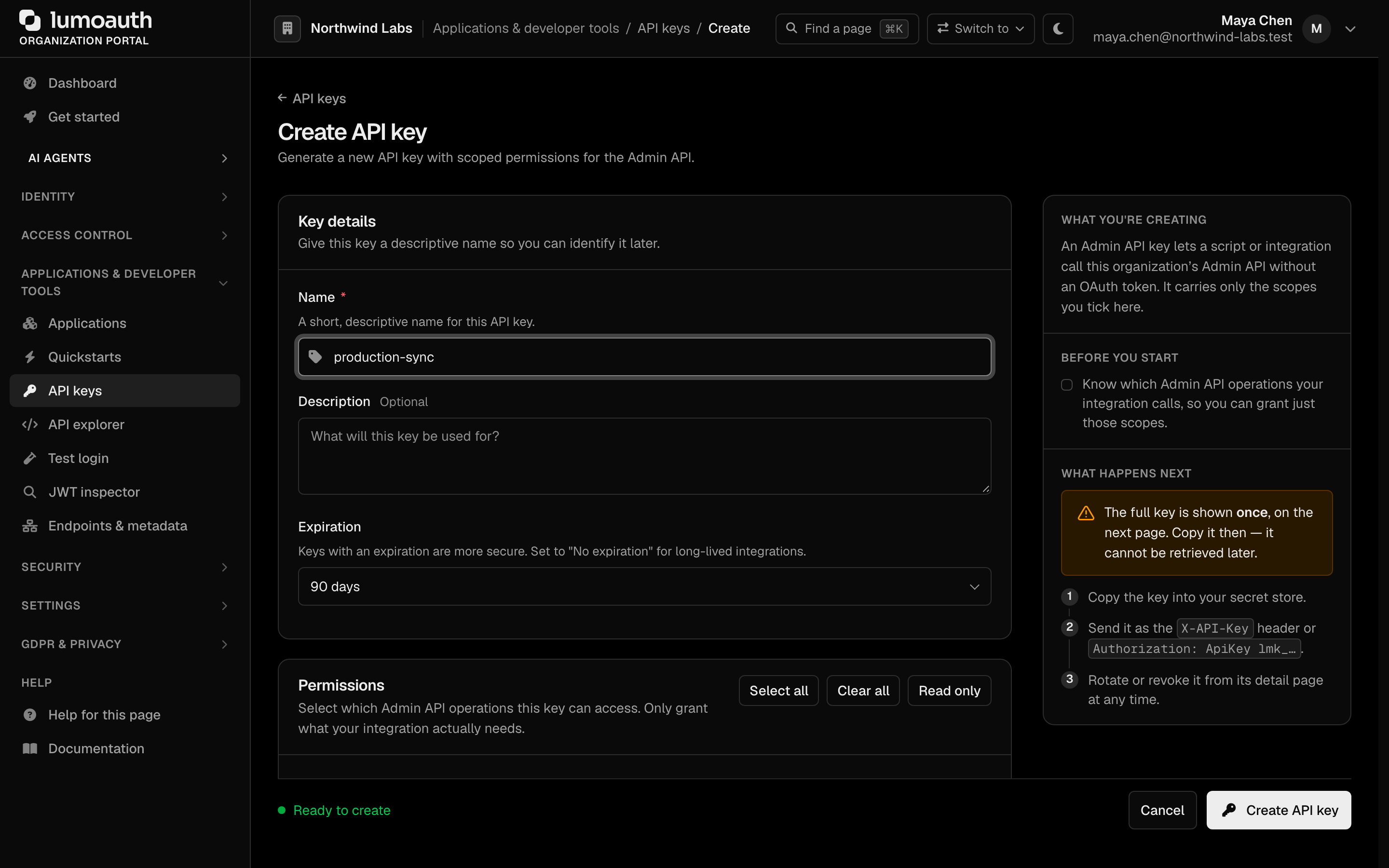
The key is shown once. Store it in your CI secret store, never in the repository.
export LUMO_BASE_URL=https://app.lumoauth.dev
export LUMO_ORG=acme-corp        # the organization slug, the {orgId} segment of /orgs/{orgId}/…
export LUMO_API_KEY=lmk_…
These are the variables the lumo CLI reads (lumo config set or lumo profile store them for you); scripts that call the Admin API directly can reuse them.
Apply configuration with the CLI
The CLI covers the resources most teams keep as code:
| Resource | Commands |
|---|---|
| Applications (OAuth clients) | lumo apps — list, get, create, update, delete, rotate-secret |
| Agents | lumo agents — list, get, create, update, delete, enable, disable, rotate-credentials, token |
| Roles | lumo roles — list, get, create, update, delete |
| Permissions | lumo permissions — list, get, create, update, delete |
| Groups | lumo groups — list, get, create, update, delete; lumo groups members — list, add, remove |
| Webhooks | lumo webhooks — list, get, create, update, delete; lumo webhooks deliveries — list, get, replay |
| MCP servers | lumo mcp servers, lumo mcp discovery, lumo mcp test |
| Organization settings | lumo org get, lumo org update, lumo settings get AREA, lumo settings update AREA |
| Anything else in the Admin API | lumo api METHOD PATH |
A script that is safe to run repeatedly looks like this:
#!/usr/bin/env bash
set -euo pipefail

# The application users sign in to.
lumo apps create \
  --name "Customer portal" \
  --redirect-uris https://portal.acme.example/auth/callback

# The permission model.
lumo permissions create --name "Approve invoices" --slug invoices.approve
lumo roles create --name Finance --description "Finance team" --permissions invoices.approve

# An audit stream to your SIEM (security information and event management system).
lumo webhooks create \
  --url https://siem.acme.example/hooks/lumoauth \
  --events user.login_failed,user.blocked,agent.revoked
Run lumo <command> --help for the exact flags of each command, and add --output json when a script needs to parse the result. Where a create command is not idempotent, look the resource up first (lumo roles list --output json) and call update when it already exists.
Call the Admin API directly
Every portal object has an Admin API endpoint. The API reference documents request and response bodies; the generated API clients (@lumoauth/api-client on npm, lumoauth-api-client on PyPI and github.com/lumoauth/api-clients/go) wrap the same endpoints with typed models.
curl -X POST "$LUMO_BASE_URL/orgs/$LUMO_ORG/api/v1/admin/roles" \
  -H "Authorization: Bearer $LUMO_API_KEY" \
  -H "Content-Type: application/json" \
  -d '{"name": "Finance", "description": "Finance team", "permissions": ["invoices.approve"]}'
Credentials that are returned once
The Admin API returns these values at creation time and never again:
- the client secret of a confidential application (
lumo apps create,lumo apps rotate-secret) - an agent's API key or client secret (
lumo agents create,lumo agents rotate-credentials) - a webhook's signing secret (
lumo webhooks create)
Capture them from the command output and write them to your secret store in the same step. If you lose one, rotate it; there is no way to read it back.
Pushing client credentials to a deploy platform
For Vercel, Netlify, GitHub Actions and Doppler you can skip the copy step: the Sync credentials… button shown when a client secret is created pushes LUMO_CLIENT_ID and LUMO_CLIENT_SECRET into a configured deploy target. See Secrets managers.
Workload-identity agents
An agent that runs on infrastructure you control does not need a stored key: LumoAuth verifies the platform's own token (Kubernetes service-account tokens, GitHub Actions, AWS, GCP, Azure and SPIFFE are supported). Create such an agent in the portal under AI Agents → Agents or through the Admin API agents endpoint; the CLI's lumo agents create covers API-key and client-credentials agents. The agent's identity type cannot be changed afterwards; switching an existing agent between an API key and workload identity means creating a new agent. How the attestation works is described in Workload attestation.
Limits to know about
- MCP servers are created and deleted, not edited. The Admin API exposes create, read and delete for MCP servers, so a change means deleting and recreating the server, and clients holding tokens for the old resource identifier must authorize again.
- Signing keys are managed in the portal. Generate, rotate, promote and revoke keys under Security → Signing keys; there is no organization-scoped Admin API for them. See Key storage and HSMs.
- A primary signing key cannot be demoted. Promote a different key instead; the previous one is demoted automatically.
See also
- Running LumoAuth in Kubernetes: how to apply the same configuration from a cluster, and how pods obtain agent identities without stored credentials.
- Agent identity: what agents, capabilities and workload attestation mean.
- CLI reference: every
lumocommand.