Approval channels
When an AI agent asks for a permission that needs a human decision (a high- or critical-risk JIT request (just-in-time: a permission granted for one task, on request), or one outside the agent's registered capabilities), LumoAuth already pages reviewers through the approvals inbox, push notifications and e-mail. Approval channels add the places where reviewers already work:
| Channel | How the request appears | How the decision comes back |
|---|---|---|
| Slack | Block Kit message with Approve / Deny buttons | Interactivity callback, verified with the app's signing secret |
| Microsoft Teams | Adaptive Card (1.5) with Action.Execute buttons | Bot Framework invoke (JWT) or outgoing-webhook HMAC |
| ServiceNow | A record in a table of your choice (sc_request, incident, …) | Business Rule posts to a callback with a per-channel bearer token |
| Jira Service Management | An issue in a project of your choice | Automation rule posts to a callback with a per-channel bearer token |
Do this first
- Give your reviewers the
jit.approvepermission (organization admins already have it; for anyone else, create a role that grants onlyjit.approve, see Delegate approval to a reviewer role). Reviewers must not be the owner of the agents they review. - Open Integrations → Approval channels (
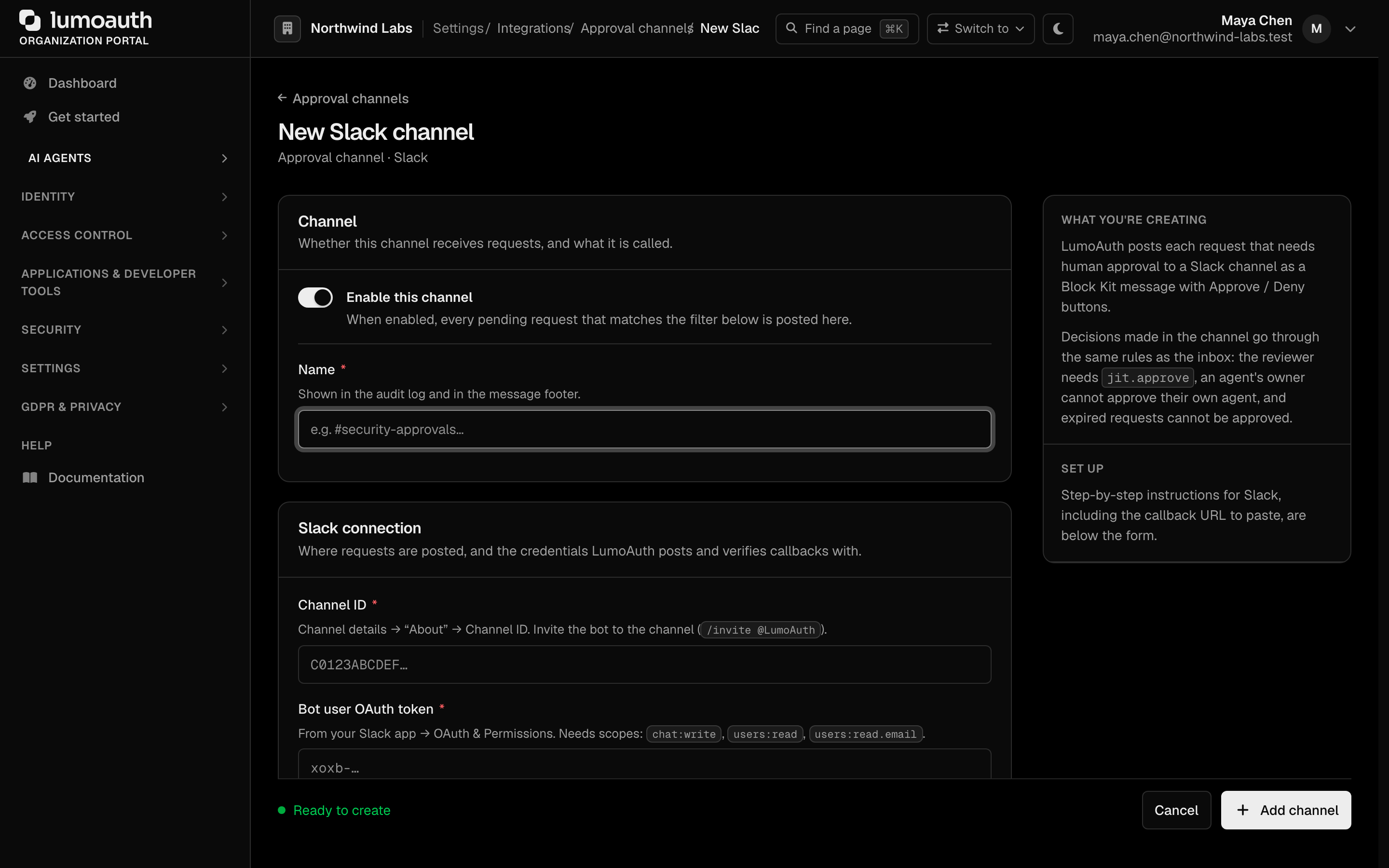
/orgs/{orgId}/portal/integrations/approval-channels). You needsettings.manage. - Under Add a channel, pick Slack, Microsoft Teams, ServiceNow or Jira Service Management, follow the provider steps below (the same steps, with the exact callback URL, are shown below the form), and click Add channel. Credentials are shown once.
- Trigger a high-risk JIT request and decide it from the channel. Check the
approval_channel.decisionaudit event.

Who can decide
Whatever the channel, the decision runs through the same service as the inbox, so every rule still applies:
- the reviewer must hold
jit.approvein the organization (a seeded system permission held by organization admins); - the agent's owner cannot review their own agent's requests (a second reviewer is required);
- the user the agent acts on behalf of cannot self-approve;
- an expired request cannot be approved.
Every decision is audit-logged (approval_channel.decision) with the acting user, the channel,
and the request id; refused attempts are logged as approval_channel.decision_rejected.
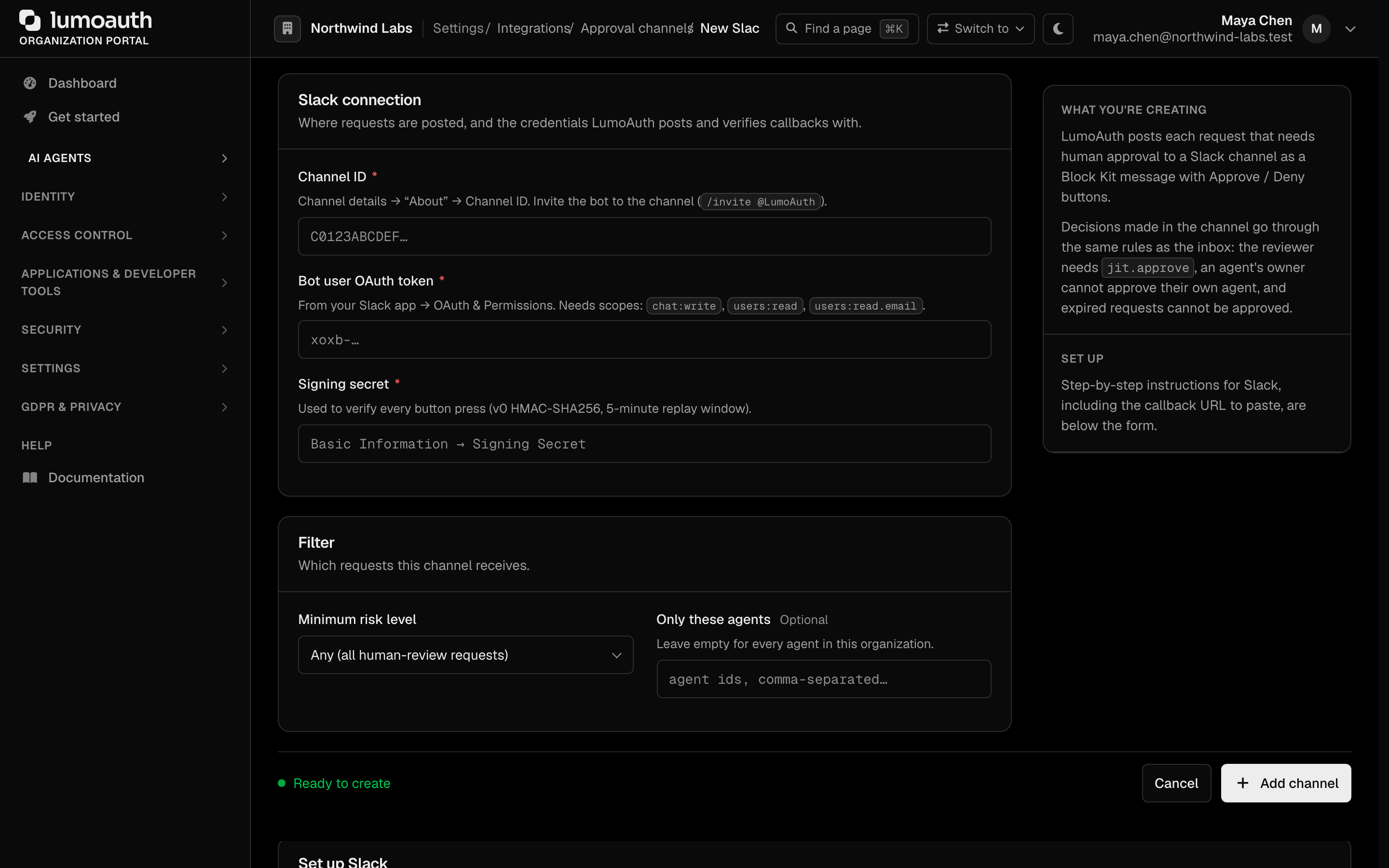
Each channel can be limited to a minimum risk level and to specific agent ids; several channels of the same type are fine.
Credentials are encrypted at rest and are never shown again after
saving. Posting happens asynchronously (Messenger async transport), so a slow or failing
provider never delays the agent's request. Failures are counted on the channel and shown on the
Integrations page.
Slack
- Create a Slack app (From scratch) and, under OAuth & Permissions, add the bot scopes
chat:write,users:readandusers:read.email. Install the app and copy the Bot User OAuth Token (xoxb-…). - Under Interactivity & Shortcuts, enable interactivity and set the Request URL to
https://<your-lumoauth>/orgs/{orgId}/hooks/approvals/slack(the portal page shows the exact URL with a copy button). - Copy the Signing Secret from Basic Information.
- Invite the bot to the channel (
/invite @YourApp) and paste the channel id (Channel details → About).
Every button press is verified with Slack's v0 signature scheme (an HMAC-SHA256 keyed hash over
v0:<timestamp>:<body>); requests older than five minutes are rejected. The Slack user is
mapped to a LumoAuth user by the e-mail on their Slack profile (users.info). After the
decision the original message is updated in place; a reviewer without jit.approve gets an
ephemeral explanation instead.
Microsoft Teams
Cards are delivered through an incoming webhook (a Teams Workflows "post to a channel when a webhook request is received" flow or a legacy connector). Paste its URL; it is stored as a secret.
To let people decide from the card, pick one of two modes:
- Bot Framework — register an Azure Bot whose messaging endpoint is
https://<your-lumoauth>/orgs/{orgId}/hooks/approvals/teams, and enter the bot's Microsoft App ID. Card actions arrive asadaptiveCard/actioninvokes carrying a Bot Framework token; LumoAuth verifies it againsthttps://login.botframework.com/v1/.well-known/keys(issuerhttps://api.botframework.com, audience = your app id). - Outgoing webhook — create an outgoing webhook in the team pointing at the same URL and
enter its security token. Requests are verified with HMAC-SHA256 over the body
(
Authorization: HMAC <base64>).
With neither configured, the card only links to the approvals inbox.

The acting person is matched by the e-mail / UPN in the activity's from block, or by a linked
Microsoft identity (aadObjectId). Incoming webhooks cannot edit a posted card, so the outcome
is posted as a follow-up card.
ServiceNow
LumoAuth creates one record per request through the Table API (POST /api/now/table/<table>),
with short_description, description, work_notes, urgency and the request id in
correlation_id and u_lumo_request_id (add the custom field or let ServiceNow ignore it).
Authentication is basic (an integration user) or OAuth 2.0 password grant.
When the channel is created you get a callback token — shown once. Store it in a system property and add a Business Rule (after update, when the approval field changes) that calls:
POST https://<your-lumoauth>/orgs/{orgId}/hooks/approvals/servicenow
Authorization: Bearer <callback token>
Content-Type: application/json

{"request_id": "<correlation_id>", "decision": "approved" | "denied",
 "actor_email": "<approver e-mail>", "comment": "<optional>"}
actor_email must belong to a LumoAuth user of the organization with jit.approve. Responses:
200 {"status": …} on success, 403 when the actor is not permitted, 404 when the request is
unknown, 409 when it is no longer pending. The outcome is mirrored back as a work note and,
optionally, a state value you configure for approvals and denials. Rotate the token from the
channel page at any time (Rotate callback token).

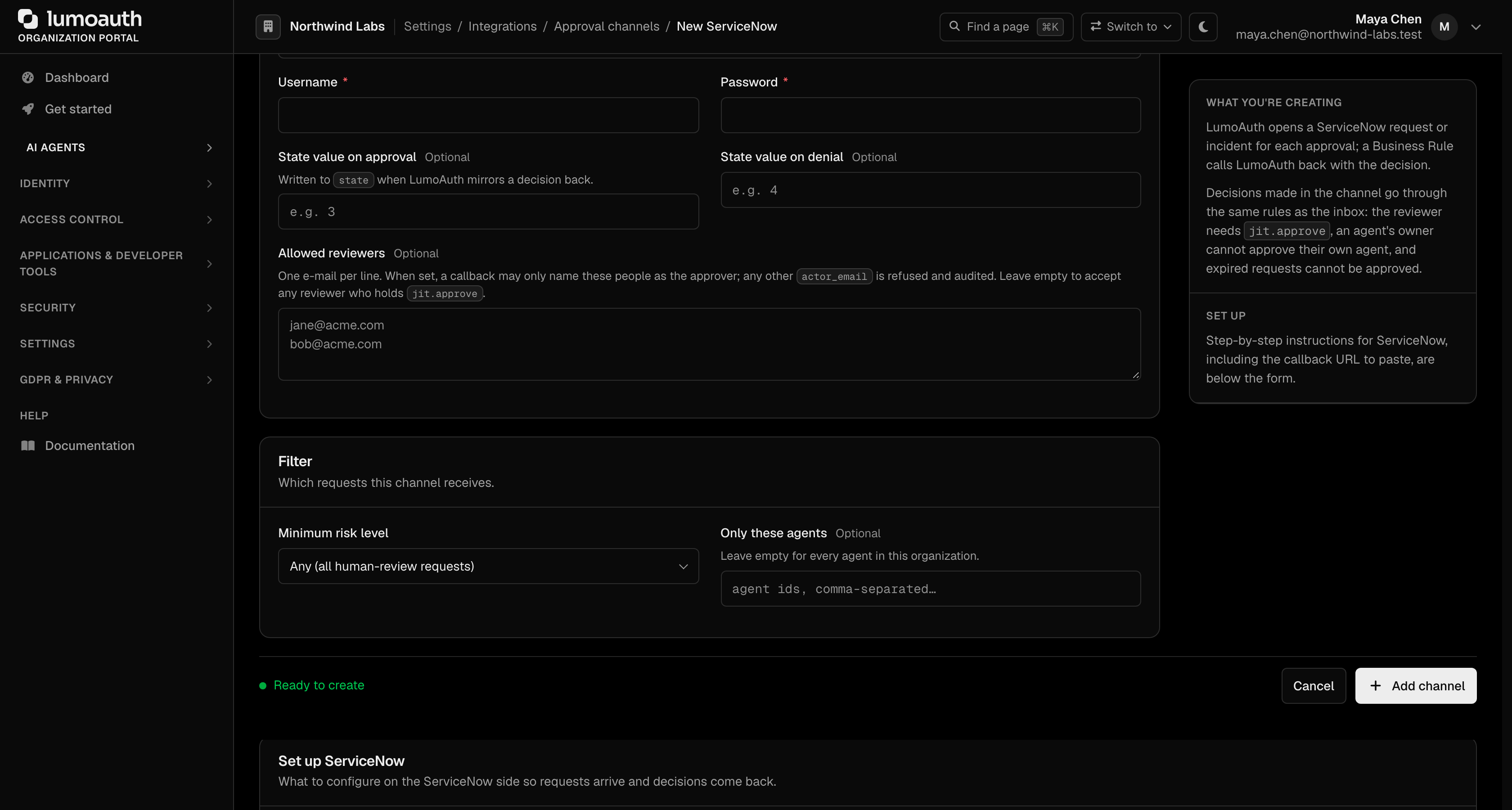
Restrict which reviewers a ticketing system may name
actor_email is asserted by your ticketing system rather than proven by a login, so anyone who
holds the callback token can name any jit.approve holder. The ServiceNow and Jira callbacks
therefore honour an optional allowed_reviewer_emails list in the channel configuration (a JSON
list or a comma, semicolon or newline separated string; matching is case-insensitive). When the
list is set, a callback naming any other actor is rejected with 403 forbidden and audited as
approval_channel.decision_rejected, so a leaked callback token can only act as those reviewers.
An empty or missing list keeps the default behaviour (any active user of the organization with
jit.approve). In every case the agent's owner and the on-behalf-of user can never approve their
own request.
Slack and Microsoft Teams channels honour the same list. There the reviewer is the e-mail Slack's
users.info reports for the clicking user, or the e-mail / UPN (or linked Microsoft identity) in
the Bot Framework payload — never a body field — and when the list is set a reviewer who is not on
it, or whose e-mail cannot be resolved, is refused with the same audit event.
Set it in the portal: open the channel, fill Allowed reviewers with one e-mail per line, and save. The list is stored with the channel configuration and applies to the next callback. If you suspect the callback token leaked, rotate it from the same page.
Jira Service Management
LumoAuth creates an issue per request (POST /rest/api/3/issue) in the configured project and
issue type, labelled lumoauth-approval and risk-<level>, with the request id in the summary.
Authenticate with an Atlassian account e-mail and API token.
Add an Automation rule — When: Issue transitioned → If: label = lumoauth-approval → Then:
Send web request — to https://<your-lumoauth>/orgs/{orgId}/hooks/approvals/jira with header
Authorization: Bearer <callback token> and a JSON body like the ServiceNow one. Map your
workflow's approve / decline statuses to decision; {{initiator.emailAddress}} is the natural
actor_email. The outcome is mirrored back as a comment.

Security notes
- Nothing is trusted before authentication. Callbacks live on the public
inbound_hooksfirewall. The provider signature (Slack), Bot Framework token or HMAC (Teams) or bearer (ServiceNow, Jira) is verified before the body is acted on. - Uniform errors. Any unauthenticated request gets the same
401. After authentication an unknown request id yields a generic404, and the reviewer's permission is checked before the request is looked up, so ids cannot be probed. - Reviewer rules always apply.
jit.approve, no owner self-review, no on-behalf-of self-approval, no expired requests. Refusals are audited. - Optional reviewer allow-list. Every channel type can be pinned to
allowed_reviewer_emails(see above); ServiceNow and Jira require it. - Rate limits. Callbacks are limited per source IP and per organization (
approval_hookslimiter). - Outbound safety. Calls go only to public HTTPS hosts, with the resolved IP pinned (SSRF and DNS rebinding guard), a 10-second timeout and no redirects.
- Secrets at rest. Channel credentials are encrypted at rest; only the SHA-256 hash of a callback token is stored.
- Timestamps. Slack requests older than five minutes are rejected.
Common mistakes
- Reviewer clicks Approve and gets "not allowed". They lack
jit.approve, own the agent, or are the on-behalf-of user. In Slack the explanation is ephemeral; in ServiceNow and Jira the callback returns403. - ServiceNow or Jira callback returns
403for a valid reviewer. The e-mail inactor_emaildoes not match a LumoAuth user of this organization (compare case and domain), or the channel'sallowed_reviewer_emailslist excludes it. - Callback returns
409. The request was already decided in the inbox or another channel, or it expired. - Nothing is posted. The request's risk level is below the channel's minimum, or the agent id filter excludes the agent. Failures are counted on the channel card on the Integrations page.