GDPR Compliance
The GDPR (General Data Protection Regulation) is the EU law governing how organizations handle personal data of people in the EU. It grants individuals rights over their own data — including the right to access, correct, export, and delete it — and requires that organizations record the consent under which data is processed.
LumoAuth includes tools to help you meet these obligations: data subject access requests (Article 15), right to erasure (Article 17), data portability (Article 20), consent management (Article 7), and records of processing activities (Article 30).
GDPR Features
| Feature | Description | Portal Location |
|---|---|---|
| Data Subject Requests (DSR) | Process access / erasure / portability requests | /orgs/{orgId}/portal/gdpr/dsr |
| Right to Erasure | Erase or anonymize user data on request | /orgs/{orgId}/portal/gdpr/dsr |
| Consent Management | Track and verify user consent records | /orgs/{orgId}/portal/gdpr/consent-records |
| Records of Processing (RoPA) | Article 30 processing activities + DPIAs | /orgs/{orgId}/portal/gdpr/processing-activities |
| Audit Trail | Full log of data access and changes | /orgs/{orgId}/portal/audit-logs |
In the portal sidebar these pages are in the GDPR & privacy group: Privacy overview, Subject requests and Consent records. Every privacy page also has a tab bar — Overview, Subject requests, Consents, Records of processing, Breaches, Privacy policies, Sub-processors, Automated decisions, Settings — so each is one click from any other, and Privacy overview has a tile for each.
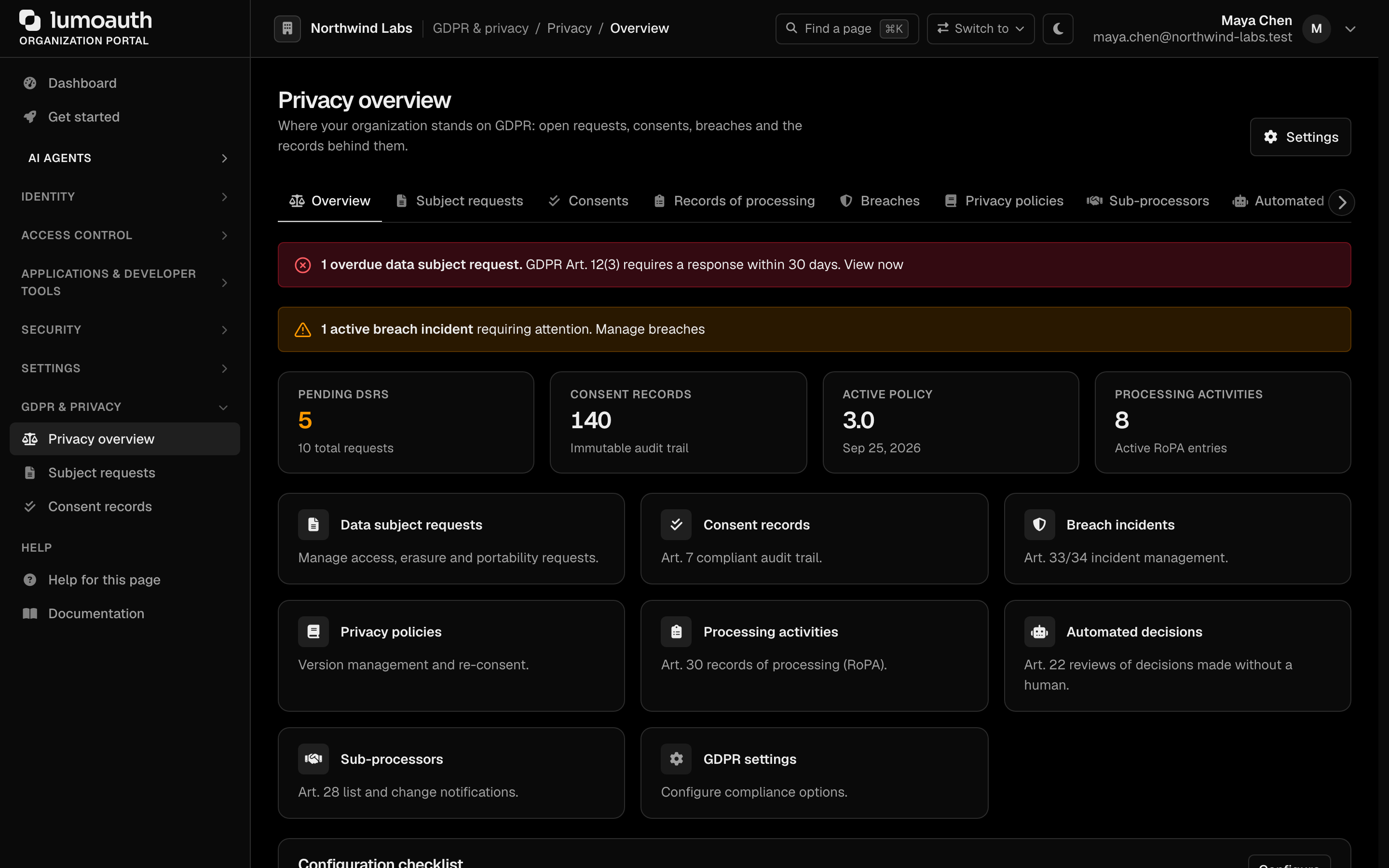
The privacy pages need the gdpr.manage permission; approving a DPIA needs gdpr.dpo. Both are seeded for every organization and held by the Tenant Admin role, so you can give a privacy team access without making them administrators. See How the admin permissions work.
Data Subject Requests (DSR)
When a user exercises a GDPR right (access under Article 15, erasure under Article 17, etc.), it is tracked as a Data Subject Request. Requests are typically initiated by the data subject through account self-service; administrators then review and process them.
Processing a DSR
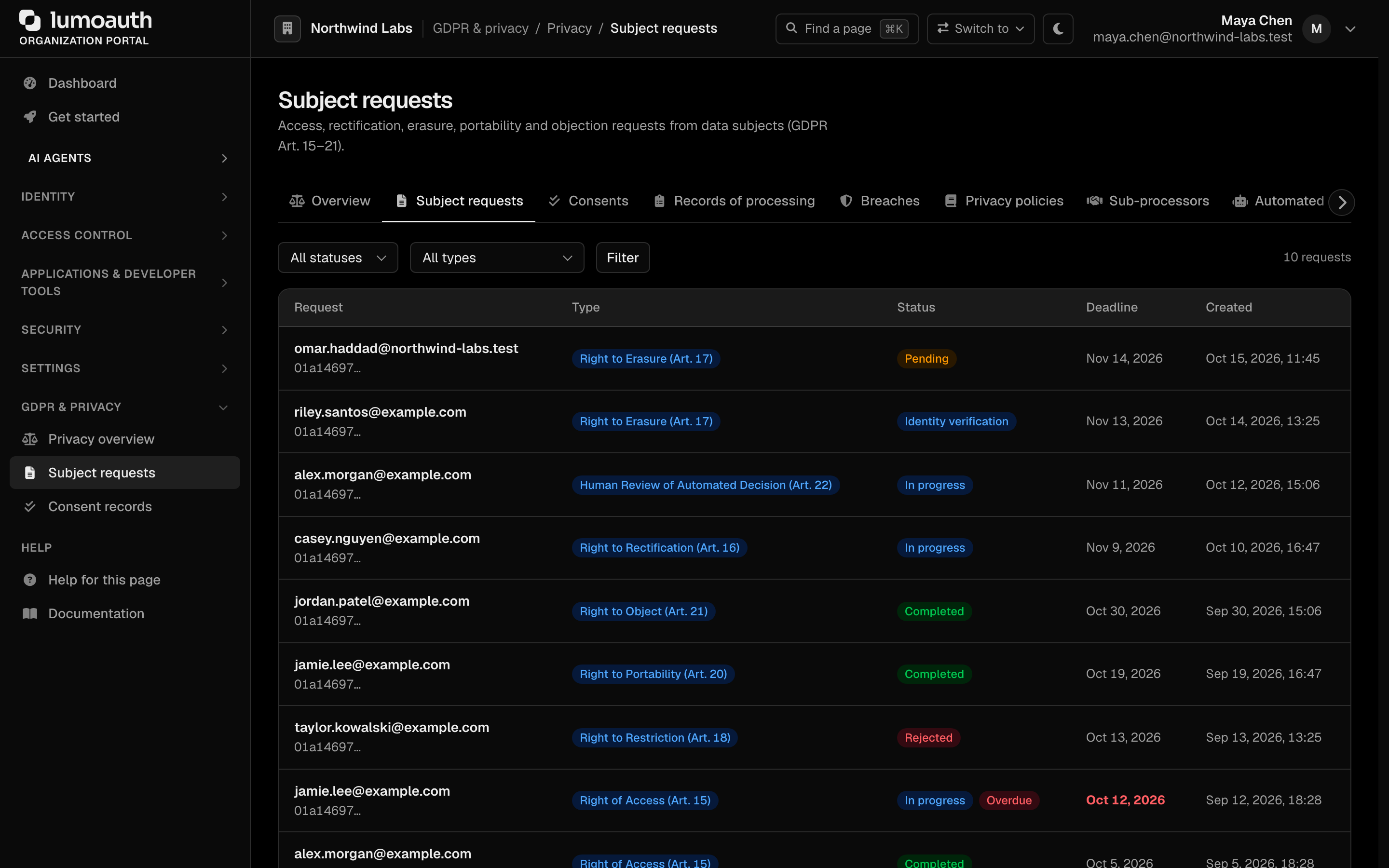
- Click Subject requests in the sidebar, or go to Privacy overview (
/orgs/{orgId}/portal/gdpr) and click the Data subject requests tile. Both open the Subject requests page at/orgs/{orgId}/portal/gdpr/dsr - Choose a status (Pending, In progress, Verification, Completed, Rejected) or a type if needed and click Filter. Request types are Access (Art. 15), Rectification (Art. 16), Erasure (Art. 17), Restriction (Art. 18), Portability (Art. 20), and Objection (Art. 21)
- Click the data subject's email address on a request to open it
- On the request page you can Update the status (Pending, In progress or Identity verification) and the assignee, add a processing note with Add note, Mark completed with a response to the data subject, or Reject with a reason. For Erasure requests, an Execute erasure action permanently erases or anonymizes the user's data
An access/portability export includes:
- User profile information
- Login history and session data
- Role and group assignments
- MFA (multi-factor authentication) enrollment status
- Social account links
- Consent records
- Audit log entries related to the user
DSRs are managed through the portal flow above. There is no api/v1/gdpr/data-export endpoint. End-users can also export their own data via account self-service (/account/data-export).
Right to Erasure (Right to Be Forgotten)
When a user requests deletion of their data (Article 17):
Processing an Erasure Request
- Go to Subject requests (
/orgs/{orgId}/portal/gdpr/dsr) and filter by type Erasure (Art. 17) - Open the request
- Verify the data subject's identity and review what will be deleted
- Click Execute erasure and confirm to permanently erase or anonymize the user's data (this action cannot be undone)
Whether erasure anonymizes or hard-deletes by default is set with Default erasure type under GDPR settings → Self-service.
Deleting a user anywhere, from the portal user list or the Admin API
(DELETE /admin/users/{id}), runs the same full erasure; it is not a soft delete.
What Gets Deleted
| Data Category | Action |
|---|---|
| User profile | Deleted |
| Login sessions and remember-me cookies | Revoked and deleted |
| Access/refresh tokens, AAuth tokens and codes | Revoked and deleted |
| Login attempts | Deleted |
| Consents | Deleted (cookie-consent proof rows are kept without IP and user agent) |
| MFA methods | Deleted |
| Passkey credentials | Deleted |
| Social account links | Deleted |
| Group memberships | Removed |
| Role assignments | Removed |
| Invitations sent to the address, one-time tokens (reset, magic link, verification), push requests, device codes | Deleted |
| CIBA, JIT and Shared Signals free text about the user | Cleared |
| Zanzibar relation tuples naming the user | Deleted |
| Failed background messages addressed to the user | Deleted |
Every erasure path (DSR, self-service, admin delete, CLI, lifecycle) notifies the recipients the data was disclosed to (Article 19), such as the applications that received the user's tokens and SCIM (automatic user provisioning) targets.
What Gets Retained
Some data is retained for legitimate business purposes (Article 17(3)):
| Data | Reason | Retention |
|---|---|---|
| Audit log entries | Security and compliance | Pseudonymised (e-mail and name removed; rows carry ids only) |
| GDPR request records | Compliance proof | Retained with request metadata |
Automated retention
Turn on Enable automated data retention enforcement at Privacy overview → Settings → Data retention
(/orgs/{orgId}/portal/gdpr/settings), set the dormant-account threshold and action (deactivate, anonymize or delete), the
soft-delete retention and the audit-log retention, and click Save GDPR settings.
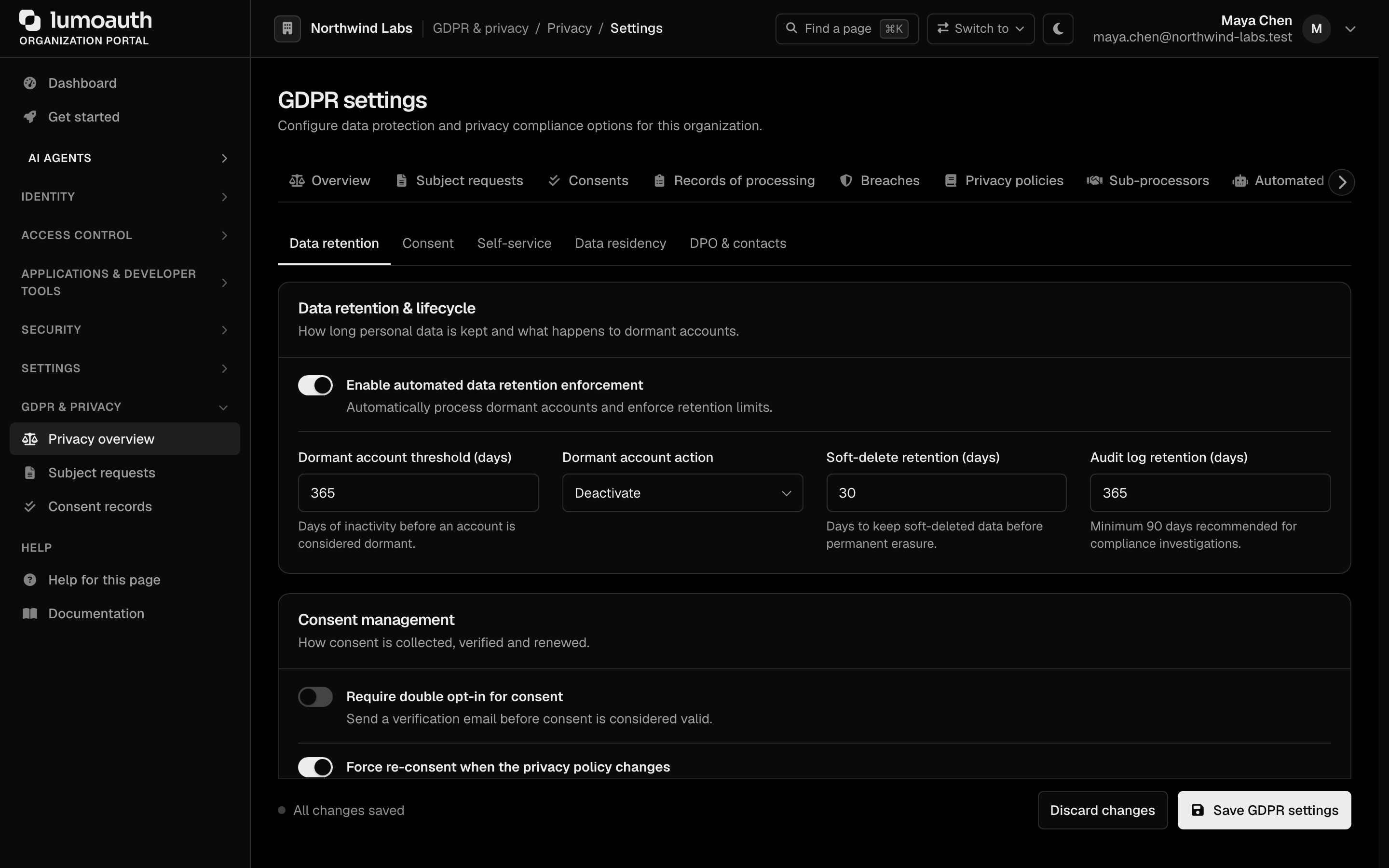
A daily platform job then applies each organization's own settings:
- Organizations that have not enabled data retention are skipped.
- Audit logs are never pruned when the organization's audit-log retention has
auto-delete off (
autoDelete: falsein the audit-log retention API). The security floor and your plan's maximum still apply.
Independently of these settings, the platform purges operational personal data on its own schedule: login attempts after 90 days, expired magic links, closed invitations after 30 days, expired push requests and device codes, failed background messages after 30 days and webhook delivery logs after 90 days.
Consent Management
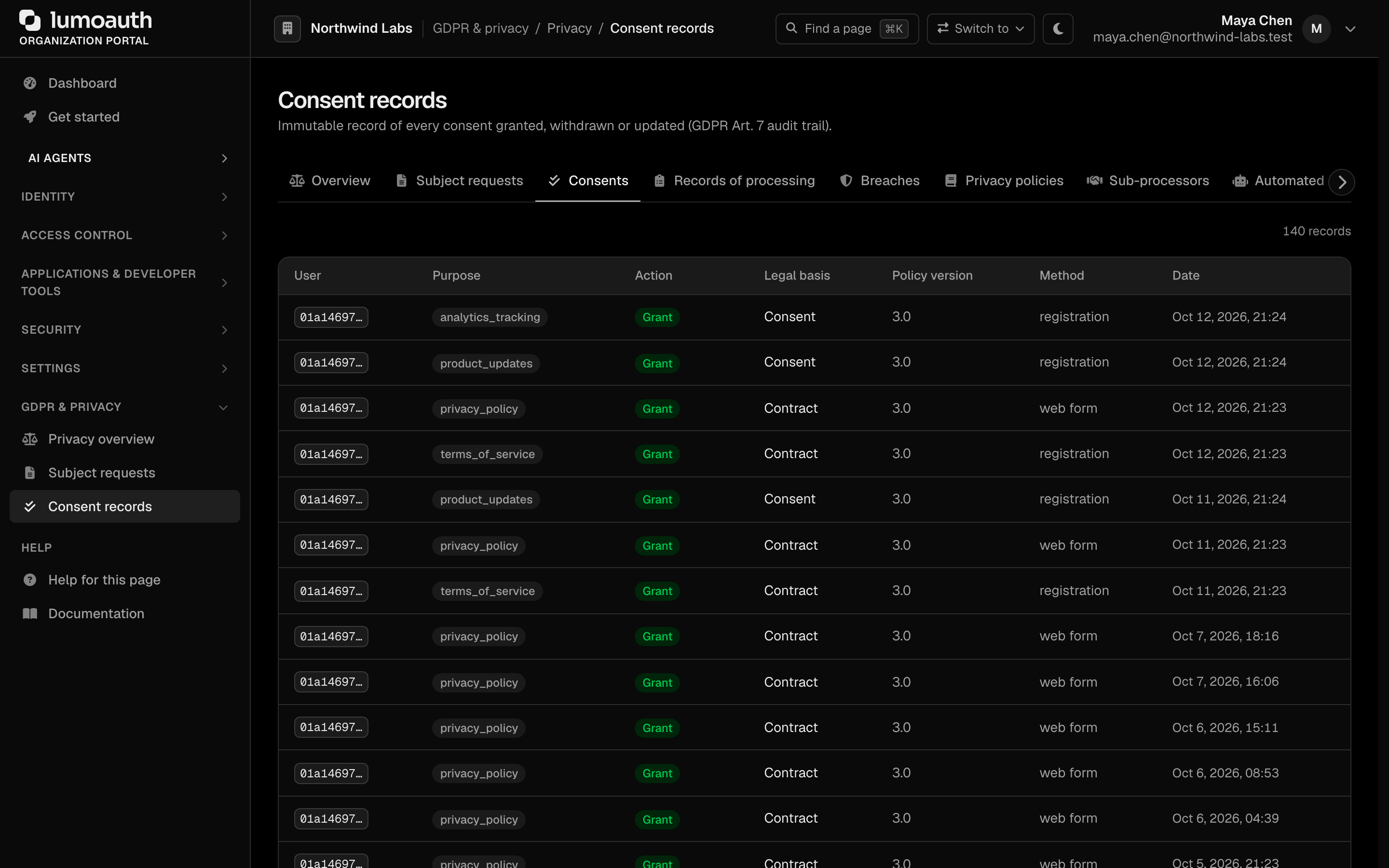
Track, verify, and manage user consent for data processing at /orgs/{orgId}/portal/gdpr/consent-records:
Purposes are whatever your organization records (for example terms of service, privacy policy, marketing or analytics); the Purpose column shows the value as recorded.
Consent records include:
- What was consented to (Purpose) and the Legal basis
- Whether consent was granted, withdrawn, updated, expired or forced to re-consent (Action), and when (Date)
- How consent was obtained (Method: web form, API, registration, double opt-in, admin or system)
- The privacy Policy version in force
Data Processing Records
LumoAuth maintains records of processing activities (Article 30) including:
- What personal data is collected
- Purpose of processing
- Categories of data subjects
- Data retention periods
- Technical and organizational security measures
Manage and export these on the Processing activities page (/orgs/{orgId}/portal/gdpr/processing-activities), opened from the Processing activities tile on the GDPR dashboard.
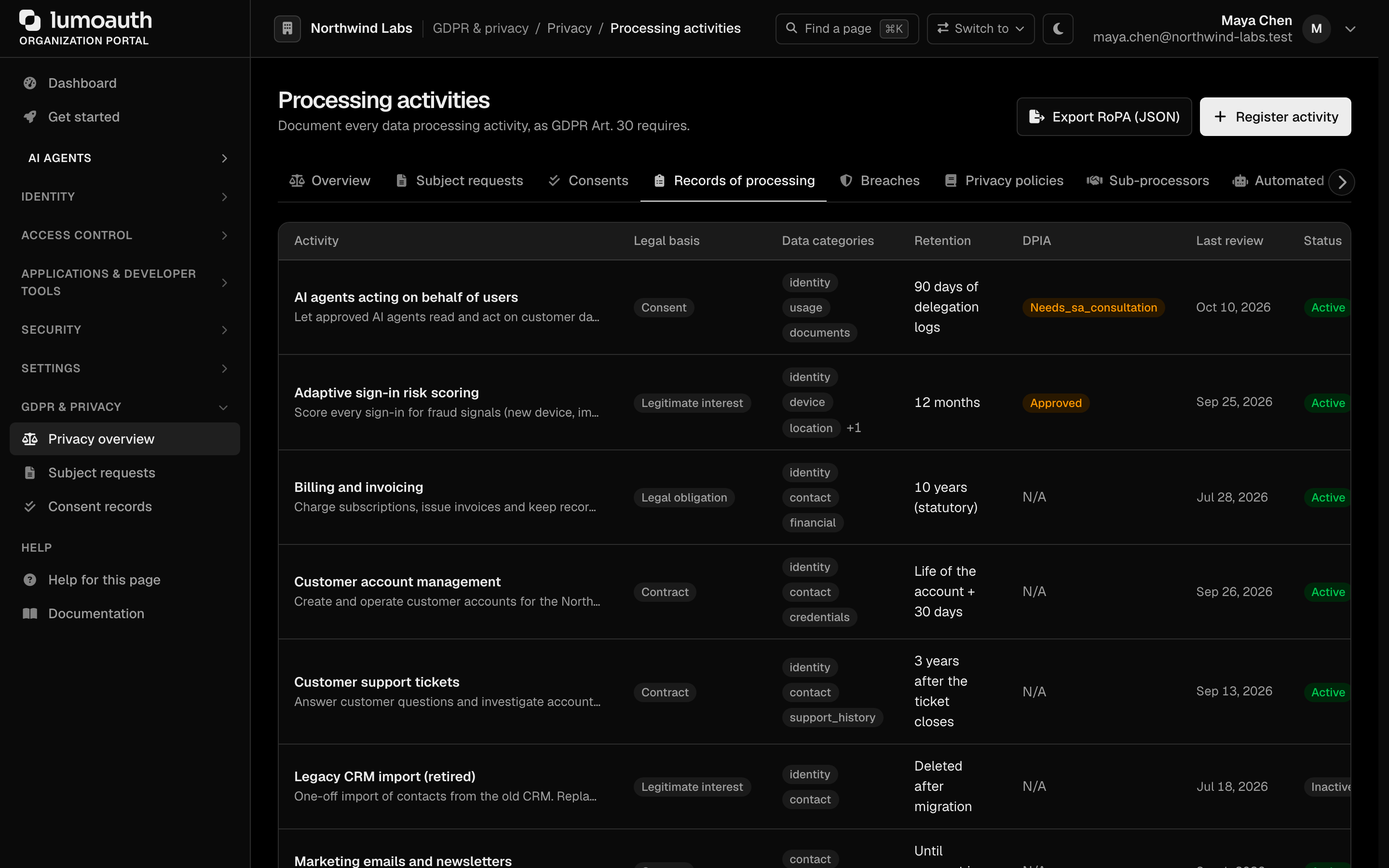 See Records of Processing (RoPA) for the full workflow, including DPIAs.
More GDPR Tools
Every page below has a tile on Privacy overview (/orgs/{orgId}/portal/gdpr) and a tab in the privacy tab bar (tab labels Privacy policies, Breaches, Automated decisions, Sub-processors and Settings), so each is one click from any other.
| Tool | Portal Location |
|---|---|
| Privacy policies | /orgs/{orgId}/portal/gdpr/privacy-policies — create draft policy versions, publish one as the active policy and trigger re-consent |
| Breach incidents | /orgs/{orgId}/portal/gdpr/breaches — report and track breach incidents (reporting one starts the 72-hour notification clock) |
| Automated decisions | /orgs/{orgId}/portal/gdpr/automated-decisions — review Article 22 automated decisions |
| Sub-processors | /orgs/{orgId}/portal/gdpr/subprocessors — view and subscribe to sub-processor change notices |
| GDPR settings | /orgs/{orgId}/portal/gdpr/settings — sections Data retention, Consent, Self-service, Data residency and DPO & contacts |
User Self-Service
Users can exercise their GDPR rights through self-service:
| Right | Self-Service Action |
|---|---|
| Access | Download your data from Privacy & data in their account |
| Rectification | Update profile information under Personal info |
| Erasure | Delete your account, or request deletion when the organization handles it as a privacy request |
| Portability | Download the Portable file (machine-readable JSON) or send the data to another service |
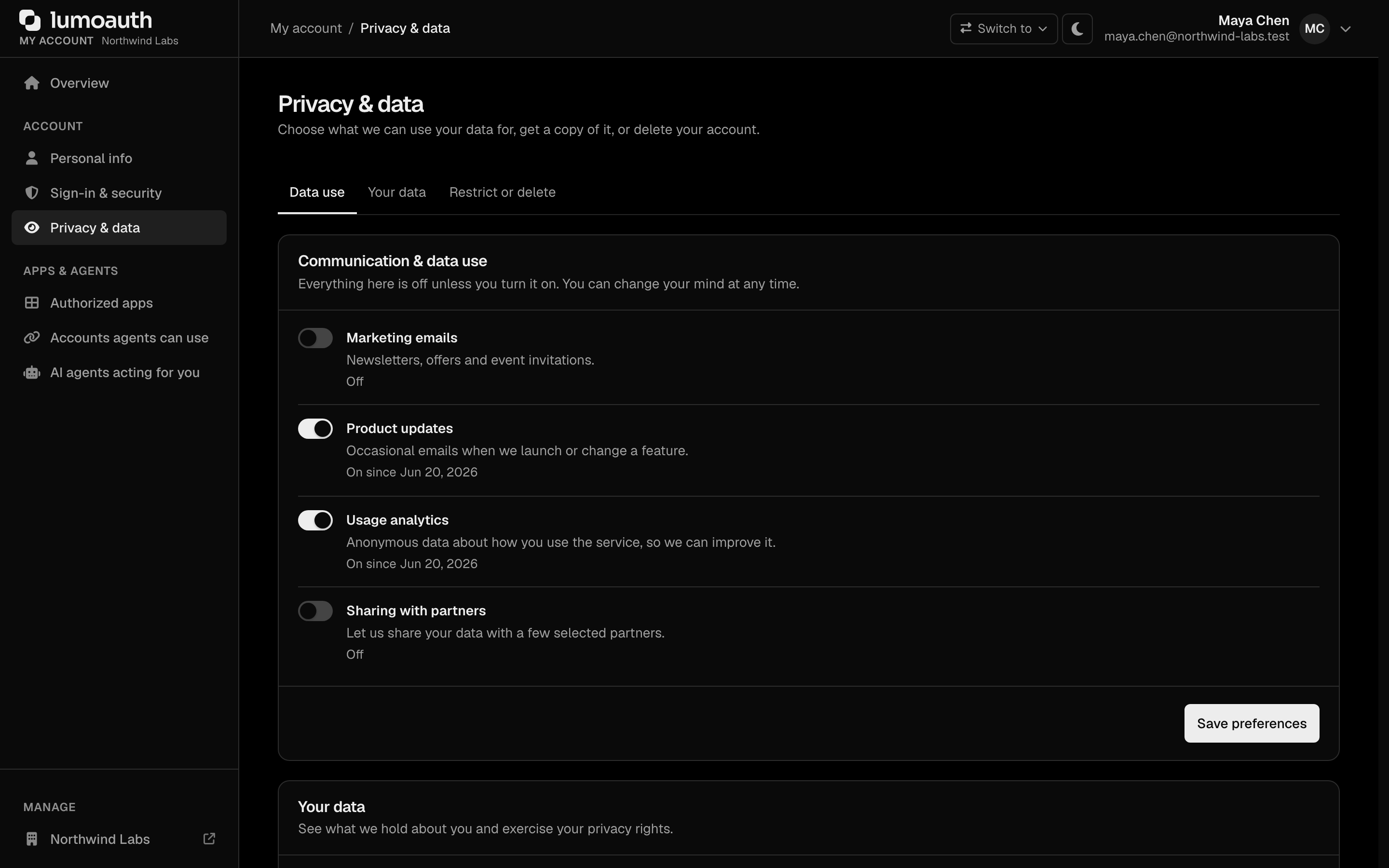
Which of these users can do on their own (account deletion, data export, processing restriction) is set under GDPR settings → Self-service. Everything starts from the Privacy & data page of the user's account (/account/privacy):
Related Guides
- Audit Logs - Track all data access and changes
- User Management - Manage user data
- Account Self-Service - User-initiated GDPR actions