Records of Processing Activities (RoPA)
GDPR Article 30 requires controllers to maintain a record of their processing activities. LumoAuth ships RoPA generation built-in: every organization can manage processing activities and export an Article 30-shaped report from the portal.
What's in the exported RoPA
The RoPA exported from the Processing activities page contains the processing activities you have registered for the organization. LumoAuth does not pre-fill activities: an organization that has registered none exports an empty list, and deactivated activities are left out. The file carries the organization name as controller, the export time, and for each activity:
| Article 30(1) field | Where it comes from |
|---|---|
| Name of the activity and purposes of processing | name, purpose |
| Lawful basis | legal_basis (consent, contract, legal obligation, vital interests, public task or legitimate interests) |
| Categories of personal data and of data subjects | data_categories, data_subject_categories |
| Recipients | recipients |
| International transfers | third_country_transfers |
| Retention periods | retention_period |
| Technical & organisational measures | security_measures |
| Contacts | controller_contact, dpo_contact, joint_controller |
| DPIA | dpia_required, dpia_status |
| Automated decision-making | is_automated_decision, profiling, human_review_contact, logic_disclosure |
| Review | is_active, last_reviewed |
Use the sub-processor list and the data residency page as the source for the recipients and transfer details of the processing LumoAuth performs on your behalf.
Generate your RoPA
Open the Processing activities page in the organization portal (Privacy overview in the sidebar, then the Records of processing tab, or the Processing activities tile):
/orgs/{orgId}/portal/gdpr/processing-activities
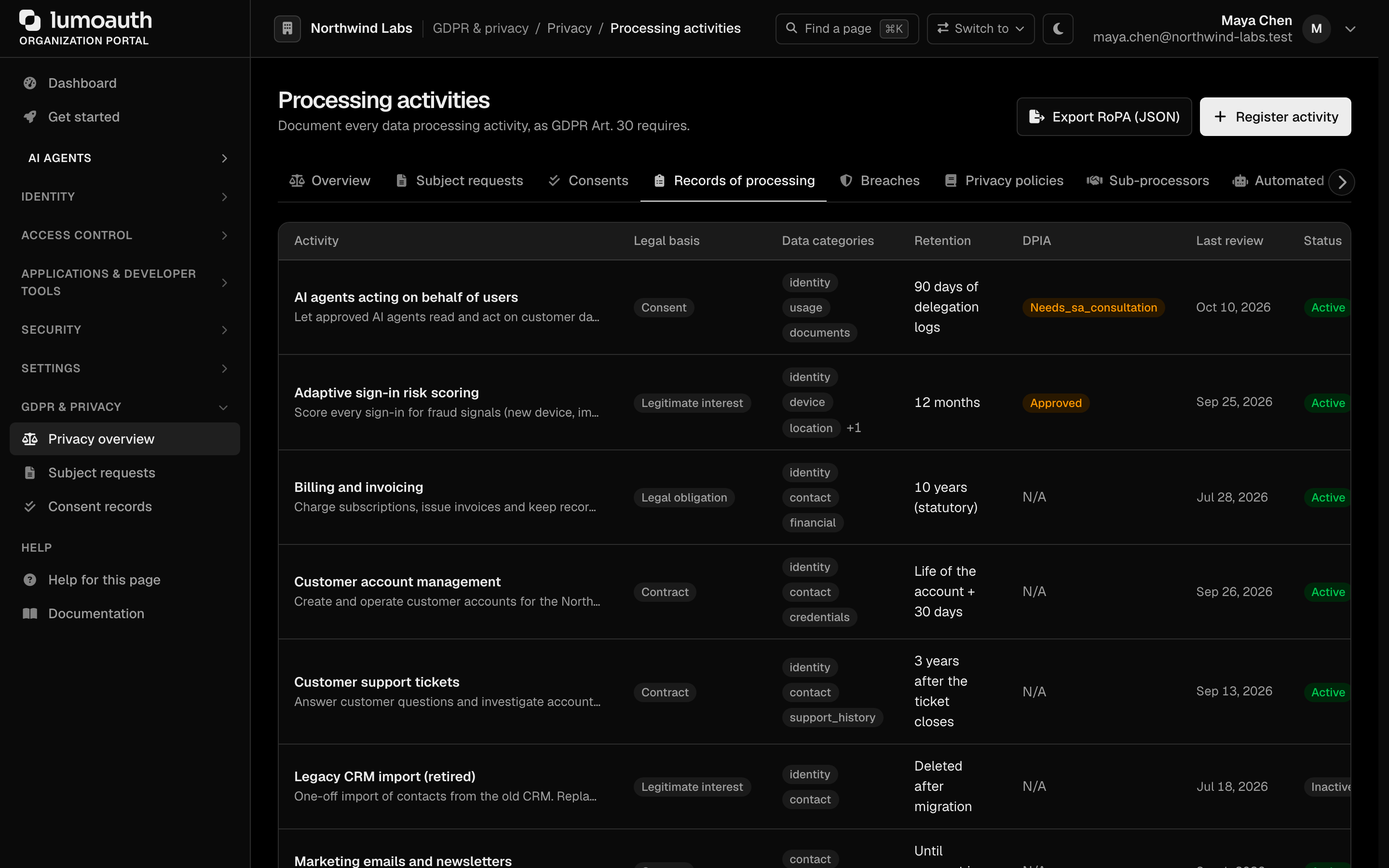
From there you can add an activity with the Register processing activity form (activity name, legal basis, retention period, purpose, security measures, data categories and recipients, then Register activity), edit or deactivate an activity from the ⋯ menu on its row, and use Export RoPA (JSON) to download the full RoPA. The export downloads as a JSON file named ropa-export-YYYY-MM-DD.json, suitable for piping into your existing GRC tool (Vanta, Drata, Tugboat). The export endpoint is:
GET /orgs/{orgId}/portal/gdpr/processing-activities/export
The RoPA exports as JSON. There is no PDF export and no api/v1/admin/gdpr/ropa API endpoint — use the portal page above.
What you must add to make it audit-ready
The export only contains what you register. As the Controller, make sure the record also covers:
- Joint Controller / Processor relationships outside LumoAuth. Your CRM, your billing system, your analytics — none of these are LumoAuth sub-processors.
- Data subjects beyond your auth surface. Marketing leads, ex-employees, etc.
- Lawful basis per processing activity. Choose the basis that fits each activity when you register it, for example "Contract" (Art. 6(1)(b)) for authentication or "Legitimate interests" (Art. 6(1)(f)) for security telemetry.
- DPIA references. If you've performed a DPIA on a high-risk processing activity, mark the activity as DPIA required and record the assessment (see below).
Annual review
Per Article 30(4), the RoPA must be kept up to date. The export always reflects the activities currently registered, so review them whenever your processing changes and schedule at least an annual review.
DPIAs (Data Protection Impact Assessments)
Article 35 DPIAs are required when processing is "likely to result in a high risk to the rights and freedoms of natural persons." LumoAuth ships a DPIA workflow attached to each processing activity.
A DPIA is created and managed per processing activity. Mark the activity as DPIA required when you edit it; the DPIA column of the Processing activities page then shows its status as a tag — click it to open the assessment, or go to its URL:
GET  /orgs/{orgId}/portal/gdpr/processing-activities/{activityId}/dpia          # view / author the DPIA
POST /orgs/{orgId}/portal/gdpr/processing-activities/{activityId}/dpia/save     # save the DPIA
POST /orgs/{orgId}/portal/gdpr/processing-activities/{activityId}/dpia/{dpiaId}/approve   # approve
GET  /orgs/{orgId}/portal/gdpr/processing-activities/{activityId}/dpia/{dpiaId}/prior-consultation
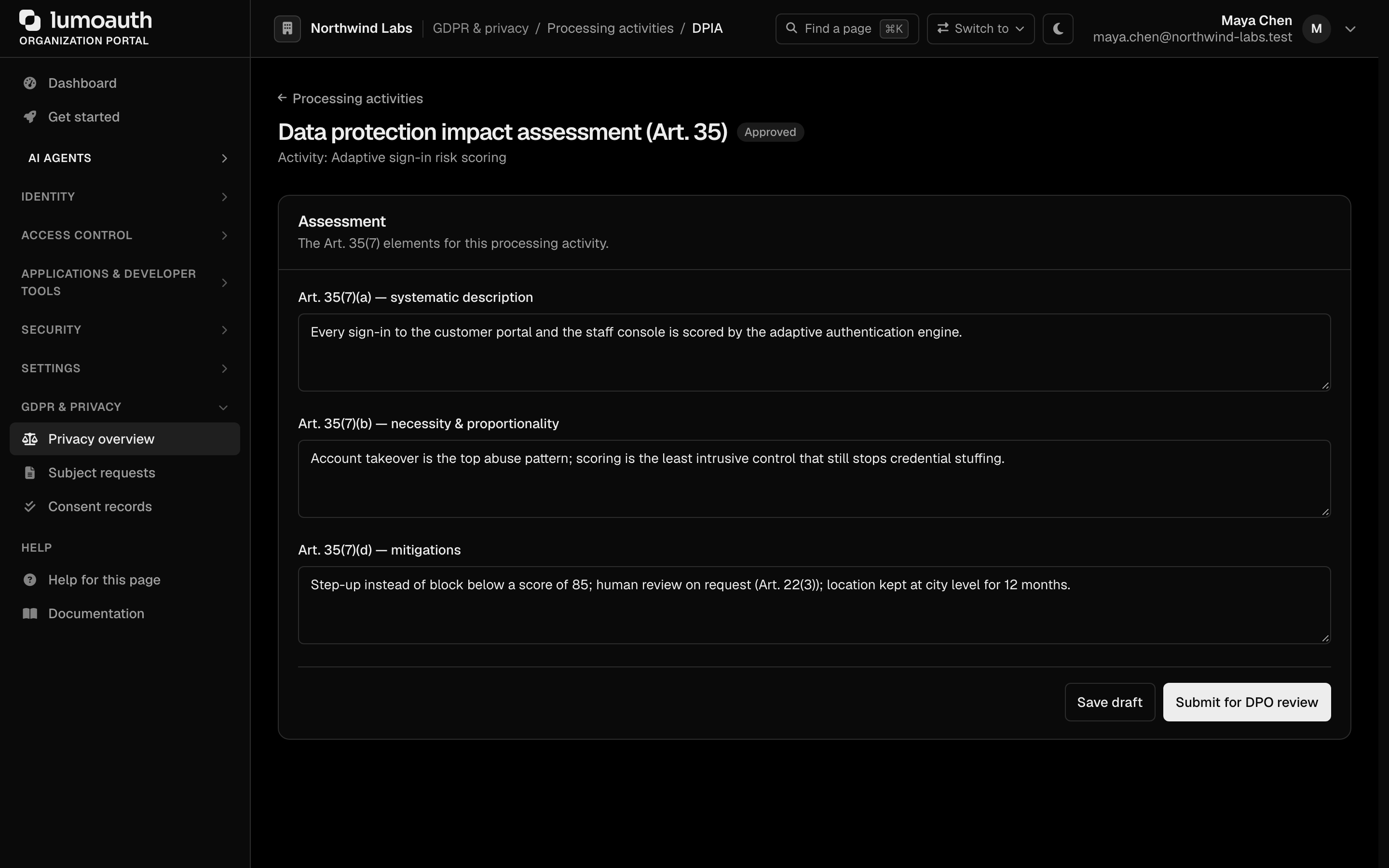
In the DPIA form you fill in the Art. 35(7) elements: the systematic description, the necessity & proportionality assessment and the mitigations. Save draft keeps it as a draft and Submit for DPO review sends it for approval; while the DPIA is Under review, a user with the gdpr.dpo permission sees the DPO sign-off section, records the DPO opinion and clicks Approve or Reject. If the assessment concludes that the supervisory authority must be consulted, the page shows a red alert with Download consultation bundle (JSON). Once approved, the activity's dpia_status in the exported RoPA reads completed.
See also
- GDPR overview — DSAR / RTBF / consent flows
- Data residency — what's stored where
- Sub-processors — third parties LumoAuth uses
- DPA + SCCs — the contractual carrier for everything above