Access Control
LumoAuth supports three authorization models, each suited to a different class of access problem. This overview compares them so you can pick — or combine — the right one for your organization. If you are unsure, read Choosing a model first: start with roles.
A quick recap of each model:
- RBAC (Role-Based Access Control). Users are assigned roles; roles hold named permissions. The simplest model — use when access is primarily a function of job title.
- ABAC (Attribute-Based Access Control). Policies evaluate attributes of the subject (user), resource, action, and environment (time, IP, device). Use when decisions depend on dynamic context.
- Zanzibar / ReBAC (Relationship-Based Access Control). Access is stored as relation tuples like
document:readme#editor@user:alice("alice is an editor of document readme"). The check engine walks the relation graph. Use when access is driven by hierarchy and sharing — folders, teams, ownership.
Authorization Models
| Model | Best For | Complexity |
|---|---|---|
| RBAC | Simple role-based access | Low |
| Groups | Organizing users by team/department | Low |
| ABAC | Context-aware, attribute-based decisions (Fine-grained authorization add-on) | Medium |
| Zanzibar | Relationship-based access for hierarchical resources (Fine-grained authorization add-on) | High |
| AI Policy Authoring | Generate policies from natural language | Low (input), High (output) |
How They Work Together
The portal's How access works page spells out the order in which one decision is made: Roles and permissions answer first (does the subject hold the permission directly, through a role, or through a group's role?), Relationships can also grant it (is the subject connected to this specific object?), and Attribute rules have the last word: an allow rule can grant what the others did not, and a deny rule overrides everything above.
You can run one model or layer them:
- RBAC only — assign users to roles like
admin,editor,viewer. - RBAC + Groups — assign roles to groups; users inherit permissions via group membership.
- RBAC + ABAC — role gates the capability, ABAC adds conditions (for example, "editors can only edit during business hours").
- Zanzibar — model relationships directly (for example, "a user can edit a document if they own it or if it is shared with their team").
Quick Comparison
| Feature | RBAC | Groups | ABAC | Zanzibar |
|---|---|---|---|---|
| Role-based decisions | ✅ | ✅ (via groups) | ❌ | ❌ |
| Attribute conditions | ❌ | ❌ | ✅ | ❌ |
| Relationship-based | ❌ | ❌ | ❌ | ✅ |
| Hierarchical | ❌ | ✅ | ❌ | ✅ |
| Context-aware | ❌ | ❌ | ✅ | ❌ |
| Scales to many objects | ❌ | ❌ | ❌ | ✅ |
Permission Testing
Test access evaluates access decisions without affecting production data.
URL: /orgs/{orgId}/portal/permissions/tester
The tester lets you:
- Select a user (defaults to you) and a permission, or pick one of the Quick presets.
- Optionally add context as JSON.
- See whether the request would be allowed or denied, and through which role, group or direct grant.
- Compare the outcome with what you expected before you rely on a role or policy.
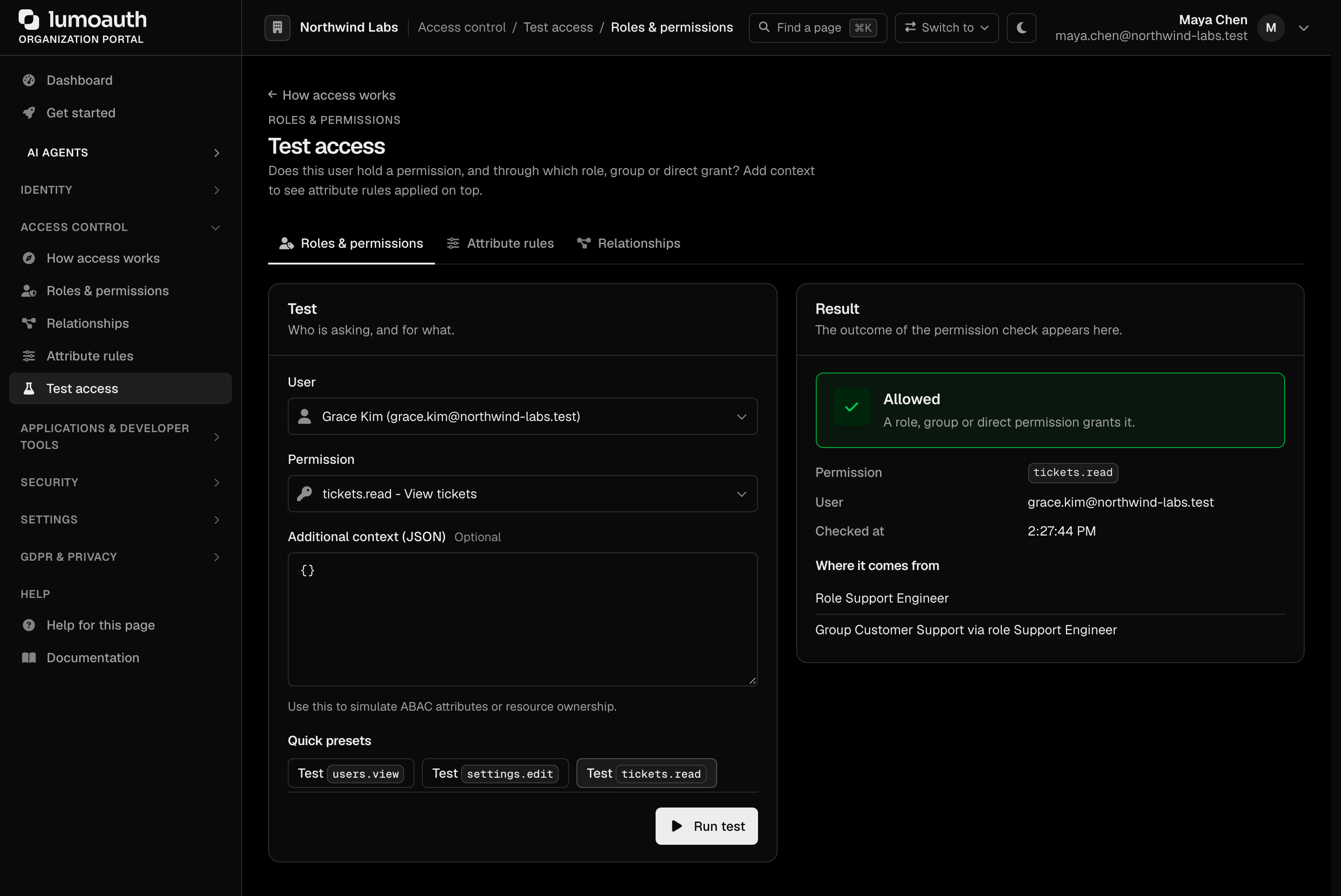
There is one tester per model, linked by the tabs at the top of each. Roles & permissions (/orgs/{orgId}/portal/permissions/tester) covers RBAC permission checks. Attribute rules (/orgs/{orgId}/portal/abac/tester) evaluates ABAC policies against a resource type, an action, and user and resource attributes. Relationships (/orgs/{orgId}/portal/zanzibar/tester) runs a Zanzibar check.
Portal Locations
Each access control feature lives directly under /orgs/{orgId}/portal/. In the sidebar, the Access control group holds How access works, Roles & permissions, Relationships, Attribute rules and Test access. Users is under Identity, and Groups (like Invitations) is a tab on the Users page.
The How access works page (/orgs/{orgId}/portal/access) is the starting point: one card per model with live counts (roles and custom permissions, active attribute rules, object types and relationships), a Test an access decision button and a Help me choose link to Choosing a model. Models that need the Fine-grained authorization add-on carry an Add-on tag when the organization does not have it.

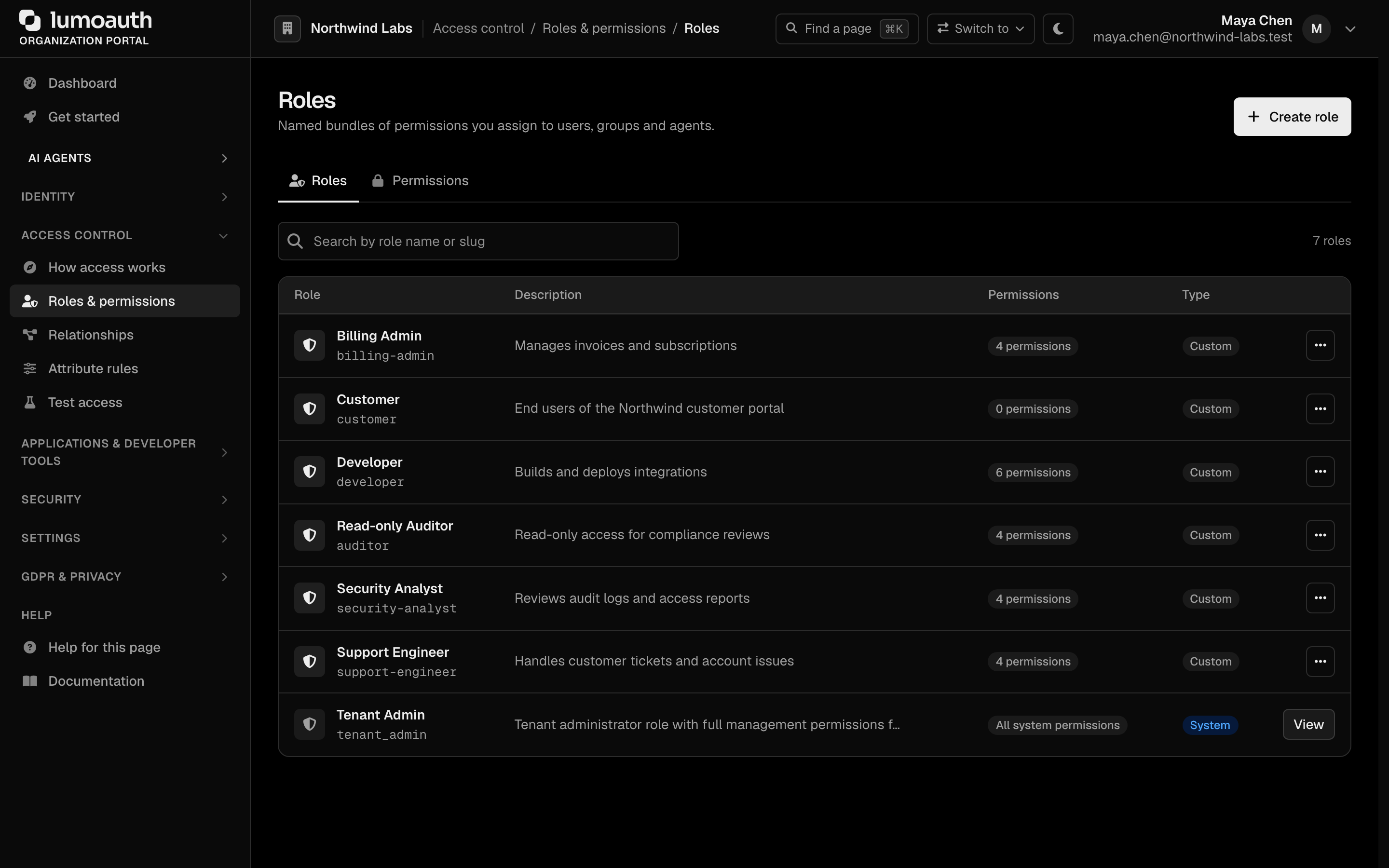
| Feature | URL |
|---|---|
| How access works | /orgs/{orgId}/portal/access |
| Users | /orgs/{orgId}/portal/users |
| Roles & permissions (Roles tab) | /orgs/{orgId}/portal/roles |
| Users → Groups tab | /orgs/{orgId}/portal/groups |
| Roles & permissions (Permissions tab) | /orgs/{orgId}/portal/permissions |
| Relationships (ReBAC) | /orgs/{orgId}/portal/zanzibar/ |
| Attribute rules (ABAC) | /orgs/{orgId}/portal/abac/ |
| AI Policy Author | /orgs/{orgId}/portal/policies/author |
| Test access (permissions) | /orgs/{orgId}/portal/permissions/tester |
In This Section
| Guide | Description |
|---|---|
| Roles & Permissions | Define roles, assign permissions, manage RBAC |
| Groups | Organize users and assign roles to groups |
| ABAC | Attribute-based access control policies |
| Zanzibar | Relationship-based access control |
| AI Policy Authoring | Generate policies from natural language |