Roles & Permissions (RBAC)
Role-based access control (RBAC) is the classical authorization model: what you may do follows from the roles you hold. A permission names a single action on a resource (for example reports.view). A role is a named bag of permissions. Users are assigned roles, and a user's effective permissions are the union of permissions from every role they hold, directly or through a group.
Use RBAC when access is mostly a function of job title — "admins can manage users, editors can edit content" — and the set of permissions is small enough to enumerate. When decisions depend on per-resource ownership, context, or relationships, combine RBAC with ABAC (attribute-based access control) or Zanzibar.
Concepts
Permissions
A permission represents a specific action on a resource.
| Example Permission | Description |
|---|---|
reports.view | View reports |
reports.edit | Create and edit reports |
reports.delete | Delete reports |
invoices.manage | Full control over invoices |
tickets.view | View support tickets |
tickets.assign | Assign tickets to people |
Custom permission slugs use lowercase letters, digits, dots, hyphens and underscores (reports.view); a colon is refused. The built-in catalogue that guards the portal and Admin API uses the same resource.action shape (users.create, roles.edit, settings.manage, jit.approve, and so on), and its namespaces are reserved (see Reserved permission slugs), so pick resource names from your own application. Both kinds live in the same table and can be attached to roles.
Roles
A role is a named collection of permissions.
| Role | Permissions |
|---|---|
viewer | reports.view, tickets.view |
editor | reports.view, reports.edit, invoices.view |
admin | All permissions |
auditor | tickets.view, reports.view |
Role Assignment
Users can hold one or more roles. Effective permissions are the union across all assigned roles.
Managing Permissions
Create a Permission
- In the sidebar, under Access control, open Roles & permissions and switch to the Permissions tab (
/orgs/{orgId}/portal/permissions). It has two sub-tabs, Custom permissions (the ones you define) and System permissions (the built-in catalogue), each with a count and a search box that matches slug, name or description. Permissions are grouped by resource (for example Tickets or Invoices); click a group to list its permissions, each with its slug, display name and a row menu.
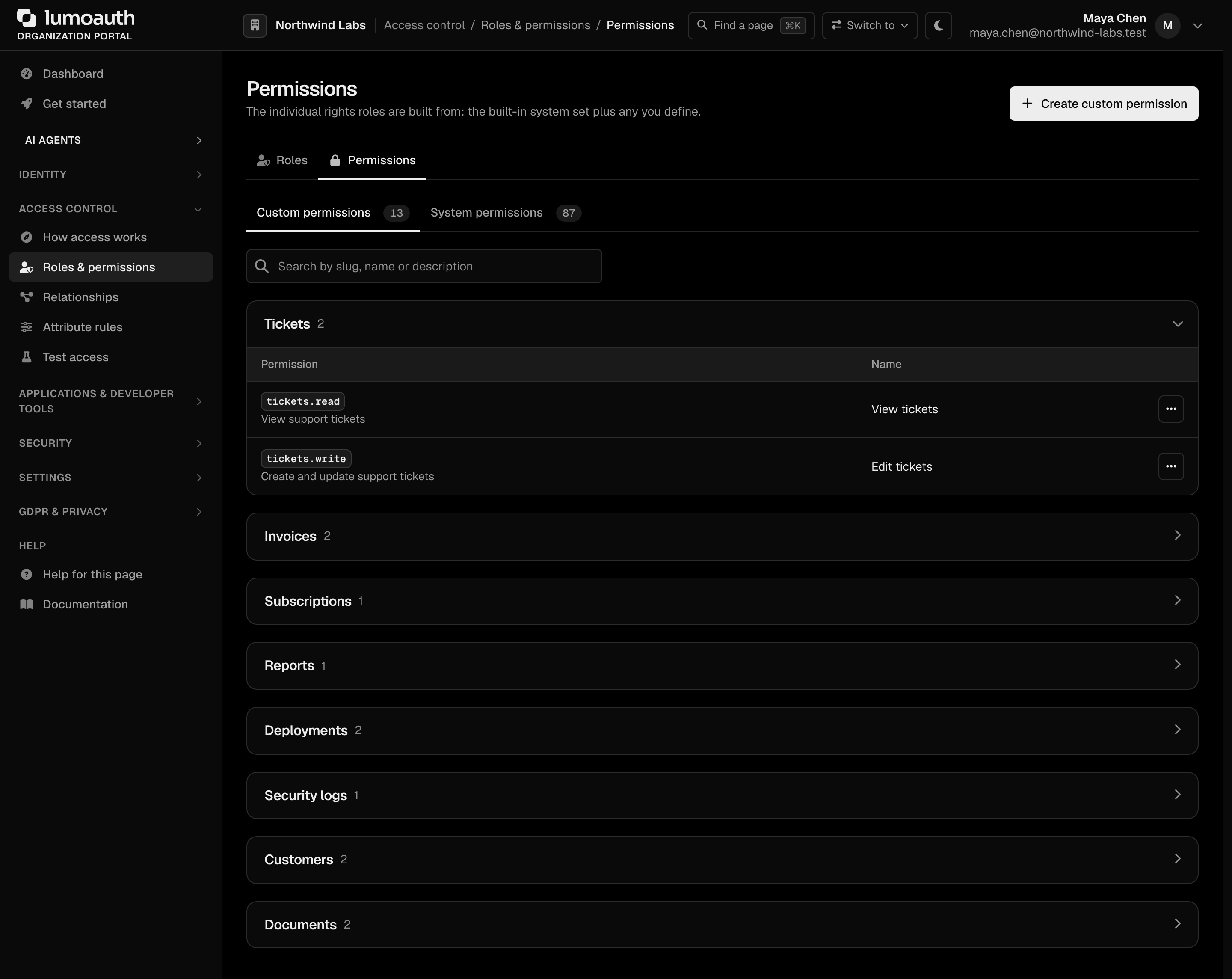
- Click Create custom permission.
- Fill in:
| Field | Description | Example |
|---|---|---|
| Resource | The kind of thing being protected | report |
| Action | What may be done to it | view |
| Slug | Derived from the resource and action as resource.action; this is the string your code checks and it cannot be changed later | report.view |
| Display name | Required. Human-readable name shown in the role editor and the permission matrix | View reports |
| Description | Optional. What this permission grants | Open and read reports |
- Click Create Permission. A new permission is held by nobody until you add it to a role.

Via API
curl -X POST https://your-domain.com/orgs/{orgId}/api/v1/admin/permissions \
  -H "Authorization: Bearer {admin_token}" \
  -H "Content-Type: application/json" \
  -d '{
    "name": "View reports",
    "slug": "reports.view",
    "description": "View reports and their details"
  }'
Managing Roles
Create a Role
- In the sidebar, under Access control, open Roles & permissions (
/orgs/{orgId}/portal/roles). The Roles tab lists every role with its description, number of permissions and type (Custom or System), and has a search box for the name or slug. The row menu (...) edits or deletes a custom role; system roles only have View.
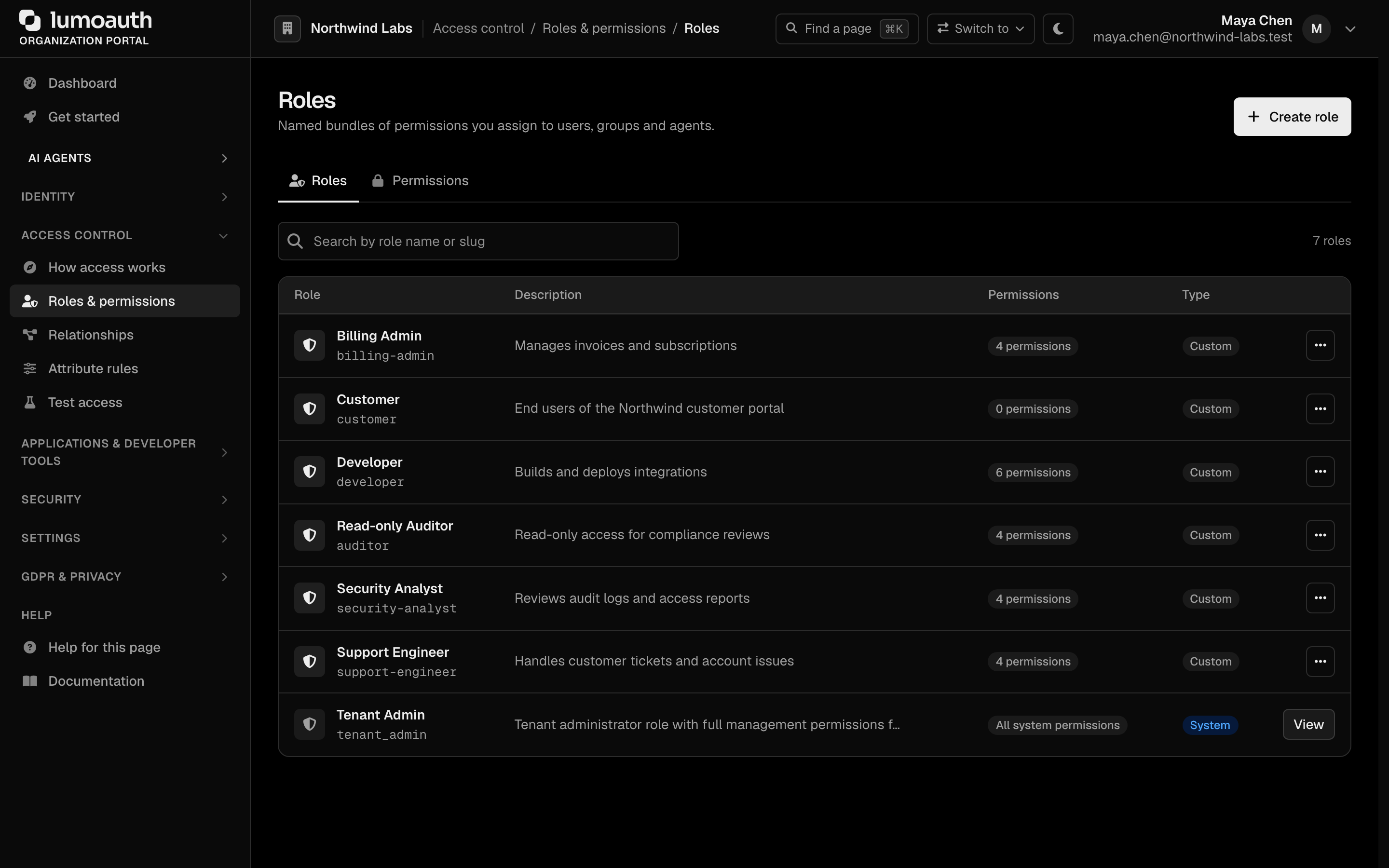
- Click Create role. When an AI provider is configured, Draft with AI next to it opens AI policy authoring.
- Fill in:
| Field | Description | Example |
|---|---|---|
| Role name | Display name. The slug is derived from it and shown under the field | Editor (slug editor) |
| Description | Role purpose | Can view and edit users and applications |
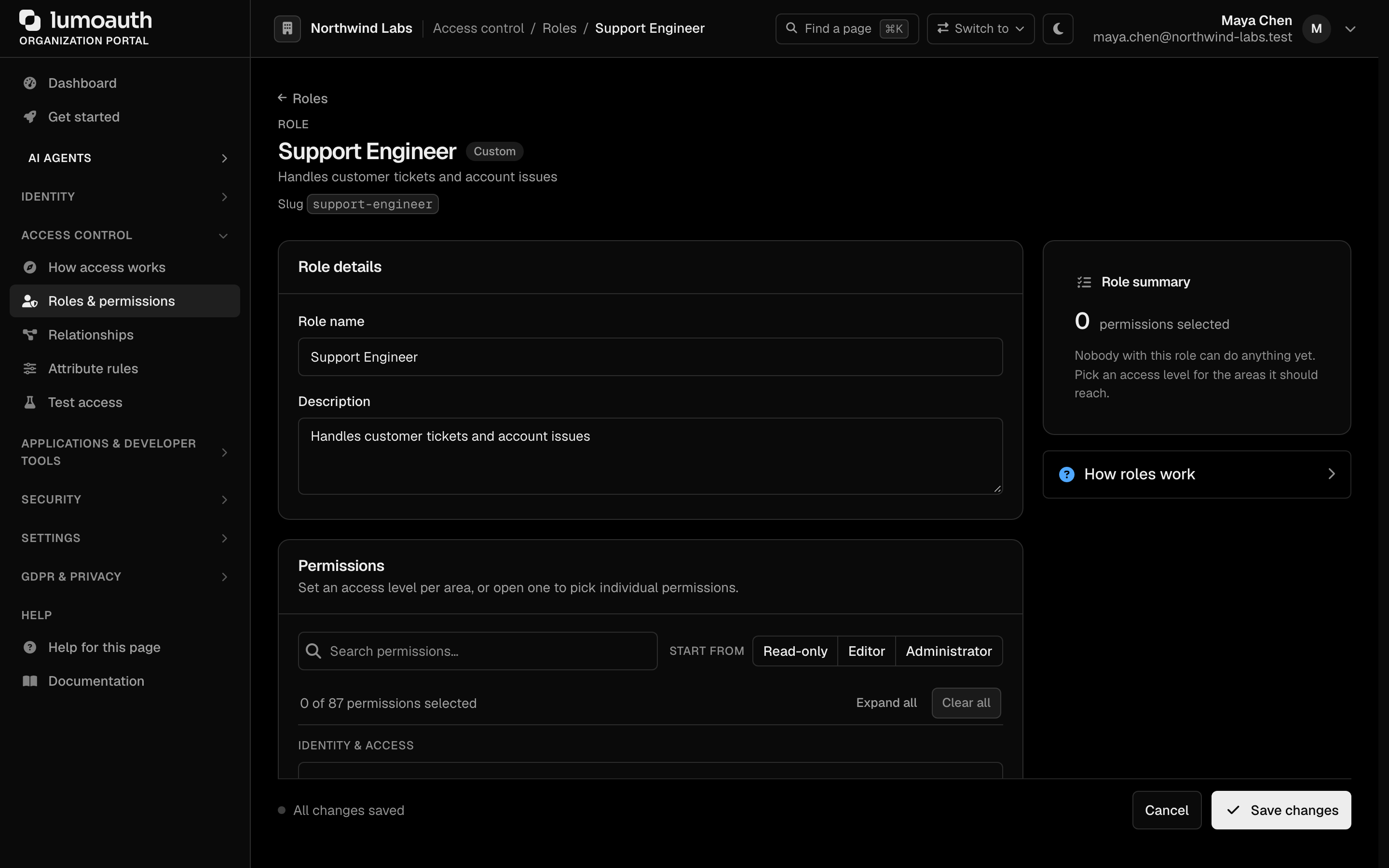
- Under Permissions, set an access level (None, View, Edit or Full) per area, or open an area to tick individual permissions. The Start from presets (Read-only, Editor, Administrator) fill in a starting set.
- Click Create role. The Role summary beside the form lists the selected areas and their levels as you go, and a role name that is already taken is refused.

To change a role later, open it from the Roles list, adjust its permissions and click Save changes. System roles can only be viewed.
Via API
# Create a role
curl -X POST https://your-domain.com/orgs/{orgId}/api/v1/admin/roles \
  -H "Authorization: Bearer {admin_token}" \
  -H "Content-Type: application/json" \
  -d '{
    "name": "Editor",
    "slug": "editor",
    "description": "Can view and edit reports and invoices"
  }'

# Set a role's permissions (PUT replaces the full set; values are permission slugs)
curl -X PUT https://your-domain.com/orgs/{orgId}/api/v1/admin/roles/{roleId}/permissions \
  -H "Authorization: Bearer {admin_token}" \
  -H "Content-Type: application/json" \
  -d '{
    "permissions": ["reports.view", "reports.edit", "invoices.view"]
  }'
Use PUT .../permissions to replace the role's full permission set with slug values. To add one or more permissions without removing existing ones, POST .../permissions instead with permission IDs: {"permissionId": 12} or {"permissionIds": [12, 13]}.
Assigning Roles to Users
Via Portal
- Go to Users (
/orgs/{orgId}/portal/users). - Click the user's name to open the user.
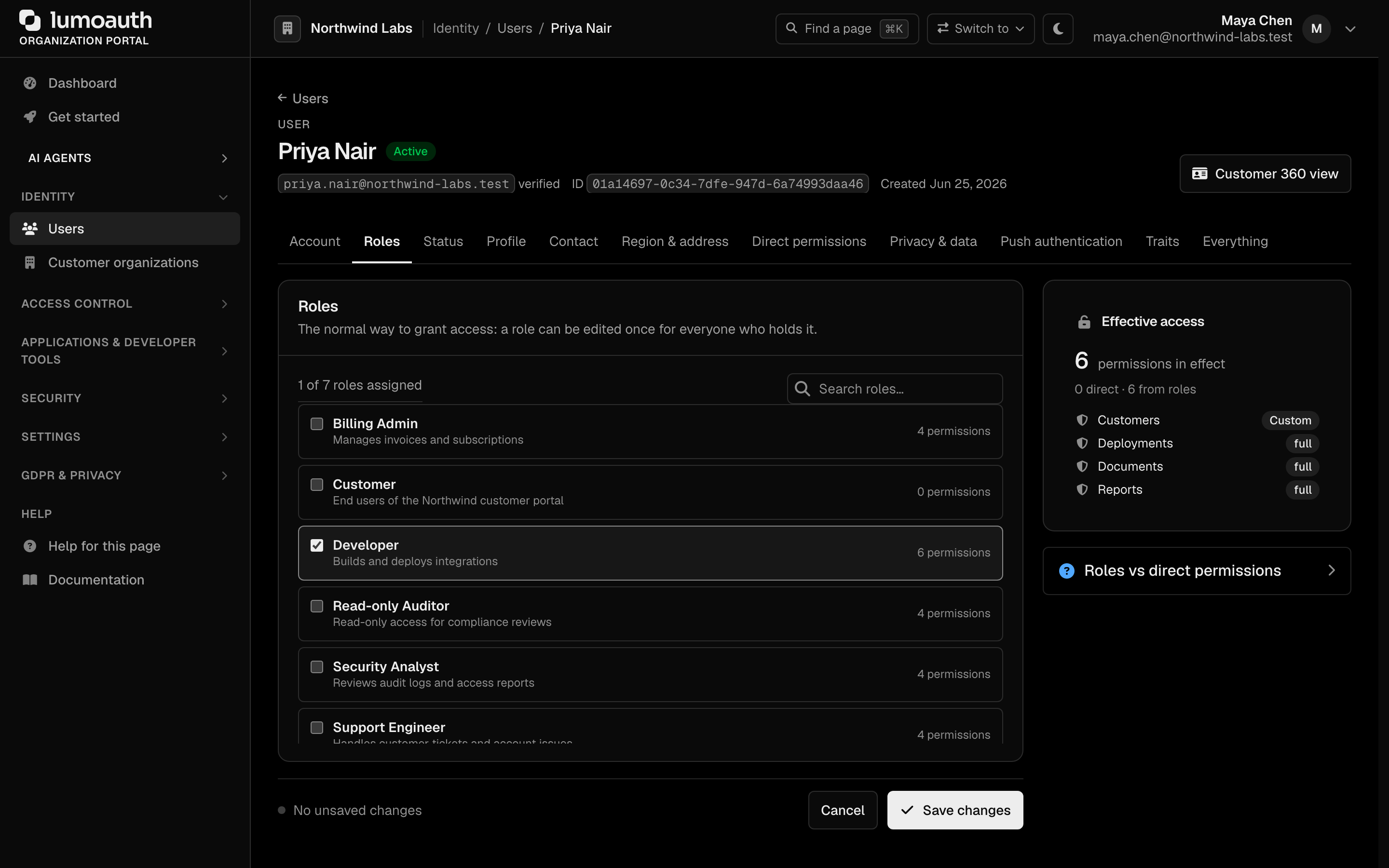
- Open the Roles tab.
- Tick or untick roles (the search box filters them), then click Save changes. The Effective access panel beside the list shows how many permissions the user ends up with, split into direct grants and permissions from roles.
Via API
# Set a user's roles (PUT replaces the full set; values are role slugs)
curl -X PUT https://your-domain.com/orgs/{orgId}/api/v1/admin/users/{userId}/roles \
  -H "Authorization: Bearer {admin_token}" \
  -H "Content-Type: application/json" \
  -d '{
    "roles": ["editor", "auditor"]
  }'

# Add a single role without removing existing ones
curl -X POST https://your-domain.com/orgs/{orgId}/api/v1/admin/users/{userId}/roles \
  -H "Authorization: Bearer {admin_token}" \
  -H "Content-Type: application/json" \
  -d '{"roleSlug": "editor"}'

# List a user's roles
curl https://your-domain.com/orgs/{orgId}/api/v1/admin/users/{userId}/roles \
  -H "Authorization: Bearer {admin_token}"
Roles in Tokens
When a user authenticates, their roles can be included as claims in the access token. The access token is a JWT (JSON Web Token: a signed JSON payload the client presents on each request).
Roles are opt-in per application: the roles claim (in the access token and the UserInfo response) is sent only when User roles is ticked and saved under the application's Security → JWT claims (JWT access tokens). A client that never enabled it, including dynamically registered clients and clients identified by a metadata document (CIMD), gets no role names. See Claims and roles.
{
  "sub": "user-uuid",
  "organization": "acme-corp",
  "roles": ["editor", "auditor"],
  "iat": 1706400000,
  "exp": 1706403600
}
The token carries role names only, never the expanded permission list. Your application can verify the token signature and map role names to its own checks, or ask LumoAuth for a permission decision at request time (below).
Checking Permissions
In Your Application
Verify the access token and read its roles claim (when the application has User roles enabled), then decide locally which roles may do what.
// Node.js example
const token = jwt.verify(accessToken, publicKey);

if ((token.roles || []).includes('editor')) {
  // Allow report edit
} else {
  // Deny access
}
Via the Permission Check API
To decide on individual permissions rather than role names, ask LumoAuth at request time. These endpoints evaluate against the caller's own access token (send it as the Bearer token), so they need no admin privileges.
# Check a single permission for the current user
curl -X POST https://your-domain.com/api/v1/permissions/check \
  -H "Authorization: Bearer {access_token}" \
  -H "Content-Type: application/json" \
  -d '{"permission": "reports.edit"}'
# -> {"allowed": true, "permission": "reports.edit", "context": {}}

# Check several at once
curl -X POST https://your-domain.com/api/v1/permissions/check-bulk \
  -H "Authorization: Bearer {access_token}" \
  -H "Content-Type: application/json" \
  -d '{"permissions": ["reports.view", "reports.edit", "reports.delete"]}'

# List the current user's effective permissions and roles
curl https://your-domain.com/api/v1/permissions/user \
  -H "Authorization: Bearer {access_token}"
Via Permission Tester
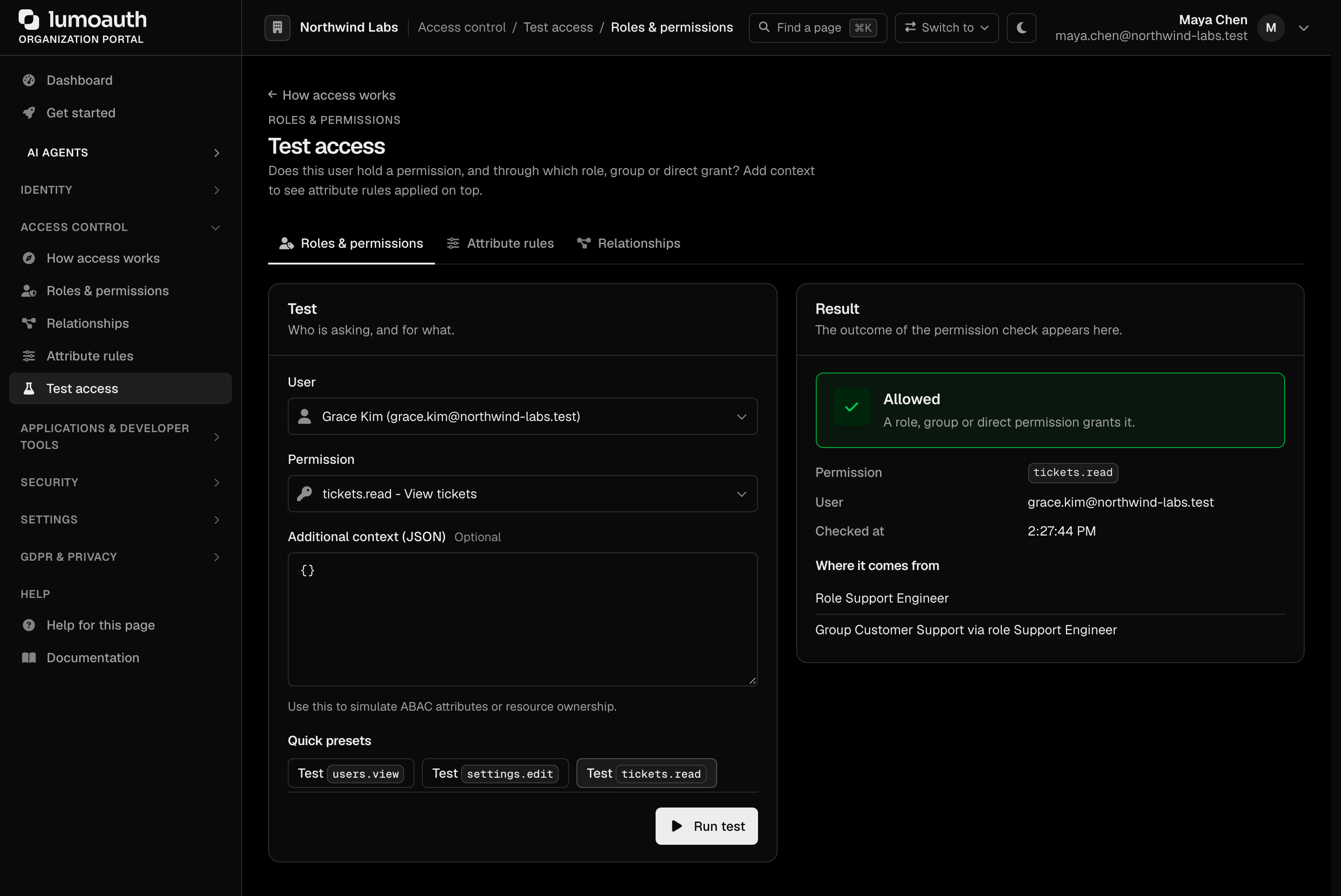
Use Test access at /orgs/{orgId}/portal/permissions/tester (Access control → Test access, Roles & permissions tab) to check whether a user holds a permission. Pick a User (it starts on you) and a Permission, optionally add context as JSON, and click Run test; the Quick presets run common checks in one click. The result shows whether access is granted and, under Where it comes from, which role, group or direct grant provides it.
How the admin permissions work
The organization portal and the Admin API are governed by the built-in resource.action
catalogue. There is no single "admin" switch:
- Getting into the portal. Anyone holding at least one admin-plane system permission
(any catalogue permission except the platform-only
tenants.*) can open the portal. Holdingjit.approvealone, for example, is enough to reach the approval inbox. - Every page checks its own permission. Opening Users needs
users.view, saving a user needsusers.edit, and so on. A page you cannot use answers403, and the sidebar hides entries you hold no permission for. - Every Admin API endpoint declares its permission. The per-endpoint list is under Required permissions. API keys are additionally limited to what their creator holds.
settings.manageis not "full admin". It covers authentication and security policy (sign-in, MFA (multi-factor authentication) and session settings, the organization profile over the API, audit-log retention), API keys, custom domains, directory (LDAP) and HR connections, log shippers, alerting and the other integrations. It does not grant users, roles, clients, webhooks, agents or anything else; give those permissions explicitly.
Permissions added in the 2026-09-25 release, seeded for every organization and granted to the built-in Tenant Admin role:
| Slug | Grants |
|---|---|
abac.view | View ABAC attribute definitions and policies |
abac.manage | Create, edit and delete ABAC attributes and policies, and set user and resource attribute values |
gdpr.manage | Data subject requests, consent, retention, breaches, and exports of other users' personal data |
gdpr.dpo | Data Protection Officer duties: DPIAs, breach sign-off, supervisory-authority reporting |
billing.manage | View and change the subscription plan, add-ons and payment details |
jit.approve | Approve or deny AI-agent just-in-time requests (now seeded for every organization) |
authz.check | Ask authorization questions about other users and agents (now seeded for every organization) |
Protecting stronger accounts
An administrator can only take account-changing actions on users who hold no more than they do. Setting a password, changing the e-mail, activating or deactivating, blocking, deleting, removing an authenticator and issuing a temporary access code all require that you hold every permission the target user holds. The same rule applies in the portal, the Admin API and to API keys (checked against the key's creator).
Reserved permission slugs
Custom permissions cannot take a system slug (users.view, settings.manage, …), any slug
inside a system namespace (for example users.impersonate or billing.refund), a tenants.
slug, or one of the retired slugs the platform once checked (agents.manage, users.manage,
zanzibar.manage, webhooks.test, gdpr.export_other, abac.policies.*,
abac.attributes.*). This applies to the portal, the Admin API and
AI policy authoring, which also only attaches permissions the author
already holds.
No privilege gain
One rule decides every place a role can be handed out: nobody can grant more than they hold, and no automated path can create an administrator. The rule is enforced in the same way whether the assignment is made by a person or by an integration, so there is no back door to check for.
| Where roles are assigned | What is enforced |
|---|---|
User editor and PUT/POST .../users/{userId}/roles | The acting administrator must hold every permission in the role. System roles are assignable only by administrators who already hold them. |
Role editor and .../roles/{roleId}/permissions | An administrator cannot attach a permission they do not hold themselves. |
| Groups | Adding a role to a group, or a user to a group, is checked against the acting administrator in the same way. |
SCIM (automatic user provisioning) /Groups membership | An IdP can add users to job-function roles, never to a system role or a role that confers administrator authority. Refused with 403 mutability. See SCIM Groups. |
| Social-login default roles | A provider's default roles cannot be system or administrator-conferring roles, and the administrator saving them must hold every permission in them. See Social Login. |
| SAML JIT provisioning | Any privileged role found in an IdP's stored default-role list is skipped at sign-in and an audit event is written. |
A role confers administrator authority when it holds any permission that changes who can do what in the organization:
| Family | Permissions |
|---|---|
| Organization settings | settings.create, settings.edit, settings.delete, settings.manage |
| Users, roles, groups | users.create, users.edit, users.delete, roles.create, roles.edit, roles.delete, roles.assign-permissions, groups.create, groups.edit, groups.delete |
| Customer organizations | organizations.members.manage, organizations.invitations.manage |
| Identity providers and provisioning | idps.create, idps.edit, idps.delete, scim.create, scim.edit, scim.delete, scim.manage |
| Signing keys | signing_keys.create, signing_keys.edit, signing_keys.rotate, signing_keys.revoke, signing_keys.delete |
| OAuth clients | clients.create, clients.edit, clients.delete, clients.rotate-secret |
| AI agents, policies, approvals | agents.create, agents.edit, agents.delete, policies.create, policies.edit, policies.delete, jit.approve |
| Fine-grained authorization | zanzibar.create, zanzibar.edit, zanzibar.delete, abac.manage |
| Privacy and billing | gdpr.manage, gdpr.dpo, billing.manage |
Read-only permissions (*.view, audit.*, analytics.*, webhooks.*, branding.*, abac.view) and your own custom application permissions never make a role administrative, so automated paths can hand them out freely.
Why this matters: an administrator who can only edit identity providers (idps.edit) could otherwise register a social provider whose default role is Tenant Admin, sign in through it with a fresh account, and become an administrator. With the rule applied everywhere, the only way to become an administrator is to be made one by someone who already is.
Best Practices
| Practice | Description |
|---|---|
| Principle of least privilege | Assign the minimum permissions needed |
| Assign permissions to roles, not users | Keeps user management simple |
| Consistent naming | Follow the resource.action convention |
| Avoid catch-all roles | Prefer focused roles over a single omnibus admin role |
| Audit role assignments | Review periodically who holds what |
| Keep administrators out of automated paths | Never put an administrator-conferring role in an IdP-managed group or a social-login default; the platform refuses it anyway |
Related
- Groups — assign roles to groups for bulk management.
- Attribute rules (ABAC) — add attribute and context conditions to access decisions.
- Relationships (ReBAC) — relationship-based access for hierarchical resources.
- Access Control Overview — compare all authorization models.
Standards used on this page
| Plain name | Standard |
|---|---|
| JSON Web Token (JWT) | RFC 7519 |
See the standards reference for what each one covers and how LumoAuth uses it.