Webhooks
Webhooks let LumoAuth notify your applications in real time when events occur — authentication events, user changes, security alerts, and more. LumoAuth POSTs a JSON payload to an HTTPS endpoint you provide and signs each request with HMAC-SHA256 (a keyed hash computed from a shared secret) so your server can verify it.
How Webhooks Work
LumoAuth sends a JSON payload to your configured endpoint for each subscribed event.
Setting Up Webhooks
Via Portal
- In the portal sidebar, open Integrations (
/orgs/{orgId}/portal/integrations) and go to the Webhooks section - Click Add webhook — this opens the form at
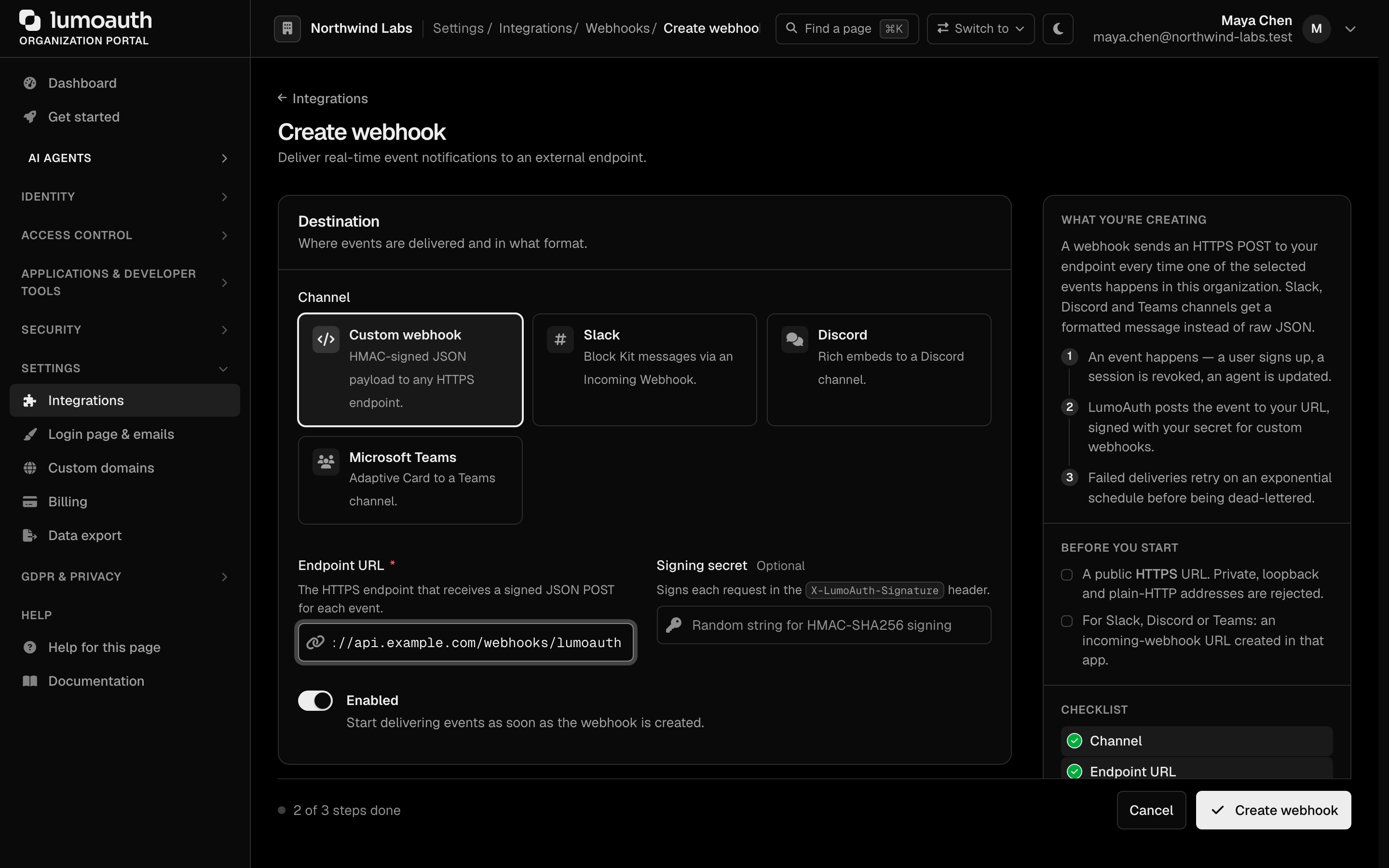
/orgs/{orgId}/portal/integrations/webhooks/create - Configure:
| Field | Description |
|---|---|
| Channel | Custom webhook (HMAC-signed JSON to any HTTPS endpoint), or Slack, Discord or Microsoft Teams, which receive a formatted message instead of raw JSON |
| Endpoint URL | Your HTTPS endpoint for receiving events (see Allowed destinations) |
| Signing secret | Optional shared secret for signature verification (custom webhooks) |
| Enabled | Enable/disable the webhook |
| Events | Which events to subscribe to. Some plans limit the number of event types per webhook; the form shows the limit |
- Click Create webhook
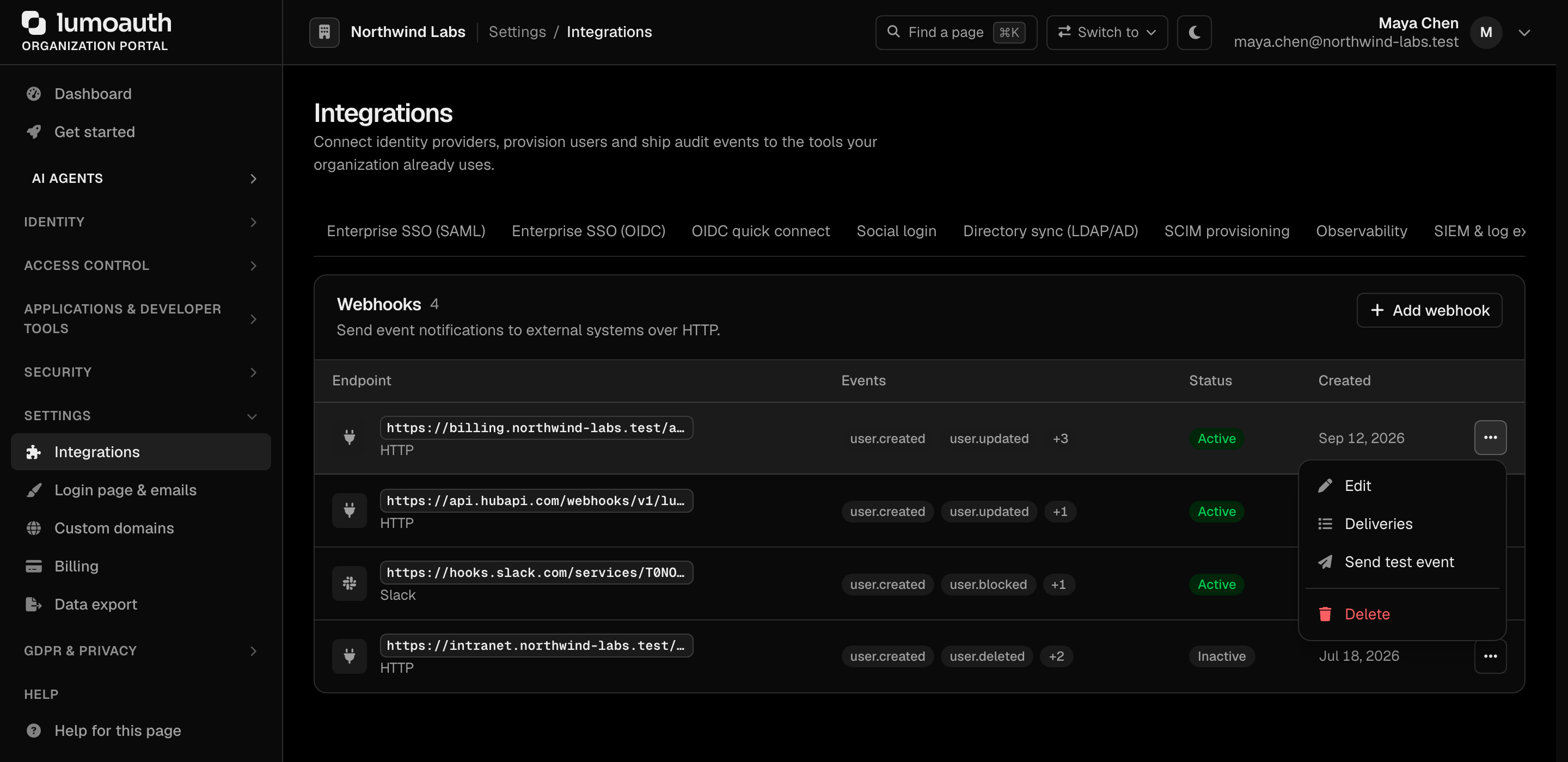
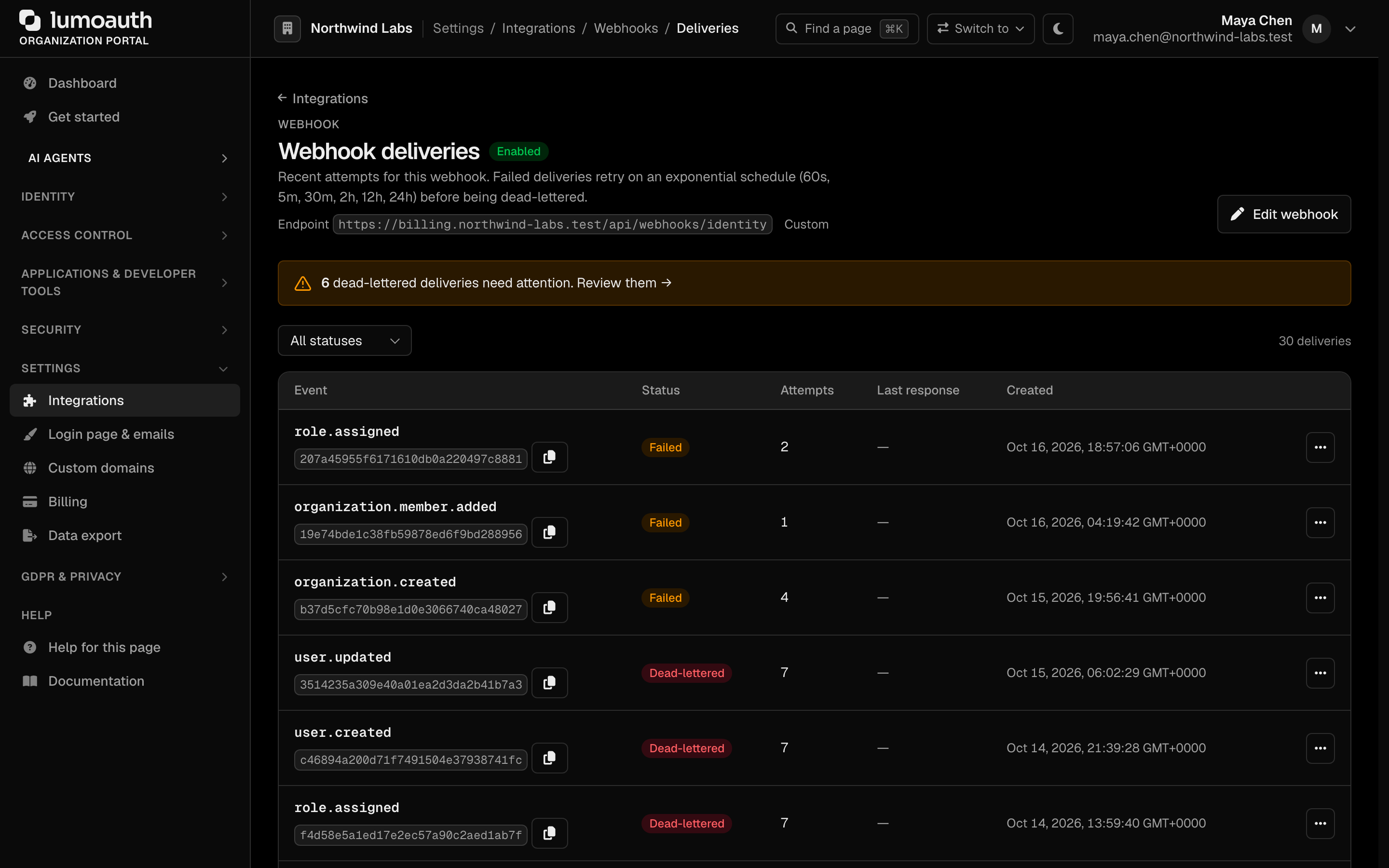
Each webhook in the Webhooks section has an actions menu with Edit, Deliveries, Send test event and Delete. To enable or disable a webhook, or to set a new signing secret, open Edit. Deliveries (/orgs/{orgId}/portal/integrations/webhooks/{id}/deliveries) lists recent attempts with their status and lets you replay failed ones.
Via API
The webhook admin API is mounted under /orgs/{orgId}/api/v1/admin/webhooks:
curl -X POST https://your-domain.com/orgs/{orgId}/api/v1/admin/webhooks \
  -H "Authorization: Bearer {admin_token}" \
  -H "Content-Type: application/json" \
  -d '{
    "url": "https://your-app.com/webhooks/lumoauth",
    "events": ["user.login", "user.login_failed", "user.created"],
    "secret": "your-webhook-secret",
    "active": true
  }'
To fetch the full, authoritative list of subscribable event names, call:
curl https://your-domain.com/orgs/{orgId}/api/v1/admin/webhooks/events \
  -H "Authorization: Bearer {admin_token}"
Allowed destinations
A webhook URL is checked when it is created, updated and tested, and the hostname is resolved and pinned again before every delivery, so a DNS record cannot be swapped to an internal address between the check and the request. The rules:
| Requirement | Accepted | Rejected |
|---|---|---|
| Scheme | https:// | http://, ftp://, file://, anything else |
| Credentials in the URL | none | https://user:pass@host/ |
| Hostname | A public name that resolves to at least one address, or a public IP literal | localhost, *.localhost, names that do not resolve, names where any A or AAAA record is in a blocked range |
Blocked address ranges (a destination is refused if any resolved address falls in one):
| Range | What it is |
|---|---|
10.0.0.0/8, 172.16.0.0/12, 192.168.0.0/16 | Private network address ranges |
127.0.0.0/8, ::1, :: | Loopback and unspecified |
169.254.0.0/16, fe80::/10 | Link-local; cloud instance metadata lives here |
100.64.0.0/10 | Shared address space / carrier-grade NAT; also cloud metadata on some providers |
0.0.0.0/8, 192.0.0.0/24, 198.18.0.0/15, 240.0.0.0/4 | "This" network, IETF protocol assignments, benchmarking, reserved and broadcast |
192.0.2.0/24, 198.51.100.0/24, 203.0.113.0/24, 2001:db8::/32 | Documentation ranges (TEST-NET-1/2/3) |
192.88.99.0/24, 2002::/16 | 6to4 relay and 6to4 addresses (the embedded IPv4 is checked too) |
64:ff9b::/96, 64:ff9b:1::/48, ::ffff:0:0/96, Teredo 2001::/32 | NAT64, IPv4-mapped and Teredo addresses: the embedded IPv4 is extracted and checked against this table |
fc00::/7, fec0::/10 | IPv6 unique-local and site-local |
224.0.0.0/4, ff00::/8 | Multicast |
The portal reports The webhook URL must be a public HTTPS URL.; the Admin API returns 400 with Webhook URL must not point to a private or internal address. To receive webhooks on a machine inside your network, expose it through a tunnel or reverse proxy with a public hostname.
Available Events
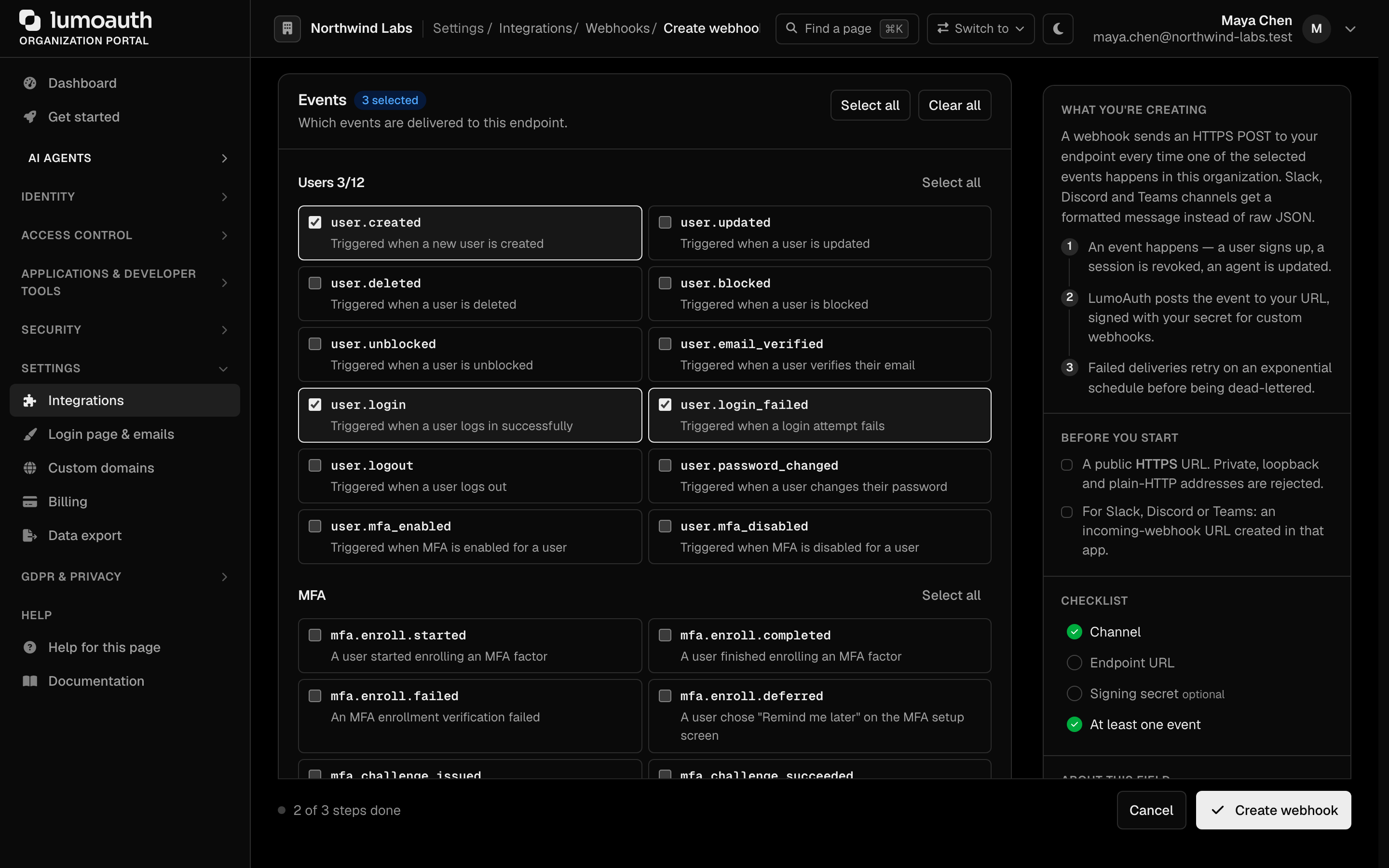
The canonical list is returned by GET /orgs/{orgId}/api/v1/admin/webhooks/events. In the portal, the Events section of the webhook form groups the same events by category, with Select all / Clear all shortcuts. The current catalog:
User Events
user.created- New user createduser.updated- User updateduser.deleted- User deleteduser.blocked- User blockeduser.unblocked- User unblockeduser.email_verified- User verified their emailuser.login- User logged in successfullyuser.login_failed- A login attempt faileduser.logout- User logged outuser.password_changed- User changed their passworduser.mfa_enabled- A user enrolled their first MFA (multi-factor authentication) factoruser.mfa_disabled- A user no longer has any active MFA factor (the user or an admin removed the last one)
MFA Events
Each MFA audit event is also a webhook event with the same name. The data object carries status, actor_id, actor_name, target_type, target_id (the user id), target_name (the user's email), ip_address, user_agent, severity and metadata (for example authenticator_id, factor_type, purpose, reason).
mfa.enroll.started- A user started enrolling an MFA factormfa.enroll.completed- A user finished enrolling an MFA factormfa.enroll.failed- An MFA enrollment verification failedmfa.enroll.deferred- A user chose "Remind me later" on the MFA setup screenmfa.challenge.issued- An MFA challenge was issuedmfa.challenge.succeeded- An MFA challenge was passedmfa.challenge.failed- An MFA challenge failedmfa.push.denied- A push sign-in request was denied in the appmfa.push.reported_fraud- A user reported a push sign-in request as "This wasn't me" — route this to your security teammfa.factor.removed- An MFA factor was removed (by the user or an admin)mfa.factor.default_changed- A user changed their default MFA factormfa.recovery_codes.generated- Recovery codes were generated or regeneratedmfa.recovery_code.used- A recovery code was used to sign inmfa.recovery.started- Account recovery startedmfa.recovery.completed- A recovered user finished re-enrolling (new factor and recovery codes)mfa.tap.issued- An admin issued a temporary access codemfa.locked- MFA was locked after too many failuresmfa.policy.changed- The organization MFA policy changedmfa.trusted_device.added- A user trusted a device to skip MFAmfa.trusted_device.revoked- A trusted device was revoked
{
  "event": "mfa.push.reported_fraud",
  "timestamp": "2026-09-24T10:30:00Z",
  "tenant": "acme-corp",
  "data": {
    "status": "failure",
    "target_type": "user",
    "target_id": "0192a3f4-…",
    "target_name": "alice@acme.com",
    "severity": "warning",
    "metadata": {
      "factor_type": "push",
      "authenticator_id": "push:5",
      "initiating_ip": "198.51.100.23",
      "location": "Lagos, NG",
      "user_agent": "Mozilla/5.0 …",
      "reason": "user_reported_not_me"
    }
  }
}
Identity & Consent Events
identity.linked- A social identity was linkedidentity.unlinked- A social identity was unlinkedconsent.granted- A user granted consent to an OAuth clientconsent.revoked- A user revoked consentsession.revoked- A session was revoked
Client & Token Events
client.created- OAuth client createdclient.updated- OAuth client updatedclient.deleted- OAuth client deletedclient.secret_rotated- OAuth client secret rotatedtoken.issued- An access token was issuedtoken.revoked- A token was revoked
Access-Control Events
role.assigned- A role was assigned to a userrole.unassigned- A role was removed from a usergroup.member_added- A user was added to a groupgroup.member_removed- A user was removed from a group
Organization Events
organization.created/organization.updated/organization.deletedorganization.member.added/organization.member.removed/organization.member.updatedorganization.invitation.accepted- An organization invitation was accepted
Agent & JIT Events
agent.created- A new agent was registeredagent.updated- An agent was updatedagent.revoked- An agent was revokedagent.attestation.accepted/agent.attestation.rejected- Agent attestation resultjit.approval_required- A JIT permission request needs human approvaljit.request.approved/jit.request.denied- A JIT permission request was resolved
Diagnostics
webhook.test- Fired manually from the portal/API to verify endpoint connectivity
Webhook Payload
Each delivery POSTs a JSON body with this envelope:
{
  "event": "user.login",
  "timestamp": "2025-02-01T14:30:00Z",
  "tenant": "acme-corp",
  "data": {
    "user_id": "user-uuid",
    "email": "alice@acme.com",
    "ip_address": "192.168.1.100"
  }
}
The event type is in the top-level event field, the organization slug is in tenant, and the event-specific fields are in data. The unique delivery identifier is not in the body — it is sent in the X-LumoAuth-Delivery header (see below).
Every request also carries these headers:
| Header | Description |
|---|---|
X-LumoAuth-Event | The event name (matches the body's event) |
X-LumoAuth-Timestamp | Unix timestamp (seconds) when the request was signed |
X-LumoAuth-Delivery | Unique delivery ID — use it for idempotency / replay detection |
X-LumoAuth-Signature | HMAC signature (see below) |
Signature Verification
When a webhook has a secret configured, each request is signed. The X-LumoAuth-Signature header is a comma-delimited set of fields:
X-LumoAuth-Signature: kid=v1,t=1706400000,id=<deliveryId>,v1=<hmac>
| Field | Meaning |
|---|---|
kid | Signing-key version (v1, or v2 after the secret has been rotated) |
t | Unix timestamp (matches X-LumoAuth-Timestamp) |
id | Delivery ID (matches X-LumoAuth-Delivery) |
v1 | HMAC-SHA256(secret, "{t}.{id}.{rawBody}"), hex-encoded |
The HMAC is computed over the signing base {timestamp}.{deliveryId}.{rawRequestBody} — not the raw body alone. Verify it like this:
const crypto = require('crypto');

function verifyWebhook(rawBody, signatureHeader, secret) {
  // Parse "kid=..,t=..,id=..,v1=.." into a map
  const parts = Object.fromEntries(
    signatureHeader.split(',').map((kv) => {
      const i = kv.indexOf('=');
      return [kv.slice(0, i), kv.slice(i + 1)];
    })
  );

  const signingBase = `${parts.t}.${parts.id}.${rawBody}`;
  const expected = crypto
    .createHmac('sha256', secret)
    .update(signingBase)
    .digest('hex');

  const a = Buffer.from(parts.v1 || '', 'hex');
  const b = Buffer.from(expected, 'hex');
  return a.length === b.length && crypto.timingSafeEqual(a, b);
}
Reject requests whose t is far from your own clock, and de-duplicate on id (the delivery ID) so a replayed request is only processed once. Always verify against the raw request body bytes — re-serializing the parsed JSON can change byte order and break the HMAC.
Retry Policy
| Scenario | Behavior |
|---|---|
| 2xx response | Success, no retry |
| Non-2xx response | Retry with exponential backoff |
| Timeout (5 s) | Retry |
| Retry schedule | 60s, 5m, 30m, 2h, 12h, 24h, then the delivery is dead-lettered (shown on the deliveries page, where it can be replayed) |
| Repeated failures | The webhook stays enabled; watch the Deliveries page and disable it yourself from Edit if the endpoint is gone |
Troubleshooting
400"must not point to a private or internal address" for a public hostname. One of its DNS records (often an AAAA record) points into a blocked range, or the name resolves to nothing from the LumoAuth host. Check every record, not just the A record.- A URL that saved before now fails the test delivery. The blocked list was extended (CGNAT
100.64.0.0/10, TEST-NET, 6to4, NAT64 and multicast ranges). Move the endpoint to a public address. http://URL refused. Onlyhttps://is accepted for webhook endpoints.
Related Guides
- Audit Logs - Historical event records
- Adaptive MFA - Security event triggers
- Observability - Monitoring and metrics
Standards used on this page
| Plain name | Standard |
|---|---|
| Private network address ranges | RFC 1918 |
See the standards reference for what each one covers and how LumoAuth uses it.