SCIM 2.0 Provisioning
Connect your identity provider (Okta, Microsoft Entra ID, OneLogin, an HR system) to LumoAuth so that people are created, updated and deactivated automatically. You paste one URL and one token into the IdP, tick which operations it may perform, and the IdP keeps LumoAuth in sync from then on.
SCIM 2.0 (System for Cross-domain Identity Management) is the internet standard behind this: it defines the User and Group JSON resources and the HTTP API that carries them. Developers who need the exact request shapes and error codes should read the SCIM API reference.
What you get
- Provisioning: a user added to the app in your IdP appears in LumoAuth.
- Sync: name, e-mail and active status follow the IdP.
- Deprovisioning: a user removed in the IdP is soft-deleted, deactivated or deleted (your choice).
- Group sync: IdP groups become LumoAuth roles and their members get the role.
Set up in three steps
1. Generate the SCIM token
- Go to
/orgs/{orgId}/portal/integrations, find the SCIM provisioning section and click Set up (or Configure, once it is active) on the Inbound SCIM card (/orgs/{orgId}/portal/integrations/scim). - Under Bearer token, click Generate bearer token (or Regenerate token to roll an existing one).
- Copy the token. It is shown once; LumoAuth stores only a hash.
- Under Provisioning, switch Enable SCIM provisioning on and click Save changes.
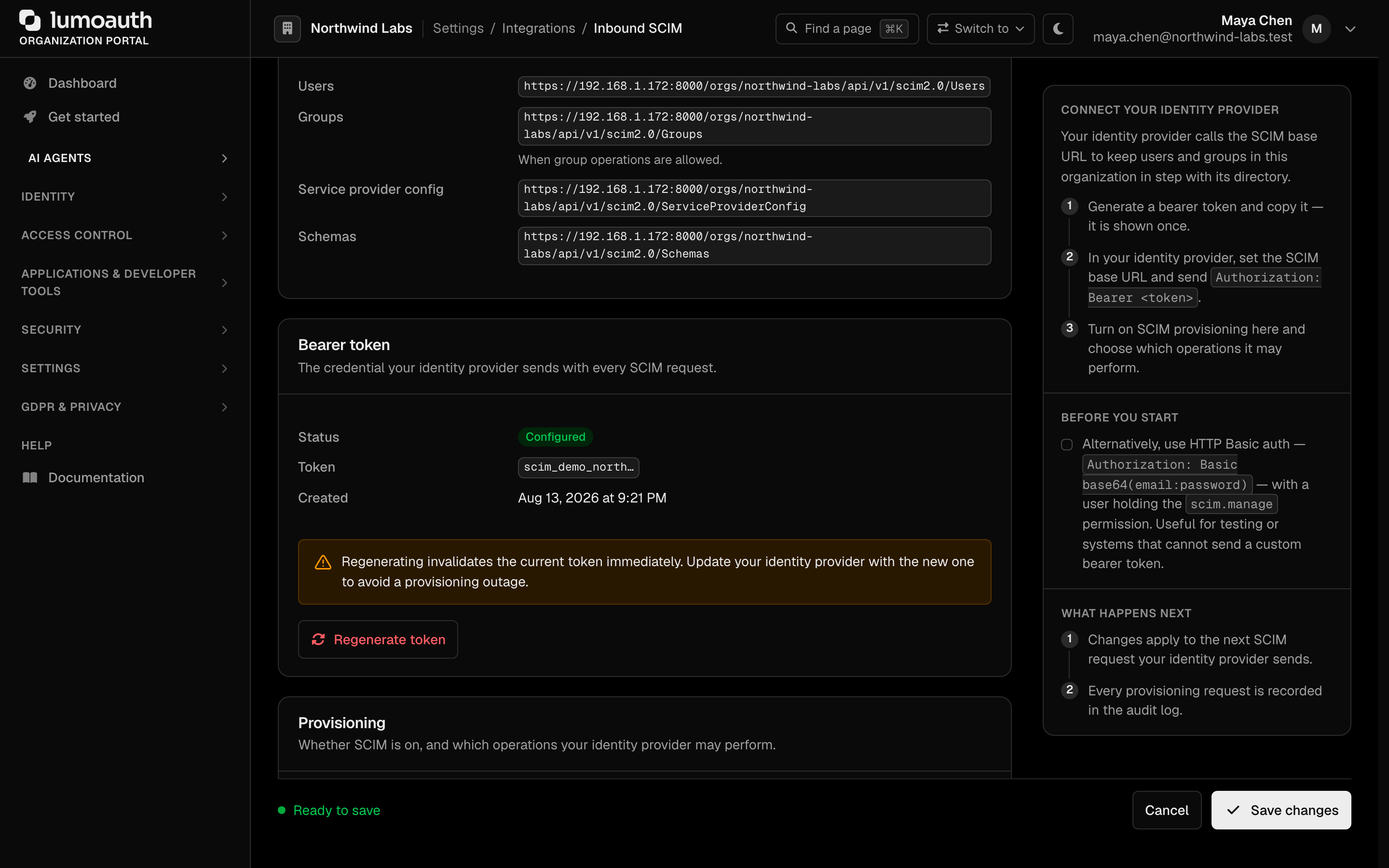
Saving the other SCIM settings later does not clear the token. Regenerate only when it has leaked or been lost.
2. Give the IdP the base URL and the token
The Endpoint card at the top of the Inbound SCIM page shows the base URL for your organization with a Copy button.
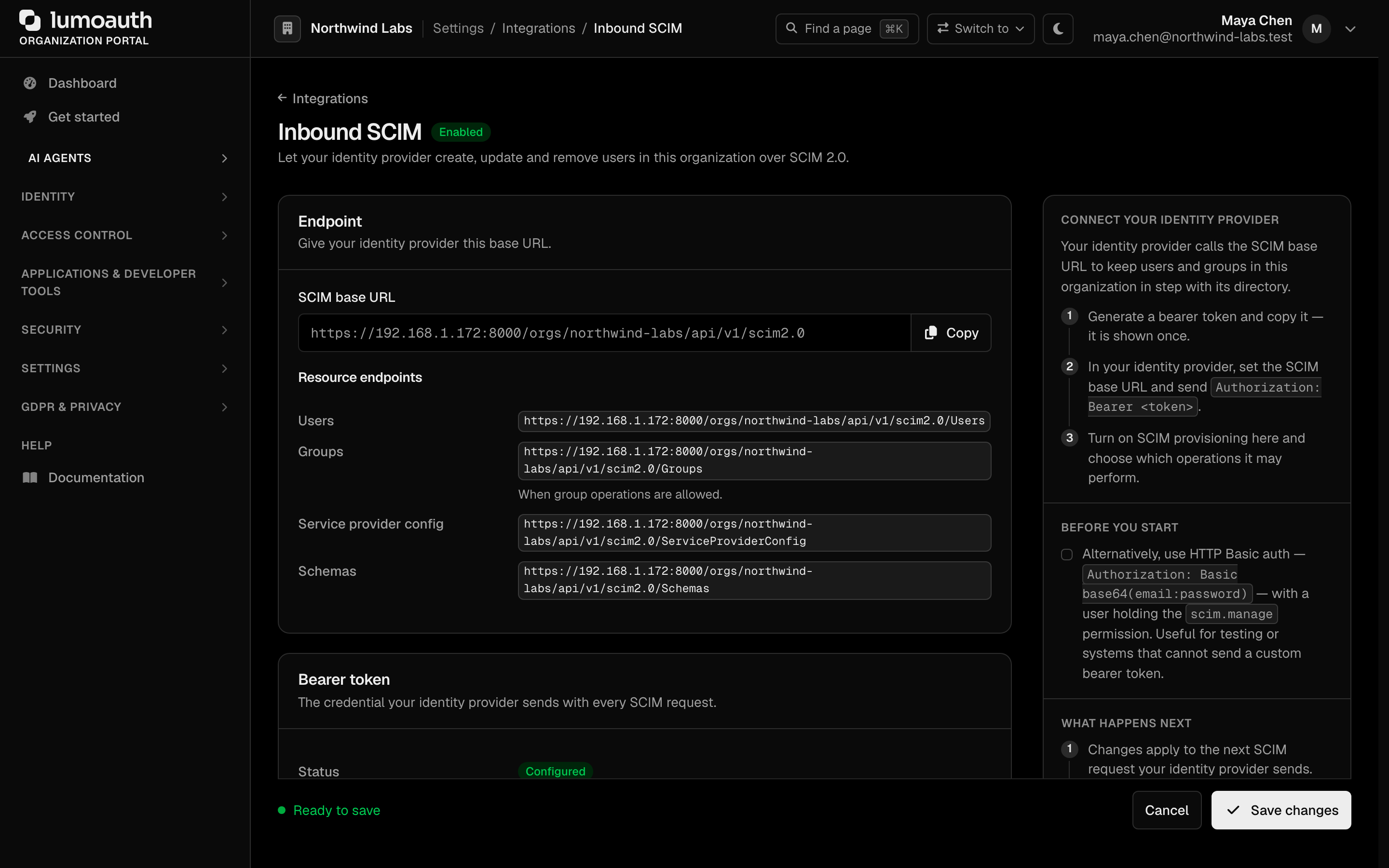
| Setting in your IdP | Value |
|---|---|
| SCIM Base URL / Organization URL | https://your-domain.com/orgs/{orgId}/api/v1/scim2.0 |
| Authentication | HTTP header / Bearer token: the token from step 1 |
| Unique identifier | userName (the e-mail address) |
On a verified custom domain the base URL is https://auth.acme.com/api/v1/scim2.0.
Okta
- Open your LumoAuth application, tab Provisioning, click Configure API Integration.
- Tick Enable API integration, paste the base URL and the token, Test API Credentials, save.
- Under To App, enable Create Users, Update User Attributes, Deactivate Users (and Push Groups on the Push Groups tab if you want group sync).
Microsoft Entra ID
- Enterprise applications > your app > Provisioning > Get started.
- Provisioning mode Automatic; Organization URL = base URL, Secret Token = the token; Test Connection, save.
- Assign users or groups to the app and turn provisioning On.
3. Decide what the IdP may do
Still on /orgs/{orgId}/portal/integrations/scim, the policy toggles are enforced on every SCIM call. A call the policy does not allow is refused with HTTP 403 and nothing is changed. Click Save changes after changing a toggle.
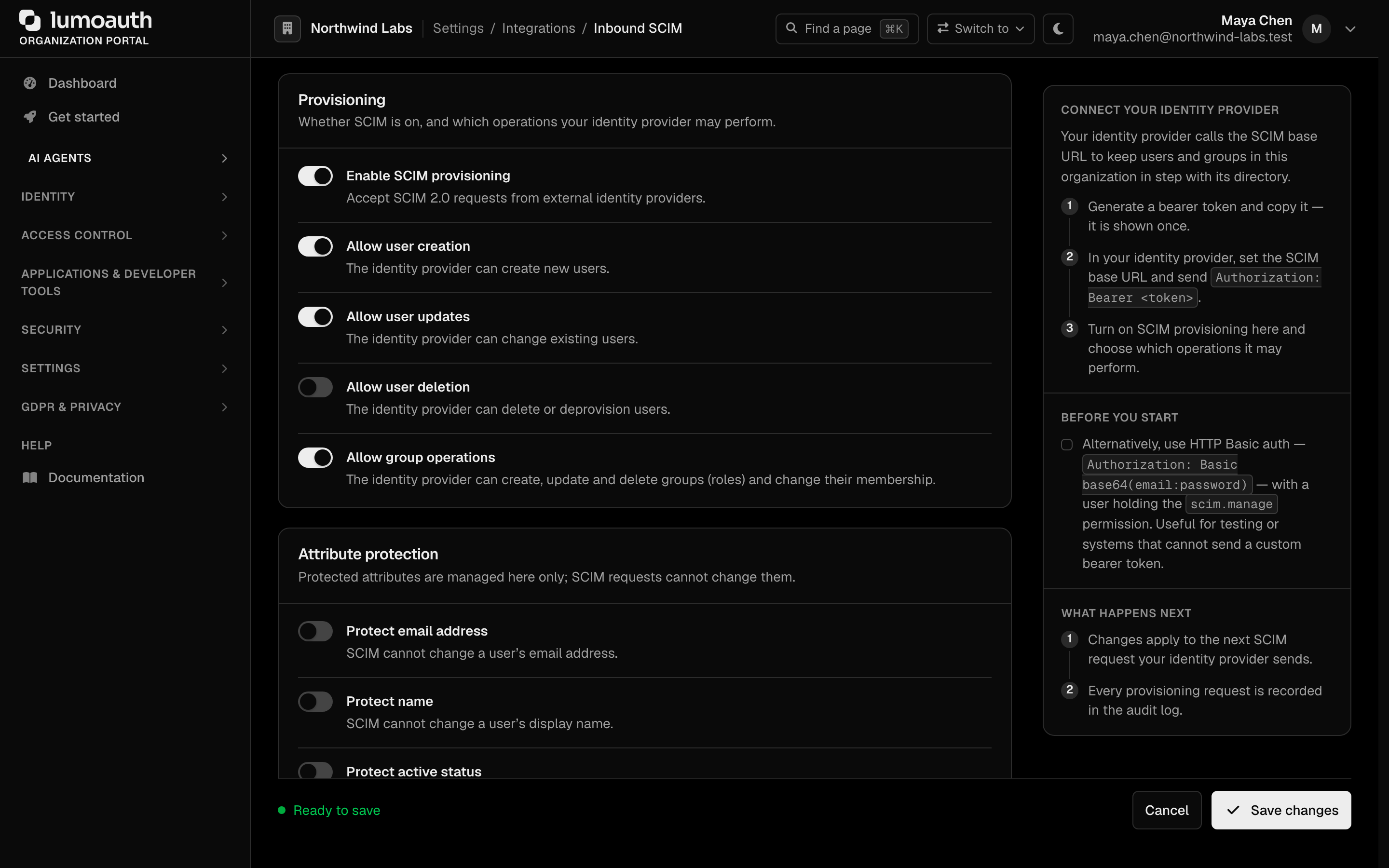
| Toggle | Default | Turn it off when |
|---|---|---|
| Allow user creation | on | Accounts are created another way (invitations, self-registration) and the IdP should only update or deactivate |
| Allow user updates | on | LumoAuth, not the IdP, is the source of truth for profile data |
| Allow user deletion | on | Leavers are handled by your own process; the IdP should never remove anyone |
| Allow group operations | on | You manage roles by hand and do not want the IdP creating or changing them |
| Auto-activate new users | on | New accounts should wait for an administrator to enable them. Applies only when the IdP does not send active; an explicit active value always wins. |
| Protect email address / name / active status | off | Users may change that field themselves in LumoAuth and the IdP must not overwrite it. The rest of each update still applies. |
| Deprovisioning action | Soft delete | Deactivate keeps the account visible and lets the IdP re-enable it; Hard delete removes it at once |
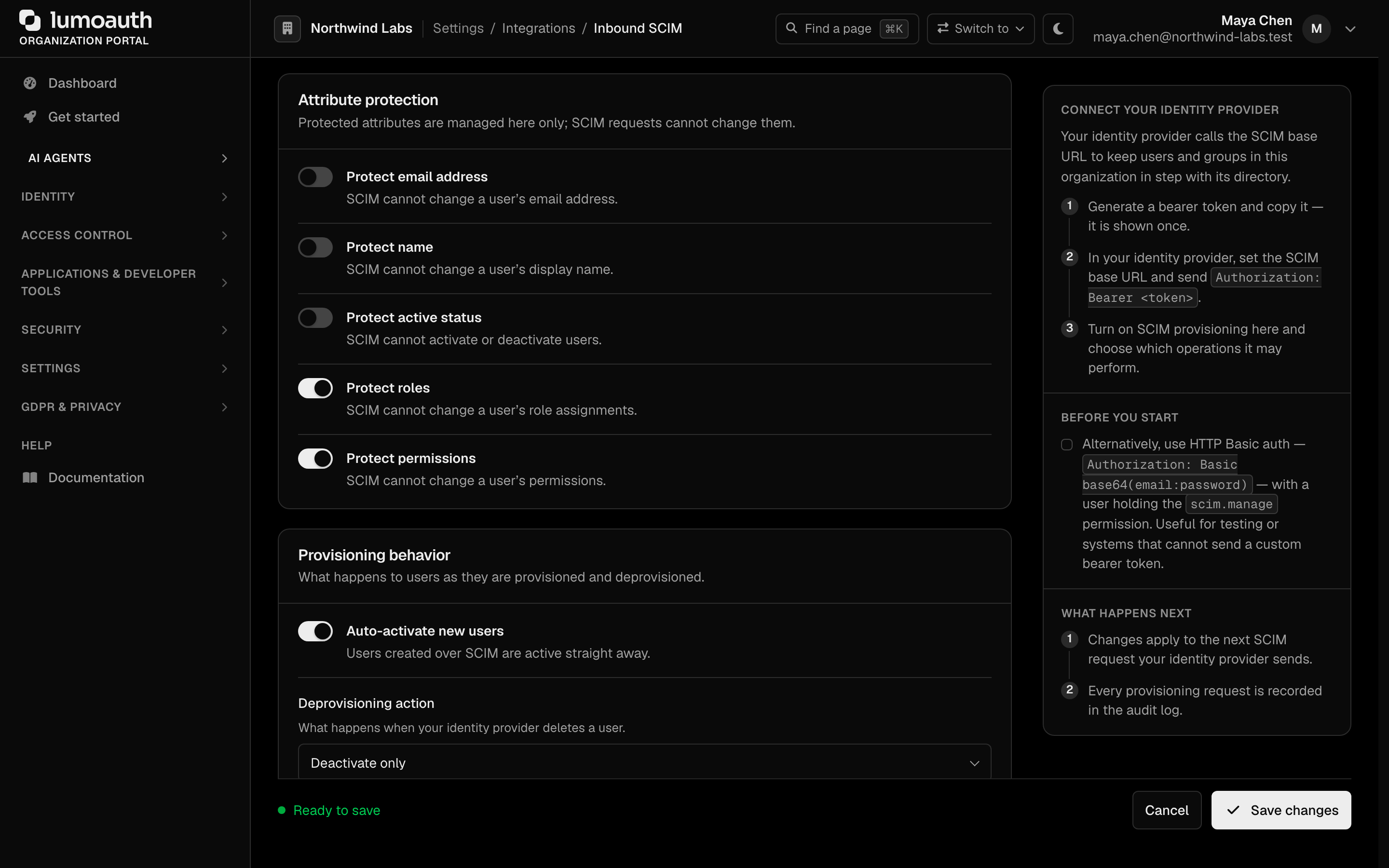
Passwords the IdP sends must meet the organization's password policy and pass the breached-password check, or the call fails with 400 invalidValue. A password replaced over SCIM signs the user out everywhere and revokes their tokens. Every SCIM write is recorded in the audit log as a scim.* event.
Roles and permissions are never writable from the User resource; the IdP can only grant roles through group membership, and never a role that makes someone an administrator (see Groups).
Test it
Create one user from your terminal to confirm the token and URL work before assigning people in the IdP:
curl -X POST "https://your-domain.com/orgs/{orgId}/api/v1/scim2.0/Users" \
  -H "Authorization: Bearer $SCIM_TOKEN" \
  -H "Content-Type: application/scim+json" \
  -d '{
    "schemas": ["urn:ietf:params:scim:schemas:core:2.0:User"],
    "userName": "alice@acme.com",
    "name": {"givenName": "Alice", "familyName": "Smith"},
    "emails": [{"value": "alice@acme.com", "primary": true}],
    "active": true,
    "externalId": "okta-user-id-123"
  }'
A 201 with the new user means you are done. A 401 means the token is wrong; a 403 means Allow user creation is off.
How the pieces map
| SCIM Attribute | LumoAuth Field |
|---|---|
userName | |
name.givenName | First name |
name.familyName | Last name |
emails[0].value | |
phoneNumbers[0].value | Phone |
active | Account active status |
externalId | External IdP identifier |
| SCIM Group | LumoAuth |
|---|---|
displayName | Role name (a slug is derived from it) |
members | Users holding the role |
Endpoint list
LumoAuth exposes the full SCIM 2.0 surface per organization. The request and response formats are in the SCIM API reference.
| Endpoint | Method | Purpose |
|---|---|---|
/orgs/{orgId}/api/v1/scim2.0/Users | GET, POST | List and create users |
/orgs/{orgId}/api/v1/scim2.0/Users/{id} | GET, PUT, PATCH, DELETE | Read, replace, update, deprovision a user |
/orgs/{orgId}/api/v1/scim2.0/Groups | GET, POST | List and create groups |
/orgs/{orgId}/api/v1/scim2.0/Groups/{id} | GET, PUT, PATCH, DELETE | Read, replace, update membership, delete a group |
/orgs/{orgId}/api/v1/scim2.0/ServiceProviderConfig | GET | SCIM capabilities (public) |
/orgs/{orgId}/api/v1/scim2.0/Schemas | GET | Supported schemas (public) |
/orgs/{orgId}/api/v1/scim2.0/ResourceTypes | GET | Supported resource types (public) |
/orgs/{orgId}/api/v1/scim2.0/Me | GET, PUT, PATCH | The caller's own resource (user access tokens only; the provisioning token gets 501; passwords cannot be changed here) |
/orgs/{orgId}/api/v1/scim2.0/Bulk | POST | Bulk operations (max 100 per request) |
/orgs/{orgId}/api/v1/scim2.0/Users/.search, /Groups/.search | POST | Filtered search via POST body |
Outbound SCIM (LumoAuth pushing user and group changes to a downstream system, with optional sync on login and scheduled batch reconciles) is a separate feature under the Outbound SCIM card at /orgs/{orgId}/portal/integrations/scim-outbound; see SCIM vendor presets and Groups, login sync and batch sync.
Troubleshooting
| Symptom | Cause | Fix |
|---|---|---|
| IdP "Test connection" fails with 401 | Wrong or regenerated token, or Enable SCIM provisioning is off | Regenerate the token and paste it again; check the Enable SCIM provisioning switch |
| 401 although you used an OAuth token from your app | Only access tokens carrying the scim scope are accepted; ID tokens and ordinary openid profile email tokens are refused | Use the provisioning token, or grant the client the scim scope. Details in the API reference |
401 Invalid credentials with Basic auth and a correct password | The account has MFA (multi-factor authentication) enabled; Basic auth is refused for it | Use the provisioning token |
403 ... disabled by this organization's SCIM provisioning policy | The matching toggle is off | Turn it on at /orgs/{orgId}/portal/integrations/scim |
One group push fails with 403 System or privileged roles cannot be modified via SCIM | The group maps to an administrator role | Assign administrators in the portal; keep them out of IdP-managed groups |
| E-mail or name changes from the IdP do not apply | That attribute is protected | Switch the protection off, or accept that LumoAuth owns the field |
400 invalidFilter on a user or group lookup | The IdP sent a filter LumoAuth does not support. Unsupported filters used to be ignored and matched everything; they are now rejected | Use a supported filter; see Filter Syntax |
400 invalidValue on create or update with a password | The password fails the password policy or is a known breached password | Stop the IdP from sending passwords, or have it send a compliant one |
| New users arrive inactive | Auto-activate new users is off and the IdP does not send active | Turn the toggle on, or map active in the IdP |
| A removed user is still visible | Deprovisioning action is Deactivate | Choose Soft delete or Hard delete |
Related Guides
- SCIM API reference - Authentication rules, policy enforcement, error envelopes
- User Management - Manual user management
- Groups - Group-based access control
- Roles & Permissions - Why SCIM cannot grant administrator roles
- Enterprise SSO - SAML/OIDC federation
Standards used on this page
| Plain name | Standard |
|---|---|
| SCIM 2.0 (user and group provisioning) | RFC 7642, RFC 7643 and RFC 7644 |
See the standards reference for what each one covers and how LumoAuth uses it.