SCIM 2.0 API
SCIM 2.0 (System for Cross-domain Identity Management) is the standard for creating, updating and removing users and groups across systems over HTTP + JSON. It has two parts:
- the core schema, which defines the
UserandGroupJSON resources and their standard attributes (userName,emails,members, etc.); - the protocol, which defines the HTTP API:
GET/POST/PUT/PATCH/DELETEon/Usersand/Groups, plus filter, sort, and pagination parameters.
LumoAuth's SCIM endpoints let an upstream IdP (Okta, Microsoft Entra ID, OneLogin, and similar) keep LumoAuth users and groups in sync automatically.
This page is the developer reference: how a call is authenticated, which organization policy gates it, and what every error looks like. If you are an Okta or Entra administrator who just wants provisioning running, start with the SCIM integration guide instead.
Base URL
All SCIM endpoints are organization-scoped:
https://app.lumoauth.dev/orgs/{orgId}/api/v1/scim2.0
{orgId} is the organization slug. On a verified custom domain the prefix is dropped (https://auth.acme.com/api/v1/scim2.0).
curl "https://app.lumoauth.dev/orgs/acme-corp/api/v1/scim2.0/Users" \
  -H "Authorization: Bearer $SCIM_TOKEN" \
  -H "Accept: application/scim+json"
Authentication
Every endpoint except the three discovery documents (/ServiceProviderConfig, /ResourceTypes, /Schemas) requires an Authorization header. Three credential types are accepted.
| Credential | Header | Who it acts as | Use it for |
|---|---|---|---|
| SCIM provisioning token | Authorization: Bearer <token> | The organization's SCIM service principal | IdP connectors (Okta, Entra, OneLogin). This is the default. |
OAuth 2.0 access token with the scim scope | Authorization: Bearer <access_token> | The token's subject, who must hold scim.manage | Your own scripts or apps that already sign users in through LumoAuth |
HTTP Basic (email:password) | Authorization: Basic <base64> | That user, who must hold scim.manage | Quick manual tests only. Refused when the account has MFA enabled. |
SCIM provisioning token
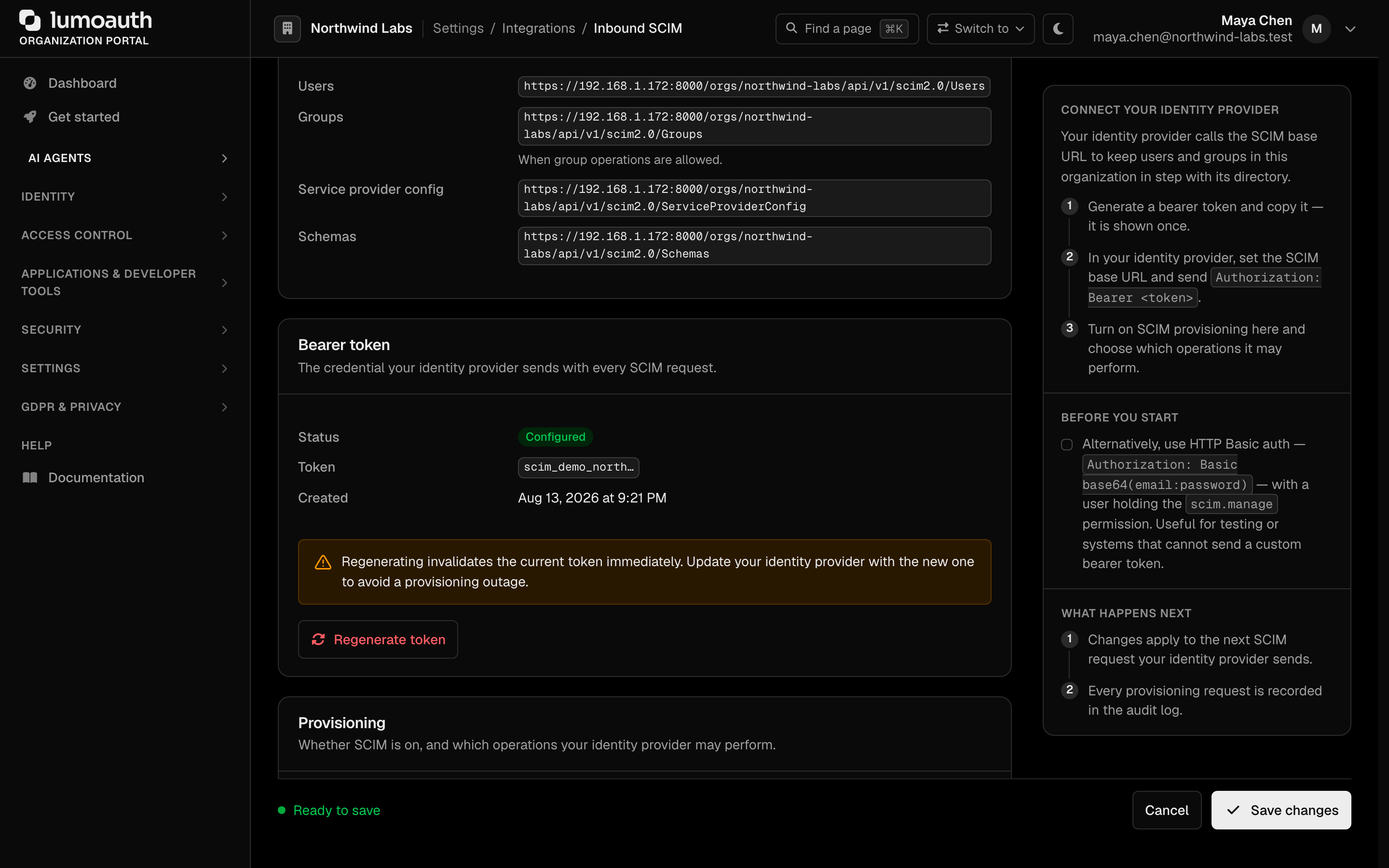
Generate it in the portal at /orgs/{orgId}/portal/integrations/scim (Generate bearer token). It is shown once and stored as a SHA-256 hash. When set through the Admin settings API (bearer_token), it is write-only: it is hashed on save and never returned. Requests made with it are attributed to the organization's administrator account (never to a LumoAuth operator account; if your organization has no administrator of its own, create a dedicated organization user with scim.manage).
OAuth 2.0 access tokens
An access token is accepted only when all of the following hold:
- It is an access token, not another JWT the organization signs. JWT tokens must carry the header
typ: at+jwt; opaque tokens issued by LumoAuth are looked up directly. - Its
scopeincludesscim, or the admin API pairadmin:scim:read(GET, HEAD, OPTIONS only) oradmin:scim:write(any method). - If it carries a URL audience (a
resourceindicator), that audience is the organization issuer or a resource beneath it. - Its subject belongs to this organization, is active, and holds the
scim.managepermission.
To obtain such a token, add scim to the OAuth client's allowed scopes and request it (for example scope=openid scim). Tokens minted for an ordinary application (openid profile email) are not SCIM credentials, even when the user is an administrator.
The following are never accepted, even though they are signed by the same organization key:
| Token | Why it is refused |
|---|---|
| OIDC ID token | No typ: at+jwt. An ID token proves who signed in, it does not authorize API access. |
Back-channel logout token (typ: logout+jwt) | Not an access token. |
JIT permission token (jit: true) | Deliberately narrower than the user; must not inherit their SCIM authority. |
Agent token (is_agent: true) | Same reason: an agent never gets the full authority of the human it works for. |
Delegated / token-exchange token (act claim) | Same reason. |
The JWT access token profile. The problem it solves: an ID token, a logout token and an access token can all be JWTs signed by the same key, so a resource server that only checks the signature can be fooled by the wrong kind of token. The rule: an access token carries the header typ: at+jwt, and a resource server must reject anything else. LumoAuth applies exactly this rule on the SCIM API. If you build your own resource server, do the same: check typ before you check the signature. See the standards reference.
HTTP Basic
Authorization: Basic base64(email:password) signs in the named user for a single request. It is rate limited per client IP and per username, and it is refused with a generic 401 when the account has MFA enabled, because a password alone would bypass the second factor. Integrations must use the provisioning token instead.
Authentication errors
Failures return the SCIM error envelope with status: "401" and a WWW-Authenticate: Basic realm="SCIM API", Bearer realm="SCIM API" header.
detail | Cause |
|---|---|
Authentication required | No Authorization header |
Token type is not accepted for the SCIM API; present an OAuth access token with the scim scope | ID token, logout token, JIT, agent or delegated token |
Access token lacks the scim (or admin:scim:read) scope required for the SCIM API | Read request with a token that has no SCIM scope |
Access token lacks the scim (or admin:scim:write) scope required for SCIM writes | Write request with admin:scim:read only, or no SCIM scope |
Access token audience does not include this organization's SCIM API | Token minted for another resource server |
User does not have SCIM API access permission | Subject lacks scim.manage |
Invalid credentials | Wrong Basic credentials, or the account has MFA enabled |
SCIM token owner is a platform-level administrator; use a tenant-scoped service account instead. | The token was created by a LumoAuth operator account; create it with an organization user (a service account) instead |
Too many failed Basic attempts return 429 with Retry-After. Authenticated traffic is also throughput-limited per organization (429, SCIM error envelope).
Organization provisioning policy
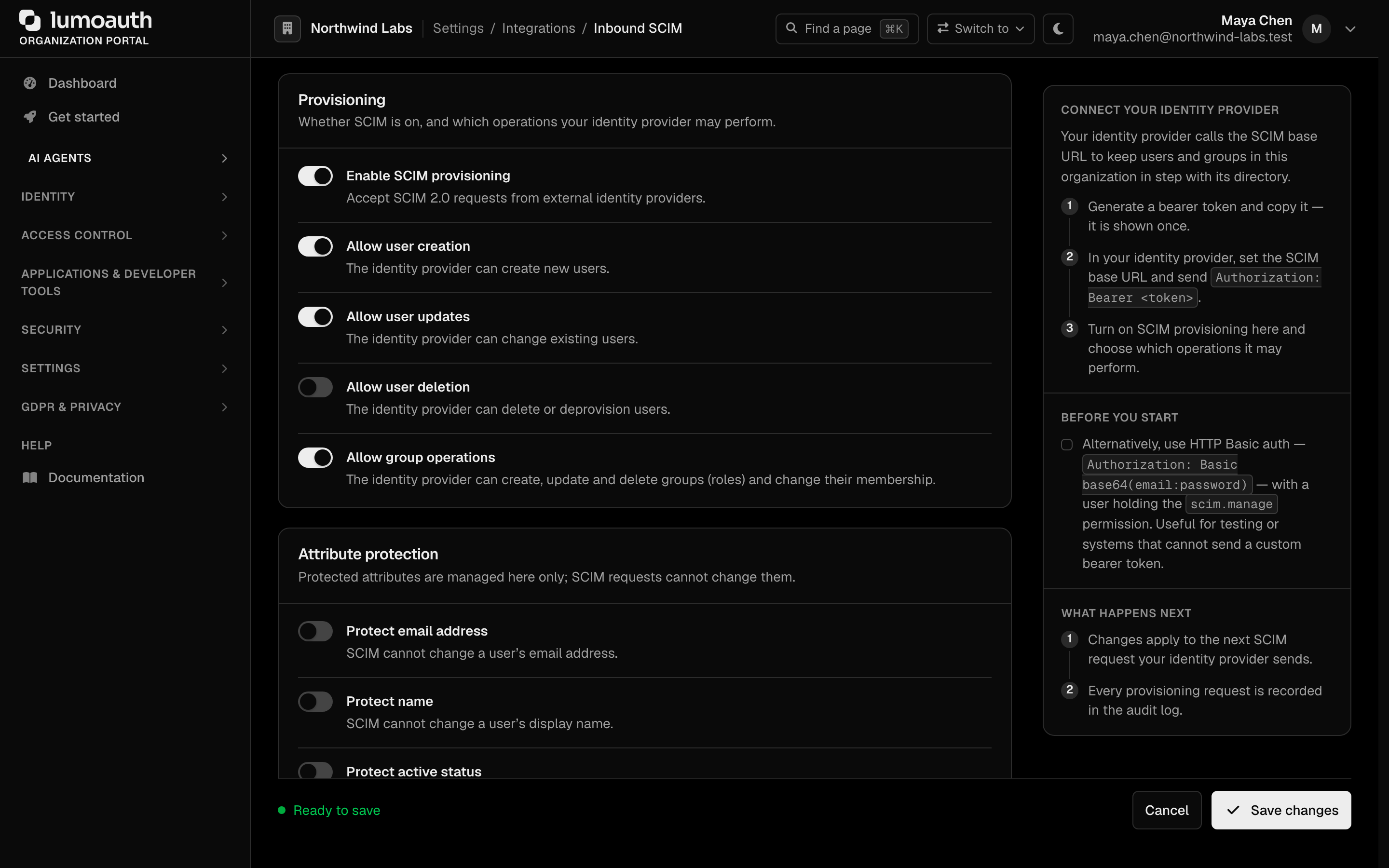
Administrators decide what an IdP may do at /orgs/{orgId}/portal/integrations/scim (the Provisioning, Attribute protection and Provisioning behavior sections). The SCIM API enforces these settings on every single-resource, PATCH and Bulk operation.
| Setting | Default | Gates |
|---|---|---|
Allow user creation (allow_user_creation) | on | POST /Users, Bulk POST on Users |
Allow user updates (allow_user_updates) | on | PUT and PATCH /Users/{id}, Bulk PUT on Users |
Allow user deletion (allow_user_deletion) | on | DELETE /Users/{id}, Bulk DELETE on Users |
Allow group operations (allow_group_operations) | on | Every write on /Groups and every Bulk Groups operation |
Auto-activate new users (auto_activate_users) | on | Whether a user created without an explicit active attribute starts active. Off: the user starts inactive until an administrator or a later active: true enables them. |
Protected attributes (protected_attributes.email, .name, .active) | all off | When on, the IdP cannot overwrite that attribute on an existing user (see below) |
Deprovisioning action (deprovisioning_action) | soft_delete | What DELETE /Users/{id} does: soft_delete, deactivate or hard_delete |
roles and permissions are always protected on the User resource; membership is managed through /Groups only.
403 policy envelope
An operation that a switched-off toggle covers is refused before anything is read or written:
{
  "schemas": ["urn:ietf:params:scim:api:messages:2.0:Error"],
  "status": "403",
  "scimType": "mutability",
  "detail": "User creation is disabled by this organization's SCIM provisioning policy"
}
The detail prefix names the toggle: User creation, User update, User deletion or Group management. Inside a Bulk request the same envelope appears as that operation's response with "status": "403"; other operations in the request still run.
Protected attributes
A protected attribute is silently kept, not rejected, because IdPs send the full resource on every sync and a hard error would stop the whole sync:
PUT /Users/{id}applies every field except the protected ones.PATCH /Users/{id}drops operations whosepathtargets the attribute (emails,emails[type eq "work"].value,name.givenName,displayName,active) and strips those keys from path-less operations.POST /Usersis never filtered; protection guards locally managed data on existing users.
Deprovisioning action
| Value | DELETE /Users/{id} does |
|---|---|
soft_delete (default) | Marks the user deleted. Hidden from lists, sessions end, restorable by an administrator. A second DELETE ...?isSoftDeleted=true erases the account through the GDPR erasure workflow (audited as gdpr.erasure.completed). A POST /Users whose userName or e-mail matches a retained (soft-deleted) account answers 409 uniqueness and never purges it. DELETE (single or Bulk) of an administrator account answers 403 mutability, exactly like a PUT/PATCH that would deactivate one. |
deactivate | Sets active: false and blocks sign-in. The row stays and the IdP can re-enable it with active: true. |
hard_delete | Removes the user immediately. |
Available Endpoints
| Resource | Methods | Details |
|---|---|---|
/Users, /Users/{id} | GET, POST, PUT, PATCH, DELETE | Filtering, pagination, sorting, PATCH. Users |
/Groups, /Groups/{id} | GET, POST, PUT, PATCH, DELETE | Groups map to organization roles. Groups |
/Me | GET, PUT, PATCH | The signed-in user's own resource; user access tokens only (the provisioning token gets 501). Bulk & Search |
/Bulk, /.search, /Users/.search, /Groups/.search | POST | Bulk operations and POST-based search. Bulk & Search |
/ServiceProviderConfig, /ResourceTypes, /ResourceTypes/{name}, /Schemas, /Schemas/{id} | GET | Public discovery documents. Discovery |
/Containers, /Containers/{id}, /PrivilegedData, /PrivilegedData/{id} | GET, POST, DELETE | Privileged Access Management (PAM) resources exposed over SCIM; listed in Discovery. |
/Feeds, /Feeds/{id}, /Subscriptions, /Subscriptions/{id} | GET (Feeds); GET, POST, DELETE (Subscriptions) | SCIM event notifications: list the event feeds LumoAuth publishes and subscribe a receiver URL to them. Events are delivered asynchronously after the write. An organization may hold at most 10 subscriptions (the 11th POST returns 409), and leaseDuration is clamped to 60 seconds – 30 days; the response reports the effective lease. |
Content Types
SCIM uses its own media types. Always include these headers:
| Header | Value | Description |
|---|---|---|
Content-Type | application/scim+json | Required for POST, PUT, PATCH requests |
Accept | application/scim+json | Recommended for all requests |
Error Responses
SCIM errors use the standard SCIM 2.0 error format:
{
  "schemas": ["urn:ietf:params:scim:api:messages:2.0:Error"],
  "status": "400",
  "scimType": "invalidFilter",
  "detail": "The filter expression is not valid."
}
| Status | scimType | Description |
|---|---|---|
400 | invalidFilter | Malformed filter, or an attribute, sub-attribute or operator LumoAuth does not support. Never widened to "match everything". See Filter Syntax |
400 | invalidValue | Invalid attribute value, a password that fails the password policy or breached-password check, a malformed PATCH value path, or a group name that maps to a reserved role slug |
400 | mutability | Attempt to modify a read-only / immutable attribute, or a password or userName change through /Me |
401 | - | Authentication required or credential refused (see Authentication errors) |
403 | mutability | Operation switched off by the organization policy, or a system / privileged role targeted through /Groups |
404 | - | Resource not found |
409 | uniqueness | Unique constraint violation |
412 | - | Precondition failed: ETag mismatch (optimistic locking); no scimType |
413 | tooLarge | Bulk request exceeds maxOperations (100) |
429 | - | Rate limit exceeded; honour Retry-After |
501 | - | /Me called with the provisioning token, or DELETE /Me |
Audit logging
Every SCIM write is recorded in the organization's audit log; writes made with the provisioning token carry actor type scim. The event type is scim.<resource>.<operation>: for example scim.user.create, scim.user.replace, scim.user.patch, scim.user.delete, the same four for scim.group.*, scim.me.replace / scim.me.patch, and scim.mixed.bulk for a Bulk request (each operation inside it is also logged on its own). Reads and searches are not audited.
Common mistakes
- 401 with an ID token. Your OIDC library gave you
id_token; SCIM needsaccess_token, and the client must have been granted thescimscope. - 401
Invalid credentialswith a correct password. The account has MFA enabled, so Basic auth is refused. Use the provisioning token. - 403
mutabilityon everyPOST /Groups. Allow group operations is off for the organization, or the group maps to a role that confers administrator authority (see Groups). - 400
invalidFilteron a filter that used to work. Unsupported filters were previously ignored and returned every resource; they are now rejected.GET /Groupsaccepts only the forms listed in Filter Syntax. - 501 on
/Mefrom your IdP connector. The provisioning token has no user; address the user as/Users/{id}. - 400
invalidValuewhen the IdP sends a password. The password fails the organization's password policy or is on the breached-password list. Configure the IdP not to send passwords, or relax the policy. - 403 on
PATCH /Users/{id}only. Allow user updates is off. Okta shows this as a failed "Update User Attributes" task. - Email changes from the IdP never land. Protected attributes: email is on; the update succeeds but keeps the local value by design.
- The provisioning token stopped working after saving settings. No longer happens: saving the policy form preserves the token. Regenerate only if it was lost.
Standards used on this page
| Plain name | Standard |
|---|---|
| SCIM 2.0 (user and group provisioning) | RFC 7642, RFC 7643 and RFC 7644 |
| Resource indicators | RFC 8707 |
| JWT access token profile | RFC 9068 |
See the standards reference for what each one covers and how LumoAuth uses it.