Add sign-in to a Next.js app
Three commands scaffold a Next.js app that signs users in with LumoAuth. Already have an app? Paste the prompt below into your AI editor, or follow the manual steps.
New app: three commands
curl -fsSL https://raw.githubusercontent.com/LumoAuth/cli/main/install.sh | sh   # or: brew install lumoauth/tap/lumo
lumo login --org your-org-slug
lumo init --framework next --dir my-app --client-id YOUR_CLIENT_ID
Then run it:
cd my-app && npm install && npm run dev
Open http://localhost:3000 and click Sign in. You are redirected to your organization's hosted login, sign in, and land back on the page signed in.
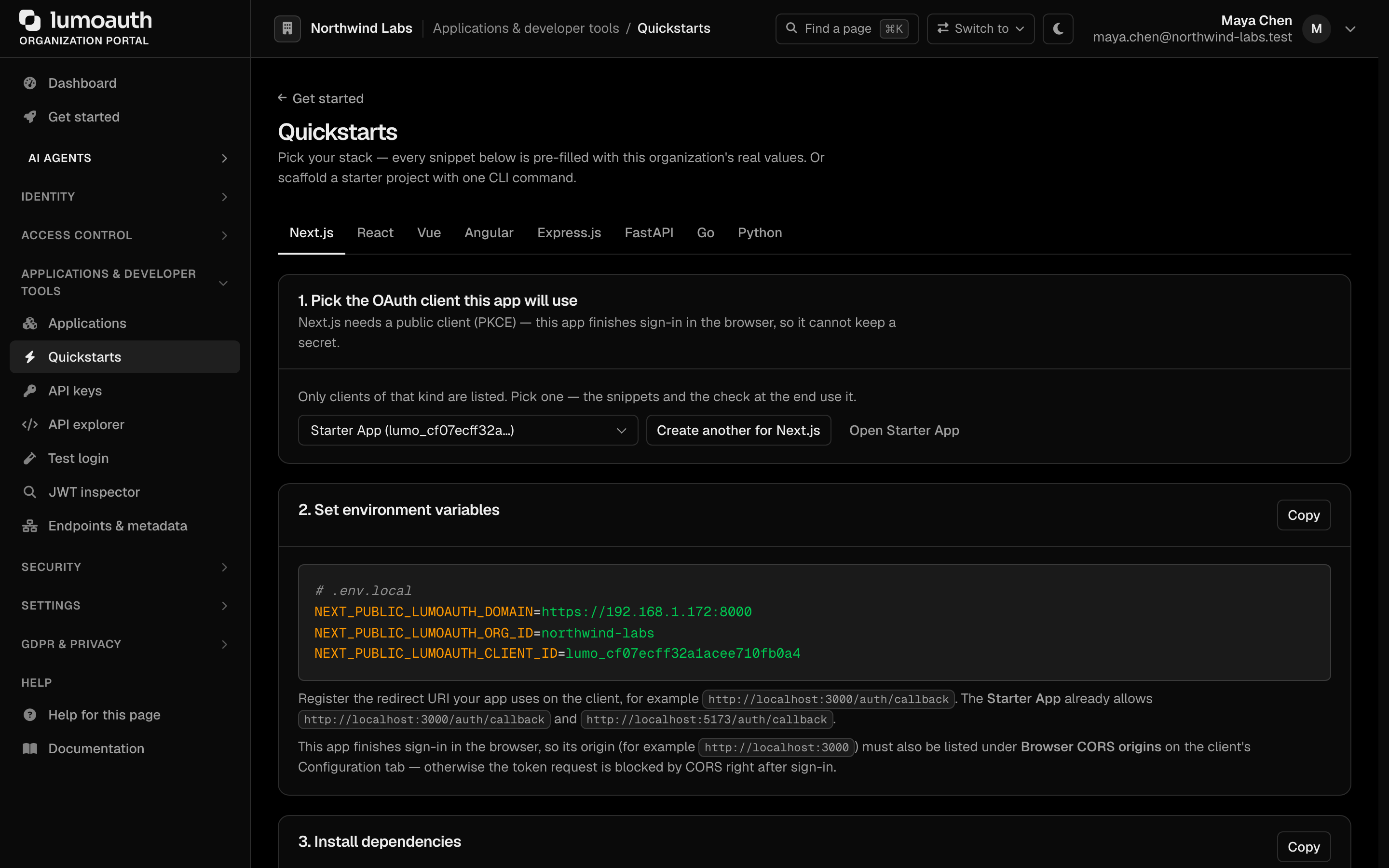
Where the values come from. lumo login opens your browser to approve the CLI and stores your organization slug and base URL, so .env.local is pre-filled. The client ID is the only value you supply. Every organization is created with a Starter App OAuth client that already allows http://localhost:3000/auth/callback and the http://localhost:3000 origin, so there is nothing to register:
- Portal → Get started → Quickstarts → Next.js shows this exact
lumo initcommand with the Starter App's client ID filled in. Copy it. - Or from the terminal:
lumo apps listprints the client ID of the Starter App.
What the scaffold contains
Nine files, no hidden framework. The three that matter:
| File | Does |
|---|---|
app/layout.tsx | Wraps the app in <LumoAuthProvider> from @lumoauth/nextjs, reading .env.local |
app/page.tsx | Shows <SignIn /> when signed out, <UserButton /> and the user's name when signed in |
app/auth/callback/page.tsx | Mounts <AuthCallback />, which finishes the PKCE code exchange and redirects to / |
.env.local holds NEXT_PUBLIC_LUMOAUTH_DOMAIN, NEXT_PUBLIC_LUMOAUTH_ORG_ID and NEXT_PUBLIC_LUMOAUTH_CLIENT_ID. Everything else is the stock Next.js 14 App Router setup. See lumo init for flags such as --org (target a sandbox organization) and --force.
Existing app: paste one prompt
Open the prompt in Cursor, or copy it into Claude Code, Copilot or any coding agent. It carries the install, the provider, the callback route and the protection patterns, with the rules an agent needs to get them right.
Before you run it, make sure the OAuth client you use allows your app's callback URL and origin. The Starter App already allows http://localhost:3000/auth/callback and http://localhost:3000. For any other URL, open the application in Portal → Applications, add the Redirect URI and the Browser CORS origin on its Configuration tab, and save.
Add to an existing app by hand
The same four steps the prompt performs. Requires Next.js 14+ with the App Router and React 18+.
1. Install and configure.
npm install @lumoauth/nextjs
NEXT_PUBLIC_LUMOAUTH_DOMAIN=https://app.lumoauth.dev
NEXT_PUBLIC_LUMOAUTH_ORG_ID=YOUR_ORG_ID
NEXT_PUBLIC_LUMOAUTH_CLIENT_ID=YOUR_CLIENT_ID
2. Wrap the app in the provider.
import { LumoAuthProvider } from '@lumoauth/nextjs';

export default function RootLayout({ children }: { children: React.ReactNode }) {
  return (
    <html lang="en">
      <body>
        <LumoAuthProvider
          domain={process.env.NEXT_PUBLIC_LUMOAUTH_DOMAIN!}
          orgId={process.env.NEXT_PUBLIC_LUMOAUTH_ORG_ID!}
          clientId={process.env.NEXT_PUBLIC_LUMOAUTH_CLIENT_ID!}
        >
          {children}
        </LumoAuthProvider>
      </body>
    </html>
  );
}
3. Mount the callback at your redirect URI.
'use client';
import { AuthCallback } from '@lumoauth/nextjs';

export default function CallbackPage() {
  return <AuthCallback afterSignInUrl="/" />;
}
4. Show sign-in, and gate what needs a user.
'use client';
import { SignedIn, SignedOut, SignIn, UserButton } from '@lumoauth/nextjs';

export default function Home() {
  return (
    <>
      <SignedOut><SignIn /></SignedOut>
      <SignedIn><UserButton showName /></SignedIn>
    </>
  );
}
Use <RedirectToSignIn /> inside <SignedOut> on pages that must not render signed out. Every LumoAuth component and hook is a client component, so files that use them start with 'use client'.
Pages Router
@lumoauth/nextjs supports the App Router only. On the Pages Router install @lumoauth/react instead and put the same <LumoAuthProvider> in pages/_app.tsx; the components and hooks are identical.
Check it worked
Portal → Get started → Quickstarts → Next.js → Check it worked shows the first sign-in that completes through the selected client. Every sign-in also appears under Audit logs.
Next steps
- Permissions in the UI.
<Protect permission="billing.manage" fallback={…}>hides what the user may not see;zanzibar={…}andabac={…}do the same for relationship and attribute rules. See Roles & Permissions. - Permissions on the server. The request handler pattern in the prompt above checks the caller's own token;
@lumoauth/backendruns admin operations with an organization API key. - Server-rendered sessions.
@lumoauth/nextjs/serveraddsauth(),currentUser(),protectPage()andlumoAuthMiddleware()for apps that keep the session in an httpOnly cookie. The React SDK reference covers every component and hook. - Other frameworks.
lumo init --framework express | fastapi | goscaffolds the same starter for those stacks; seelumo init.