Add authentication to your Vue.js app
This guide walks you through adding authentication and access control to a Vue.js application using the @lumoauth/client with Vue Composition API.
Before you start
You need:
- A LumoAuth account with an organization (sign up)
- A registered OAuth application with a redirect URI (e.g.,
http://localhost:5173/auth/callback) - Vue 3 + Vite
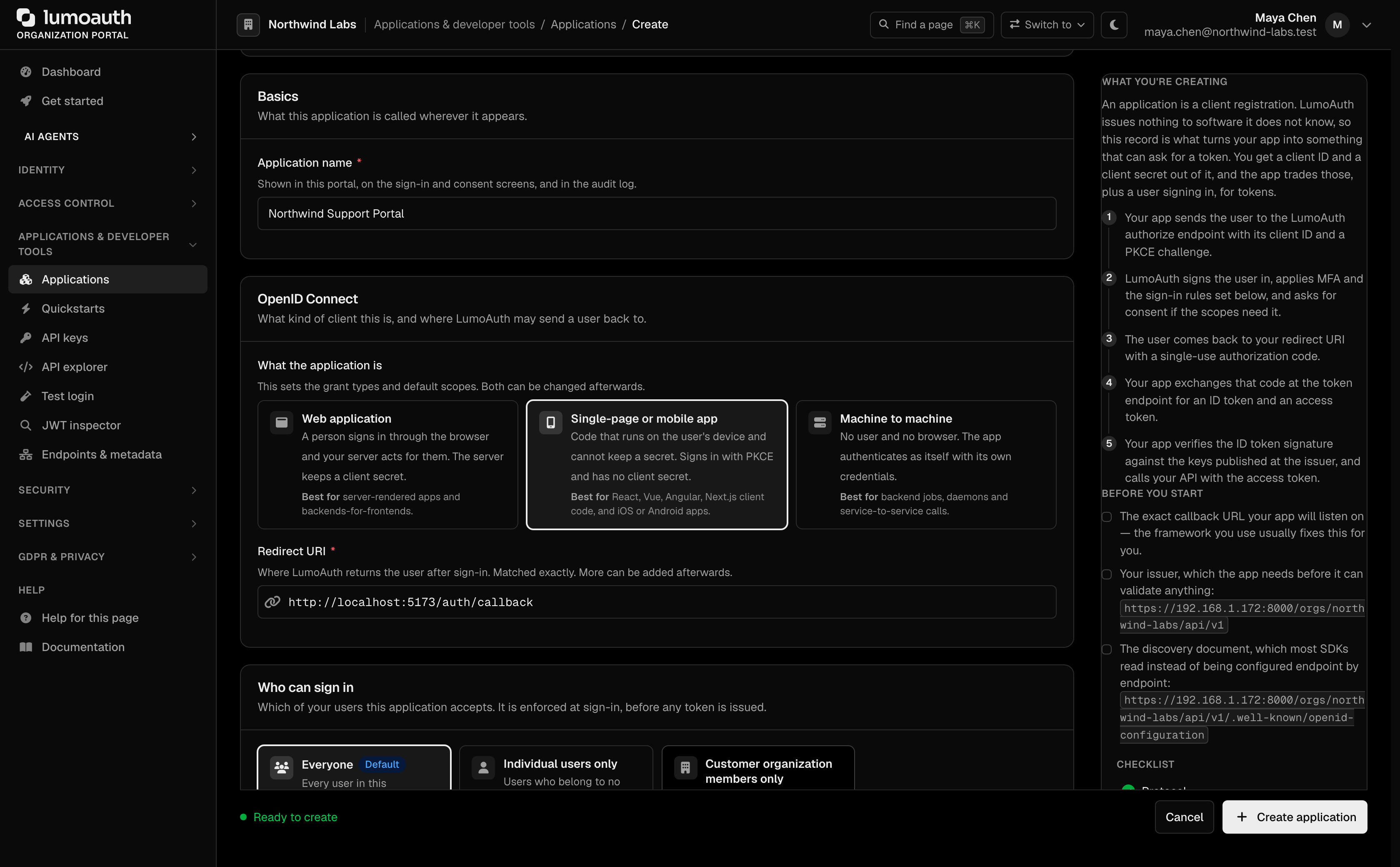
To register the application, open Applications in the portal sidebar and click New application. Enter an Application name, choose Single-page or mobile app, enter the Redirect URI, and click Create application.
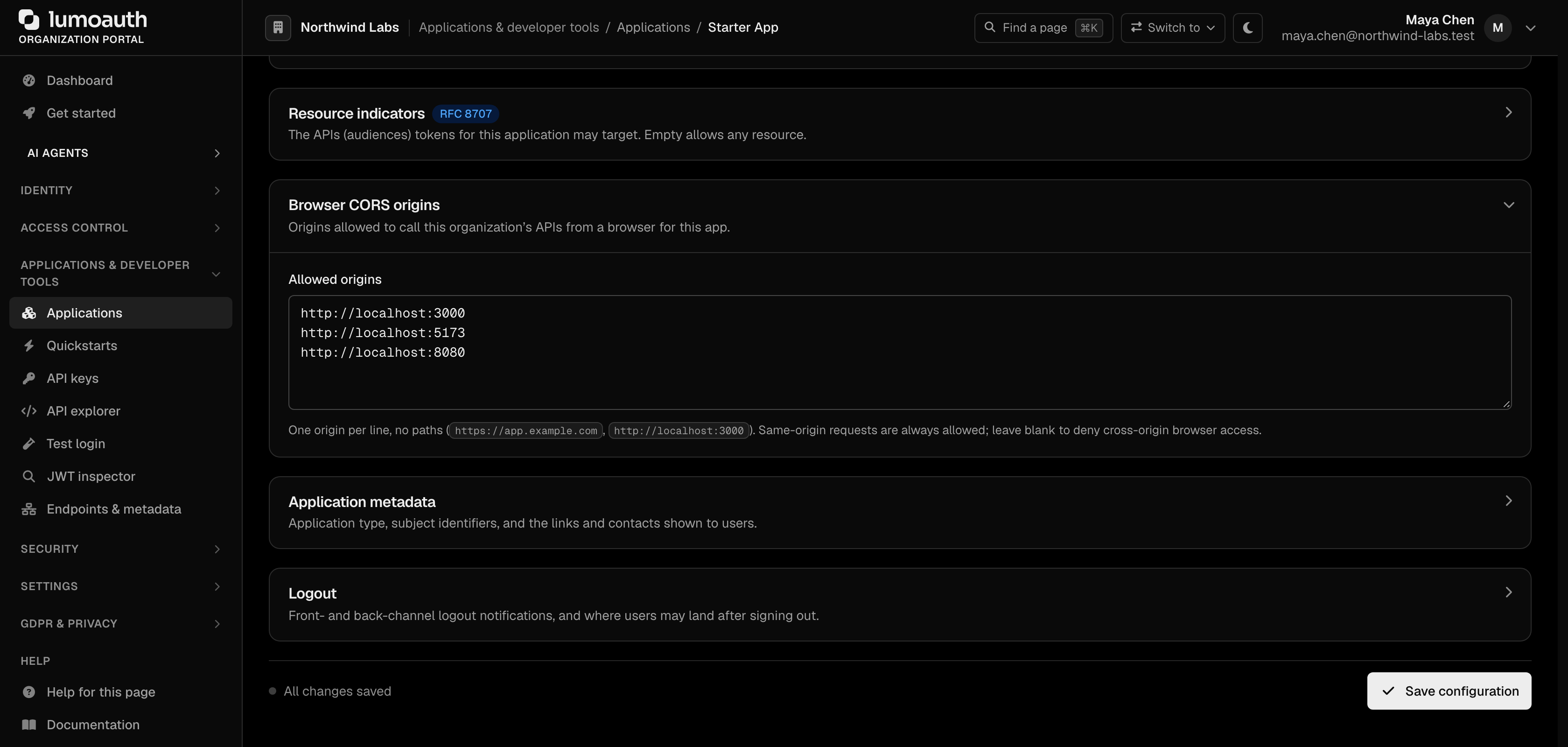
Because this app finishes sign-in in the browser, also add its origin (for example http://localhost:5173) under Browser CORS origins on the application's Configuration tab and click Save configuration. Otherwise the token request is blocked by CORS right after sign-in.
Install the SDK
npm install @lumoauth/client
Environment variables
The Quickstarts page (under Applications & developer tools) has a Vue tab that shows your organization ID and client ID pre-filled, ready to copy.

The tab's first step lists only OAuth clients of the kind these snippets need; if none exists, Create one for this framework opens the create form with the right type preselected and brings you back. Its last step, Check it worked, shows the first sign-in that completes through the selected client.
VITE_LUMOAUTH_DOMAIN=https://app.lumoauth.dev
VITE_LUMOAUTH_ORG_ID=YOUR_ORG_ID
VITE_LUMOAUTH_CLIENT_ID=YOUR_CLIENT_ID
Set up the composable
Create src/composables/useLumoAuth.ts:
import { inject, provide, type InjectionKey } from 'vue';
import { LumoAuth, AuthModule } from '@lumoauth/client';

const LumoAuthKey: InjectionKey<LumoAuth> = Symbol('LumoAuth');
const AuthModuleKey: InjectionKey<AuthModule> = Symbol('AuthModule');

export function provideLumoAuth() {
  const domain = import.meta.env.VITE_LUMOAUTH_DOMAIN as string;
  const orgId = import.meta.env.VITE_LUMOAUTH_ORG_ID as string;
  const clientId = import.meta.env.VITE_LUMOAUTH_CLIENT_ID as string;

  const authModule = new AuthModule({ baseUrl: domain, orgId, clientId });
  const client = new LumoAuth({
    baseUrl: domain,
    orgId,
    clientId,
    token: () => sessionStorage.getItem('lumoauth_access_token') || '',
  });

  provide(LumoAuthKey, client);
  provide(AuthModuleKey, authModule);
  return { client, authModule };
}

export function useLumoAuth() {
  const client = inject(LumoAuthKey);
  if (!client) throw new Error('Call provideLumoAuth() in a parent component');
  return client;
}

export function useAuthModule() {
  const auth = inject(AuthModuleKey);
  if (!auth) throw new Error('Call provideLumoAuth() in a parent component');
  return auth;
}
Call provideLumoAuth() in App.vue:
<script setup lang="ts">
import { provideLumoAuth } from './composables/useLumoAuth';
provideLumoAuth();
</script>
PKCE sign-in
PKCE (a one-time secret that protects the sign-in code) lets a browser app sign
in without a client secret. buildAuthorizationUrl generates the secret and a
state value; keep both until the callback.
import { useAuthModule } from './composables/useLumoAuth';

const auth = useAuthModule();

async function signIn() {
  const redirectUri = `${window.location.origin}/auth/callback`;
  const { url, codeVerifier, state } = await auth.buildAuthorizationUrl({ redirectUri });
  sessionStorage.setItem('lumoauth_pkce_verifier', codeVerifier);
  sessionStorage.setItem('lumoauth_pkce_state', state);
  window.location.href = url;
}
Callback handler
Mount this component at /auth/callback:
<script setup lang="ts">
import { onMounted } from 'vue';
import { useRouter } from 'vue-router';
import { useAuthModule } from '../composables/useLumoAuth';

const router = useRouter();
const auth = useAuthModule();

onMounted(async () => {
  const params = new URLSearchParams(window.location.search);
  const code = params.get('code');
  const returnedState = params.get('state');
  const codeVerifier = sessionStorage.getItem('lumoauth_pkce_verifier');
  const savedState = sessionStorage.getItem('lumoauth_pkce_state');

  if (!code || returnedState !== savedState || !codeVerifier) {
    router.push('/');
    return;
  }

  const tokens = await auth.exchangeCodeForTokens({
    code,
    codeVerifier,
    redirectUri: `${window.location.origin}/auth/callback`,
  });

  sessionStorage.setItem('lumoauth_access_token', tokens.access_token);
  sessionStorage.removeItem('lumoauth_pkce_verifier');
  sessionStorage.removeItem('lumoauth_pkce_state');
  router.push('/dashboard');
});
</script>

<template><p>Signing in…</p></template>
Permission checks
import { ref, onMounted } from 'vue';
import { useLumoAuth } from '../composables/useLumoAuth';

const client = useLumoAuth();
const canEdit = ref(false);

onMounted(async () => {
  canEdit.value = await client.permissions.check('documents.edit');
});