Express.js Quickstart
Wire LumoAuth into an Express app using the official
@lumoauth/express middleware.
Three routes (/auth/login, /auth/callback, /auth/logout) and a
requireAuth() gate — that's the entire integration. Sign-in uses the
authorization code flow with PKCE (a one-time secret that protects the
sign-in code), and the tokens live only in the server-side session.
Prerequisites
- Node.js 20+
- An OAuth client registered in your LumoAuth organization with redirect URI
http://localhost:3000/auth/callbackand grant typesauthorization_code,refresh_token.
Register the client in the portal under Applications → New application: enter an Application name, choose Web application, enter the Redirect URI, and click Create application. The client secret is shown once, on the page you land on.

The Quickstarts page (under Applications & developer tools) has a Express.js tab that shows the .env values for your organization and client pre-filled, ready to copy.
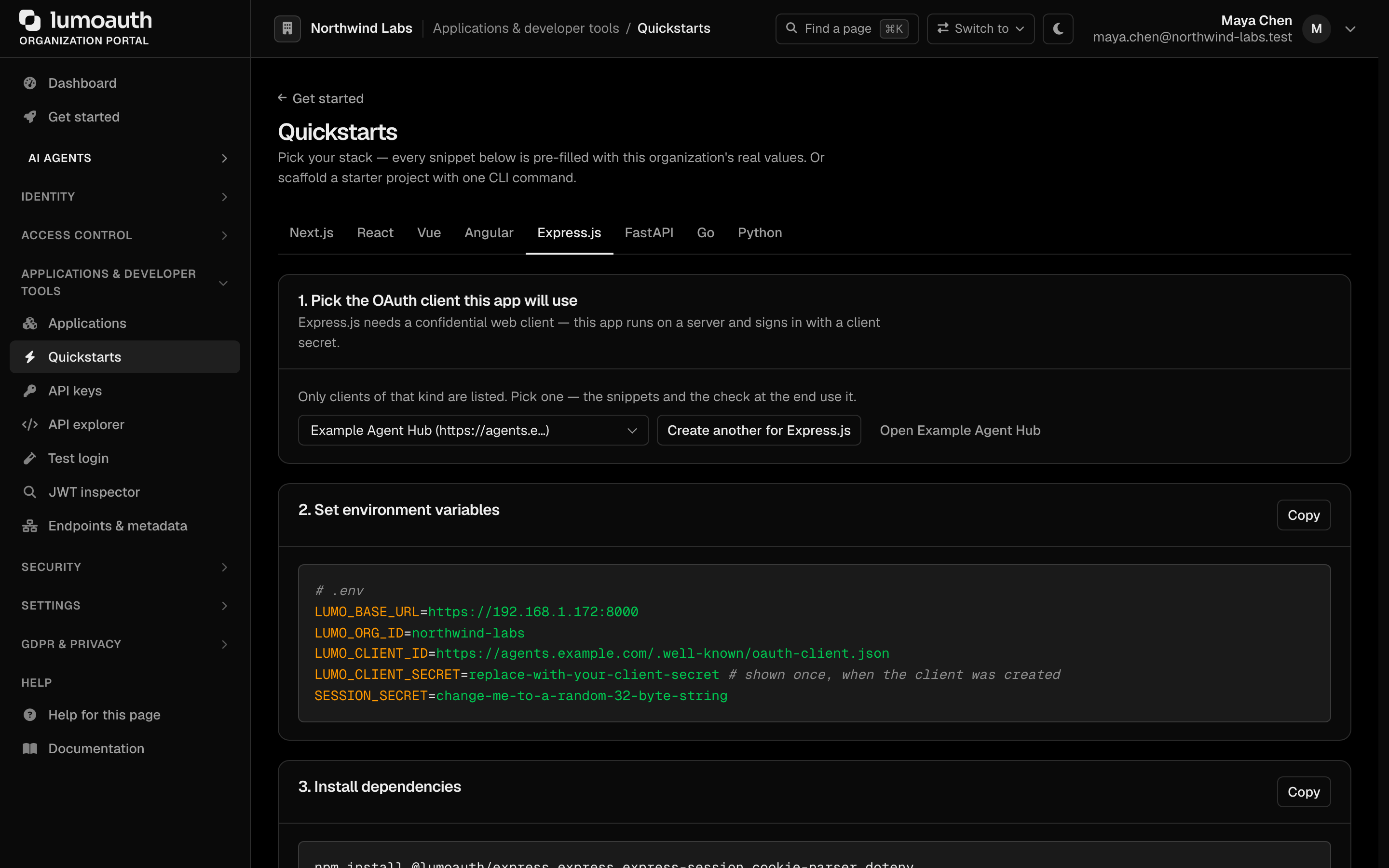
The tab's first step lists only OAuth clients of the kind these snippets need; if none exists, Create one for this framework opens the create form with the right type preselected and brings you back. Its last step, Check it worked, shows the first sign-in that completes through the selected client.
Skip the by-hand setup with the CLI:
lumo login --org your-org-slug
lumo init --framework express --dir ./my-app
cd ./my-app && npm install && npm start
Manual install
npm install @lumoauth/express express express-session dotenv
.env:
LUMO_BASE_URL=https://app.lumoauth.dev
LUMO_ORG_ID=your-org-slug
LUMO_CLIENT_ID=your-oauth-client-id
LUMO_CLIENT_SECRET=your-oauth-client-secret
SESSION_SECRET=change-me-to-a-random-32-byte-string
PORT=3000
server.js:
import "dotenv/config";
import express from "express";
import session from "express-session";
import { lumoAuthMiddleware, requireAuth } from "@lumoauth/express";

const app = express();

// Session middleware MUST be mounted before lumoAuthMiddleware.
app.use(session({
  secret: process.env.SESSION_SECRET,
  resave: false,
  saveUninitialized: false,
  cookie: {
    httpOnly: true,
    sameSite: "lax",
    secure: process.env.NODE_ENV === "production",
  },
}));

// Wires GET /auth/login, GET /auth/callback, GET|POST /auth/logout.
// Populates req.user from the session for every other request.
app.use(lumoAuthMiddleware({
  baseUrl: process.env.LUMO_BASE_URL,
  organization: process.env.LUMO_ORG_ID,
  clientId: process.env.LUMO_CLIENT_ID,
  clientSecret: process.env.LUMO_CLIENT_SECRET,  // omit for public clients
  prefix: "/auth",                               // default
  postLoginRedirect: "/",
  postLogoutRedirect: "/",
}));

app.get("/", (req, res) => {
  if (!req.user) return res.redirect("/auth/login");
  res.send(`<h1>Hi ${req.user.email}</h1><a href="/auth/logout">Sign out</a>`);
});

// Gate any handler with requireAuth(). 401 if not signed in.
app.get("/api/me", requireAuth(), (req, res) => res.json(req.user));

app.listen(process.env.PORT || 3000, () => {
  console.log(`http://localhost:${process.env.PORT || 3000}`);
});
Visit http://localhost:3000 — you'll be redirected to LumoAuth, sign
in, and bounce back with req.user populated.
Scope and permission gating
requireAuth() accepts options for finer-grained access control:
// Require specific scopes (403 if any are missing).
app.get("/admin", requireAuth({ scopes: ["admin"] }), (req, res) => {
  res.json({ ok: true });
});

// Programmatic check (e.g. RBAC / Zanzibar / DB lookup).
app.get("/billing", requireAuth({
  authorize: async (user, req) => {
    return user.email?.endsWith("@acme.com") ?? false;
  },
}), (req, res) => {
  res.json({ ok: true });
});
Forwarding webhooks to localhost
While you're developing, run lumo tunnel in another
terminal to forward live webhook events from your organization to your local
Express handler:
lumo tunnel --to http://localhost:3000/webhooks
Production checklist
- Replace the in-memory session store with Redis / Postgres / MongoDB-backed session — the default loses sessions on restart.
- Set
cookie.secure: true(the snippet above already does this in production viaNODE_ENV). - Set
app.set('trust proxy', true)if behind a reverse proxy soreq.protocolcorrectly reportshttps. - Rotate
SESSION_SECRETperiodically; consider stacking secrets via the array form for graceful key rotation. - Confirm the OAuth client's redirect URI matches your production callback URL exactly.