Add authentication to your Express app
This guide walks you through protecting an Express API with LumoAuth using the @lumoauth/client TypeScript SDK, which runs in Node as well as in browsers and checks permissions as the signed-in user whose bearer token your API receives. You'll validate access tokens, check permissions, and optionally add a server-side login flow.
Two related packages cover the other cases: @lumoauth/express mounts the login, callback and logout routes and a requireAuth() gate for apps that serve HTML pages, and @lumoauth/backend runs checks and admin operations with your organization's own API key (LUMOAUTH_SECRET_KEY) rather than a user's token.
Before you start
You need:
- A LumoAuth account with an organization (sign up)
- A registered OAuth application configured as a public client (PKCE) with a Client ID
- Node.js 18+
To register the application, open Applications in the portal sidebar and click New application. Enter an Application name, choose Single-page or mobile app, enter the Redirect URI, and click Create application.
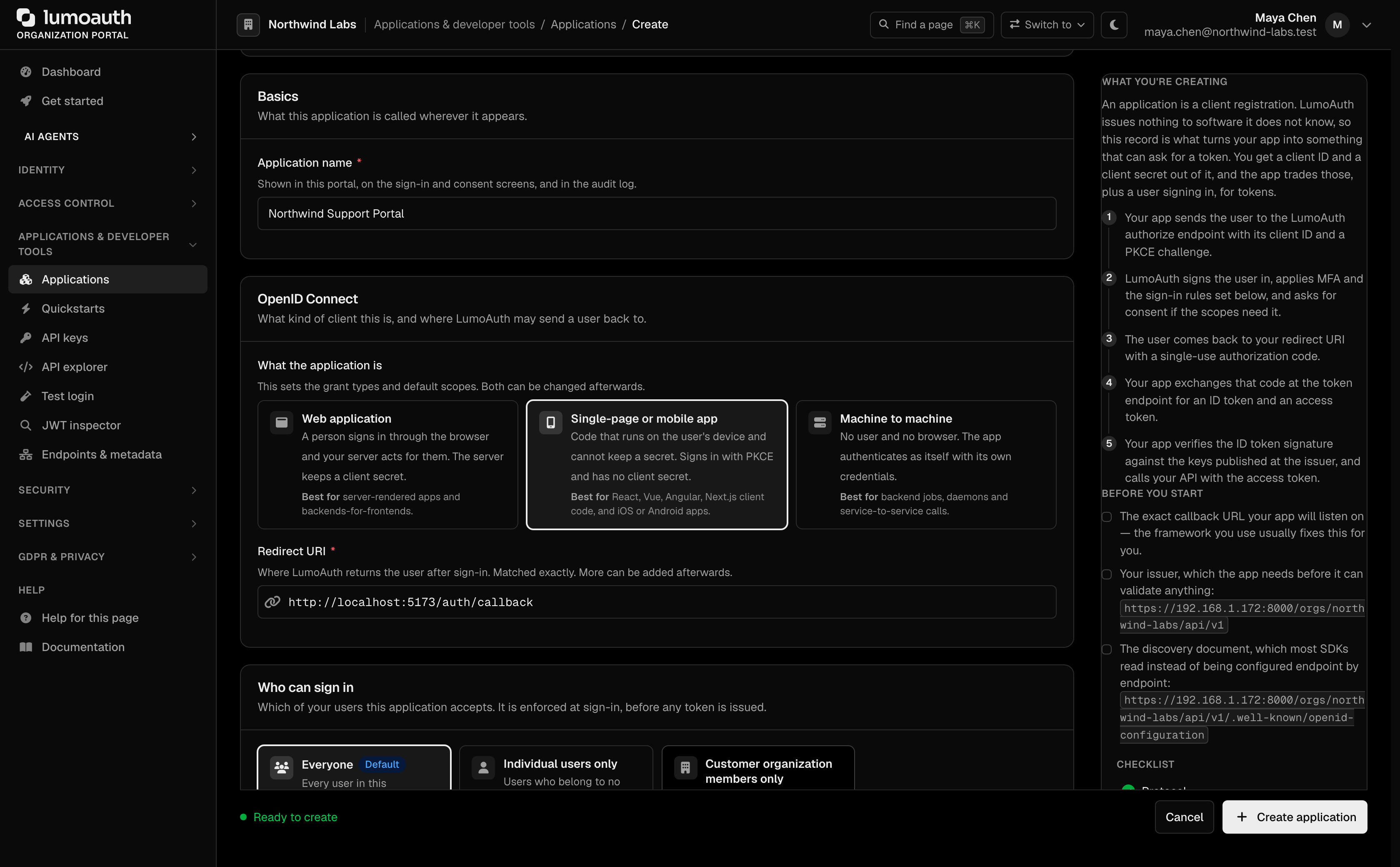
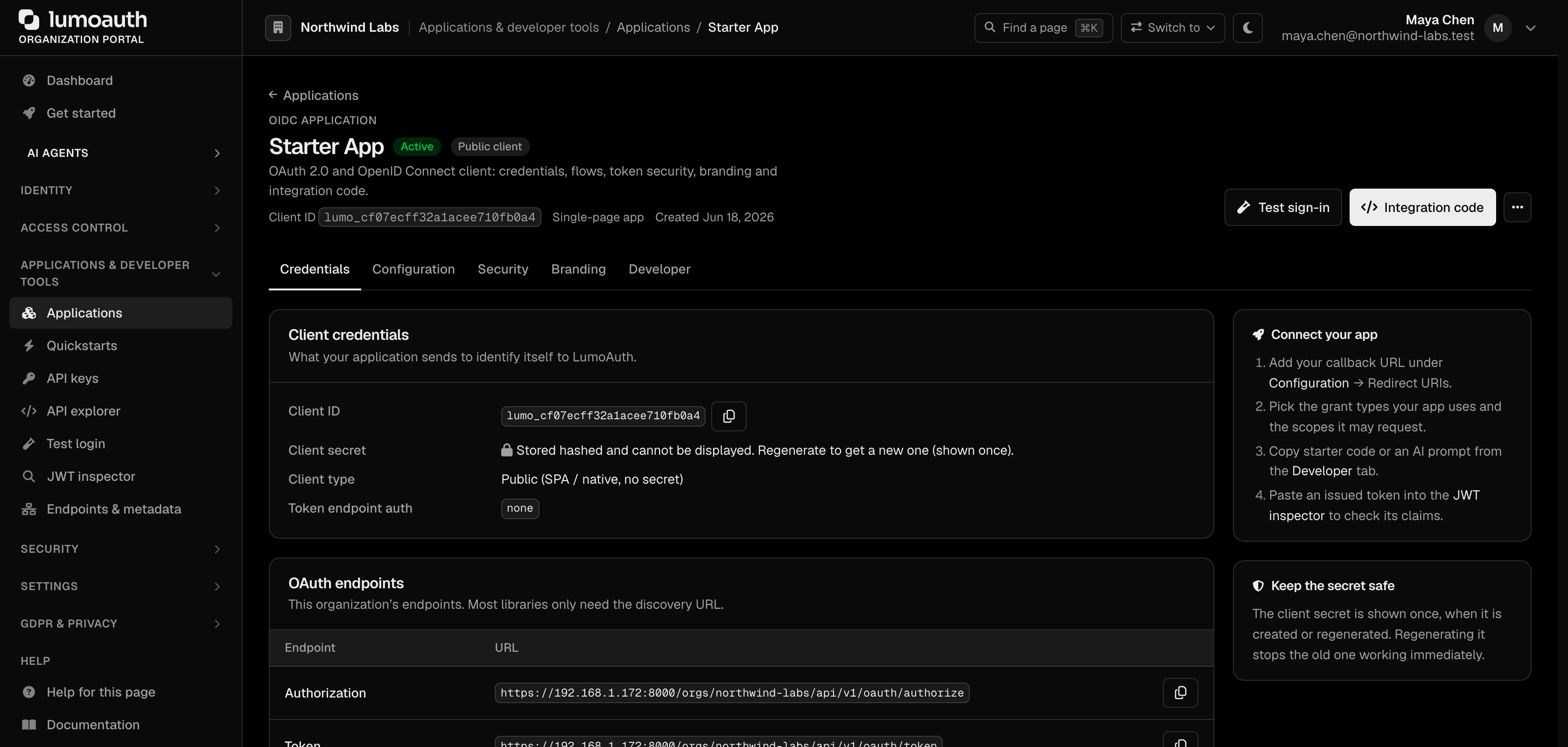
From your organization portal, note your Organization ID and Client ID. This guide uses the PKCE flow for a public client, so no Client Secret is required. The Client ID is on the application's Credentials tab.
Install dependencies
npm install @lumoauth/client express
npm install -D typescript @types/express tsx
Initialize the client
AuthModule handles the OAuth flows for your public client (PKCE, a one-time secret that protects the sign-in code, so no client secret is needed). userClient(token) builds a LumoAuth client that runs every check as the user who owns that token.
import { AuthModule, LumoAuth } from '@lumoauth/client';

const baseUrl = process.env.LUMOAUTH_URL || 'https://app.lumoauth.dev';

export const auth = new AuthModule({
  baseUrl,
  orgId: process.env.LUMOAUTH_ORG_ID || 'acme-corp',
  clientId: process.env.LUMOAUTH_CLIENT_ID || 'your-client-id',
});

export function userClient(token: string) {
  return new LumoAuth({ baseUrl, token });
}
Create auth middleware
Validate the Bearer token on incoming requests and attach the user, plus a client credentialed as that user, to the request object.
import type { Request, Response, NextFunction } from 'express';
import { auth, userClient } from '../lumo';

export async function requireAuth(req: Request, res: Response, next: NextFunction) {
  const header = req.headers.authorization;
  if (!header?.startsWith('Bearer ')) {
    return res.status(401).json({ error: 'Missing or invalid Authorization header' });
  }

  try {
    const token = header.slice(7);
    const user = await auth.getUserInfo(token);
    (req as any).user = user;
    (req as any).lumo = userClient(token);
    next();
  } catch {
    res.status(401).json({ error: 'Invalid or expired token' });
  }
}
Create permission middleware
Gate routes by RBAC permission using the LumoAuth permissions API. The check runs with the caller's own token, so the answer is about that user.
import type { Request, Response, NextFunction } from 'express';
import { LumoAuthApiError } from '@lumoauth/client';

export function requirePermission(permission: string) {
  return async (req: Request, res: Response, next: NextFunction) => {
    try {
      const allowed = await (req as any).lumo.permissions.check(permission);
      if (!allowed) {
        return res.status(403).json({ error: 'Forbidden', permission });
      }
      next();
    } catch (err) {
      if (err instanceof LumoAuthApiError) {
        return res.status(err.statusCode ?? 502).json({ error: err.code });
      }
      next(err);
    }
  };
}
Set up routes
import express from 'express';
import { requireAuth } from './middleware/auth';
import { requirePermission } from './middleware/permissions';

const app = express();
app.use(express.json());

// Public route
app.get('/api/health', (req, res) => {
  res.json({ status: 'ok' });
});

// Authenticated route
app.get('/api/profile', requireAuth, (req, res) => {
  res.json((req as any).user);
});

// Permission-protected route
app.get(
  '/api/admin/users',
  requireAuth,
  requirePermission('users.list'),
  (req, res) => {
    res.json({ users: [] });
  }
);

app.delete(
  '/api/admin/users/:id',
  requireAuth,
  requirePermission('users.delete'),
  (req, res) => {
    res.json({ deleted: req.params.id });
  }
);

const port = process.env.PORT || 3000;
app.listen(port, () => console.log(`Server running on port ${port}`));
Add Zanzibar checks (optional)
For relationship-based access control, use the Zanzibar module:
import { Router } from 'express';
import { requireAuth } from '../middleware/auth';

const router = Router();

router.get('/api/documents/:id', requireAuth, async (req, res) => {
  const canView = await (req as any).lumo.zanzibar.check({
    object: `document:${req.params.id}`,
    relation: 'viewer',
    subject: `user:${(req as any).user.sub}`,
  });

  if (!canView) {
    return res.status(403).json({ error: 'Not authorized to view this document' });
  }

  res.json({ id: req.params.id, content: '...' });
});

export default router;
Add a server-side login flow (optional)
If your Express app serves HTML pages, you can initiate PKCE login from the server. (@lumoauth/express does exactly this for you; the routes below show what it mounts.) The login and callback routes store the PKCE codeVerifier in the user's session, so you need express-session:
npm install express-session
npm install -D @types/express-session
Mount the session middleware before your auth router in src/index.ts:
import session from 'express-session';
import authRouter from './routes/auth';

app.use(
  session({
    secret: process.env.SESSION_SECRET || 'change-me-in-production',
    resave: false,
    saveUninitialized: false,
  })
);

app.use(authRouter);
Then define the login and callback routes:
import { Router } from 'express';
import { auth } from '../lumo';

const router = Router();

router.get('/auth/login', async (req, res) => {
  const { url, codeVerifier, state } = await auth.buildAuthorizationUrl({
    redirectUri: 'http://localhost:3000/auth/callback',
    scope: 'openid profile email',
  });

  // Store in session (requires express-session — see install + setup below)
  (req as any).session.codeVerifier = codeVerifier;
  (req as any).session.state = state;
  res.redirect(url);
});

router.get('/auth/callback', async (req, res) => {
  if (req.query.state !== (req as any).session.state) {
    return res.status(400).send('Invalid state');
  }
  const tokens = await auth.exchangeCodeForTokens({
    code: req.query.code as string,
    codeVerifier: (req as any).session.codeVerifier,
    redirectUri: 'http://localhost:3000/auth/callback',
  });

  (req as any).session.accessToken = tokens.access_token;
  res.redirect('/dashboard');
});

export default router;
Run the server
npx tsx src/index.ts
Test with curl:
# Health check
curl http://localhost:3000/api/health

# Authenticated request
curl -H "Authorization: Bearer YOUR_ACCESS_TOKEN" \
  http://localhost:3000/api/profile

# Permission-protected request
curl -H "Authorization: Bearer YOUR_ACCESS_TOKEN" \
  http://localhost:3000/api/admin/users
What's next?
- Configure RBAC to define roles and permissions for your API
- Set up Zanzibar for relationship-based access control
- Enable webhooks to sync user events with your backend
- SDKs & Libraries - Full SDK API reference