Add authentication to your Python app
This guide walks you through authenticating a Python backend service or AI agent with LumoAuth using the lumoauth Python SDK. You'll set up client credentials authentication, use the Ask API for authorization, and optionally set up delegation chains.
Before you start
You need:
- A LumoAuth account with an organization (sign up)
- An Agent or OAuth application registered in your organization with Client ID and Client Secret
- Python 3.9+
From your organization portal, note your Organization ID, Client ID, and Client Secret. To register an OAuth application for this, open Applications → New application and choose Machine to machine; the client secret is shown once, on the page you land on after Create application.
The Quickstarts page (under Applications & developer tools) has a Python tab that shows the organization ID and client ID pre-filled, ready to copy.
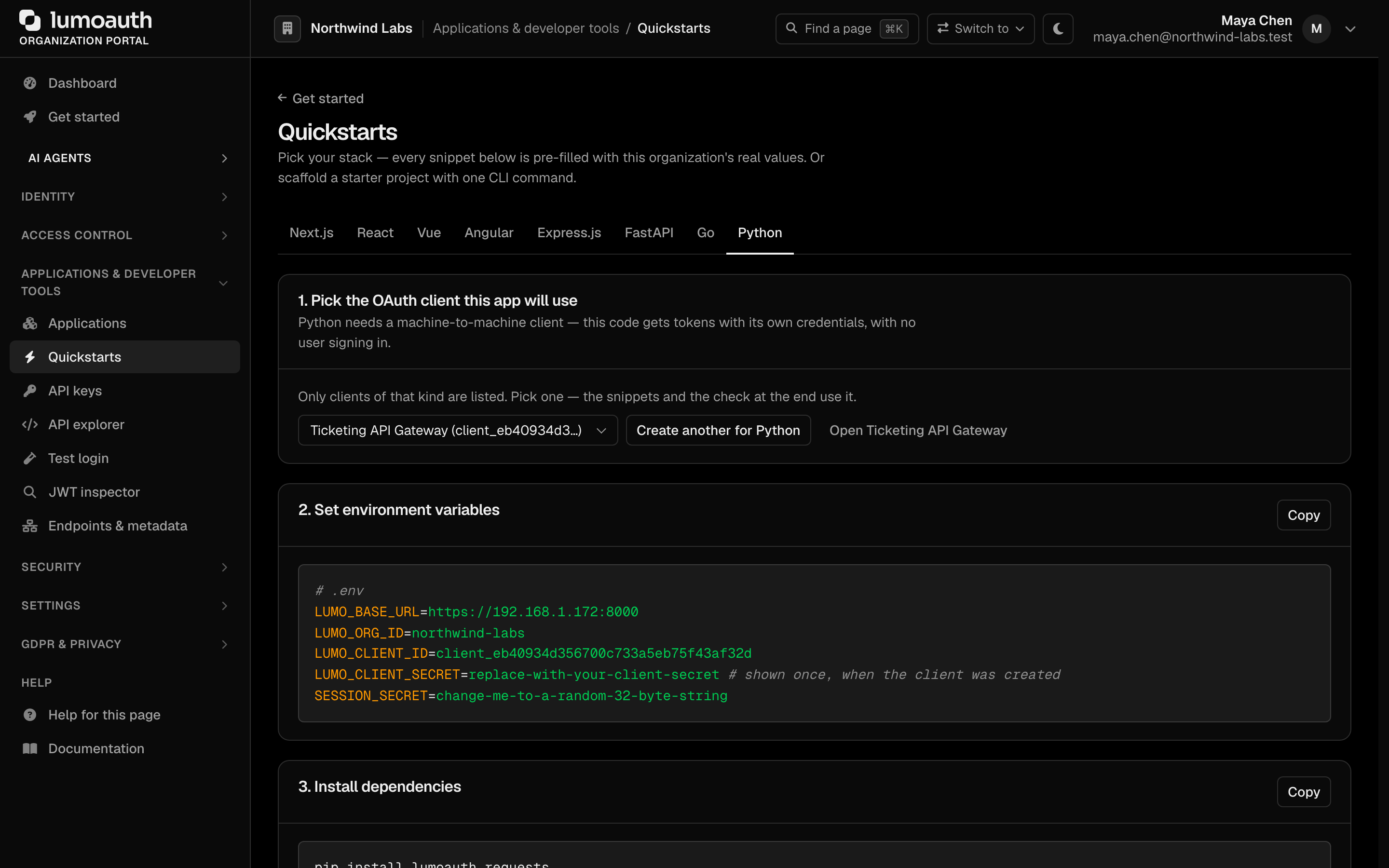
The tab's first step lists only OAuth clients of the kind these snippets need; if none exists, Create one for this framework opens the create form with the right type preselected and brings you back. Its last step, Check it worked, shows the first sign-in that completes through the selected client.
Install the SDK
pip install lumoauth
For cryptographic agent identity (AAuth), install with the extra:
pip install 'lumoauth[aauth]'
Authenticate your agent
The SDK uses the OAuth 2.0 client credentials flow for server-to-server authentication.
from lumoauth import LumoAuthAgent

agent = LumoAuthAgent(
    base_url="https://app.lumoauth.dev",
    org_id="acme-corp",
    client_id="your-client-id",
    client_secret="your-client-secret",
)

# Authenticate and get an access token
agent.authenticate(scopes=["read:users", "write:documents"])
print(f"Authenticated. Scopes: {agent.token_scopes}")
You can also use environment variables instead of passing credentials directly:
LUMOAUTH_URL=https://app.lumoauth.dev
LUMOAUTH_ORG_ID=acme-corp
AGENT_CLIENT_ID=your-client-id
AGENT_CLIENT_SECRET=your-client-secret
agent = LumoAuthAgent()  # reads from environment
agent.authenticate()
Use the Ask API
The Ask API provides lightweight preflight authorization checks, designed for LLM tool-calling workflows where you need a quick allow/deny decision before executing an action.
from lumoauth import LumoAuthAgent

agent = LumoAuthAgent()
agent.authenticate()

# Simple boolean check
if agent.is_allowed("read_document", context={"document_id": "doc-123"}):
    print("Access granted - reading document")
else:
    print("Access denied")

# Detailed response with audit trail
result = agent.ask("delete_user", context={"user_id": "u-456"})
print(result)
# {
#   'allowed': False,
#   'action': 'delete_user',
#   'reason': 'insufficient_permissions',
#   'audit_id': 'aud_abc123',
#   'context': {'user_id': 'u-456'}
# }
Check agent identity and capabilities
from lumoauth import LumoAuthAgent

agent = LumoAuthAgent()
agent.authenticate()

# Get full agent identity
info = agent.get_agent_info()
print(f"Agent: {info['agent_id']}")
print(f"Capabilities: {info['capabilities']}")

# Check for specific capability
if agent.has_capability("web_search"):
    print("Agent can perform web searches")

# Monitor budget
budget = agent.get_budget_status()
print(f"Budget policy: {budget}")

if agent.is_budget_exhausted():
    print("Daily token budget reached - pausing operations")
Act on behalf of users with delegation chains
Use token exchange (swapping the user's consent for a token that records both the agent and the user it acts for) to perform actions on behalf of a user. This is useful for AI agents that need user-scoped permissions.
from lumoauth import LumoAuthAgent, DelegationChain

agent = LumoAuthAgent()
agent.authenticate()

chain = DelegationChain(agent, redirect_uri="https://myapp.com/consent")

# Step 1: Generate a consent URL for the user
consent_url = chain.get_consent_url(
    "session-1",
    scopes=["profile", "documents"],
)
print(f"Redirect user to: {consent_url}")

# Step 2: After user grants consent, handle the callback
chain.handle_consent_callback("session-1", authorization_code="CODE_FROM_CALLBACK")

# Step 3: Exchange for a delegated token
delegated_token = chain.exchange("session-1", scopes=["read:documents"])

# Step 4: Make API calls on behalf of the user
response = chain.request("session-1", "GET", "/api/v1/documents")
print(response.json())

# Clean up when done
chain.revoke("session-1")
Integrate with MCP servers
Exchange your agent token for an MCP server-scoped token:
from lumoauth import LumoAuthAgent

agent = LumoAuthAgent()
agent.authenticate()

mcp_token = agent.get_mcp_token("my-mcp-server")
# Use mcp_token to authenticate with the MCP server
Use in a FastAPI app
Install the SDK with the FastAPI extra (this also pulls in fastapi):
pip install 'lumoauth[fastapi]'
from fastapi import FastAPI, Depends, HTTPException
from lumoauth import LumoAuthAgent

app = FastAPI()
agent = LumoAuthAgent()
agent.authenticate()


def check_permission(action: str):
    def dependency():
        agent.ensure_authenticated()
        if not agent.is_allowed(action):
            raise HTTPException(status_code=403, detail="Forbidden")
    return Depends(dependency)


@app.get("/api/documents", dependencies=[check_permission("read_documents")])
async def list_documents():
    return {"documents": []}


@app.delete("/api/documents/{doc_id}", dependencies=[check_permission("delete_documents")])
async def delete_document(doc_id: str):
    return {"deleted": doc_id}
What's next?
- Configure agent identity in the LumoAuth organization portal
- Set up ABAC policies for attribute-based authorization
- Enable audit logs to track agent actions
- SDKs & Libraries - Full SDK API reference
Standards used on this page
| Plain name | Standard |
|---|---|
| Token exchange (delegation) | RFC 8693 |
See the standards reference for what each one covers and how LumoAuth uses it.