AI Agents and MCP
This is the portal user guide — registering, operating, and monitoring agents from the UI. Building agents or calling the APIs directly? See the developer/protocol landing, AI Access Control.
LumoAuth treats AI agents as first-class identities: each agent is a registered OAuth client with its own credentials, scopes, budget, and audit trail. This page covers how to register and operate agents, how agents authenticate, and how they connect to Model Context Protocol (MCP) servers — a protocol for LLM hosts (Claude, ChatGPT, Cursor) to discover and call external tools. Agents can also prove who they are with AAuth, LumoAuth's agent protocol in which every request carries a signature made with the agent's own key.
Do this first
- Register an agent under AI Agents → Agents (
/orgs/{orgId}/portal/agents) and copy its credential (an API key or client secret is shown once, on the page after you register). - Give at least one person who is not the agent's owner the
jit.approvepermission, so requests that need a human can be approved (see Approving agent requests). - Optionally add an access policy (AI Agents → Agent rules → Access rules) and a security-signals stream (AI Agents → Agent activity → Security signals), both created from a dialog behind a button in the page header.
The portal section is AI Agents in the sidebar: Agents (with AAuth credentials, AAuth resources and Connections as tabs), Approvals, MCP servers, Agent rules (Access rules, Auto-approve rules, Cross-app access) and Agent activity (Activity, Security signals).

Why AI agent identity?
As AI agents become part of enterprise workflows, they need:
- Authentication — verify which agent is making a request.
- Authorization — control what each agent can access.
- Audit trail — track agent actions for compliance.
- Scoped access — limit agents to specific resources and operations.
- Revocation — disable agent access immediately.
LumoAuth treats AI agents as first-class identities, similar to users and service accounts.
Managing AI agents
Portal
Navigate to AI Agents → Agents (/orgs/{orgId}/portal/agents). The page has four tabs: Agents, AAuth credentials, AAuth resources and Connections.
- Register agent (page header) — the three-step registration wizard (see below).
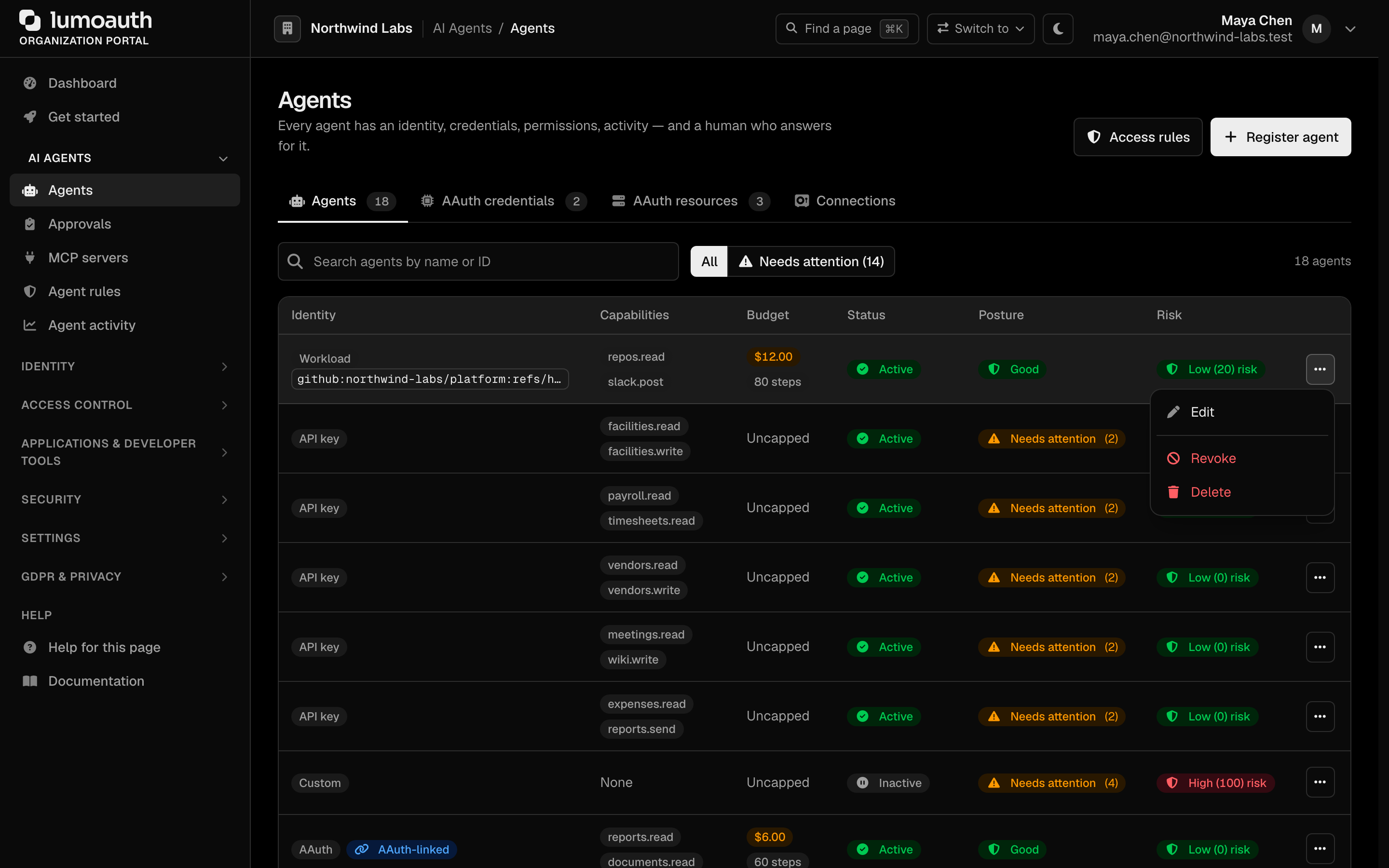
- Agent list — every registered agent with its identity type, capabilities, budget, status, security posture and risk. The Needs attention filter shows only agents with an open posture finding.
- Agent detail (
/orgs/{orgId}/portal/agents/{agentId}) — click an agent's name to open its page, with the sections Overview (the security-posture card, then the identity card), Next steps (copy-paste snippets), Test, Credentials, Access, Connections, AI gateway keys and Activity. Edit agent in its header opens the edit form. The older/agent/{agentId}/observabilityURL redirects here.
Security posture
Every agent gets a deterministic configuration checklist, computed from what is stored about it — nothing is sampled or scored by behaviour (that is the separate risk badge). Each line says why it matters and links to the page that fixes it:
| Check | Needs attention when |
|---|---|
| Identity type | API key or Custom (nothing attests the agent); Client secret is informational |
| Workload binding | A workload agent has no binding (critical), accepts a platform-generic audience, accepts any GitHub/GitLab ref, or binds a whole Azure directory |
| Attestation | Never attested (informational) or last attested more than 30 days ago |
| Credentials | API key has no expiry, expires within 14 days, or has expired (critical); a shared secret is older than 180 days |
| Capabilities | None (the agent is refused everywhere), a bare * (critical) or a resource.* wildcard |
| Budget | No daily limit, step cap or timeout |
| Acting for people | May act on behalf of users is on but no user-in-the-loop consent is configured |
| Access rule | No enabled access rule applies to the agent |
| Auto-approve rules | A rule for this agent uses a wide pattern such as * or read* |
| Agent card | Published card lists skills (informational) |
| Status | Suspended or inactive |
Each row has an actions menu (⋯):
- Edit — change the agent's name, capabilities (same picker as registration), API key expiry, budget, metadata and who may use it. The identity type is fixed once an agent is registered. Every portal edit is audited as
agent.updatedwith the changed fields. - Revoke — permanently disable an agent and revoke every credential it holds (JIT, token vault, AAuth and OAuth tokens, AI gateway keys). Revocation is final: a revoked agent can't be reactivated, so register a new one.
- Reactivate — shown for a suspended or inactive (for example dormant) agent; brings it back. Credentials revoked by the suspension stay revoked.
- Delete — revokes the agent's credentials first, then removes it.
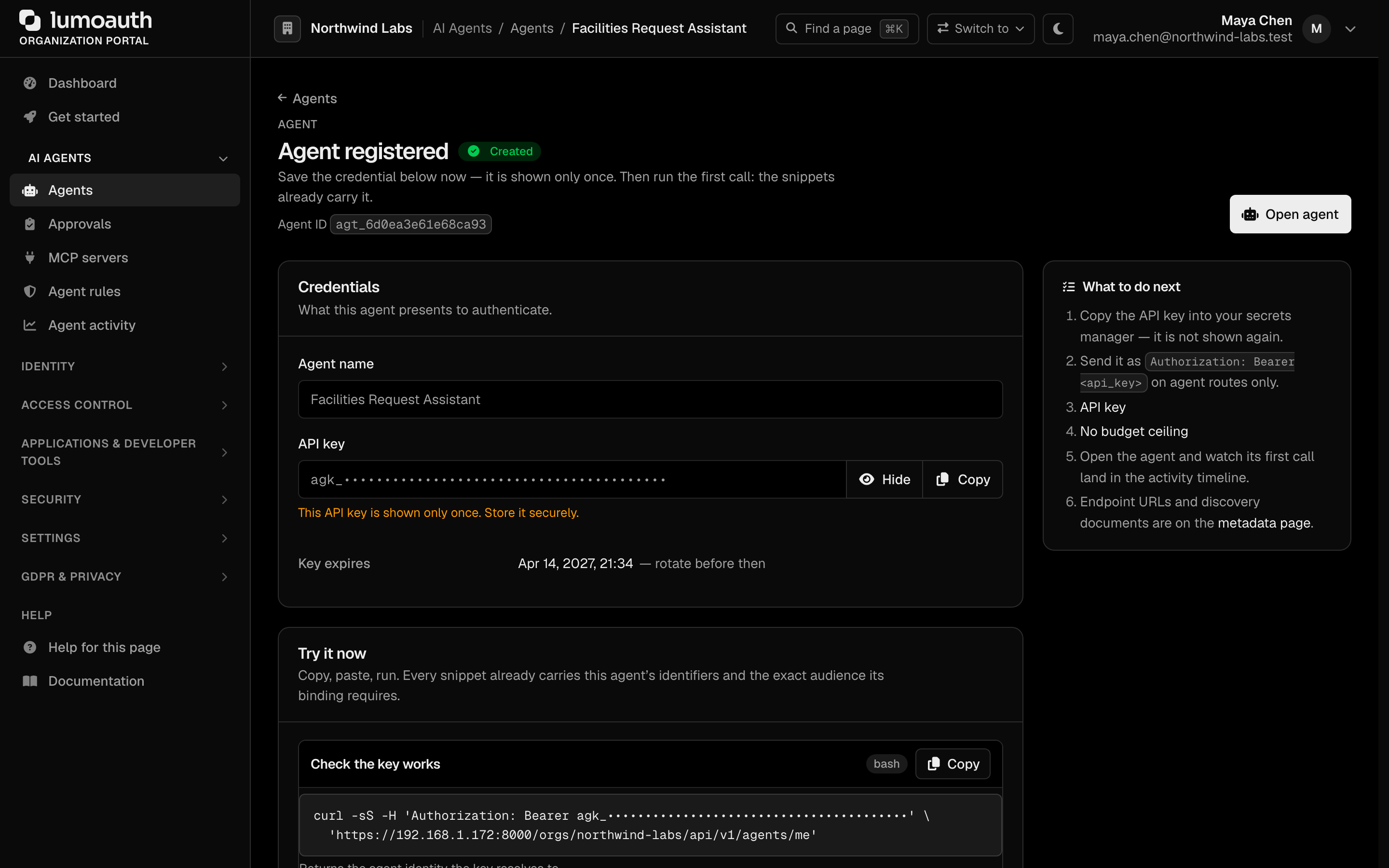
The agent edit page never shows the agent's API key or its stored hash; the key is shown once, at creation. See Kill switch.
Registering an agent
- Go to AI Agents → Agents (
/orgs/{orgId}/portal/agents). - Click Register agent.
- Configure:
The wizard has three steps. Without JavaScript it is one long form whose Next buttons validate the steps so far on the server; typed values are always kept.
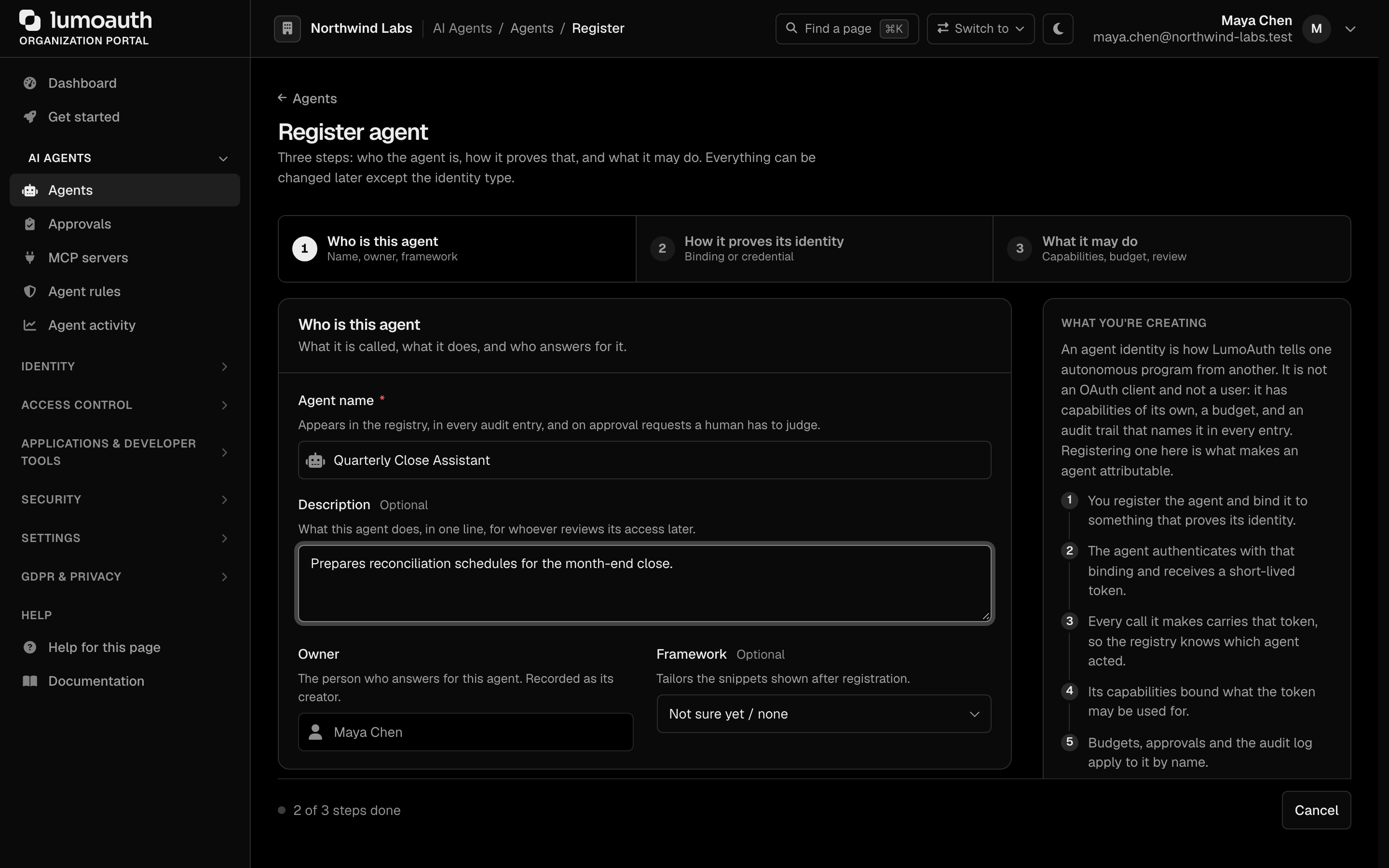
Step 1 — Who is this agent
| Field | Description |
|---|---|
| Agent name | Display name for the agent; appears in the registry, in audit entries and on approval requests |
| Description | What the agent does (optional) |
| Owner | You — recorded as the agent's creator, the human who answers for it |
| Framework | Optional; tailors the snippets shown after registration |
| Metadata | Optional version, environment and team |
Step 2 — How it proves its identity. The identity cards are ordered strongest first and the recommended one is pre-selected: Workload identity (recommended — the cloud or CI platform vouches for the agent, no secret exists), AAuth (the agent signs each request with its own key), Client certificate, Client ID and secret, API key (prototype only) and Custom. The type cannot be changed later. Choosing Workload identity reveals the provider cards (GitHub Actions, AWS, Google Cloud, Kubernetes, Azure, SPIFFE, the CI/CD providers and any OIDC issuer) and the binding fields for the chosen provider, including the agent-specific audience to configure on the platform. Choosing API key reveals Key expires after — 180 days by default; Never is an explicit choice.
Step 3 — What it may do
| Field | Description |
|---|---|
| Allowed capabilities | A picker of LumoAuth permissions grouped by resource, each resource with a resource.* wildcard row (flagged — it covers actions that do not exist yet), plus a Custom capabilities box for your own resource.action names. Entries are saved in canonical form (Invoices:Read becomes invoices.read); the box previews the canonical form as you type. Permissions you do not hold yourself are disabled with the reason inline — you cannot grant an agent more than you hold |
| Acting for people | May act on behalf of users, and for AAuth agents the user-in-the-loop, delegation and token-exchange switches |
| Budget and limits | Daily hard limit, max steps and timeout |
| Review | A summary of what will be registered |
- Click Register agent. What you receive depends on the identity type:
- API key — the key is shown once on the next page, with its expiry and a runnable call that already uses it.
- Client ID and secret — the client ID and the client secret are shown once on the next page.
- Workload identity, AAuth, Client certificate, Custom — no secret is generated; you land on the agent's page, whose Next steps section has the attestation call for the exact audience the binding requires and, for GitHub Actions or GitLab CI, the workflow YAML (
permissions: id-token: write) that mints a token for it.
Agent authentication
Agents registered with the Client ID and secret identity type authenticate using the OAuth 2.0 client-credentials flow:
curl -X POST https://your-domain.com/orgs/{orgId}/api/v1/oauth/token \
  -d grant_type=client_credentials \
  -d client_id=AGENT_CLIENT_ID \
  -d client_secret=AGENT_CLIENT_SECRET \
  -d scope="agent:read agent:execute"
Agent credentials (the agk_ API key and agent access tokens) are stateless: no session cookie is ever set, the credential is sent on every call, and it is accepted only on agent, JIT and authorization-check routes. It is rejected on the portal, account and admin pages. See Agent API keys.
The returned access token contains agent-specific claims:
{
  "sub": "agent-uuid",
  "client_id": "agent-client-id",
  "agent_name": "data-processor",
  "scope": "agent:read agent:execute",
  "organization": "acme-corp",
  "iat": 1706400000,
  "exp": 1706403600
}
Workload identity
For agents running on Kubernetes, AWS EKS, GCP, Azure, GitHub Actions or SPIFFE, LumoAuth can trust the platform's own identity token — a K8s ServiceAccount JWT, an EKS IRSA projected token, a GCP metadata-server token, or an Azure Managed Identity token — and exchange it for a LumoAuth access token via token exchange (swap one token for another, recording the subject). No static client secret required. See Workload Identity Federation.
If an attestation is rejected, the response is a generic attestation_rejected message; the exact cause is in the audit log (agent.attestation.rejected), never in the response. See Agent attestation.
Approving agent requests
When an agent asks for a permission that needs a human (a high-risk JIT request), the request lands in AI Agents → Approvals (/orgs/{orgId}/portal/approvals), in push and mobile notifications, and in any configured approval channel.
Who can approve:
| Rule | Detail |
|---|---|
Holds jit.approve | A seeded system permission. Organization admins have it; give other reviewers a role that grants just jit.approve (it is the Agent approvals row in the AI agents group of the role editor). |
| Not the agent's owner | The person who created the agent can never approve or deny its requests. A second reviewer is required. |
| Not the requesting user | The user the agent acts on behalf of cannot approve their own request. |
| Before expiry | Expired requests cannot be approved, even if still listed. |

The inbox shows everything waiting on a human; filter it by Permission requests, User consents or Action approvals. JIT requests are approved or denied in place, singly or in bulk; the other kinds show who has to act. A request the agent made on a user's behalf without that user's prior consent carries a Needs the user's consent badge and names who must consent — approving it is the reviewer's part of the decision, the user's consent is theirs. Decided requests say who decided; one an auto-approve rule let through reads Auto-approved by rule aap_…, linking to the rule. The deny dialog has a Message to the agent field — the only text the agent ever sees. The older /orgs/{orgId}/portal/jit-approvals URL serves the same page.
If the Approve button reports that you are not allowed, one of these rules applied. See Who can approve.
Agent access rules (conditional access)
AI Agents → Agent rules → Access rules (/orgs/{orgId}/portal/agents/policies) gates agent authentication after the credential is verified. With no enabled policy nothing changes; with policies, the first failing rule denies (403 access_policy_denied), and an evaluation error denies too.
- Click Create rule in the page header (or in the empty state), or Edit… on an existing rule.
- In the dialog, enter a Rule name and choose All agents or Selected agents only.
- Fill in at least one condition: Must have attested within (hours), Must have been used in the last (days), Risk level must be at most, Must connect from these IP ranges (one CIDR or IP per line).
- Check Preview impact — it lists the active agents this rule would deny today and why — then click Create rule (or Save changes).
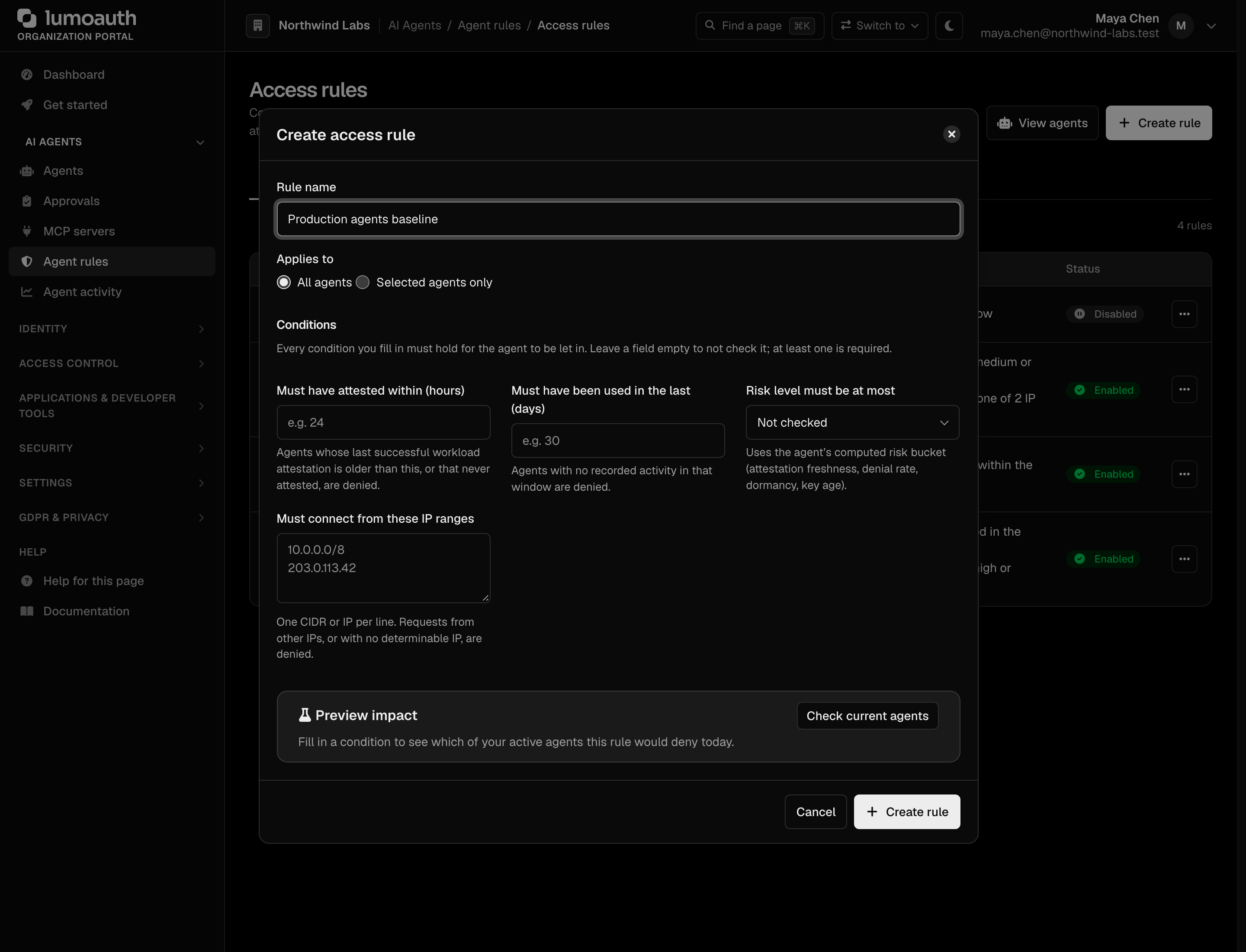
Rules are listed with their conditions in plain words. When active agents are not covered by any enabled rule, a notice names them with a Create a rule for them shortcut. Each row has an actions menu with Edit…, Disable / Enable and Delete. Viewing needs agents.view; creating, editing, enabling or disabling and deleting need agents.edit. Details: Agent governance.
Security signals (SSF / CAEP)
AI Agents → Agent activity → Security signals (/orgs/{orgId}/portal/agent-guard/security-signals) has two tabs:
- Streams (outbound): where LumoAuth sends agent security events (an agent revoked, a JIT task suspended). Click Create stream, enter the receiver's HTTPS endpoint, audience and bearer token (required unless you tick that the endpoint accepts unauthenticated deliveries), tick the events — labelled checkboxes with the agent events pre-selected — then click Send verification on the stream to send a test event. Edit… changes a stream in place.
- Receivers (inbound): where LumoAuth receives events from Okta, Microsoft Entra, Google, Duo, Ping, Jamf, CrowdStrike or any SSF transmitter. Click Add receiver, pick the transmitter preset, click Create receiver, and copy the push URL and one-time bearer into the vendor console. A deep link such as
?tab=receivers&preset=oktaopens the dialog pre-filled.
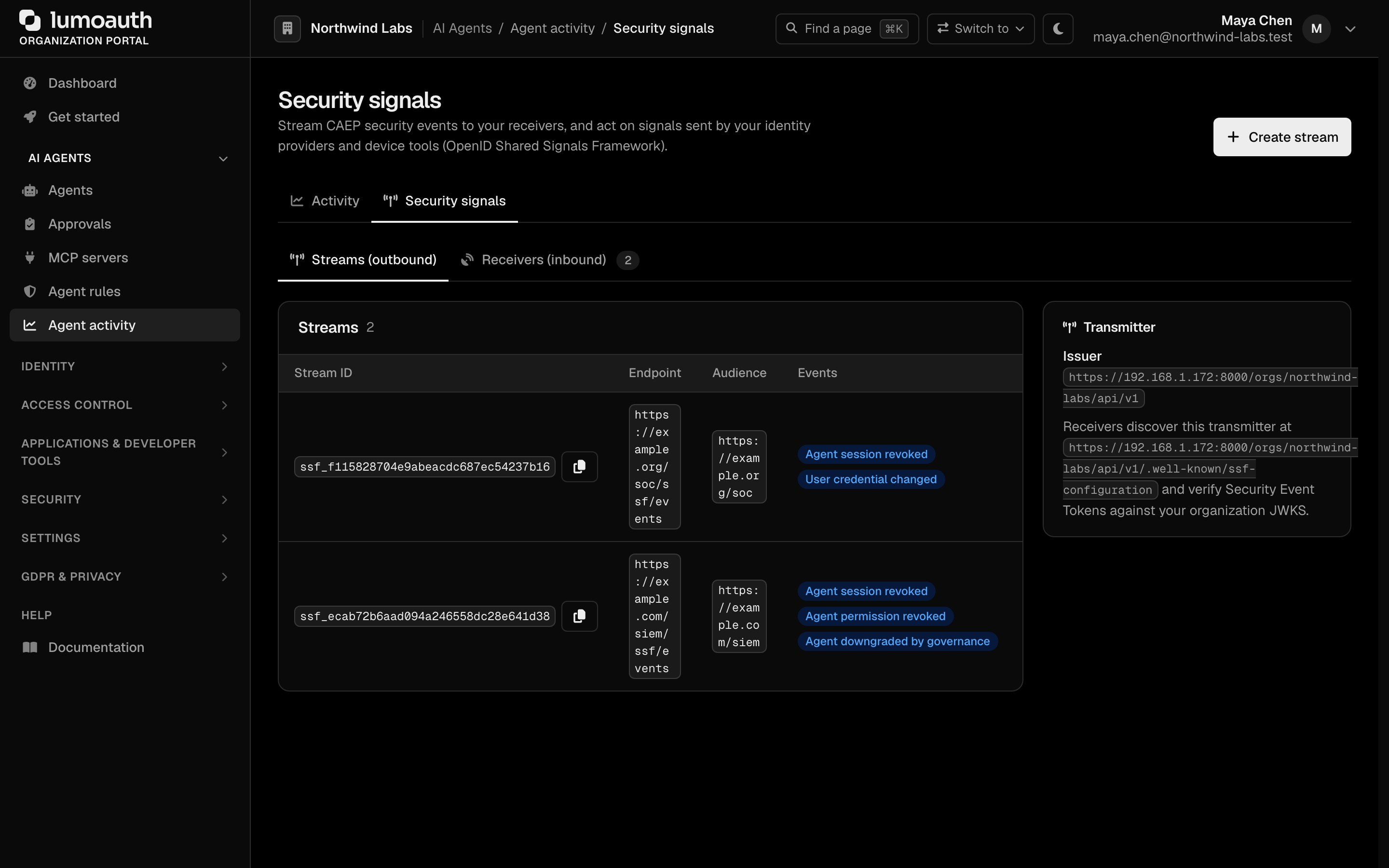
Both buttons need settings.manage. Details: Shared signals and the Agent activity dashboard.
Model Context Protocol (MCP)
LumoAuth is the OAuth 2.1 authorization server for MCP servers: agents obtain a token from LumoAuth and present it to the MCP server, which validates it against LumoAuth.
What is MCP?
MCP lets LLM hosts discover and invoke external tools in a standardized way. MCP servers expose tools; MCP clients call them. LumoAuth authorizes those tool calls.
Configuring MCP servers
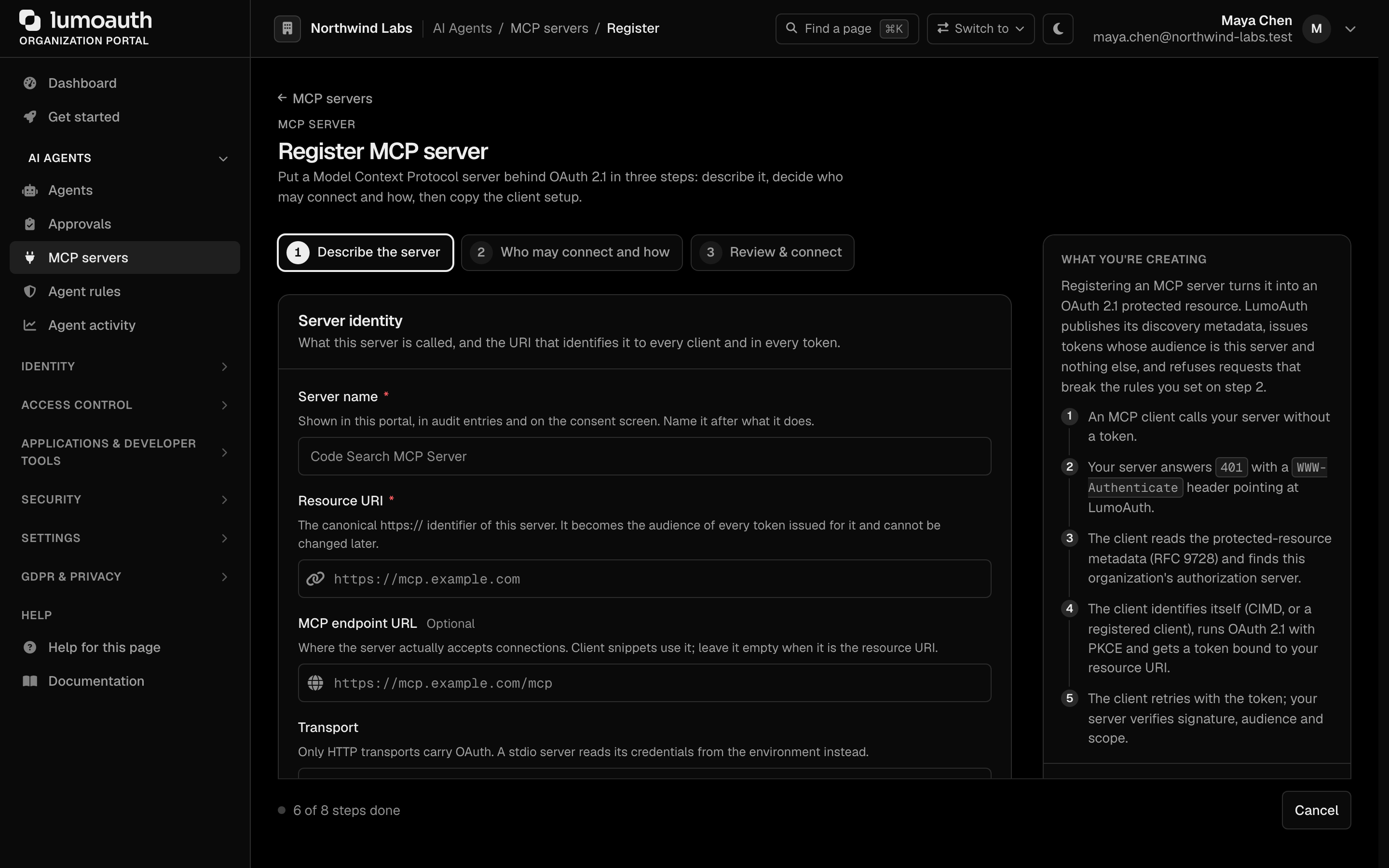
MCP servers have their own portal page, AI Agents → MCP servers (/orgs/{orgId}/portal/mcp-servers).
- Go to AI Agents → MCP servers (
/orgs/{orgId}/portal/mcp-servers). - Click Register MCP server.
- Configure:
| Field | Description |
|---|---|
| Server name | Display name for the MCP server, shown in the portal and on consent screens |
| Resource URI | The canonical https:// identifier of the server; it becomes the audience of every token issued for it |
| MCP endpoint URL | Where the server accepts connections, if that differs from the resource URI (optional) |
| Transport | Streamable HTTP (recommended), HTTP + Server-Sent Events (older clients) or stdio (local process, no OAuth) |
| Authorization mode | OAuth 2.1 protected (recommended) or Public |
| Scopes | What operations are permitted (optional; each scope has a description) |
| Token lifetime (seconds) | How long tokens issued for this server are valid |
The form is a three-step wizard (Describe the server, Who may connect and how, Review & connect).
- Click Register MCP server.
MCP authentication flow
- Agent authenticates with LumoAuth.
- LumoAuth issues a token scoped for the organization and audience-bound to the MCP server (
audclaim set to the server's Resource URI). - Agent presents the token to the MCP server.
- MCP server validates the token (JWT signature +
audcheck, or via introspection).
Agent permissions
Agents can be assigned:
- Roles — the same RBAC roles used for users.
- Scopes — OAuth scopes limiting API access.
- ABAC policies — attribute-based conditions (e.g., time restrictions, IP ranges).
- Zanzibar relations — fine-grained per-object access.
Principle of least privilege
Grant agents only the minimum permissions they need:
Audit trail
All agent actions are logged in the audit log:
| Event | Description |
|---|---|
agent.created | Agent registered |
agent.authenticated | Agent obtained a token |
agent.action | Agent performed an action |
agent.revoked | Agent access revoked |
aauth.agent_revoked / aauth.agent_deleted | Agent revoked / deleted from the portal |
mcp.connection | Agent connected to MCP server |
Use cases
| Scenario | Description |
|---|---|
| Data processing | Agent accesses databases and APIs to process data |
| Customer support | AI assistant accesses user information to help customers |
| Code review | Agent accesses repositories and review tools |
| Monitoring | Agent checks system health and triggers alerts |
| Content generation | Agent accesses CMS and publishes content |
Related
- Agent governance — risk scoring, access policies, dormancy lifecycle
- Shared signals — SSF/CAEP streams and receivers
- Applications — register OAuth clients for agents
- OAuth 2.0 client credentials — M2M authentication
- Access control — agent permissions
- Audit logs — agent activity tracking
Standards used on this page
| Plain name | Standard |
|---|---|
| Token exchange (delegation) | RFC 8693 |
See the standards reference for what each one covers and how LumoAuth uses it.