Agent activity (CAEP dashboard)
This is the portal monitoring dashboard. For the outbound protocol that streams these events see the CAEP transmitter (Shared Signals); for the policies that generate them see Agent Governance.
The Agent activity page (the CAEP dashboard) is a fleet-wide view of AI agent task activity and just-in-time permission requests in your organization. Use it to monitor whether agents are operating within expected parameters and to spot elevated-risk activity.
What is CAEP?
CAEP (Continuous Access Evaluation Profile) is a standard for identity providers to push real-time session-event signals (session revoked, credential change, risk level change) to relying parties so they can invalidate sessions immediately — rather than waiting for a token to expire. In LumoAuth, the Agent activity page applies this model to AI agents: you can see how agents progress through their tasks, how many JIT permission requests they raise, and whether any are blocked or denied.
CAEP is a profile of the OpenID Shared Signals Framework (SSF). SSF carries events as signed security event tokens, either pushed to the receiver's URL or polled by the receiver on its own schedule. What you must do to act on these events outside LumoAuth: create a stream on the Security signals page and verify each token's signature, iss, aud and jti in your receiver.
Accessing the dashboard
In the organization portal, open AI Agents → Agent activity (/orgs/{orgId}/portal/caep-dashboard).
Dashboard panels
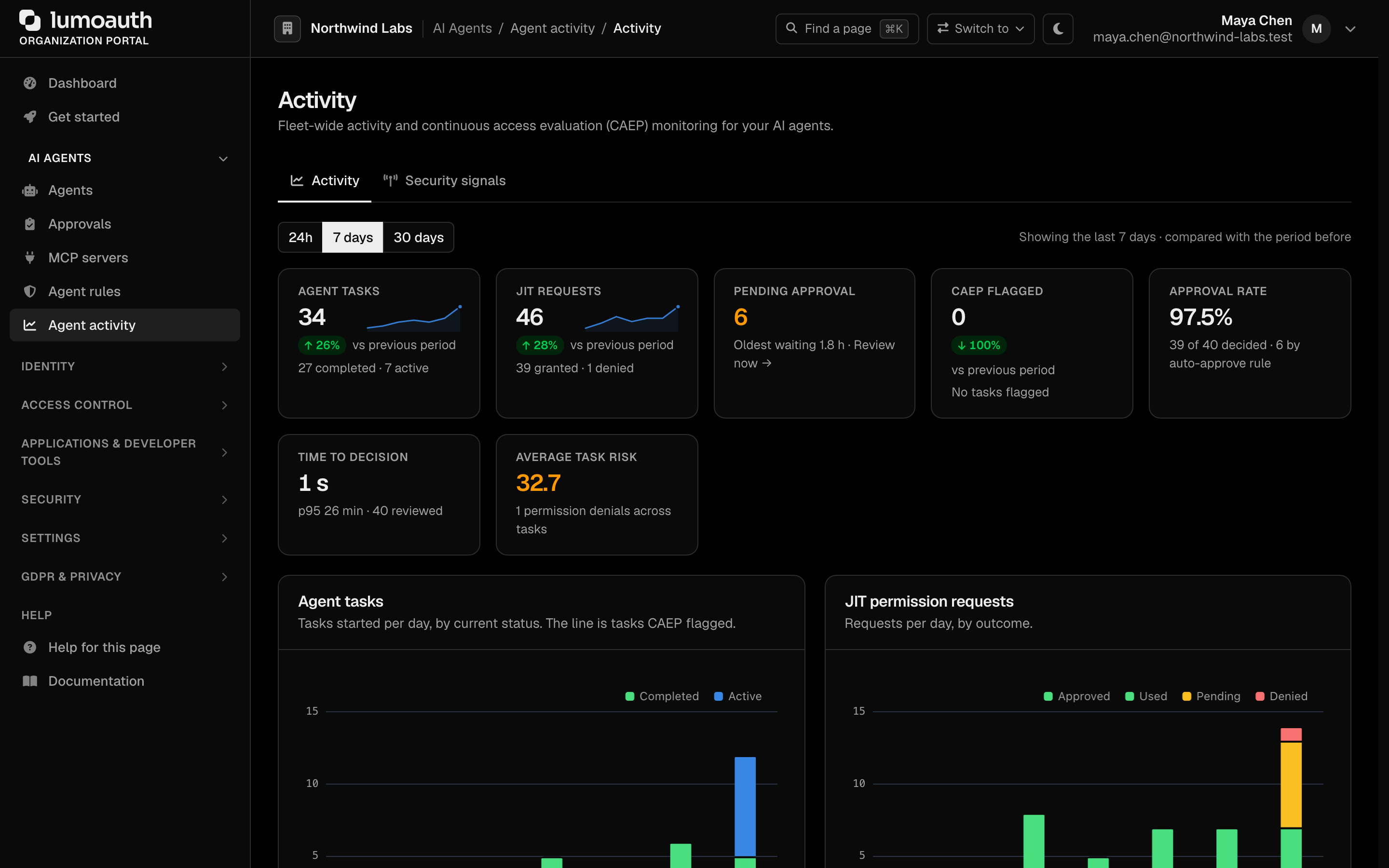
Use the time range selector at the top of the page to view the last 24h (hourly buckets), 7 days, or 30 days. Every tile, chart and table follows the selected range, and each tile compares the period with the one of the same length before it. Every chart has a View as table link with the same numbers. When there was no agent activity in the period, the page says so once instead of showing empty charts.
Summary tiles
| Tile | Meaning |
|---|---|
| Agent tasks | Tasks agents started in the period, with how many completed and are still active |
| JIT requests | Just-in-time permission requests raised in the period, with how many were granted and denied |
| Pending approval | Requests waiting for a human right now, and how long the oldest has waited. When there are any, the tile links to the Approvals inbox |
| CAEP flagged | Tasks flagged by continuous access evaluation |
| Approval rate | Share of the decided requests (approved, used or denied) that were granted, and how many were approved automatically by an approval policy |
| Time to decision | Median time from a request to its human or policy decision, with the 95th percentile |
| Average task risk | Mean accumulated risk score of the tasks (0–100: 20 medium, 40 high, 60 critical) |
Task activity
Agent tasks charts tasks started per day by their current status, with a line for the tasks CAEP flagged. Task risk groups the same tasks into risk bands and shows the average, the permission requests and denials they accumulated, and the average task duration. Task types shows what kinds of work agents started (when there is more than one type, otherwise Task outcomes shows the status split).
| Status | Meaning |
|---|---|
| Active | Agent is executing the task |
| Completed | Task finished |
| Suspended | Task was suspended, for example by continuous access evaluation |
| Terminated | Task was ended before completing |
Busiest agents ranks agents by tasks and JIT outcomes (approved, denied, pending); High-risk agents lists agents whose average task risk is 20 or higher, with how many of their tasks were flagged. When agents are active is a weekday-by-hour heatmap of tasks and requests.
JIT request activity
JIT permission requests charts requests per day grouped by outcome:
| Status | Meaning |
|---|---|
| Approved | The request was granted |
| Used | The granted permission was exercised |
| Denied | A human approver rejected the request |
| Pending | Awaiting human review |
| Expired | Nobody decided before the request expired |
| Revoked | A granted permission was withdrawn |
Request risk shows the risk level assigned to each request when it was made. Time to decision charts the median and 95th-percentile wait for a decision per day, with the slowest decision, the number approved by policy, and the average TTL requested versus granted. Permission types requested shows which rich-authorization-request detail types (authorization_details types) agents ask for and how often each was denied; Actions requested counts the actions across all requests. Recent CAEP events lists the tasks continuous access evaluation flagged (or, when none were, the denied, revoked and high-risk requests).
A high ratio of denied requests may indicate that agents are attempting actions outside their configured scope, or that approval workflows need tuning.
Interpreting the data
| Observation | What to check |
|---|---|
| Many suspended or terminated tasks | Open the agent's page (see Individual agent monitoring) and review its Activity tab |
| Many JIT denials | Review agent capability and permission configuration |
| Spike in pending JIT | Check whether approvers are receiving notifications |
| No task activity | Confirm the agent is active and correctly calling the LumoAuth SDK |
Streaming these events to other systems
The dashboard shows what happened; the Security signals page sends it onward and takes signals in. Open AI Agents → Agent activity → Security signals (/orgs/{orgId}/portal/agent-guard/security-signals); you need settings.manage to create anything.
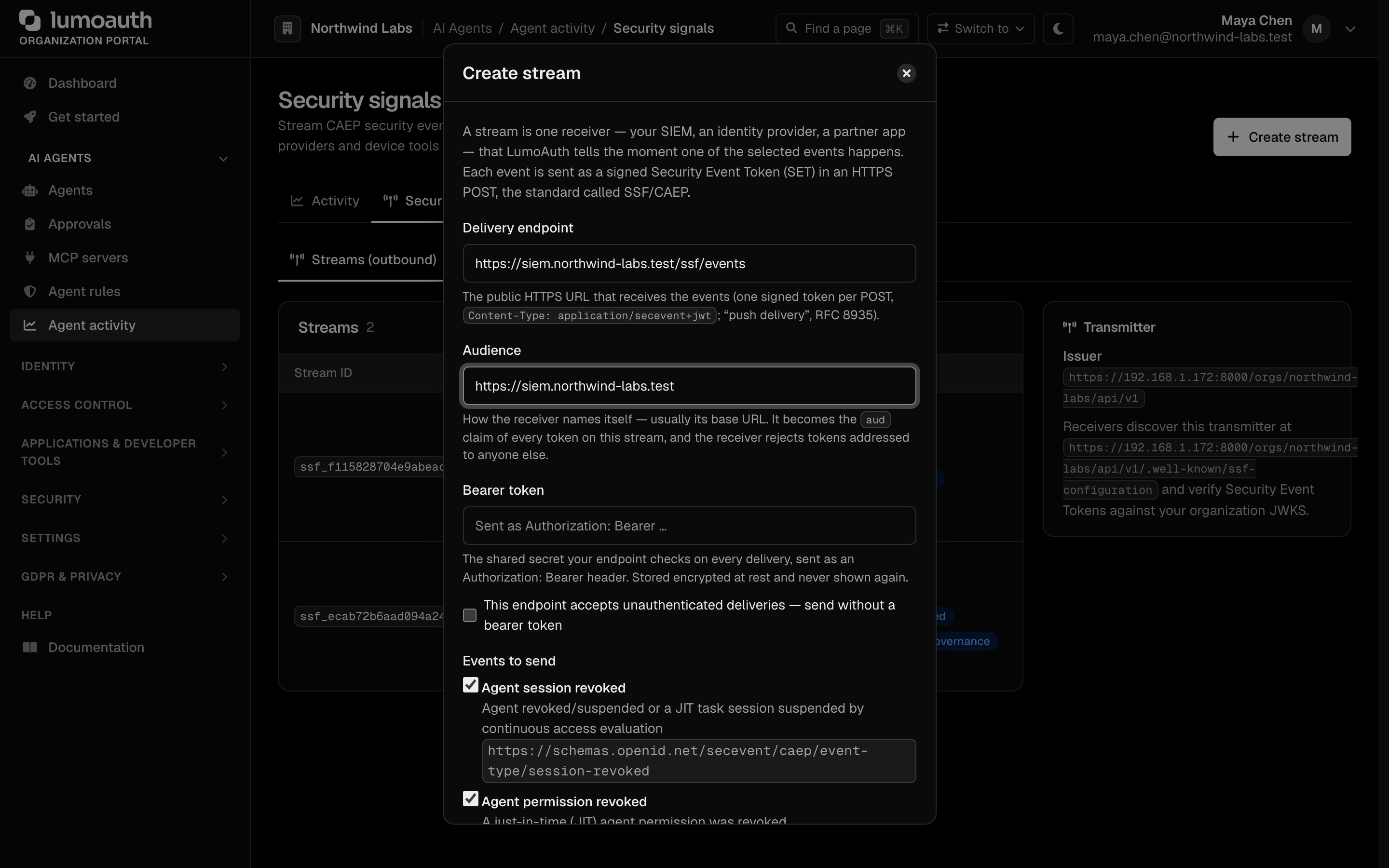
- Streams (outbound) tab: click Create stream in the page header. In the dialog, enter the receiver's public HTTPS endpoint, an audience, an optional bearer token and the event types (
session-revoked,token-claims-change,assurance-level-change, ...). Click Create stream, then Send verification to send a test event. - Receivers (inbound) tab: click Add receiver, pick the transmitter preset (Okta, Microsoft Entra, Google RISC, Duo, Ping, Jamf, CrowdStrike or Generic), choose subject mapping and delivery, and click Create receiver. Copy the push URL and the bearer shown once into the vendor console.
?tab=receivers&preset=oktaopens the dialog pre-filled.
Protocol details, event payloads and a sample receiver are in Shared signals.
Individual agent monitoring
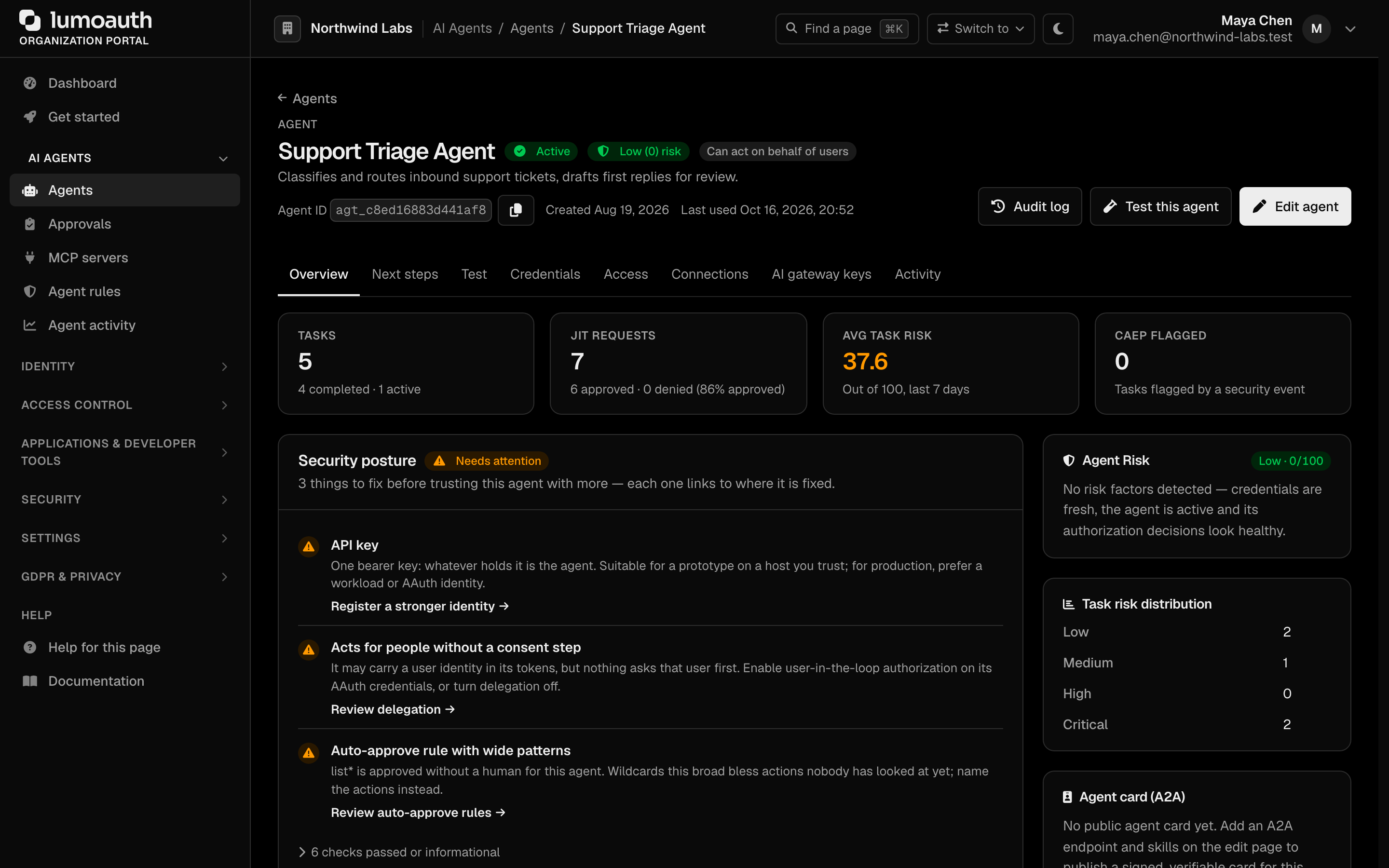
For a deeper view of a specific agent's behaviour, open AI Agents → Agents and click the agent's name. This opens the agent's page:
/orgs/{orgId}/portal/agents/{agentId}
(The older /orgs/{orgId}/portal/agent/{agentId}/observability URL redirects here.) The page has the sections Overview, Next steps, Test, Credentials, Access, Connections, AI gateway keys and Activity (the links under the header jump to each). Activity shows the execution timeline of tasks, JIT requests, and audit events, with a time range filter (1h, 24h, 7 days, 30 days).
Related
- JIT Permissions — configure just-in-time permission workflows; who can approve requires
jit.approve - Shared signals — the SSF/CAEP transmitter and receiver
- AI Agent Registry — register and manage agents
- Audit logs — detailed event trail
Standards used on this page
| Plain name | Standard |
|---|---|
| Shared Signals Framework (SSF) and Continuous Access Evaluation Profile (CAEP) | OpenID SSF 1.0 and OpenID CAEP 1.0 |
| Security event tokens | RFC 8417 |
| Push delivery of security events | RFC 8935 |
| Poll delivery of security events | RFC 8936 |
| Rich authorization requests | RFC 9396 |
See the standards reference for what each one covers and how LumoAuth uses it.