Push approval for agent actions
Sometimes an agent is about to do something it should not do silently — wire money, send a customer-facing email, delete data, deploy to production. Push approval lets the agent call a single SDK method and get a human-in-the-loop tap on their phone before it proceeds.
This reuses the same push pipeline that powers human MFA: each prompt is bound to the phone's own signing key (ECDSA P-256) and expires after 120 s. The user's phone is registered once; agents borrow that established trust path for action approvals.
The demo
npm install @lumoauth/agent
import { LumoAgent } from '@lumoauth/agent';

// Reads LUMOAUTH_URL, LUMOAUTH_ORG_ID, AGENT_CLIENT_ID and AGENT_CLIENT_SECRET;
// the agent authenticates itself on first use.
const agent = new LumoAgent();

const approval = await agent.approvals.require({
  taskId: `wire-${Date.now()}`,
  reason: 'Wire $4,500 to vendor INV-7741',
  impact: 'high',
  onBehalfOf: 'ada@acme.com',
  meta: { action: 'wire-transfer', amount: 4500, vendor: 'INV-7741' },
});

if (approval.status !== 'approved') {
  throw new Error(`agent action denied: ${approval.status}`);
}

// approval.token is short-lived and bound to this specific task — use as
// the auth header for the actual side-effecting call.
Calling from your own backend instead of from the agent? @lumoauth/backend exposes the same approvals.require() on LumoAuthBackend.
What the user sees on their phone:
- Agent name at the top, not a generic "sign-in" prompt
- Action description (
reason) in a card with severity-tinted border - Impact tier badge — Low / Medium / High / Critical
- Action metadata — every key/value in
metarendered as a row - Approve / Deny buttons that sign with the device's stored ECDSA key
Python SDK
pip install lumoauth
from lumoauth import LumoAuthAgent, require_approval

agent = LumoAuthAgent()
agent.authenticate()

result = require_approval(
    agent,
    task_id="wire-001",
    reason="Wire $4,500 to vendor INV-7741",
    impact="high",
    on_behalf_of="ada@acme.com",
    meta={"amount": 4500, "vendor": "INV-7741"},
)
if result.status != "approved":
    raise RuntimeError(f"denied: {result.status} ({result.reason})")
Impact levels
| Tier | When to use it | UI treatment on phone |
|---|---|---|
low | Read-only enrichment, lookups | Green accent |
medium | Reversible writes (draft an email, create a ticket) | Amber accent |
high | Irreversible writes with bounded blast radius (send email, charge $X) | Orange accent |
critical | Catastrophic if wrong (delete data, wire money over $threshold) | Red accent + extra friction |
The UI styling is hard-coded; you don't need to do anything beyond pick the right tier.
Endpoints
POST /orgs/{orgId}/api/v1/agents/me/approvals— create a requestGET /orgs/{orgId}/api/v1/agents/me/approvals/{token}/status— poll
The SDK helpers handle the polling for you.
Batch responses (approver device)
Approvers reviewing JIT permission requests (just-in-time permissions: narrow, short-lived access an agent asks for at the moment it needs it) from the mobile app can
respond to several at once: POST /orgs/{orgId}/push-auth/jit/respond-batch
takes up to 25 request ids and a single device signature over the sorted id
list (jit-approve-batch:{id1,id2,...}:{challenge_nonce}:{iat} /
jit-deny-batch:..., with a single-use server nonce from
POST /push-auth/jit/challenge and 300 s freshness — identical signature
rules to the single respond endpoint).
Results are per-id, so a batch can partially succeed. See
JIT permissions for the wire format.
The organization portal inbox has matching multi-select batch actions, a pending badge that updates live, and auto-approve rules for recurring low-risk requests — all aimed at reducing approval fatigue without weakening the human gate on high/critical actions.
Security notes
- Approve/deny challenges are bound to a server-generated nonce
(
auth-request:{request_id}:{challenge_nonce}/deny-request:{request_id}:{challenge_nonce}), fetched via/request-details, single-use, and rotated on consumption — a captured signature cannot be replayed. Deny requires a signature too. The device-signed JIT endpoints (/jit/list,/jit/details,/jit/respond,/jit/respond-batch) use the same scheme since mobile contract 1.3: a single-use nonce from/jit/challengeplusiat. - Browser login completion is bound to the initiating session
(
session_nonceissued at/initiate, verified at/push-auth-login, plus initiating-IP matching), closing the detached-approval / push-bombing account-takeover vector. - Every push-auth endpoint is rate-limited, including device lifecycle (
update-token,unenroll) and the device-signed JIT endpoints.
Required setup
-
The user must have enrolled the LumoAuth mobile app on their phone: in My account → Sign-in & security, click Add a sign-in method and choose LumoAuth app. Without an enrolled device the API responds
428 Precondition Requiredwith{ "error": "no_enrolled_device" }.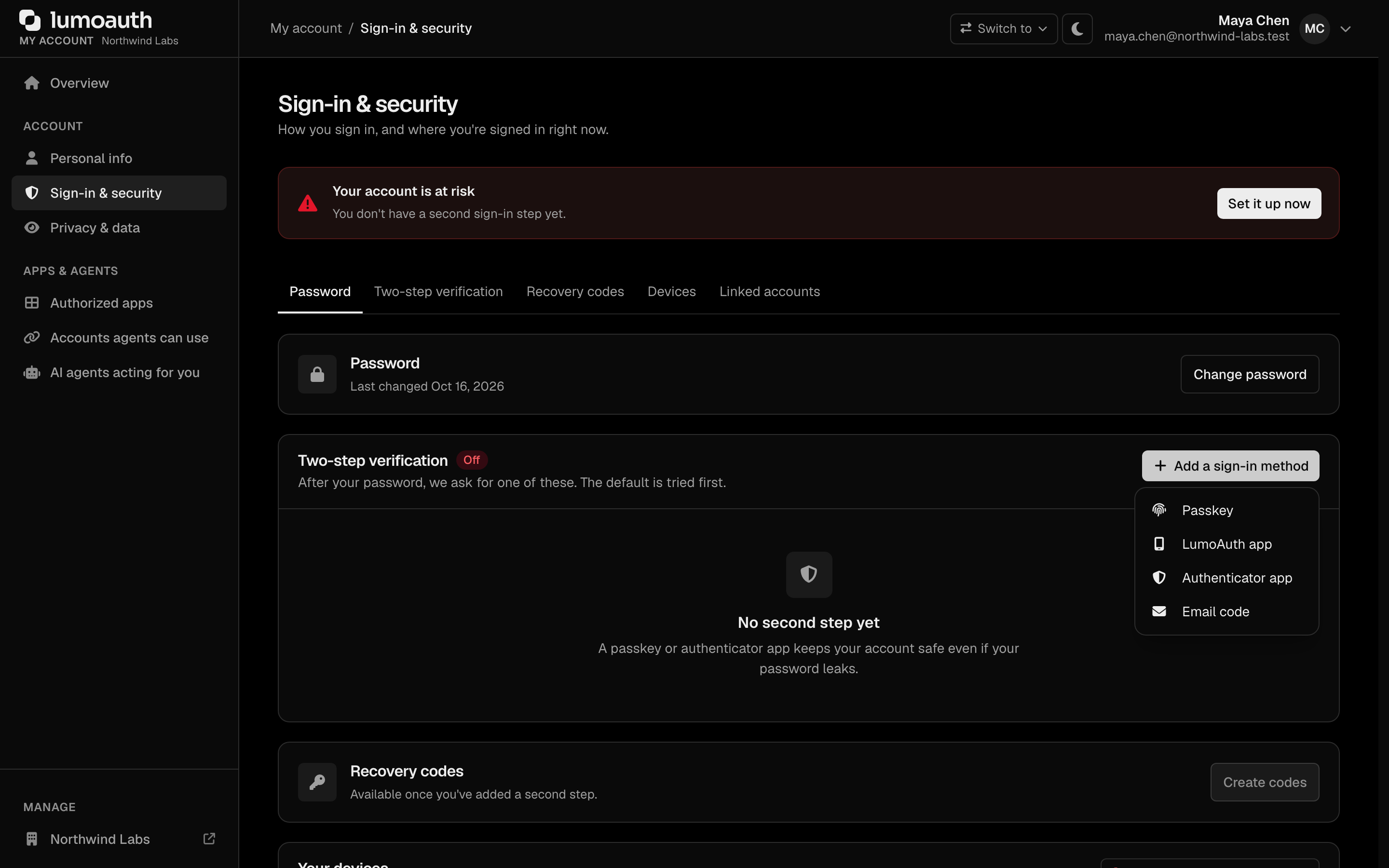
-
The agent must authenticate with its own identity — workload attestation (proving where it runs with a token from its cloud platform) or AAuth (the agent identity protocol, with the agent's own signing key) — and present an agent token. Approvals are scoped to the calling agent.
-
Set
on_behalf_ofto the email or numericuser_idof the user who must approve.
Rate limits
Per (tenant, agent, user) tuple: 10 approvals / 5 minutes by default. Push bombing a single user via a rogue agent is therefore bounded by both a hard ceiling and the audit log.
Unified approvals inbox
The organization portal has a single approvals inbox, AI Agents → Approvals
(/orgs/{orgId}/portal/approvals), that consolidates every "waiting on a human"
surface into one newest-first list, superseding the older JIT-only
/orgs/{orgId}/portal/jit-approvals view. Its status tabs are Waiting, Approved, Denied and All permission requests,
and a second row filters by type: Everything, Permission requests, User
consents and Action approvals, each with a badge showing how many items are
waiting. It aggregates three item types:

- JIT permission requests — always deep-link to the JIT approvals surface (filter Permission requests), where you approve or deny.
- Push approvals (agent action requests) — deep-link to the subject user's review page only when the viewer is the subject (that page authorizes the subject only); for every other admin they are informational (answered on-device).
- AAuth user-consent requests (a user approving what an AAuth agent may do on their behalf) — informational by design: the end user grants consent from the agent redirect, so there is no portal action to take.
The inbox is a read model — it never mutates state; each actionable item links into the native flow that owns the decision.
See also
- Create LumoAuth Agent quickstart — end-to-end demo
- JIT permissions — when you want a token, not just a yes/no
- Async authorization (agent CIBA) — user-targeted authorization with a token, over the OAuth backchannel (CIBA: the agent asks a user to approve on their own device, without a redirect)
- Mobile approvals device API — the versioned wire contract the phone app implements (push payload schema, challenge-signature formats, rate limits)