Shared Signals (SSF / CAEP)
This is the CAEP transmitter — the outbound SSF protocol and stream config. For the risk/lifecycle policies that generate these events see Agent Governance; for the portal monitoring view see the CAEP Dashboard.
LumoAuth is an OpenID Shared Signals Framework (SSF) 1.0 transmitter for agent security events (SSF is the standard for passing security events such as "session revoked" between systems; CAEP is its profile of event types). When something security-relevant happens to an AI agent — it gets revoked, a JIT task session is suspended by continuous access evaluation, a just-in-time permission is withdrawn, or governance deactivates a dormant agent — LumoAuth pushes a signed security event token (SET) carrying a CAEP 1.0 event to every receiver you configure.
Delivery is push only: LumoAuth POSTs the SET to your endpoint
with Content-Type: application/secevent+jwt. Deliveries are asynchronous,
retried with exponential backoff, and every attempt is audited
(ssf.set_delivered / ssf.set_delivery_failed).
OpenID Shared Signals Framework (SSF) 1.0 and the CAEP 1.0 profile solve one problem: a security decision made in one system (a session revoked, a device out of compliance) has to reach every other system now, not when a token happens to expire. Events travel as security event tokens. What you must do as a receiver: verify the SET signature against the transmitter jwks_uri, check iss and aud, and deduplicate on jti.
Do this first
- Open
/orgs/{orgId}/portal/agent-guard/security-signals(AI Agents → Agent activity → Security signals). You needagents.viewto see the page andsettings.manageto create anything. - On the Streams (outbound) tab, click Create stream in the page header. A dialog opens.
- Enter your receiver's HTTPS endpoint (Delivery endpoint), an Audience, an optional Bearer token, and tick the Events you want. Click Create stream.
- Click Send verification on the new stream and confirm your endpoint received the verification SET.
- To receive signals from Okta, Entra or another transmitter instead, switch to the Receivers (inbound) tab and click Add receiver (see Receiving signals).
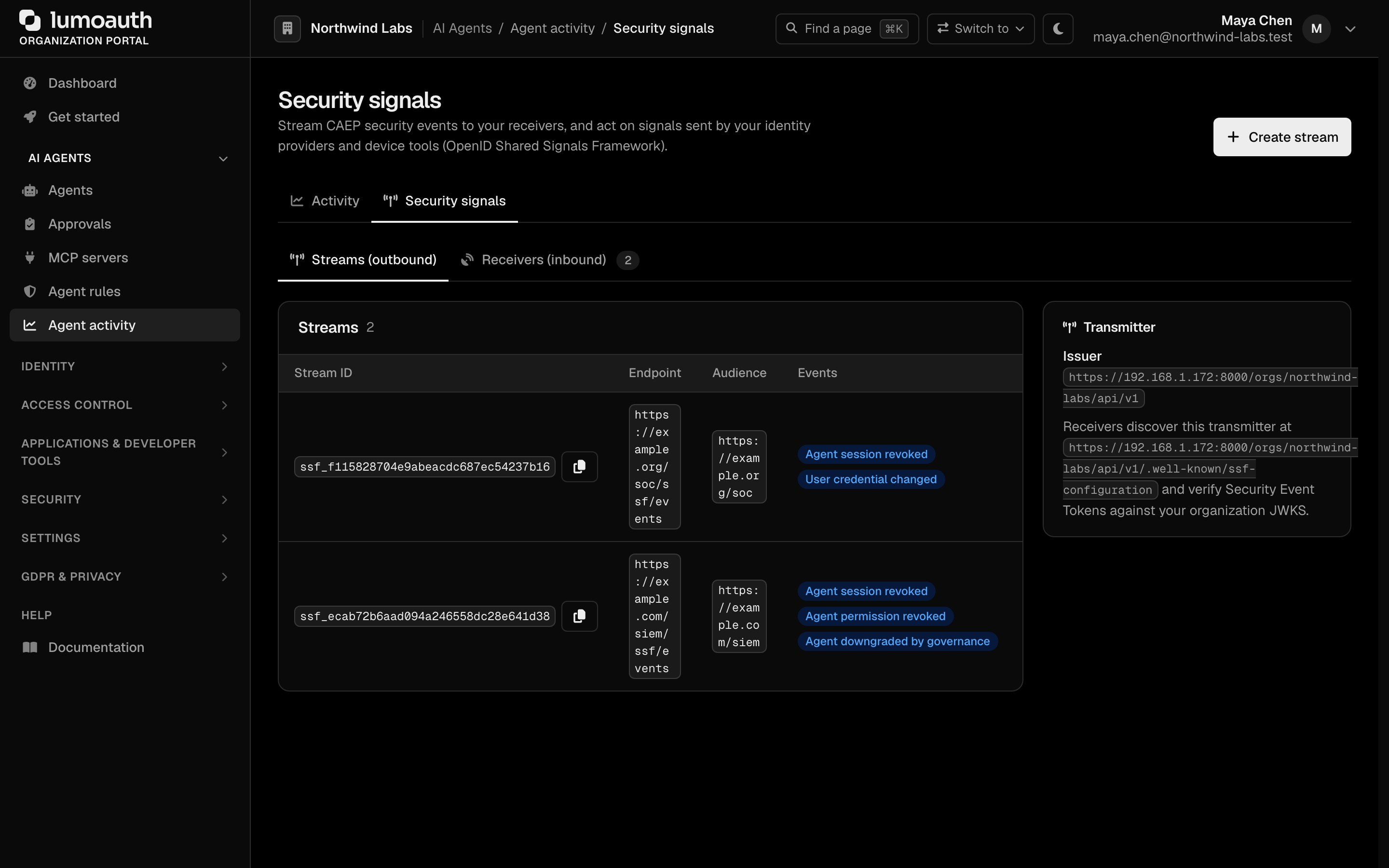
Transmitter metadata
Receivers discover the transmitter via the org-scoped well-known document (no authentication required):
GET /orgs/{orgId}/api/v1/.well-known/ssf-configuration
{
  "spec_version": "1_0",
  "issuer": "https://app.lumoauth.dev/orgs/acme/api/v1",
  "jwks_uri": "https://app.lumoauth.dev/orgs/acme/api/v1/.well-known/jwks.json",
  "delivery_methods_supported": ["urn:ietf:rfc:8935"],
  "configuration_endpoint": "https://app.lumoauth.dev/orgs/acme/api/v1/ssf/stream",
  "verification_endpoint": "https://app.lumoauth.dev/orgs/acme/api/v1/ssf/verify",
  "authorization_schemes": [{ "spec_urn": "urn:ietf:rfc:6749" }],
  "events_supported": [
    "https://schemas.openid.net/secevent/caep/event-type/session-revoked",
    "https://schemas.openid.net/secevent/caep/event-type/token-claims-change",
    "https://schemas.openid.net/secevent/caep/event-type/assurance-level-change"
  ]
}
SETs are signed with the organization signing key; verify signatures against the
jwks_uri. The issuer is always the org-scoped issuer — custom domains are
not reflected in SSF SETs, so the value is stable across delivery contexts.
Stream setup
Streams are managed with the same admin credentials as the rest of the
Admin API (Bearer token or API key), or in
the portal under AI Agents → Agent activity → Security signals
(/orgs/{orgId}/portal/agent-guard/security-signals, Streams (outbound) tab). In the
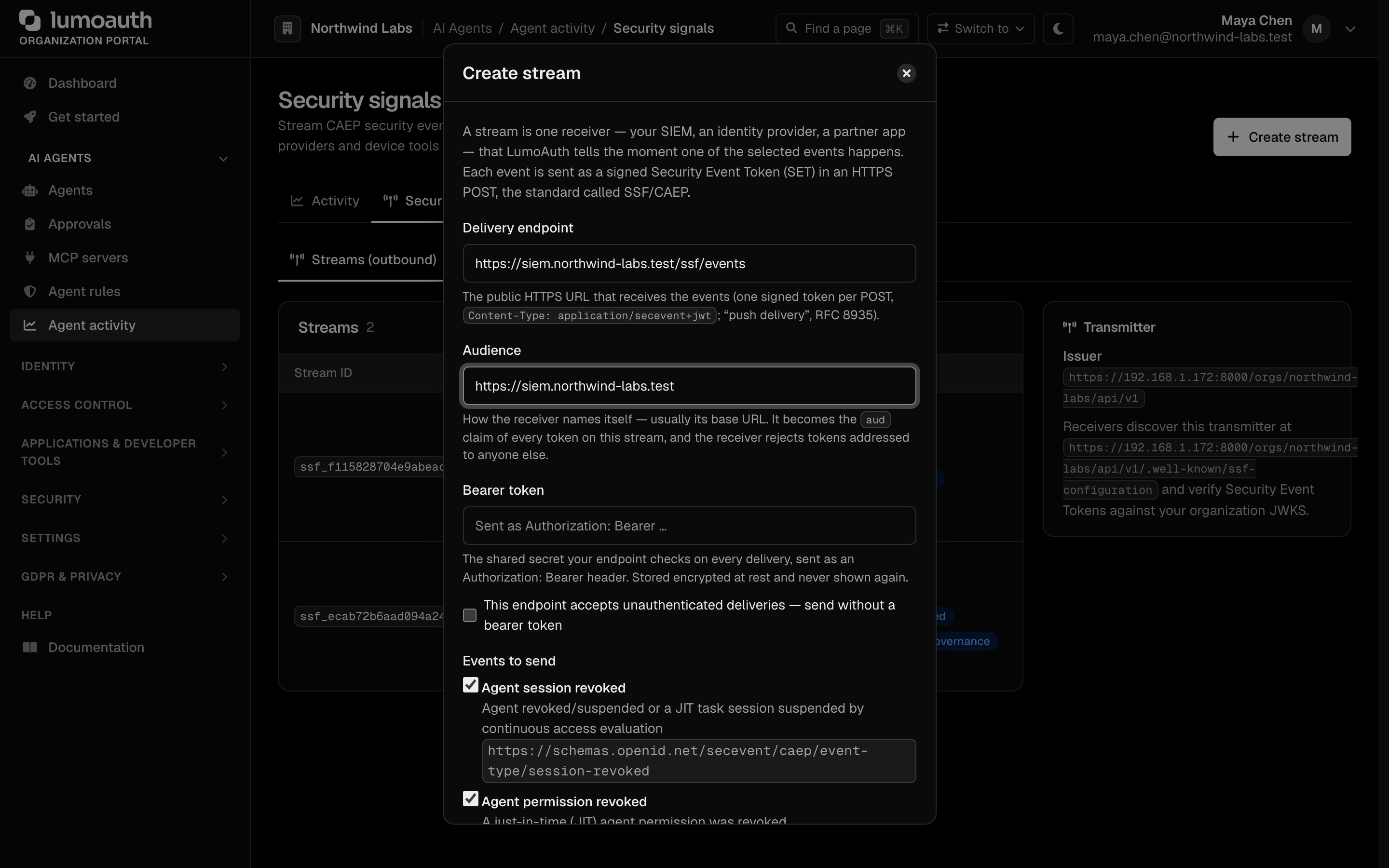
portal, Create stream in the page header opens a dialog with the same
fields as the API call below, explained in plain words: the Delivery endpoint
(the HTTPS URL that receives one signed token per POST — "push delivery"),
the Audience (how the receiver names itself; the aud claim), a
Bearer token and Events to send. Events are labelled checkboxes ("Agent
session revoked", "Agent permission revoked", "Agent downgraded by governance",
"User credential changed", "Device compliance changed") with the event-type URI
underneath; the three agent events are pre-selected for a new stream. The bearer
token is required unless you tick This endpoint accepts unauthenticated
deliveries; streams without one are flagged No bearer in the list. Edit… in a
stream's actions menu reopens the dialog prefilled — a blank bearer keeps the stored
one, the opt-out tick removes it. Creating, editing, pausing, verifying and deleting
streams requires the settings.manage permission.
Push delivery of security events defines how a transmitter POSTs one SET per request with Content-Type: application/secevent+jwt. What you must do: answer 202 Accepted once the SET is stored (not once it is processed) and return a 400 with an err code only for SETs you will never accept, so retries are not wasted.
Create a stream
POST /orgs/{orgId}/api/v1/ssf/stream
Content-Type: application/json

{
  "delivery": {
    "method": "urn:ietf:rfc:8935",
    "endpoint_url": "https://receiver.example.com/events",
    "authorization_token": "receiver-shared-bearer-token"
  },
  "audience": "https://receiver.example.com",
  "events_requested": [
    "https://schemas.openid.net/secevent/caep/event-type/session-revoked",
    "https://schemas.openid.net/secevent/caep/event-type/token-claims-change"
  ]
}
endpoint_urlmust be a public HTTPS URL (private/internal addresses are rejected — deliveries are SSRF-guarded and DNS-pinned).authorization_tokenis optional; when set it is stored encrypted at rest and sent asAuthorization: Bearer …on every delivery. It is write-only — it is never returned by the API.audiencebecomes theaudclaim of every SET on the stream.events_deliveredin the response is the intersection ofevents_requestedandevents_supported.
The 201 response returns the stream configuration including the generated
stream_id (ssf_…).
Read / delete
GET    /orgs/{orgId}/api/v1/ssf/stream                  # all streams
GET    /orgs/{orgId}/api/v1/ssf/stream?stream_id=ssf_…  # one stream
DELETE /orgs/{orgId}/api/v1/ssf/stream?stream_id=ssf_…
Multiple streams (one per receiver) are supported. Pause/resume is available in the portal (Pause / Enable in the stream's actions); paused streams receive nothing.
Verify delivery
Trigger an SSF Verification Event to prove end-to-end delivery:
POST /orgs/{orgId}/api/v1/ssf/verify
Content-Type: application/json

{ "stream_id": "ssf_…", "state": "any-opaque-echo-value" }
The receiver gets a SET with event type
https://schemas.openid.net/secevent/ssf/event-type/verification whose
payload echoes state.
Event catalog
| Event type URI | When fired | sub_id format | Payload example |
|---|---|---|---|
…/caep/event-type/session-revoked | An agent is suspended or revoked (admin API / portal status transition) | iss_sub — iss = organization issuer, sub = agent id (agent_…) | {"event_timestamp": 1751328000, "initiating_entity": "admin", "reason_admin": {"en": "Agent \"billing-bot\" transitioned to status \"revoked\""}} |
…/caep/event-type/session-revoked | Continuous access evaluation suspends a JIT task session (risk threshold / anomalous request frequency) | opaque — the CAEP session id (caep_…) | {"event_timestamp": 1751328000, "initiating_entity": "policy", "reason_admin": {"en": "JIT task session suspended by continuous access evaluation"}, "task_id": "task_…", "agent_id": "agent_…", "evaluation_events": ["risk_threshold_exceeded"]} |
…/caep/event-type/token-claims-change | A single JIT permission is revoked | opaque — the JIT token id (jti) | {"event_timestamp": 1751328000, "initiating_entity": "policy", "reason_admin": {"en": "JIT permission revoked: budget exceeded"}, "claims": {"authorization_details": "revoked"}, "task_id": "task_…", "agent_id": "agent_…"} |
…/caep/event-type/assurance-level-change | Governance deactivates a dormant agent | iss_sub — iss = organization issuer, sub = agent id | {"event_timestamp": 1751328000, "namespace": "https://lumoauth.dev/assurance/agent", "previous_level": "active", "current_level": "dormant-deactivated", "change_direction": "decrease", "initiating_entity": "system", "reason_admin": {"en": "Agent deactivated after 90 days without activity (…)"}} |
…/ssf/event-type/verification | On request (/ssf/verify or the portal button) | opaque — the stream id (ssf_…) | {"state": "any-opaque-echo-value"} |
Subject identifiers follow the standard subject-identifier formats for security events. Agent-scoped events use iss_sub
because agents are principals of the organization issuer; JIT/task/stream handles
use opaque because they are transmitter-scoped identifiers with no issuer
semantics of their own. The assurance levels in assurance-level-change are
vendor-defined (active / dormant-deactivated) under the
https://lumoauth.dev/assurance/agent namespace.
Receiver quickstart
- Expose an HTTPS endpoint that accepts
POSTwithContent-Type: application/secevent+jwtand responds202 Accepted. Anything other than 2xx is retried with backoff. - Create a stream (above) pointing at it, subscribing to the events you care about.
- Send a verification event and check you received it.
- Validate each SET: signature against
jwks_uri,issequals the transmitterissuer,audequals your configured audience, headertypissecevent+jwt, and deduplicate onjti(redeliveries reuse the samejti).
A delivered verification SET decodes to:
// header
{ "alg": "RS256", "kid": "…", "typ": "secevent+jwt" }

// payload
{
  "iss": "https://app.lumoauth.dev/orgs/acme/api/v1",
  "jti": "set_9f2c1a…",
  "iat": 1751328000,
  "aud": "https://receiver.example.com",
  "sub_id": { "format": "opaque", "id": "ssf_4b1d…" },
  "events": {
    "https://schemas.openid.net/secevent/ssf/event-type/verification": {
      "state": "any-opaque-echo-value"
    }
  }
}
Minimal Node.js receiver:
import express from 'express';
import { createRemoteJWKSet, jwtVerify } from 'jose';

const JWKS = createRemoteJWKSet(
  new URL('https://app.lumoauth.dev/orgs/acme/api/v1/.well-known/jwks.json'),
);

const app = express();
app.post('/events', express.text({ type: 'application/secevent+jwt' }), async (req, res) => {
  try {
    const { payload, protectedHeader } = await jwtVerify(req.body, JWKS, {
      issuer: 'https://app.lumoauth.dev/orgs/acme/api/v1',
      audience: 'https://receiver.example.com',
      typ: 'secevent+jwt',
    });
    for (const [eventType, eventPayload] of Object.entries(payload.events)) {
      console.log('security event', eventType, payload.sub_id, eventPayload);
    }
    res.status(202).end();
  } catch (e) {
    res.status(400).json({ err: 'invalid_request', description: String(e) });
  }
});
app.listen(8443);
Receiving signals
LumoAuth is also an SSF receiver: your identity provider, EDR or MDM can tell it that a user's session must end, a credential was compromised, an account was disabled, or a device fell out of compliance — and LumoAuth acts on it within the same request.
Add a receiver in the portal
Inbound streams live on the Receivers (inbound) tab of AI Agents → Agent activity → Security signals (/orgs/{orgId}/portal/agent-guard/security-signals?tab=receivers).
Creating one requires settings.manage.

- Click Add receiver in the page header (or Add a receiver in the empty state). A dialog opens.
- Pick the Transmitter preset. The dialog shows the vendor's docs link and asks only for what the preset cannot derive (for example the Okta org subdomain or the Entra directory id); the issuer and JWKS URL fields appear for free-form presets.
- Check the Audience (how the transmitter must address us — the
audclaim it puts in every event), then choose How events name the user (by email address, by provider subject, by provider subject strictly, or by phone number — the technicalemail/sub/iss_sub/phonesubject mappings) and the Delivery method: Push — the transmitter sends each event to LumoAuth the moment it happens or Poll — LumoAuth asks the transmitter for new events on a schedule (shows the poll URL and bearer fields). - Tick the Events to act on and click Create receiver.
- Copy the push endpoint and the per-stream bearer shown once, and paste them into the transmitter's console.
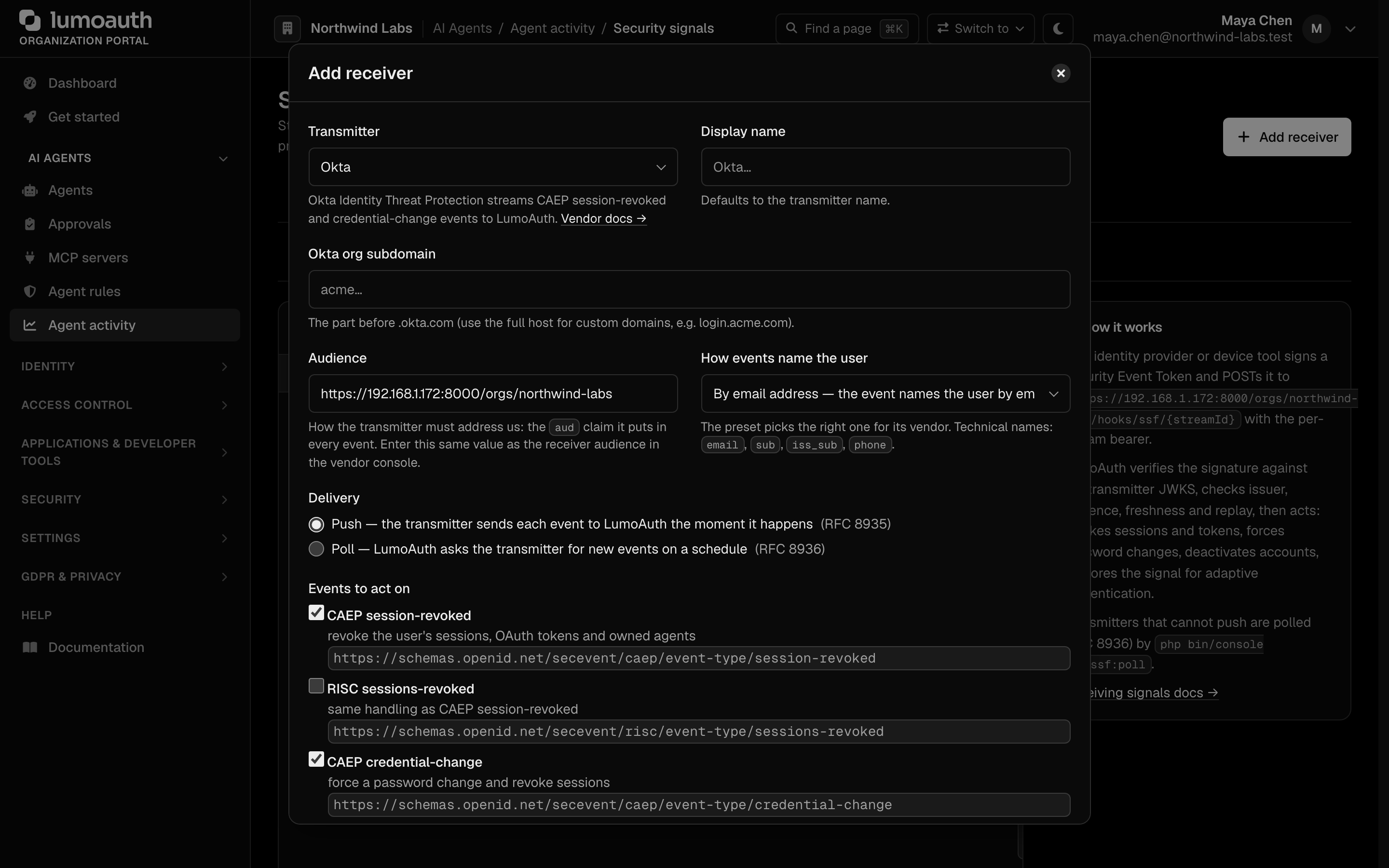
Deep links open the dialog pre-filled: ?tab=receivers&preset=okta lands an
admin straight in the Okta form. Preset keys: okta, entra, google_risc,
duo, ping, jamf, crowdstrike, generic. The Inbound signals & device
posture tiles on the Integrations page use these links.
Supported transmitters
| Preset | Issuer / JWKS | Notes |
|---|---|---|
| Okta (Identity Threat Protection) | https://{org}.okta.com · /oauth2/v1/keys | Enter the org subdomain or custom login host |
| Microsoft Entra ID | https://login.microsoftonline.com/{tenant}/v2.0 · /discovery/v2.0/keys | Enter the directory (tenant) id |
| Google RISC (Cross-Account Protection) | https://accounts.google.com · https://www.googleapis.com/oauth2/v3/certs | Subject mapping iss_sub (Google sub ↔ linked identity) |
| Cisco Duo, Ping Identity, Jamf, CrowdStrike | free-form | Copy issuer and JWKS URL from the vendor console |
| Generic | free-form | Any SSF 1.0 transmitter |
Delivery
Push delivery and poll delivery are the two SSF delivery methods. Push is for transmitters that can reach you; poll is for those that cannot, and the receiver acknowledges each SET by jti so the transmitter can drop it. What you must do: pick the method the transmitter supports and, for poll, schedule app:ssf:poll.
- Push — the transmitter POSTs each SET to
https://app.lumoauth.dev/orgs/{org}/hooks/ssf/{streamId}withContent-Type: application/secevent+jwtandAuthorization: Bearer <per-stream bearer>. The bearer is generated when the stream is created and shown once (only its SHA-256 is stored); rotate it from the portal (Rotate bearer in the receiver's actions). The endpoint answers202on accept,400{"err": "invalid_request" | "invalid_key" | "access_denied", "description": "…"}on failure,401 authentication_failedfor a bad bearer and429when the per-stream limiter (600 per minute) trips. - Poll — for transmitters that cannot push, enter their poll
URL (+ bearer). LumoAuth polls it every minute, requesting up to 100 SETs (
returnImmediately: true), ingests them and acknowledges (ack) or reports per-SET errors (setErrs).
Verification
Every SET is checked in this order before anything is touched: compact JWS
shape and typ: secevent+jwt; alg in RS256/RS384/RS512/ES256/ES384 (no HMAC,
no none); signature against the transmitter JWKS (fetched over public HTTPS
with SSRF guards, cached 15 min); iss equals the stream issuer; aud
contains the stream audience (defaults to https://app.lumoauth.dev/orgs/{org});
iat within ±10 minutes; jti present and not seen before on this stream
(a replay is acknowledged with 202 but not re-processed).
Subject mapping
The stream's subject mapping says how the sub_id subject identifier (or a RISC
subject) is matched to a LumoAuth user of the organization:
| Mapping | Matches |
|---|---|
email | sub_id.email against the user's email |
sub | sub_id.sub against the user's external id or a linked identity (UserIdentity) |
iss_sub | like sub, and sub_id.iss must equal the stream issuer |
phone | sub_id.phone_number against the user's phone number |
Agent subjects. A subject that does not resolve to a user is tried as an
agent of the organization: an iss_sub subject (whose iss is the stream
issuer), an opaque subject or a bare sub carrying either the public agent
id (agt_…) or the identifier of an AAuth registration linked to a core
agent. Revocation-class events aimed at an agent — CAEP session-revoked,
credential-change, RISC sessions-revoked, credential-compromise,
account-disabled — suspend the agent through the kill switch (see
Agent governance); the other event types are recorded
only. Reactivation stays a human decision.
A subject that resolves to neither is stored as ignored — nothing happens.
What each event does
| Event type | Action |
|---|---|
CAEP session-revoked, RISC sessions-revoked | Revoke every user session and OAuth access/refresh token (including stateless JWT access tokens: every token issued before the event is rejected by LumoAuth from then on); suspend every agent the user owns (kill switch, see Agent lifecycle); re-emit CAEP session-revoked on your outbound streams |
CAEP credential-change, RISC credential-compromise | Set must change password, revoke sessions and tokens (JWT access tokens issued before the event included); re-emit CAEP credential-change |
RISC account-disabled | Deactivate the user, revoke everything |
RISC account-enabled | Reactivate the user — only if the account was disabled by an SSF signal (an admin-disabled account stays disabled) |
CAEP device-compliance-change | Stored as an inbound risk signal and re-emitted as CAEP device-compliance-change on your outbound streams; no revocation |
CAEP assurance-level-change, RISC account-purged, identifier-changed | Stored as an inbound risk signal (InboundSignalStore::latestForUser()) that adaptive authentication can consult; no immediate action |
SSF verification | Marks the stream Verified |
Every event is audit-logged (ssf.receiver.*) and listed under Recent
events on the Receivers (inbound) tab for 30 days.
Replay protection. A SET is processed once per stream: a repeated jti
is acknowledged with 202 but ignored, as the push delivery standard requires. The check is backed by
a unique constraint on (stream, jti), so two concurrent deliveries of the
same SET cannot both be processed — the second one is acknowledged as a
duplicate.
Troubleshooting
- No Create stream / Add receiver button. You hold
agents.viewbut notsettings.manage. - "The delivery endpoint must be a public HTTPS URL". Outbound streams refuse private, loopback and reserved addresses (SSRF guard). Use a public hostname; tunnels such as ngrok work for testing.
- Verification SET never arrives. Check the
ssf.set_delivery_failedaudit event for the HTTP status your endpoint returned; anything other than 2xx is retried with backoff. - Inbound SET answered
400 invalid_key. The signature could not be verified against the transmitter's JWKS (wrong JWKS URL, or thekidis not in it). Other400responses name the failing claim indescription; a common cause is an issuer mismatch, for example an Okta custom login host entered as the org subdomain. - Inbound SET answered
202but nothing happened. The subject did not resolve to a user under the stream's subject mapping; the event is stored as ignored in Recent events.
Implemented subset & notes
- Delivery (transmitter): push only. As a receiver LumoAuth supports both push and poll — see Receiving signals.
- Stream management: create / read / delete plus verification. Stream update, per-stream status endpoint and the add/remove subject endpoints of the SSF Stream Management API are not implemented — streams are cheap to recreate, and all subjects of the organization are implicitly in scope of every stream.
- Events: the CAEP event types above plus
credential-changeanddevice-compliance-change(emitted when an inbound signal forces a password change or reports a compliance change); events are only emitted when at least one enabled stream subscribes to the type (checked with a ~60s cache). - Auth for management: standard LumoAuth admin credentials rather than an SSF-specific scheme.
Standards used on this page
| Plain name | Standard |
|---|---|
| Shared Signals Framework (SSF) and Continuous Access Evaluation Profile (CAEP) | OpenID SSF 1.0 and OpenID CAEP 1.0 |
| Security event tokens | RFC 8417 |
| Push delivery of security events | RFC 8935 |
| Subject identifiers for security events | RFC 9493 |
| Poll delivery of security events | RFC 8936 |
See the standards reference for what each one covers and how LumoAuth uses it.