Workload Identity Federation
Authenticate agents using the cryptographic identity of the platform they run on — Kubernetes ServiceAccount, AWS EKS IRSA ServiceAccount, GCP Service Account, Azure Managed Identity, GitHub Actions, SPIFFE, or any OIDC provider — instead of storing a static client secret. A workload identity is an OIDC JWT issued by the platform itself (a K8s ServiceAccount JWT, an EKS-issued IRSA token, a GCP metadata-server token, or an Azure Managed Identity token). LumoAuth trusts that token and issues its own access token in exchange via token exchange (swap one token for another, recording the subject). This is workload identity federation: the agent is authenticated by where it runs, not by a secret it stores.
Token exchange flow
- Agent to Cloud Provider: Request Identity Token (OIDC JWT)
- Cloud Provider to Agent: Signed Subject Token
- Agent to LumoAuth Server: Token Exchange Request (subject_token)
- Note: 4. Verify subject_token (Issuer, Aud, Signature)
- Note: 5. Match Agent Config
- LumoAuth Server to Agent: LumoAuth Access Token
The agent retrieves a signed JWT from its environment (the subject token) and sends it to LumoAuth. LumoAuth verifies the signature against the provider's JWKS and, if valid, issues a LumoAuth access token.
Token exchange defines the urn:ietf:params:oauth:grant-type:token-exchange grant: a client presents a subject_token it already holds and receives a token for a different audience or issuer. What you must do: send subject_token_type=urn:ietf:params:oauth:token-type:jwt and mint the platform token with the aud you registered on the agent, because LumoAuth enforces it on every exchange.
Do this first
- In AI Agents → Agents, click Register agent, choose the identity type Workload identity and pick the provider under Where it runs.
- Fill in the provider fields below. The form shows the audience the platform must mint the token for — by default the agent's own URL,
https://<your-deployment>/orgs/<orgId>/api/v1/agents/<agentId>— with a copy button; configure the cloud side with it. - In the workload, read the platform token (for Kubernetes: the projected ServiceAccount token file) and POST it to
/orgs/{orgId}/api/v1/oauth/tokenas shown in API usage. - Use the returned access token on agent, JIT (just-in-time permission) and authz routes. It is stateless (no cookie, send it on every call).
Configuration
To enable workload identity for an agent:
-
Open AI Agents → Agents in the Organization Portal.
-
Start agent setup — click Register agent, or open an existing workload-identity agent and click Edit agent to change its binding. The identity type itself cannot be changed after registration.
-
Select identity type — fill in step 1 (name and description), click Next, and on step 2, How it proves its identity, choose Workload identity.

-
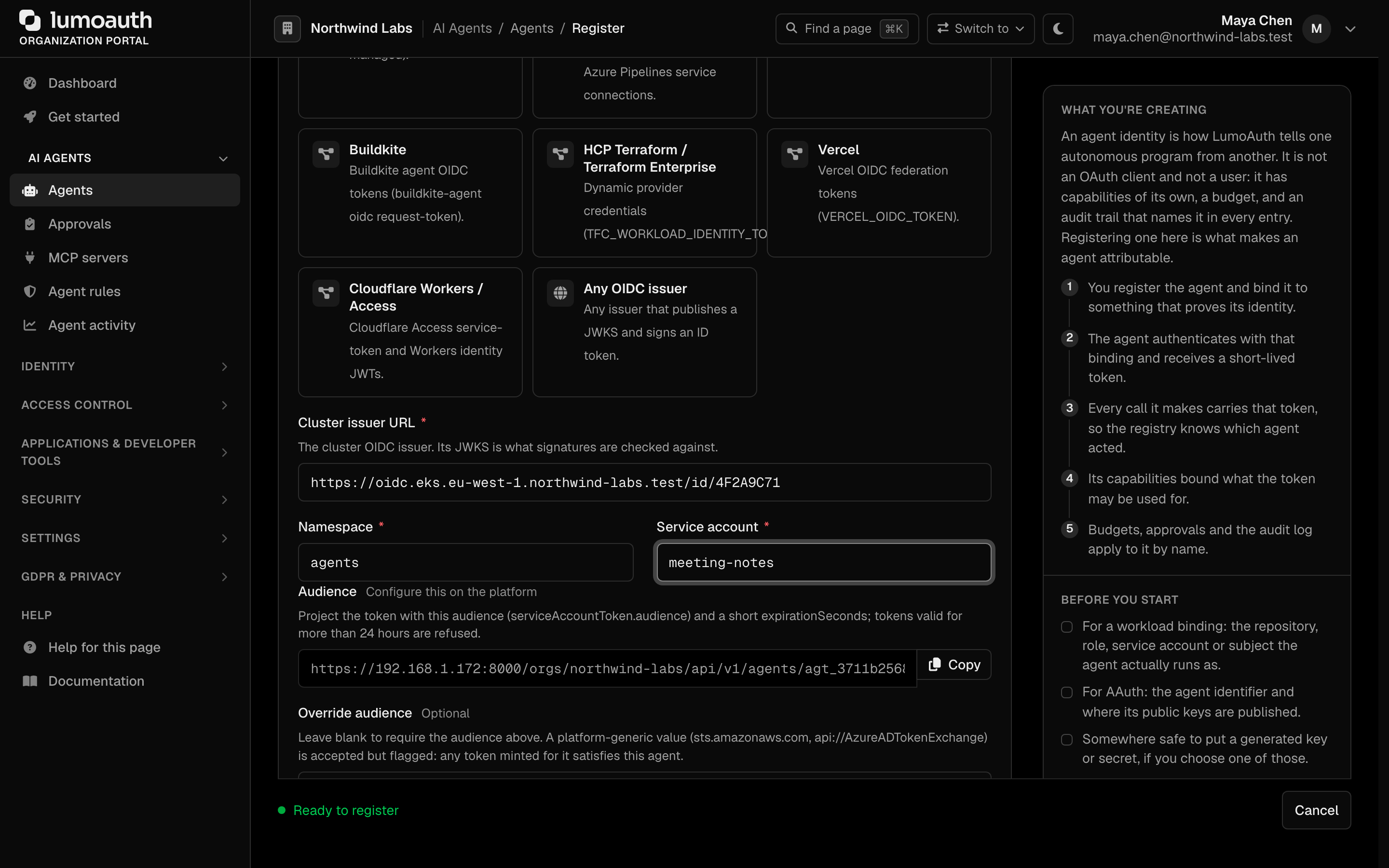
Choose where it runs — the Where it runs cards offer GitHub Actions, AWS, Google Cloud, Kubernetes, Azure, SPIFFE / SPIRE and Any OIDC issuer, plus the CI/CD and edge providers GitLab CI, Azure DevOps (Azure Pipelines), CircleCI, Buildkite, HCP Terraform / Terraform Enterprise, Vercel and Cloudflare Workers / Access.
-
Configure trust — fill in the provider-specific fields that appear below the cards (described in the provider guides), then click Register agent. LumoAuth derives the binding subject from the fields; you never type
k8s:…orgithub:…yourself.
Every provider block ends with the Audience: the agent-specific default is shown read-only with a copy button, and an Override audience field accepts a platform value when the platform cannot mint a custom audience. An override that is not hosted on your deployment (for example sts.amazonaws.com) is accepted but flagged as generic on save, in the admin API (workloadAudienceGeneric: true) and in every attestation response (identity.audience_generic: true), because any token the platform mints for that audience satisfies the agent.
GitHub Actions attestation is included on every plan. Binding an agent to AWS, GCP, Azure, Kubernetes, SPIFFE or another CI/CD platform needs an add-on; the form shows a notice when the organization's plan does not include it.
Provider guides
The binding subject in each table is what LumoAuth stores as the agent's workloadIdentity; the admin API accepts the same workloadIdentityConfig keys (see the attestation provider matrix) and fills the default audience when none is given.
GitHub Actions
Authenticate a workflow run with the token GitHub mints for it (permissions: id-token: write).
| Field | Config key | Description |
|---|---|---|
| Repository | repository | owner/repo (required) |
| Branch or tag ref | ref | refs/heads/main; a bare branch name is expanded. Default on the register form. |
| Environment | environment | Deployment environment, alternative or addition to the ref |
| Accept any branch, tag or pull request | allow_any_ref | Explicit opt-in for a repository-only binding — a fork pull request can then act as the agent |
| Repository ID / Owner ID | repository_id, repository_owner_id | Numeric ids that survive a rename or transfer (recommended) |
| Job workflow ref | job_workflow_ref | Pins the workflow file and the ref it ran from |
| Exact subject | sub | The full sub when customised in the repository OIDC settings |
Binding subject: github:owner/repo:refs/heads/main (or github:owner/repo with any ref accepted). GitHub Actions is included on every plan.
Kubernetes
Authenticate a pod with a projected ServiceAccount token.
| Field | Config key | Description |
|---|---|---|
| Cluster issuer URL | issuer | The cluster OIDC issuer (must serve discovery over HTTPS) |
| Namespace | namespace | Namespace the pod runs in |
| Service account | service_account | Name of the ServiceAccount |
Binding subject: k8s:namespace/serviceaccount. Project the token with the agent audience and a short lifetime:
volumes:
  - name: lumoauth-token
    projected:
      sources:
        - serviceAccountToken:
            audience: https://app.lumoauth.dev/orgs/acme-corp/api/v1/agents/agt_42
            expirationSeconds: 600
            path: token
Tokens that expire more than 24 hours out are refused, and each token is accepted once — read the file again only after kubelet has rotated it, or request a token per attestation through the TokenRequest API.
AWS (EKS / IRSA)
AWS is supported through IAM Roles for Service Accounts (IRSA) on EKS: the
pod's projected ServiceAccount token is an OIDC JWT signed by the cluster's
issuer, and LumoAuth verifies it against that issuer's JWKS. Plain EC2, Lambda
or ECS workloads without an OIDC token (for example an STS GetCallerIdentity
signature) are not supported — use the Custom OIDC provider or SPIFFE for
those.
| Field | Config key | Description |
|---|---|---|
| EKS OIDC issuer URL | issuer | https://oidc.eks.<region>.amazonaws.com/id/<cluster-id> |
| Namespace | namespace | Namespace the pod runs in |
| Service account | service_account | The IRSA-annotated ServiceAccount |
Binding subject: aws:irsa:namespace/serviceaccount. The IAM role ARN is not part of the binding — it is not in the token. Project a second token with the agent audience (as for Kubernetes); the IRSA token for sts.amazonaws.com is accepted only as a flagged override.
Google Cloud
Authenticate via a GCP service account identity token.
| Field | Config key | Description |
|---|---|---|
| Service account email | service_account_email | agent@project.iam.gserviceaccount.com |
| Project ID | project_id | Narrows to one project (optional) |
Binding subject: gcp:agent@project.iam.gserviceaccount.com. Fetch the token from the metadata server with ?audience=<agent audience>&format=full.
Azure
Authenticate via a managed identity or app registration (Entra ID).
| Field | Config key | Description |
|---|---|---|
| Directory (tenant) ID | tenant_id | Entra directory GUID (common / organizations / consumers are rejected) |
| Application (client) ID | client_id | The managed identity or app registration (azp / appid) |
| Object (principal) ID | object_id | Also pin the service principal oid (optional) |
| Accept every identity in this directory | allow_tenant_wide | Explicit opt-in for a directory-wide azure:<tenant_id> binding; rejected otherwise |
Binding subject: azure:<tenant_id>:<client_id>.
SPIFFE / SPIRE
Authenticate any workload that holds a SPIFFE identity (SPIRE, Istio, or another SPIFFE implementation) using a JWT-SVID. Platform-agnostic: works on bare metal, VMs, or across clouds.
| Field | Description |
|---|---|
| SPIFFE ID | spiffe://prod.acme.com/agents/report-runner — also accepts a prefix that narrows at path boundaries |
| Trust domain | prod.acme.com — SVIDs from other trust domains are rejected |
| OIDC discovery issuer URL | SPIRE OIDC Discovery Provider base URL (standard discovery → jwks_uri) |
| Static JWKS URL | Alternative to the discovery issuer for deployments without the OIDC Discovery Provider |
| Audience | Expected aud — JWT-SVIDs are audience-scoped by design, so this is always required |
See Agent attestation — SPIFFE / SPIRE for the full walkthrough.
Custom OIDC provider
Use any standard OpenID Connect provider (Auth0, Okta, Keycloak, your own issuer). In the portal this is the Any OIDC issuer card.
| Field | Config key | Description |
|---|---|---|
| Issuer URL | issuer | The iss claim value; must serve OIDC discovery over HTTPS |
| Expected subject | — | The exact sub claim (stored as the binding subject) |
| Static JWKS URL | jwks_uri | Only for issuers without discovery |
| (API only) | claims | Extra exact-match pins, e.g. {"email": "agent@example.com"} |
The subject is matched exactly (no prefix narrowing), because subject grammars differ per issuer.
CI/CD and edge platforms
Build pipelines and edge runtimes mint their own OIDC tokens, so an agent that
runs in CI never needs a stored secret either. Each of these is a first-class
choice in the agent form; fill in the fields and LumoAuth builds the binding
subject for you, discovering the signing keys from the issuer's OIDC metadata
(JWKS cached, iss/aud/exp/nbf enforced, RS256/ES256 only).
| Provider | Token | Key fields | Binding subject |
|---|---|---|---|
| GitLab CI | id_tokens: in .gitlab-ci.yml | Instance URL (blank = gitlab.com), project path, optional project ID (recommended), optional ref type + ref, audience | gitlab:group/project[:branch/main] |
| Azure DevOps | Azure Pipelines workload identity federation | Organization id (GUID) and name, project, service connection, audience (api://AzureADTokenExchange) | azdo:org/project/pipeline |
| CircleCI | CIRCLE_OIDC_TOKEN_V2 | Organization id (UUID), project id (UUID), audience | circleci:orgId/projectId |
| Buildkite | buildkite-agent oidc request-token | Organization slug, pipeline slug, audience | buildkite:org/pipeline |
| HCP Terraform / Terraform Enterprise | TFC_WORKLOAD_IDENTITY_TOKEN | Issuer (blank = app.terraform.io), organization, workspace, audience | tfc:org/workspace |
| Vercel | VERCEL_OIDC_TOKEN | Issuer (team or global mode), team slug, project, environment (default production; any accepts all), audience | vercel:team/project[:production] |
| Cloudflare Workers / Access | Access service token or Workers identity JWT | Issuer (https://<team>.cloudflareaccess.com), worker/service-token name, optional JWKS URL, AUD tag | cloudflare:team/worker |
Leaving GitLab's ref or Vercel's environment blank accepts any branch or any
environment. Pin them (branch/main, production) when the agent is only
supposed to run from one place — an attacker who can open a merge request
otherwise inherits the agent's identity.
Set the audience to something specific to your deployment — the agent-specific
default the form shows, https://<your-deployment>/orgs/<orgId>/api/v1/agents/<agentId>,
is the best choice; the organization issuer is also deployment-specific. It is
enforced on every token.
API usage (token exchange)
Once configured, your agent can exchange its platform token for a LumoAuth token:
POST /orgs/{org_id}/api/v1/oauth/token HTTP/1.1
Host: your-lumoauth-domain.com
Content-Type: application/x-www-form-urlencoded

grant_type=urn:ietf:params:oauth:grant-type:token-exchange
&subject_token=<PLATFORM_TOKEN>
&subject_token_type=urn:ietf:params:oauth:token-type:jwt
Parameters
| Parameter | Required | Description |
|---|---|---|
subject_token | Yes | The OIDC JWT from your platform. Kubernetes / AWS IRSA: content of the projected token at /var/run/secrets/.../token. GCP: metadata-server identity token. Azure: Managed Identity token. GitHub Actions: ACTIONS_ID_TOKEN_REQUEST_URL token. SPIFFE: JWT-SVID. |
subject_token_type | Yes | Must be urn:ietf:params:oauth:token-type:jwt. |
grant_type | Yes | Must be urn:ietf:params:oauth:grant-type:token-exchange. |
There is no provider selector parameter. LumoAuth reads the JWT's sub, looks
up the agent whose registered workload identity matches it, and verifies the
token with the verifier configured for that agent's provider (aws, gcp,
k8s, github, azure, spiffe, custom, …). A subject_issuer form field is accepted
for backwards compatibility but ignored. The same token rules
apply as on the attestation endpoint: exp required and within 24 hours, one-time use, agent active.
The dedicated attestation endpoint
(POST /orgs/{orgId}/api/v1/agents/{agentId}/attest; attestation is the agent
proving where it runs with its platform token) performs the same verification
when you already know the agent ID.
Example: Python
import requests

def get_access_token(org_id, subject_token):
    url = f"https://app.lumoauth.dev/orgs/{org_id}/api/v1/oauth/token"
    payload = {
        "grant_type": "urn:ietf:params:oauth:grant-type:token-exchange",
        "subject_token": subject_token,
        "subject_token_type": "urn:ietf:params:oauth:token-type:jwt"
    }

    response = requests.post(url, data=payload)
    response.raise_for_status()
    return response.json()["access_token"]

# 1. Read the Kubernetes ServiceAccount token
with open('/var/run/secrets/kubernetes.io/serviceaccount/token') as f:
    k8s_token = f.read().strip()

# 2. Exchange for a LumoAuth token
token = get_access_token("acme-corp", k8s_token)
print(f"Got Access Token: {token}")
LumoAuth validates that the aud claim in the subject token matches the expected audience configured for the agent.
Common mistakes
- The exchange fails and the error body does not say why. Verification details name the agent's registered binding, so they are logged server-side only (and, on the attestation endpoint, audited as
agent.attestation.rejected). Check the audit log or ask your operator for theWorkload identity token rejected during token exchangelog line. - No agent matches the token. LumoAuth looks up the agent by the normalized subject (for example
k8s:namespace/serviceaccount). If the registeredworkloadIdentitydoes not match, or the agent is notactive, the grant is refused. - The second exchange with the same token fails. Tokens are one-time use (
jti, or a hash of the token when the issuer mints none). Fetch a new platform token per exchange. - A binding saved before this release never matches. Older portal bindings stored a role ARN, a raw e-mail or
system:serviceaccount:ns:saand no audience. Open the agent, review the binding fields and save; LumoAuth rewrites it in the canonical form with the agent audience. - Plain EC2, Lambda or ECS. These have no OIDC token; use Custom OIDC or SPIFFE.
- Token verified but
403 access_policy_denied. A conditional access policy denied the agent; thereasonfield names the rule.
Related
- Agent Registry — create the agent and configure trust
- Chain of Agency — act on behalf of a user after authenticating the workload
Standards used on this page
| Plain name | Standard |
|---|---|
| Token exchange (delegation) | RFC 8693 |
See the standards reference for what each one covers and how LumoAuth uses it.