Agent Auth (AAuth) Protocol
AAuth is an authorization framework for autonomous agents acting on behalf of users and organizations — the agent identity protocol in which an agent proves who it is by signing each request with its own private key instead of sending a shared secret. It gives agents and resources cryptographic identities, binds every token to a key (proof-of-possession), and sends every call as a signed HTTP request (an HTTP message signature: a cryptographic signature over specific parts of the request — method, path, selected headers, body digest). The verifier rebuilds the signature input from the request and checks the signature — so every call has a replay-proof proof of possession.
AAuth is an emerging protocol under active development. LumoAuth tracks the current draft and may adjust as the standard evolves. The full normative protocol reference — token formats, signature profile, discovery documents, and error codes — is the AAuth 1.0 Specification.
Overview
AAuth extends OAuth 2.1 for agents with cryptographic identities. Unlike traditional OAuth clients that require user interaction for each authorization, AAuth supports:
- Autonomous operation — agents act independently once authorized
- Cryptographic identity — all parties have verifiable identities via public-key cryptography
- Proof-of-possession — every token is bound to a key, preventing token theft
- Signed HTTP requests — every request is signed, protecting integrity and preventing replay
- Progressive authentication — from "no user" to "user actively present"
- Delegation — agents delegate capabilities to sub-agents
- Token exchange — agents exchange tokens across trust boundaries
Key concepts
Parties in AAuth
| Party | Description | Identity |
|---|---|---|
| Agent | An autonomous software entity | HTTPS URL with cryptographic identity |
| Resource | A protected service or API | URI with cryptographic identity |
| Authorization Server | Issues tokens after verifying identities | LumoAuth organization endpoint |
| User | Human who authorizes agents | Optional, depending on auth level |
Token types
AAuth defines three JWT token types. A JWT (JSON Web Token) is a signed JSON payload; all AAuth tokens are JWTs bound to a public key:
- Agent Token (
agent+jwt) — proves the agent (or a per-session delegate of it) to the authorization server. Issued by the agent server to a delegate, bound to the delegate's public key viacnf.jkt. Presented to LumoAuth in theagent_tokenfield. - Resource Token (
resource+jwt) — proves the resource's identity to the authorization server. Issued to resources, short-lived (resource-configured, 5 minutes by default), bound to the resource's public key viacnf.jkt. - Auth Token (
auth+jwt) — authorizes an agent's access to a specific resource. Issued by LumoAuth for a specific agent+resource+user combination, 1 hour default, bound to the agent's public key viacnf.
Authentication levels
| Level | Description | User interaction | Use cases |
|---|---|---|---|
none | No user identity | None | Public APIs, anonymous access |
authenticated | User logged in once | Initial only | General agent tasks |
authorized | User explicitly approved | Explicit consent | Sensitive operations |
user | User actively present | Per-request | High-security operations |
Protocol flows
Flow 1: Agent registration
Before participating in AAuth, agents and resources must register with the authorization server.
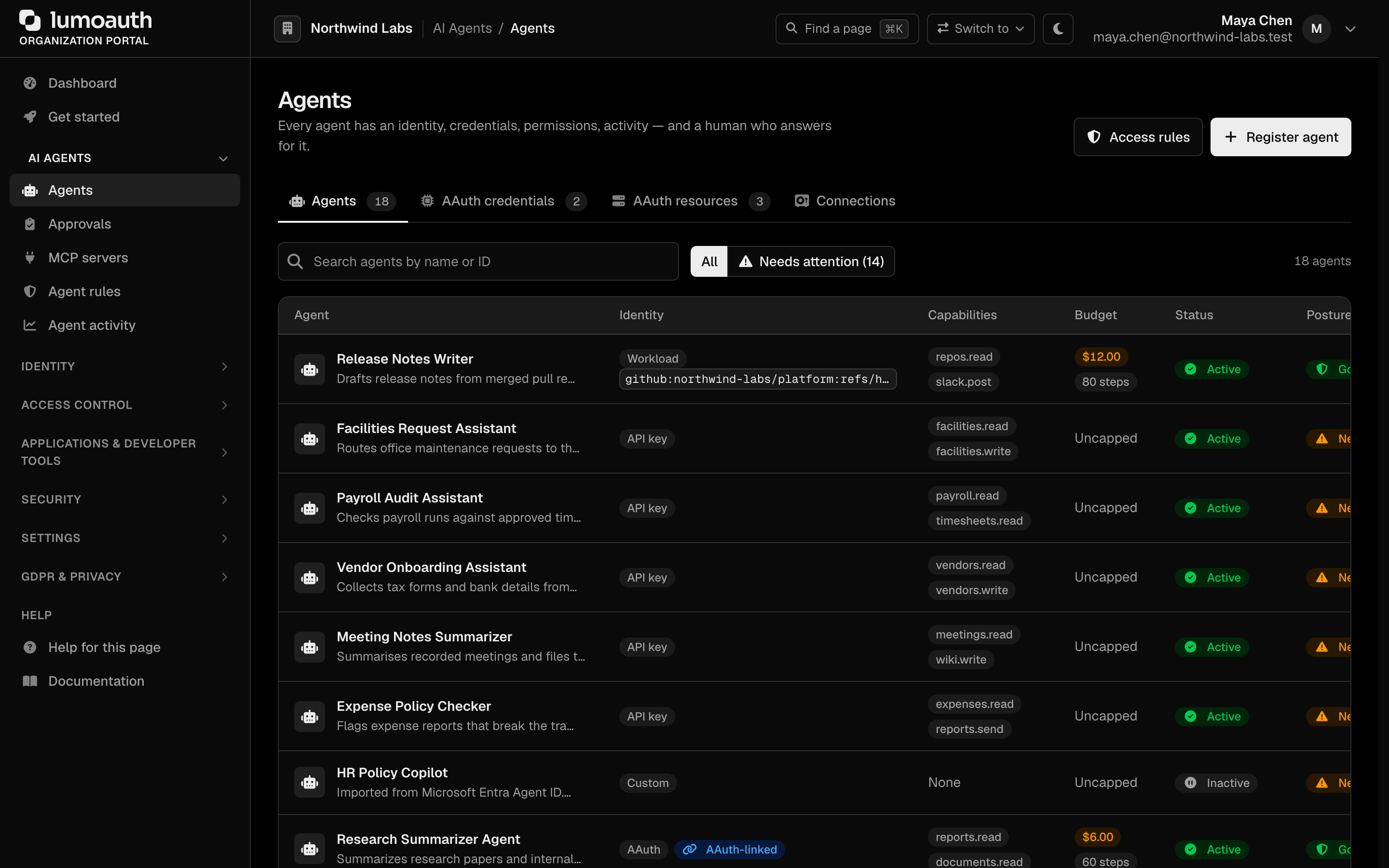
Register agents and resources through the Organization Portal at
/orgs/{orgId}/portal/agents?tab=aauth (the older /orgs/{orgId}/portal/aauth/agents URL still
works but redirects here), or via the API. AI Agents → Agents has a
Register agent button; its AAuth resources tab has Register resource and lists the
organization's AAuth discovery endpoints.
Flow 2: Direct authorization (no user)
For none or authenticated level access, no user interaction is needed:
The request carries the agent's credential in Agent-Auth (as agent_token=<JWT>) and is signed with the standard Signature/Signature-Input request-signature headers (see Step 6).
For request_type=auth, the granted scope comes from the resource token's
scope claim (set when the resource token is minted — see Step 5).
A scope field in the auth request body is ignored. To narrow scope, mint a
resource token with the narrower scope.
When no user is in the loop, every requested scope must be one of the agent's
Pre-authorized scopes in its registration — this applies even when
user-in-the-loop authorization is switched off for the agent. A scope outside
that list is rejected with invalid_scope rather than silently granted.
POST https://app.lumoauth.dev/orgs/{orgId}/api/v1/aauth/agent/token
Content-Type: application/json
Agent-Auth: agent_token=eyJhbGc...
Signature-Input: sig1=("@method" "@target-uri" "content-type" "content-digest" "authorization");created=1706814000;nonce="abc123..."
Signature: sig1=:base64url-signature:

{
  "request_type": "auth",
  "agent_token": "eyJhbGc...",
  "resource_token": "eyJhbGc..."
}

Response 200:
{
  "request_type": "auth",
  "auth_token": "eyJhbGc...",
  "token_type": "auth+jwt",
  "expires_in": 3600,
  "refresh_token": "aauth_refresh_abc123def456"
}
refresh_token is only present when the agent is registered with refresh tokens enabled. expires_in reflects the issued token's configured lifetime.
Flow 3: User authorization (explicit consent)
For authorized or user level access:
- Agent to Auth Server: Request authorization (agent_token + resource_token)
- Auth Server to Agent: 200: request_token + authorization_uri
- Agent to User: Redirect to consent screen (authorization_uri)
- User to Auth Server: User approves/denies
- Auth Server to Agent: Redirect with authorization code
- Agent to Auth Server: Exchange code for tokens
- Auth Server to Agent: auth_token + refresh_token
- Agent to Resource: Access protected resource with auth_token
- Resource to Agent: Protected data
Worked example: AI email agent
A complete walkthrough of an AI email agent reading and sending mail for a user.
Scenario
| Component | Identifier | Description |
|---|---|---|
| Agent | https://email-agent.aiservices.com | AI email assistant |
| Resource | https://api.mailservice.com | Email API service |
| Auth Server | https://app.lumoauth.dev/orgs/acme-corp | LumoAuth organization |
| User | alice@acme-corp.com | Alice wants to use the agent |
Step 1: Register the agent (one-time)
In the Organization Portal, go to /orgs/acme-corp/portal/agents/create?identity_type=aauth (AI Agents → Agents → Register agent, with AAuth selected on step 2, How it proves its identity; the form opens at step 1, so give the agent a name and click Next first) and configure:
- Agent name: AI Email Assistant
- Agent identifier:
email-agent@aiservices.com(the form asks forlocal@domainform, like an email address; it must match the identifier your agent code uses exactly) - JWKS URL:
https://email-agent.aiservices.com/.well-known/jwks.json(or paste the key set into JWKS (inline)) - Signing algorithms:
ed25519,ecdsa-p256-sha256,rsa-pss-sha512(the registered HTTP-signature algorithm names; dispatched by key type) - On step 3, under Acting for people: ✅ User-in-the-loop authorization, ✅ Delegation to sub-agents, ✅ Token exchange, and Pre-authorized scopes
email:read,email:send,email:delete(one per line)

Click Register agent. Then open the new registration from the AAuth credentials tab of the Agents page and edit it to add:
- Redirect URIs:
https://email-agent.aiservices.com/oauth/callback
Step 2: Register the resource (one-time)
At /orgs/acme-corp/portal/aauth/resources/create (Register resource on the AAuth resources tab of the Agents page):
- Resource name: Corporate Email API
- Resource identifier:
https://api.mailservice.com - JWKS URI:
https://api.mailservice.com/.well-known/jwks.json - Supported scopes:
email:read,email:send,email:delete(one per line) - Default auth level: Authorized — an auth token is required (requires explicit user consent)
Click Register resource.

Step 3: Agent generates a key pair
AAuth uses Ed25519 by default. Ed25519 is a modern elliptic-curve signature scheme — short keys, fast, widely supported. The agent generates a key pair per user session:
// Email agent code (Node.js)
const crypto = require('crypto');

// Generate Ed25519 key pair for this user session
const { publicKey, privateKey } = crypto.generateKeyPairSync('ed25519', {
  publicKeyEncoding: { type: 'spki', format: 'pem' },
  privateKeyEncoding: { type: 'pkcs8', format: 'pem' }
});

// Convert to JWK format
const publicKeyJwk = {
  kty: 'OKP',
  crv: 'Ed25519',
  x: publicKey.export({ type: 'spki', format: 'der' })
    .slice(-32).toString('base64url')
};

// Store private key securely for this session
session.agentPrivateKey = privateKey;
session.agentPublicKeyJwk = publicKeyJwk;
Step 4: Obtain an agent token
The main agent server issues an agent token to Alice's session delegate:
const agentToken = await fetch('https://email-agent.aiservices.com/delegate/token', {
  method: 'POST',
  headers: { 'Content-Type': 'application/json' },
  body: JSON.stringify({
    delegate_sub: `https://email-agent.aiservices.com/session/${alice.sessionId}`,
    delegate_public_key: publicKeyJwk,
    audience: ['https://app.lumoauth.dev/orgs/acme-corp/api/v1'],
    lifetime: 3600
  })
}).then(r => r.json());

console.log('Agent Token:', agentToken.access_token);
Resulting agent token claims:
{
  "typ": "agent+jwt",
  "alg": "EdDSA",
  "kid": "agent-key-1"
}
{
  "iss": "https://email-agent.aiservices.com",
  "sub": "https://email-agent.aiservices.com/session/alice-123",
  "aud": ["https://app.lumoauth.dev/orgs/acme-corp/api/v1"],
  "exp": 1706817600,
  "iat": 1706814000,
  "jti": "agent_token_abc123",
  "cnf": {
    "jkt": "SHA256_thumbprint_of_delegate_public_key"
  }
}
Step 5: Resource creates a resource token
The email API creates a short-lived resource token to prove its identity. The resource authenticates with its own signed HTTP request (Signature + Signature-Input headers signed with the resource's registered key — there is no Bearer fallback). The body must name the agent it is being created for (agent) and that agent's key thumbprint (agent_jkt):
const requestBody = {
  resource: 'https://api.mailservice.com',   // or resource_identifier
  agent: 'https://email-agent.aiservices.com',
  agent_jkt: agentToken.cnf.jkt,             // SHA-256 thumbprint of the agent's public key
  scope: 'email:read email:send'             // optional
};

const resourceToken = await fetch(
  'https://app.lumoauth.dev/orgs/acme-corp/api/v1/aauth/resource/token',
  {
    method: 'POST',
    headers: {
      'Content-Type': 'application/json',
      // Sign with the resource's registered key (see Step 6 for the signing pattern):
      ...signResource('POST',
        'https://app.lumoauth.dev/orgs/acme-corp/api/v1/aauth/resource/token',
        requestBody)
    },
    body: JSON.stringify(requestBody)
  }
).then(r => r.json());

console.log('Resource Token:', resourceToken.resource_token);  // token_type: 'resource+jwt'
The token lifetime comes from the resource's configured resourceTokenLifetime (returned as expires_in); a lifetime field in the body is ignored. The response is { resource_token, token_type: 'resource+jwt', expires_in }.
Step 6: Request authorization with user consent
The agent requests authorization with Alice's consent. The request is authenticated with a standard HTTP message signature carried in the Signature and Signature-Input headers — the agent's credential travels separately in Agent-Auth as agent_token=<JWT>.
Hand-rolling the signature is easy to get subtly wrong (covered-component list, the mandatory nonce, base64 vs base64url). Prefer the LumoAuth SDK signer — AAuthClient.sign_request() from the lumoauth package (Python), signRequest() from @lumoauth/agent (Node.js) or SignRequest in the Go SDK — which emits the exact headers the server requires. The example below shows the wire format for reference.
The server requires the signature to cover @method, @target-uri (or @authority/@path), content-type, content-digest, and authorization, and Signature-Input must include both created and a fresh nonce (replay protection):
const crypto = require('crypto');

// Build request body
const requestBody = {
  request_type: 'auth',
  agent_token: agentToken.access_token,
  resource_token: resourceToken.resource_token,
  // No `scope` here: for request_type=auth the server derives scope from the
  // resource token's `scope` claim (Step 5). A body `scope` is ignored.
  redirect_uri: 'https://email-agent.aiservices.com/oauth/callback'
};

const method = 'POST';
const targetUri = 'https://app.lumoauth.dev/orgs/acme-corp/api/v1/aauth/agent/token';
const contentType = 'application/json';
const bodyBytes = Buffer.from(JSON.stringify(requestBody));
const contentDigest = `sha-256=:${crypto.createHash('sha256').update(bodyBytes).digest('base64')}:`;

const created = Math.floor(Date.now() / 1000);
const nonce = crypto.randomBytes(16).toString('base64url'); // fresh per request

// Covered components + signature parameters (created + nonce)
const covered = '("@method" "@target-uri" "content-type" "content-digest" "authorization")';
const sigParams = `${covered};created=${created};nonce="${nonce}"`;

const signatureBase = [
  `"@method": ${method}`,
  `"@target-uri": ${targetUri}`,
  `"content-type": ${contentType}`,
  `"content-digest": ${contentDigest}`,
  `"authorization": `, // no Authorization header on this call
  `"@signature-params": ${sigParams}`
].join('\n');

const signature = crypto.sign(null, Buffer.from(signatureBase), session.agentPrivateKey);

// Request authorization
const authResponse = await fetch(targetUri, {
  method: 'POST',
  headers: {
    'Content-Type': contentType,
    'Content-Digest': contentDigest,
    'Agent-Auth': `agent_token=${agentToken.access_token}`,
    'Signature-Input': `sig1=${sigParams}`,
    'Signature': `sig1=:${signature.toString('base64url')}:`
  },
  body: JSON.stringify(requestBody)
});

// When user consent is required, the server replies 200 with a request_token
// and an authorization_uri to redirect the user to.
const authData = await authResponse.json();
if (authData.authorization_uri) {
  console.log('User authorization required');
  console.log('Authorization URL:', authData.authorization_uri);
  session.requestToken = authData.request_token;

  // Redirect Alice to the consent screen
  redirectUser(authData.authorization_uri);
}
A 401 from this endpoint is the Agent-Auth authentication challenge (error: "authentication_required") — a signature/credential failure, not the consent path. The "user consent needed" response is a 200 carrying request_token + authorization_uri.
Step 7: User sees the consent screen
Alice is redirected to the LumoAuth consent screen, which shows:
- Agent: AI Email Assistant (
https://email-agent.aiservices.com) - Will access: Corporate Email API (
https://api.mailservice.com) - Permissions requested: ☑️
email:read— read emails and metadata; ☑️email:send— send emails on your behalf - Trust indicators: ✅ Verified agent identity ✅ Verified resource identity ✅ Cryptographically secured
This application will act on behalf of Alice (alice@acme-corp.com).
Step 8: Exchange the authorization code for tokens
After Alice approves, she's redirected back with an authorization code:
// Alice is redirected back with authorization code
// https://email-agent.aiservices.com/oauth/callback?code=authz_code_abc123def456

const codeExchangeBody = {
  request_type: 'code',
  code: 'authz_code_abc123def456',
  redirect_uri: 'https://email-agent.aiservices.com/oauth/callback' // must match the registered URI
};

// Sign and exchange code for tokens (same Signature/Signature-Input + Agent-Auth
// pattern as Step 6 — signRequest returns those headers).
const tokenResponse = await fetch(targetUri, {
  method: 'POST',
  headers: {
    'Content-Type': 'application/json',
    ...signRequest('POST', targetUri, codeExchangeBody)
  },
  body: JSON.stringify(codeExchangeBody)
}).then(r => r.json());

console.log('Auth Token:', tokenResponse.auth_token);
console.log('Refresh Token:', tokenResponse.refresh_token);
console.log('Expires in:', tokenResponse.expires_in, 'seconds');

// Store tokens securely
session.authToken = tokenResponse.auth_token;
session.refreshToken = tokenResponse.refresh_token;
Step 9: Access the email API
When calling the resource directly with the auth token, the agent signs the request the same way and the resource verifies that the HTTP signature key matches the cnf.jkt bound into the auth token (proof-of-possession). signEmailRequest returns the standard Signature/Signature-Input headers:
// Read emails
const signEmailRequest = (method, url, authToken) => {
  const created = Math.floor(Date.now() / 1000);
  const nonce = crypto.randomBytes(16).toString('base64url');
  const covered = '("@method" "@target-uri" "authorization")';
  const sigParams = `${covered};created=${created};nonce="${nonce}"`;

  const signatureBase = [
    `"@method": ${method}`,
    `"@target-uri": ${url}`,
    `"authorization": Bearer ${authToken}`,
    `"@signature-params": ${sigParams}`
  ].join('\n');

  const signature = crypto.sign(null, Buffer.from(signatureBase), session.agentPrivateKey);
  return {
    'Signature-Input': `sig1=${sigParams}`,
    'Signature': `sig1=:${signature.toString('base64url')}:`
  };
};

const emails = await fetch('https://api.mailservice.com/v1/emails/inbox', {
  method: 'GET',
  headers: {
    'Authorization': `Bearer ${session.authToken}`,
    ...signEmailRequest('GET',
      'https://api.mailservice.com/v1/emails/inbox',
      session.authToken)
  }
}).then(r => r.json());

console.log('Fetched', emails.length, 'emails');
// Send email
const emailData = {
  to: 'bob@example.com',
  subject: 'Meeting Summary',
  body: 'Here is the summary of our meeting...',
  from: 'alice@acme-corp.com'
};

const emailBody = JSON.stringify(emailData);
const emailDigest = `sha-256=:${crypto.createHash('sha256')
  .update(Buffer.from(emailBody))
  .digest('base64')}:`;

const sendResult = await fetch('https://api.mailservice.com/v1/emails/send', {
  method: 'POST',
  headers: {
    'Authorization': `Bearer ${session.authToken}`,
    'Content-Type': 'application/json',
    'Content-Digest': emailDigest,
    'Agent-Auth': signEmailRequestWithBody('POST',
      'https://api.mailservice.com/v1/emails/send',
      session.authToken, emailDigest)
  },
  body: emailBody
}).then(r => r.json());

console.log('Email sent:', sendResult.message_id);
Step 10: Refresh the token
// The refresh token is bound to the resource it was issued for: the fresh
// resource token MUST come from that same resource, and the scopes it carries
// can only narrow the original grant (never widen it).
const refreshBody = {
  request_type: 'refresh',
  refresh_token: session.refreshToken,
  resource_token: resourceToken.resource_token, // required: a fresh resource token for the SAME resource
  scope: 'email:read email:send'
};

const refreshResponse = await fetch(targetUri, {
  method: 'POST',
  headers: {
    'Content-Type': 'application/json',
    ...signRequest('POST', targetUri, refreshBody)
  },
  body: JSON.stringify(refreshBody)
}).then(r => r.json());

// Update tokens
session.authToken = refreshResponse.auth_token;
session.refreshToken = refreshResponse.refresh_token || session.refreshToken;

console.log('Tokens refreshed');
Security features
1. Proof-of-possession binding
All tokens are bound to cryptographic keys. A stolen token is useless without the matching private key.
2. Signed HTTP requests
Every request is signed, protecting against:
- Request tampering
- Replay attacks (with nonce validation)
- Man-in-the-middle attacks
3. Cryptographic identity verification
All parties have verifiable cryptographic identities with published JWKS endpoints.
4. Delegation chain tracking
The act (actor) claim tracks the complete delegation chain:
{
  "sub": "user_12345",
  "client_id": "https://primary-agent.com",
  "act": {
    "sub": "https://delegate-agent.com",
    "act": {
      "sub": "https://sub-delegate.com"
    }
  }
}
API reference
Agent token endpoint
POST /orgs/{orgId}/api/v1/aauth/agent/token
Main endpoint for token operations. Requires the agent token in the Agent-Auth header and a signed HTTP request (Signature/Signature-Input headers) made with the key bound to that token.
| request_type | Purpose | Required fields |
|---|---|---|
auth | Request new auth token | agent_token, resource_token (scope is taken from the resource token; a body scope is ignored) |
code | Exchange authorization code | code, redirect_uri |
refresh | Refresh auth token | refresh_token, resource_token (must be issued by the resource the refresh token was granted for; scopes may only narrow the stored grant) |
exchange | Exchange token across boundaries | auth_token, resource_token |
A success response carries request_type, the issued auth_token, token_type (auth+jwt), and expires_in (plus refresh_token when enabled). When request_type=auth needs user consent, the response is instead 200 with request_token + authorization_uri.
Discovery endpoints
All AAuth discovery metadata is hosted by LumoAuth and is organization-scoped under /orgs/{orgId}/api/v1:
GET /orgs/{orgId}/api/v1/.well-known/aauth-issuer — authorization server metadata (supported algorithms, token types, request types, endpoints). For example, it reports agent_signing_algs_supported: ["ed25519", "ecdsa-p256-sha256", "rsa-pss-sha512"] and request_types_supported: ["auth", "code", "exchange", "refresh"].
GET /orgs/{orgId}/api/v1/.well-known/aauth-agent — registered-agent metadata, including the agent's JWKS URI and supported capabilities.
GET /orgs/{orgId}/api/v1/.well-known/aauth-resource — registered-resource metadata, including supported scopes and auth levels.
These describe agents/resources registered with this LumoAuth organization — distinct from each agent's or resource's own /.well-known/jwks.json, which it self-hosts.
Other endpoints
| Method & path | Purpose |
|---|---|
POST /orgs/{orgId}/api/v1/aauth/agent/issue | Issue an agent token (agent+jwt) to a per-session delegate. |
POST /orgs/{orgId}/api/v1/aauth/resource/token | Create a resource token (resource+jwt); see Step 5. |
POST /orgs/{orgId}/api/v1/aauth/resource/token/verify | Resource validates a resource token it received. |
POST /orgs/{orgId}/api/v1/aauth/auth/token/verify | Resource validates an auth token presented by an agent. Returns pop_required: true — the resource must confirm the incoming request's HTTP Message Signature key matches the token's cnf.jkt. |
POST /orgs/{orgId}/api/v1/aauth/token/revoke | Revoke a token issued to the calling agent (signed request). Tokens of other agents are left alone; the response is always 200 {"revoked": true}. |
GET /orgs/{orgId}/api/v1/aauth/jwks.json | Authorization server JWKS. |
GET /orgs/{orgId}/api/v1/aauth/agents/{agentId}/jwks.json | A registered agent's published JWKS. |
GET /orgs/{orgId}/api/v1/aauth/resources/{resourceId}/jwks.json | A registered resource's published JWKS. |
Best practices
For agents
- Generate a unique key pair per user session — don't reuse keys across users
- Store private keys securely — use an HSM if possible, encrypt at rest
- Request only the scopes you need
- Refresh proactively — before tokens expire
- Validate all responses — check signatures and claims
For resources
- Verify proof-of-possession — don't accept tokens without valid signatures
- Validate token claims — check
aud,scope,exp - Implement clear error responses
- Cache validated tokens — to rate-limit verification cost
- Log security events — failed verifications, insufficient scopes
Never store private keys in source code or environment variables in production. Use a Hardware Security Module (HSM) or secure key management service.
Related
- AAuth Quickstart — minimal working setup
- Agent Registry — manage agent registrations in your organization
- Chain of Agency — token exchange and delegation patterns (the delegation chain records which user asked which agent to act)
Standards used on this page
| Plain name | Standard |
|---|---|
| Signed HTTP requests (HTTP message signatures) | RFC 9421 |
| JSON Web Token (JWT) | RFC 7519 |
| Key thumbprint | RFC 7638 |
| Request body digest | RFC 9530 |
See the standards reference for what each one covers and how LumoAuth uses it.