Identity Federation
Federation content is split across several guides to match the two audiences it serves:
- Human users from an external IdP (identity provider: Okta, Microsoft Entra ID, ADFS, Google Workspace, OneLogin, Ping, JumpCloud, Duo): Enterprise SSO and the SAML 2.0 API
- AI agents and workloads running in cloud infrastructure (K8s, AWS, GCP): Workload Federation
- Token exchange (swapping one token for another) between identity domains: Chain of Agency
The rest of this page is a directory of everything an organization can federate with today.
Enterprise SSO connectors (OIDC)
Add these from Organization portal → Settings → Integrations → Enterprise
SSO (OIDC) → Add a provider (the vendor tiles; the last tile is the generic
form for any other OpenID Connect provider). Each connector asks only for the vendor-specific fields it
needs, derives the issuer from them, and fetches
{issuer}/.well-known/openid-configuration to fill in the authorization,
token, userinfo, JWKS and end-session endpoints. The discovery fetch is
SSRF-checked and IP-pinned; you can override any endpoint by hand.
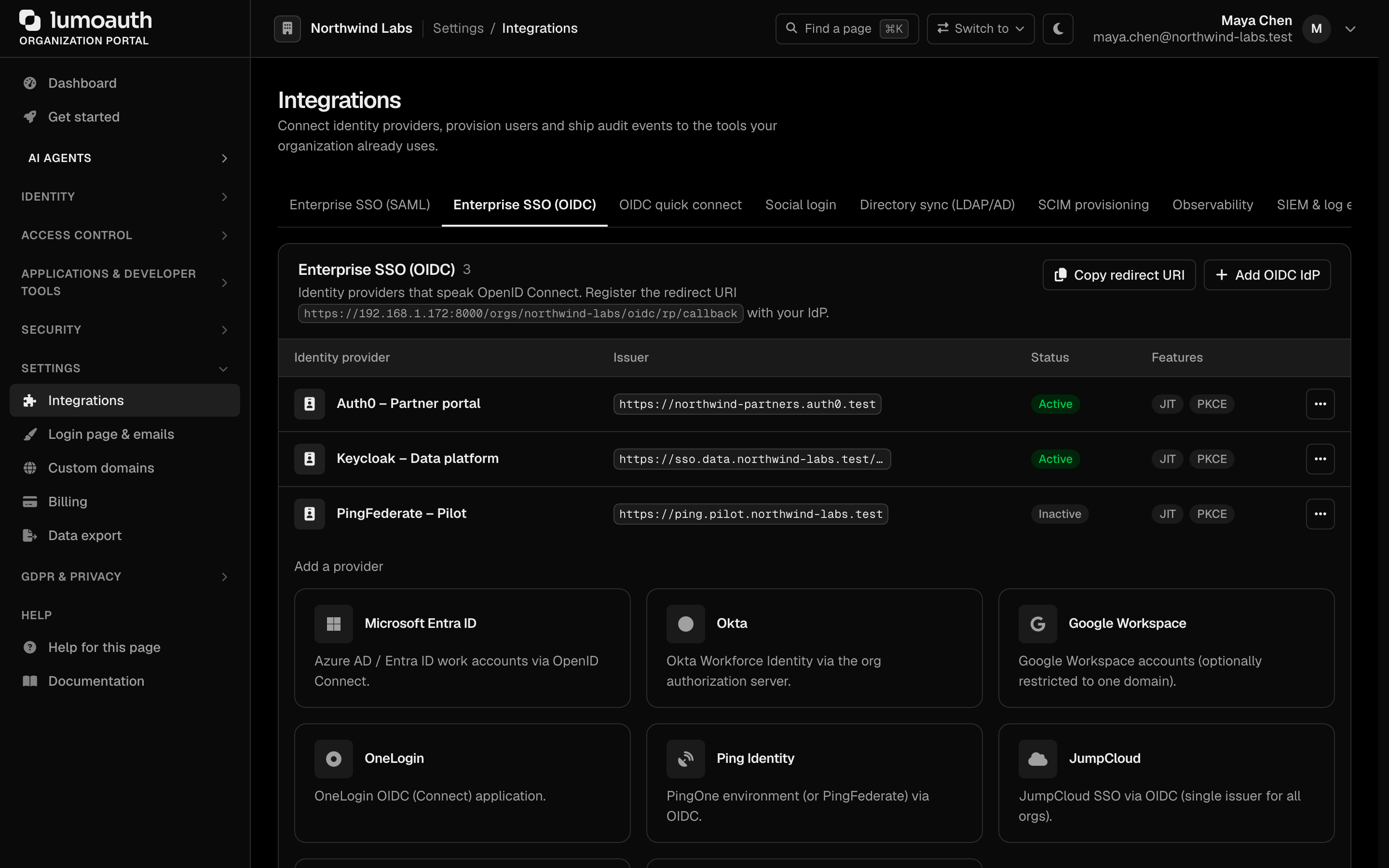
| Connector | Vendor fields | Issuer |
|---|---|---|
| Microsoft Entra ID | Directory (tenant) ID | https://login.microsoftonline.com/{tenant}/v2.0 |
| Okta | Okta domain (optionally …/oauth2/default) | https://{domain} |
| Google Workspace | Workspace domain (optional, restricts the hd claim) | https://accounts.google.com |
| OneLogin | OneLogin subdomain | https://{subdomain}.onelogin.com/oidc/2 |
| Ping Identity | PingOne environment ID + auth domain (auth.pingone.com, .eu, .ca, .asia or a custom domain) | https://{auth domain}/{env id}/as |
| JumpCloud | — (single issuer for all orgs) | https://oauth.id.jumpcloud.com |
| Cisco Duo SSO | Duo SSO subdomain (the sso-xxxxxxxx part) | https://sso-{id}.sso.duosecurity.com/oidc/{client_id} |
Each connector page shows the redirect URI to paste into the vendor console plus the vendor's own setup steps. Saving creates a real OIDC IdP configuration, so the connection appears in the OIDC table and users can sign in with it immediately. The generic Add OIDC IdP form is still there for providers without a preset.
SAML 2.0
LumoAuth is both a SAML Service Provider (SP: it accepts sign-ins from your customers' identity providers) and a SAML Identity Provider (IdP: it signs users into SAML applications). See SAML SP and SAML IdP. As an SP, LumoAuth requires inbound single-logout messages to be signed by the IdP, binds each user to the IdP that issued their NameID, and links or provisions accounts only for each IdP's Allowed email domains (see How SAML users are matched).
Social logins
Configure these under Settings → Integrations → Social login (click Add provider). Each provider needs an OAuth client you create at the vendor, the redirect URI LumoAuth shows you, and (optionally) a scope override — sensible defaults are filled in per provider.
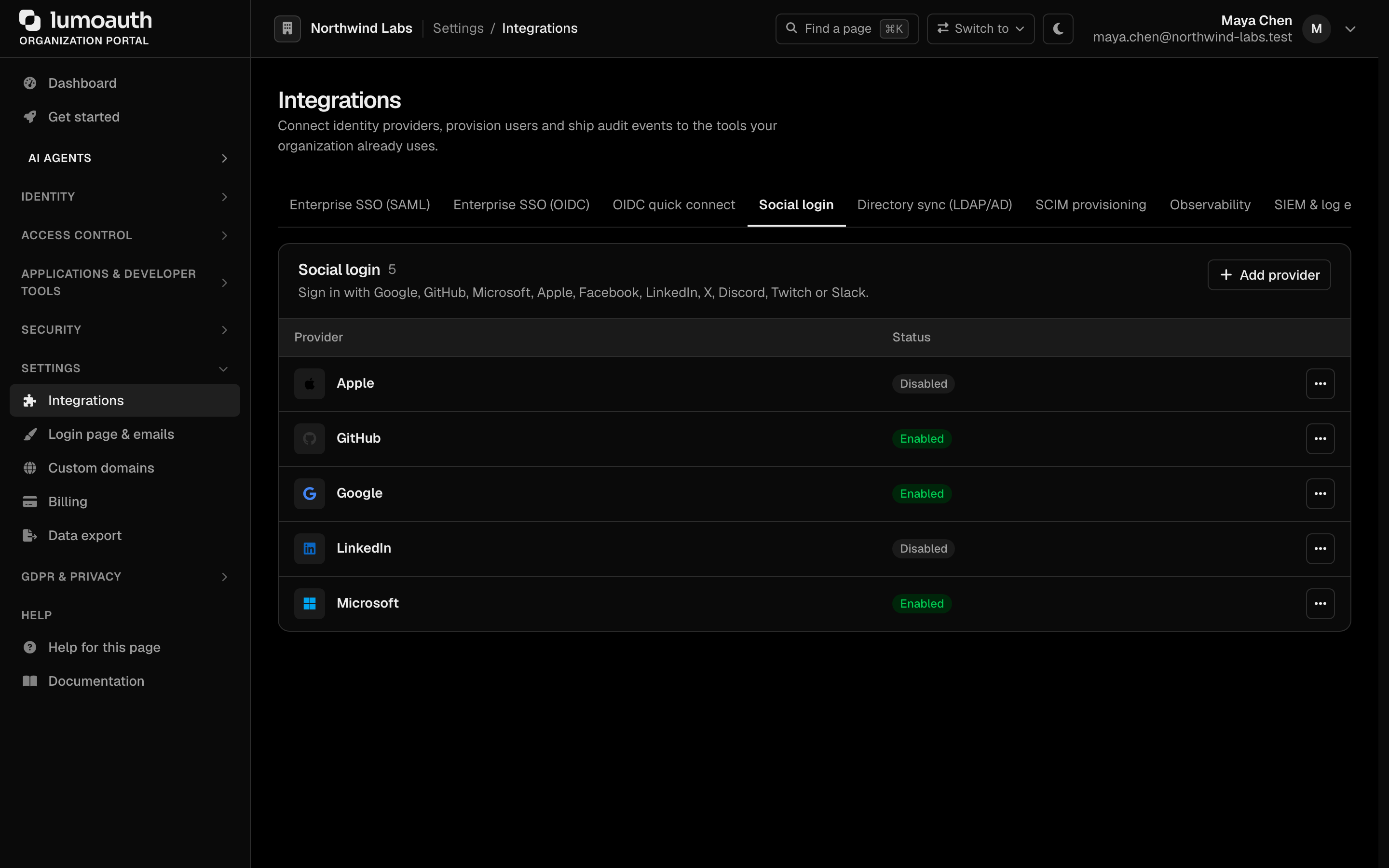
| Provider | Default scopes | Identity source | |
|---|---|---|---|
openid profile email | Verified ID token | Yes, verification asserted | |
| Microsoft | openid profile email User.Read | Verified ID token | Yes |
| Apple | name email | Verified ID token | Yes, verification asserted |
email public_profile | Graph /me | Yes, verification not asserted | |
r_liteprofile r_emailaddress | /v2/me + /v2/emailAddress | Yes, verification not asserted | |
| GitHub | read:user user:email | /user + /user/emails | Primary verified address only |
| X (formerly Twitter) | users.read tweet.read | /2/users/me | No — see below |
| Discord | identify email | /users/@me | Yes; verified is honoured |
| Twitch | user:read:email | Helix /helix/users | Yes, verification not asserted |
| Slack | openid profile email | Verified ID token (Sign in with Slack) | Yes, verification asserted |
Notes:
- X requires PKCE. LumoAuth generates an S256 code challenge for X automatically and authenticates the token request with HTTP Basic, as X requires. No configuration is needed.
- X never returns an e-mail address. LumoAuth provisions users by e-mail, and linking a provider requires its e-mail to match the signed-in account's, so X can currently neither create nor be linked to an account.
- Twitch is called through the Helix API, which needs the app client id alongside the access token; LumoAuth sends it for you.
- Slack is a real OIDC provider: the ID token is signature-verified against Slack's JWKS and preferred over the userinfo endpoint.
- Providers that do not assert e-mail verification are treated as unverified. LumoAuth refuses to auto-link them onto a pre-existing account, and a new account they create stays inactive until the user verifies the address from the e-mailed link. Verifying from another browser drops the social link. See Unverified provider emails.
- Linking a provider (by the signed-in account owner) requires the provider's e-mail to match the account's e-mail. The callback URL is always generated by LumoAuth; provider error text is logged, never shown to users.
- A social sign-in runs the same account checks as a password sign-in (deleted, blocked, inactive and locked users are refused) and creates a regular, revocable session. Default roles granted on first sign-in can never be administrator roles; see Social Login.
Directory sync
- LDAP / Active Directory — direct bind authentication with attribute mapping and JIT provisioning. The directory must be reachable at a public address, its TLS certificate is always verified, and empty passwords are never sent to the directory; see Enterprise SSO. Accounts are linked by directory and DN; an e-mail match only adopts an account nothing else owns (see How LDAP users are matched).
- Inbound SCIM 2.0 (System for Cross-domain Identity Management, the standard for syncing users and groups between systems) — an upstream IdP provisions users and groups into LumoAuth; see SCIM.
- Outbound SCIM 2.0 — LumoAuth provisions downstream apps, with vendor presets for Okta, Entra, OneLogin, JumpCloud, Google Workspace, Salesforce, GitHub, Slack, Zoom and Atlassian.
- HRIS sync — the HR system is the source of truth for joiners, movers and leavers; see HRIS sync.
Workload and agent identity
- Workload Federation — Kubernetes, AWS, GCP, Azure, GitHub OIDC and SPIFFE.
- Chain of Agency — token exchange between identity domains.
Standards used on this page
| Plain name | Standard |
|---|---|
| Token exchange (delegation) | RFC 8693 |
| SAML 2.0 | OASIS SAML 2.0 |
| SCIM 2.0 (user and group provisioning) | RFC 7642, RFC 7643 and RFC 7644 |
| LDAP authentication | RFC 4513 |
See the standards reference for what each one covers and how LumoAuth uses it.