HRIS sync (joiner / mover / leaver)
An HRIS (HR information system) integration makes your HR system the source of truth for who works here. LumoAuth pulls the employee directory on a schedule (or when the provider sends a webhook), compares it with the organization's users, and applies three kinds of change:
| Lifecycle event | What LumoAuth does |
|---|---|
| Joiner — an active employee with no LumoAuth account | Creates the user (or sends an invitation), sets name and attributes, and adds the department group |
| Mover — an existing user whose HR record changed | Updates name, title, department and group membership; reactivates a rehire |
| Leaver — an employee the HRIS reports as terminated | Deactivates the account, removes group memberships, and revokes every session and OAuth token. Only accounts the sync itself provisioned or previously linked are affected, and never an administrator — anything else is reported as skipped |
LumoAuth never deletes a user. A leaver is deactivated so the audit trail, group history and any owned agents survive. If the same person is rehired, the next sync reactivates the existing account instead of creating a second one.
Configure it under Organization portal → Integrations → HR & directory
sync, or directly at /orgs/{org}/portal/integrations/hris.
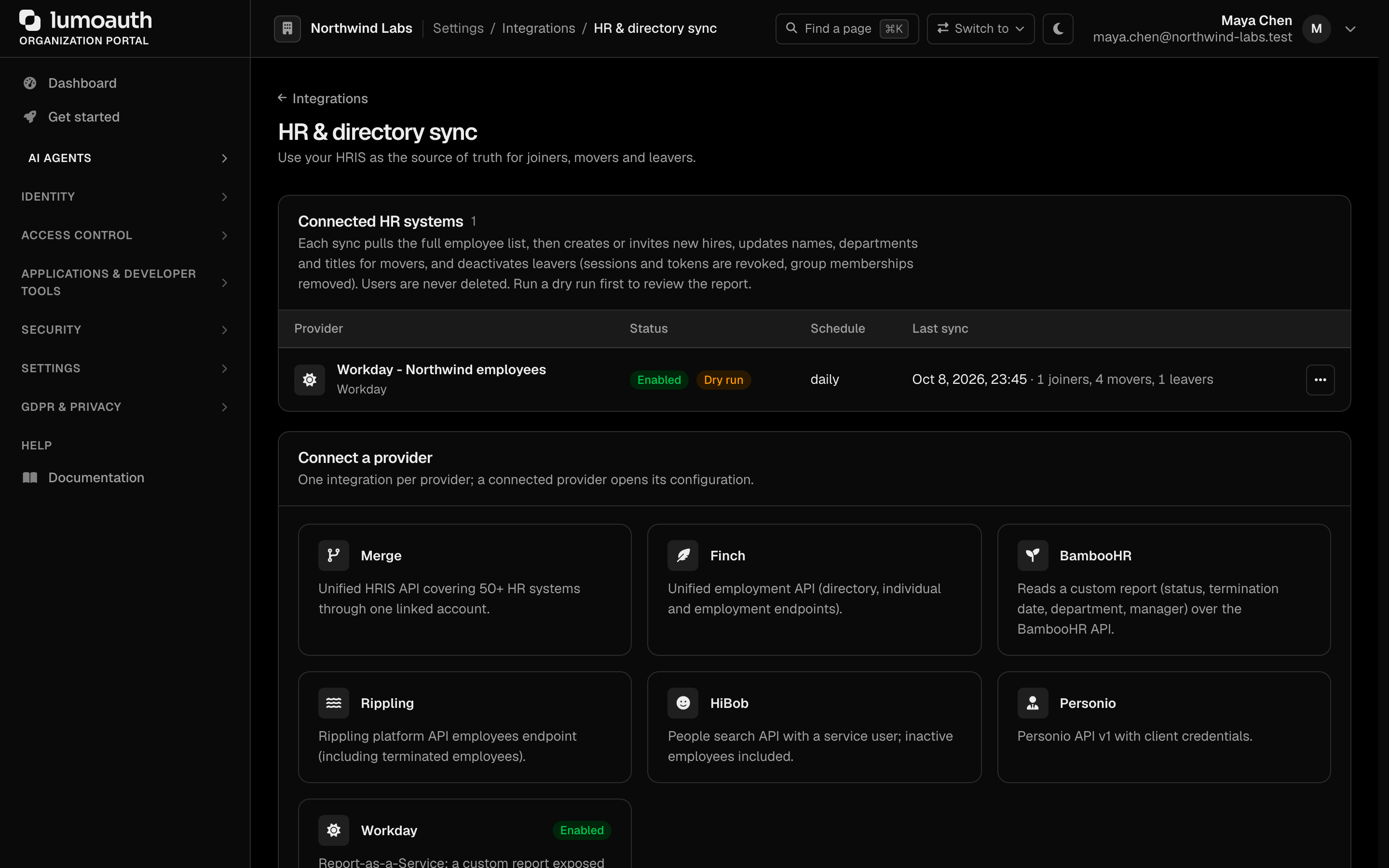
Supported providers
| Provider | API LumoAuth reads | Credentials you supply | Webhooks |
|---|---|---|---|
| Merge | Unified HRIS GET /employees (cursor paging, expand=manager,employments,groups) | API key + linked-account token | Yes |
| Finch | GET /employer/directory plus batched POST /employer/individual and /employer/employment | Access token | Yes |
| BambooHR | POST /v1/reports/custom?format=JSON (the directory omits status and termination dates) | API key + company subdomain | No |
| Rippling | GET /employees/include_terminated, falling back to GET /employees | API access token | No |
| HiBob | POST /v1/people/search with showInactive: true | Service user id + token | No |
| Personio | POST /v1/auth then GET /v1/company/employees | Client id + client secret | No |
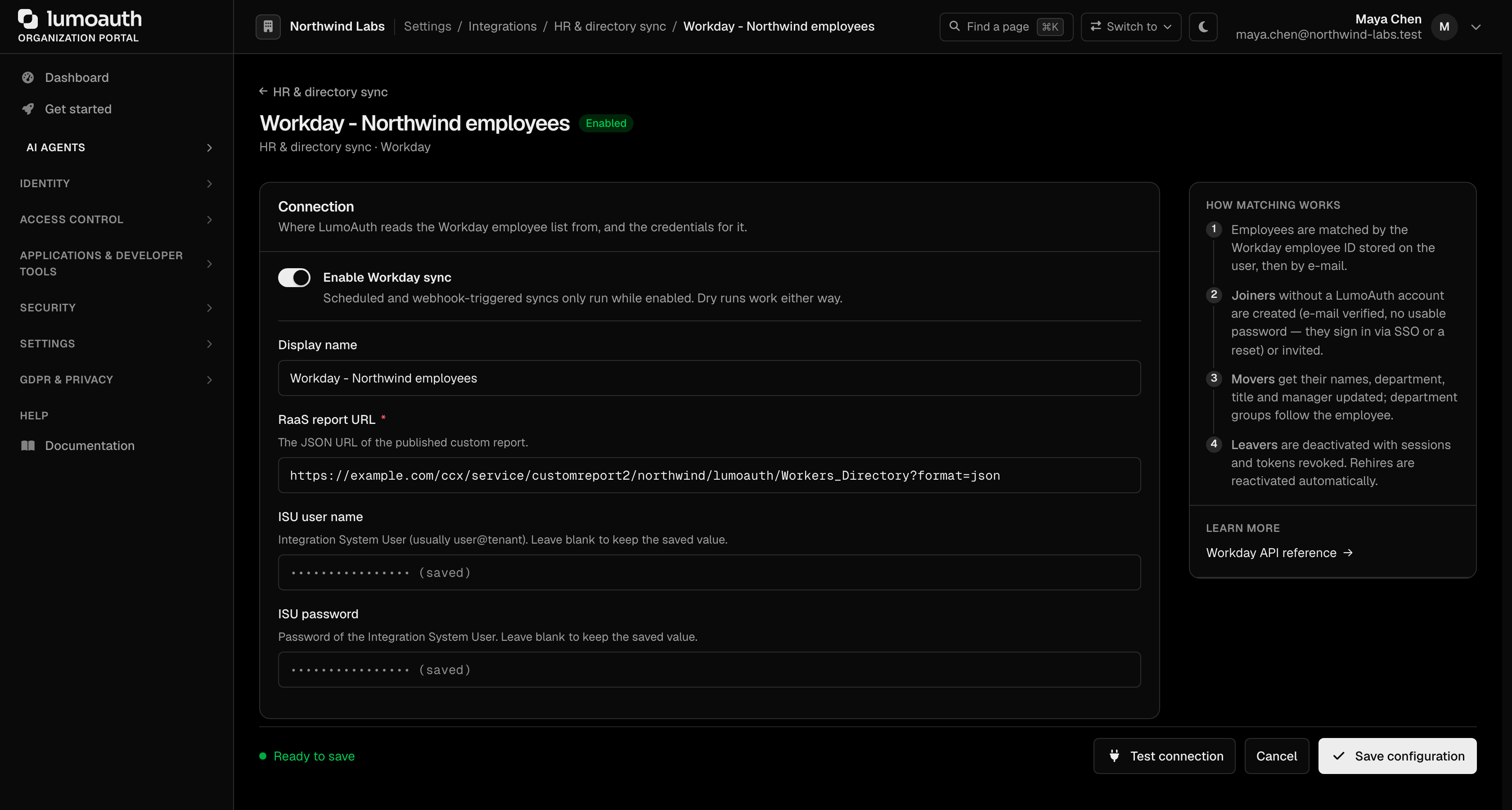
| Workday | A Report-as-a-Service (RaaS) custom report published as JSON | Integration System User name + password, report URL | No |
Every provider is normalised into the same employee record — external id, work e-mail, first / last / display name, department, job title, manager e-mail, employment status, start date and termination date — so the sync engine never sees a vendor-specific shape.
BambooHR and Workday let you override the column names under Column mapping when your report uses custom labels.
Setting one up
- Create the API credential at the vendor (the configure page links to the exact page in each vendor's console and lists the scope needed).
- Open the provider's tile under Connect a provider, paste the credential and any vendor field (subdomain, report URL, base URL). Secrets are encrypted at rest and are never shown again — leave a secret field blank to keep the stored value when you edit other settings. Click Connect … (for example Connect Workday) to save.
- Press Test connection. LumoAuth makes one cheap read call and reports what it saw ("Connected to Merge — employee data is visible for the linked account") or the vendor's own error.
- Leave Dry run only on and press Sync now. The run report lists every action the sync would take, with no changes made.
- When the report looks right, turn dry run off, pick a schedule and enable the integration.
Outbound calls only go to public HTTPS hosts, pin the resolved IP against DNS rebinding and time out after 10 seconds.
Options
| Option | Default | Effect |
|---|---|---|
| Add users to a group named after their department | off | Groups are created on demand; when someone moves department the membership moves with them. Only groups the sync created are populated: an existing group with the same name (for example an administrators group), or any group carrying system or administrator-conferring roles, is never joined, so HR data cannot grant LumoAuth privileges. |
| Invite new hires by e-mail instead of creating accounts directly | off | Sends the standard invitation; the account is created when the person accepts |
| Deactivate leavers | on | Terminated employees are deactivated, sessions and OAuth tokens revoked, group memberships removed. Applies only to accounts the sync created or linked (they carry the provider identity); an account that merely shares the e-mail address, or any administrator, is reported as skipped |
| Provision pre-hires before their start date | off | Employees in a pending / onboarding state are reported as skipped until they become active |
| Dry run only | off | Every sync — scheduled, webhook or manual — produces a report and changes nothing |
| Schedule | daily (preselected on a new integration) | manual, hourly (min. 55 min apart) or daily (min. 23 h apart) |
These options are in the Sync behaviour section of the provider form.

Matching and idempotency
Employees are matched to users in this order:
- External identity — a
hris:{provider}identity storing the HRIS employee id. This survives an e-mail change, so renaming someone's mailbox is a mover, not a joiner plus a leaver. - Work e-mail, lower-cased and validated. Records without a usable e-mail address are reported as skipped.
Because matching is by stable external id, running the same sync twice is a no-op: the second run reports every employee as unchanged. Records that fail individually are counted as errors and the run continues.
A single run processes at most 50 000 employee records, so a mis-scoped HRIS filter cannot deactivate a whole directory in one pass.
Running a sync
- Portal — Sync now on the integration page queues an asynchronous run
(
RunHrisSyncMessage); the runs list refreshes when it finishes. - Schedule — LumoAuth runs every enabled integration that is due on its schedule.
- Webhook — Merge and Finch can notify LumoAuth on employee changes.
Every run is recorded with counts (joiners, movers, leavers, unchanged, skipped, errors) and a per-employee action report. Open a run to see exactly which account was created, updated or deactivated and why. Reports longer than the row cap are truncated and the overflow is counted.
Inbound webhooks (Merge and Finch)
Point the provider at:
POST https://<your-host>/orgs/{org}/hooks/hris/merge
POST https://<your-host>/orgs/{org}/hooks/hris/finch
The provider form shows the exact URL under Webhook (optional). Paste the signing secret into the webhook secret credential field of the form (Webhook signature key for Merge, Webhook secret for Finch). Without
a stored secret the endpoint answers 403 webhook_not_enabled — LumoAuth never
accepts an unsigned HRIS event.

| Provider | Header | Signature |
|---|---|---|
| Merge | X-Merge-Webhook-Signature | HMAC-SHA256 of the raw body; base64url, standard base64 and hex encodings are accepted |
| Finch | Finch-Signature: v1=<hex> + Finch-Timestamp | HMAC-SHA256 of "{timestamp}.{body}"; the timestamp must be within 300 seconds |
The signature is verified before any organization data is touched. The payload itself is never trusted as identity data: a valid event only triggers a full pull from the provider's API, so a forged or replayed body cannot inject an employee record. Bodies over 1 MB are rejected.
Deliveries are also throttled and de-duplicated:
- The endpoint accepts at most 60 deliveries per minute per source IP and per
organization + provider; beyond that it answers
429 rate_limited. - A delivery whose signature was already seen in the last 24 hours is
acknowledged with
202 {"duplicate": true}and triggers nothing. - While a webhook-triggered sync is still queued for the integration, further
events are acknowledged with
202 {"coalesced": true}and fold into that run; the next event after the run starts queues a new one.
Troubleshooting
| Symptom | Cause |
|---|---|
| "… rejected the credentials (HTTP 401)" | The API key, token or ISU password is wrong, or it lost the employee-read scope |
| "BambooHR: a valid company subdomain is required" | The subdomain field contains a full URL or invalid characters — use just the part before .bamboohr.com |
| "Workday: the RaaS report URL is required" | Paste the report's JSON web-service URL; LumoAuth appends format=json if it is missing |
| Everyone shows as skipped | The records have no usable work e-mail, or they are pre-hires and Provision pre-hires is off |
Webhook returns 401 invalid_signature | The stored webhook secret does not match the one in the provider's console, or the request was replayed outside the skew window |
Related
- SCIM vendor presets — push the resulting users back out to downstream apps over SCIM (the standard for automatic user provisioning)
- Integrations overview