Billing, plans and add-ons
LumoAuth's hosted service bills through Stripe. What an organization may use is plan ∪ add-ons ∪ contract overrides.
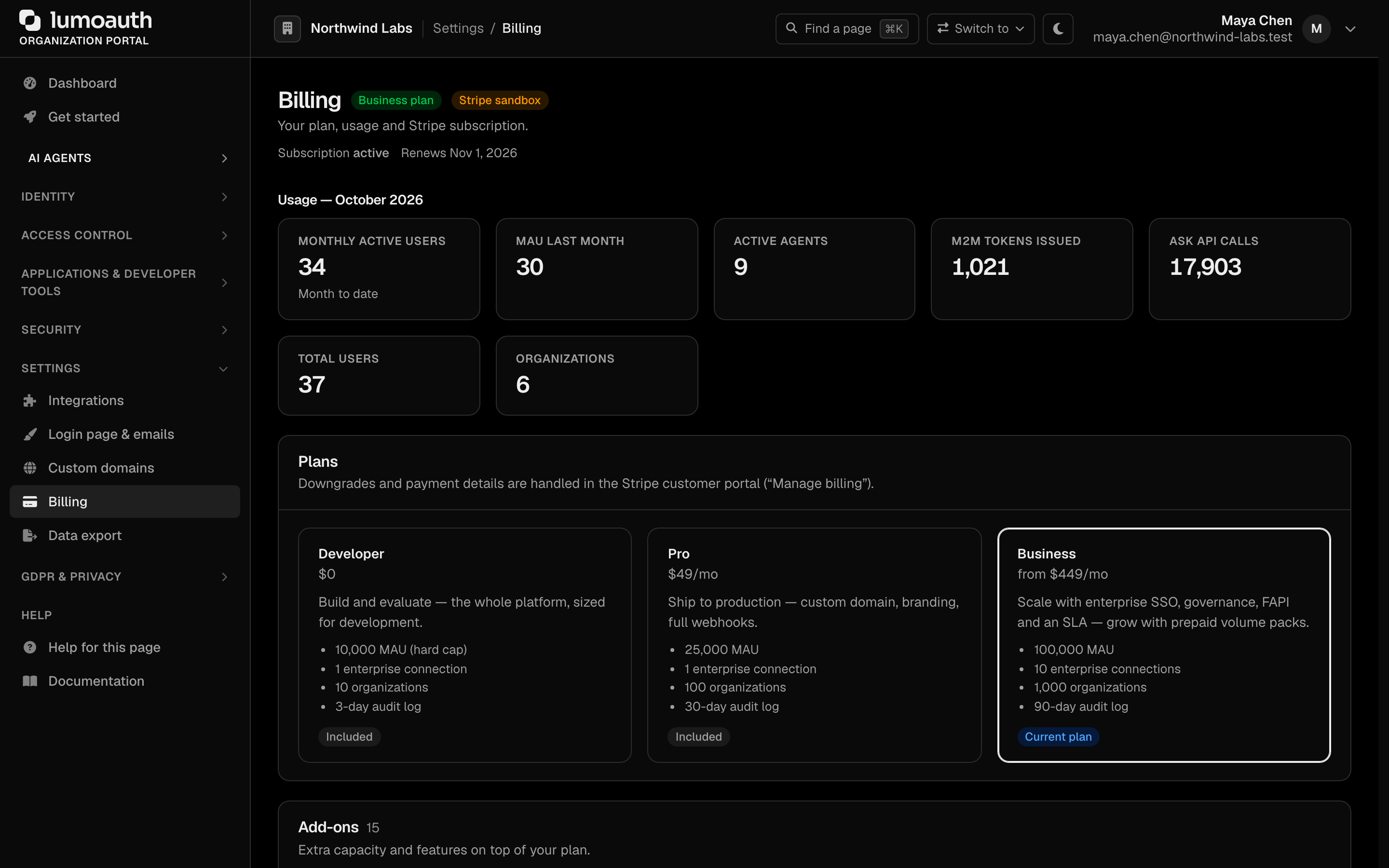
Billing lives at Organization portal → Settings → Billing (/orgs/{orgId}/portal/billing) and requires the billing.manage permission. The page shows this month's usage, the plans, the add-ons sold on the organization's plan and the plan limits. It does not list individual features; contract-billed plans, manual grants and custom limits are set by LumoAuth at your request.
Plans
Plans, add-ons, limits, overage prices and feature placement come from one catalog. The billing page, the docs feature matrix and the public pricing data are all derived from it.
| Plan | Id | Monthly | Notes |
|---|---|---|---|
| Developer | free | $0 | 10k MAU hard cap, no custom domain, 3-day audit log, "Secured by LumoAuth" badge |
| Pro | pro | $49 | 25k MAU (monthly active users), 100 active agents, 10k M2M (machine-to-machine) tokens, then overage; custom domain, branding, full webhooks, sender-constrained tokens (DPoP) |
| Business | business | $449 | 100k MAU, 2,500 active agents, 100k M2M tokens, 10 enterprise connections, LDAP directory sign-in, HRIS (HR system) sync, SIEM log export, shared security signals (SSF/CAEP), the FAPI 2.0 high-security profile, certificate-bound (mTLS) tokens, admin SSO, Agent Governance included, 99.9 % SLA — grows with prepaid volume packs |
The legacy plan id enterprise is accepted as an alias of business (rows written before the Enterprise plan left the hosted catalog).
Default plan. Every organization starts on — and, without an entitled subscription, falls back to — the Developer plan. Organizations upgrade themselves from their Billing page.
The legacy ids startup / starter and the marketing names developer, launch, scale are accepted as aliases everywhere a plan is read.
Add-ons are purchasable capabilities layered on a plan:
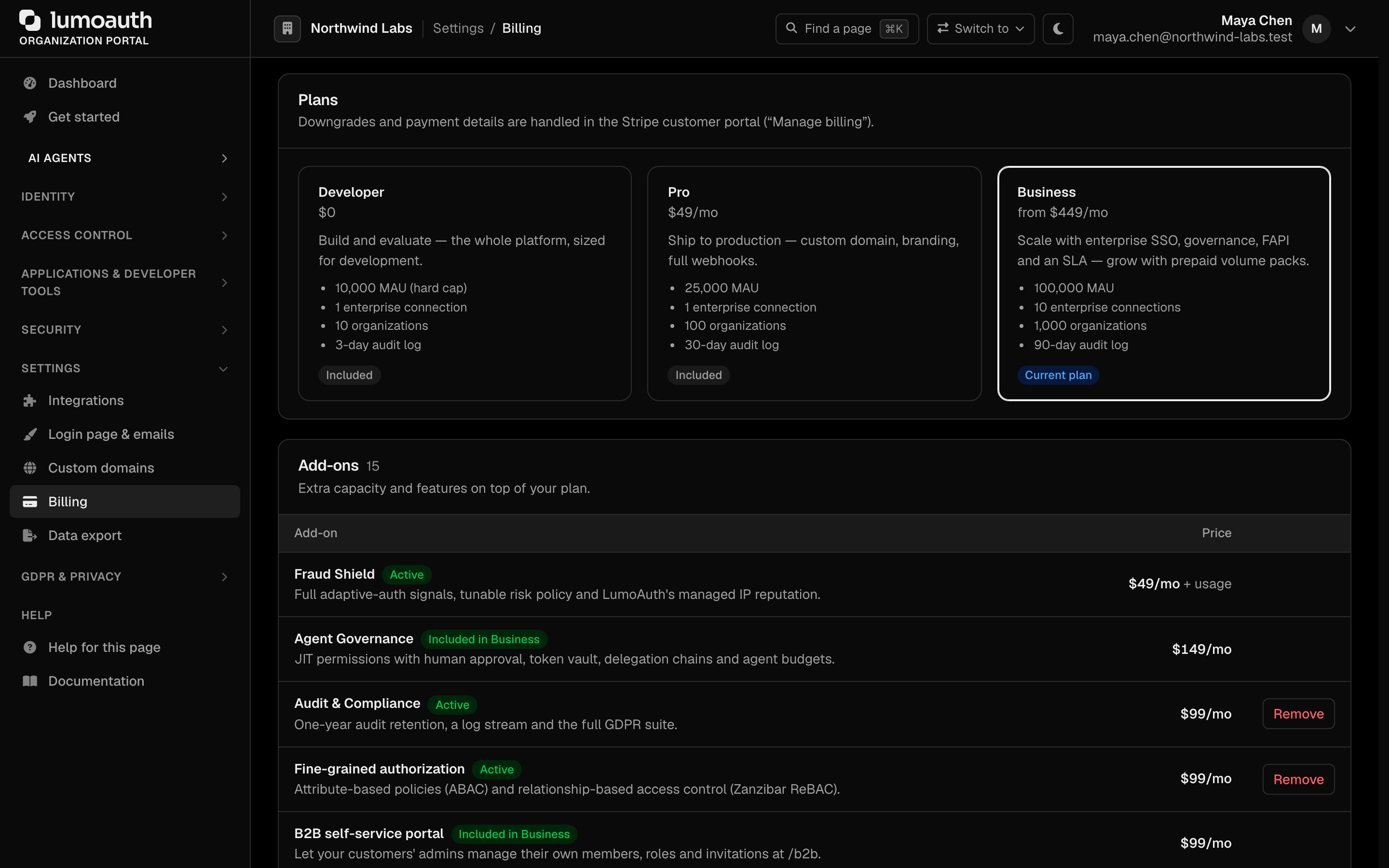
| Add-on | Id | Monthly | Sold on | Included in |
|---|---|---|---|---|
| Fraud Shield | fraud_shield | $49 + $0.004 / MAU over 10k | Developer, Pro, Business | — |
| Agent Governance | agent_governance | $149 | Pro | Business |
| Audit & Compliance | audit_compliance | $99 | Pro, Business | — |
| Fine-grained authorization (attribute rules, ABAC, and relationships, ReBAC) | fine_grained_authz | $99 | Pro, Business | — |
| Threat Detection | threat_detection | $199 (requires Fraud Shield) | Business | — |
| BYOK signing keys | byok_keys | $299 | Business | — |
Developer sandboxes (lumo dev start, POST /admin/sandbox/spawn) | dev_sandboxes | $199 | Business | — |
| Additional log stream / custom domain | extra_log_stream, extra_custom_domain | $99 / $20 each | Pro, Business | — |
Volume packs (Business uplift). Prepaid blocks priced below the overage rate, cheaper per unit the more blocks are on the subscription (Stripe volume tiers: the total quantity sets the unit price of every block). Buying packs raises the organization's entitled limit, so overage only starts above plan limit + packs.
| Pack | Id | Block | 1–3 blocks | 4–15 | 16+ | vs. overage |
|---|---|---|---|---|---|---|
| Additional MAU | mau_pack | 25,000 MAU | $300 ($0.012) | $250 ($0.010) | $200 ($0.008) | $0.015 |
| Additional active agents | agent_pack | 1,000 agents | $25 ($0.025) | $20 ($0.020) | $16 ($0.016) | $0.03 |
| Additional M2M tokens | m2m_pack | 100,000 tokens | $160 ($0.0016) | $130 ($0.0013) | $100 ($0.0010) | $0.002 |
An add-on grants features (e.g. geo_velocity) and may raise limits. Add-ons a plan includes come with the plan and are never billed separately.
When a plan lacks a feature
Gated features stay visible in the portal. A page whose feature the plan lacks still opens: it shows a not included in your plan notice with the upgrade path, its settings are greyed out (the form is disabled, provider tiles carry a lock tag) and the primary action becomes Upgrade to enable, which goes to Billing with that feature preselected. Only the actions that would use the feature are gated: save, enable, test, sync-now and create. Disable and delete stay open so an organization that downgraded can always clean up. Existing resources keep showing their status and errors. This applies to every integration page (analytics & CDP, CRM, HR sync, device posture, alert channels, SIEM & log export, approval channels), the Customer 360 view and the authorization pages (ABAC, relationships, delegation, token vault, security signals).
On the API, a gated call gets 403 with error set to feature_not_in_plan or plan_limit_reached, a feature or limit field, and an upgrade object naming the plan or addon that unlocks it. A gated portal action (save, enable, test, create) redirects to the billing page with the unlock hint, while the pages themselves stay reachable in the greyed-out state described above.
Principle: gate at configuration time, never break a running login. A billing lapse or downgrade makes premium features fall back to defaults (risk signals drop, log sinks stop shipping, LDAP behaves as unconfigured); it never locks end users out.
Quotas and the Free hard cap
Creation of organizations, enterprise connections (one connection = one IdP plus its SCIM (automatic user provisioning) directory), MCP servers, custom domains, log streams, admin seats and sandboxes is checked against the plan limit. Sandboxes are special: no plan includes any (sandboxes: 0); the Developer sandboxes add-on (dev_sandboxes, Business only) grants the feature and a limit of 10 live sandboxes per owner. The gate is on spawning — lumo dev list and lumo dev stop keep working after the add-on lapses so what exists can always be cleaned up, and expired sandboxes are removed nightly. Agent registration is capped only on the Developer plan (registered_agents, 10); paid plans register agents freely and pay overage on monthly active agents and M2M tokens instead. Resources created before a downgrade keep working for a 14-day grace period, after which the newest custom domains and log streams over the limit are disabled — never deleted; other over-limit resources are only reported.
The Developer plan's MAU limit is a hard cap: at 80 % and 100 % the billing page warns, above 100 % a 14-day grace period starts, and past 120 % (or when the grace period ends) new self-service sign-ups are paused — existing users always sign in.
Checkout, add-ons and the customer portal
- Upgrade creates the Stripe customer if needed, then a subscription-mode Checkout Session for the organization. The plan's flat price and every overage price the plan has go on the subscription (metered items show as $0 lines until usage exceeds the included volume). The subscription is anchored to the first of the month (UTC) — the first invoice is prorated — so billing periods coincide with the calendar-month meters.
- Add-ons on an organization with a live subscription are added as subscription items immediately with proration; a metered add-on adds its usage price too. An organization without a subscription (Developer + add-on) goes through Checkout with the add-on line items. The billing page shows a proration preview ("$X due today, then $Y/mo").
- Trials: add-ons with a trial period offer a local, card-less trial once per organization.
- Remove deletes the subscription item (credit prorated); an add-on another active add-on requires cannot be removed first.
- Manage billing opens the Stripe customer portal for payment methods, invoices and downgrades. Upgrade on a plan card starts the checkout; Add (or Add more for quantity add-ons) and Remove manage add-ons.
Prices are created with tax_behavior: exclusive; tax is collected where a tax registration exists for the jurisdiction.
Subscription changes made in Stripe (a completed checkout, an item added or removed in the customer portal, a cancellation, a failed payment) reach LumoAuth through Stripe's webhooks and update the organization's plan and add-ons within seconds. A failed payment sets the subscription to past_due; access continues until Stripe cancels it, after which the organization falls back to the Developer plan.
Usage meters
Usage is reported to Stripe nightly. Besides the raw meters, every organization gets an overage value per meter — max(0, month to date − entitled limit) — which is what the plan overage prices bill, and organizations holding a metered add-on get the same raw value on the add-on's own meter.
| Meter | Definition | Kind |
|---|---|---|
mau | Distinct users with an interactive sign-in (password, passkey, magic link, social, SSO) in the calendar month. A user counts once however often they sign in; token refreshes, silent renewals, agents and API keys never count. | period |
active_agents | Distinct agents that obtained a token (OAuth client credentials or token exchange, AAuth platform token) in the calendar month. Registered-but-idle agents cost nothing. | period |
m2m_tokens | Machine-to-machine tokens issued: client_credentials, token-exchange, jwt-bearer grants and AAuth platform tokens. Authorization-code, refresh, device and CIBA grants (an end user is behind them) are not counted. | counter |
ask_calls | Ask API requests. | counter |
connections, organizations, custom_domains, mcp_servers, log_streams | Point-in-time counts. | gauge |
Period and gauge meters are reported month to date every night; counter meters are reported as yesterday's delta.
The billing page shows this month to date and last month for MAU, plus active agents, M2M tokens and Ask API calls, next to the plan's included volumes.

Standards used on this page
| Plain name | Standard |
|---|---|
| Sender-constrained tokens (DPoP) | RFC 9449 |
| Shared Signals Framework (SSF) and Continuous Access Evaluation Profile (CAEP) | OpenID SSF 1.0 and OpenID CAEP 1.0 |
| Financial-grade API (FAPI) 2.0 | FAPI 2.0 Security Profile |
| Mutual TLS client authentication | RFC 8705 |
See the standards reference for what each one covers and how LumoAuth uses it.