SIEM & log export
Every audit event LumoAuth records (sign-ins, MFA (multi-factor authentication) challenges, user and role changes, OAuth client changes, agent activity, configuration changes) can be shipped in near real time to your SIEM (security information and event management system), data lake or warehouse through one or more log sinks. Sinks are configured per organization under Portal → Integrations → SIEM & log export (/orgs/{orgId}/portal/integrations/log-sinks) and require the settings.manage permission. Pick a destination under Add a sink (or click Configure on its card in the SIEM & log export section of the Integrations page) to open its form.
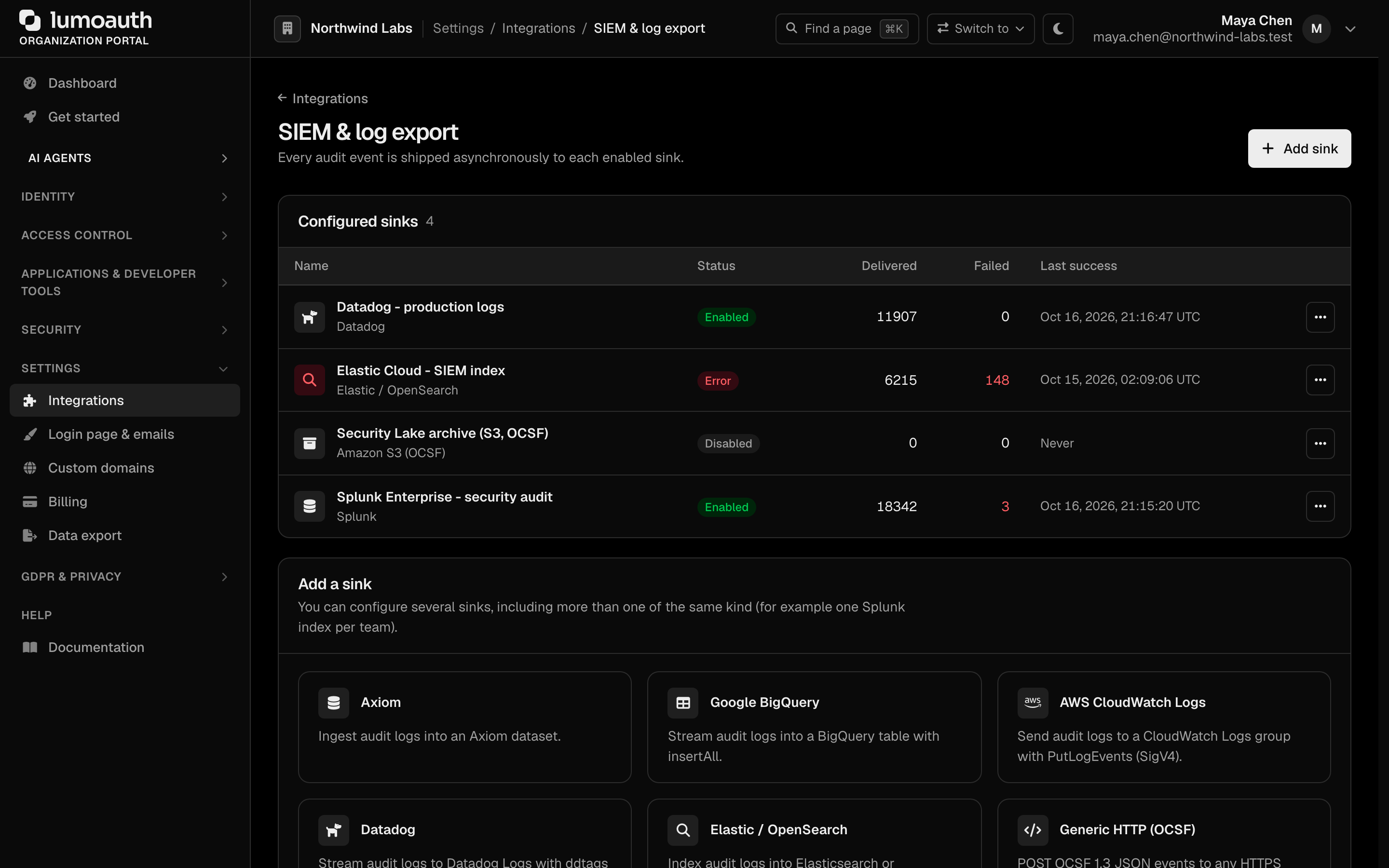
You can create as many sinks as you need, including several of the same kind (for example one Splunk index per team). Each enabled sink receives every event independently; a failing sink never blocks the others.
How delivery works
- The audit log row is written.
- If the organization has at least one enabled sink, a message is queued on the async Messenger transport (the request that produced the event is never slowed down).
- A worker ships the event to each enabled sink with its provider-specific transport and authentication. Transient failures are retried by Messenger (3 attempts, exponential back-off).
- The sink's Delivered / Failed counters, Last success time and Last error are updated and shown in the portal.
Privacy. Client IP addresses are bucketed before leaving LumoAuth (IPv4 → /24, IPv6 → /48). Secrets are encrypted at rest with Sodium and are only decrypted in memory while a delivery runs; the portal never shows them again after saving.
Network safety. Every endpoint must be a public HTTPS host. Loopback, private network address ranges, link-local and cloud-metadata addresses are rejected when you save and again right before every delivery (DNS is pinned for the request). Requests time out after 10 s and never follow redirects.
Event formats
| Format | Used by | Notes |
|---|---|---|
| LumoAuth JSON (ECS-like) | Splunk, CloudWatch Logs, Sentinel, Google SecOps, Elastic/OpenSearch, Sumo Logic, BigQuery, Snowflake | Flat document: @timestamp, message, event.{type,action,outcome,severity,reason}, tenant.{id,slug}, actor.{id,name,type}, target.{type,id,name}, source.{ip,geo}, http.{user_agent,method,url}, trace.{correlation_id,session_id,request_id}, error, metadata, changes. |
| OCSF 1.3 | Amazon S3, Generic HTTP | Class 3002 Authentication for sign-in / sign-out / MFA / SSO events, 3001 Account Change for user, password and MFA-enrolment changes, 6003 API Activity for everything else. Includes activity_id, severity_id, status_id, time (epoch ms), metadata.product, actor.user, src_endpoint.ip, http_request, and the original fields under unmapped. |
| OTLP/HTTP JSON | OpenTelemetry | One logRecord per event with severityNumber, body = human-readable message, semantic-convention attributes (event.name, enduser.id, client.address, http.request.method, url.full, session.id, …). |
Providers
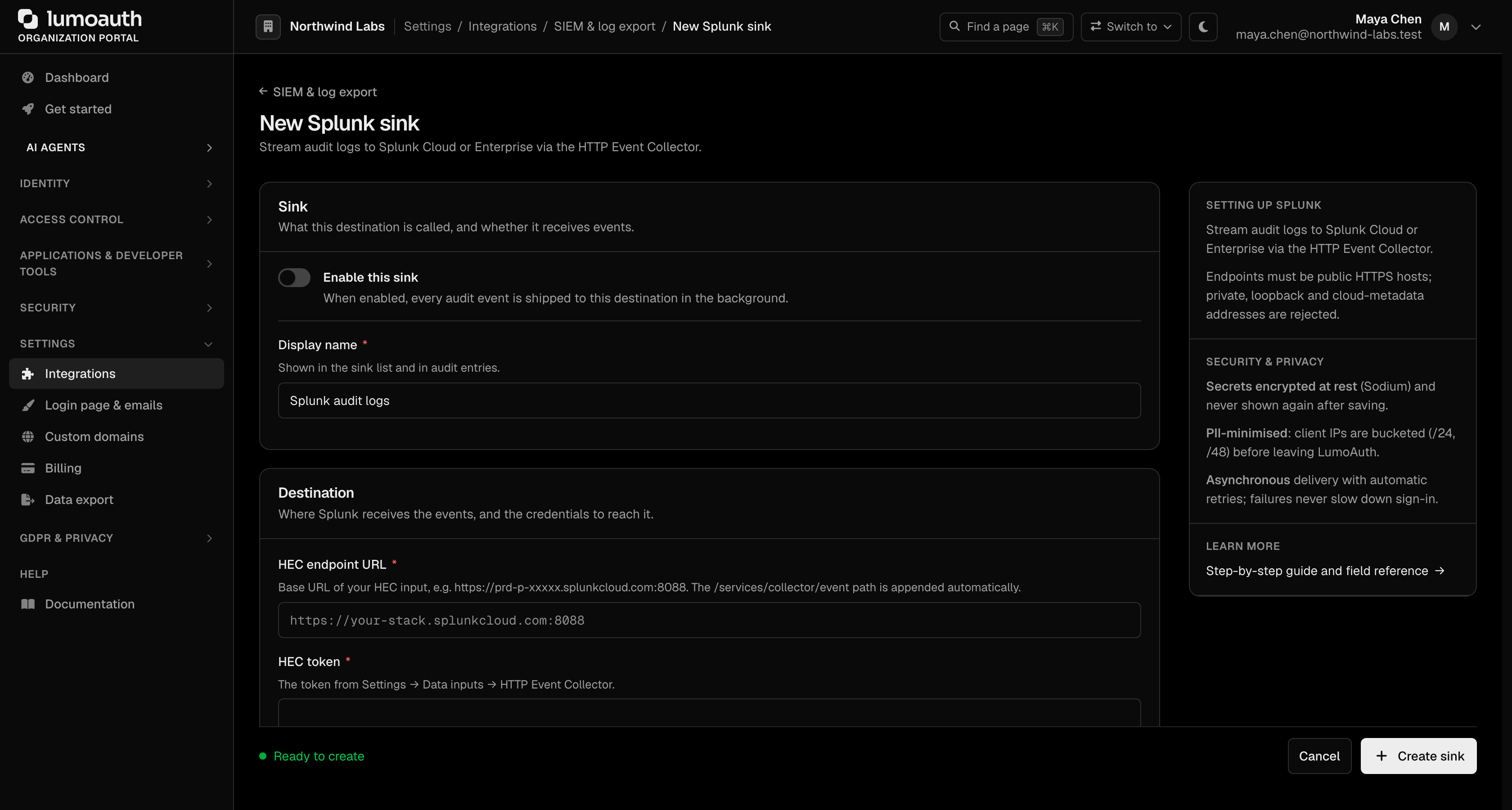
Each provider form is generated from the provider's field list. Every form starts with an Enable this sink switch and a Display name, followed by the provider's Destination fields; finish with Create sink. Secret fields are never shown again after saving; on an existing sink, leave them blank to keep the stored value.
Splunk
Transport: HTTP Event Collector, POST {url}/services/collector/event, Authorization: Splunk <token>.
| Field | Notes |
|---|---|
| HEC endpoint URL | e.g. https://prd-p-xxxxx.splunkcloud.com:8088 (path appended automatically) |
| HEC token (secret) | Settings → Data inputs → HTTP Event Collector |
| Index, Source, Sourcetype | Optional; sourcetype defaults to lumoauth:audit |
AWS CloudWatch Logs
Transport: PutLogEvents signed with AWS Signature V4 (no SDK). The log group must exist; the log stream is created on first delivery.
IAM policy for the access key: logs:PutLogEvents, logs:CreateLogStream on the log group. Temporary STS credentials are supported through the optional session token. Use Custom endpoint for FIPS or VPC endpoints.
Microsoft Sentinel
Transport: Azure Monitor Logs Ingestion API through a Data Collection Endpoint (DCE) and Data Collection Rule (DCR), authenticated with an Entra ID app registration (client credentials, scope https://monitor.azure.com/.default). Tokens are cached until shortly before expiry.
Setup: create a custom table (for example LumoAuthAudit_CL) with a DCR whose stream is Custom-LumoAuthAudit_CL, grant the app registration Monitoring Metrics Publisher on the DCR, then enter the organization ID, client ID, client secret, DCE ingestion URI, DCR immutable ID and stream name. Rows carry TimeGenerated plus the LumoAuth JSON fields.
Google SecOps (Chronicle)
Transport: Chronicle ingestion API POST /v2/unstructuredlogentries:batchCreate, bearer token obtained from a service-account key via a signed JWT assertion (scope https://www.googleapis.com/auth/malachite-ingestion).
Fields: region (US, Europe, …), customer ID, log type (upper-case, e.g. LUMOAUTH; register a JSON parser for it), service-account JSON key (secret).
Elastic / OpenSearch
Transport: bulk API (POST {url}/_bulk, NDJSON, create action so data streams work).
Authentication: API key (Authorization: ApiKey <encoded>) for Elastic, or Basic (user:password) for OpenSearch and self-managed clusters. Default index logs-lumoauth.audit-default.
Sumo Logic
Transport: hosted HTTP Logs source. The source URL contains the collector token and is therefore stored encrypted. Optional X-Sumo-Category, X-Sumo-Name and X-Sumo-Host headers.
Amazon S3 (OCSF)
Transport: PutObject signed with SigV4. One JSON-lines object per event at
{prefix}/year=YYYY/month=MM/day=DD/{uuidv7}.jsonl in OCSF 1.3 — ready for Amazon Security Lake custom sources, Athena or any lakehouse. Set Custom endpoint for S3-compatible stores (MinIO, Cloudflare R2); path-style addressing is used in that case.
IAM: s3:PutObject on the prefix.
OpenTelemetry (OTLP/HTTP)
Transport: POST {url}/v1/logs (OTLP JSON). Works with the OpenTelemetry Collector and vendors that accept OTLP/HTTP (Grafana, Honeycomb, Datadog, New Relic, …). Add routing headers under Extra headers and put credentials in Authorization header (stored encrypted). service.name is configurable.
Generic HTTP (OCSF)
Transport: POST to any HTTPS endpoint with an OCSF 1.3 JSON body, either the bare object or an {"events": [ … ]} envelope. Static headers plus an encrypted Authorization header.
Google BigQuery
Transport: tabledata.insertAll streaming insert with a service-account bearer (scope bigquery.insertdata). insertId is {tenant_id}-{audit_log_id} so retries never duplicate rows. Create the table first:
CREATE TABLE `my-project.security.lumoauth_audit` (
  event_time TIMESTAMP, tenant_id STRING, tenant_slug STRING,
  event_type STRING, action STRING, status STRING, severity STRING, message STRING,
  actor_id STRING, actor_name STRING, actor_type STRING, initiated_by STRING,
  target_type STRING, target_id STRING, target_name STRING,
  source_ip STRING, source_geo STRING, user_agent STRING, request_method STRING, request_url STRING,
  correlation_id STRING, session_id STRING, request_id STRING,
  result_reason STRING, error_message STRING, error_code STRING, duration_ms INT64,
  schema_version STRING, payload JSON
) PARTITION BY DATE(event_time);
Snowflake
Transport: SQL API v2 (POST https://{account}.snowflakecomputing.com/api/v2/statements) with key-pair JWT authentication. Values are sent as bind variables; identifiers are validated against Snowflake's unquoted-identifier grammar. HTTP 202 (asynchronous execution) counts as delivered.
Setup:
CREATE TABLE SECURITY.PUBLIC.LUMOAUTH_AUDIT (
  EVENT_TIME TIMESTAMP_TZ, TENANT_ID STRING, TENANT_SLUG STRING,
  EVENT_TYPE STRING, ACTION STRING, STATUS STRING, SEVERITY STRING, MESSAGE STRING,
  ACTOR_ID STRING, ACTOR_NAME STRING, ACTOR_TYPE STRING, INITIATED_BY STRING,
  TARGET_TYPE STRING, TARGET_ID STRING, TARGET_NAME STRING,
  SOURCE_IP STRING, USER_AGENT STRING, REQUEST_METHOD STRING, REQUEST_URL STRING,
  CORRELATION_ID STRING, SESSION_ID STRING, REQUEST_ID STRING,
  RESULT_REASON STRING, ERROR_MESSAGE STRING, DURATION_MS NUMBER, PAYLOAD VARIANT
);
-- generate an RSA key pair, then:
ALTER USER LUMO_WRITER SET RSA_PUBLIC_KEY = 'MIIBIjANBgkqh…';
Paste the PKCS#8 private key into the sink form (passphrase optional). The account identifier is the locator (xy12345.eu-west-1) or the organization form (myorg-myaccount).
Testing a sink
Open the sink and choose Send test event. A synthetic integration.test event is delivered through the real pipeline and the result (or the provider's error message) is shown inline; counters and Last error are updated as for a real delivery. A previous error is cleared automatically after the next successful delivery or when you save the configuration.
Audit trail
Creating, updating, enabling, disabling and deleting a sink writes log_sink.created, log_sink.updated, log_sink.enabled, log_sink.disabled and log_sink.deleted audit events (which are themselves exported to your sinks).
Datadog, Axiom and Honeycomb
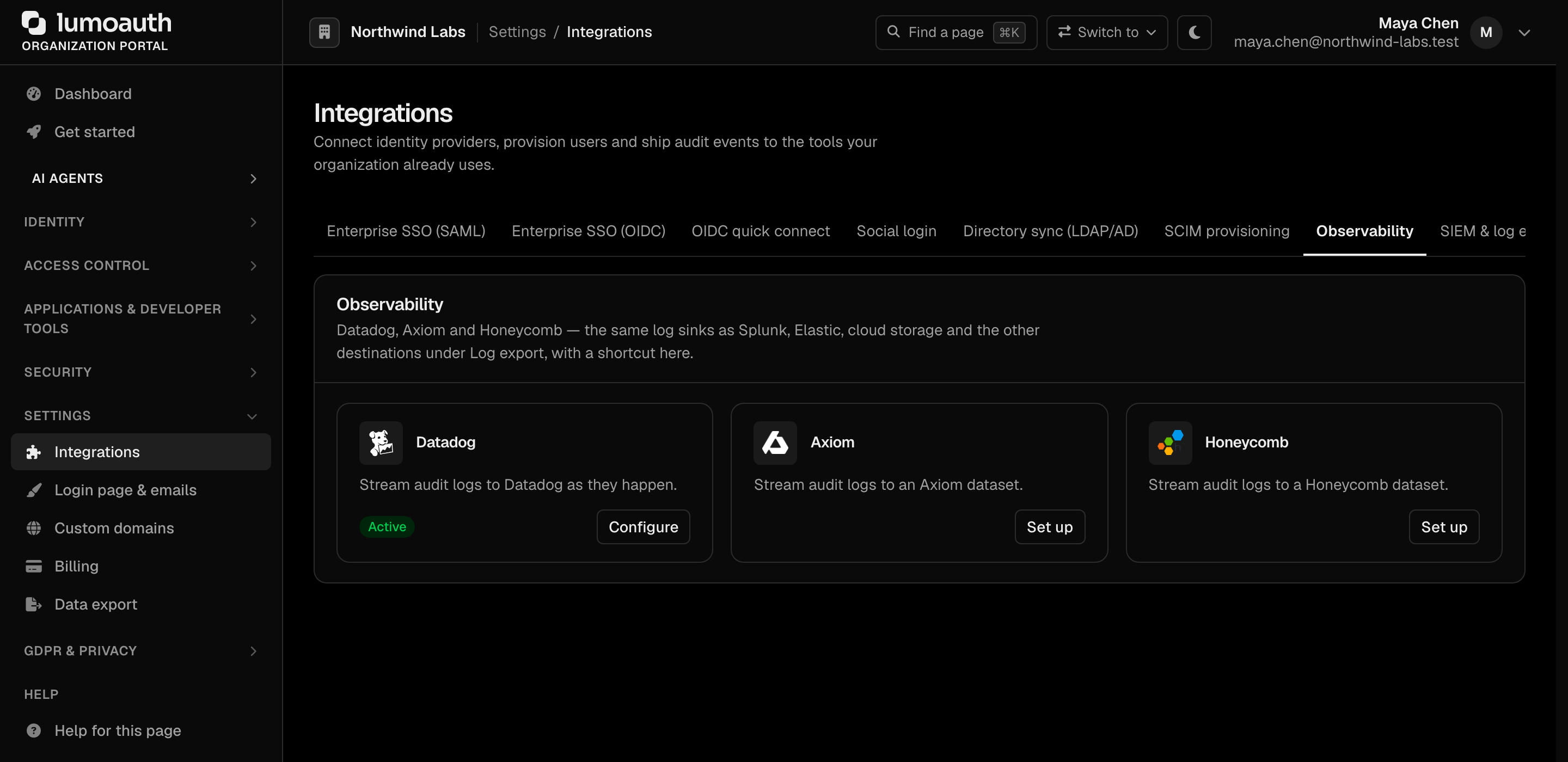
Datadog, Axiom and Honeycomb are log sinks like the others; the Observability section of the Integrations page is a shortcut to them (Set up on each card opens the same sink form). See Observability for the fields each one asks for.
Standards used on this page
| Plain name | Standard |
|---|---|
| Private network address ranges | RFC 1918 |
See the standards reference for what each one covers and how LumoAuth uses it.