FIDO Metadata Service (MDS3)
The FIDO Alliance Metadata Service publishes a signed catalogue of every certified FIDO2 authenticator (the hardware or software that holds a passkey), keyed by AAGUID (a fixed identifier for an authenticator model). LumoAuth downloads and verifies that catalogue so it can:
- show a real authenticator name ("YubiKey 5 Series", "Windows Hello Hardware Authenticator") instead of a raw AAGUID,
- record the certification level of each registered passkey,
- optionally refuse passkeys from authenticators that are not FIDO certified or whose keys have been reported compromised.
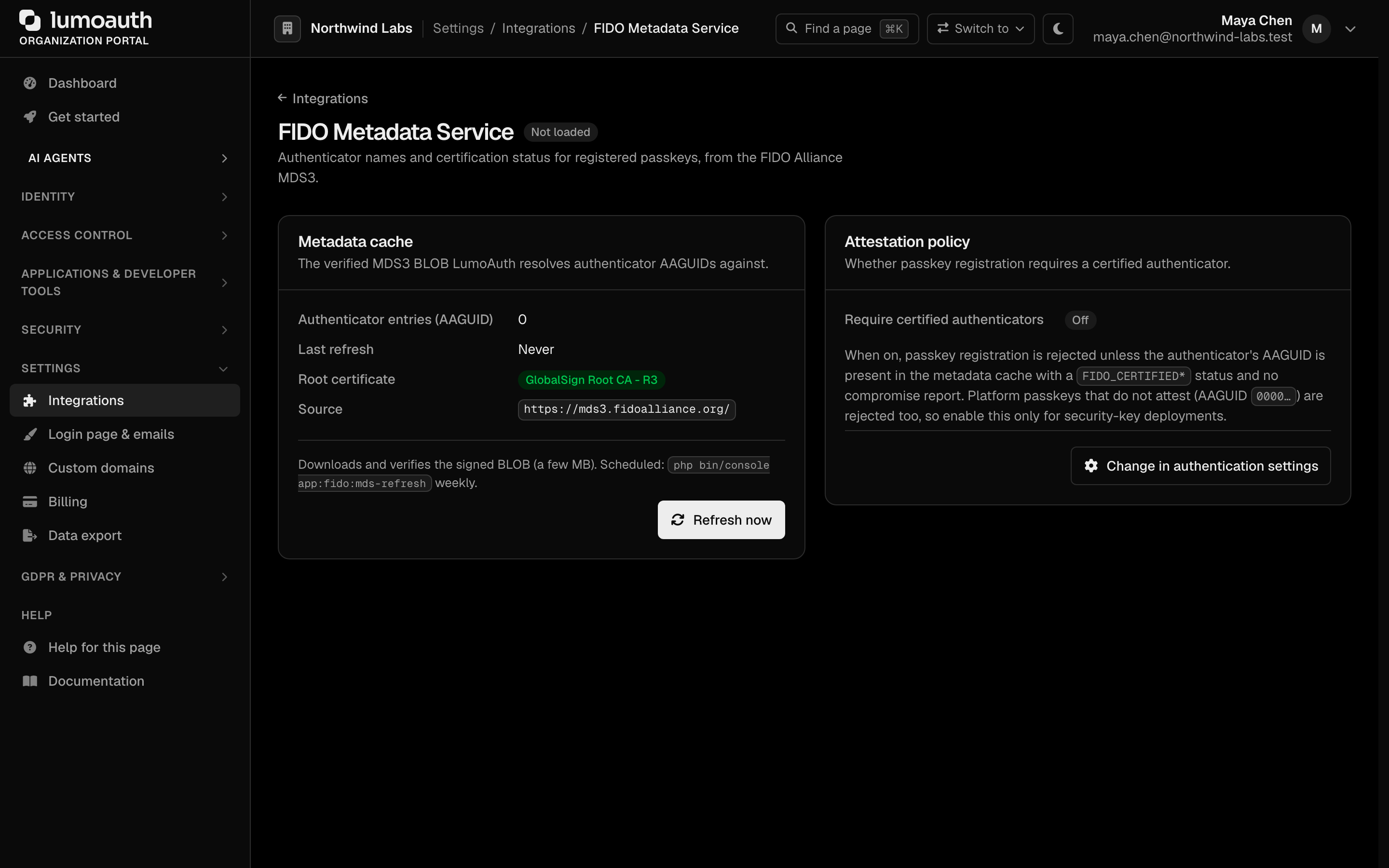
The page is at Portal → Integrations → Passkeys & authenticators → FIDO Metadata Service (/orgs/{orgId}/portal/integrations/fido-mds) and needs settings.manage.
The metadata cache
LumoAuth keeps one cache of the FIDO Alliance metadata BLOB for the whole platform (it is not per organization) and refreshes it weekly; the FIDO Alliance republishes the BLOB roughly monthly. Refresh now on the page fetches the latest BLOB immediately. The cache card shows the BLOB serial, its publication date and the number of entries.
Every download is verified before it is used: the BLOB is a signed JSON token whose certificate chain must lead to the FIDO Alliance's trust anchor (GlobalSign Root CA - R3), every certificate must be within its validity window and signed by the next one, and the signature must match the leaf key. Verification fails closed, so an unverifiable BLOB never replaces the cache. The download goes through the same SSRF guard as every other outbound call: public HTTPS only, DNS pinned, 30-second timeout.
What happens at passkey registration
After a passkey's attestation is validated and bound to the signed-in user, LumoAuth looks the authenticator's AAGUID up in the cache and stores the authenticator name and certification level on the credential. The all-zero AAGUID (reported by authenticators that deliberately do not identify themselves, including most platform passkeys) is never looked up and stays "unknown".
The audit entry passkey.registered carries the AAGUID, the resolved name and the certification level.
Certification rules
An entry counts as certified when its status history contains at least one FIDO_CERTIFIED* status and no compromise or revocation status. The reported level is the highest one seen, ranked FIDO_CERTIFIED < L1 < L1plus < L2 < L2plus < L3 < L3plus.
These statuses withdraw certification and mark the entry revoked:
REVOKED, USER_VERIFICATION_BYPASS, ATTESTATION_KEY_COMPROMISE, USER_KEY_REMOTE_COMPROMISE, USER_KEY_PHYSICAL_COMPROMISE.
Requiring certified authenticators
Portal → Security → Sign-in settings → Identity methods has the switch Require FIDO-certified authenticators under Passkeys & biometrics (passkeys.require_certified_authenticator, off by default); the Change in authentication settings button in the Attestation policy card of the FIDO Metadata Service page opens it. With it on, a passkey registration is rejected unless the AAGUID is present in the MDS cache, certified, and free of compromise reports. The user sees an actionable error and the attempt is audit-logged as passkey.registration_rejected with the reason (unknown_aaguid or not_certified).
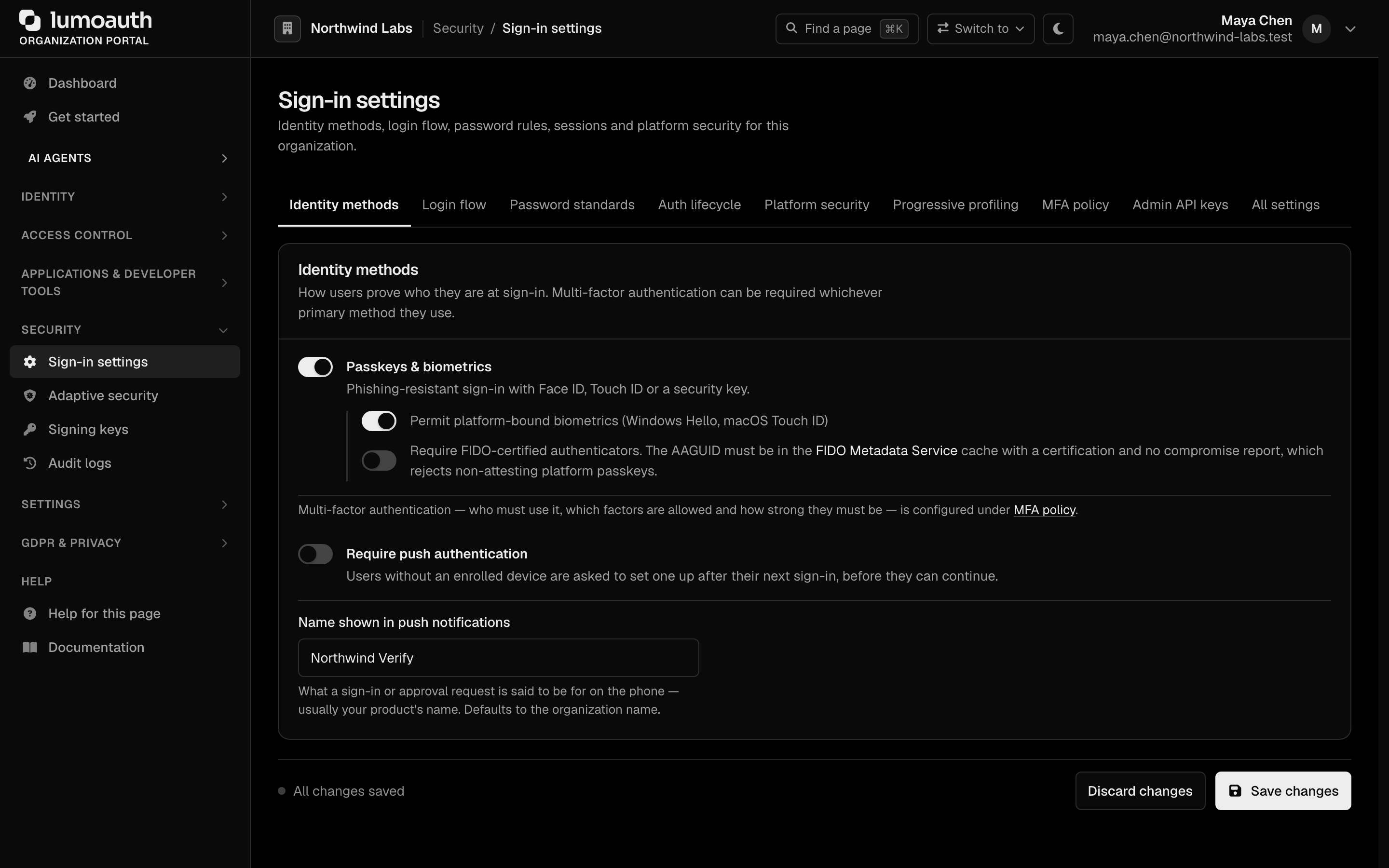
This is a strict policy. Most platform passkeys (iCloud Keychain, Google Password Manager, Windows Hello in its software form) report an all-zero AAGUID or no attestation at all and will be refused. Turn it on when your organization issues hardware security keys and wants to guarantee their assurance level — and refresh the metadata cache first, or every registration fails.
Standards used on this page
| Plain name | Standard |
|---|---|
| Passkeys (WebAuthn and FIDO2) | W3C Web Authentication and FIDO Alliance CTAP |
| JSON Web Token (JWT) | RFC 7519 |
See the standards reference for what each one covers and how LumoAuth uses it.