Alert channels
LumoAuth raises a security alert whenever the audit pipeline records a high or critical risk event: failed-login bursts, MFA (multi-factor authentication) bypass attempts, policy or signing-key changes, agent kill switches, revoked credentials and similar. Alert channels let each organization route those events to the tools its security team already watches.
Before the 2026-09-25 release the alert pipeline was not connected to the audit log, so channels only received test alerts. Every audit row is now scored as it is written; the event-to-risk map is in Audit logs → Security-relevant events.
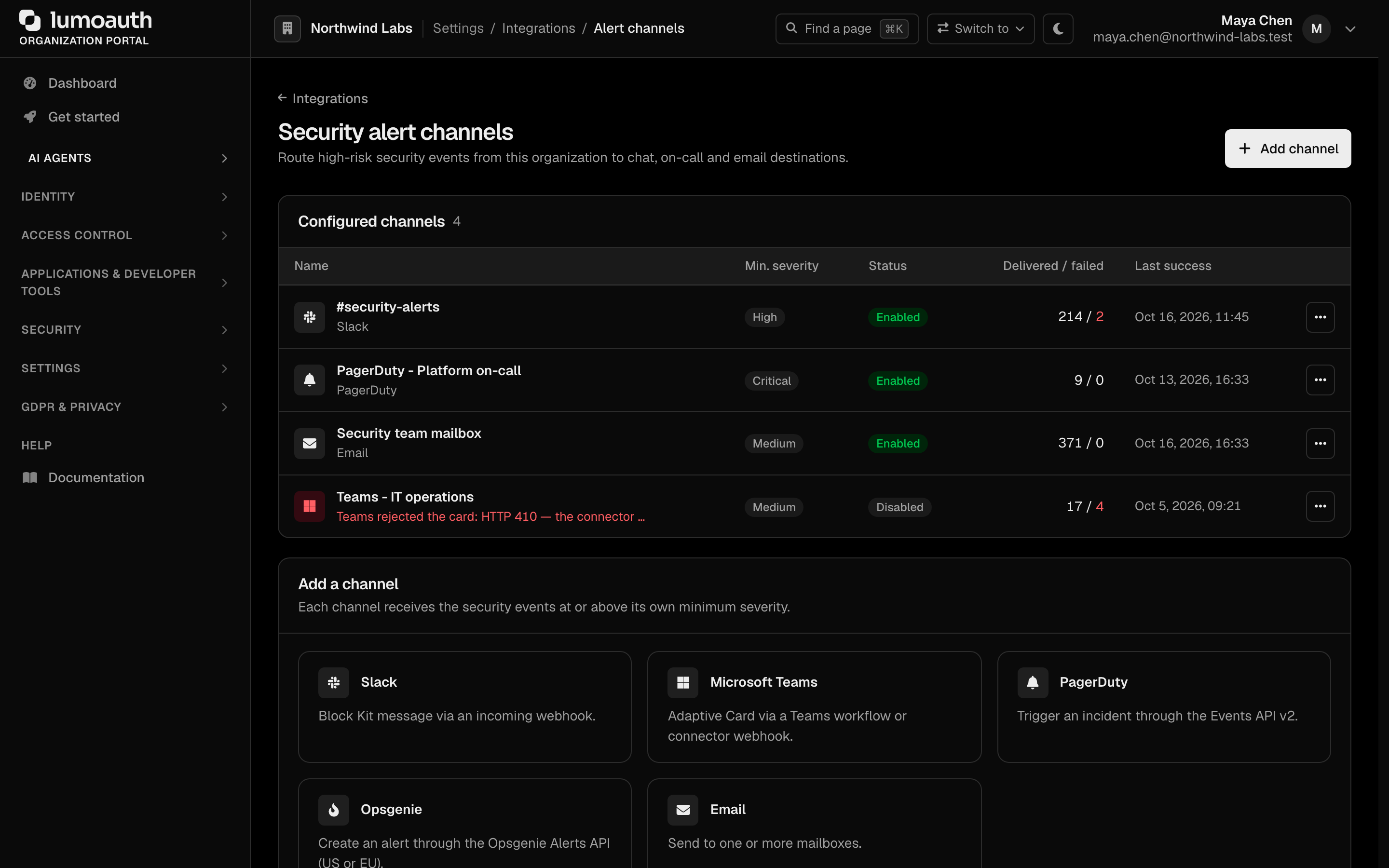
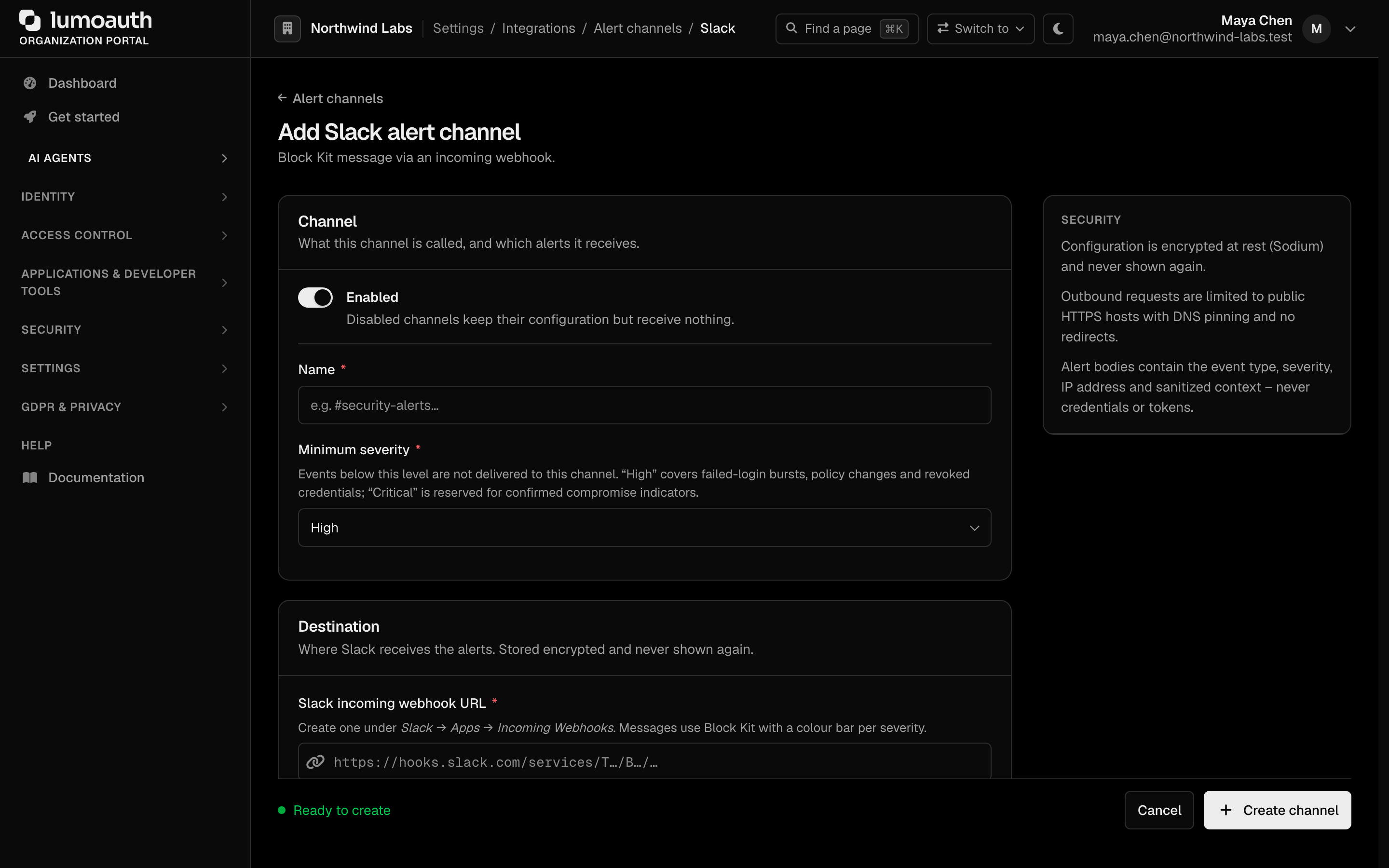
Configure them under Integrations → Alerting & notifications (/orgs/{orgId}/portal/integrations/alert-channels; the page is titled Security alert channels). You need the settings.manage permission. Pick a destination under Add a channel, give the channel a Name, choose its Minimum severity, fill in the destination and click Create channel.
Destinations
| Type | Transport | What arrives |
|---|---|---|
| Slack | Incoming webhook (hooks.slack.com) | Block Kit message with a colour bar per severity, the organization, user, IP address and a JSON details block. |
| Microsoft Teams | Workflow webhook (Power Automate “Post to a channel when a webhook request is received”) or classic *.webhook.office.com connector | Adaptive Card 1.5 in the incoming-webhook envelope ({"type":"message","attachments":[{"contentType":"application/vnd.microsoft.card.adaptive", …}]}). |
| PagerDuty | Events API v2 | A triggered event. Severity map: critical → critical, high → error, medium → warning, low → info. A dedup_key per event type, organization, IP and hour collapses repeats into one incident. |
| Opsgenie | Alerts API (US or EU region) | An alert with priority P1 (critical) … P4 (low), an alias for deduplication, tags and flat details. |
| Your organization’s email provider when configured, otherwise the platform mailer | HTML and plain-text email to the Recipients list (up to 10 addresses, separated by commas or new lines). |
Only the Microsoft hosts *.webhook.office.com, *.logic.azure.com and *.powerplatform.com are treated as Teams endpoints. Any other public HTTPS URL is accepted as a generic receiver and gets the same envelope plus an X-LumoAuth-Event: security.alert header.
Minimum severity
Every channel has a minimum severity (low, medium, high, critical). An alert is delivered only when its risk level is at or above that threshold, so you can page on-call for critical events and post everything else to chat. The default is high.
Testing
Send test alert posts a synthetic medium-severity alert (alert_channel.test) to the channel with the saved configuration and reports the outcome inline. Because it is medium severity, it is delivered regardless of the channel’s threshold; real alerts respect it.
Delivery and troubleshooting
- Delivery is asynchronous (Symfony Messenger
asynctransport). The request that raised the alert is never slowed down by a slow webhook. - Each channel tracks delivered / failed counts, the last success time and the last error, shown in the list and on the Integrations page tile.
- Disabled channels keep their configuration but receive nothing. Deleting a channel is immediate.
- Failed deliveries are not retried: alert fan-out is best-effort, and a dead provider must not clog the queue. Fix the configuration and use Send test alert to confirm.
Security
- Webhook URLs, routing keys and API keys are encrypted at rest and never displayed again after saving; leave a secret field blank on edit to keep it.
- Outbound requests go only to public HTTPS hosts, with DNS pinning against rebinding, no redirects, strict TLS validation and a 10-second timeout.
- Alert bodies carry the event type, severity, environment, organization, user email, IP address and the sanitized audit context. Credentials, tokens and password material are never included.
- Every change is audit-logged (
alert_channel.created,alert_channel.updated,alert_channel.enabled/disabled,alert_channel.deleted,alert_channel.tested).
Adaptive-authentication block decisions (a risk-level block or a Tor/VPN network block) are raised as high alerts; challenge and allow decisions are not.
Related
- Webhooks — the Microsoft Teams webhook channel delivers all subscribed platform events (user created, …) as Adaptive Cards; alert channels are for security alerts only.
- SIEM (security information and event management system) & log export — stream every audit event, not only alerts, to your SIEM.
- SMS and email providers