AI Agent + MCP in 5 Minutes
Build an AI agent with its own identity that calls an MCP server with a scoped, audited bearer token. Five steps. Real working code. No service accounts.
Want to see the whole flow (agent token → MCP metadata → allow/deny → JIT approval) before you write a line of code? Open the interactive demo → — a simulated walkthrough for a fictional organization, no account, nothing provisioned.
Want the mental model first? How LumoAuth secures an agent → diagrams this lifecycle and maps every credential/token.
- A registered MCP server publishing protected resource metadata (the document that tells clients which authorization server protects it)
- An agent registered with capabilities and an audit trail
- A short-lived MCP-scoped bearer minted by the admin API
- An audit-logged tool call attributed to that specific agent
- A JIT escalation flow for sensitive actions, with a human approver in the loop
- Agent to LumoAuth: POST /admin/agents/{id}/token
- LumoAuth to Agent: MCP-scoped access token (TTL ≤ 1h)
- Agent to MCP Server: POST /mcp + Authorization: Bearer
- MCP Server to LumoAuth: protected resource metadata / JWKS verify
- LumoAuth to MCP Server: allow + scopes (audit logged)
- MCP Server to Agent: tool result
Two paths are documented below. Path A (service-account agent) is the 5-minute path: admin mints a bearer for the agent, agent calls the MCP server with Authorization: Bearer …. Path B (AAuth, cryptographic identity) is a production upgrade with Ed25519 keys and signed HTTP requests (every request carries a signature made with the agent's private key). Use Path A first; harden to Path B when you're ready.
Prerequisites
- A LumoAuth organization — sign up, copy your org slug + an admin Bearer token (run
lumo loginand grab it from~/.lumoauth/credentials.yaml, or create an admin API key in the portal under API keys). - Python 3.10+ or Node 20+. Both are shown.
- An MCP server you control. (LumoAuth doesn't currently host a public sample MCP server; spin up
npx @modelcontextprotocol/server-everythinglocally if you need one.)
export LUMO_BASE_URL="https://app.lumoauth.dev"
export LUMO_ORG="your-org-slug"
export LUMO_ADMIN_TOKEN="..."   # Bearer access token from `lumo login` or admin API key
The admin API is mounted under
/orgs/$LUMO_ORG/api/v1/admin/.... Every URL below uses that prefix.
Step 1 — Register the MCP server (30 seconds, one-time admin)
curl -X POST "$LUMO_BASE_URL/orgs/$LUMO_ORG/api/v1/admin/mcp/servers" \
  -H "Authorization: Bearer $LUMO_ADMIN_TOKEN" \
  -H "Content-Type: application/json" \
  -d '{
    "name": "Invoices MCP",
    "description": "Internal invoices MCP server",
    "resource_uri": "https://invoices.example.com/mcp",
    "endpoint_url": "https://invoices.example.com/mcp",
    "scopes_supported": ["invoices.read", "invoices.refund"],
    "transport": "http_streamable",
    "auth_mode": "oauth"
  }'
Response:
{
  "data": {
    "server_id": "mcp_01HF...",
    "name": "Invoices MCP",
    "resource_uri": "https://invoices.example.com/mcp",
    "scopes_supported": ["invoices.read", "invoices.refund"]
  }
}
Point your MCP server at the protected resource metadata URL for token verification:
$LUMO_BASE_URL/orgs/$LUMO_ORG/api/v1/.well-known/oauth-protected-resource/mcp/<server_id>
That's the entire MCP-side change.
Step 2 — Register the agent (30 seconds)
curl -X POST "$LUMO_BASE_URL/orgs/$LUMO_ORG/api/v1/admin/agents" \
  -H "Authorization: Bearer $LUMO_ADMIN_TOKEN" \
  -H "Content-Type: application/json" \
  -d '{
    "name": "Invoice Analyzer",
    "description": "Reads invoices on behalf of finance team",
    "capabilities": ["invoices.read"]
  }'
Response:
{
  "data": {
    "agentId": "agt_01HF...",
    "name": "Invoice Analyzer",
    "capabilities": ["invoices.read"]
  }
}
Save agentId. The agent is now a first-class principal — searchable in the portal under AI Agents → Agents, revocable in one click, audited everywhere.
Step 3 — Mint an MCP-scoped bearer for the agent (Path A)
curl -X POST "$LUMO_BASE_URL/orgs/$LUMO_ORG/api/v1/admin/agents/agt_01HF.../token" \
  -H "Authorization: Bearer $LUMO_ADMIN_TOKEN" \
  -H "Content-Type: application/json" \
  -d '{
    "expiresIn": 600,
    "scopes": ["invoices.read"]
  }'
expiresIn is the lifetime in seconds (default 3600, at most 30 days). scopes is optional and can only narrow the agent's registered capabilities — leave it out to get all of them; asking for one the agent does not have is a 400.
Response:
{
  "data": {
    "accessToken": "eyJ...",
    "tokenType": "Bearer",
    "expiresIn": 600,
    "scopes": ["invoices.read"]
  }
}
This is the same code path the in-portal tour and lumo agents token use.
Two routes mint an agent token and are not interchangeable by audience:
POST /orgs/{orgId}/api/v1/admin/agents/{id}/token— the canonical admin API route (shown here). Requires an admin bearer / API key. Use it for server-side provisioning.POST /orgs/{orgId}/api/v1/agents/{id}/token— the route thelumoCLI uses (lumo agents token), authenticated as the agent itself.
Pick the admin path for admin-authenticated automation; use the CLI (or the agent-authenticated path) from the agent side. Don't mix the credential type with the wrong route.
Step 4 — Call the MCP server
- Python
- Node
import os
import requests  # bundled with the lumoauth SDK; no extra install needed

resp = requests.post(
    "https://invoices.example.com/mcp",
    headers={"Authorization": f"Bearer {os.environ['MCP_TOKEN']}"},
    json={"jsonrpc": "2.0", "id": 1, "method": "tools/call",
          "params": {"name": "list_invoices", "arguments": {}}},
)
resp.raise_for_status()
print(resp.json())
const resp = await fetch("https://invoices.example.com/mcp", {
  method: "POST",
  headers: {
    "Authorization": `Bearer ${process.env.MCP_TOKEN}`,
    "Content-Type": "application/json",
  },
  body: JSON.stringify({
    jsonrpc: "2.0",
    id: 1,
    method: "tools/call",
    params: { name: "list_invoices", arguments: {} },
  }),
});
console.log(await resp.json());
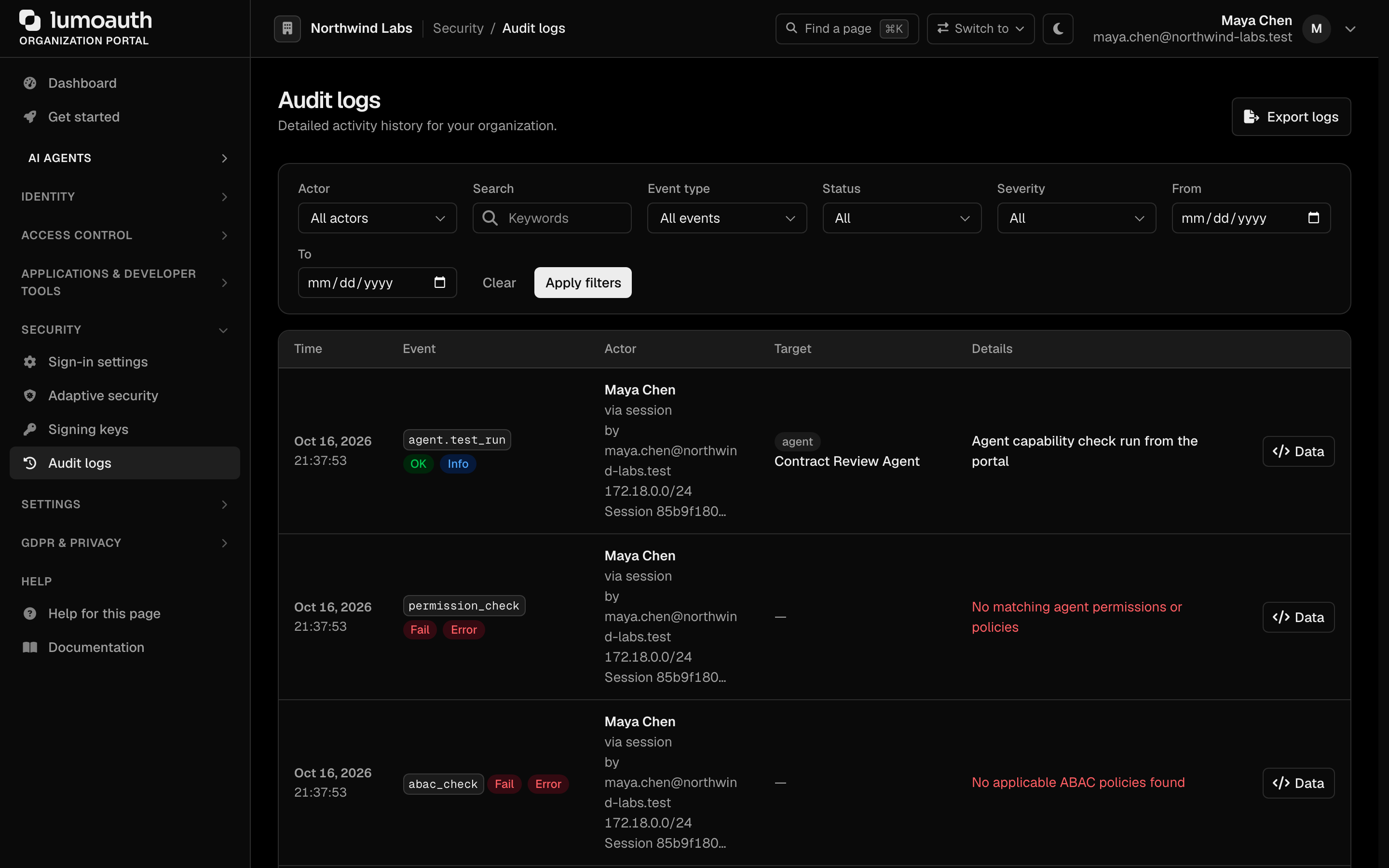
That's it. Open the LumoAuth portal → Audit logs → search for your agent's agentId and you see the call, the resource, the scope, the IP, and the result.
Step 5 — JIT permissions for sensitive tools
Don't put invoices.refund in the agent's standing capabilities. Request it just-in-time, with a human approver in the loop. JIT works on top of LumoAuthAgent (the standard agent client):
from lumoauth import LumoAuthAgent, JITContext

agent = LumoAuthAgent()       # reads LUMOAUTH_URL / LUMOAUTH_ORG_ID / agent creds
agent.authenticate()

with JITContext(agent) as jit:
    jit.create_task(name="Process refund for ticket #4429")

    result = jit.request_permission({
        "type": "mcp_action",
        "resource": "https://invoices.example.com/mcp",
        "actions": ["invoices.refund"],
        "identifier": "invoice_88231",
    }, justification="Customer requested refund per ticket #4429")

    if result["status"] == "approved":
        elevated = jit.get_token(result["request_id"])
        # Use elevated token for the refund call
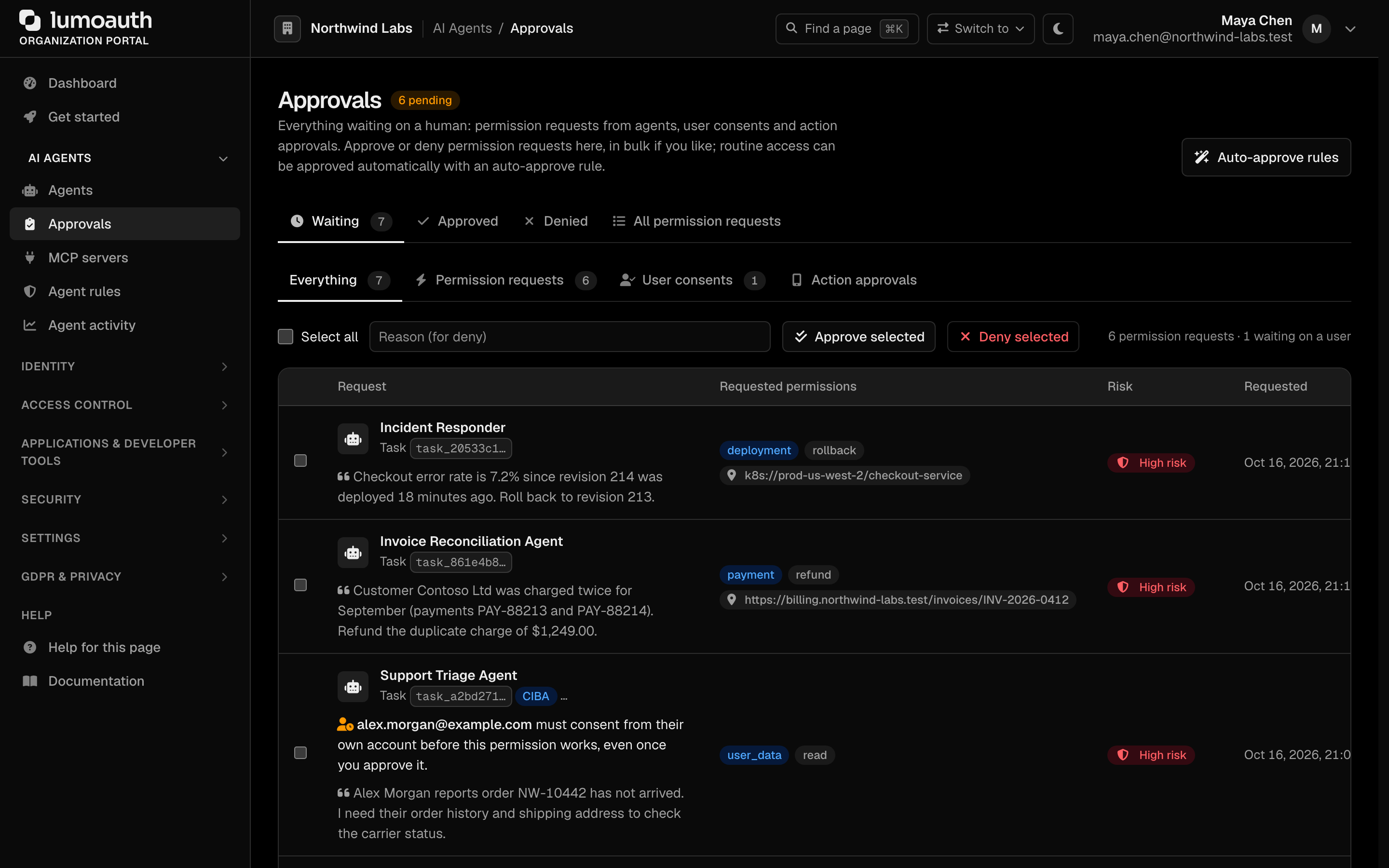
A human approver sees this in the portal under AI Agents → Approvals (filter Permission requests) — risk score, justification, the agent's recent activity. They click Approve or Deny. Your agent resumes (or aborts). Every decision is logged.
Path B — AAuth (cryptographic agent identity, Ed25519 keys, signed HTTP requests)
Use this in production when you don't want to ship admin credentials inside your agent. The agent holds an Ed25519 private key; the public JWK is registered with LumoAuth; every token request is signed.
AAuth ships in both official SDKs: lumoauth[aauth] (Python) and
@lumoauth/agent (Node/TypeScript). Pick your language below. For the
full language quickstarts see Python (AAuth) and
Node.js (AAuth).
- Python
- Node
from lumoauth import AAuthClient

# 1. Generate a keypair (once; persist private_pem in a secret manager)
private_pem, jwks = AAuthClient.generate_keypair()

# 2. Register the agent with its JWKS URI (instead of the simpler Step 2 above)
#    POST /admin/agents with identity_type=certificate and jwks_uri=...

# 3. At runtime, mint an AAuth token
client = AAuthClient(
    agent_identifier="https://invoice-analyzer.example.com",
    private_key_pem=private_pem,
    base_url=os.environ["LUMO_BASE_URL"],
    org_id=os.environ["LUMO_ORG"],
)

# `agent_token` is the agent's own `agent+jwt` (presented in Agent-Auth);
# `resource_token` comes from the MCP server's discovery + nonce flow.
# request_type=auth requires both; see /agents/aauth for the full Flow 2.
tokens = client.request_authorization(
    resource_token=resource_token,
    agent_token=agent_token,
)

# 4. Make signed calls (Bearer + RFC 9421 HTTP Message Signature)
resp = client.signed_request(
    "POST",
    "https://invoices.example.com/mcp",
    auth_token=tokens["auth_token"],
    data={"jsonrpc": "2.0", "id": 1, "method": "tools/call",
          "params": {"name": "list_invoices", "arguments": {}}},
)
import { AAuthClient, generateKeypair } from '@lumoauth/agent';

// 1. Generate a keypair (once; persist privateKeyPem in a secret manager)
const { privateKeyPem, jwks } = generateKeypair();

// 2. Register the agent with its JWKS (instead of the simpler Step 2 above)
//    POST /admin/agents with identity_type=certificate and jwks_uri=...

// 3. At runtime, mint an AAuth token
const client = new AAuthClient({
  agentIdentifier: 'https://invoice-analyzer.example.com',
  privateKeyPem: process.env.AGENT_PRIVATE_KEY,
  baseUrl: process.env.LUMO_BASE_URL,
  orgId: process.env.LUMO_ORG,
});

// agentToken — the agent's own `agent+jwt` (presented in Agent-Auth)
// resourceToken — comes from the MCP server's discovery + nonce flow
const result = await client.requestAuthToken({ resourceToken, agentToken });

// 4. Make signed calls (Bearer + RFC 9421 HTTP Message Signature)
const resp = await client.signedRequest('POST', 'https://invoices.example.com/mcp', {
  authToken: result.authToken,
  data: { jsonrpc: '2.0', id: 1, method: 'tools/call',
          params: { name: 'list_invoices', arguments: {} } },
});
Each signed call carries the access token as a Bearer credential plus a standard HTTP message signature: a Signature header (with Signature-Input + Content-Digest). The signature covers @method, @authority, @path, signature-key, content-digest, content-type, and authorization, with a fresh created timestamp and a single-use nonce — so replays and tampering are rejected.
For request_type=auth, LumoAuth derives the granted scope from the resource
token's scope claim — a scope field in the request body is ignored. Set
the scope when the resource token is minted, not on the auth request. See the
AAuth Protocol reference.
What you just got vs. a service-account API key
| Service-account API key | LumoAuth Agent + MCP | |
|---|---|---|
| Identity | "service account X used by 47 services" | agt_01HF… — one specific agent |
| Scope | All-or-nothing | Per-token, per-resource, time-bound |
| Sensitive actions | Same key | JIT + human approval (HITL) |
| Revocation | Rotate everywhere | Revoke agent → CAEP invalidates in 30s |
| Audit trail | "the API key did it" | Filter actor_id=agt_… for every action |
| Delegation chain | Untracked | Token exchange records every hop |
For the full lifecycle diagram and a map of every credential/token type an agent uses, see How LumoAuth secures an agent.
Next steps
-
Wire
agent.jit_request.createdandagent.budget_exhaustedwebhooks -
Use the CLI:
lumo agents token --agent-id agt_… --scope invoices.read(CLI reference) -
Multi-agent orchestration with delegation chains (token exchange)
-
In-portal guided tour: open Get started and click Start the tour under AI agent + MCP in 60 seconds (
/orgs/{orgId}/portal/onboarding/agent-mcp-tour). Each step creates a real MCP server, agent and token in your organization.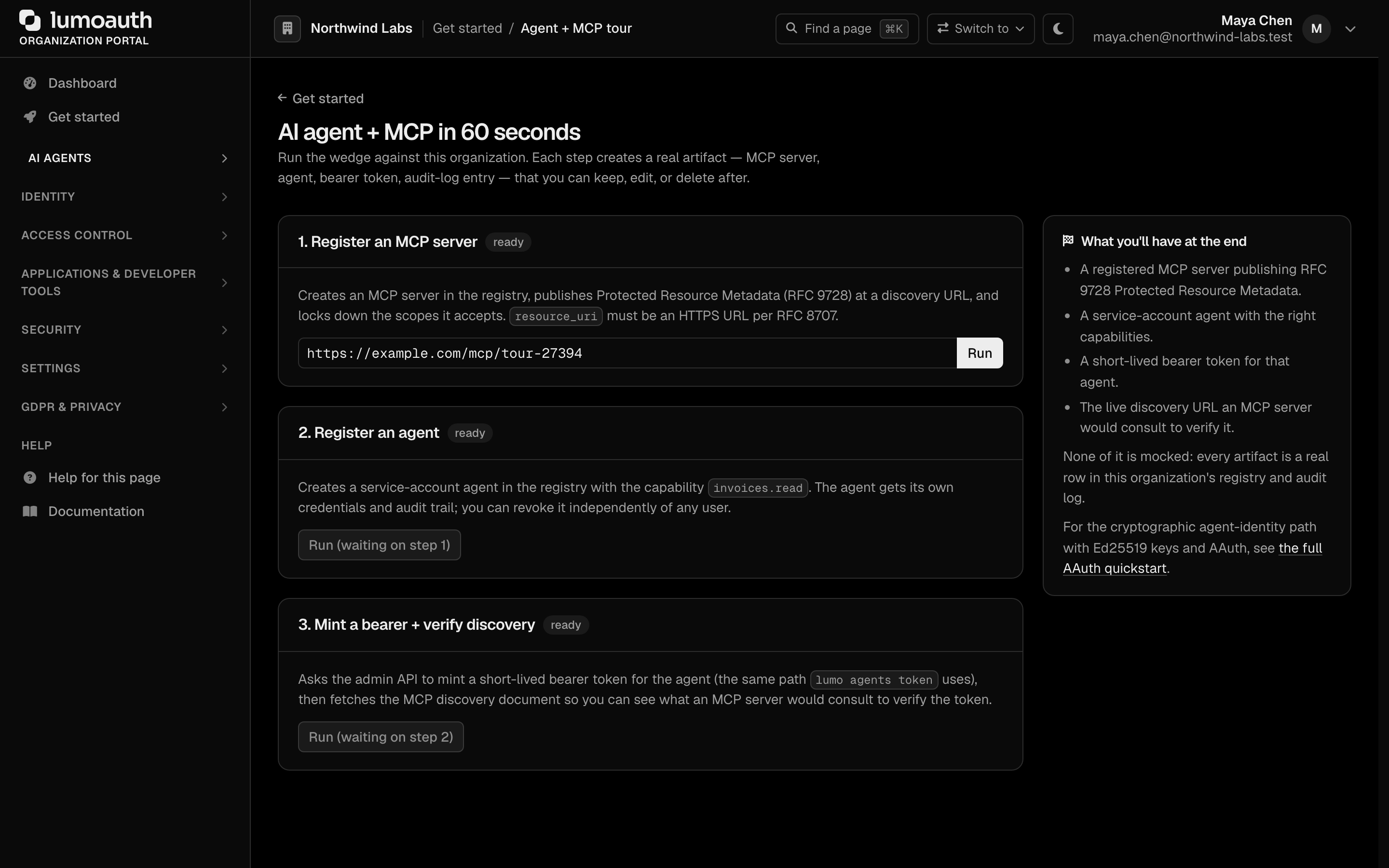
Common errors
| Error | Meaning | Fix |
|---|---|---|
401 Unauthorized on /admin/agents/.../token | Admin token missing or expired | Re-run lumo login or rotate your admin API key |
404 Not Found on /admin/mcp/servers | Admin endpoints are /orgs/{slug}/api/v1/admin/..., not /api/v1/... | Add the /admin segment |
invalid_request: Missing request_type parameter | AAuth (Path B) requires request_type ∈ {auth, code, exchange, refresh} | Path A doesn't hit /aauth/... — verify you're calling /admin/agents/{id}/token |
invalid_resource | MCP server resource_uri typo | GET /admin/mcp/servers to list |
insufficient_scope | Capability not in agent | Add to agent (admin) or request JIT |
agent_revoked | CAEP invalidated mid-flight | Re-mint; check audit log |
Error bodies aren't all the same shape — protocol endpoints (OAuth/AAuth/JIT/MCP
token errors) return OAuth-style {error, error_description}, while the admin
and validation layer returns the richer {error, message, status, details}
envelope. See the Errors reference for which family each
endpoint uses.
Standards used on this page
| Plain name | Standard |
|---|---|
| Protected resource metadata | RFC 9728 |
| Signed HTTP requests (HTTP message signatures) | RFC 9421 |
| Token exchange (delegation) | RFC 8693 |
See the standards reference for what each one covers and how LumoAuth uses it.