Token Vault (Connections)
The Token Vault brokers outbound third-party OAuth tokens for your AI agents. You configure a "Connection" once (Google, Slack, GitHub, Salesforce, or any custom OAuth 2.0 provider), users link their accounts through the provider's own consent screen, and agents fetch live, short-lived access tokens on demand. LumoAuth keeps custody of the long-lived credentials.
Agents only ever receive short-lived access tokens. Refresh tokens and provider client secrets are stored encrypted at rest and are never exposed through any API, UI, or log.
Why a Token Vault?
Without a vault, every agent that needs to call Slack or Google Drive ends up holding long-lived refresh tokens in its own environment — impossible to rotate, audit, or revoke centrally. The Token Vault inverts that:
| Concern | Without vault | With Token Vault |
|---|---|---|
| Refresh-token custody | Scattered across agent hosts | Encrypted in LumoAuth only |
| Revocation | Hunt down every copy | One click (user or admin) |
| Audit | None | vault.token_issued for every fetch |
| Access policy | Whatever the agent does | Per-connection allowed-agents list |
| Refresh handling | Every agent reimplements it | Transparent, single-flight, in the vault |
Concepts
- Connection — a per-organization configured integration: provider template (or custom endpoints), OAuth client credentials, scopes, and an agent access policy. Two grant modes:
- User-delegated (
authorization_code+ PKCE, a one-time secret that protects the sign-in code): each user links their own account; agents act on behalf of that user. - Machine (
client_credentials): one service credential owned by the connection itself.
- User-delegated (
- Grant — a linked credential (encrypted access + refresh tokens). User grants belong to a user; machine grants belong to the connection. Statuses:
active,revoked,expired,refresh_failed.
Admin setup
-
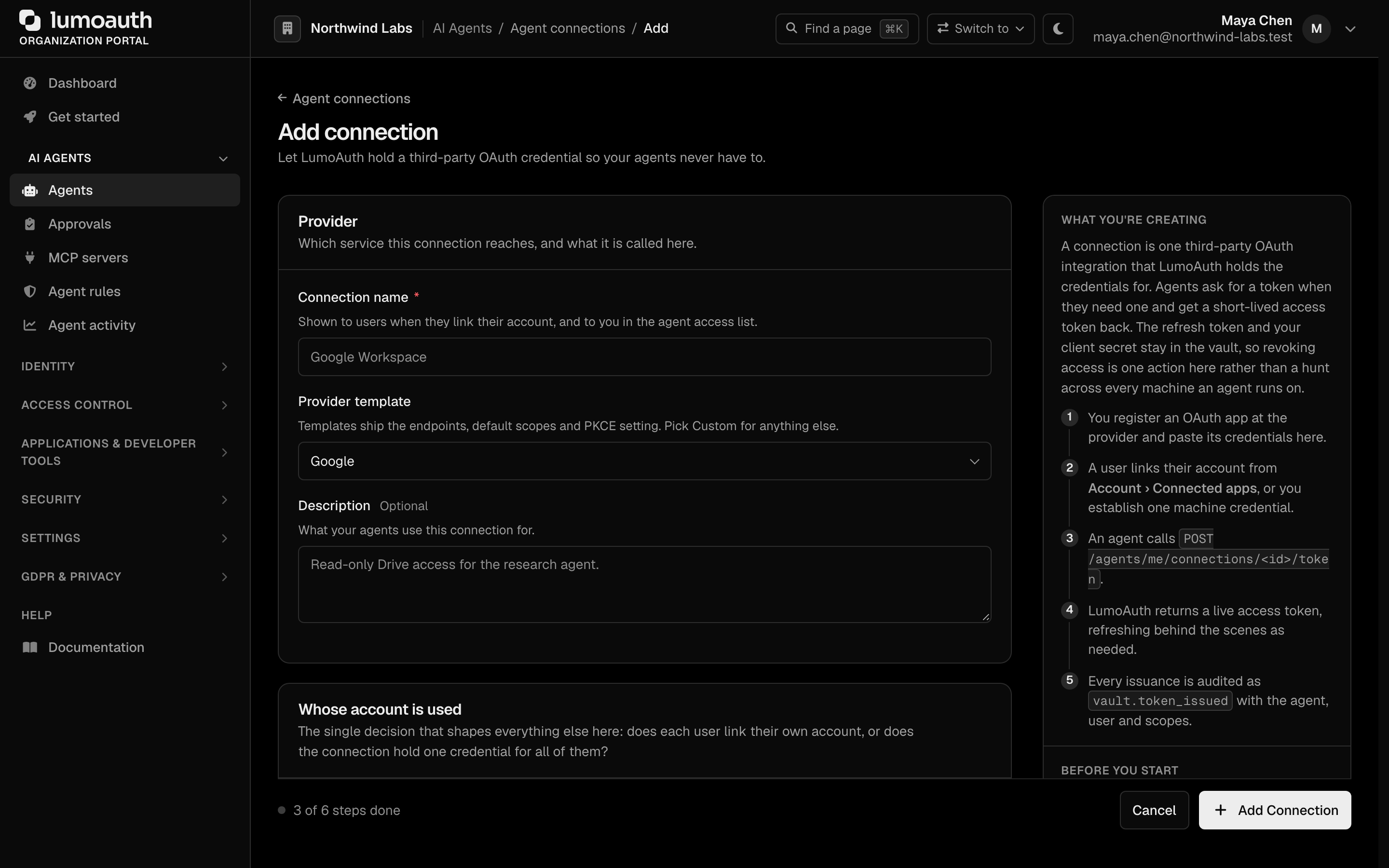
In the organization portal go to AI Agents → Agents → Connections (
/orgs/{orgId}/portal/connections) and click Add connection. -
Enter a Connection name and pick a Provider template (see the catalogue below), or Custom OAuth 2.0 provider and supply the authorization/token (and optionally revocation) endpoints under Endpoints.
-
Under Whose account is used, choose User-delegated (each user links their own account) or Machine (one service credential for the whole connection).
-
Paste the OAuth Client ID and Client secret from the app you registered at the provider. The secret is encrypted at rest and never shown again.
-
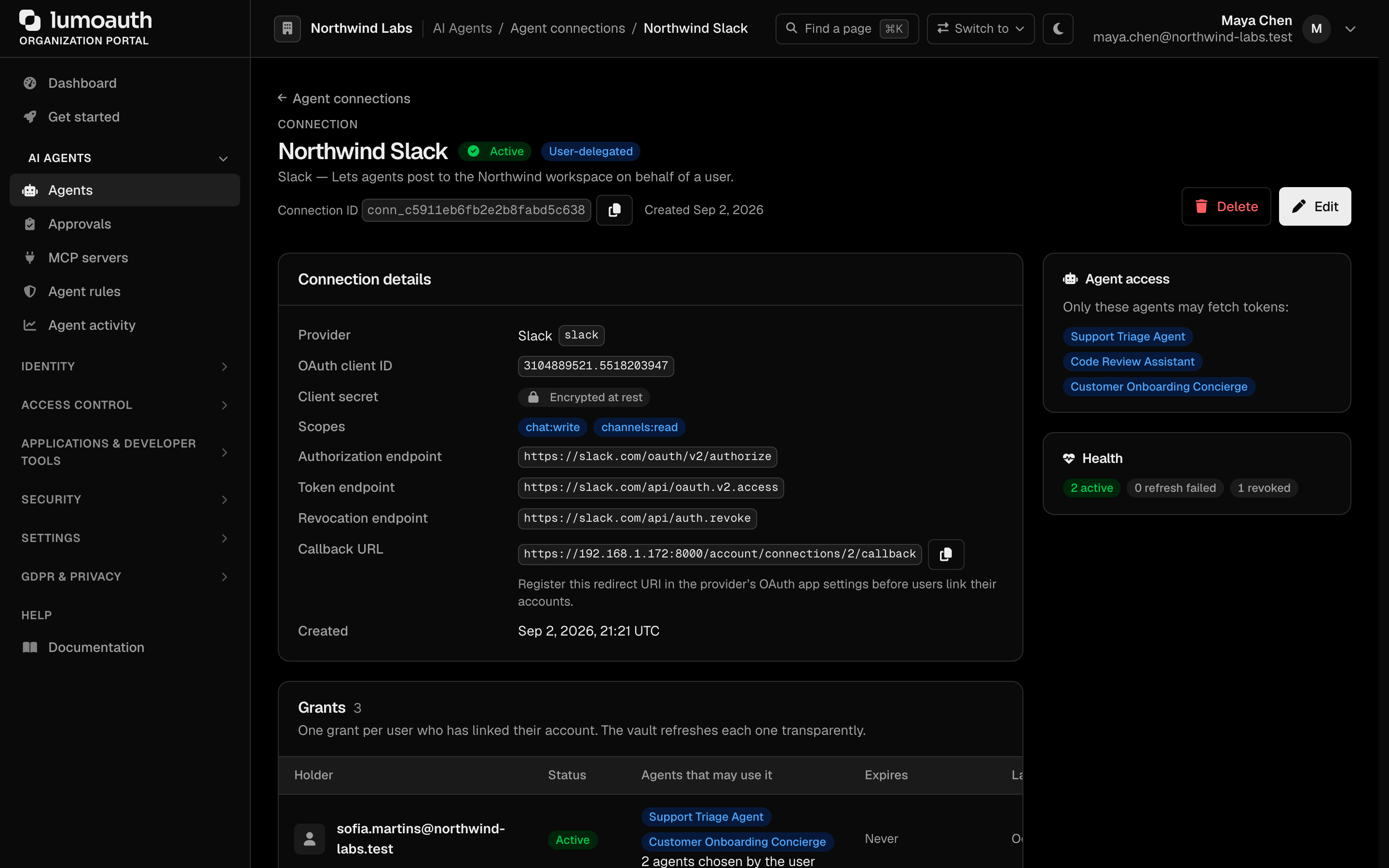
Choose Scopes (leave empty to use the template's defaults). The form shows the Callback URL to register at the provider —
https://<your-deployment>/account/connections/{id}/callback, where{id}is the number the connection gets when saved; the finished URL with a copy button is on the detail page right after. -
Under Agent access, new connections start as Only selected agents: name the agents that may use it (everything else is refused). If you opened the form from an agent's page (or with
?agent=agt_…), that agent is preselected. All active agents is the explicit alternative. Click Add Connection. -
For user-delegated connections, register the Callback URL shown on the connection detail page in the provider's OAuth app settings.
-
For machine connections, click Establish machine credential on the connection detail page to run the client-credentials exchange.
Provider catalogue
Built-in templates ship the authorization, token and revocation endpoints,
sensible default scopes, the PKCE setting and the client-authentication style
(post or HTTP Basic), so a connection is usually just "paste the client id and
secret":
| Google Calendar | Gmail | Microsoft Graph | |
| Slack | Atlassian (Jira / Confluence) | Notion | Linear |
| GitHub | Asana | Airtable | Zoom |
| Salesforce | HubSpot | Zendesk | Shopify |
| Box | Dropbox | Stripe Connect | Custom |
Templates whose host depends on your account carry placeholders — Zendesk's
https://{subdomain}.zendesk.com/oauth/tokens, Shopify's {shop} — and the
connection form asks for those values.
Importing more providers
Anything not built in can be added from Nango's public providers.yaml
catalogue, which covers several hundred OAuth 2.0 APIs. Only auth_mode: OAUTH2
entries are importable — API-key, Basic and OAuth 1 providers have no token
endpoint for the vault to broker. Nango's ${connectionConfig.subdomain}
placeholders become {subdomain} placeholders, token_request_auth_method: basic becomes HTTP Basic client authentication, and non-HTTPS endpoints are
refused.
Imported templates are maintained by LumoAuth and appear in the connection form marked imported. Built-ins are never overridden by an import, so a bad upstream entry cannot silently repoint an existing connection's token endpoint.
User linking
End users manage their own links under My account → Accounts agents can use (/account/connections, formerly "Connected accounts"):
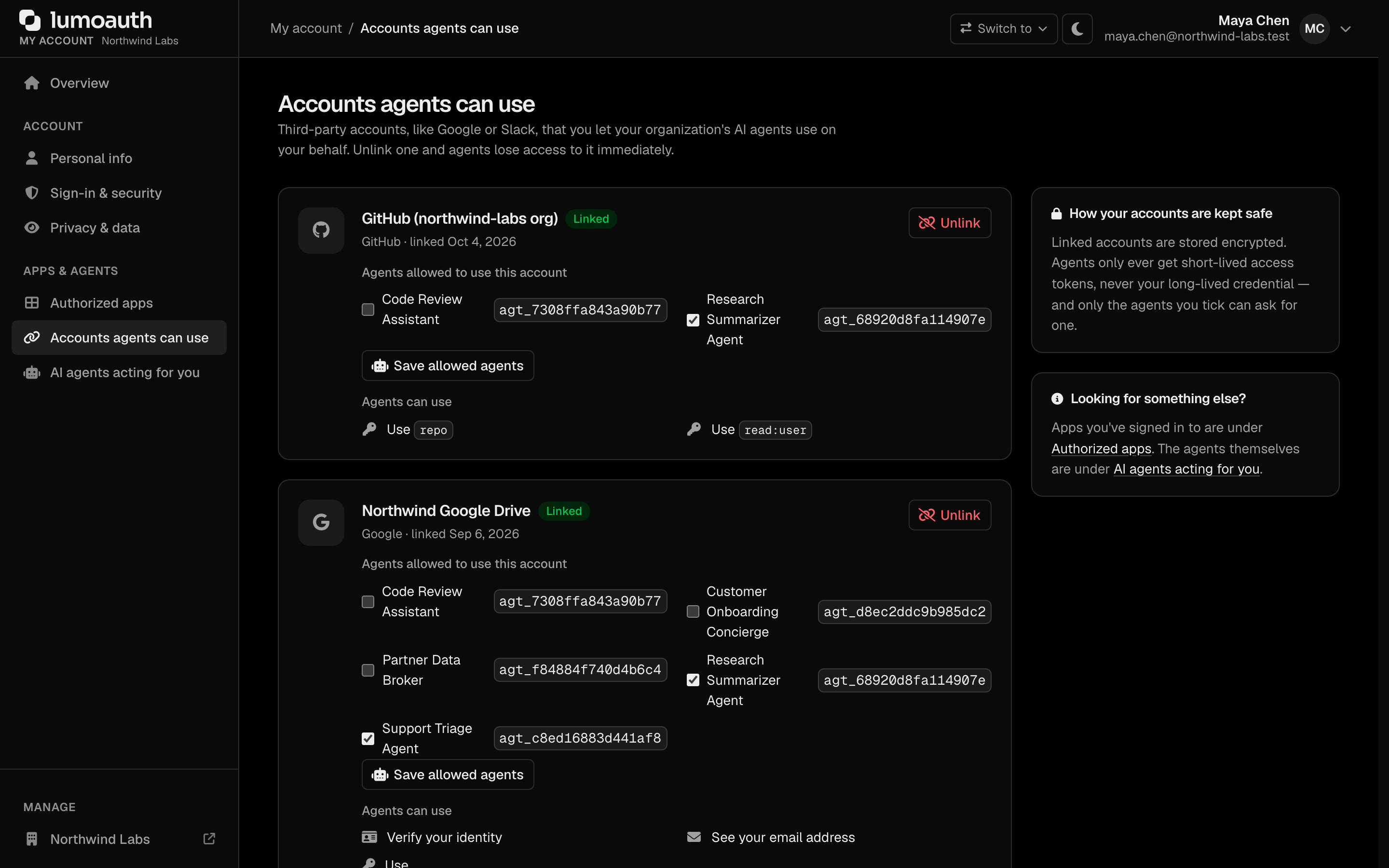
- The user ticks the agents that may use the account (Agents that may use this account once linked) and clicks Link account; they are redirected to the provider's consent screen (authorization code + PKCE, CSRF-bound state, 10-minute TTL).
- After consent, LumoAuth exchanges the code, encrypts the tokens, and stores the grant bound to that user and connection, together with the user's agent allow-list.
- Agents allowed to use this account can be changed at any time with Save allowed agents. Only agents that are active, flagged act on behalf of users and permitted by the connection's allowed-agents policy are offered; a grant with no allowed agent is usable by nobody.
- Unlink revokes the grant: best-effort token revocation at the provider (when its revocation endpoint is known), then local wipe. Agents lose access immediately.
A linked account is never usable by "every delegation-capable agent of the organization". The owning user chooses, agent by agent, who may act with it. Grants linked before this rule existed start closed (no allowed agent) until the user re-opens them from this page. Admins see each grant's allowed agents by name in the connection's Grants table (Agents that may use it; a grant the user has not opened yet reads None yet — the user has to pick).
Agent API
Agents authenticate with their normal agent bearer token (same as /agents/me).
List available connections
curl https://app.lumoauth.dev/orgs/acme/api/v1/agents/me/connections \
  -H "Authorization: Bearer $AGENT_TOKEN"
{
  "connections": [
    {
      "connection_id": "conn_1f3a9c2b7d8e4a5f6b0c1d2e",
      "name": "Google Workspace",
      "provider": "google",
      "provider_label": "Google",
      "grant_mode": "authorization_code",
      "scopes": ["openid", "email", "https://www.googleapis.com/auth/drive.readonly"],
      "user_delegated": true,
      "machine_grant_status": null,
      "linked_users": 12
    }
  ]
}
No secrets or token material appear in this response.
Fetch an access token
# User-delegated: the agent acts on behalf of a specific user
curl -X POST https://app.lumoauth.dev/orgs/acme/api/v1/agents/me/connections/conn_1f3a9c2b7d8e4a5f6b0c1d2e/token \
  -H "Authorization: Bearer $AGENT_TOKEN" \
  -H "Content-Type: application/json" \
  -d '{"user_id": "alice@acme.com"}'
{
  "access_token": "ya29.a0Af...",
  "token_type": "Bearer",
  "expires_at": "2026-07-01T13:45:00+00:00",
  "scopes": ["openid", "email", "https://www.googleapis.com/auth/drive.readonly"]
}
For machine connections, omit the body — the connection-level credential is used (and bootstrapped automatically on first use).
A user-delegated token is issued only when that user allowed this agent on their grant (see User linking) and the user is still active and not blocked. Otherwise the call fails with 403 delegation_not_allowed and the attempt is audited as vault.delegated_token_denied (agent, connection, user, reason). Every successful fetch also records agent activity (last_used_at) for dormancy policies.
The vault refreshes near-expiry tokens transparently before answering. (This mirrors the JIT, or just-in-time, permission model: the agent gets access only when it asks, for a short window.) Concurrent requests for the same grant are single-flighted: only one refresh hits the provider; other callers reuse the result or receive 503 + Retry-After for the brief lock window.
| Error | Status | Meaning |
|---|---|---|
delegation_not_permitted | 403 | Agent lacks act on behalf of users |
delegation_not_allowed | 403 | The user did not allow this agent on their grant, or the user is deactivated / blocked |
agent_not_allowed | 403 | Connection's allowed-agents policy excludes this agent |
grant_not_found | 404 | The user has not linked this connection |
grant_revoked / grant_expired / refresh_failed | 409 | Credential unusable — user must re-link |
refresh_in_progress | 503 | Concurrent refresh; retry after Retry-After |
rate_limited | 429 | Per-(organization, agent) token_vault limiter tripped |
Security model
- Encryption at rest — client secrets, access tokens, and refresh tokens are encrypted at rest with the platform encryption key, the same mechanism protecting SAML/SCIM/webhook secrets. Organizations with a BYOK vault KEK (secrets manager flagged
vault_kek) get token material encrypted under their own key instead — see Bring your own key below. - Refresh-token custody — refresh tokens are write-only from the vault's perspective: used for provider refresh calls, never returned by any endpoint or included in audit metadata.
- Allowed-agents policy — enforced on every token fetch. User-delegated fetches additionally require the agent's
canActOnBehalfOfUsersflag and the owning user's per-grant allow-list, mirroring JIT delegation and push approval. - User revocation wins — a revoked or unlinked grant fails closed (
409) even if a cached token would still be live at the provider; a deactivated or blocked user's grants are frozen (403). - HTTPS only — authorization, token and revocation endpoints must be
https://.http://is accepted solely for a loopback host (localhost,127.x,::1) outside production, for local mock providers. - SSRF-guarded egress — custom providers mean arbitrary URLs; every outbound call (authorize redirect, token exchange, refresh, revocation) is validated by the platform URL safety checker with DNS pinning, and follows no redirects.
- Audit trail —
vault.connection_created/updated/deleted,vault.grant_linked(with the allowed agents),vault.grant_agents_updated,vault.grant_revoked,vault.token_issued(agent, connection, user, scopes — never token material),vault.delegated_token_denied,vault.refresh_failed. - Rate limiting — token fetches are limited per (organization, agent) via the
token_vaultlimiter (60 per minute).
Operations
Grants that expire within the next hour are refreshed proactively in the background. Grants marked refresh_failed stay visible in the portal (AI Agents → Agents → Connections → open the connection → Grants, shown as Refresh failed) so admins can see which users need to re-link. The same table shows the agents each user allowed on their grant (None means the user has not opened the account to any agent yet).
Bring your own key (BYOK)
When an organization configures a secrets manager with a vault KEK, the vault derives a per-organization key from it (HKDF) and encrypts token material under that key with authenticated encryption bound to the organization id and the grant id — a ciphertext copied onto another grant row (or another organization's row) no longer decrypts. Rows written without BYOK use the same construction under a vault-specific subkey of the platform encryption key.
Rows sealed under an earlier key keep decrypting; they are re-encrypted under the current key after BYOK is switched on or off. The derived KEK is held in memory for at most five minutes and is never cached in plaintext.
Standards used on this page
| Plain name | Standard |
|---|---|
| Proof Key for Code Exchange (PKCE) | RFC 7636 |
| Token revocation | RFC 7009 |
See the standards reference for what each one covers and how LumoAuth uses it.