AI gateways
Most agent platforms route their model calls through an AI gateway (an LLM proxy) so spend, model access and prompt logging live in one place. LumoAuth connects to your gateway and gives every agent its own virtual key: created when the agent is created, revoked the moment the kill switch fires (the kill switch is what suspending, revoking or deactivating an agent triggers).
That closes the usual gap — a shared sk-… key pasted into a dozen agent
deployments, impossible to attribute and impossible to revoke without breaking
everything.
| Gateway | What LumoAuth creates | How it is revoked |
|---|---|---|
| LiteLLM | Virtual key via POST /key/generate (key_alias, metadata.lumo_agent_id, optional team and budget) | POST /key/delete |
| Portkey | Workspace service API key via the Admin API (type: service, optional usage_limits and default config) | DELETE /v1/admin/api-keys/{id} |
| Kong AI Gateway (Konnect) | Consumer with custom_id = agent id, plus a key-auth credential | Consumer is deleted (credentials go with it) |
| Cloudflare AI Gateway | Account API token scoped to the AI Gateway Run permission group, for the authenticated gateway's cf-aig-authorization header | DELETE /accounts/{id}/tokens/{tokenId} |
Connecting a gateway
-
Organization portal → Settings → Integrations → Agent ecosystem (
/orgs/{orgId}/portal/integrations/agent-ecosystem), then the AI gateways section.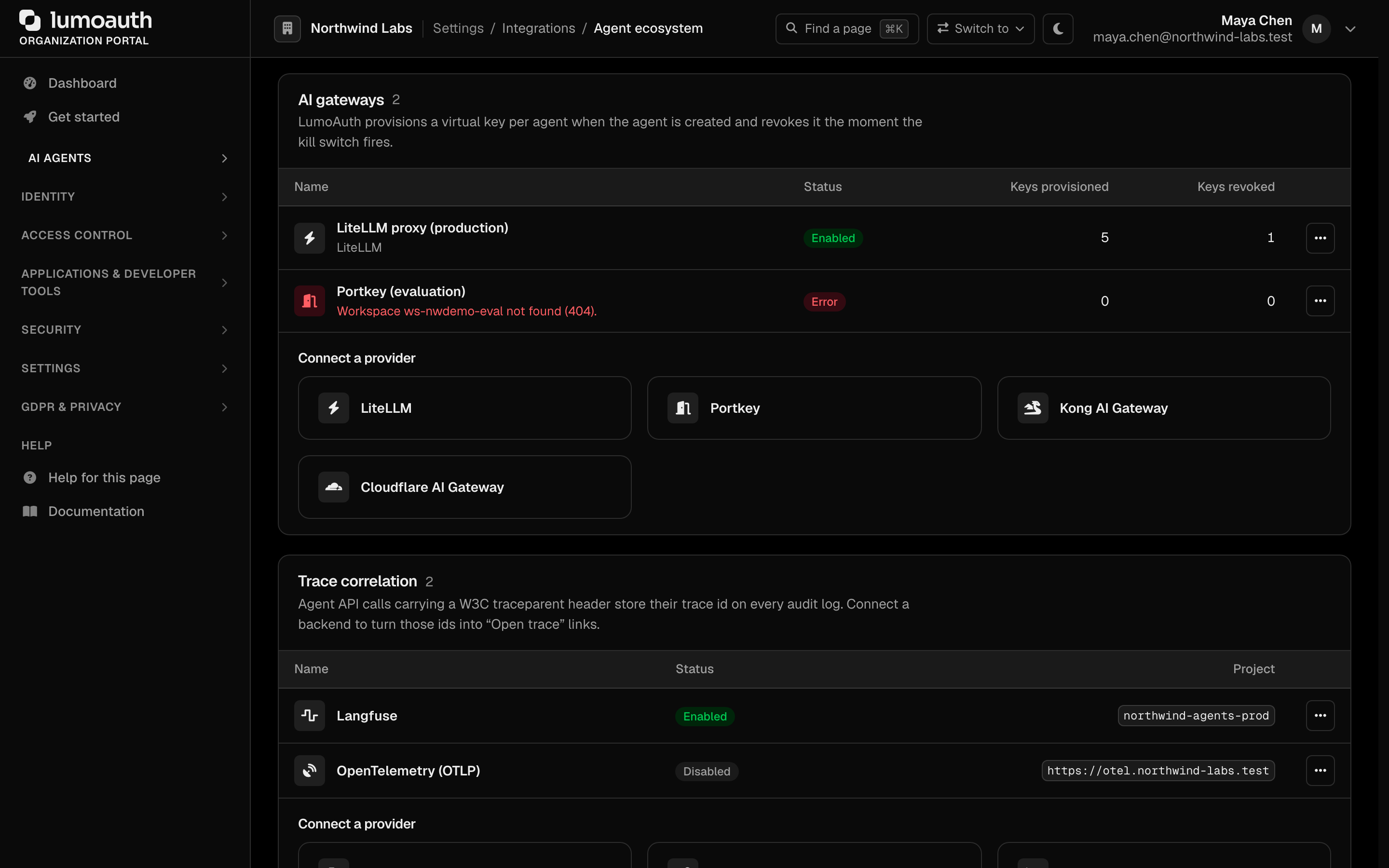
-
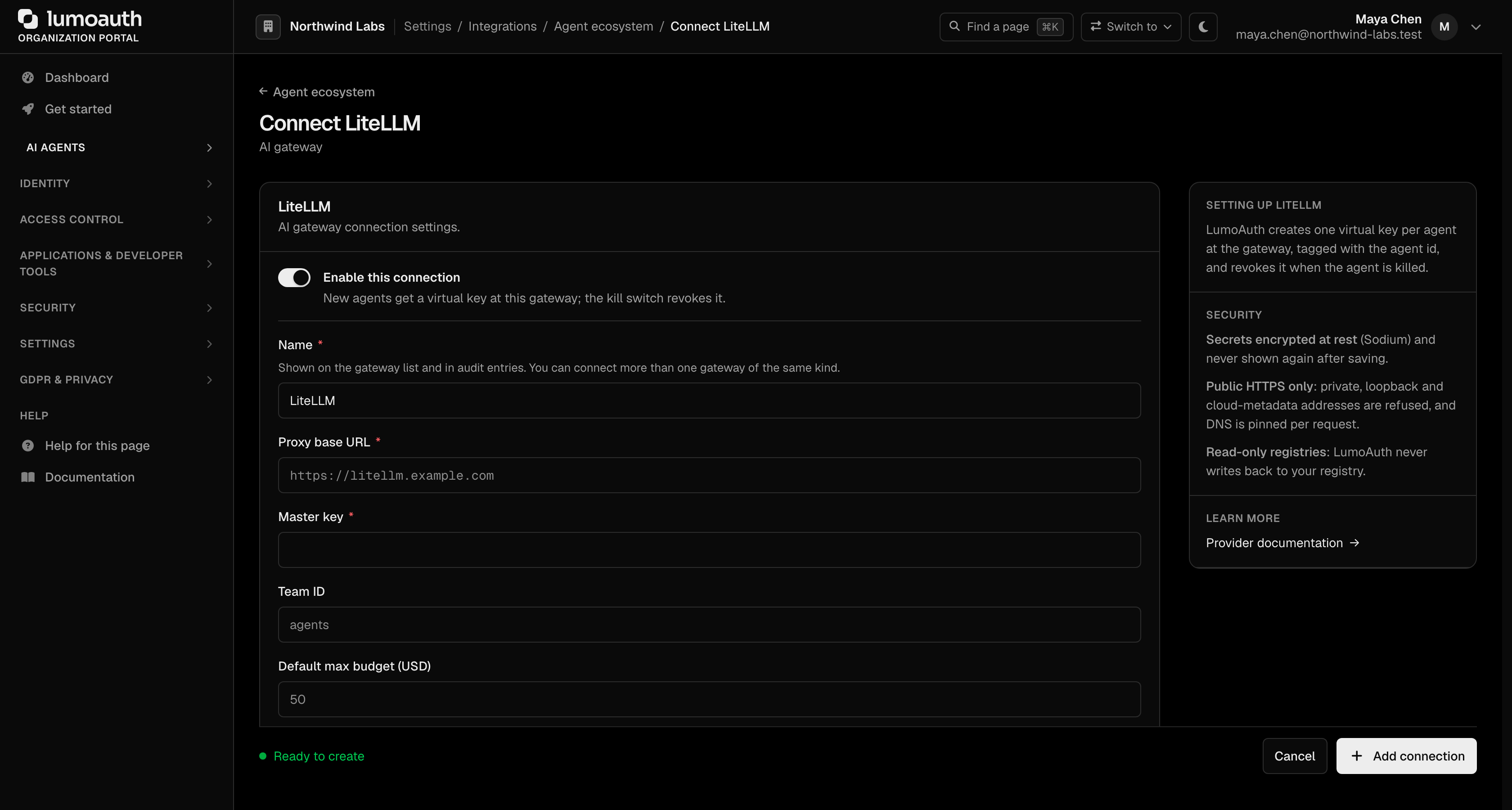
Pick the gateway under Connect a provider and fill in its fields. Credentials (LiteLLM master key, Portkey admin key, Konnect access token, Cloudflare API token) are encrypted at rest and never shown again — leave the field blank when editing to keep the stored value.
-
Leave Enable this connection on and click Add connection to save.
-
On the saved connection, press Test connection. The gateway is called with a cheap read (
/health/liveliness, list keys, list consumers, read gateway) and any error is shown verbatim and stored as the connection's last error.
You can connect more than one gateway, including two of the same kind (for example one LiteLLM proxy per region). Every enabled gateway gets a key for every new agent.
Fields
| Gateway | Configuration | Secret |
|---|---|---|
| LiteLLM | Proxy base URL, team id, default max budget (USD), budget duration | Master key |
| Portkey | Workspace id, default config id, API base URL, default monthly budget | Admin API key |
| Kong | Konnect control plane id (UUID), Konnect API base | Konnect access token |
| Cloudflare | Account id, gateway id, AI Gateway Run permission group id | API token that can create tokens |
When an agent has a budget policy (max_cost_usd, monthly_usd or
max_budget), that value is used for its virtual key. Otherwise the gateway's
default budget applies. Agents without either get an unlimited key — set a
gateway default if you do not want that.
Lifecycle
agent created ──► ProvisionAgentGatewayKeyMessage (async)
                    └─► one key per enabled gateway, recorded as AgentGatewayKey
                        (handle + encrypted secret when the gateway returns one)

kill switch  ────► RevokeAgentGatewayKeyMessage (async)
 (suspend /         └─► key deleted at the gateway, row marked revoked,
  revoke /              stored secret wiped
  deactivate)
Provisioning is idempotent per (agent, gateway): an agent that already has
an active key at a gateway is skipped, so re-running never creates duplicates.
Both directions are asynchronous and never throw into the agent lifecycle — a
gateway outage cannot block agent creation or, more importantly, a kill switch.
Failures are recorded on the key row and the gateway's last error, and audited
as ai_gateway.key_provision_failed / ai_gateway.key_revoke_failed.
A gateway that is unreachable at revoke time keeps the key row in active with
the error attached, so the failure is visible rather than silently swallowed.
Re-run revocation by toggling the agent's status once the gateway is back.
Keys for one agent are listed on Agent observability → AI gateway keys (gateway, key handle, status, provisioned and revoked timestamps). Secrets are never displayed.
Verifying LumoAuth agent tokens at the gateway
Virtual keys answer "which agent is this?" for the gateway's own accounting. If you also want the gateway to verify the agent's LumoAuth identity, each gateway page shows a ready-made configuration snippet that validates agent JWTs against your organization's JWKS:
https://<your-deployment>/orgs/<orgId>/api/v1/.well-known/jwks.json
- LiteLLM —
enable_jwt_auth: truewithlitellm_jwtauth.public_key_urlpointing at the JWKS. - Kong — the
openid-connectplugin (Enterprise) withconsumer_by: ["custom_id"], which maps straight onto the consumer LumoAuth created for the agent; or the OSSjwtplugin with the organization's RS256 key. - Cloudflare — a Worker in front of the gateway that verifies the token with
jose'screateRemoteJWKSetbefore adding thecf-aig-authorizationheader. - Portkey — verify at your edge before Portkey; the gateway itself authenticates with the provisioned key.
Audit events
| Event | When |
|---|---|
agent_ecosystem.gateway.created / .updated / .deleted | Configuration changes (secrets are listed by field name only) |
agent_ecosystem.gateway.enabled / .disabled | Toggle |
agent_ecosystem.gateway.tested | Test connection |
ai_gateway.key_provisioned | Virtual key created for an agent |
ai_gateway.key_revoked | Virtual key revoked (carries the reason) |
ai_gateway.key_provision_failed / ai_gateway.key_revoke_failed | Gateway error |
Security notes
- Every outbound call goes through the platform SSRF guard: HTTPS only, public addresses only, DNS pinned per request, no redirects, 10-second timeout.
- No vendor SDKs —
symfony/http-clientonly. - Provider error bodies are truncated to 200 characters before they reach an audit entry, and URLs are logged as host + path so query strings never leak.
- Gateway secrets are stored as one encrypted JSON blob; the per-agent key secret is encrypted separately and wiped on revocation.
Related
- Agent Governance — the kill switch that triggers revocation
- Tracing and trace correlation — linking gateway traffic to audit events
- Agent Registry