Agent Auth (AAuth) - Quick Start Guide
Get your agent authenticated and authorized in 5 minutes. This guide walks you through the essential steps to implement Agent Auth in your application.
This quickstart takes approximately 15-20 minutes to complete from start to finish.
Prerequisites
- Access to a LumoAuth tenant (e.g.,
acme-corp) - Node.js 18+ or Python 3.9+ installed
- Basic understanding of OAuth 2.0 concepts
You'll need a LumoAuth tenant with AAuth enabled, and a server environment capable of generating Ed25519 or RSA key pairs.
Step 1: Generate Key Pair (1 min)
Agent Auth requires cryptographic keys. Generate an Ed25519 key pair:
// Node.js
const crypto = require('crypto');
const { publicKey, privateKey } = crypto.generateKeyPairSync('ed25519', {
publicKeyEncoding: { type: 'spki', format: 'pem' },
privateKeyEncoding: { type: 'pkcs8', format: 'pem' }
});
// Convert public key to raw bytes for JWK
const publicKeyBytes = Buffer.from(
publicKey.replace(/-----BEGIN PUBLIC KEY-----|-----END PUBLIC KEY-----|\n/g, ''),
'base64'
).slice(-32);
const jwks = {
keys: [{
kty: 'OKP',
crv: 'Ed25519',
x: publicKeyBytes.toString('base64url'),
use: 'sig',
kid: 'key-1'
}]
};
console.log('JWKS:', JSON.stringify(jwks, null, 2));
console.log('\nPrivate Key (save securely):');
console.log(privateKey);
# Python
from cryptography.hazmat.primitives.asymmetric import ed25519
from cryptography.hazmat.primitives import serialization
import base64
import json
# Generate key pair
private_key = ed25519.Ed25519PrivateKey.generate()
public_key = private_key.public_key()
# Export public key
public_bytes = public_key.public_bytes(
encoding=serialization.Encoding.Raw,
format=serialization.PublicFormat.Raw
)
jwks = {
"keys": [{
"kty": "OKP",
"crv": "Ed25519",
"x": base64.urlsafe_b64encode(public_bytes).decode().rstrip('='),
"use": "sig",
"kid": "key-1"
}]
}
print('JWKS:', json.dumps(jwks, indent=2))
print('\nSave your private key securely!')
Only call the introspection endpoint from your backend server. Never expose your client credentials or call this endpoint from client-side code.
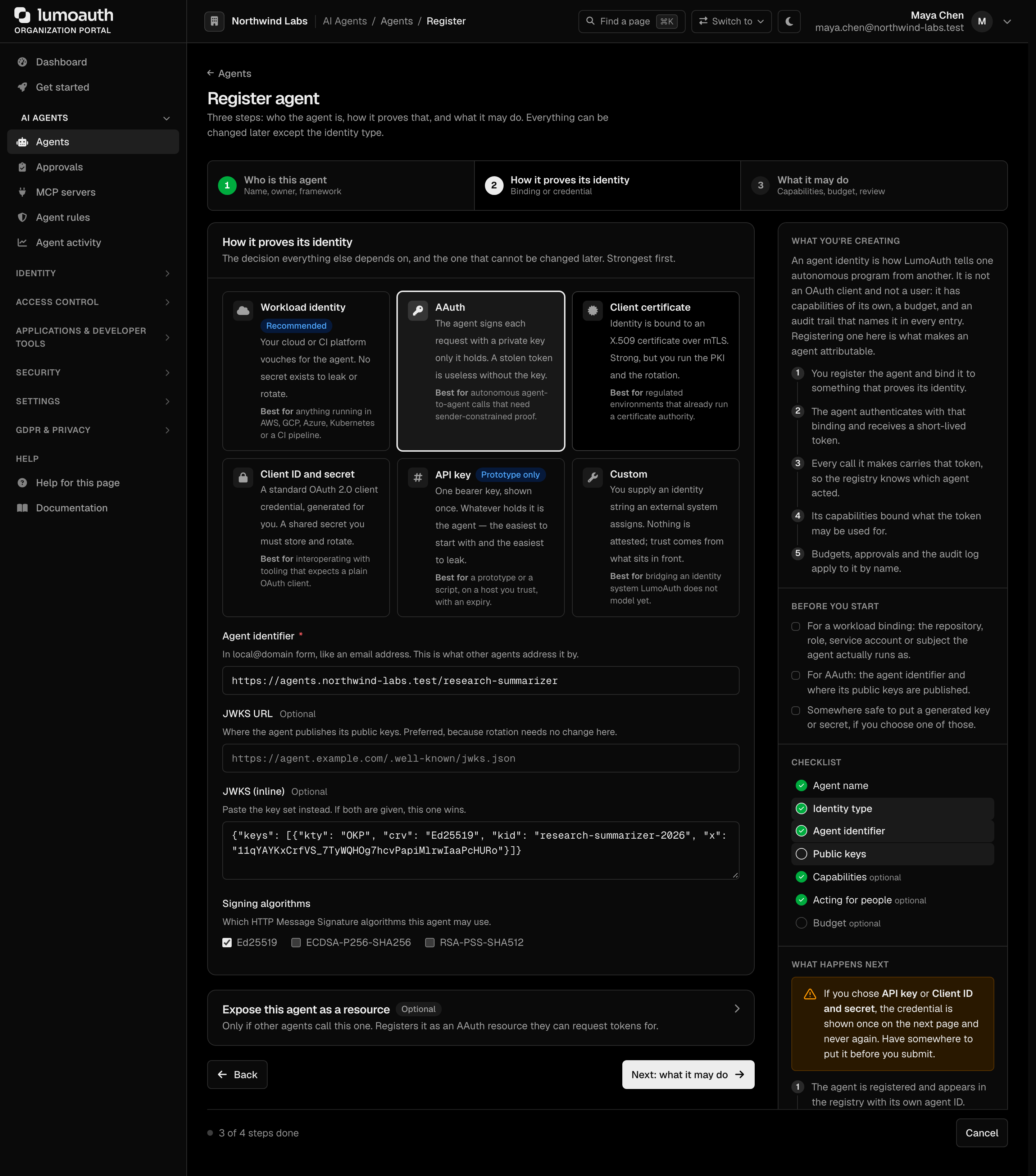
Step 2: Register Your Agent (2 min)
Navigate to your tenant's portal to register your agent:
Navigate to your tenant portal to register agents and resources, or use the Admin API for programmatic registration.
Fill in the registration form:
| Field | Example Value | Description |
|---|---|---|
| Name | My First Agent | Human-readable agent name |
| Agent Identifier | https://my-agent.example.com | HTTPS URL uniquely identifying your agent |
| Description | Testing AAuth protocol | Optional description |
| JWKS | Paste your JWKS from Step 1 | Your agent's public keys |
| Redirect URI | https://my-agent.example.com/oauth/callback | Where to send authorization codes |
| Allowed Scopes | read write | Scopes this agent can request |
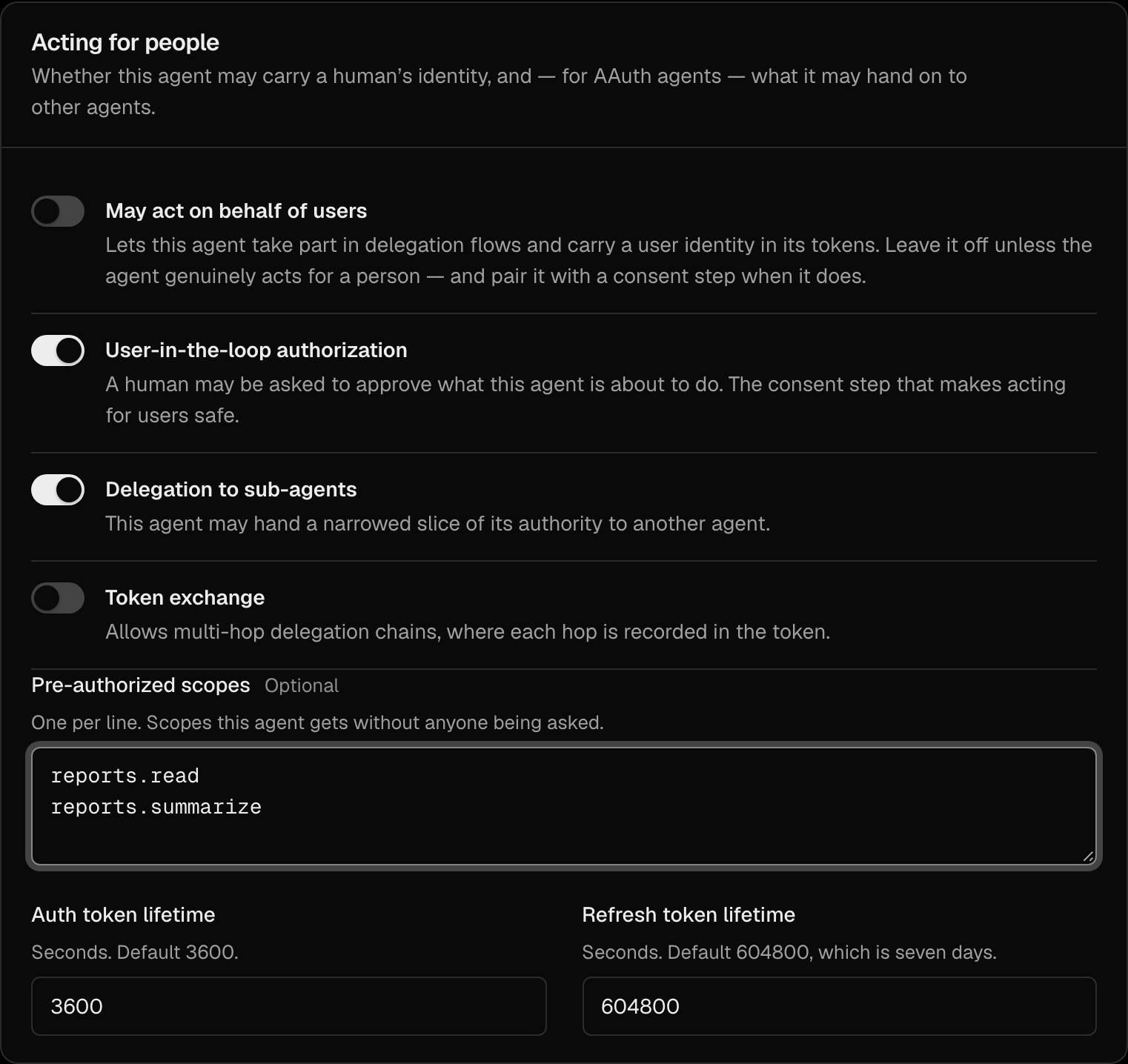
Enable features:
- ✅ User Authorization Enabled
- ✅ Delegation Enabled
Click Create Agent to complete registration.
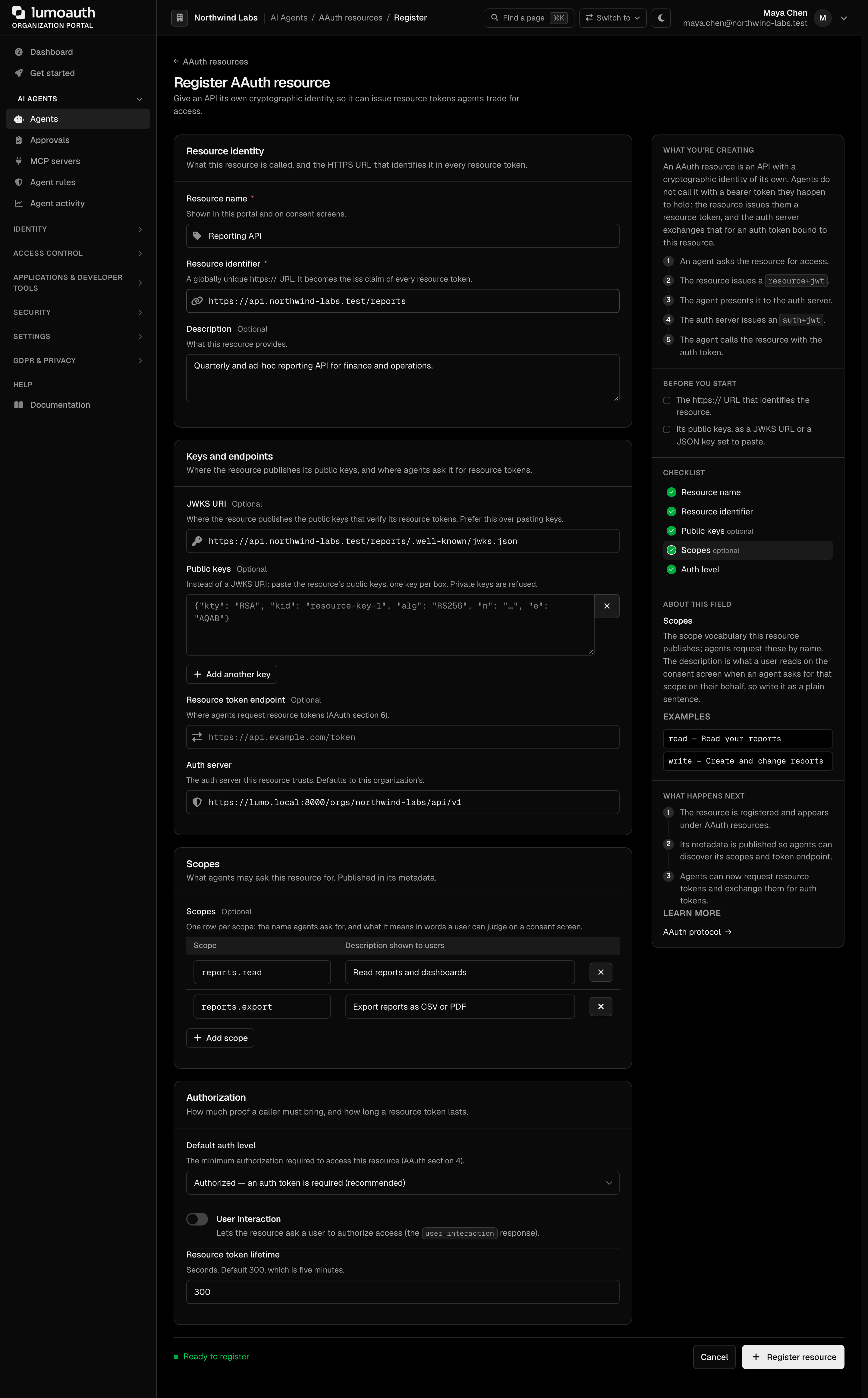
Step 3: Register a Resource (1 min)
Register the protected resource (API) your agent will access:
Navigate to your tenant portal to register agents and resources, or use the Admin API for programmatic registration.
| Field | Example Value |
|---|---|
| Name | My API |
| Resource Identifier | https://api.example.com |
| JWKS URI | https://api.example.com/.well-known/jwks.json |
| Supported Scopes | read, write |
| Default Auth Level | authorized |
Step 4: Make Your First Request (1 min)
Now you're ready to authenticate your agent and access the resource. Here's a minimal example:
const crypto = require('crypto');
// Configuration
const config = {
tenantSlug: 'acme-corp',
agentIdentifier: 'https://my-agent.example.com',
resourceIdentifier: 'https://api.example.com',
authServerUrl: 'https://app.lumoauth.dev',
privateKey: process.env.AGENT_PRIVATE_KEY, // Load securely
redirectUri: 'https://my-agent.example.com/oauth/callback'
};
// Helper: Sign HTTP request
function signRequest(method, url, headers = {}, body = null) {
const components = [
`"@method": ${method}`,
`"@target-uri": ${url}`
];
if (body) {
const bodyStr = JSON.stringify(body);
const digest = crypto.createHash('sha256').update(bodyStr).digest('base64');
const contentDigest = `sha-256=:${digest}:`;
components.push(`"content-type": application/json`);
components.push(`"content-digest": ${contentDigest}`);
headers['Content-Digest'] = contentDigest;
}
const signatureBase = components.join('\n');
const signature = crypto.sign(null, Buffer.from(signatureBase),
crypto.createPrivateKey(config.privateKey));
const covered = components.map(c => c.split('"')[1]).join(' ');
const agentAuth = `sig1=:${signature.toString('base64')}:; ` +
`label="sig1"; alg="ed25519"; ` +
`keyid="${config.agentIdentifier}#key-1"; ` +
`created=${Math.floor(Date.now() / 1000)}; ` +
`covered="${covered}"`;
return { agentAuth, headers };
}
// Step 1: Get agent token (delegation)
async function getAgentToken(sessionPublicKey) {
// Your agent server issues agent tokens
// For testing, you can skip delegation and use your agent directly
return 'your_agent_token_here';
}
// Step 2: Get resource token
async function getResourceToken() {
const body = {
resource_identifier: config.resourceIdentifier,
audience: `${config.authServerUrl}/t/${config.tenantSlug}/api/v1`,
lifetime: 300
};
// Note: In production, the resource would create and sign this token itself
// For testing, we'll use a simplified approach - check your LumoAuth setup
// to see if your tenant has test mode enabled or if you need resource credentials
const response = await fetch(
`${config.authServerUrl}/t/${config.tenantSlug}/api/v1/aauth/resource/token`,
{
method: 'POST',
headers: {
'Content-Type': 'application/json',
// Resources authenticate using their own credentials or signing
'Authorization': `Bearer ${config.resourceIdentifier}`
},
body: JSON.stringify(body)
}
);
if (!response.ok) {
const errorText = await response.text();
throw new Error(`Failed to get resource token: ${response.status} ${errorText}`);
}
const data = await response.json();
return data.resource_token;
}
// Step 3: Request authorization
async function requestAuthorization(agentToken, resourceToken) {
const requestBody = {
request_type: 'auth',
agent_token: agentToken,
resource_token: resourceToken,
scope: 'read write',
redirect_uri: config.redirectUri
};
const url = `${config.authServerUrl}/t/${config.tenantSlug}/api/v1/aauth/agent/token`;
const { agentAuth, headers } = signRequest('POST', url, {}, requestBody);
headers['Content-Type'] = 'application/json';
headers['Agent-Auth'] = agentAuth;
const response = await fetch(url, {
method: 'POST',
headers,
body: JSON.stringify(requestBody)
});
if (response.status === 401) {
// User authorization required
const data = await response.json();
console.log('Redirect user to:', data.auth_url);
// User will be redirected back with authorization code
return null;
}
if (!response.ok) {
const errorText = await response.text();
throw new Error(`Authorization request failed: ${response.status} ${errorText}`);
}
return await response.json();
}
// Step 4: Exchange authorization code
async function exchangeCode(code, requestToken) {
const requestBody = {
request_type: 'code',
code: code,
request_token: requestToken
};
const url = `${config.authServerUrl}/t/${config.tenantSlug}/api/v1/aauth/agent/token`;
const { agentAuth, headers } = signRequest('POST', url, {}, requestBody);
headers['Content-Type'] = 'application/json';
headers['Agent-Auth'] = agentAuth;
const response = await fetch(url, {
method: 'POST',
headers,
body: JSON.stringify(requestBody)
});
return await response.json();
}
// Step 5: Access protected resource
async function callResourceApi(authToken, endpoint) {
const url = `${config.resourceIdentifier}${endpoint}`;
const headers = {
'Authorization': `Bearer ${authToken}`
};
const { agentAuth } = signRequest('GET', url, headers);
headers['Agent-Auth'] = agentAuth;
const response = await fetch(url, { headers });
return await response.json();
}
// Main flow
async function main() {
// 1. Get tokens
const agentToken = await getAgentToken();
const resourceToken = await getResourceToken();
// 2. Request authorization
const tokens = await requestAuthorization(agentToken, resourceToken);
if (!tokens) {
console.log('User authorization required - check console for URL');
return;
}
// 3. Access resource
const data = await callResourceApi(tokens.access_token, '/v1/data');
console.log('Success! Got data:', data);
}
main().catch(console.error);
Complete Flow Diagram
Key Takeaways
HTTP Signing
Every request is signed using RFC 9421 to prevent tampering and replay attacks
Token Binding
Tokens are bound to keys via proof-of-possession, preventing token theft
User Consent
Users explicitly authorize agents to act on their behalf
Troubleshooting Common Issues
401 Error: "Unauthorized" on Resource Token Request
Problem: Getting 401 when requesting a resource token.
Solutions:
- Verify resource is registered: Check that you've registered the resource in LumoAuth at the exact identifier URL
- Check tenant slug: Ensure you're using the correct tenant slug in the URL
- Resource authentication: Resources need proper credentials or signing. In development, check if your tenant has a test/development mode
- HTTPS requirement: All identifiers must use HTTPS (or localhost for local development)
TypeError: response.headers.raw is not a function
Problem: The Fetch API doesn't have a raw() method.
Solution: Use Object.fromEntries(response.headers) to log headers:
// For debugging
console.log('Headers:', Object.fromEntries(response.headers));
404 Error: Agent or Resource Not Found
Problem: The agent or resource identifier isn't recognized.
Solutions:
- Check registration: Verify the agent/resource is registered in the portal
- Match identifiers exactly: The identifier in your code must match exactly what's registered (including https://, trailing slashes, etc.)
- Case sensitivity: URLs are case-sensitive
Signature Verification Failed
Problem: HTTP Message Signature verification fails.
Solutions:
- Check key format: Ensure your private key is in the correct PEM format
- Verify JWKS: The public key in your JWKS must match your private key
- Algorithm match: Use the same algorithm (ed25519) in both registration and signing
- Covered components: Ensure all required components are included in the signature
Development/Testing Tips
// Add error handling to all async functions
async function getResourceToken() {
try {
const response = await fetch(url, options);
if (!response.ok) {
const errorText = await response.text();
console.error('Error response:', errorText);
throw new Error(`HTTP ${response.status}: ${errorText}`);
}
return await response.json();
} catch (error) {
console.error('Request failed:', error);
throw error;
}
}
// For local development with self-signed certificates
// Add to your Node.js script (NOT for production!):
process.env.NODE_TLS_REJECT_UNAUTHORIZED = '0';
Next Steps
- Read the full protocol specification: Agent Auth Protocol
- Implement token refresh: Use refresh tokens to avoid re-authorization
- Add delegation: Allow your agent to delegate to sub-agents
- Explore token exchange: Exchange tokens across trust boundaries
- Review security best practices: HSM storage, key rotation, rate limiting
Check the AAuth Protocol specification for detailed technical documentation, or the Agent Registry for managing agent registrations.