OAuth 2.0 & OpenID Connect
LumoAuth implements OAuth 2.0 and OpenID Connect (OIDC) as its core authorization and authentication framework. OAuth 2.0 defines the authorize and token endpoints and the standard grant types (authorization code, client credentials, refresh token, etc.); OIDC adds an identity layer on top with an id_token (a signed statement of who signed in) and a userinfo endpoint. This guide covers grant types, token management, OIDC features, and protocol extensions.
Supported Grant Types
| Grant Type | Use Case | Standard |
|---|---|---|
| Authorization Code | Web apps, SPAs (with PKCE) | OAuth 2.0 |
| Authorization Code + PKCE | Public clients (SPAs, mobile) | PKCE (a one-time secret that protects the sign-in code) |
| Client Credentials | Machine-to-machine | OAuth 2.0 |
| Refresh Token | Renew expired access tokens | OAuth 2.0 |
| Device Authorization | CLI tools, smart TVs, IoT | Device authorization (sign in on another device) |
| CIBA | Decoupled authentication (call center, POS) | Client-initiated backchannel authentication |
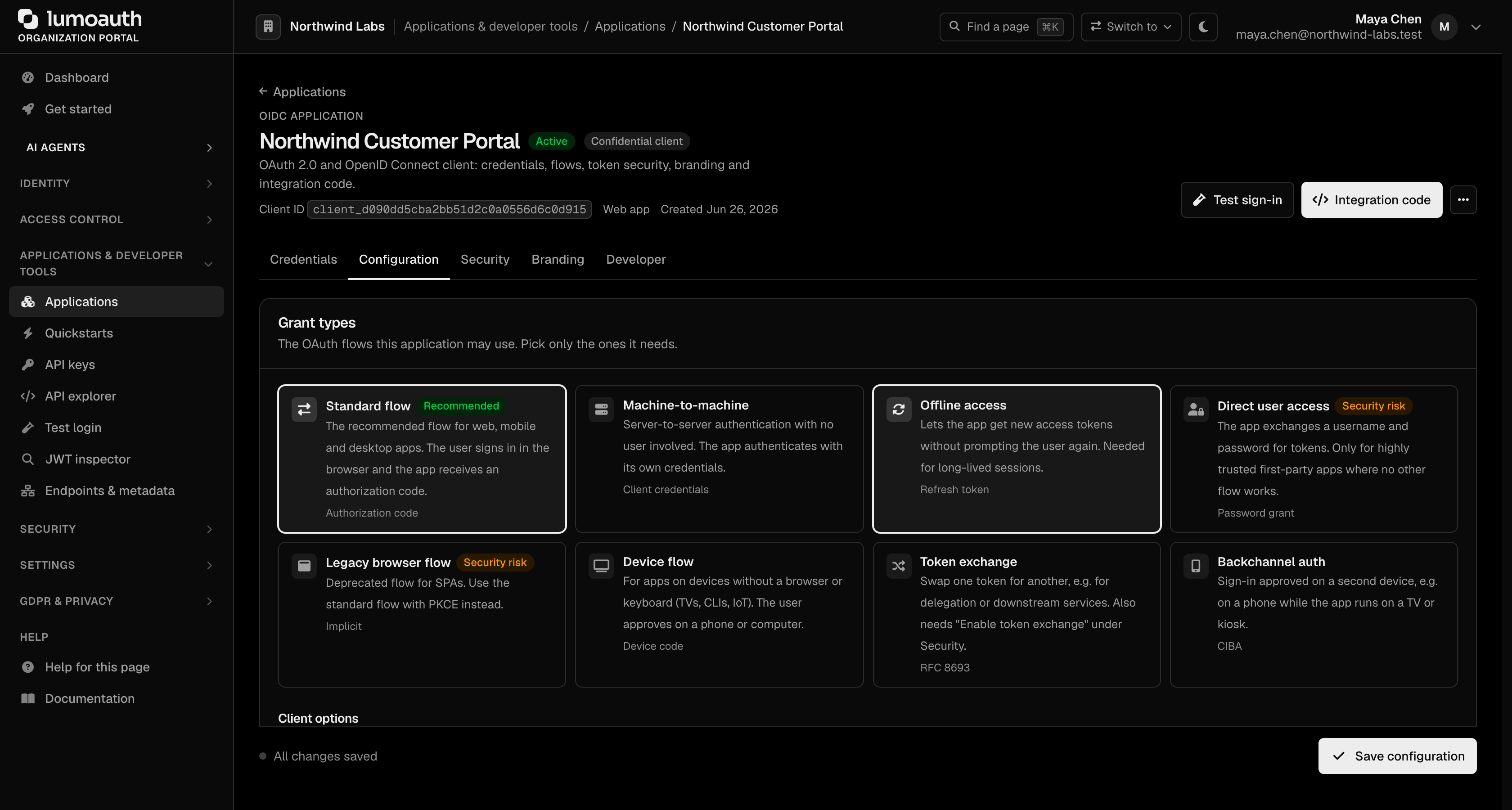
In the portal, the grant types an application may use are selected under Applications → your app → Configuration → Grant types (click Save configuration afterwards).
Authorization Code Flow
The most common flow for web applications:
1. App redirects user to:
   /orgs/{orgId}/api/v1/oauth/authorize
     ?response_type=code
     &client_id=YOUR_CLIENT_ID
     &redirect_uri=https://your-app.com/callback
     &scope=openid profile email
     &state=random_state

2. User authenticates (login page)

3. LumoAuth redirects back with authorization code:
   https://your-app.com/callback?code=AUTH_CODE&state=random_state
     &iss=https://your-domain.com/orgs/{orgId}/api/v1
   (check iss == discovery issuer and state == the value you sent)

4. App exchanges code for tokens:
   POST /orgs/{orgId}/api/v1/oauth/token
     grant_type=authorization_code
     &code=AUTH_CODE
     &redirect_uri=https://your-app.com/callback
     &client_id=YOUR_CLIENT_ID
     &client_secret=YOUR_CLIENT_SECRET
Redirect URIs
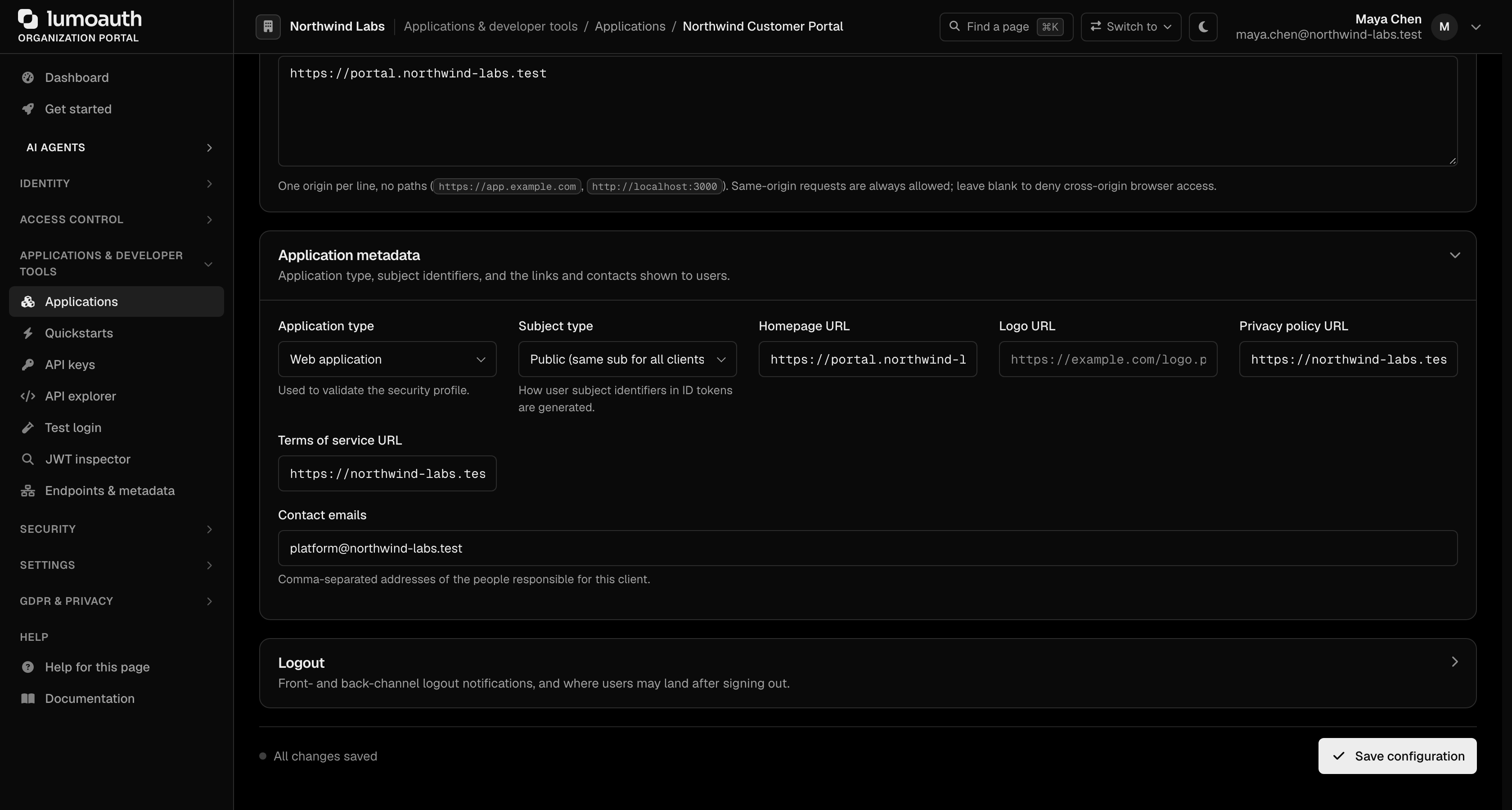
The redirect_uri you send must match a registered URI exactly (scheme, host, port, path, query). What you can register:
| Client type | Allowed redirect URIs |
|---|---|
| Web (default) | https://... only |
| Native (set Configuration → Application metadata → Application type to Native application (mobile / desktop)) | https://..., loopback http://127.0.0.1:<port>/... / http://localhost/... / http://[::1]/..., or a private-use scheme such as com.example.app:/callback |
| Any | Never javascript:, data:, vbscript:, blob:, file: or about:; the portal, the admin API and dynamic registration all refuse them |
The same rules apply to post-logout redirect URIs. client_uri, logo_uri, policy_uri and tos_uri must be http(s). Details: Redirect URI rules.
Redirect URIs are managed on the application's Configuration tab, under Redirect URIs. The Application type selector is further down the same tab, in the collapsed Application metadata section.
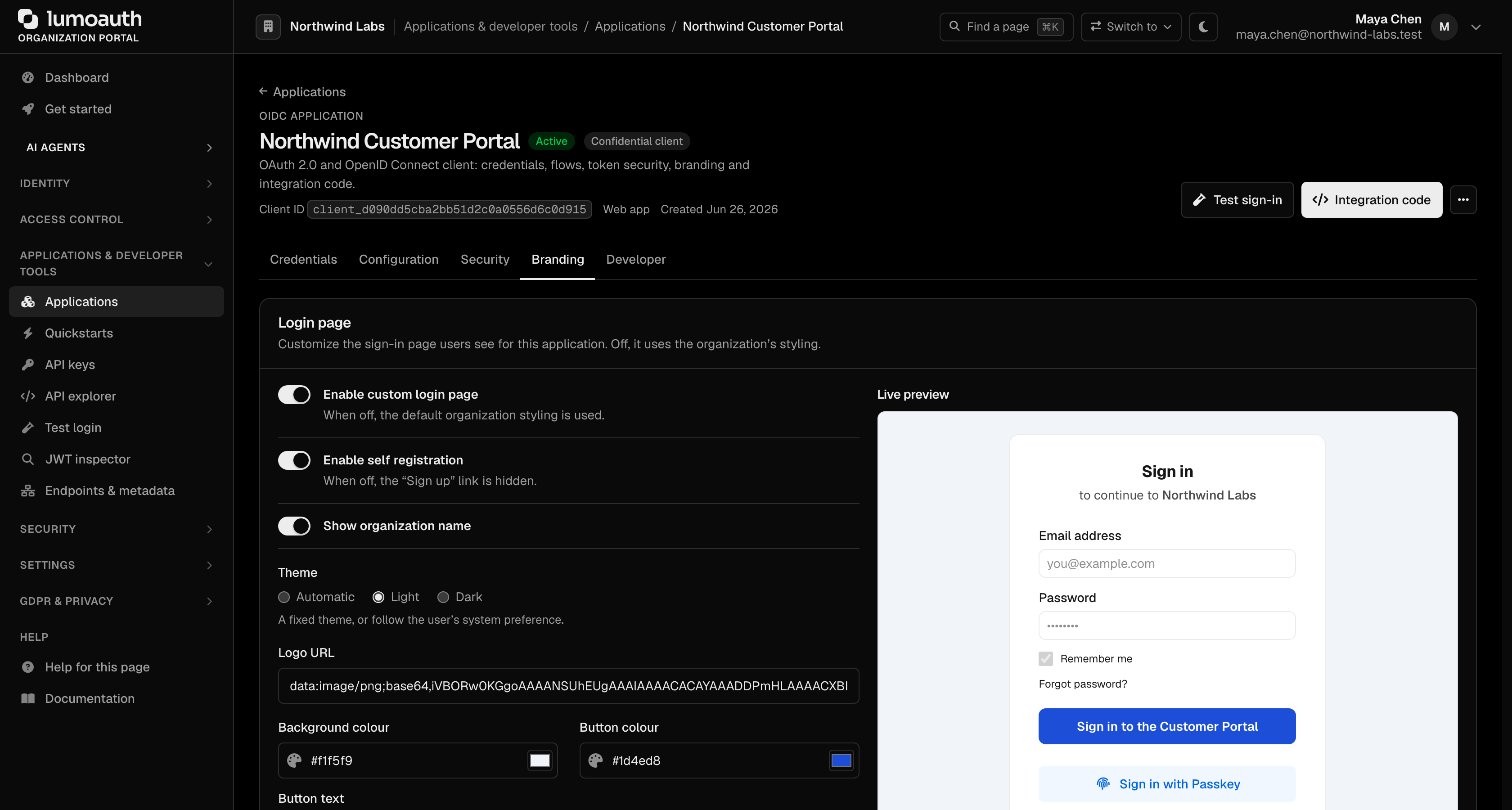
Hosted login page
When the user is not signed in, /authorize shows the organization's login page, or the application's own branded page if Applications → your app → Branding → Login page → Enable custom login page is on. Both are protected by a CSRF token, per-IP and per-email throttling, a lockout after 5 failed attempts, and a single generic error for every failure. Applications that render their own sign-in form can use the JSON endpoint POST /orgs/{orgId}/api/v1/oauth/login/json, which establishes the session and then continues through /authorize; it never returns tokens. See Hosted login page.
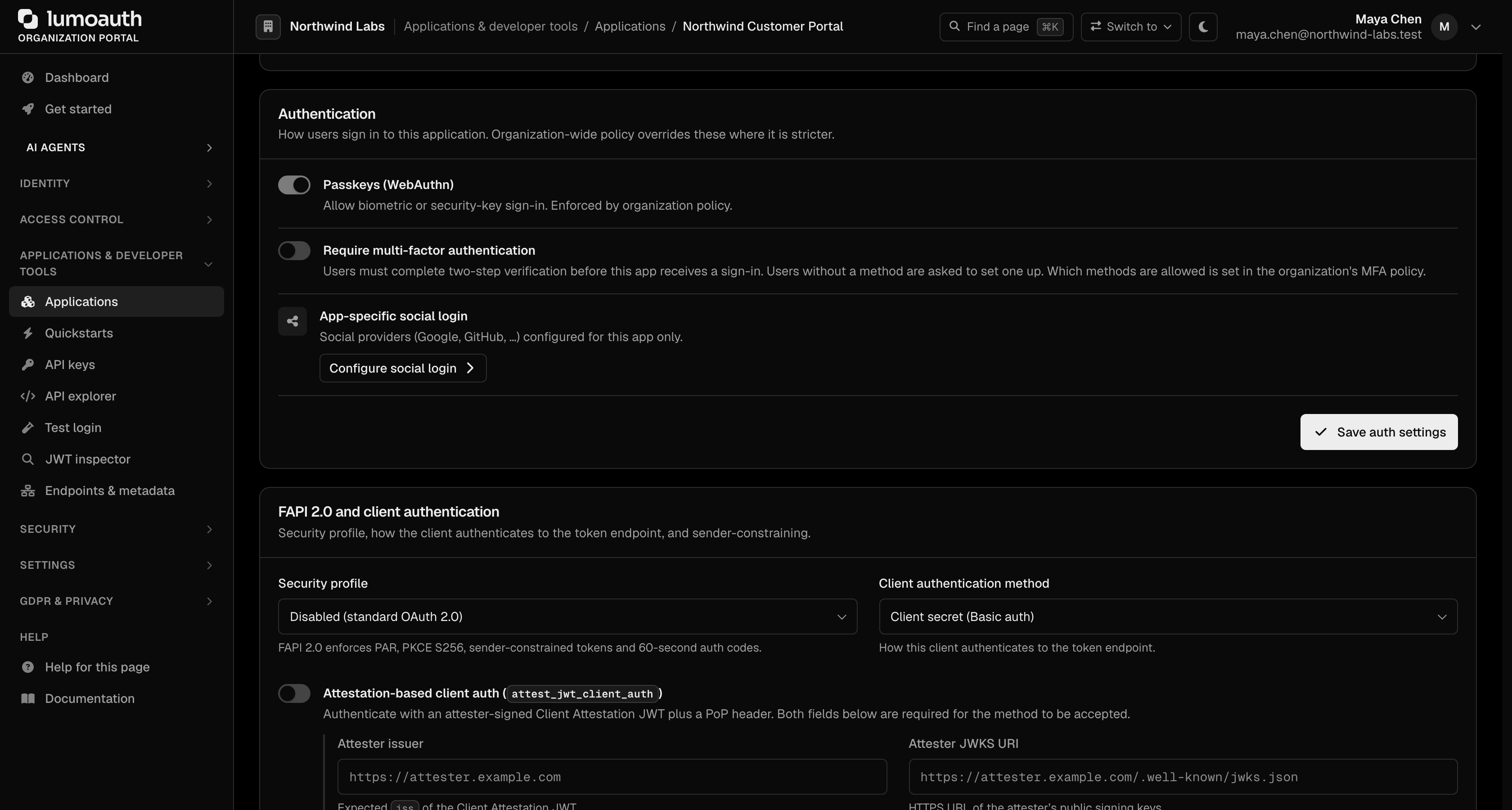
Requiring MFA for an application
Turn on Security → Authentication → Require multi-factor authentication on the application, then click Save auth settings, to make /authorize insist on a second factor for its users: users without a verified factor in the session go through step-up (or enrollment), and prompt=none returns interaction_required. The former Enable MFA and Enterprise SSO switches are gone; they had no effect. See Requiring MFA for one application.
With PKCE (for Public Clients)
Add PKCE parameters for SPAs and mobile apps:
Step 1: Generate code_verifier and code_challenge

Step 2: Include in authorization request:
  &code_challenge=CHALLENGE
  &code_challenge_method=S256

Step 3: Include in token request:
  &code_verifier=VERIFIER
Client Credentials Flow
For machine-to-machine authentication (no user involved):
curl -X POST https://your-domain.com/orgs/{orgId}/api/v1/oauth/token \
  -d grant_type=client_credentials \
  -d client_id=YOUR_CLIENT_ID \
  -d client_secret=YOUR_CLIENT_SECRET \
  -d scope="api:read api:write"
Refresh Token Flow
Exchange a refresh token for a new access token:
curl -X POST https://your-domain.com/orgs/{orgId}/api/v1/oauth/token \
  -d grant_type=refresh_token \
  -d refresh_token=YOUR_REFRESH_TOKEN \
  -d client_id=YOUR_CLIENT_ID \
  -d client_secret=YOUR_CLIENT_SECRET
OIDC Features
Discovery
Every organization exposes an OIDC discovery document:
GET /orgs/{orgId}/api/v1/.well-known/openid-configuration
Returns endpoints, supported scopes, signing algorithms, and more. The document's issuer is https://your-domain.com/orgs/{orgId}/api/v1 on the organization path and the bare domain (https://auth.acme.com) on a verified custom domain. jwks_uri, registration_endpoint, etc. are advertised as absolute URLs. Always read endpoint locations and the issuer from discovery rather than hard-coding them.
Every token's iss claim, the iss field in introspection responses and the iss parameter on authorization responses equal that issuer byte-for-byte. Configure your OIDC library with the discovery issuer and leave issuer validation on.
The issuer identifier in the response and OpenID Connect Core 3.1.3.7: compare iss with the discovery issuer before trusting an authorization code or a token. This is the one check that defeats mix-up attacks. See the integrator checklist.
ID Tokens
ID tokens are JWTs containing user identity claims:
{
  "iss": "https://your-domain.com/orgs/acme-corp/api/v1",
  "sub": "user-uuid",
  "aud": "client-id",
  "exp": 1706403600,
  "iat": 1706400000,
  "nonce": "random-nonce",
  "email": "alice@acme.com",
  "name": "Alice Smith",
  "email_verified": true,
  "auth_time": 1706399990,
  "amr": ["pwd", "otp", "mfa"],
  "acr": "urn:lumoauth:acr:mfa"
}
amr lists how the user signed in and acr the strongest MFA tier completed (omitted when no second factor was completed in the session). Access tokens carry the same two claims. Discovery lists both in claims_supported and the supported acr values in acr_values_supported; request a minimum level with acr_values — see Authentication context.
UserInfo Endpoint
curl https://your-domain.com/orgs/{orgId}/api/v1/oauth/userinfo \
  -H "Authorization: Bearer {access_token}"
Standard Scopes
These are the OIDC scopes advertised in scopes_supported and honored by the token/userinfo endpoints:
| Scope | Claims Included |
|---|---|
openid | sub |
profile | name, given_name, family_name, picture |
email | email, email_verified |
phone | phone_number, phone_number_verified |
address | address |
offline_access | (no claims — requests a refresh token) |
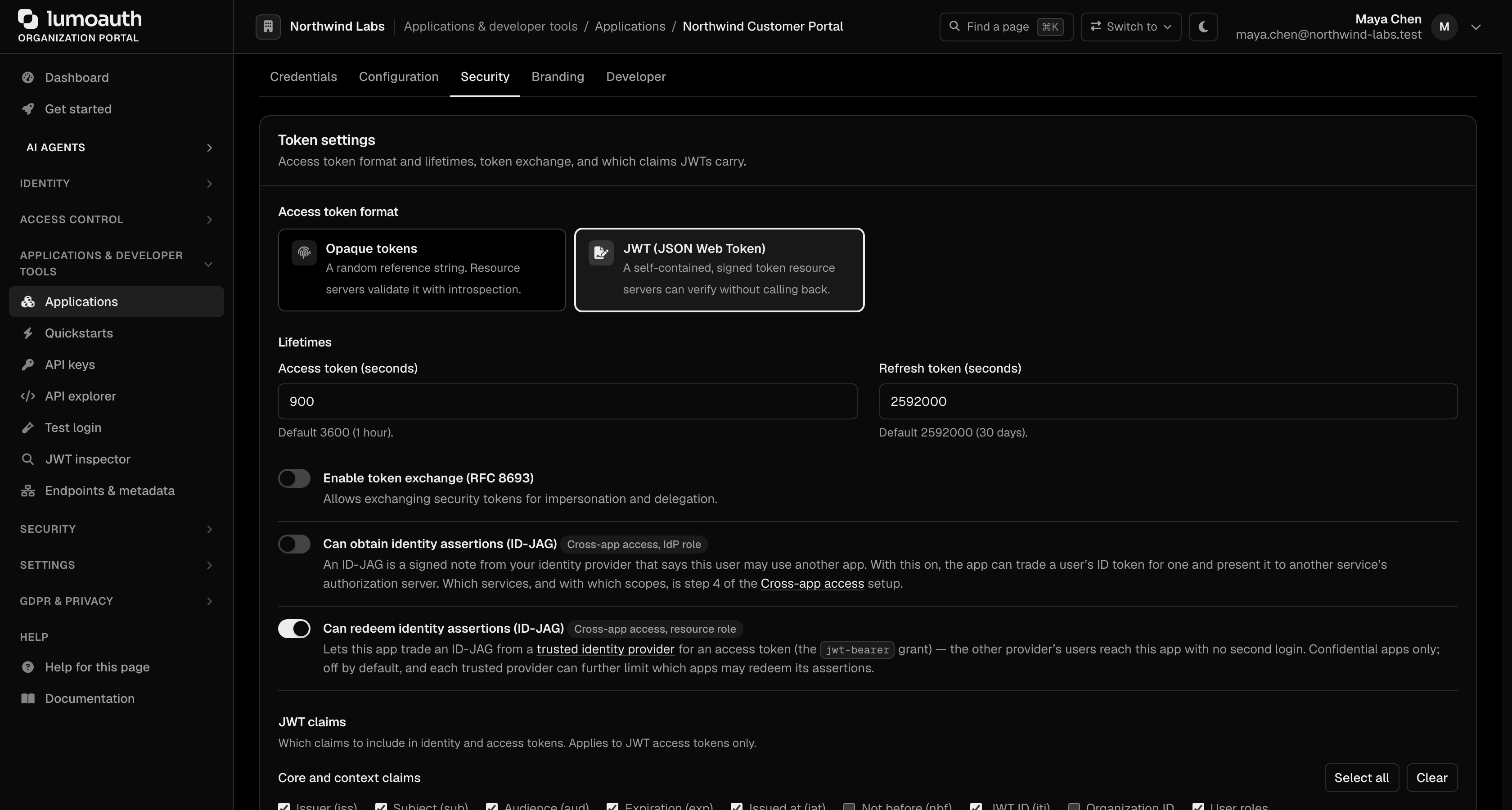
roles and permissions are not standard OIDC scopes and are not honored if requested as scopes. To include role claims in tokens, tick User roles in the application's token settings (Applications → your app → Security → Token settings → JWT claims, then Save token settings) rather than requesting a scope. The same section has a Static custom claims (JSON) field for fixed per-client claims.
JWKS Endpoint
JWKS (JSON Web Key Set) is a JSON document listing the public keys a service uses to sign its JWTs. Clients fetch it to verify access and ID tokens.
GET /orgs/{orgId}/api/v1/.well-known/jwks.json
Advanced Protocol Extensions
DPoP (sender-constrained tokens)
DPoP binds an access token to a key pair held by the client. Every API call must include a fresh signed proof, so a stolen bearer token alone cannot be replayed by an attacker.
# Include DPoP proof header in token request
curl -X POST https://your-domain.com/orgs/{orgId}/api/v1/oauth/token \
  -H "DPoP: eyJ..." \
  -d grant_type=authorization_code \
  -d code=AUTH_CODE \
  -d client_id=YOUR_CLIENT_ID
The resulting token is bound to the DPoP key and can only be used with a matching DPoP proof.
PAR (pushed authorization requests)
Pushed authorization requests let the client POST the authorization parameters to the server first and then redirect the user with a short opaque request_uri. This keeps sensitive parameters out of the browser address bar and front channel.
# Push authorization request
curl -X POST https://your-domain.com/orgs/{orgId}/api/v1/oauth/par \
  -d client_id=YOUR_CLIENT_ID \
  -d client_secret=YOUR_CLIENT_SECRET \
  -d response_type=code \
  -d redirect_uri=https://your-app.com/callback \
  -d scope="openid profile"

# Response: {"request_uri": "urn:ietf:params:oauth:request_uri:...", "expires_in": 60}

# Redirect user with the request_uri
/orgs/{orgId}/api/v1/oauth/authorize?client_id=YOUR_CLIENT_ID&request_uri=urn:ietf:params:oauth:request_uri:...
RAR (rich authorization requests)
Rich authorization requests extend OAuth with a structured authorization_details parameter so the client can request fine-grained, typed authorization (for example a specific payment amount or a specific set of account operations) instead of only flat scope strings.
{
  "authorization_details": [
    {
      "type": "payment_initiation",
      "instructedAmount": {"currency": "EUR", "amount": "123.50"},
      "creditorName": "Merchant Inc.",
      "creditorAccount": {"iban": "DE02..."}
    }
  ]
}
Dynamic client registration
Dynamic client registration is a JSON API for registering OAuth clients at runtime instead of through the admin portal. Paired with the discovery document, clients can discover endpoints and then self-register.
curl -X POST https://your-domain.com/orgs/{orgId}/api/v1/connect/register \
  -H "Content-Type: application/json" \
  -d '{
    "client_name": "My App",
    "redirect_uris": ["https://my-app.com/callback"],
    "grant_types": ["authorization_code"],
    "response_types": ["code"],
    "token_endpoint_auth_method": "client_secret_post"
  }'
Client ID Metadata Documents (CIMD)
Client ID Metadata Documents let a client skip registration altogether: it publishes a JSON document about itself at a public https:// URL and uses that URL as its client_id. LumoAuth fetches and validates the document when the client first signs a user in. This is the method the MCP authorization specification prefers, and what Claude's connectors use. It is on by default on every plan; switch it off under Security → Sign-in settings → Platform security if your organization should accept only applications registered here. The clients that connected this way are listed under Applications → External clients (CIMD), where you can also check any document before it is used. See Client ID Metadata Documents and the sample client.
CIBA (Client-Initiated Backchannel Authentication)
Initiate authentication from a backend service:
curl -X POST https://your-domain.com/orgs/{orgId}/api/v1/oauth/bc-authorize \
  -d client_id=YOUR_CLIENT_ID \
  -d client_secret=YOUR_CLIENT_SECRET \
  -d scope="openid" \
  -d login_hint="alice@acme.com" \
  -d binding_message="Approve login from call center"
The user receives a push notification or out-of-band prompt to approve.
Token Formats
| Token | Format | Description |
|---|---|---|
| Access Token | JWT (JWT access token profile) | A signed JSON Web Token, verifiable without a server call using the public keys at the JWKS endpoint |
| Refresh Token | Opaque | Must be exchanged at the token endpoint |
| ID Token | JWT | OIDC identity claims, also a signed JSON Web Token |
| Authorization Code | Opaque | Short-lived, single-use |
Logout
Sign users out with the discovery end_session_endpoint (/orgs/{orgId}/api/v1/oauth/logout) and an id_token_hint; register a Back-channel logout URI (Applications → your app → Configuration → Logout) so LumoAuth can end your session when the sign-out starts elsewhere. Do not link your app to the hosted /logout route: it requires a CSRF token that only LumoAuth-rendered pages have. The check_session iframe and session_state implement OpenID Connect Session Management for browser apps. See Logout.
Token Revocation
Clients call the token revocation endpoint to invalidate an access or refresh token immediately (for example on logout or when a token is compromised).
curl -X POST https://your-domain.com/orgs/{orgId}/api/v1/oauth/revoke \
  -d token=TOKEN_TO_REVOKE \
  -d client_id=YOUR_CLIENT_ID \
  -d client_secret=YOUR_CLIENT_SECRET
Related Guides
- Integrator checklist - Issuer validation, redirect URIs, PKCE, DPoP
- Applications Overview - Register and manage applications
- Device Flow - Device Authorization grant
- Signing Keys - JWT signing key management
- SAML Applications - SAML 2.0 integration
Standards used on this page
| Plain name | Standard |
|---|---|
| OAuth 2.0 (the core sign-in and token protocol) | RFC 6749 |
| OpenID Connect (OIDC) | OpenID Connect Core 1.0 |
| Proof Key for Code Exchange (PKCE) | RFC 7636 |
| Device authorization (sign in on another device) | RFC 8628 |
| Client-initiated backchannel authentication (CIBA) | OpenID CIBA Core 1.0 |
| Issuer identifier in the response | RFC 9207 |
| JSON Web Key (JWK) and key sets (JWKS) | RFC 7517 |
| Sender-constrained tokens (DPoP) | RFC 9449 |
| Pushed authorization requests (PAR) | RFC 9126 |
| Rich authorization requests | RFC 9396 |
| Dynamic client registration | RFC 7591 and RFC 7592 |
| Discovery document | RFC 8414 and OpenID Connect Discovery |
| JWT access token profile | RFC 9068 |
| JSON Web Token (JWT) | RFC 7519 |
| Logout | OpenID Connect RP-Initiated, Front-Channel, Back-Channel Logout and Session Management |
| Token revocation | RFC 7009 |
See the standards reference for what each one covers and how LumoAuth uses it.