SAML Applications
SAML 2.0 is the OASIS XML-based single sign-on standard: an Identity Provider (IdP) authenticates users and issues a signed assertion (a statement of who signed in), and Service Providers (SPs) trust the IdP and grant access. Messages travel over HTTP using the HTTP-POST or HTTP-Redirect bindings.
LumoAuth supports SAML in two directions — keep them distinct:
- LumoAuth as IdP (this guide): you register SAML Service Provider applications (such as Salesforce or AWS) under Applications (New application → SAML 2.0). LumoAuth authenticates your users and issues assertions to those SPs.
- LumoAuth as SP (Enterprise SSO): you add external SAML Identity Providers on the SAML identity providers page (
/orgs/{orgId}/portal/saml-idps) so your users can log in through a corporate IdP. See Enterprise SSO.
This guide covers registering SAML Service Providers that use LumoAuth as their identity source.
LumoAuth as SAML Identity Provider
When LumoAuth acts as the IdP, your applications (Service Providers) redirect users to LumoAuth for authentication, and LumoAuth sends back a SAML assertion confirming the user's identity.
User → Service Provider → LumoAuth (IdP) → Authenticates → SAML Assertion → Service Provider
Registering a SAML Service Provider
Via Portal
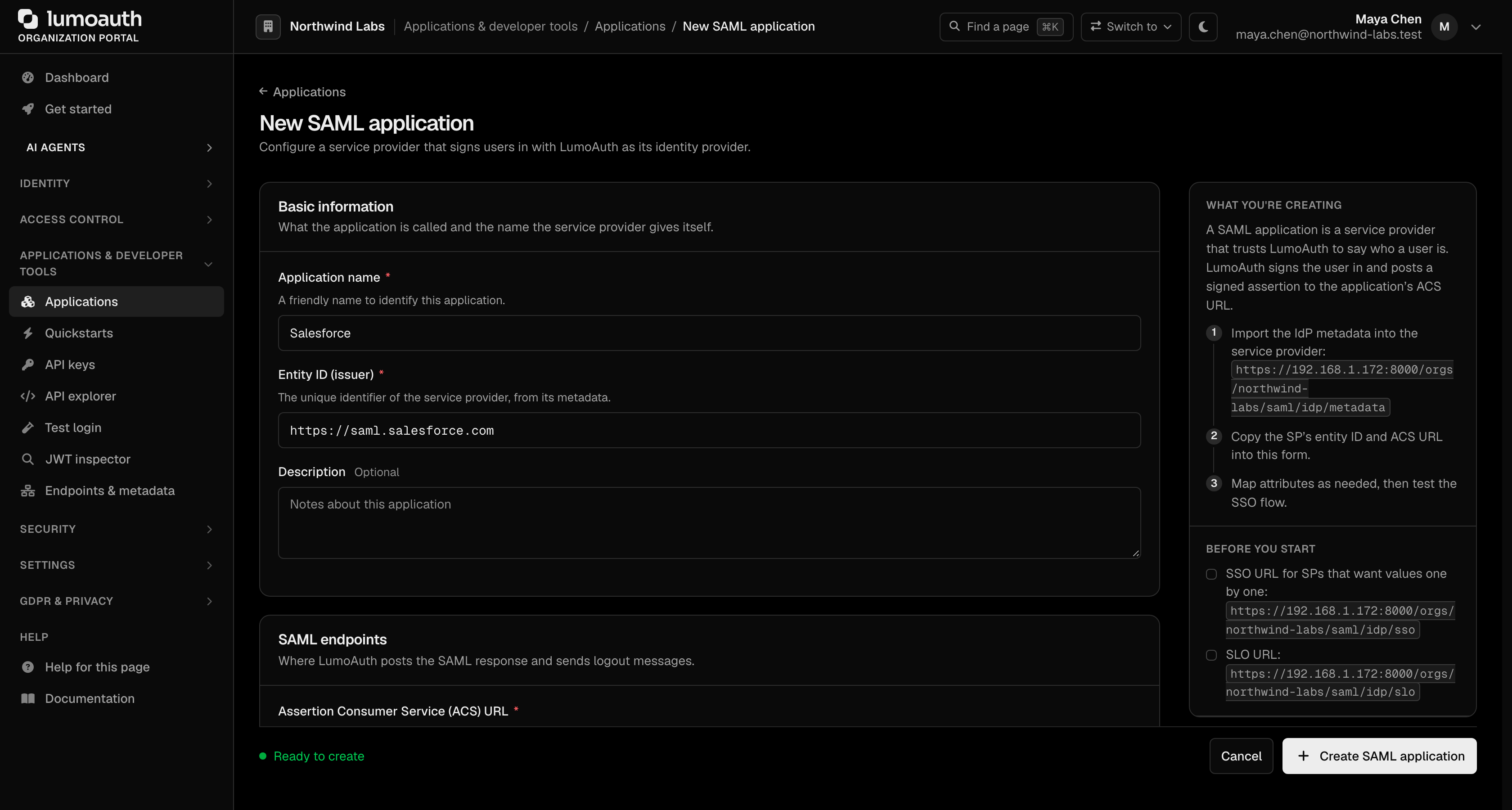
- Go to Applications, click New application and choose SAML 2.0 as the protocol. That form asks only for the application name, Entity ID (issuer) and ACS URL. The full form with every option below is at
/orgs/{orgId}/portal/applications/saml/create. - On the New SAML application page, configure:
| Field | Description | Example |
|---|---|---|
| Application name | Display name | Salesforce |
| Entity ID (issuer) | SP's unique SAML identifier, from its metadata | https://saml.salesforce.com |
| Description | Notes about the application (optional) | |
| Assertion Consumer Service (ACS) URL | Where the SAML response is POSTed after authentication | https://login.salesforce.com/saml/acs |
| Single logout (SLO) URL | Where logout requests and responses are sent (optional) | https://login.salesforce.com/saml/slo |
| Default relay state | Where to land after SSO when the SP sends none (optional) | |
| NameID format | User identifier format | Email address, Persistent, Transient, Unspecified |
| NameID source | Which user field fills the NameID | User email, User ID, Username |
| Sign SAML responses / Sign SAML assertions | What LumoAuth signs | |
| Require signed AuthnRequests | The SP must sign its authentication requests | |
| Encrypt assertions | Encrypts the assertion; requires the SP certificate | |
| SP certificate (PEM) | SP's X.509 certificate for signature verification and encryption (optional) | Paste the PEM text |
- Click Create SAML application.
LumoAuth IdP Metadata
Provide this metadata URL to your Service Provider:
/orgs/{orgId}/saml/idp/metadata
The SAML application's page lists the values to copy on its Identity provider tab (IdP metadata URL, IdP entity ID, SSO URL, SLO URL and the IdP signing certificate), and the IdP metadata button opens the metadata XML. The Service provider and Security tabs show what you entered; click Edit to change it.
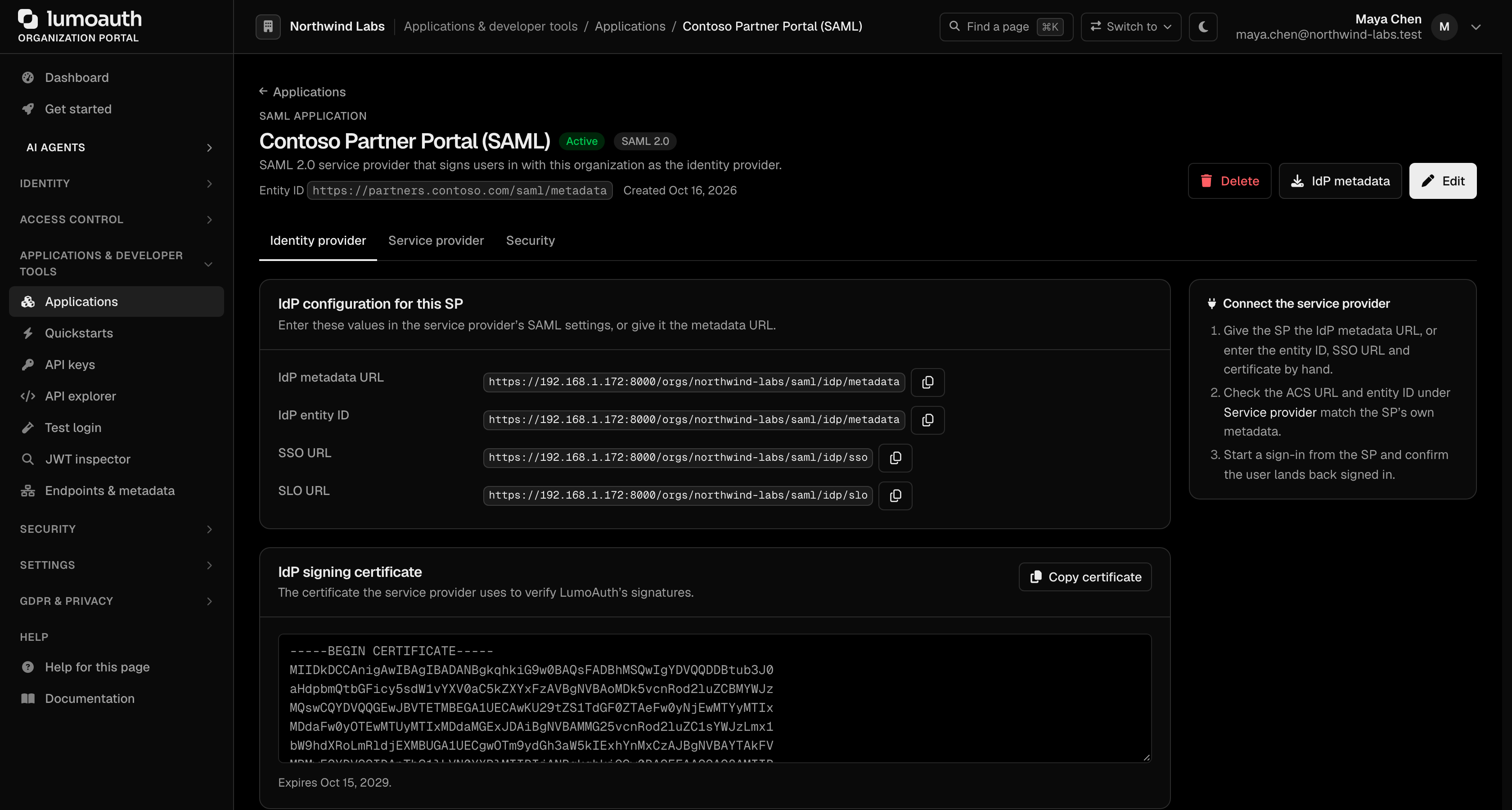
The metadata includes:
- IdP Entity ID
- SSO endpoint URL
- SLO endpoint URL
- Signing certificate
SAML Endpoints
| Endpoint | URL | Purpose |
|---|---|---|
| SSO (HTTP-POST) | /orgs/{orgId}/saml/idp/sso | Receive authentication requests |
| SSO (HTTP-Redirect) | /orgs/{orgId}/saml/idp/sso | Receive authentication requests |
| SLO | /orgs/{orgId}/saml/idp/slo | Single logout |
| Metadata | /orgs/{orgId}/saml/idp/metadata | IdP metadata XML |
Attribute Mapping
Each mapping pairs a SAML attribute name (the Name your SP expects in the assertion) with a LumoAuth user field. The available user fields are:
| LumoAuth Field | Description | Example Value |
|---|---|---|
email | User email | alice@acme.com |
name | Full display name | Alice Smith |
username | Login identifier | alice@acme.com |
id | User ID | 01890c8e-... |
roles | Role assignments (multi-valued) | editor, auditor |
The mapping keys are the SAML attribute names emitted in the assertion and are stored per Service Provider. New SPs start with default mappings that use the standard SAML attribute URIs, for example:
| SAML Attribute Name (key) | LumoAuth Field |
|---|---|
urn:oid:0.9.2342.19200300.100.1.3 | email |
urn:oid:2.5.4.42 | name |
http://schemas.xmlsoap.org/ws/2005/05/identity/claims/emailaddress | email |
http://schemas.xmlsoap.org/ws/2005/05/identity/claims/name | name |
The portal's SAML application form has no mapping editor, so applications created there use these defaults.
SAML Assertion Example
<saml:Assertion>
  <saml:Issuer>https://your-domain.com/orgs/acme-corp</saml:Issuer>
  <saml:Subject>
    <saml:NameID Format="urn:oasis:names:tc:SAML:1.1:nameid-format:emailAddress">
      alice@acme.com
    </saml:NameID>
  </saml:Subject>
  <saml:Conditions>
    <saml:AudienceRestriction>
      <saml:Audience>https://salesforce.com/sp</saml:Audience>
    </saml:AudienceRestriction>
  </saml:Conditions>
  <saml:AttributeStatement>
    <saml:Attribute Name="urn:oid:0.9.2342.19200300.100.1.3">
      <saml:AttributeValue>alice@acme.com</saml:AttributeValue>
    </saml:Attribute>
    <saml:Attribute Name="urn:oid:2.5.4.42">
      <saml:AttributeValue>Alice Smith</saml:AttributeValue>
    </saml:Attribute>
  </saml:AttributeStatement>
</saml:Assertion>
Common SP Configurations
Salesforce
| Setting | Value |
|---|---|
| Entity ID | https://your-company.my.salesforce.com |
| ACS URL | https://your-company.my.salesforce.com?so=ORGID |
| Name ID | emailAddress |
AWS
| Setting | Value |
|---|---|
| Entity ID | urn:amazon:webservices |
| ACS URL | https://signin.aws.amazon.com/saml |
| Name ID | persistent |
Tableau
| Setting | Value |
|---|---|
| Entity ID | https://sso.online.tableau.com/public/sp/metadata |
| ACS URL | Your Tableau Online SSO URL |
| Name ID | emailAddress |
Related Guides
- Enterprise SSO - Using external SAML/OIDC IdPs
- Applications Overview - Register and manage applications
- OAuth 2.0 & OIDC - OAuth/OIDC-based applications