Attribute-Based Access Control (ABAC)
ABAC evaluates attributes of the subject (the user), the resource, the action, and the environment (time, IP, device) against declarative policies. Unlike RBAC — which answers "does the user have role X?" — ABAC answers "do the facts about this request satisfy policy Y?". That lets you express rules like "engineering users can write to internal documents during business hours from trusted IPs" without baking role combinations into code.
Use ABAC when decisions depend on dynamic context. It pairs well with RBAC: role membership gates the capability, ABAC narrows it down with conditions.
ABAC is part of the Fine-grained authorization add-on ($99/month, available on Pro and Business, together with Zanzibar ReBAC, relationship-based access control). Buy it under Billing → Add-ons; on Developer, upgrade to Pro first. Without it (and with billing enforced) the ABAC pages show an upgrade notice, allow policies grant nothing, and new attributes and policies can't be created or edited — but deny policies you already have stay enforced until you disable or delete them. See ABAC plan behaviour.
How ABAC Works
An ABAC policy evaluates four attribute categories:
| Category | Examples |
|---|---|
| Subject (who) | User role, department, clearance level, group membership |
| Resource (what) | Document classification, owner, creation date |
| Action (how) | Read, write, delete, approve |
| Environment (context) | Time of day, IP address, device type, location |
Example Policy
"Allow users in the
engineeringgroup towritetointernaldocuments during business hours (9 AM – 6 PM) from trusted IP ranges."
Subject:     user.groups contains "engineering"
Resource:    resource.classification equals "internal"
Action:      write
Environment: environment.hour gte 9 AND environment.hour lt 18 AND environment.ip matches "^203\.0\.113\."
Decision:    ALLOW
Managing ABAC Policies
Create a Policy
- In the sidebar, under Access control, open Attribute rules (
/orgs/{orgId}/portal/abac/).
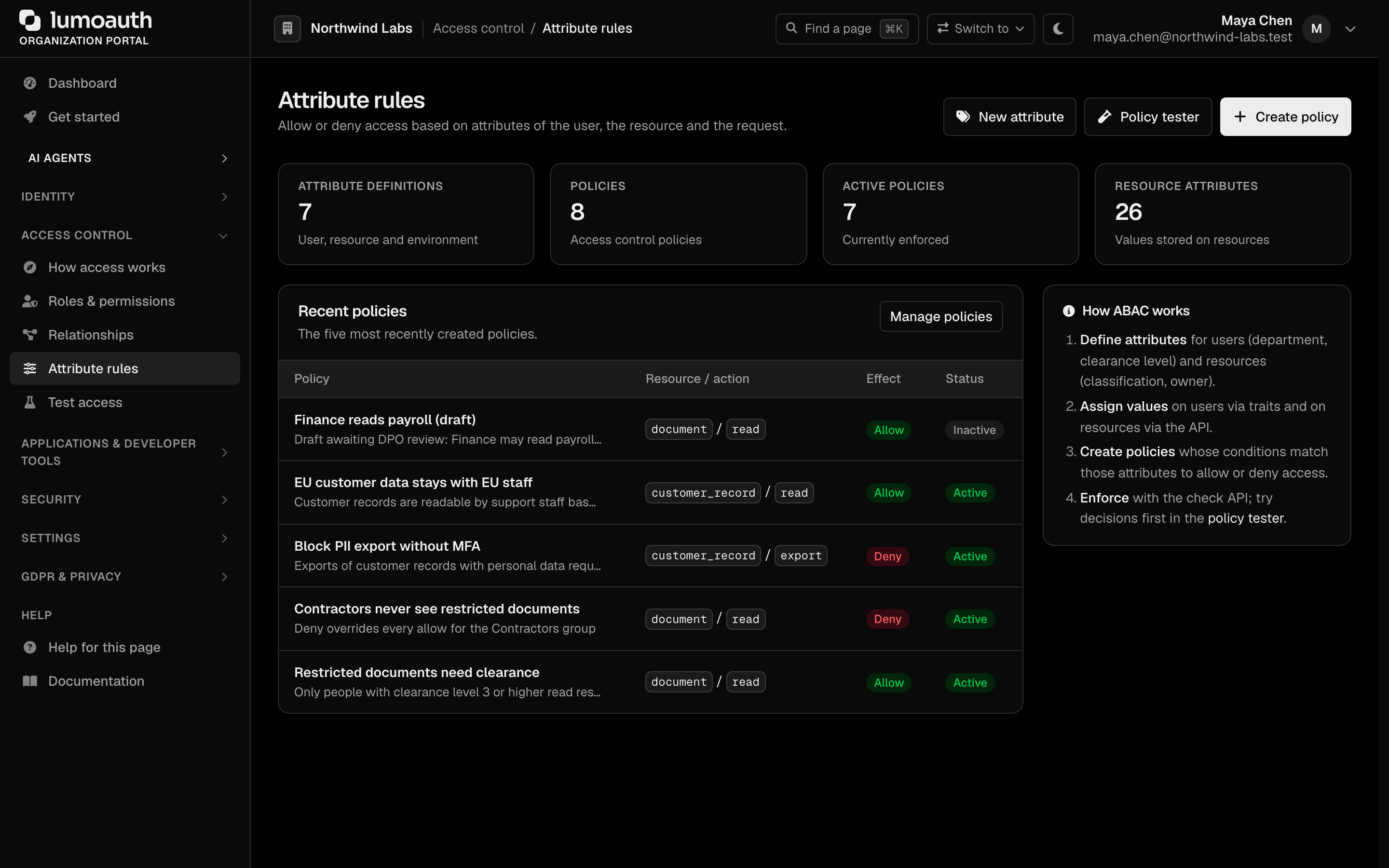
The page shows four counters (Attribute definitions, Policies, Active policies and Resource attributes), the five most recently created policies, and the New attribute, Policy tester and Create policy buttons. Manage policies opens the full policy list.
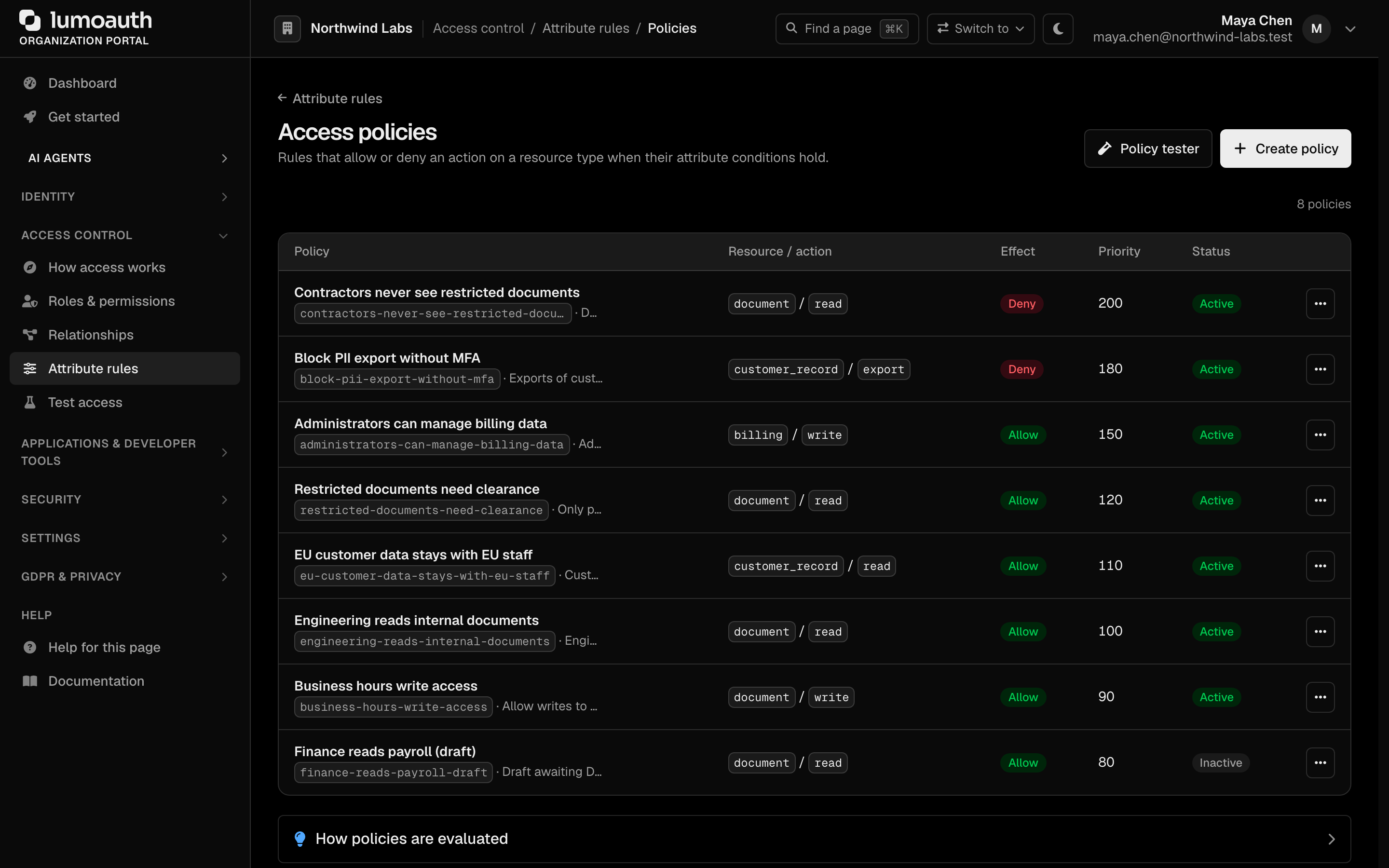
The policy list (/orgs/{orgId}/portal/abac/policies) shows each policy's name and slug, its resource type and action, its effect (Allow or Deny), priority and status. The row menu (...) edits, deactivates or deletes a policy. Deactivating keeps the policy but stops evaluating it.
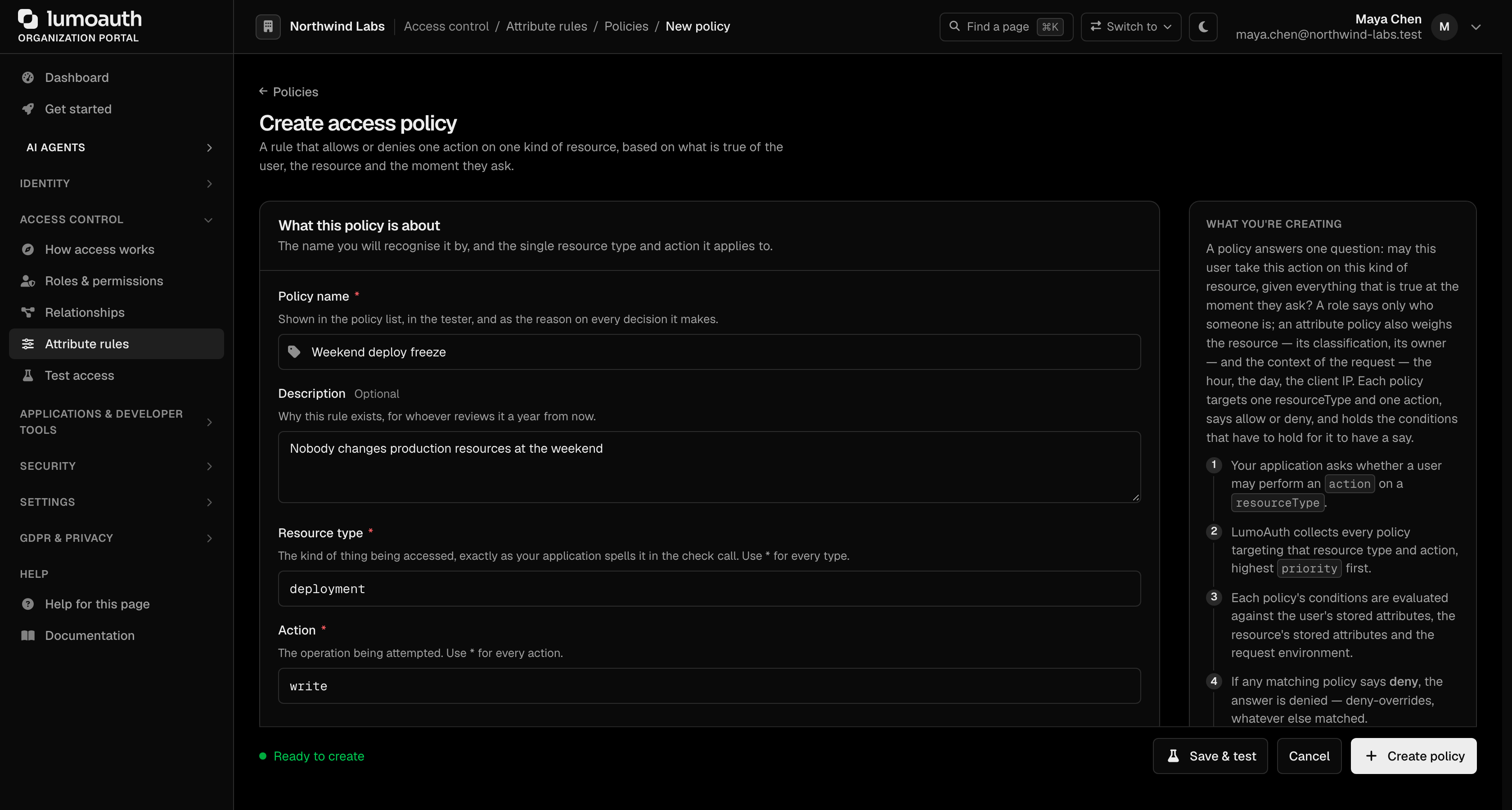
- Click Create policy.
- Define the policy:
| Field | Description |
|---|---|
| Policy name | Human-readable policy name |
| Description | Optional. What this policy controls |
| Resource type | The kind of resource the policy targets, exactly as your application sends it (* for every type) |
| Action | The action being controlled (* for every action) |
| Effect | Allow or Deny |
| Priority | Evaluation order, 0-1000 (higher priority evaluated first) |
| Active | Only active policies are evaluated |
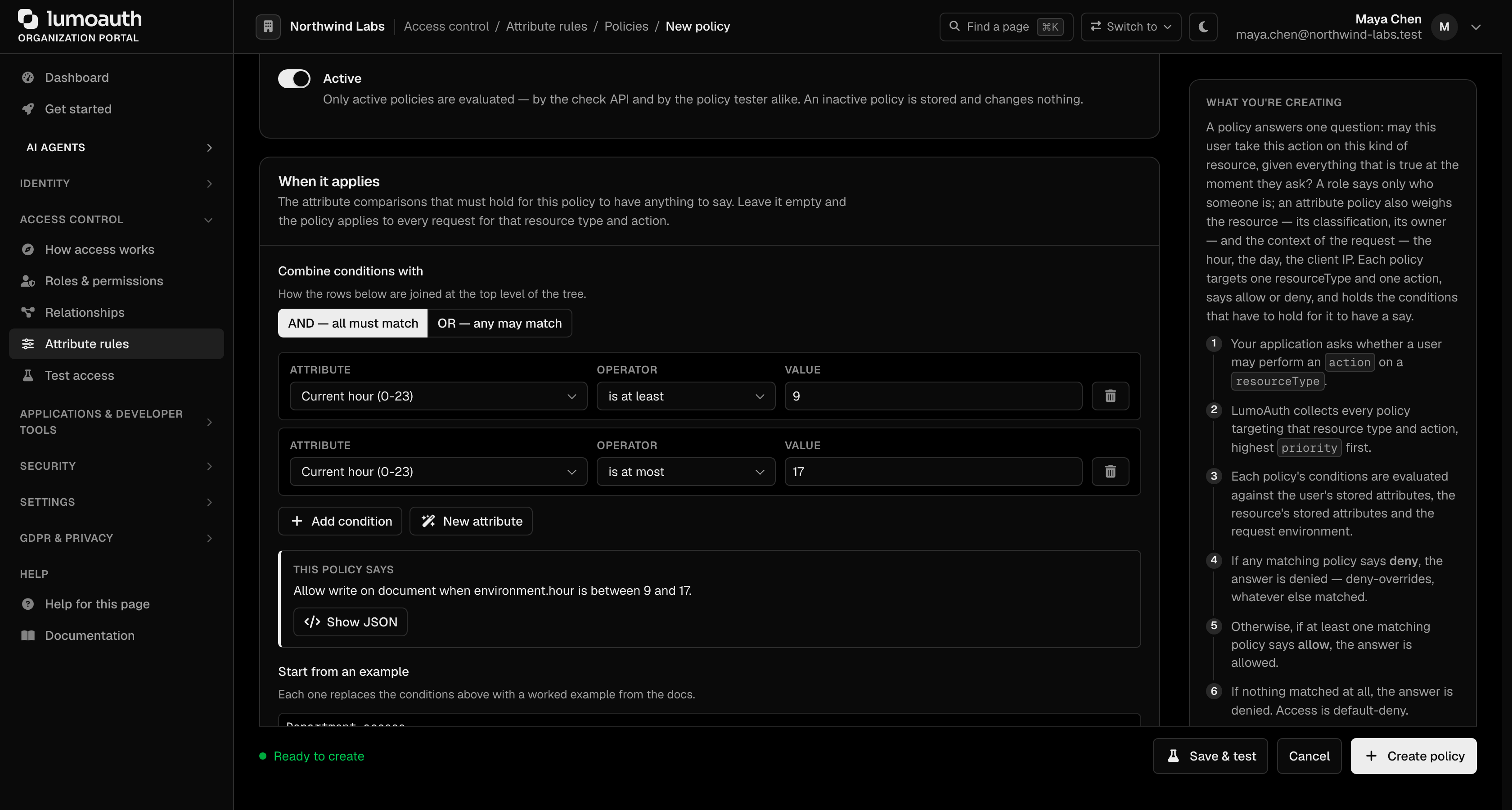
| When it applies | The conditions. Each row compares an attribute of the user, the resource or the environment with a value; rows are combined with AND or OR. With no conditions the policy matches every request for that resource type and action |
- Click Create policy, or Save & test to save it and open it in the policy tester.
Add conditions with Add condition, or load a worked example under Start from an example. If a condition needs an attribute that is not defined yet, New attribute adds one without leaving the form.
Define Attributes
Conditions read attributes. Under Attribute rules, New attribute (/orgs/{orgId}/portal/abac/attributes/create) defines one; finish with Create attribute. The Attribute definitions page (/orgs/{orgId}/portal/abac/attributes) lists them, with All, User, Resource and Environment tabs, and the row menu edits or deletes one.
| Field | Description |
|---|---|
| Name | Display name; the attribute's slug (for example department) is derived from it and is what conditions refer to |
| Description | Optional. What the attribute means |
| Applies to | User, Resource or Environment |
| Data type | string, number, boolean, array, date or datetime |
| Required | Whether a value must always be present |
| Default value and Validation rules | Optional. Fallback value and JSON validation rules |
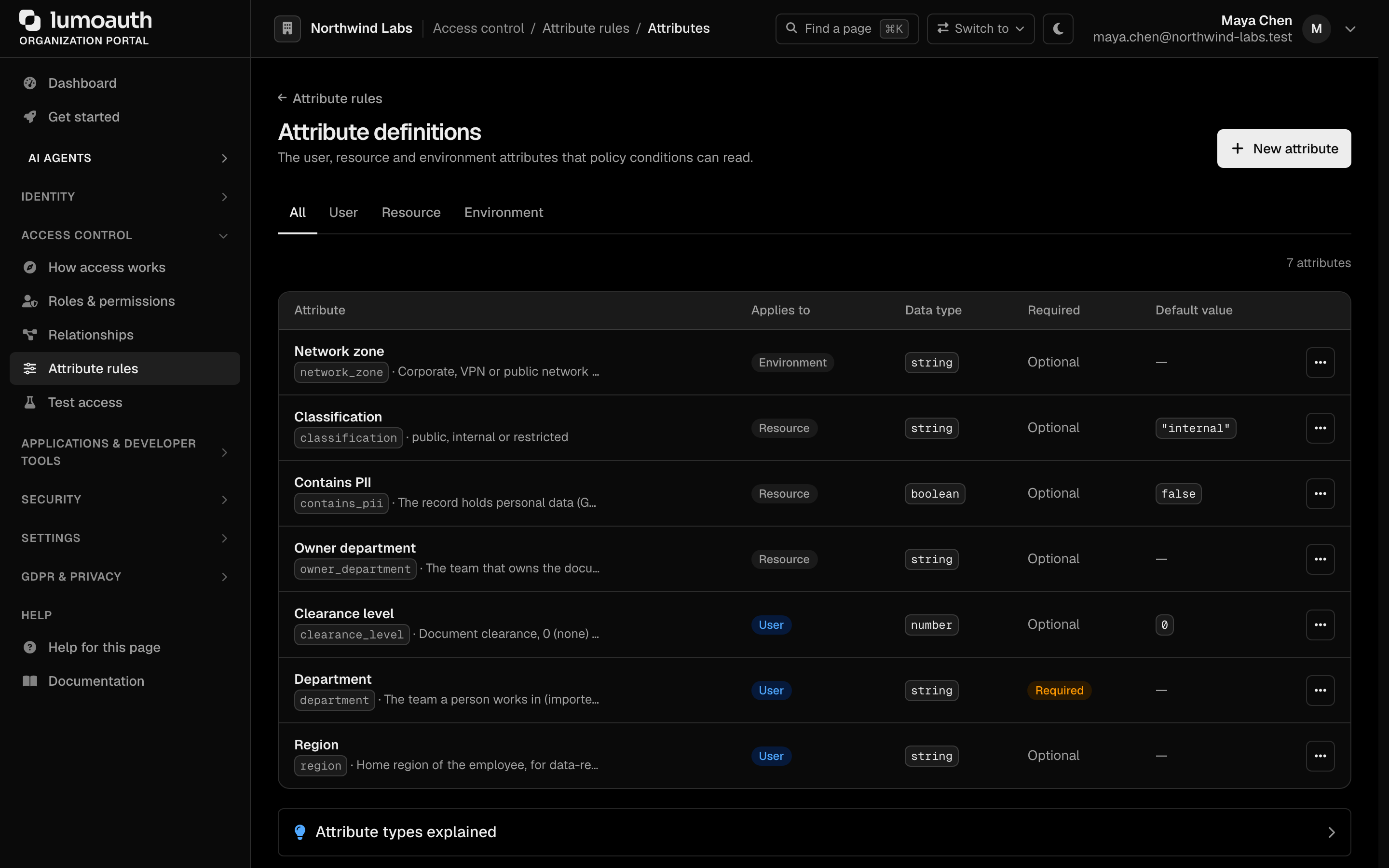
User attribute values are stored as user traits; resource attribute values are set through the ABAC API.
Policy Evaluation
LumoAuth combines policies using the deny-overrides algorithm:
- Collect every policy whose
actionandresourceTypematch the request. - Evaluate each matching policy's conditions against the request attributes.
- If any policy with
decision: DENYmatches, the final decision is Deny. - Otherwise, if at least one policy with
decision: ALLOWmatches, the final decision is Allow. - If no policy matches, the default is Deny (closed-world assumption).
Priority controls the order in which policies are considered, which is especially useful for ensuring restrictive deny policies are evaluated before broader allows.
Subject Attributes
Built-in user attributes available to conditions (the policy form lists them next to the condition builder):
| Attribute | Description | Example |
|---|---|---|
user.id, user.email, user.username, user.name | Identity fields | alice@acme.com |
user.givenName, user.familyName, user.locale, user.zoneinfo | Profile fields | "Alice" |
user.roles | Assigned role slugs | ["editor", "auditor"] |
user.groups | Group slugs | ["engineering"] |
user.permissions | Effective permission slugs | ["reports.view"] |
user.emailVerified | Email verification status | true |
user.mfaEnabled | Whether MFA (multi-factor authentication) is active | true |
user.isActive, user.blocked | Account status | true |
user.tenantId, user.orgId | Organization identifiers | |
user.trait_<key> | A user trait set by an administrator, an import or a policy (for example user.trait_plan) | "enterprise" |
user.self_<key> | A trait the user typed in themself on a progressive-profiling form. Self-asserted values never appear as user.trait_<key> or as a custom attribute, so a policy only relies on them when it names self_ explicitly | "finance" |
user.<slug> | Any attribute you define, such as user.department | "engineering" |
Environment Attributes
Contextual attributes evaluated at request time, under the environment prefix:
| Attribute | Description | Example |
|---|---|---|
environment.currentTime | Current time (H:i:s) | 14:30:00 |
environment.currentDate, environment.currentDateTime | Current date / date-time | 2026-01-15 |
environment.hour | Current hour (0–23) | 14 |
environment.dayOfWeek | Day of the week (1 = Monday … 7 = Sunday) | 1 |
environment.isWeekend | Saturday or Sunday | false |
environment.ip, environment.userAgent, environment.requestMethod, environment.requestPath | Request details, when the check supplies them | 203.0.113.7 |
Anything else you need (a country, a risk score, a device flag) is passed by the caller in the environment object of the check request and matched against an environment attribute you define. A device posture integration adds a device namespace automatically.
Example Policies
Each condition is one row in When it applies: an attribute, an operator and a value, joined by AND or OR. The operators are equals, not_equals, in, not_in, contains, not_contains, gt, lt, gte, lte, matches (regular expression), exists and not_exists. A policy has one Action; use * for every action, or create one policy per action.
Require MFA for Sensitive Actions
Name:        Require MFA for deletions
Action:      delete
Condition:   user.mfaEnabled equals false
Effect:      Deny
Geographic Restriction
Define an environment attribute country and send it in the environment object of each check.
Name:        Allow access only from US
Action:      *
Condition:   environment.country not_equals "US"
Effect:      Deny
Business Hours Only
This is the form's own Business hours example under Start from an example.
Name:        Allow write access during business hours
Action:      write
Condition:   environment.hour gte 9
             AND environment.hour lte 17
             AND environment.isWeekend equals false
Effect:      Allow
Block High-Risk Sessions
Define an environment attribute riskScore and pass the score from your application.
Name:        Block high-risk sessions
Action:      *
Condition:   environment.riskScore gte 80
Effect:      Deny
Combining ABAC with RBAC
ABAC complements RBAC. A common pattern:
- RBAC decides what a user can do based on their roles.
- ABAC decides when and where they can do it based on context.
Example: the editor role grants documents.edit, and an attribute rule limits the edit action on document resources to business hours.
Testing Policies
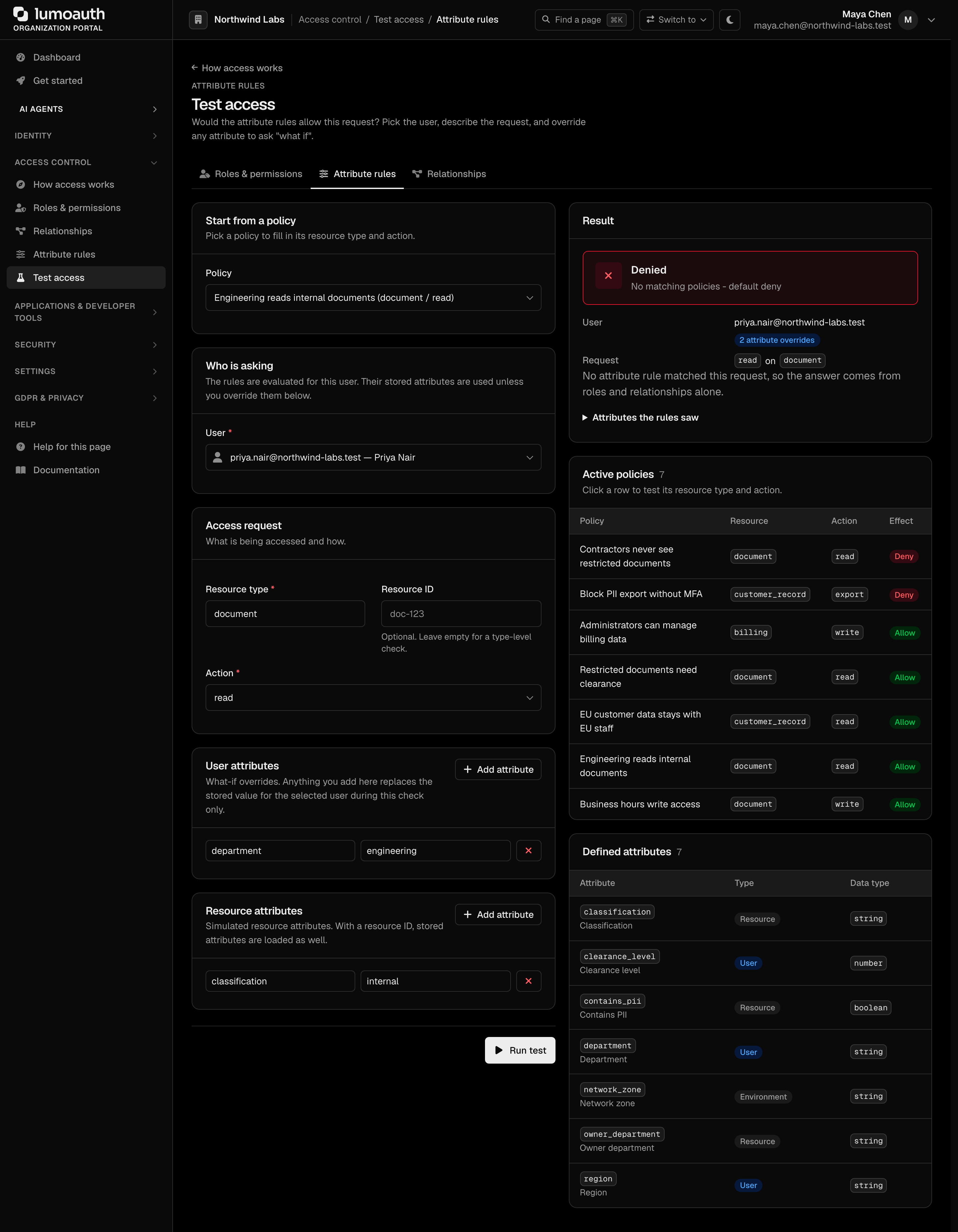
The Attribute rules mode of Test access at /orgs/{orgId}/portal/abac/tester (Access control → Test access → Attribute rules) evaluates the user you pick; any attribute you type overrides the stored value for that check, so you can ask "what if":
- Optionally pick a policy under Start from a policy to pre-fill its resource type and action.
- Specify the resource type, the action and, optionally, a resource ID.
- Add simulated User attributes and Resource attributes. Built-in user attributes (id, email, roles) come from the selected user's account; anything you add under User attributes overrides them for this check.
- Click Run test.
- Review the decision and which active policies matched, and use it to debug policy conflicts.
Via the ABAC Check API
Evaluate a policy decision programmatically. The check runs against the caller's own access token, so send it as the Bearer token (no admin role needed):
curl -X POST https://your-domain.com/orgs/{orgId}/api/v1/abac/check \
  -H "Authorization: Bearer {access_token}" \
  -H "Content-Type: application/json" \
  -d '{
    "resourceType": "financial-report",
    "action": "read",
    "resourceId": "report-123"
  }'
# -> { "allowed": false, "reason": "...", "matchedPolicies": [...] }
| Field | Required | Description |
|---|---|---|
resourceType | yes | The resource type the policy targets |
action | yes | The action being attempted (read, write, …) |
resourceId | no | Specific resource instance, for per-resource attributes |
environment | no | Extra context object; the server also adds ip, userAgent, requestMethod |
Related endpoints: POST /orgs/{orgId}/api/v1/abac/check-bulk (up to 100 checks at once) and GET /orgs/{orgId}/api/v1/abac/my-attributes (the caller's resolved attributes).
Related
- Roles & Permissions — base RBAC model.
- Relationships (ReBAC) — relationship-based access.
- AI Policy Authoring — generate roles and relationship policies from plain English (attribute rules are authored by hand).
- Adaptive MFA — risk scores as ABAC attributes.