OAuth Clients
This admin API manages OAuth 2.0 and OpenID Connect client applications within your organization. Use it to create, update, enable/disable, and delete clients, rotate client secrets, and set the scopes each client is allowed to request.
GET    /orgs/{orgId}/api/v1/admin/clients
POST   /orgs/{orgId}/api/v1/admin/clients
GET    /orgs/{orgId}/api/v1/admin/clients/{clientId}
PUT    /orgs/{orgId}/api/v1/admin/clients/{clientId}
PATCH  /orgs/{orgId}/api/v1/admin/clients/{clientId}
DELETE /orgs/{orgId}/api/v1/admin/clients/{clientId}
POST   /orgs/{orgId}/api/v1/admin/clients/{clientId}/rotate-secret
POST   /orgs/{orgId}/api/v1/admin/clients/{clientId}/enable
POST   /orgs/{orgId}/api/v1/admin/clients/{clientId}/disable
GET    /orgs/{orgId}/api/v1/admin/clients/{clientId}/scopes
PUT    /orgs/{orgId}/api/v1/admin/clients/{clientId}/scopes
Authentication
All client management endpoints require an admin API key with a clients scope (admin or admin:clients:read / admin:clients:write), or a Bearer access token that carries an admin scope. The user (or the API key's creator) must also hold the endpoint's permission: clients.view to read, clients.create, clients.edit, clients.delete or clients.rotate-secret to change; see Required permissions. A plain openid profile email token gets 403.
The Client Object
{
  "id": 38,
  "clientId": "client_abc123...",
  "name": "My Application",
  "isConfidential": true,
  "isPublic": false,
  "isActive": true,
  "requiresPkce": true,
  "createdAt": "2026-01-15T10:30:00Z",
  "redirectUris": ["https://app.example.com/callback"],
  "scopes": ["openid", "profile", "email"],
  "grantTypes": ["authorization_code", "refresh_token"]
}
id is a numeric identifier (not the clientId). The redirectUris, scopes, and grantTypes arrays are only included on single-client responses (GET /clients/{clientId} and on create); the list endpoint omits them. The client secret is never part of any read response.
List Clients
curl "https://app.lumoauth.dev/orgs/acme-corp/api/v1/admin/clients?page=1&limit=50" \
  -H "Authorization: ApiKey lmk_abc123"
Query Parameters
| Parameter | Description |
|---|---|
page | Page number (default: 1) |
limit | Results per page (default: 25, max: 100) |
search | Filter by name or client ID |
isPublic | Filter by client type — true for public clients, false for confidential |
Create Client
curl -X POST https://app.lumoauth.dev/orgs/acme-corp/api/v1/admin/clients \
  -H "Authorization: ApiKey lmk_abc123" \
  -H "Content-Type: application/json" \
  -d '{
    "name": "My Application",
    "redirectUris": ["https://app.example.com/callback"],
    "scopes": ["openid", "profile", "email"],
    "grantTypes": ["authorization_code", "refresh_token"],
    "isConfidential": true,
    "requiresPkce": true
  }'
{
  "data": {
    "id": 39,
    "clientId": "client_abc123...",
    "secret": "raw_secret_only_shown_once",
    "name": "My Application",
    "_note": "Store the secret securely. It will not be shown again."
  },
  "message": "OAuth client created successfully"
}
secret is returned only once at creation time. It is stored as a bcrypt hash; neither the API nor the portal can display it again. If you lose it, rotate it.
Create Parameters
| Field | Type | Description |
|---|---|---|
name | string | Required. Display name |
redirectUris | array | Allowed redirect URIs; see Redirect URI rules |
scopes | array | Allowed scopes (default: openid profile email) |
grantTypes | array | Allowed grant types (default: authorization_code refresh_token) |
isConfidential | boolean | true for server-side apps, false for SPAs (default: true) |
requiresPkce | boolean | Require PKCE for authorization code flow (default: true) |
Redirect URI rules
The same policy applies in the portal, this API and dynamic registration:
| URI | Accepted |
|---|---|
https://app.example.com/callback | Yes |
http://127.0.0.1:8400/callback, http://localhost/cb, http://[::1]/cb | Yes at registration; used at runtime only when the client's application type is Native (set in the portal under Configuration → Application metadata → Application type). Web clients, the default, must use https. |
com.example.app:/callback (private-use scheme) | Yes, for native apps |
http://app.example.com/callback | No (http on a non-loopback host) |
javascript:…, data:…, vbscript:…, blob:…, file:…, about:… | No, ever. The request fails with 400 and the client is not created. |
At authorization time the redirect_uri must match a registered entry exactly (scheme, host, port, path, query). No wildcards.
The core OAuth 2.0 standard makes the registered redirect URI the anchor of the whole authorization code flow, and OAuth for native apps describes the loopback and private-use-scheme redirects that native apps use. To comply, register exact URIs and mark installed apps as native.
Refresh tokens
A client receives a refresh_token only when its grantTypes include refresh_token (a legacy client with an empty list keeps receiving them) and its refresh-token lifetime is above zero. offline_access is not required and does not change this.
| Setting | Where | Rule |
|---|---|---|
| Refresh token lifetime | Portal: Applications → your app → Security → Lifetimes | Sliding lifetime of each refresh token; default 30 days, accepted range 1 day to 1 year. |
| Family expiry | Fixed | The chain of rotated refresh tokens from one sign-in ends after 90 days, or after the client's refresh-token lifetime if that is longer. Rotation never extends it; the user signs in again after that. |
Removing refresh_token from grantTypes stops new refresh tokens, including the replacement on the next refresh, so existing sessions end when their access token expires.
Claims and roles
Access tokens carry personal data only for the scopes that were granted, whatever the client's JWT-claims settings say: email/email_verified need email, name and the other profile claims need profile, phone_number needs phone, address needs address. The JWT claims settings (portal: Applications → your app → Security → Token settings → JWT claims, JWT access tokens) can only remove claims from that set.
roles is opt-in per client: the access token and the UserInfo response include the user's role names only when User roles is ticked and saved in the client's JWT claims. A client that never saved that setting gets no roles.
Update Client
Use PUT to replace all fields; PATCH for partial updates. Redirect URIs are validated with the same rules as on create.
curl -X PATCH https://app.lumoauth.dev/orgs/acme-corp/api/v1/admin/clients/01JF3KABCDE... \
  -H "Authorization: ApiKey lmk_abc123" \
  -H "Content-Type: application/json" \
  -d '{
    "name": "My Application v2",
    "redirectUris": [
      "https://app.example.com/callback",
      "https://app.example.com/auth/callback"
    ]
  }'
Enable / Disable Client
A disabled client is treated as unknown on every OAuth endpoint: authorize (inline error), token, PAR, CIBA, device authorization, introspection and revocation all answer invalid_client, and its hosted login page stops accepting credentials. Disabling does not revoke tokens that were already issued; revoke them first if you need them gone.
curl -X POST https://app.lumoauth.dev/orgs/acme-corp/api/v1/admin/clients/01JF3KABCDE.../disable \
  -H "Authorization: ApiKey lmk_abc123"
{
  "message": "Client disabled",
  "data": { "id": 38, "clientId": "client_abc123...", "isActive": false }
}
curl -X POST https://app.lumoauth.dev/orgs/acme-corp/api/v1/admin/clients/01JF3KABCDE.../enable \
  -H "Authorization: ApiKey lmk_abc123"
Rotate Client Secret
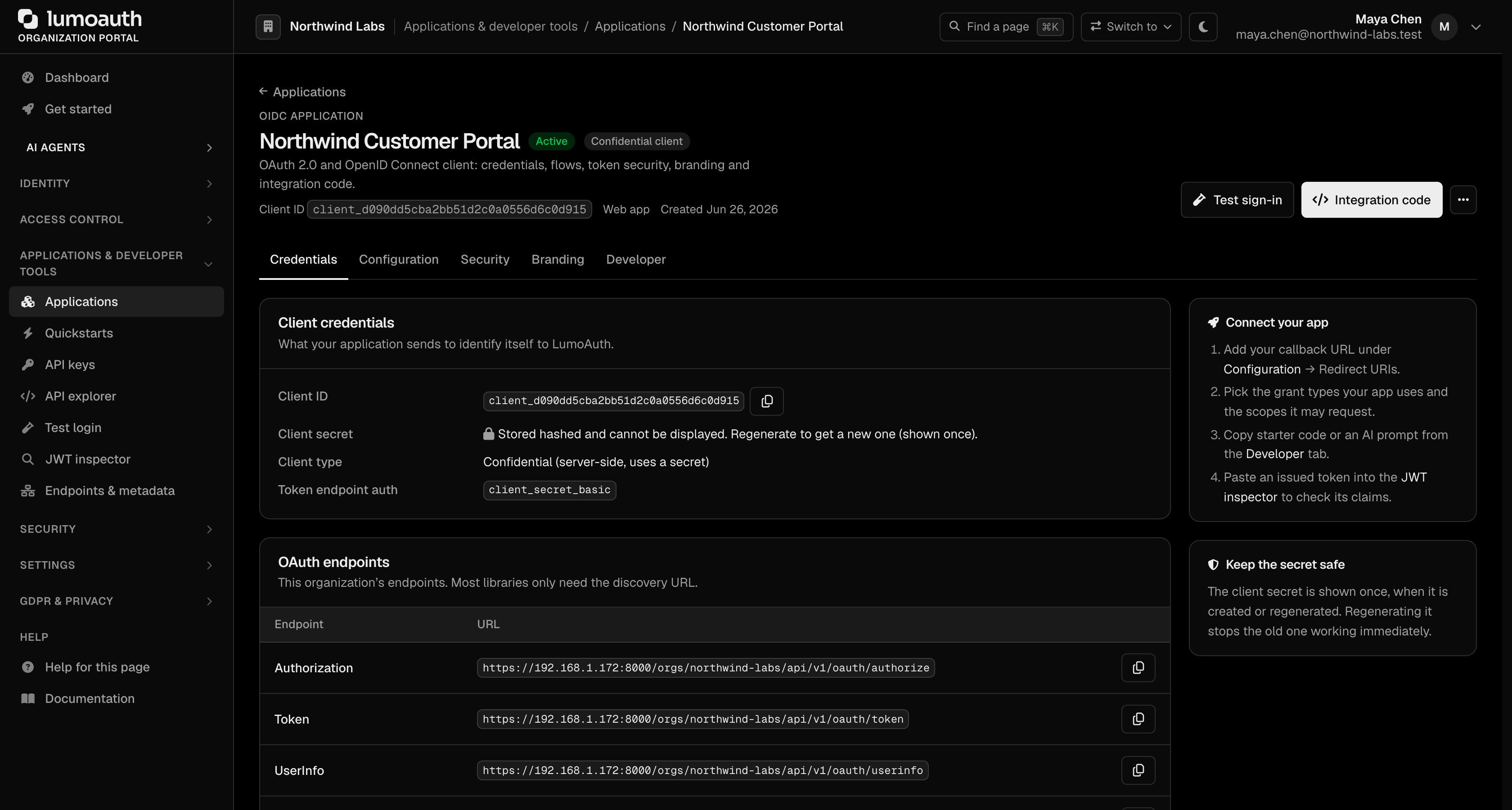
Rotation is the only way to obtain a usable secret after creation. The old secret stops working immediately; deploy the new one first where you can (the portal offers deploy targets for this). In the portal, rotation is the Regenerate link next to Client secret on the application's Credentials tab; the new secret is shown once.
curl -X POST https://app.lumoauth.dev/orgs/acme-corp/api/v1/admin/clients/01JF3KABCDE.../rotate-secret \
  -H "Authorization: ApiKey lmk_abc123"
{
  "data": {
    "clientId": "client_abc123...",
    "secret": "new_secret_only_shown_once",
    "_note": "Store the new secret securely. It will not be shown again."
  },
  "message": "Client secret rotated successfully"
}
The first-party lumoauth-cli:{orgId} client that the lumo login device flow provisions is a public client; its secret column holds a hash of a discarded random value and there is nothing to reveal or rotate.
Manage Client Scopes
Get Client Scopes
curl "https://app.lumoauth.dev/orgs/acme-corp/api/v1/admin/clients/01JF3KABCDE.../scopes" \
  -H "Authorization: ApiKey lmk_abc123"
{
  "data": ["openid", "profile", "email", "read:reports"]
}
Set Client Scopes
Replaces all allowed scopes for the client.
curl -X PUT https://app.lumoauth.dev/orgs/acme-corp/api/v1/admin/clients/01JF3KABCDE.../scopes \
  -H "Authorization: ApiKey lmk_abc123" \
  -H "Content-Type: application/json" \
  -d '{"scopes": ["openid", "profile", "email", "read:reports", "write:reports"]}'
Delete Client
curl -X DELETE https://app.lumoauth.dev/orgs/acme-corp/api/v1/admin/clients/01JF3KABCDE... \
  -H "Authorization: ApiKey lmk_abc123"
Returns 200 on success. Deleting a client does not revoke existing access tokens — revoke tokens first if needed.
Common mistakes
400on create with "Invalid redirect URI". One entry uses a forbidden scheme, plainhttpon a non-loopback host, or has no host. Nothing is created; fix the entry and resend.- Loopback redirect registered but
/authorizesays the redirect URI does not match. The client's application type is still Web. Change Application type to Native application (mobile / desktop) on the application's Configuration tab (Application metadata section) in the portal. 403with a user's access token. The token has noadminscope; requestadmin(oradmin:clients:write) when obtaining it, or use an API key.- Looking for the secret on the client detail page. It is not there. The portal's Credentials tab shows "Stored hashed and cannot be displayed" with a Regenerate action; use it or
rotate-secret. - No
refresh_tokenin the token response. The client'sgrantTypesdo not includerefresh_token. Add it;offline_accessalone does nothing. rolesoremaildisappeared from access tokens. Since 2026-09-28emailneeds theemailscope,nametheprofilescope, androlesmust be switched on explicitly (User roles) under Security → Token settings → JWT claims.- Disabled a client and tokens still work. Expected: disabling blocks new grants and introspection by that client, but does not revoke tokens. Use the revocation endpoint.
Related
- Dynamic Client Registration — self-service registration through the API
- Scopes — standard and custom scopes
- Token formats — access token lifetimes and claims
- Integrator checklist
Standards used on this page
| Plain name | Standard |
|---|---|
| OAuth 2.0 (the core sign-in and token protocol) | RFC 6749 |
| OpenID Connect (OIDC) | OpenID Connect Core 1.0 |
| Proof Key for Code Exchange (PKCE) | RFC 7636 |
| OAuth for native apps | RFC 8252 |
| Dynamic client registration | RFC 7591 and RFC 7592 |
| Client-initiated backchannel authentication (CIBA) | OpenID CIBA Core 1.0 |
| Device authorization (sign in on another device) | RFC 8628 |
| Token introspection | RFC 7662 |
| Token revocation | RFC 7009 |
See the standards reference for what each one covers and how LumoAuth uses it.