Logout
LumoAuth implements OpenID Connect RP-initiated logout. When your application (the "relying party", the app that relies on LumoAuth for sign-in) wants to sign a user out of their LumoAuth session, redirect them to this endpoint. This is the end_session_endpoint in the discovery document. LumoAuth invalidates the session, tells every other application in the SSO session, and, if configured, redirects the user back to your application.
GET|POST /orgs/{orgId}/api/v1/oauth/logout
Do this
- Clear your own session first.
- Redirect the browser to the discovery
end_session_endpointwithid_token_hintand a registeredpost_logout_redirect_uri. - Register a Back-Channel Logout URI on your client so LumoAuth can also sign the user out of your app when the logout starts somewhere else.
GET https://app.lumoauth.dev/orgs/acme-corp/api/v1/oauth/logout?
  id_token_hint=eyJhbGciOiJSUzI1NiIs...&
  post_logout_redirect_uri=https%3A%2F%2Fapp.example.com%2Flogout-success&
  state=xyz789
Request Parameters
| Parameter | Required | Description |
|---|---|---|
id_token_hint | recommended | The ID token issued to the client. Used to identify the user and validate the client (and to authorize post_logout_redirect_uri). |
post_logout_redirect_uri | URL to redirect after logout. Must be pre-registered on the client (same scheme rules as redirect URIs). Only honored when id_token_hint identifies the client. | |
state | Opaque value passed back in the redirect |
The endpoint identifies the client from id_token_hint. Without it, LumoAuth ends the SSO session but cannot validate a post_logout_redirect_uri, so the user lands on the default logout confirmation page.
No CSRF token is needed here: this endpoint is designed to be reached from another site. The hosted session's own logout link is different, see Signing out of the hosted session.
Logout Flow
- Redirect the user to the logout endpoint with
id_token_hint. - LumoAuth invalidates the user's SSO session and clears the remember-me and OP browser-state cookies.
- LumoAuth POSTs a logout token to every client with a back-channel logout URI.
- LumoAuth renders (or, with a redirect URI, skips) the confirmation page, which loads every client's front-channel logout URI in a hidden iframe.
- LumoAuth redirects to
post_logout_redirect_uri(if registered) withstate.
Post-Logout Redirect
After logout, the user is redirected to:
https://app.example.com/logout-success?state=xyz789
If post_logout_redirect_uri is not registered for the client, the user lands on LumoAuth's default logout confirmation page.
Front-Channel and Back-Channel Logout
When a user logs out, LumoAuth also propagates the logout to every other client in the SSO session, so a single sign-out clears the user everywhere. Both mechanisms are configured per OAuth client (Applications → your app → Configuration → Logout) and advertised in discovery:
{
  "end_session_endpoint": "https://app.lumoauth.dev/orgs/acme-corp/api/v1/oauth/logout",
  "check_session_iframe": "https://app.lumoauth.dev/orgs/acme-corp/api/v1/oauth/check_session",
  "frontchannel_logout_supported": true,
  "frontchannel_logout_session_supported": true,
  "backchannel_logout_supported": true,
  "backchannel_logout_session_supported": true
}
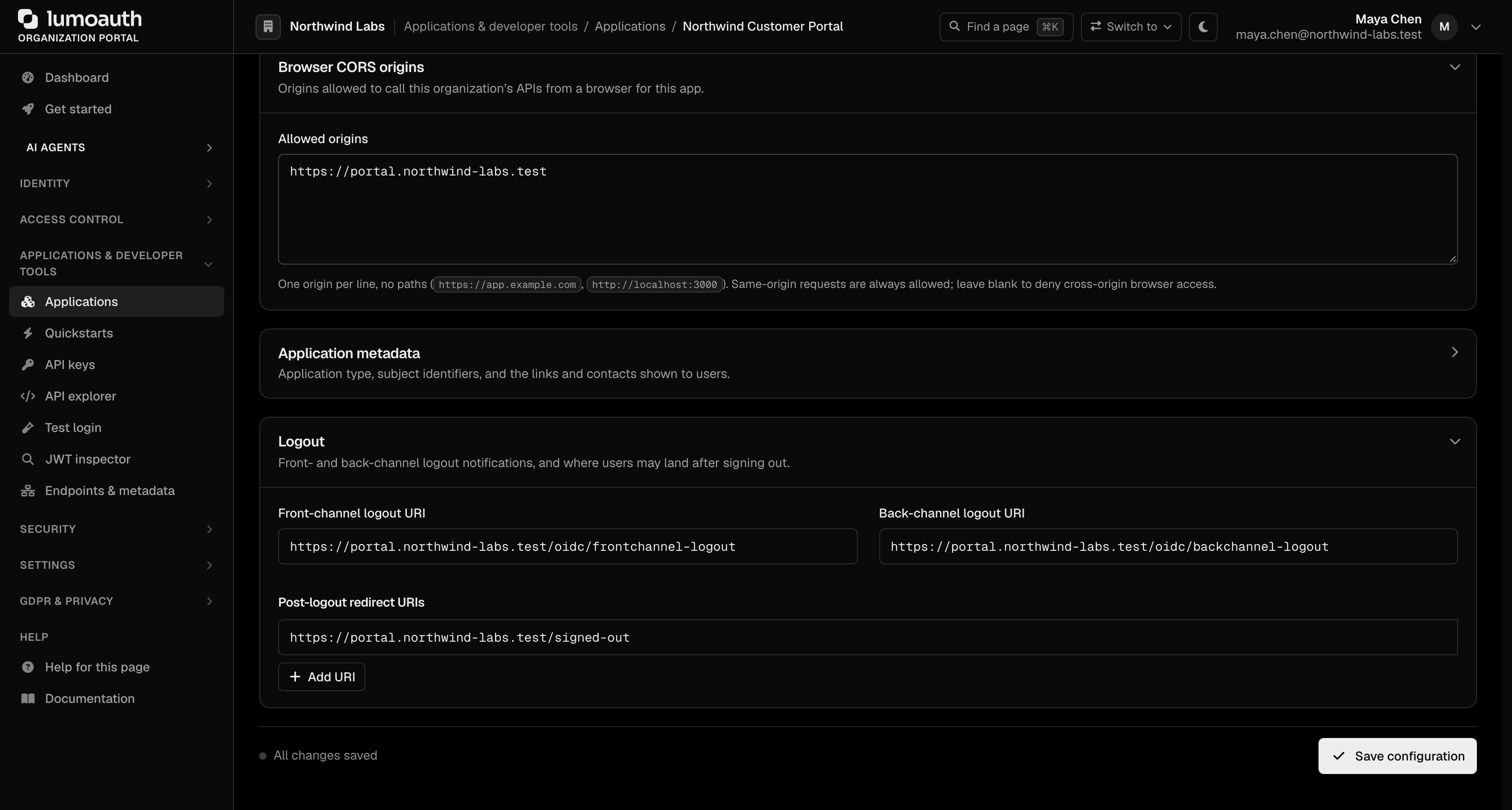
In the portal, expand the Logout section at the bottom of the application's Configuration tab to set the Front-channel logout URI, the Back-channel logout URI and the Post-logout redirect URIs, then click Save configuration.
| Mechanism | How it works | Client configuration |
|---|---|---|
| Back-channel (OIDC Back-Channel Logout 1.0) | LumoAuth POSTs a signed logout token (events containing http://schemas.openid.net/event/backchannel-logout, plus sub and/or sid) server-to-server to your backchannel_logout_uri. No browser involved, so it works even if the user closed the tab or blocks third-party cookies. | Set a Back-Channel Logout URI. Verify the logout token like an ID token (signature via jwks_uri, iss equals the discovery issuer, aud is your client_id) and end the session with that sid. |
| Front-channel (OIDC Front-Channel Logout 1.0) | The logout confirmation page loads your frontchannel_logout_uri in a hidden iframe with iss and sid query parameters so your app can clear its own cookies. LumoAuth adds the iframe origins to the page's frame-src CSP directive automatically. | Set a Front-Channel Logout URI. Your page must be embeddable by LumoAuth (do not send X-Frame-Options: DENY or a frame-ancestors that excludes the LumoAuth origin) and must compare iss with the discovery issuer. |
Which one? Use back-channel logout whenever your app has a server: it is reliable and does not depend on the browser. Add front-channel logout only for browser-only apps that keep their session in cookies, and treat it as best effort (browsers that partition third-party cookies may not deliver it).
Both are triggered automatically by the RP-initiated logout flow above — no extra parameters are required.
OpenID Connect Back-Channel Logout 1.0 delivers logout as a signed JWT to the RP's server; Front-Channel Logout 1.0 does it through the browser with iframes. Both solve "the user signed out of one app but is still signed in to the others". To comply, validate the logout token (or the iss/sid pair) against discovery before ending a session.
Session monitoring (check_session_iframe)
GET /orgs/{orgId}/api/v1/oauth/check_session
OpenID Connect Session Management 1.0 lets a browser app notice that the LumoAuth session ended (or changed user) without polling the server. It works with two pieces of data:
session_state: returned on every successful authorization response to anhttp(s)redirect URI. It isSHA256(client_id + " " + origin + " " + OP browser state + " " + salt) + "." + salt, whereoriginis the origin of yourredirect_uri. Store it; you never compute it yourself.- OP browser state: a JavaScript-readable cookie on the LumoAuth origin (
lumo_op_bs,SameSite=None; Secure). It is reset on logout.
Your page embeds the check_session_iframe from discovery and posts "<client_id> <session_state>" to it. The iframe recomputes the hash from the cookie it can read and answers unchanged, changed or error, to your origin only.
const discovery = await (await fetch(
  'https://app.lumoauth.dev/orgs/acme-corp/api/v1/.well-known/openid-configuration'
)).json();
const opOrigin = new URL(discovery.check_session_iframe).origin;

const iframe = document.createElement('iframe');
iframe.src = discovery.check_session_iframe;
iframe.style.display = 'none';
document.body.appendChild(iframe);

window.addEventListener('message', (event) => {
  if (event.origin !== opOrigin) return;
  if (event.data === 'changed') {
    // The LumoAuth session ended or changed. Re-check silently:
    // redirect to /authorize?prompt=none ... and treat `login_required` as signed out.
  }
});

setInterval(() => {
  iframe.contentWindow.postMessage(`${clientId} ${sessionState}`, opOrigin);
}, 5000);
When you receive changed, do not sign the user out immediately: run a prompt=none authorization request. A new code means the user re-authenticated (the value simply rotated); login_required means the session is gone.
OpenID Connect Session Management 1.0 defines session_state and the OP iframe protocol. To comply, post client_id and the stored session_state to the iframe with the OP origin as the postMessage target, and accept replies only from that origin.
session_state is not added for custom-scheme redirect URIs (native apps have no web origin and cannot embed an iframe). Because the mechanism relies on a third-party cookie, treat it as a convenience and rely on back-channel logout for correctness.
Signing out of the hosted session
The LumoAuth-hosted pages (portal, account, login) sign out through GET|POST /logout (or POST /orgs/{orgId}/logout). Since September 2026 that route requires a CSRF token: a _csrf_token parameter (token id logout) that only a page rendered by LumoAuth can obtain. A request without it is answered with 403 Invalid CSRF token. This stops a third-party page from force-logging users out. The organization-scoped variant accepts POST only, with the token in the form body (a GET, or a token in the query string, is refused).
| You are building | Use |
|---|---|
| A LumoAuth page or theme (Twig) | path('auth_logout', {_csrf_token: csrf_token('logout')}), as the shipped layouts do |
| Your own application | The end_session_endpoint above with id_token_hint. It needs no CSRF token and ends the same session. |
Common mistakes
- Linking your app's "Sign out" button to
/logout. You will get403 Invalid CSRF token.Useend_session_endpointwithid_token_hintinstead. post_logout_redirect_uriignored. It was not registered on the client, orid_token_hintwas omitted so the client could not be identified.- Front-channel iframe never loads. Your logout page sends
X-Frame-Optionsor aframe-ancestorsdirective that excludes the LumoAuth origin, or the browser blocks third-party cookies. Prefer back-channel logout. - The
check_sessioniframe always answerserror. The message must be exactly"<client_id> <session_state>"with one space, and the page must be served over HTTPS so theSecureOP cookie exists. - Logout token rejected by your library. Validate
issagainst the discoveryissuer(.../orgs/{orgId}/api/v1or the bare custom domain), not a hand-built string.
Related
- Authorization endpoint — start a new session
- Token formats — token lifetimes and issuer validation
- Sessions API — server-side session management
Standards used on this page
| Plain name | Standard |
|---|---|
| Logout | OpenID Connect RP-Initiated Logout, Front-Channel Logout, Back-Channel Logout and Session Management |
| Discovery document | RFC 8414 and OpenID Connect Discovery |
| JSON Web Key (JWK) and key sets (JWKS) | RFC 7517 |
See the standards reference for what each one covers and how LumoAuth uses it.