Resource Indicators
Resource indicators let the client explicitly tell the authorization server which resource server(s) the issued access token is intended for. LumoAuth then mints tokens whose aud (audience) claim names those resources. Each resource server validates the aud claim before accepting the token, which prevents token-confusion attacks — a token issued for API A cannot be replayed against API B.
A resource indicator is the resource parameter: the identifier of the API (the audience) a token is for. The aud claim it sets follows the standard JWT access token profile, so any JWT library can check it. Terms are explained in the glossary.
Resource indicators prevent token confusion attacks by binding access tokens to specific resource servers.
What is a Resource Indicator?
A resource indicator is an absolute URI that identifies a resource server:
GET /orgs/acme-corp/api/v1/oauth/authorize
  ?response_type=code
  &client_id=your-client-id
  &redirect_uri=https://app.example.com/callback
  &scope=openid profile
  &resource=https://api.example.com
Multiple Resources
Request access to multiple APIs by repeating the resource parameter:
GET /orgs/acme-corp/api/v1/oauth/authorize
  ?response_type=code
  &client_id=your-client-id
  &redirect_uri=https://app.example.com/callback
  &scope=openid profile
  &resource=https://api1.example.com
  &resource=https://api2.example.com
  &resource=https://api3.example.com
Validation
The authorization server validates each resource URI:
- Format validation — must be an absolute URI without fragments.
- Client authorization check — must be registered in the client's allowed audience URIs.
- Returns an
invalid_targeterror if validation fails.
Allowed resources must be configured on the OAuth client during registration. Requesting an unregistered resource returns invalid_target.
Token Endpoint
Authorization Code Grant
When exchanging an authorization code for tokens, you can optionally specify a subset of the originally authorized resources:
curl -X POST https://app.lumoauth.dev/orgs/acme-corp/api/v1/oauth/token \
  -u "CLIENT_ID:CLIENT_SECRET" \
  -d "grant_type=authorization_code" \
  -d "code=AUTH_CODE" \
  -d "redirect_uri=https://app.example.com/callback" \
  -d "resource=https://api.example.com"
Resource indicators let you request tokens scoped to specific services, reducing the blast radius if a token is compromised.
Refresh Token Grant
Refresh tokens are bound to the full set of resources from the original authorization. When using a refresh token, you can request a subset:
curl -X POST https://app.lumoauth.dev/orgs/acme-corp/api/v1/oauth/token \
  -u "CLIENT_ID:CLIENT_SECRET" \
  -d "grant_type=refresh_token" \
  -d "refresh_token=REFRESH_TOKEN" \
  -d "resource=https://api1.example.com"
Client Credentials Grant
curl -X POST https://app.lumoauth.dev/orgs/acme-corp/api/v1/oauth/token \
  -u "CLIENT_ID:CLIENT_SECRET" \
  -d "grant_type=client_credentials" \
  -d "scope=api.read api.write" \
  -d "resource=https://api.example.com"
Device Code Grant
curl -X POST https://app.lumoauth.dev/orgs/acme-corp/api/v1/oauth/token \
  -u "CLIENT_ID:CLIENT_SECRET" \
  -d "grant_type=urn:ietf:params:oauth:grant-type:device_code" \
  -d "device_code=DEVICE_CODE" \
  -d "resource=https://api.example.com"
Token Exchange Grant
Token exchange (swapping one token for another, the mechanism behind delegation and impersonation) also supports resource indicators:
curl -X POST https://app.lumoauth.dev/orgs/acme-corp/api/v1/oauth/token \
  -u "CLIENT_ID:CLIENT_SECRET" \
  -d "grant_type=urn:ietf:params:oauth:grant-type:token-exchange" \
  -d "subject_token=SUBJECT_TOKEN" \
  -d "subject_token_type=urn:ietf:params:oauth:token-type:access_token" \
  -d "resource=https://api.example.com"
JWT Audience Claim
When resource indicators are present, the JWT access token's aud claim reflects the target resource(s):
Single Resource
{
  "iss": "https://app.lumoauth.dev/orgs/acme-corp/api/v1",
  "sub": "user_123",
  "aud": "https://api.example.com",
  "exp": 1706817600,
  "iat": 1706814000,
  "client_id": "mobile_app",
  "scope": "openid profile"
}
Multiple Resources
{
  "iss": "https://app.lumoauth.dev/orgs/acme-corp/api/v1",
  "sub": "user_123",
  "aud": [
    "https://api1.example.com",
    "https://api2.example.com",
    "https://api3.example.com"
  ],
  "exp": 1706817600,
  "iat": 1706814000,
  "client_id": "mobile_app",
  "scope": "openid profile"
}
No Resources (Default)
{
  "iss": "https://app.lumoauth.dev/orgs/acme-corp/api/v1",
  "sub": "user_123",
  "aud": "mobile_app",
  "exp": 1706817600,
  "iat": 1706814000,
  "client_id": "mobile_app",
  "scope": "openid profile"
}
Without resource indicators, aud is the client's registered audience URI (or the list of them), and the client_id when none is registered.
Pushed Authorization Request (PAR)
Resource indicators can be included in pushed authorization requests (PAR: the client POSTs the authorization parameters to a back-channel endpoint first, receiving a request_uri that it then uses in the browser redirect):
curl -X POST https://app.lumoauth.dev/orgs/acme-corp/api/v1/oauth/par \
  -u "CLIENT_ID:CLIENT_SECRET" \
  -d "response_type=code" \
  -d "redirect_uri=https://app.example.com/callback" \
  -d "scope=openid profile" \
  -d "resource=https://api.example.com" \
  -d "resource=https://api2.example.com"
Resources are validated at PAR time and stored with the request. When using the returned request_uri, the authorization endpoint automatically loads the resources.
Token Introspection
The introspection endpoint returns the aud claim for resource-constrained tokens:
Single Resource
{
  "active": true,
  "scope": "openid profile",
  "client_id": "mobile_app",
  "aud": "https://api.example.com",
  "exp": 1706817600,
  "sub": "user_123"
}
Multiple Resources
{
  "active": true,
  "scope": "openid profile",
  "client_id": "mobile_app",
  "aud": [
    "https://api.example.com",
    "https://api2.example.com"
  ],
  "exp": 1706817600,
  "sub": "user_123"
}
Resource Server Validation
Resource servers MUST validate that the aud claim in access tokens matches their own resource URI. Accepting tokens with the wrong audience is a security vulnerability.
Example Validation (PHP)
$jwt = decode($accessToken);
$expectedAudience = 'https://api.example.com';

if (is_string($jwt['aud'])) {
    if ($jwt['aud'] !== $expectedAudience) {
        throw new InvalidAudienceException();
    }
} elseif (is_array($jwt['aud'])) {
    if (!in_array($expectedAudience, $jwt['aud'])) {
        throw new InvalidAudienceException();
    }
} else {
    throw new InvalidAudienceException();
}
Example Validation (Node.js)
const jwt = decode(accessToken);
const expectedAudience = 'https://api.example.com';

const audiences = Array.isArray(jwt.aud) ? jwt.aud : [jwt.aud];

if (!audiences.includes(expectedAudience)) {
    throw new Error('Invalid audience');
}
Client Configuration
Organization Portal
- Navigate to Applications.
- Select your application.
- Go to the Configuration tab.
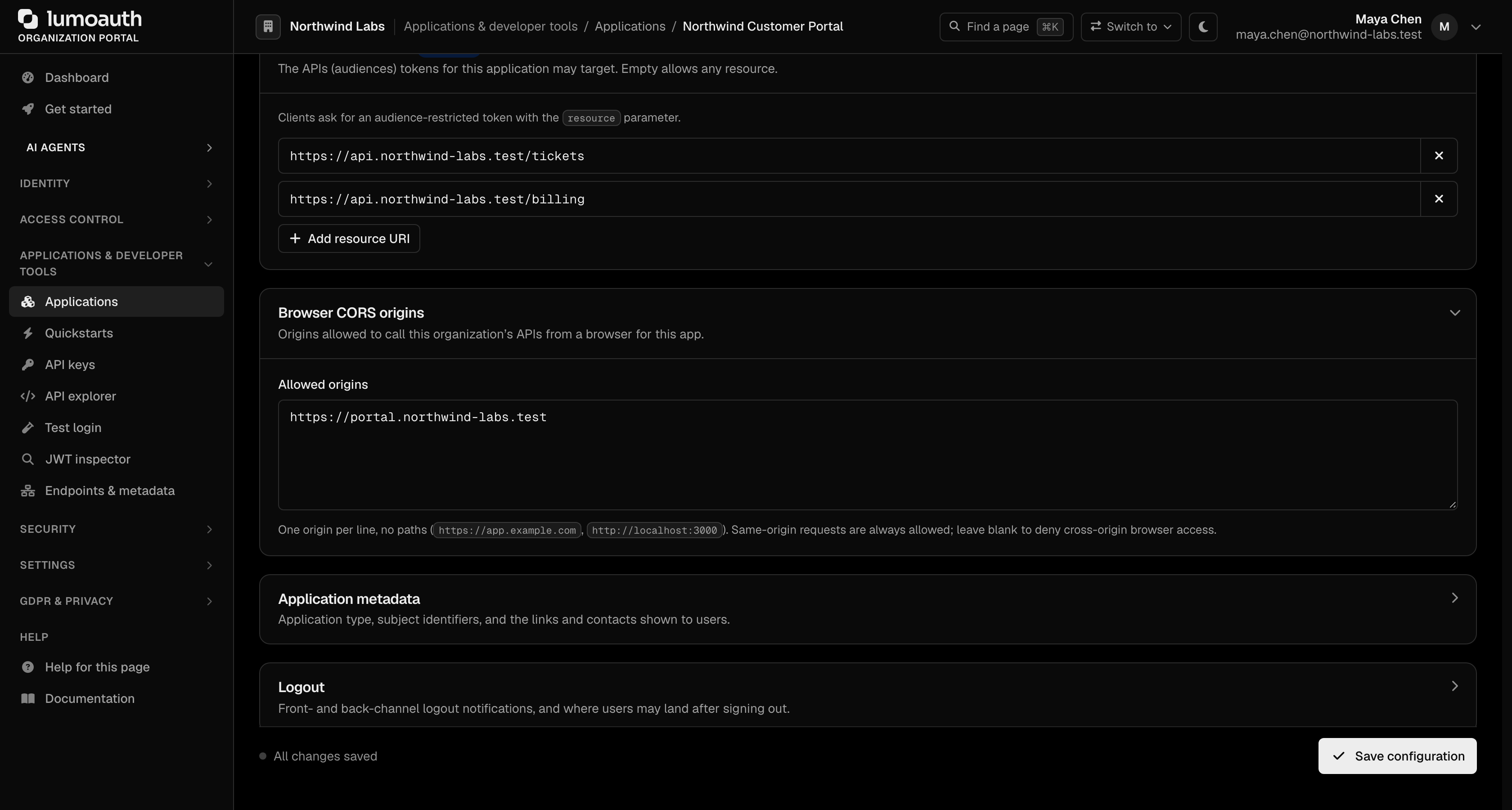
- Expand the Resource indicators section.
- Enter an allowed resource URI; click Add resource URI for each additional one. Leaving the list empty allows any resource.
- Click Save configuration.
Dynamic Client Registration
curl -X POST https://app.lumoauth.dev/orgs/acme-corp/api/v1/connect/register \
  -H "Content-Type: application/json" \
  -d '{
    "client_name": "My Application",
    "redirect_uris": ["https://app.example.com/callback"],
    "grant_types": ["authorization_code", "refresh_token"],
    "audience_uris": [
      "https://api.example.com",
      "https://api2.example.com"
    ]
  }'
Validation Modes
| Mode | When it applies | Example |
|---|---|---|
| Exact match | A registered URI without a trailing slash | Registered: https://api.example.com ✓ Valid: https://api.example.com ✗ Invalid: https://api.example.com/v2 |
| Prefix match | A registered URI ending in /: any path under it is allowed | Registered: https://api.example.com/ ✓ Valid: https://api.example.com/v2 ✓ Valid: https://api.example.com/path/to/resource ✗ Invalid: https://api2.example.com |
The same rule decides whether the resources requested at the token endpoint are a subset of those granted at authorization time.
Error Responses
invalid_target
Returned when:
- The resource URI is malformed.
- The resource is not registered for the client.
- The requested resources are not a subset of granted resources.
{
  "error": "invalid_target",
  "error_description": "Resource URI must be an absolute URI without fragment"
}
{
  "error": "invalid_target",
  "error_description": "Resource 'https://api.example.com' is not registered for this client"
}
{
  "error": "invalid_target",
  "error_description": "Requested resources must be a subset of granted resources"
}
Discovery Metadata
The discovery document advertises resource indicator support:
curl https://app.lumoauth.dev/orgs/acme-corp/api/v1/.well-known/openid-configuration
{
  "issuer": "https://app.lumoauth.dev/orgs/acme-corp/api/v1",
  "authorization_endpoint": "...",
  "token_endpoint": "...",
  "resource_indicators_supported": true
}
Security Benefits
Token Replay Prevention
Without resource indicators, a token stolen from one API can be replayed against other APIs. With resource indicators:
- Each token is bound to specific resource server(s) via the
audclaim. - Resource servers validate the audience before accepting tokens.
- A compromised API cannot use stolen tokens elsewhere.
Least Privilege
Authorize broadly once, then obtain narrow tokens for each API:
User authorizes: [billing-api, users-api, analytics-api]

Token 1 (for billing):   aud = "https://billing-api.example.com"
Token 2 (for users):     aud = "https://users-api.example.com"
Token 3 (for analytics): aud = "https://analytics-api.example.com"
Centralized Governance
The authorization server controls which clients can access which resources:
- Pre-register allowed audience URIs per client.
- Prevent unauthorized cross-API access.
- Keep a centralized audit trail.
Best Practices
| Practice | Recommendation |
|---|---|
| Use HTTPS | Always use https:// URIs in production |
| Validate audience | Resource servers MUST check the aud claim on every request |
| Request minimal resources | Only request access to APIs needed for the current operation |
| Use token downscoping | Authorize broadly, request narrowly at the token endpoint |
| Register URIs carefully | Only register legitimate resource servers in client config |
Related
Standards used on this page
| Plain name | Standard |
|---|---|
| Resource indicators | RFC 8707 |
| JWT access token profile | RFC 9068 |
| Token exchange (delegation) | RFC 8693 |
| Pushed authorization requests (PAR) | RFC 9126 |
| Token introspection | RFC 7662 |
| Dynamic client registration | RFC 7591 and RFC 7592 |
| Discovery document | RFC 8414 and OpenID Connect Discovery |
See the standards reference for what each one covers and how LumoAuth uses it.