FAPI 2.0 Security Profile
FAPI 2.0 is a security profile on top of OAuth 2.0 designed for financial APIs, open banking, healthcare, and any application handling high-value or highly sensitive transactions. Use it when regulatory requirements or threat models demand stronger client authentication and tokens that are bound to a specific client key or certificate.
FAPI 2.0 (Financial-grade API Security Profile, from the OpenID Foundation) is a hardening profile of OAuth 2.0. It mandates pushed authorization requests (PAR: the request goes to the server first and the browser only carries a reference), sender-constrained tokens (DPoP: a token tied to the client's key, so a stolen copy cannot be replayed), PKCE (a one-time secret that protects the sign-in code) and asymmetric client authentication. Terms are explained in the glossary.
Use FAPI 2.0 for financial-grade APIs, open banking integrations (PSD2), healthcare, and any application requiring the strongest OAuth security.
Do this
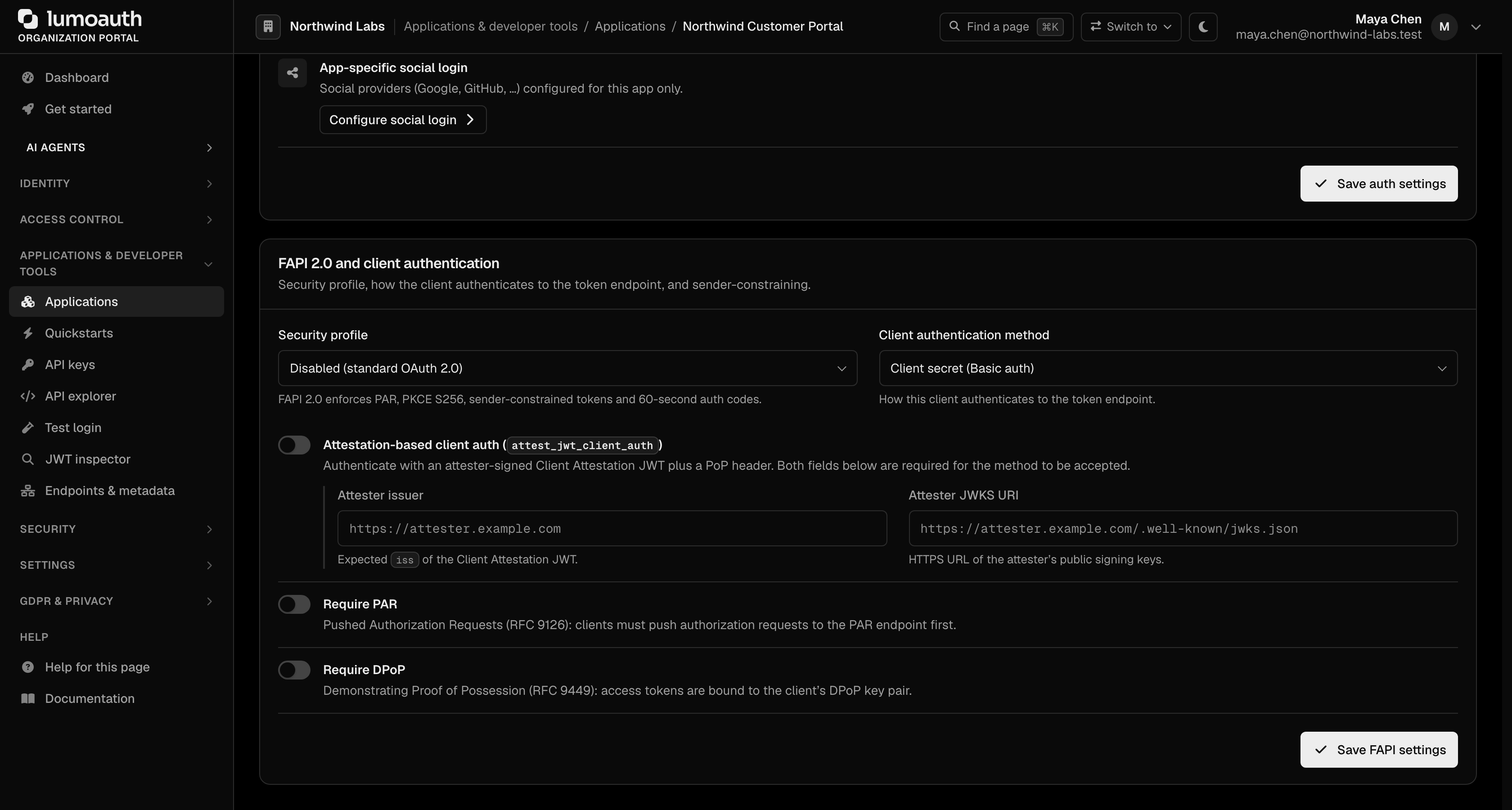
- In the portal open Applications → your app → Security, and under FAPI 2.0 and client authentication set Security profile to FAPI 2.0 Baseline (or FAPI 2.0 Advanced).
- Choose an asymmetric client authentication method:
private_key_jwt(upload a JWKS or setjwks_uri) ortls_client_auth(register the certificate subject DN; your deployment must terminate mTLS at the edge, see tls_client_auth (mTLS)). - Push every authorization request through PAR and send a
DPoPproof on the token request and on every API call. - Validate
isson the authorization response and on every token, exactly as for any other client (integrator checklist).
What FAPI 2.0 Adds on Top of OAuth 2.0
| Attack Type | FAPI Protection |
|---|---|
| Token theft — attacker steals an access token | DPoP binds tokens to a client-held key; a stolen token alone cannot be used from another host |
| Request tampering — modifying authorization parameters in the URL | PAR sends the request through a back-channel, returning a short reference used in the front channel |
| Replay attacks — reusing old authentication data | Nonces and short-lived codes (60 seconds) prevent replay |
| Code interception — capturing the authorization code | PKCE S256 ensures only the original client can redeem codes |
Key Features
| Feature | What It Does |
|---|---|
| PAR (pushed authorization requests) | The client POSTs the authorization parameters to a back-channel endpoint first, receiving a request_uri that it then uses in the front-channel redirect. Avoids URL-length limits and tampering. |
| DPoP (sender-constrained tokens, "demonstrating proof of possession") | Binds an access token to a client-held key. Each request includes a short-lived proof JWT signed with that key; a stolen token alone is useless from another host. |
| mTLS (mutual TLS client authentication) | Uses a client certificate to authenticate the client at the token endpoint. Certificate-bound access tokens are not issued. |
| private_key_jwt | The client signs a JWT assertion with a private key instead of sending a shared client secret. |
| Short auth codes | Authorization codes expire in 60 seconds (vs. 10 minutes in standard OAuth). |
How to Enable FAPI 2.0
Configure FAPI 2.0 in the Organization Portal:
- Navigate to Applications and select your application.
- Click the Security tab and scroll to the FAPI 2.0 and client authentication section.
- Choose a Security profile:
| Profile | Security Level | Use Case |
|---|---|---|
Disabled (standard OAuth 2.0) | Standard OAuth | Regular web/mobile apps |
FAPI 2.0 Baseline | High | Open Banking, PSD2 |
FAPI 2.0 Advanced | Maximum | High-value financial services |
- Choose the Client authentication method in the same section, and optionally turn on Require PAR and Require DPoP.
- Click Save FAPI settings.
PAR: Pushed Authorization Requests
Instead of putting all authorization parameters in the URL (where they could be seen or modified), PAR lets the client push the request first and get back a short reference to use.
POST /orgs/{orgId}/api/v1/oauth/par
Step 1: Push the Authorization Request
curl -X POST https://app.lumoauth.dev/orgs/acme-corp/api/v1/oauth/par \
  -u "CLIENT_ID:CLIENT_SECRET" \
  -d "response_type=code" \
  -d "redirect_uri=https://myapp.com/callback" \
  -d "scope=openid profile email" \
  -d "code_challenge=E9Melhoa2OwvFrEMTJguCHaoeK1t8URWbuGJSstw-cM" \
  -d "code_challenge_method=S256"
Response
{
  "request_uri": "urn:ietf:params:oauth:request_uri:abc123xyz...",
  "expires_in": 600
}
Step 2: Exchange the Code with a DPoP Proof
curl -X POST https://app.lumoauth.dev/orgs/acme-corp/api/v1/oauth/token \
  -H "DPoP: eyJhbGciOiJFUzI1NiIsInR5cCI6ImRwb3Arand0IiwiandrIjp7Li4ufX0..." \
  -u "CLIENT_ID:CLIENT_SECRET" \
  -d "grant_type=authorization_code" \
  -d "code=YOUR_AUTH_CODE" \
  -d "code_verifier=YOUR_CODE_VERIFIER"
Response with DPoP Token
{
  "access_token": "eyJhbGciOiJSUzI1NiIsInR5cCI6...",
  "token_type": "DPoP",
  "expires_in": 3600,
  "scope": "openid profile email"
}
token_type is DPoP, not BearerWhen using FAPI with DPoP, the token response returns token_type: "DPoP" instead of "Bearer". Present the token as Authorization: DPoP <token> together with a fresh DPoP proof on every request.
DPoP Proof Structure
The DPoP proof is a JWT with these required fields:
| Field | Location | Description |
|---|---|---|
typ | Header | Must be dpop+jwt |
alg | Header | Asymmetric algorithm: ES256/ES384/ES512, RS256/RS384/RS512, PS256/PS384/PS512 or EdDSA |
jwk | Header | Your public key (never include the private key) |
htm | Payload | HTTP method (POST, GET) |
htu | Payload | Full URL of the request |
iat | Payload | Current timestamp (must be within 60 seconds) |
jti | Payload | Unique identifier (at least 16 characters) |
ath | Payload | Access token hash (only for resource requests) |
nonce | Payload | Server-provided nonce, only when the organization requires one (see below) |
DPoP nonce retry
Server-provided nonces are opt-in per organization (settings.security.dpop_require_nonce: true). When they are on, a proof without a fresh nonce is answered with 400 use_dpop_nonce at the token endpoint and 401 use_dpop_nonce at protected resources, each carrying a DPoP-Nonce header. Build a new proof that includes that value in nonce (with a new jti and iat) and repeat the request. Nonces are single-use. Details and examples: Token formats.
Client Authentication Methods
FAPI 2.0 recommends stronger client authentication than shared secrets. Configure your preferred method under Client authentication method in the FAPI 2.0 and client authentication section of the application's Security tab.
| Method | Security | How It Works |
|---|---|---|
client_secret_basic | Low | Password in HTTP Authorization header |
client_secret_post | Low | Password in POST body |
private_key_jwt | High | Sign a JWT with your private key |
tls_client_auth | High | TLS certificate authentication (mTLS), terminated at your edge proxy |
client_secret_jwt is not supported: client secrets are stored one-way hashed (bcrypt), so the server never holds the plaintext needed to verify an HMAC-signed assertion. Use private_key_jwt for JWT-based client authentication.
private_key_jwt Example
Instead of sending a client_secret, the client creates a signed JWT assertion:
curl -X POST https://app.lumoauth.dev/orgs/acme-corp/api/v1/oauth/token \
  -d "grant_type=authorization_code" \
  -d "code=YOUR_AUTH_CODE" \
  -d "client_assertion_type=urn:ietf:params:oauth:client-assertion-type:jwt-bearer" \
  -d "client_assertion=eyJhbGciOiJSUzI1NiIsInR5cCI6IkpXVCJ9..."
The client assertion must contain:
| Claim | Value |
|---|---|
iss | Your client_id |
sub | Your client_id (same as iss) |
aud | The discovery issuer (for example https://app.lumoauth.dev/orgs/acme-corp/api/v1) |
exp | Expiration (short — 60 seconds recommended) |
jti | Unique identifier |
tls_client_auth (mTLS)
With tls_client_auth the client proves its identity with an X.509 client certificate instead of a secret. LumoAuth matches the certificate's subject DN against the TLS client auth subject DN registered on the client (the PKI method of the mutual-TLS standard). Comparison is by normalised RDN set, so CN=api-client, O=Acme, C=US and /C=US/O=Acme/CN=api-client are equal.
LumoAuth's edge terminates mTLS and forwards the certificate to the application; the subject DN is derived from the forwarded certificate, never taken from a DN header. For tls_client_auth to succeed:
| Requirement | Why |
|---|---|
| The certificate is presented during the TLS handshake of the token request | Without it the request is treated as having no client credential. |
client_id in the POST body | Required with tls_client_auth; it selects the registered DN to compare against. |
| The certificate's subject DN matches the TLS client auth subject DN registered on the client | Comparison is by normalised RDN set. |
On the client:
curl -X POST https://app.lumoauth.dev/orgs/acme-corp/api/v1/oauth/token \
  --cert client.crt --key client.key \
  -d "grant_type=client_credentials" \
  -d "client_id=YOUR_CLIENT_ID"
Mutual TLS client authentication replaces shared secrets with a client certificate presented during the TLS handshake, so the credential can never be replayed from a log or a leaked config file. To comply on the client side, register the certificate's subject DN, present the certificate on every token request, and send client_id in the body. The certificate-bound access token part of that standard (cnf.x5t#S256) is not implemented; use DPoP for sender-constrained tokens.
Discovery Document
FAPI 2.0 capabilities are advertised in the OpenID Connect discovery document:
GET /orgs/{orgId}/api/v1/.well-known/openid-configuration
{
  "pushed_authorization_request_endpoint": "https://.../oauth/par",
  "require_pushed_authorization_requests": false,
  "dpop_signing_alg_values_supported": ["ES256", "ES384", "ES512", "RS256", "RS384", "RS512", "PS256", "PS384", "PS512", "EdDSA"],
  "token_endpoint_auth_methods_supported": [
    "client_secret_basic",
    "client_secret_post",
    "private_key_jwt",
    "tls_client_auth",
    "attest_jwt_client_auth",
    "none"
  ],
  "authorization_response_iss_parameter_supported": true,
  "request_parameter_supported": true,
  "require_signed_request_object": false,
  "request_object_signing_alg_values_supported": ["RS256", "RS384", "RS512", "PS256", "PS384", "PS512", "ES256", "ES384", "ES512"],
  "response_modes_supported": ["query", "fragment", "form_post", "jwt", "query.jwt", "fragment.jwt", "form_post.jwt"],
  "authorization_signing_alg_values_supported": ["RS256", "RS384", "RS512", "ES256", "ES384", "ES512", "PS256", "PS384", "PS512"],
  "tls_client_certificate_bound_access_tokens": false
}
Signed request objects (JAR) and signed authorization responses (JARM) are described on the Authorization endpoint page. Certificate-bound access tokens (cnf.x5t#S256) are not issued, so tls_client_certificate_bound_access_tokens is false.
For FAPI 2.0, prefer the sender-constrained, asymmetric authentication methods — private_key_jwt or tls_client_auth. The client_secret_* and none methods are advertised for non-FAPI clients on the same server.
Error Responses
| Error | Cause | Solution |
|---|---|---|
invalid_request + "PAR required" | Client has PAR enabled but didn't use it | Push request to /oauth/par first |
invalid_request + "code_challenge is required" | FAPI clients must use PKCE S256 | Send code_challenge and code_challenge_method=S256 |
invalid_dpop_proof | DPoP proof is malformed, expired, replayed, or missing for a DPoP-only client | Check typ, htm/htu, timestamps, a fresh jti, and the signature |
use_dpop_nonce (400 at token, 401 at resources) | The organization requires a server nonce | Retry with the DPoP-Nonce header value in the proof's nonce claim |
invalid_client with private_key_jwt | Assertion signature or aud failed | Publish the JWKS, sign with the matching key, set aud to the discovery issuer |
invalid_client with tls_client_auth | Certificate not presented, DN mismatch, or client disabled | Present the certificate on the token request, check the registered subject DN and that the client is enabled |
Common mistakes
audof theprivate_key_jwtassertion set to the token endpoint URL. Use the discoveryissuer.
Glossary
| Term | Meaning |
|---|---|
| PAR | Pushed Authorization Request — secure way to initiate OAuth flows |
| DPoP | Demonstrating Proof-of-Possession — binds tokens to client keys |
| mTLS | Mutual TLS — two-way certificate authentication |
| JWK | JSON Web Key — format for a cryptographic key |
| JWKS | JSON Web Key Set — collection of JWKs |
| JKT | JWK Thumbprint — hash of a public key used for identification |
| PKCE | Proof Key for Code Exchange — protects authorization codes |
Related
Standards used on this page
| Plain name | Standard |
|---|---|
| Financial-grade API (FAPI) 2.0 | FAPI 2.0 Security Profile |
| OAuth 2.0 (the core sign-in and token protocol) | RFC 6749 |
| Pushed authorization requests (PAR) | RFC 9126 |
| Sender-constrained tokens (DPoP) | RFC 9449 |
| Proof Key for Code Exchange (PKCE) | RFC 7636 |
| Mutual TLS client authentication | RFC 8705 |
| JWT client authentication and the JWT bearer grant | RFC 7523 |
| Signed authorization requests (JAR) | RFC 9101 |
| Signed authorization responses (JARM) | OpenID JWT Secured Authorization Response Mode |
| Discovery document | RFC 8414 and OpenID Connect Discovery |
See the standards reference for what each one covers and how LumoAuth uses it.