Sessions
A session represents an authenticated user's browser or device. LumoAuth tracks sessions server-side (cookie-backed) and issues OAuth 2.0 tokens for API access. Access tokens are short-lived JWTs (signed tokens an API can verify without calling LumoAuth); refresh tokens let clients obtain new access tokens without asking the user to sign in again.
Session Types
| Type | Description | Stored |
|---|---|---|
| Login Session | Server-side session after user authenticates | Server (cookie-based) |
| Access Token | Short-lived JWT for API access | Client-side |
| Refresh Token | Long-lived token to obtain new access tokens | Server + Client |
| Remember Me | Extended session for returning users | Server (cookie-based) |
Session Configuration
Configure the session timeout in the Auth lifecycle section of Sign-in settings (/orgs/{orgId}/portal/settings/authentication), then click Save changes:
| Setting | Description | Default | Range |
|---|---|---|---|
| Session timeout | Lifetime of a login session, in seconds | 1209600 (14 days) | 300 – 2,592,000 seconds |
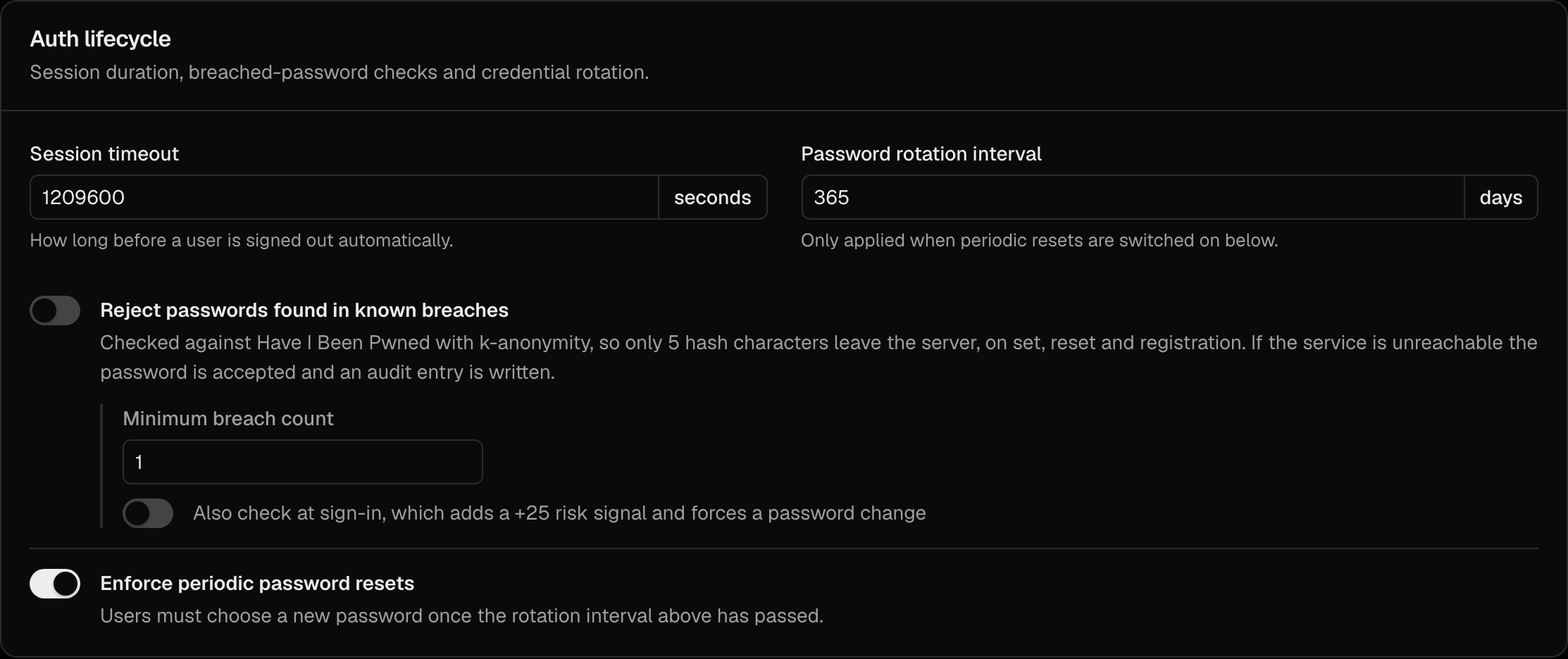
Access- and refresh-token lifetimes are not configured here — they are set per OAuth client in the client's configuration. See OAuth Clients.
Viewing Active Sessions
As an Admin
There is no per-user "Sessions" tab in the portal. Admins list a user's sessions through the Admin API:
curl https://your-domain.com/orgs/{orgId}/api/v1/admin/users/{userId}/sessions \
  -H "Authorization: Bearer {admin_token}"
As a User
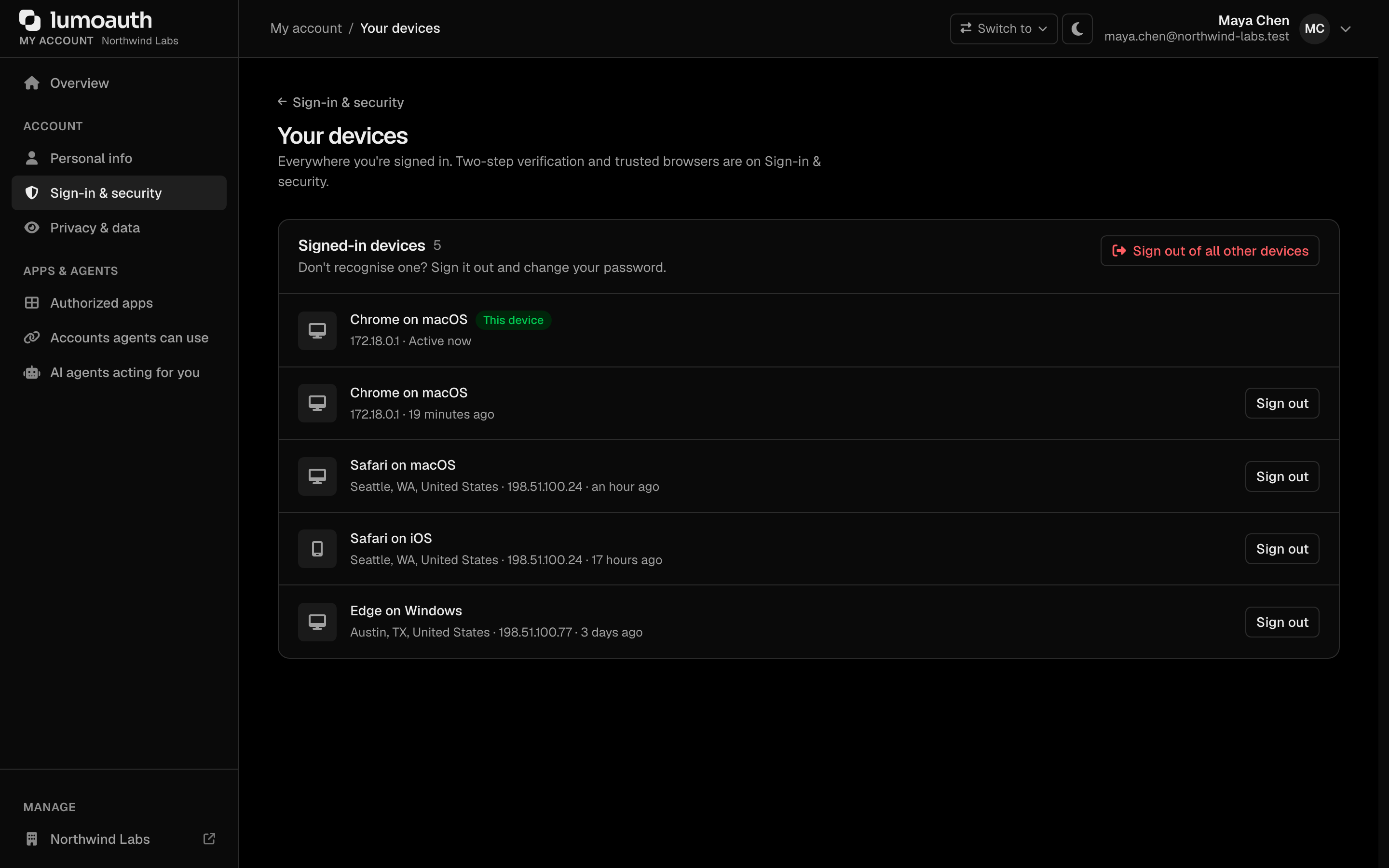
Users view and revoke their own sessions on the Your devices page of their account (/account/sessions, also reachable from the Devices section of Sign-in & security), including per-session device, IP and last-activity details. Every way of signing in creates a session record here: password, magic link, passkey, push and social login (Google, GitHub, Microsoft and the rest). The current session is marked This device.
Revoking Sessions
Revoke a User's Sessions (Admin API)
Force a user to re-authenticate by revoking their sessions. Both an admin/users/{userId}/sessions DELETE and a POST .../sessions/revoke form are available:
# Revoke all of one user's sessions
curl -X POST https://your-domain.com/orgs/{orgId}/api/v1/admin/users/{userId}/sessions/revoke \
  -H "Authorization: Bearer {admin_token}"
Revoke All Sessions Tenant-Wide
To force every user in the organization to re-authenticate (e.g. after a security incident):
curl -X POST https://your-domain.com/orgs/{orgId}/api/v1/admin/sessions/revoke-all \
  -H "Authorization: Bearer {admin_token}"
As a User
A signed-in user can revoke one session with Sign out next to it (POST /account/sessions/{id}/revoke) or all of their other sessions with Sign out of all other devices (POST /account/sessions/revoke-all) from /account/sessions. Both are forms that carry a CSRF token; they cannot be triggered by a link from another site.
Signing out
Signing out goes through /logout and requires a CSRF token (a hidden value that proves the request came from a LumoAuth page): the request must carry _csrf_token (token id logout), which every shipped sign-out link and form includes. A bare GET /logout without the token is refused and leaves the session in place. This stops a malicious page from logging your users out (a "logout CSRF"). If you build your own sign-out button, render it with the token:
<a href="{{ path('auth_logout', {_csrf_token: csrf_token('logout')}) }}">Sign out</a>
For an application that signs users in through OAuth, end the LumoAuth session with the OIDC logout endpoint instead of linking to /logout.
What each action revokes
"Remember me" keeps a browser signed in for 30 days with a signed cookie. That cookie is bound to a per-user security stamp, so the actions below also end every remembered browser instead of letting the cookie silently sign it back in.
| Action | Sessions | Remember-me cookies | OAuth access and refresh tokens |
|---|---|---|---|
User revokes one session at /account/sessions | The chosen one | All of the user's | Kept |
| User signs out all other sessions ("sign out everywhere") | All other sessions | All of the user's | All of the user's |
| Admin revokes one session | The chosen one | All of the affected user's | Kept (use the token endpoints) |
| Admin revokes a user's sessions or all organization sessions | All of the affected users' | All of the affected users' | All of the affected users' |
| User changes their password, completes a password reset, or an admin sets their password | Other sessions (all of them after a reset or admin set) | All (the password is part of the signature) | All of the user's |
| Admin blocks, deactivates or deletes a user, SCIM/HRIS deprovisions them (soft or hard delete) | All (ended on the next request) | All | All of the user's |
An SSF session-revoked or credential-compromise event is received for the user | All | All | All of the user's |
| Recovery code used at sign-in | Every other session and trusted device | All | All of the user's |
"All of the user's" tokens includes access tokens that were already issued: each of these
actions sets a per-user cutoff, and every access token issued before it is refused at once.
LumoAuth's own APIs reject it, introspection returns {"active": false},
and userinfo rejects it. AAuth agent tokens issued for the user are revoked
too. A resource server that only verifies the JWT signature locally cannot see the cutoff and
keeps accepting the token until it expires; introspect tokens when this matters.
A blocked, deactivated or deleted user also cannot redeem an existing refresh token: the
token endpoint answers invalid_grant, and so does a refresh token issued before the cutoff.
Token Revocation
Revoke specific tokens:
# Revoke a refresh token
curl -X POST https://your-domain.com/orgs/{orgId}/api/v1/oauth/revoke \
  -H "Content-Type: application/x-www-form-urlencoded" \
  -d "token={refresh_token}&client_id={client_id}&client_secret={client_secret}"
Session Security
| Feature | Description |
|---|---|
| Session fixation protection | Sessions are regenerated after login, including social logins |
| Pre-authentication checks on every method | Blocked, inactive, soft-deleted and locked users cannot sign in by password, passkey, magic link, push or social login, and an existing session of such a user is ended on their next request |
| Logout CSRF protection | /logout needs a CSRF token; a cross-site page cannot sign users out |
| Secure cookies | Session cookies use Secure, HttpOnly, SameSite flags |
| Self-service revocation | Users can revoke individual or all sessions from /account/sessions |
| Admin revocation | Admins can revoke a user's sessions, or all organization sessions, via the Admin API; remember-me cookies are invalidated too |
| Organization binding | A session from one organization is never accepted by another organization's /authorize or device-verification page: the user is asked to sign in to that organization. The token endpoint refuses codes and refresh tokens whose user belongs to another organization (invalid_grant). |
| Forced re-authentication | Require re-auth for sensitive operations |
Related Guides
- User Management Overview - Full user lifecycle
- Audit Logs - Track session events
- Adaptive MFA - Risk-based session controls
Standards used on this page
| Plain name | Standard |
|---|---|
| OAuth 2.0 (the core sign-in and token protocol) | RFC 6749 |
| JSON Web Token (JWT) | RFC 7519 |
See the standards reference for what each one covers and how LumoAuth uses it.