Migrating from Auth0
This guide moves your organization from Auth0 to LumoAuth. Most of the heavy lifting is one CLI command.
- 100 users: ~30 seconds
- 10K users: ~5 minutes (with
--concurrent 8) - 1M users: ~50 minutes (run from a machine with good network egress to LumoAuth)
1. Export your Auth0 tenant
In the Auth0 Dashboard, go to User Management → Users → Export Users → Bulk export. Pick the JSON format (not CSV — bulk JSON preserves nested user_metadata and app_metadata).
You can also use Auth0's Management API:
curl "https://YOUR_TENANT.auth0.com/api/v2/jobs/users-exports" \
  -H "Authorization: Bearer $AUTH0_MGMT_TOKEN" \
  -H "Content-Type: application/json" \
  -d '{"connection_id": "con_abc...", "format": "json"}'
The export comes back as either a JSON array (small Auth0 tenants) or NDJSON (one user per line — large tenants). lumo migrate auth0 accepts both.
2. Provision a LumoAuth tenant
brew install lumoauth/tap/lumo     # or another channel, see /cli/install
lumo login --org your-new-org-slug
If you don't have an organization yet, sign up — registration auto-provisions a "Starter App" OAuth client you can use for the migrated users.
3. Dry-run the migration
Always dry-run first. The CLI parses the export, validates each user, and reports what would happen — without writing anything:
lumo migrate auth0 --file users.json --dry-run
Output (rows are printed to stderr; the summary line is also emitted to stdout for scripting):
→ Loaded 12,847 user(s) from users.json
  --dry-run: no writes will be performed
  Target tenant: acme-corp
  Base URL:      https://app.lumoauth.dev
  Concurrency:   4

  ✓ ada@acme.com
  ✓ grace@acme.com
  – (no email)  (missing email)
  ...

Done. created=12,821 skipped=26 failed=0
In a dry run the CLI does not contact the server, so it cannot detect which emails already exist — every row with a non-empty email is reported as ✓ (would-create), and rows with no email are reported as skipped (missing email). Duplicate detection happens only on the real run (a 409 Conflict from the API is recorded as skipped). If anything looks wrong, fix the export and re-run with --dry-run.
4. Run the migration
lumo migrate auth0 --file users.json --concurrent 4
Idempotent — 409 conflicts (user already exists by email) are recorded as skipped, not errors. Re-run safely after a network blip.
For very large organizations, narrow the concurrent worker count to whatever your server tolerates:
lumo migrate auth0 --file users.json --concurrent 16    # max
lumo migrate auth0 --file users.json --concurrent 1     # serial, gentlest
For staged migrations, use --limit to migrate a chunk at a time:
lumo migrate auth0 --file users.json --limit 100 # first 100 only
5. What's preserved
| Auth0 field | LumoAuth field | Notes |
|---|---|---|
email | email | Used as the LumoAuth identity key |
email_verified | emailVerified | Carries over |
name, given_name, family_name | name, givenName, familyName | Top-level fields |
username | username | Defaults to the email when absent |
These are the fields the Admin API's create endpoint (POST /admin/users) stores. The CLI also sends nickname, picture, locale, blocked and the original user_id, user_metadata, app_metadata and created_at under a traits object, but the endpoint does not read those keys, so they are not persisted. See the CLI reference for the exact request.
App code that hard-coded auth0|abc123 ids needs a mapping from the Auth0 user_id to the LumoAuth user id. Build it after the run from the export and lumo users get <email> -o json (which returns the new id), and keep user_metadata / app_metadata in your own database keyed by that id. Set pictures and locales afterwards with lumo users update <id> --picture <url> and lumo api PATCH /users/<id> --data '{"locale":"…"}', and block users that were blocked in Auth0 with lumo users block <id>.
last_login is not migrated — LumoAuth tracks logins natively from cutover day.
6. What's intentionally dropped
- Password hashes. Auth0 uses bcrypt with a tenant-specific pepper (a server-side secret mixed into every hash). LumoAuth uses bcrypt with its own pepper. Replaying foreign hashes would skip the breach check on the next login, which is a regression. Migrated users are created without a password and go through password-reset / magic-link / SSO on first sign-in. To trigger that proactively — sending each migrated user a password-reset email instead of waiting for their next sign-in — add
--send-resetto the migration run (lumo migrate auth0 --file users.json --send-reset). - TOTP / SMS / Push MFA enrolment. Vendor-bound. Re-enrol on LumoAuth.
- Passkeys. Bound to the
auth0.comdomain they were created on — invalid forlumoauth.dev. Re-enrol. - Active sessions. Refresh tokens issued by Auth0 will not be honored by LumoAuth. Users sign in fresh.
7. Migrate organizations
If you use Auth0 Organizations, export them and recreate each via the LumoAuth Admin API. Create them with the POST /orgs/{orgId}/api/v1/admin/organizations endpoint (accepts name, slug, displayName, description, logoUrl, metadata, isActive), directly with curl as below or through lumo api POST /organizations --data '{…}':
# Export Auth0 organizations
curl "https://YOUR_TENANT.auth0.com/api/v2/organizations" \
  -H "Authorization: Bearer $AUTH0_MGMT_TOKEN" \
  > organizations.json

# Recreate each in LumoAuth
jq -c '.[]' organizations.json | while read -r org; do
  name=$(echo "$org" | jq -r '.name')
  slug=$(echo "$org" | jq -r '.name | ascii_downcase')
  curl -X POST "$LUMO_BASE_URL/orgs/$LUMO_ORG/api/v1/admin/organizations" \
    -H "Authorization: Bearer $LUMO_ADMIN_TOKEN" \
    -H "Content-Type: application/json" \
    -d "{\"name\": \"$name\", \"slug\": \"$slug\"}"
done
You can also create them by hand in the admin portal (Identity → Customer organizations → New organization).
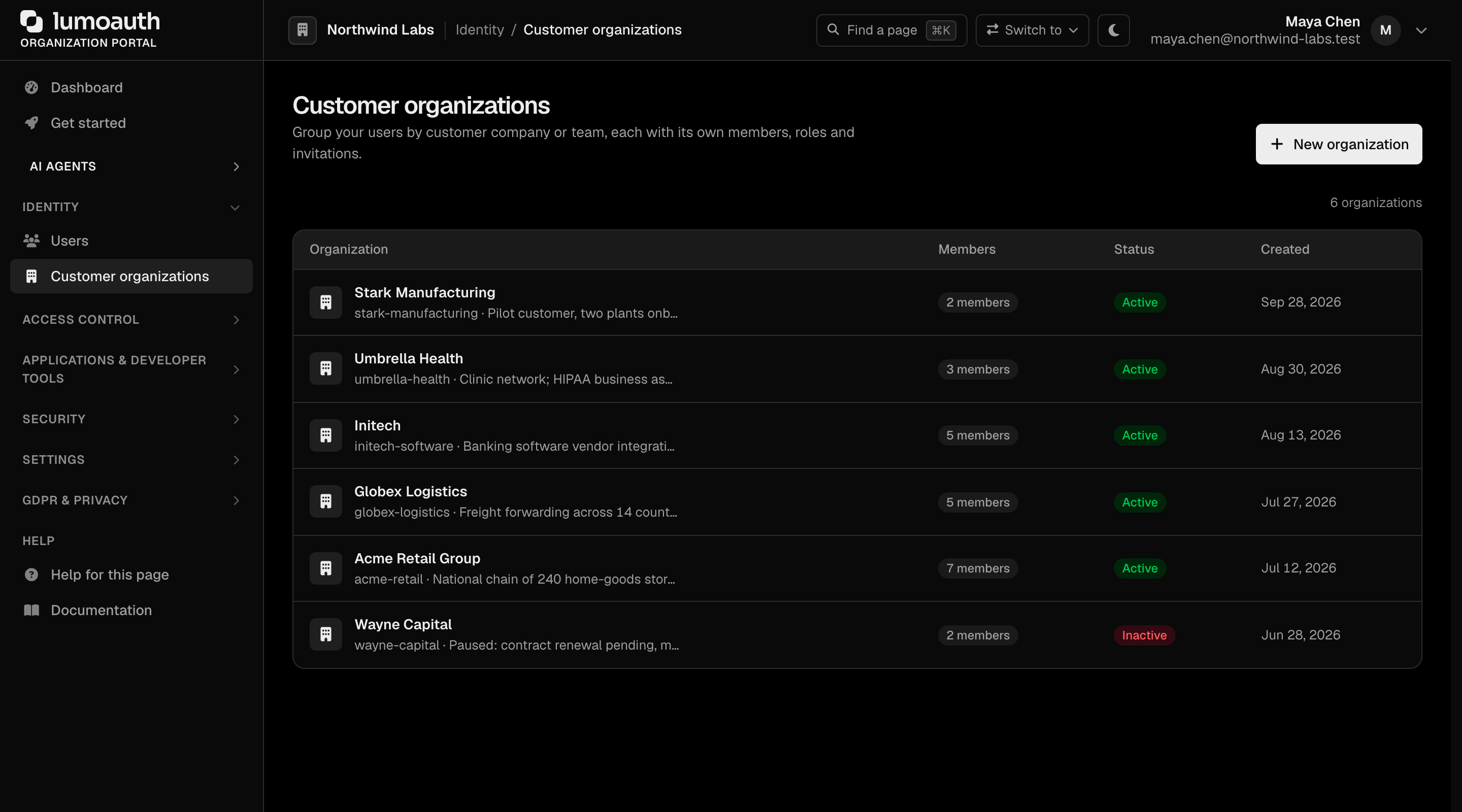
Add members afterwards with POST /orgs/{orgId}/api/v1/admin/organizations/{organizationId}/members ({"userId": "...", "roleId": ...}).
8. Migrate OAuth applications
Auth0 calls them "Applications," LumoAuth calls them "OAuth Clients." The shapes are nearly identical:
# For each Auth0 app, create a LumoAuth client:
lumo apps create \
  --name "Acme Web App" \
  --redirect-uris "https://acme.com/callback,http://localhost:3000/auth/callback" \
  --grant-types "authorization_code,refresh_token"
Auth0 client_ids are not portable — your apps need the new LumoAuth client_id. Plan a co-ordinated cutover (run both Auth0 and LumoAuth-issued tokens in parallel for a window).
9. Migrate Connections (Social + Enterprise)
| Auth0 connection | LumoAuth equivalent | How |
|---|---|---|
| Google, GitHub, Microsoft | Social Login | Configure social providers |
| SAML | SAML IdP | Paste the metadata URL → done. Setup guide |
| OIDC | OIDC IdP | Enter the issuer URL, client ID and secret → done |
| Active Directory / LDAP | Enterprise SSO | Connection-by-connection setup guide |
| Database (username + password) | LumoAuth users | Already migrated by step 4 |
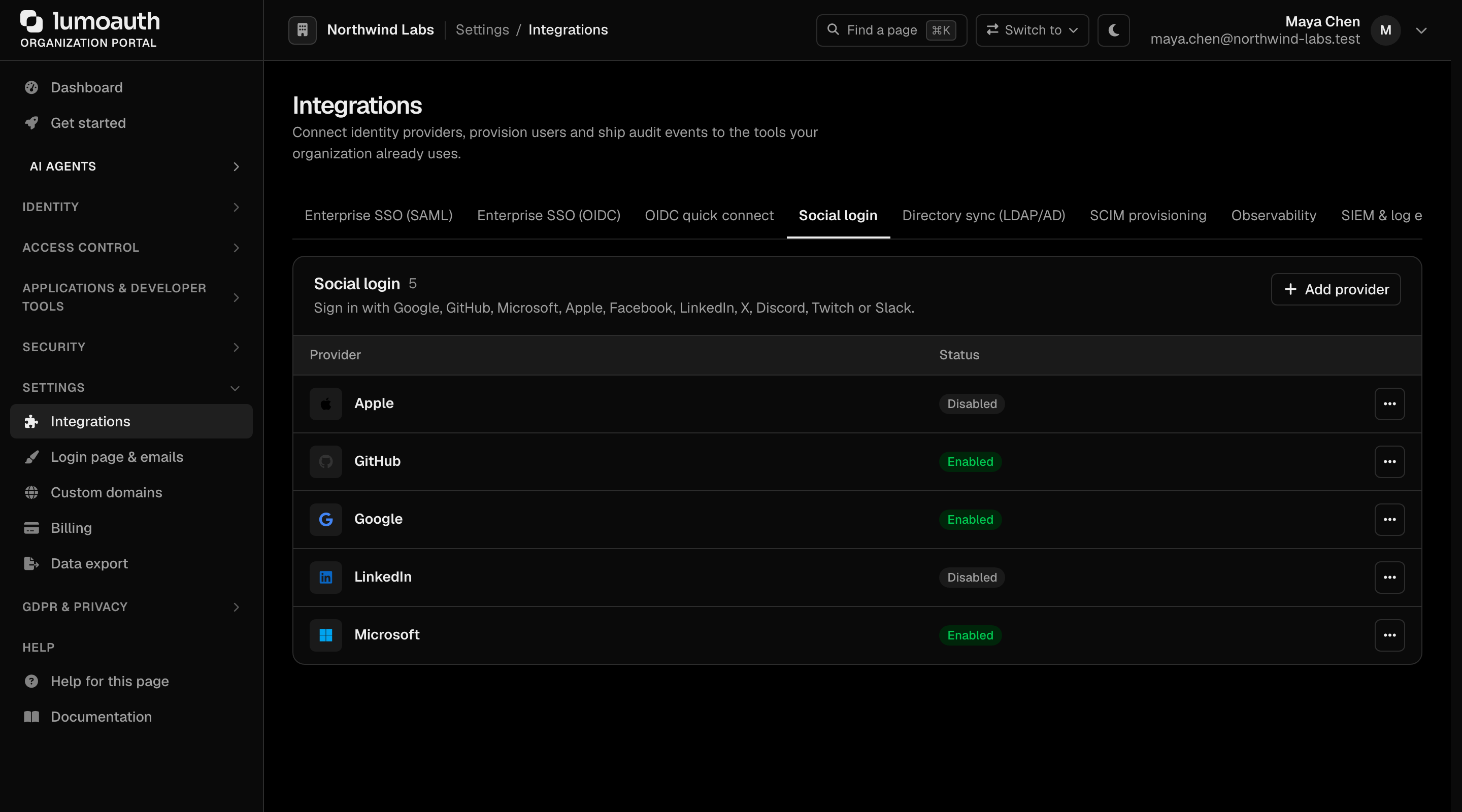
Social providers and enterprise IdPs are all added in the portal under Settings → Integrations.
10. Cutover playbook
Use the parallel-run pattern. The Auth0-specific notes:
- Auth0 sessions outlive LumoAuth migration; users keep working in Auth0 until they sign out.
- Auth0 Rules / Actions / Hooks: review each one and re-implement either as a webhook handler (LumoAuth posts
user.login,user.login_failed,user.createdand the rest of the event catalogue to your endpoint) or as logic in your app. LumoAuth does not run custom code inside the login flow. - Auth0 logs: export them via Auth0's log streaming before you decommission. LumoAuth's audit log starts fresh from cutover day.
Common errors
| Message | Cause | Fix |
|---|---|---|
parse JSON array: ... / parse NDJSON line: ... | Export is malformed (truncated download, hand-edited) | Re-export from Auth0. NDJSON vs. array is auto-detected — there's no flag to set, and blank/trailing lines are skipped, so they don't error |
skipped (missing email) | Auth0 user has no email (rare — federated identity edge case) | These rows never reach the server; they're counted as skipped, not failures. Pre-filter if you want them gone: jq 'select(.email != null)' |
– email (409) (recorded as skipped) | User with that email already exists in LumoAuth | Expected on re-run; not an error |
| Migration runs but custom metadata is missing | Used CSV export instead of JSON | Re-export as JSON (CSV drops nested user_metadata / app_metadata) |