Migrating from Okta
The migration is manual: Okta's Users API exports cleanly, the data shape maps directly, and the steps below create each user through the LumoAuth Admin API. Many teams instead keep Okta as the identity provider and connect it to LumoAuth; see step 6.
1. Export Okta users
curl "https://YOUR_TENANT.okta.com/api/v1/users?limit=200" \
  -H "Authorization: SSWS $OKTA_API_TOKEN" \
  -H "Accept: application/json" \
  > okta-users.json
For organizations larger than 200 users, follow Okta's pagination Link header (the response includes a Link: <next>; rel="next" header).
2. Map Okta fields to LumoAuth
The LumoAuth Admin user-create endpoint reads these top-level fields: email, username, name, givenName, familyName, phoneNumber, password, isActive, emailVerified, roles and groups. Map Okta's fields onto those:
| Okta field | LumoAuth field |
|---|---|
profile.email | email |
status == "ACTIVE" | isActive |
profile.firstName + " " + profile.lastName | name |
profile.firstName | givenName |
profile.lastName | familyName |
profile.login | username |
profile.mobilePhone | phoneNumber |
id (e.g. 00u1abc...) | Your own mapping table (see step 3) |
profile.* (custom attributes), created, lastLogin | Your own database, keyed by the LumoAuth user id |
The create endpoint also accepts a metadata object, but user responses never return it, so it cannot carry the vendor's user id for later lookups. Keep your own mapping from the vendor id to the LumoAuth user id returned in the create response (data.id); the loop below records it. The endpoint does not accept a caller-supplied creation timestamp either — createdAt is set by LumoAuth at create time, so keep the original timestamp in the same mapping table if your app relies on it.
3. Create the users
LumoAuth's Admin API creates one user per request at POST /orgs/{orgId}/api/v1/admin/users (there is no bulk array endpoint). Reshape the Okta export into one JSON object per line, then POST each in a loop and record the Okta id next to the LumoAuth id from the response:
# Reshape Okta users into newline-delimited LumoAuth user objects,
# carrying the Okta id along for the mapping table
jq -c '.[] | {
  okta_user_id: .id,
  user: {
    email: .profile.email,
    emailVerified: true,
    name: ((.profile.firstName // "") + " " + (.profile.lastName // "")),
    givenName: .profile.firstName,
    familyName: .profile.lastName,
    username: .profile.login,
    phoneNumber: .profile.mobilePhone,
    isActive: (.status == "ACTIVE")
  }
}' okta-users.json > lumo-users.ndjson

# POST each user; an existing-email 409 is expected on re-runs.
# Writes "okta_user_id,lumo_user_id" lines to mapping.csv.
while read -r row; do
  oid=$(echo "$row" | jq -r '.okta_user_id')
  user=$(echo "$row" | jq -c '.user')
  id=$(curl -sS -X POST "$LUMO_BASE_URL/orgs/$LUMO_ORG/api/v1/admin/users" \
    -H "Authorization: Bearer $LUMO_ADMIN_TOKEN" \
    -H "Content-Type: application/json" \
    -d "$user" | jq -r '.data.id // empty')
  [ -n "$id" ] && echo "$oid,$id" >> mapping.csv
done < lumo-users.ndjson
The loop is idempotent: a 409 Conflict (email already exists) means the user was already created and can be safely skipped on re-runs; for those, GET /admin/users/{email} (or lumo users get <email> -o json) returns the id to backfill the mapping. $LUMO_ADMIN_TOKEN is an access token with the admin scope, or use an organization API key instead (-H "Authorization: ApiKey lmk_…", with the admin:users:write scope). The same request works as lumo api POST /users --data "$user".
4. Migrate Okta Groups
curl "https://YOUR_TENANT.okta.com/api/v1/groups?limit=200" \
  -H "Authorization: SSWS $OKTA_API_TOKEN" \
  > okta-groups.json

jq -r '.[] | "lumo groups create --name \"\(.profile.name)\""' \
  okta-groups.json | bash
For each group, fetch its members and add them to the LumoAuth group:
jq -r '.[] | .id' okta-groups.json | while read gid; do
  curl "https://YOUR_TENANT.okta.com/api/v1/groups/$gid/users?limit=200" \
    -H "Authorization: SSWS $OKTA_API_TOKEN" \
    > "members-$gid.json"
done

# Members are matched by email; <group-id-or-slug> is the LumoAuth group
lumo groups members add <group-id-or-slug> \
  --users "$(jq -r '[.[].profile.email] | join(",")' members-<gid>.json)"
5. Migrate Okta Apps (OIDC + SAML)
For each Okta app, recreate the LumoAuth equivalent:
- OIDC web app (OIDC: OpenID Connect, the sign-in layer on top of OAuth 2.0) →
lumo apps create --type web --grant-types authorization_code,refresh_token --redirect-uris … - OIDC SPA →
lumo apps create --type spa --grant-types authorization_code --redirect-uris … - OIDC native →
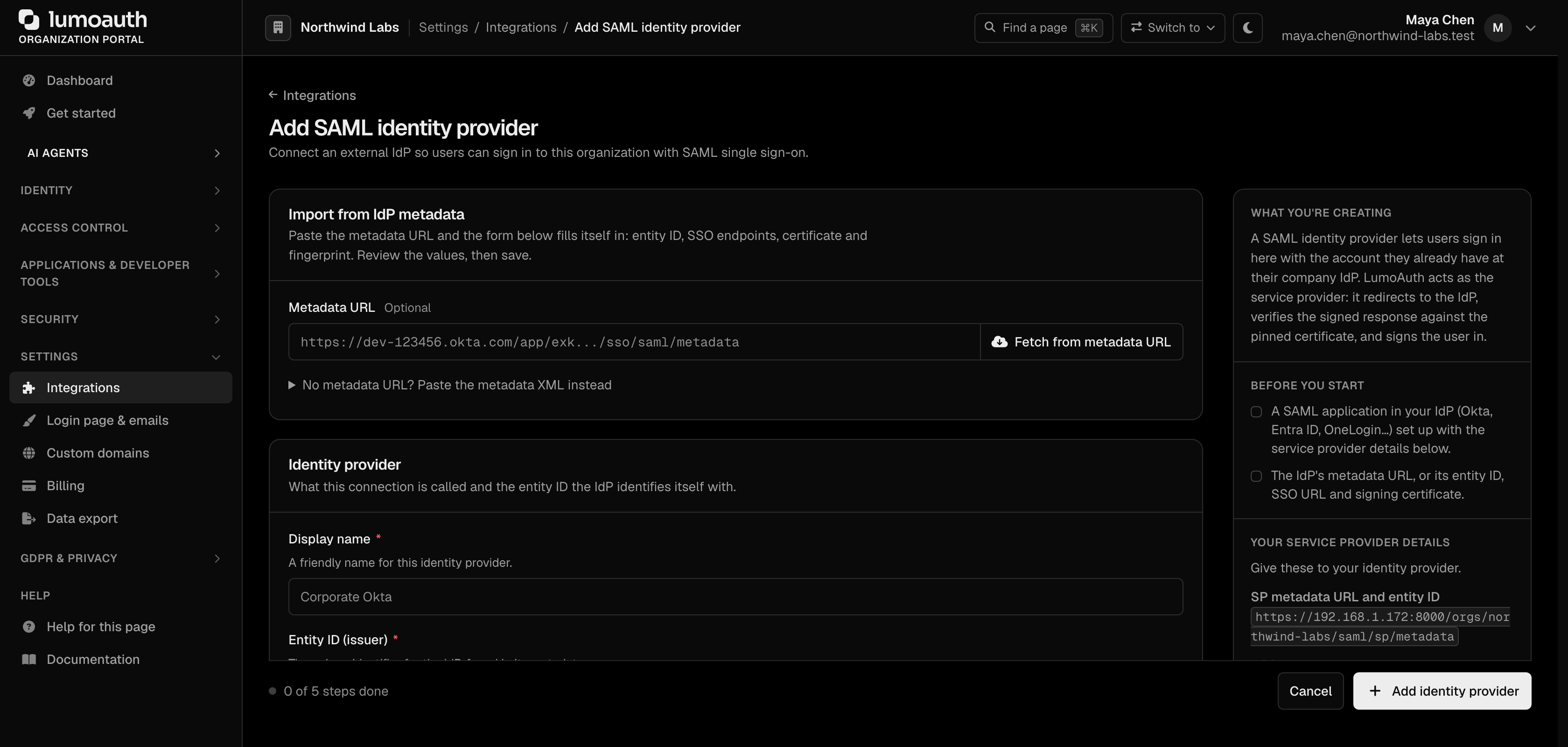
lumo apps create --type native --redirect-uris … - SAML app → configure SAML in the admin portal under Settings → Integrations → Enterprise SSO (SAML) → Add SAML IdP (
/orgs/{orgId}/portal/saml-idps/new). LumoAuth's own SP metadata for an upstream IdP to consume is served at/orgs/{orgId}/saml/sp/metadata. (This is uncommon when migrating from Okta — usually you're keeping Okta as the IdP and pointing it at LumoAuth. For that more common case, see step 6.)
6. Keep Okta as your IdP (recommended for many migrations)
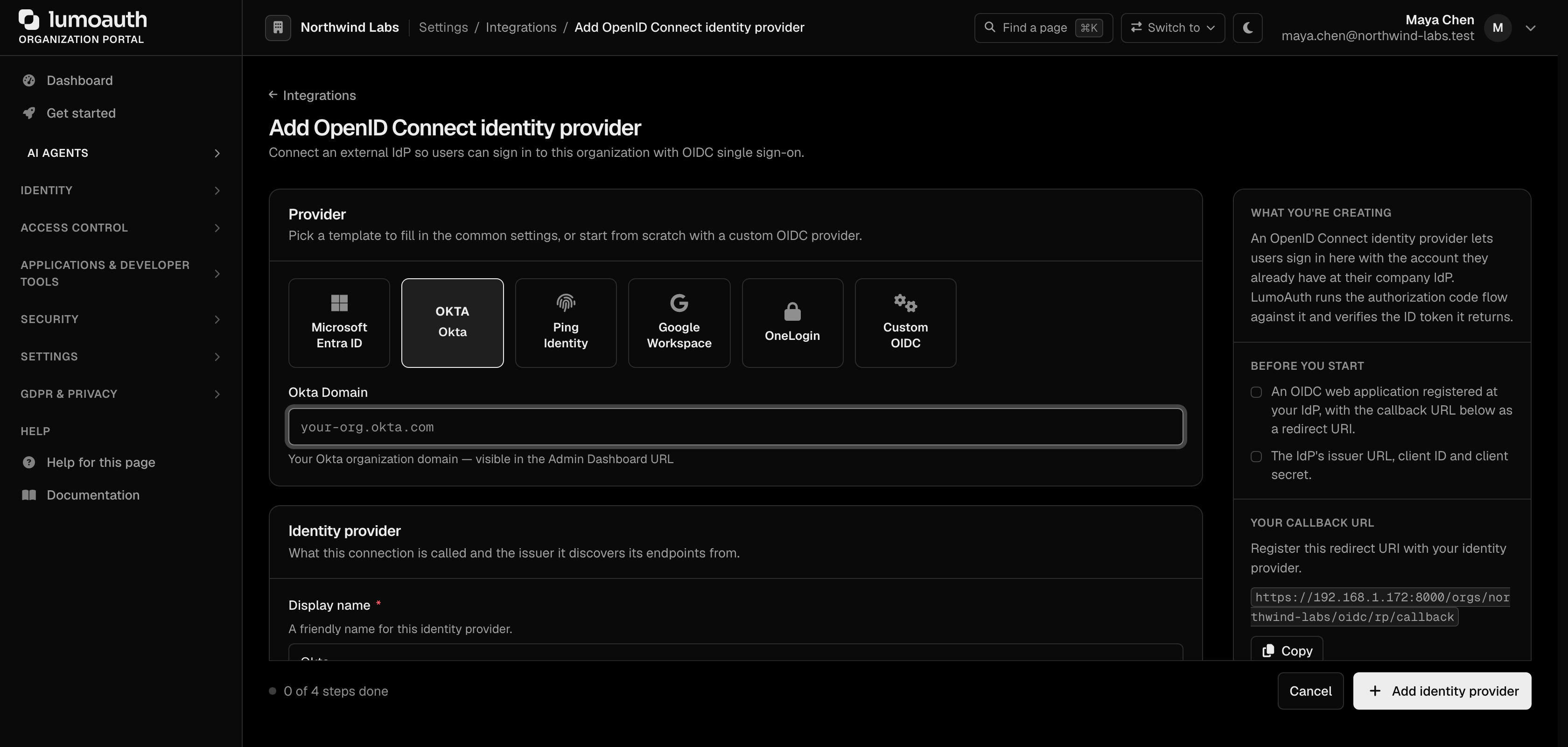
If your customers know your auth as "Sign in with Okta" you don't need to move that — keep Okta as the upstream identity provider (IdP) and let LumoAuth act as the relying party (the application side that trusts it). Register Okta as an upstream OIDC IdP in the portal (there is no JSON admin API for this):
- Go to Settings → Integrations → Enterprise SSO (OIDC) → Add OIDC IdP (
/orgs/{orgId}/portal/oidc-idps/new). - Under Provider, pick the Okta template and enter your Okta Domain (
YOUR_TENANT.okta.com), or enter the Issuer URL (https://YOUR_TENANT.okta.com) yourself. Leave the endpoint fields blank; they are discovered from the issuer's/.well-known/openid-configuration. - Register the callback URL shown on the form (
/orgs/{orgId}/oidc/rp/callback) as a redirect URI on your Okta OIDC app. - Enter a Display name and the Client ID / Client secret from your Okta OIDC app, then click Add identity provider.
This keeps Okta as your identity store while LumoAuth handles fine-grained authz, agent identity, MCP, and the things Okta doesn't do.
7. What's intentionally dropped
- Password hashes. Okta uses bcrypt with an organization pepper; the export doesn't include them. Users sign in fresh.
- Okta MFA enrolments. Vendor-bound. Re-enrol on LumoAuth.
- Okta Sign-On Policies. LumoAuth has equivalent risk-based MFA via Adaptive MFA — recreate the policy intent under Security → Adaptive security in the portal.
- Active sessions. Okta session cookies aren't honored by LumoAuth.
8. Cutover
Okta-specific note: if your apps use Okta's Sign-In Widget, the LumoAuth replacement is <SignIn /> from @lumoauth/react (or the hosted login URL for non-React apps). The migration cost is low because Okta-protected apps are typically OpenID Connect relying parties, and LumoAuth speaks OpenID Connect natively.