Migrating from Firebase Auth
The migration is manual: the Firebase CLI exports your users, and the steps below reshape the export and create each user through the LumoAuth Admin API.
1. Export Firebase users
firebase auth:export users.json --project YOUR_FIREBASE_PROJECT
Output is JSON with one record per user including email, password hash format, and provider data.
2. Map Firebase fields to LumoAuth
The LumoAuth Admin user-create endpoint reads these top-level fields: email, username, name, givenName, familyName, phoneNumber, password, isActive, emailVerified, roles and groups.
| Firebase field | LumoAuth field |
|---|---|
email | email |
emailVerified | emailVerified |
displayName | name |
phoneNumber | phoneNumber |
photoUrl | picture, set after creation with PATCH /admin/users/{id} (or lumo users update <id> --picture <url>) |
localId (Firebase UID) | Your own mapping table (see step 3) |
customClaims, providerUserInfo[] | Your own database, keyed by the LumoAuth user id |
createdAt (ms epoch) | Not accepted; LumoAuth sets createdAt at import time |
lastSignedInAt | Not migrated; LumoAuth tracks logins from cutover day |
3. Create the users
The Admin API creates one user per request at POST /orgs/{orgId}/api/v1/admin/users (there is no bulk endpoint). Reshape the export into one JSON object per line, POST each one, and record the Firebase UID next to the LumoAuth id from the response:
# Reshape Firebase users into newline-delimited LumoAuth user objects,
# carrying the Firebase UID and photo along
jq -c '.users[] | select(.email != null) | {
  firebase_uid: .localId,
  picture: .photoUrl,
  user: {
    email: .email,
    emailVerified: (.emailVerified // false),
    name: .displayName,
    phoneNumber: .phoneNumber
  }
}' users.json > lumo-users.ndjson

# POST each user; an existing-email 409 is expected on re-runs.
# Writes "firebase_uid,lumo_user_id" lines to mapping.csv and sets the picture.
while read -r row; do
  uid=$(echo "$row" | jq -r '.firebase_uid')
  pic=$(echo "$row" | jq -r '.picture // empty')
  user=$(echo "$row" | jq -c '.user')
  id=$(curl -sS -X POST "$LUMO_BASE_URL/orgs/$LUMO_ORG/api/v1/admin/users" \
    -H "Authorization: Bearer $LUMO_ADMIN_TOKEN" \
    -H "Content-Type: application/json" \
    -d "$user" | jq -r '.data.id // empty')
  [ -z "$id" ] && continue
  echo "$uid,$id" >> mapping.csv
  [ -n "$pic" ] && curl -sS -X PATCH "$LUMO_BASE_URL/orgs/$LUMO_ORG/api/v1/admin/users/$id" \
    -H "Authorization: Bearer $LUMO_ADMIN_TOKEN" \
    -H "Content-Type: application/json" \
    -d "{\"picture\": \"$pic\"}" -o /dev/null
done < lumo-users.ndjson
The loop is idempotent: a 409 Conflict (email already exists) means the user was already created and can be safely skipped on re-runs. For users created on an earlier run, GET /admin/users/{email} (or lumo users get <email> -o json) returns the id to backfill the mapping.
$LUMO_ADMIN_TOKEN is an access token with the admin scope, or use an organization API key instead (-H "Authorization: ApiKey lmk_…", with the admin:users:write scope). The same requests work as lumo api POST /users --data "$user" and lumo api PATCH /users/<id> --data '{"picture":"…"}'.
4. What's intentionally dropped
- Firebase password hashes. The export does include hashed passwords (scrypt with Firebase parameters), but LumoAuth uses bcrypt. Replaying scrypt hashes would mean keeping a Firebase-compatible verifier permanently. Cleaner to migrate users through password-reset.
- Custom tokens. Firebase ID tokens are verified against Firebase's public keys; LumoAuth publishes its own. Users sign in fresh.
- Phone-only users. Firebase allows phone-only accounts (no email). LumoAuth requires an email on every user. Capture an email at first LumoAuth sign-in; the
select(.email != null)filter above skips those records. - Anonymous users. Firebase has anonymous accounts; LumoAuth doesn't. Anonymous users in your app should be re-onboarded with a real account.
5. Migrate sign-in providers
Firebase social providers map to LumoAuth social providers 1:1:
- Google → Configure Google Social Login
- Facebook, Apple, Microsoft, GitHub, Twitter — same pattern
- Phone (SMS code) — SMS as a second factor (Sign-in settings → MFA policy → Allowed factors → Text message (SMS); needs an SMS provider configured)
- Email link (passwordless) — LumoAuth Magic Links (Sign-in settings → Login flow → Magic link login)
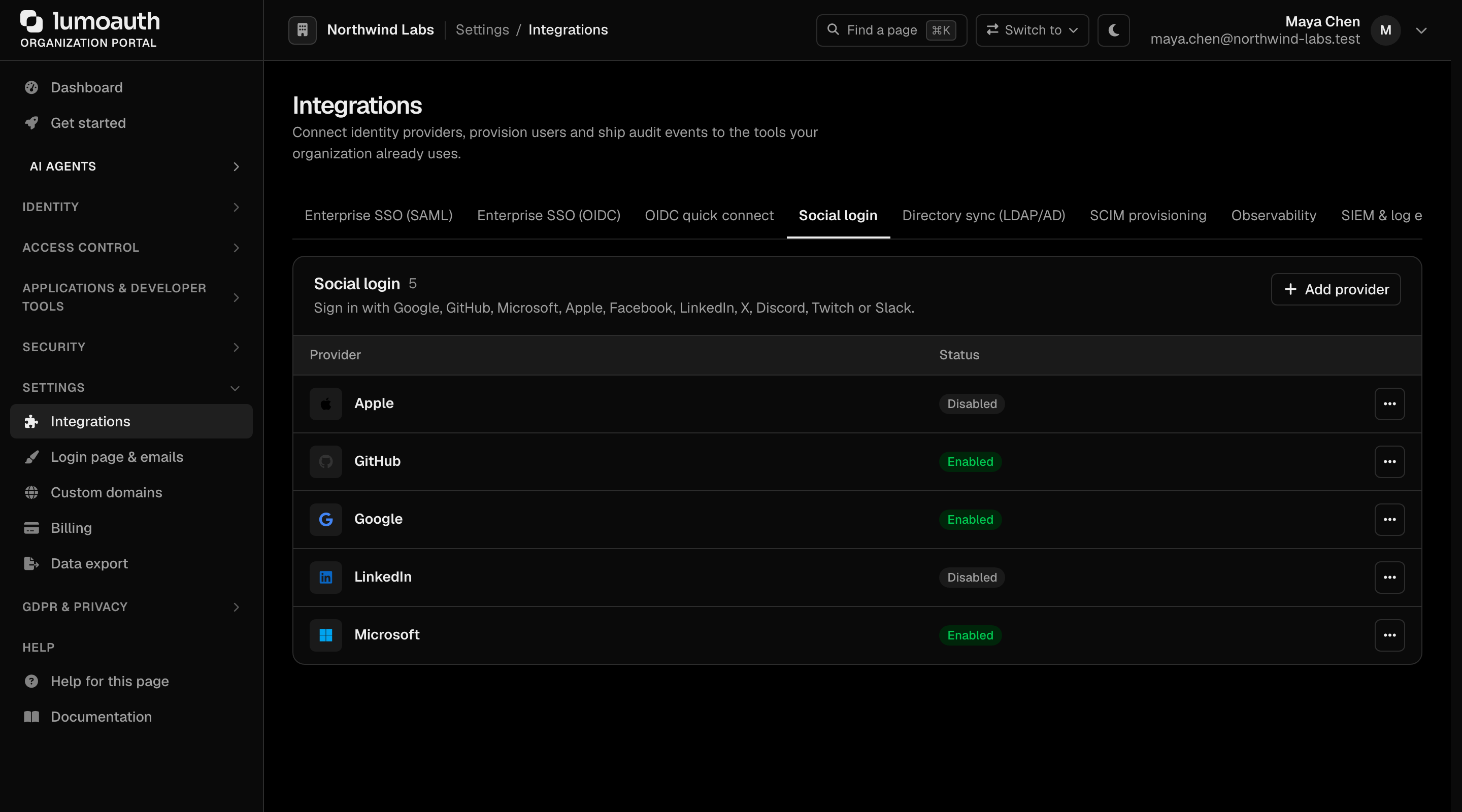
Configure each provider in LumoAuth before cutover. Social providers are added in the portal under Settings → Integrations → Social login → Add provider.
6. Cutover
Firebase doesn't have native "dual provider" support, so the parallel-run pattern is implemented in your app:
- On every sign-in attempt, try LumoAuth first.
- On 401 from LumoAuth, fall back to Firebase.
- After successful Firebase sign-in, prompt the user to "Set a new password" — which writes to LumoAuth.
- Once 95%+ of MAU has migrated, flip the order (try Firebase first, fall back disabled), then decommission.
What you gain over Firebase Auth
- Standards. OAuth 2.0 / OpenID Connect / SAML / SCIM are all first-class on LumoAuth; Firebase Auth doesn't speak SAML or SCIM.
- B2B features. Organizations, SSO connections, SCIM, RBAC + ABAC + Zanzibar — none of which Firebase has.
- AI agent identity. AAuth + MCP + JIT — Firebase has no concept of these.
- EU data residency. Firebase data resides in regions you can't fully control on the free tier; LumoAuth Business includes the EU region.
- Custom domains for hosted login. Firebase requires the auth flow to live on
your-project.firebaseapp.comunless you do significant work; LumoAuth supports custom domains out of the box.