Migrating from Clerk
The migration is manual but well-defined: Clerk exports cleanly, the data shape maps directly to LumoAuth, and the steps below walk through it with the Admin API.
1. Export your Clerk users
From the Clerk Dashboard, go to Users → … → Export users. Pick JSON.
Or via Clerk's Backend API:
curl "https://api.clerk.com/v1/users?limit=500" \
  -H "Authorization: Bearer $CLERK_SECRET_KEY" \
  > clerk-users.json
For organizations over 500 users, paginate using ?offset=500, ?offset=1000, etc. and concatenate.
2. Map Clerk fields to LumoAuth
The LumoAuth Admin user-create endpoint reads these top-level fields: email, username, name, givenName, familyName, phoneNumber, password, isActive, emailVerified, roles and groups. Map Clerk's fields onto those:
| Clerk field | LumoAuth field |
|---|---|
email_addresses[0].email_address | email |
email_addresses[0].verification.status == "verified" | emailVerified |
first_name + " " + last_name | name |
first_name | givenName |
last_name | familyName |
username | username |
id (e.g. user_2abc...) | Your own mapping table (see step 3) |
image_url | picture, set after creation with PATCH /admin/users/{id} |
public_metadata, private_metadata, unsafe_metadata | Your own database, keyed by the LumoAuth user id |
The create endpoint also accepts a metadata object, but user responses never return it, so it cannot carry the vendor's user id for later lookups. Keep your own mapping from the vendor id to the LumoAuth user id returned in the create response (data.id); the loop below records it. The endpoint does not accept a caller-supplied creation timestamp either — createdAt is set by LumoAuth at create time, so keep the original timestamp in the same mapping table if your app relies on it.
3. Create the users
LumoAuth's Admin API creates one user per request at POST /orgs/{orgId}/api/v1/admin/users (there is no bulk array endpoint). First reshape the Clerk export into one JSON object per line, then POST each one in a loop and record the Clerk id next to the LumoAuth id from the response:
# Reshape Clerk users into newline-delimited LumoAuth user objects,
# carrying the Clerk id and image along for the mapping table
jq -c '.data[] | {
  clerk_user_id: .id,
  picture: .image_url,
  user: {
    email: .email_addresses[0].email_address,
    emailVerified: (.email_addresses[0].verification.status == "verified"),
    name: ((.first_name // "") + " " + (.last_name // "")),
    givenName: .first_name,
    familyName: .last_name,
    username: .username
  }
}' clerk-users.json > lumo-users.ndjson

# POST each user; an existing-email 409 is expected on re-runs.
# Writes "clerk_user_id,lumo_user_id" lines to mapping.csv and sets the picture.
while read -r row; do
  cid=$(echo "$row" | jq -r '.clerk_user_id')
  pic=$(echo "$row" | jq -r '.picture // empty')
  user=$(echo "$row" | jq -c '.user')
  id=$(curl -sS -X POST "$LUMO_BASE_URL/orgs/$LUMO_ORG/api/v1/admin/users" \
    -H "Authorization: Bearer $LUMO_ADMIN_TOKEN" \
    -H "Content-Type: application/json" \
    -d "$user" | jq -r '.data.id // empty')
  [ -z "$id" ] && continue
  echo "$cid,$id" >> mapping.csv
  [ -n "$pic" ] && curl -sS -X PATCH "$LUMO_BASE_URL/orgs/$LUMO_ORG/api/v1/admin/users/$id" \
    -H "Authorization: Bearer $LUMO_ADMIN_TOKEN" \
    -H "Content-Type: application/json" \
    -d "{\"picture\": \"$pic\"}" -o /dev/null
done < lumo-users.ndjson
The loop is idempotent: a 409 Conflict (email already exists) means the user was already created and can be safely skipped on re-runs; for those, GET /admin/users/{email} (or lumo users get <email> -o json) returns the id to backfill the mapping. $LUMO_ADMIN_TOKEN is an access token with the admin scope, or use an organization API key instead (-H "Authorization: ApiKey lmk_…", with the admin:users:write scope). The same requests work as lumo api POST /users --data "$user".
4. Migrate Clerk Organizations
Create each organization via the Admin API at POST /orgs/{orgId}/api/v1/admin/organizations (accepts name, slug, displayName, description, logoUrl, metadata, isActive), with curl as below or lumo api POST /organizations --data '{…}':
curl "https://api.clerk.com/v1/organizations?limit=500" \
  -H "Authorization: Bearer $CLERK_SECRET_KEY" \
  > clerk-orgs.json

jq -c '.data[] | {name: .name, slug: .slug}' clerk-orgs.json | while read -r org; do
  curl -sS -X POST "$LUMO_BASE_URL/orgs/$LUMO_ORG/api/v1/admin/organizations" \
    -H "Authorization: Bearer $LUMO_ADMIN_TOKEN" \
    -H "Content-Type: application/json" \
    -d "$org"
done
For org memberships:
jq -r '.data[].id' clerk-orgs.json | while read org_id; do
  curl "https://api.clerk.com/v1/organizations/$org_id/memberships?limit=500" \
    -H "Authorization: Bearer $CLERK_SECRET_KEY" \
    > "memberships-$org_id.json"
done
Then join the membership records to mapping.csv from step 3, and add each member via POST /orgs/{orgId}/api/v1/admin/organizations/{organizationId}/members with {"userId": "<lumo user id>", "roleId": <organization role id>} (list the organization's roles with GET …/organizations/{organizationId}/roles).
5. What you cannot migrate from Clerk
- Password hashes. Clerk uses bcrypt; export does not include hashes (deliberate). Users password-reset on first LumoAuth login.
- Sessions. Clerk session JWTs aren't honored by LumoAuth. Users sign in fresh.
- OAuth-only users. If a user signed in only via Google/GitHub OAuth in Clerk, they have no password. They re-link the social provider in LumoAuth (no friction — they click "Sign in with Google" again). Signing in with the provider links to the imported account only when it was imported with
emailVerified: trueand without a password, and the provider asserts a verified email; otherwise the sign-in is refused as "An account with this email already exists". - Magic links / email codes. Stateless; no migration needed.
6. Migrate sign-in methods config
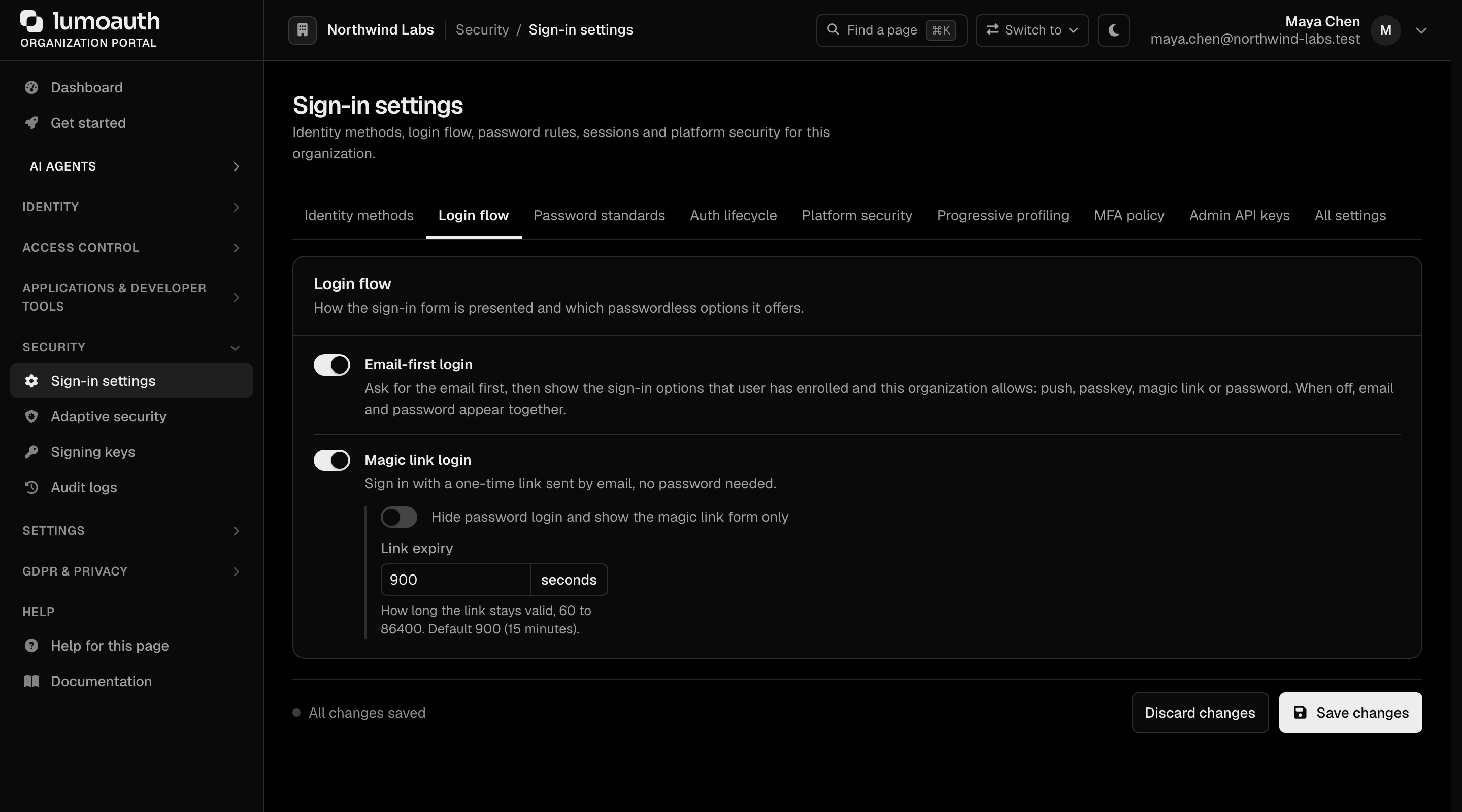
Clerk's "Allowed identifiers" + "Sign-in factors" map to LumoAuth's per-organization settings, mostly under Security → Sign-in settings in the portal:
| Clerk setting | LumoAuth setting |
|---|---|
| Email + Password | Always available; there is no toggle. Sign-in settings → Login flow → Email-first login only controls whether the email is asked for first |
| Email code (passwordless) | Sign-in settings → Login flow → Magic link login |
| Phone + Password / SMS code | SMS is a second factor, not a primary sign-in method: Sign-in settings → MFA policy → Allowed factors → Text message (SMS) (needs an SMS provider configured) |
| Username | Not supported; users sign in with their email address |
| Google / GitHub / Microsoft / etc. | Settings → Integrations → Social login → Add provider |
| Web3 wallet | Not supported on LumoAuth |
7. Cutover
Use the parallel-run pattern. Clerk-specific notes:
- Clerk's
<SignIn />React component embeds Clerk's hosted UI. Replace with<SignIn />from@lumoauth/react(npm install @lumoauth/react) — the API is intentionally similar to ease the cutover. - Clerk webhooks (
user.created,session.created, …) have LumoAuth equivalents (user.created,user.login,session.revoked, …) — see the event catalogue. Repoint your webhook receiver. - Clerk's
useUser()/useAuth()hooks have direct equivalents in@lumoauth/react:useUser()anduseLumoAuth()(renamed to avoid conflicts during dual-run).
What you gain by migrating
| Clerk | LumoAuth | |
|---|---|---|
| Cost at 50K MAU | $1,000/mo+ | $449/mo (Business) |
| Custom domain | Pro tier | included |
| RBAC (access by role) | included | included |
| ABAC (rules on attributes) / Zanzibar-style relationships | not available | included |
| SAML / SCIM | enterprise only | included on Business |
| AI agent identity (AAuth, MCP, JIT) | not available | included |
| EU data residency | enterprise | included on Business |