lumo migrate
Replay an export from another identity provider against the LumoAuth Admin API. The command is idempotent — re-runs skip rows that already exist, so it's safe to re-run after fixing data and pick up where you left off.
lumo migrate auth0 --file users.json --org your-org-slug
lumo migrate auth0 is the only importer. migrate does not have its own --org flag:
target an organization with the global --org flag, the LUMO_ORG env var, or your stored
credentials from lumo login. For other identity providers, see
Other identity providers.
lumo migrate auth0
Imports users from an Auth0 bulk-user-import JSON file.
Workflow
- In Auth0, run a Users export job (Tenant Settings → Import / Export Users → Export users) and download the JSON file.
- Authenticate to LumoAuth:
lumo login --org your-org-slug(or setLUMO_API_KEYfor scripted use). - Run the migration:
lumo migrate auth0 --file users.json
- Re-run if needed. Already-present users return HTTP 409 from
POST /admin/usersand are reported asskipped— re-runs only create what's missing.
Flags
| Flag | Default | Notes |
|---|---|---|
--file | (required) | Path to the Auth0 JSON export file. Both array and NDJSON (one JSON object per line) formats are accepted. |
--dry-run | false | Parse and validate only; no writes. Use to check the file shape before a real import. |
--concurrent | 4 | Parallel workers. Min 1, max 16. Higher = faster but riskier under organization rate limits. |
--limit | 0 | Stop after N users. 0 = no limit. Useful for staged migrations (--limit 100 to validate, then full run). |
--send-reset | false | Trigger a password-reset email for each migrated user. Recommended — see "Why passwords aren't migrated" below. |
Output
Rows are printed to stderr as they complete:
  ✓ alice@example.com                                  # created
  – bob@example.com  (already exists)                  # skipped
  ✗ charlie@example.com  HTTP 422  invalid email format  # failed
Plus a final summary on stderr:
Done. created=124 skipped=12 failed=2
When piped (-o json or any non-TTY), the summary is also emitted as a single JSON object on stdout for scripting:
{"total": 138, "created": 124, "skipped": 12, "failed": 2, "dry_run": false}
Exit code is 0 when no failures, 1 when any row failed.
What's preserved
The CLI normalises each Auth0 user object into a POST /admin/users request. The Admin API's
create endpoint stores these fields:
| Auth0 field | LumoAuth user field |
|---|---|
email | email |
email_verified | emailVerified |
name, given_name, family_name | name, givenName, familyName |
username | username (defaults to the email when absent) |
The CLI also includes nickname, picture, locale and blocked, and the original
user_id, user_metadata, app_metadata and created_at under a traits object, but
the create endpoint does not read those keys, so they are not stored. To keep them:
- Record the mapping from the Auth0
user_idto the LumoAuth user id yourself. After the run,lumo users get <email> -o jsonreturns the newid; apps that referenced the oldauth0|abc123id look it up through that mapping. - Set the picture and locale afterwards:
lumo users update <id> --picture <url>andlumo api PATCH /users/<id> --data '{"locale":"de"}'. - Block users that were blocked in Auth0 with
lumo users block <id>.
last_login is not migrated — LumoAuth tracks logins natively from cutover day.
Why passwords aren't migrated
Auth0 stores user passwords as bcrypt hashes (or, for older organizations, custom hash functions). LumoAuth uses bcrypt cost 13 by default and applies a Have-I-Been-Pwned breach check on sign-in. Replaying a foreign hash directly would:
- Break sign-in for any user whose hash uses a different cost / pepper / function.
- Skip the breach check, leaving known-compromised passwords valid.
The CLI deliberately drops password hashes and the migrated user is sent through your organization's "first login" flow — magic link, password reset, or social login — the next time they sign in. Pass --send-reset to trigger this proactively (each migrated user gets an email pointing them at the password-reset flow).
Staged migration
For organizations with > 10K users, run in stages so you can validate before going all-in:
# 1. Dry run to validate the file
lumo migrate auth0 --file users.json --dry-run

# 2. Migrate 100 to confirm everything works end-to-end
lumo migrate auth0 --file users.json --limit 100

# 3. Full migration
lumo migrate auth0 --file users.json --concurrent 8

# 4. Re-run after fixing any failures (idempotent)
lumo migrate auth0 --file users.json
What is not migrated
-
Roles, groups, and permissions — Auth0 stores these in a separate export, and the importer does not read it. Recreate roles in the portal (Access control → Roles & permissions) or via
lumo roles create, and assign them vialumo users roles set. -
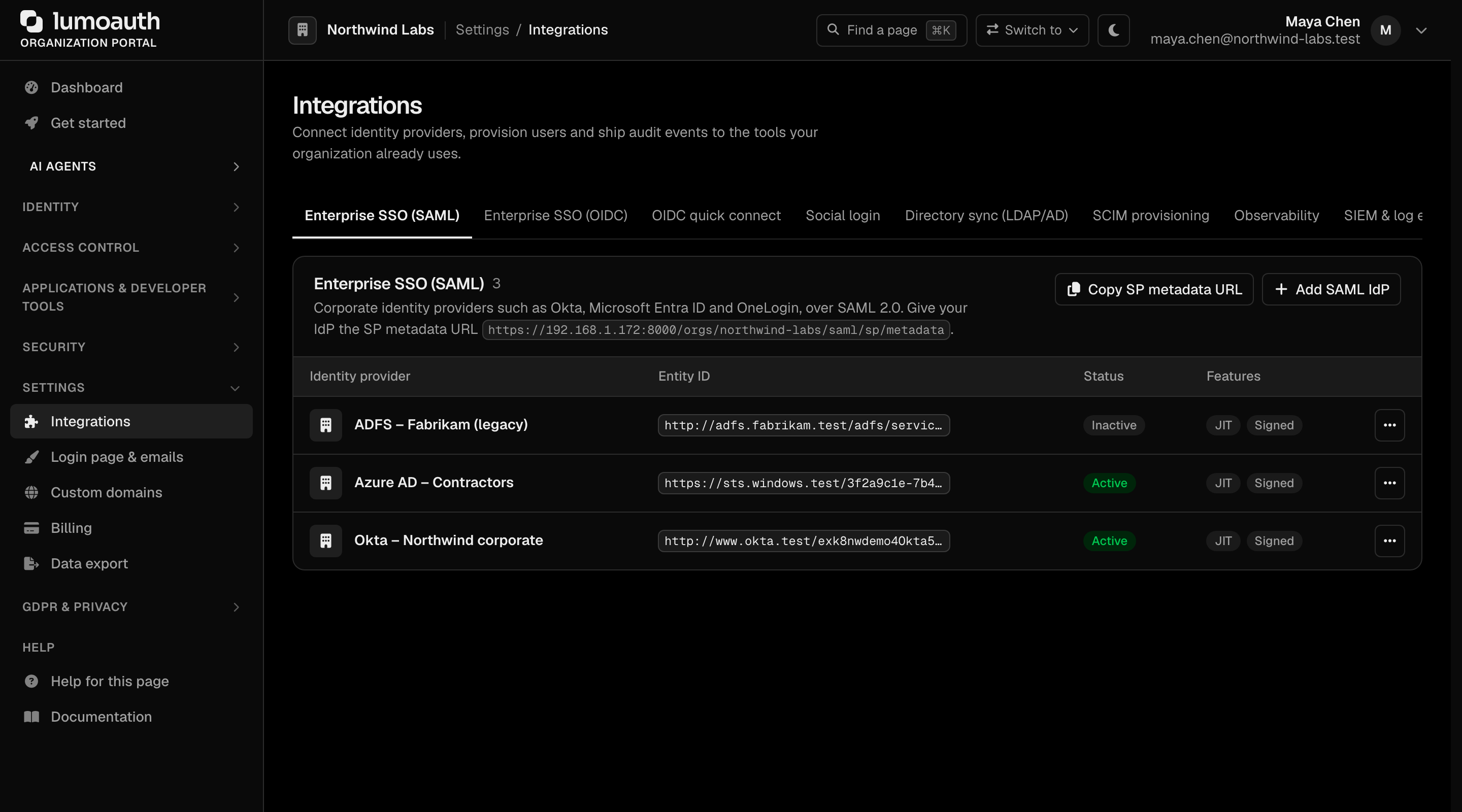
Connections (Auth0's term for social/SSO IdPs) — recreate in the LumoAuth portal under Settings → Integrations (the Social login, Enterprise SSO (SAML) and Enterprise SSO (OIDC) tabs). The Google / GitHub / Microsoft / etc. client IDs you used in Auth0 are reusable.
-
Rules and Actions — these are Auth0-specific custom JavaScript. LumoAuth's equivalent is policy authoring (RBAC + ABAC + Zanzibar) and webhooks; they're not auto-translated.
Other identity providers
There is no importer for Clerk, Okta, Cognito or Firebase. Each of those has a
migration guide that walks through the same pattern by hand:
export from the source, reshape each record with jq, and create users one per request
with lumo users create or POST /admin/users (via lumo api POST /users --data '{…}').
A 409 Conflict means the email already exists, so the loop is re-runnable just like the
Auth0 importer.