lumo login / logout / whoami
Sign in to a LumoAuth organization through OAuth 2.0 device authorization: the CLI shows a short code, you approve it in a browser on any device, and the CLI receives a token. No API key paste, no copy-and-tweak.
Quick start
lumo login --org acme-corp
The CLI:
- Calls
POST /orgs/acme-corp/api/v1/oauth/device_authorizationwith the well-known first-party clientlumoauth-cliand an explicitscope(the list of what the token may do; defaultopenid profile email admin). - Prints a short user code and tries to open the verification URL in your default browser.
- Polls the token endpoint at the server-provided interval.
- On approval, stores credentials at
~/.lumoauth/credentials.yaml(mode 0600).
lumo whoami
# Profile:    default
# Org:        acme-corp
# Base URL:   https://app.lumoauth.dev
# Auth:       login token (expires 2026-09-16T17:00:00Z)
# User:       jane@acme.com
# Scopes:     openid profile email admin

lumo logout
# Logged out. Profile "default" removed from /Users/jane/.lumoauth/credentials.yaml.
lumo whoami -o json returns the same facts as JSON, including admin_api: true|false.
Flags
| Flag | Purpose |
|---|---|
--org <slug> | Organization slug. If omitted, prompted interactively. |
--scope a,b,c | Scopes to request. Default openid,profile,email,admin. Narrow for least privilege, e.g. openid,admin:users:read. |
--profile <name> | Log in to (or create) a named profile. Switch between profiles later with lumo profile use <name>. |
--base-url <url> | Override the LumoAuth base URL (e.g. https://eu.app.lumoauth.dev). |
--insecure | Skip TLS verification — only for local dev servers with a self-signed or local-CA certificate. Remembered in the profile for that server only, so later commands don't need it. Chosen automatically when you enter a localhost, .local, http:// or private-network (10.x, 172.16–31.x, 192.168.x) URL. |
--no-browser | Don't try to open the browser; print the URL instead. |
Scopes
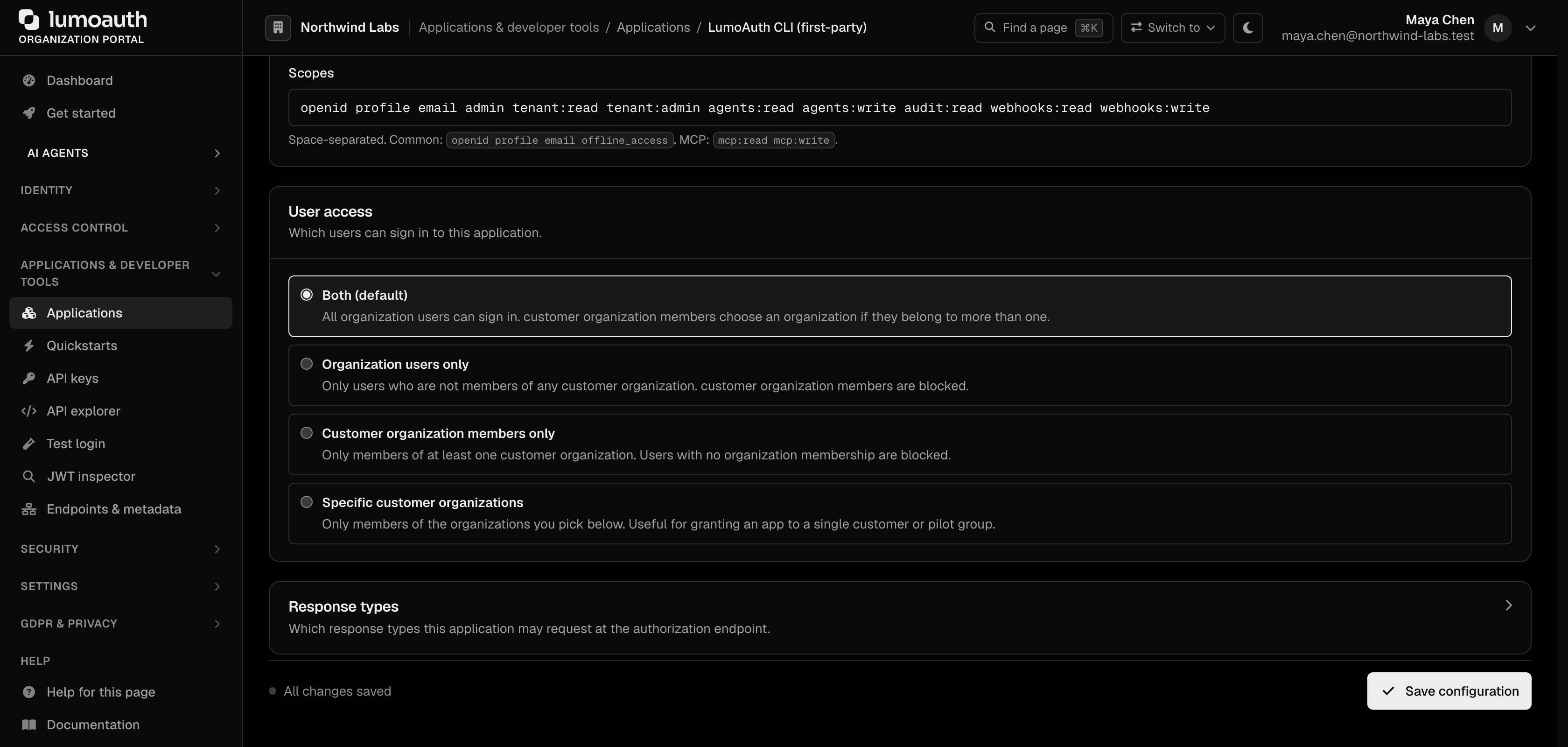
The token carries exactly the scopes you request. admin is what every lumo resource command needs; resource scopes such as admin:users:read give a least-privilege session. The granted list is stored with the credentials and shown by lumo whoami. If the organization's CLI client does not allow a requested scope, login fails with invalid_scope and tells you what to do. Details: Authentication.
How auth resolves at runtime
When you run lumo <anything-else> after a successful login, the CLI uses:
- the login token of the active profile, when it targets the same organization as the command (refreshed silently when expired);
- otherwise the API key from
--api-key,LUMO_API_KEYor the config file.
Stored credentials also pre-fill the organization and base URL, so you don't have to repeat --org acme-corp on every command.
The lumoauth-cli first-party client
The first time lumo login runs against an organization, the server lazy-creates a public OAuth client identified by lumoauth-cli (suffixed internally to lumoauth-cli:<slug> for storage uniqueness). Properties:
- Public client (no secret),
device_code + refresh_tokengrants only. - Allowed scopes:
openid profile email adminplus a few legacy per-resource read/write scopes. - PKCE (a one-time secret that protects the sign-in code) is not required — the device flow already binds approval to the verified user code.
Administrators can narrow the client's allowed scopes in the portal, under Applications → Provided by LumoAuth tab → LumoAuth CLI (first-party) → Configuration → Allowed scopes, to force least-privilege CLI sessions.
Headless / SSH environments
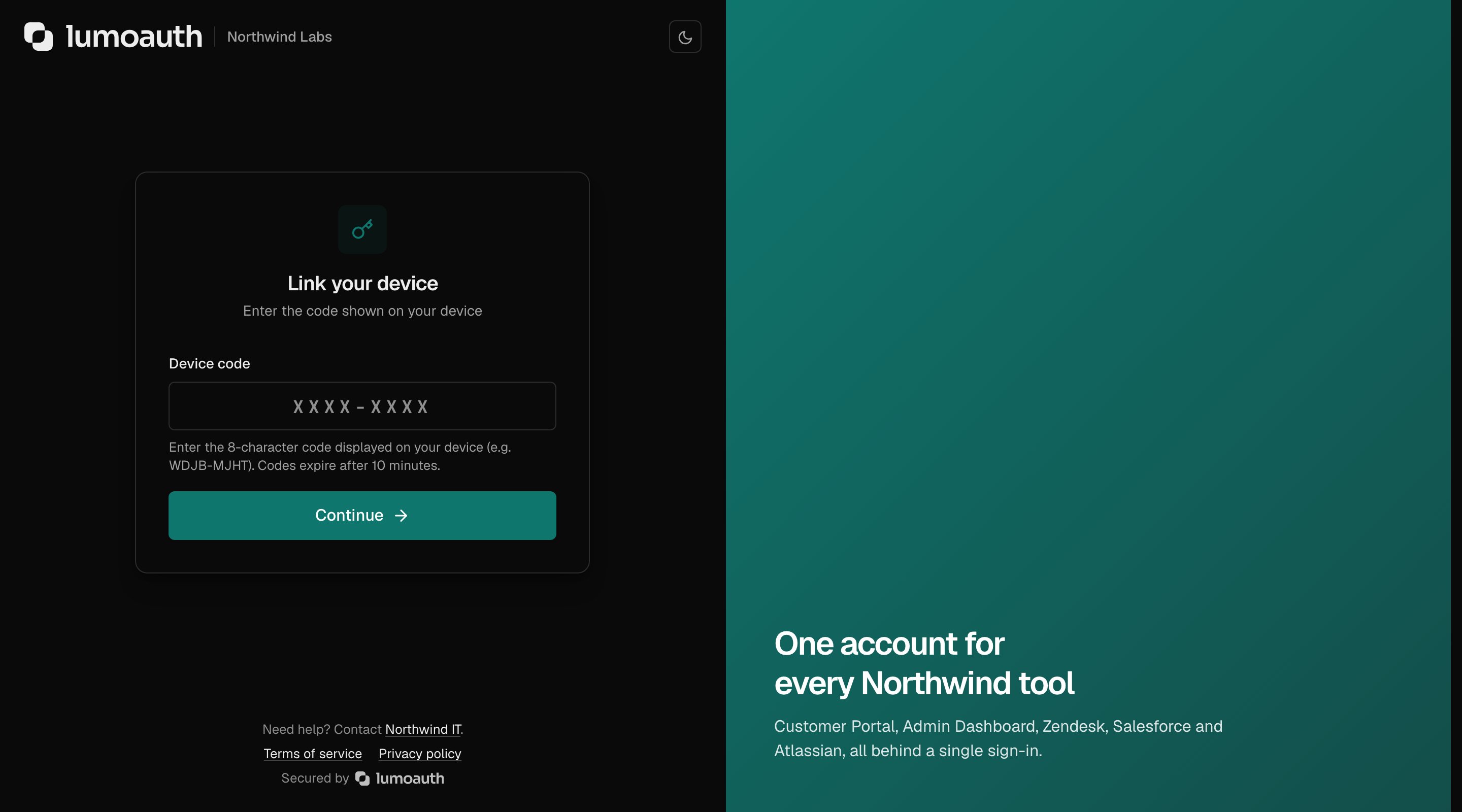
Pass --no-browser and the CLI prints the verification URL to stderr. Open it in any browser (on your laptop, even if you're SSH'd into a server), sign in if asked, and approve. If you open the URL without the user_code parameter, the Link your device page asks for the code first.
ssh prod-jumpbox
lumo login --org acme-corp --no-browser
# Verification URL: https://app.lumoauth.dev/orgs/acme-corp/api/v1/oauth/device?user_code=ABCD-EFGH
# User code:        ABCD-EFGH
# Waiting for approval...
CI / scripting
For non-interactive use, prefer an organization-scoped API key:
# .github/workflows/deploy.yml
- run: lumo agents create --name "Deploy bot" -o json
  env:
    LUMO_API_KEY: ${{ secrets.LUMO_ADMIN_KEY }}
    LUMO_ORG: acme-corp
The CLI will not prompt for anything, will not try to open a browser, and will fail with exit code 2 if neither path is available.
Troubleshooting
| Symptom | Fix |
|---|---|
device code expired before user approved | Re-run lumo login — codes are valid for 10 minutes. |
login failed: access_denied | You clicked Deny on the Authorize Device page, or the consent was rejected. |
stored credentials have expired | The refresh token (30 days) expired or was revoked; run lumo login again. |
403 with required_scopes right after login | The token was narrowed with --scope, or the organization narrowed the CLI client. Follow the printed hint: lumo login --scope …. |
invalid_scope | The requested scope is not allowed on the lumoauth-cli client. Narrow --scope, or ask an admin to allow it. |
| Browser doesn't open | Pass --no-browser and visit the URL by hand. |
tls: failed to verify certificate on later commands | Your profile predates the remembered TLS setting. Run lumo login --insecure once against the dev server. |
Standards used on this page
| Plain name | Standard |
|---|---|
| Device authorization (sign in on another device) | RFC 8628 |
See the standards reference for what each one covers and how LumoAuth uses it.