Rate Limiting
LumoAuth applies rate limiting to protect endpoints from abuse, brute force attacks, and excessive load. Limits are enforced per organization, per IP, and per client or user depending on the endpoint. When a limit is hit, the server returns HTTP 429 Too Many Requests with a Retry-After header.
Rate Limit Tiers
These limits apply to the hosted service. They are set per deployment; there is no portal UI for changing them.
| Endpoint Category | Default Limit | Window |
|---|---|---|
Login (portal form, /orgs/{orgId}/login) | 5 attempts per IP and per email | Per 15 minutes |
| Magic link requests | 5 per email, 20 per IP | Per 10 minutes |
| Push-auth sign-in | 5 per email, 20 per IP (and 5 initiations per IP) | Per 10 minutes |
Hosted OAuth login (/orgs/{orgId}/api/v1/oauth/login/submit and /login/json) | Shares the Login budget: 5 attempts per IP and per email | Per 15 minutes |
| MFA Challenge (multi-factor authentication) (hosted challenge page and the MFA challenge API, one budget per user) | 10 requests | Per 15 minutes; the API answers 429 rate_limited with Retry-After |
| Token (OAuth) | 100 requests | Per minute |
| Authorize (OAuth) | 60 requests | Per minute |
| Registration | 5 requests | Per hour |
| Password Reset | 3 requests per IP + email, and 5 per email address regardless of IP | Per hour; a throttled request gets the same neutral "if an account exists" response |
| Current-password re-entry (change password or e-mail, delete account, forced password change) | 5 attempts per user | Per 15 minutes; wrong passwords also count toward account lockout |
| API (general) | 1000 requests | Per minute |
Per credential (Admin API, /api/v1/authz/**, Zanzibar expand, ABAC (attribute-based access control) check-bulk, /me/**), keyed by API key, token user + client, or session user | 600 requests | Per minute; 429 rate_limited + Retry-After. See Per-credential limit |
| SCIM API (automatic user provisioning) | 500 requests | Per minute |
| Email verification (send) | 3 requests | Per 10 minutes |
| Email verification (verify) | 5 requests | Per 10 minutes |
Resend verification e-mail (/verify-email/resend) | 3 per address and 20 per IP | Per hour (fixed) |
| Webhook delivery | 100 requests | Per minute (outbound) |
Account lockout. Every login surface, including the hosted OAuth login endpoints used by
the hosted login page and the JSON login, feeds the same lockout accounting: after 5 failed
attempts the account is locked for 15 minutes and further attempts are refused until the lock
expires. The form logins (/login, /orgs/{orgId}/login) also spend one unit
of the per-email budget atomically before the password is checked, so parallel guesses cannot
race past the lockout count; when it is spent the page answers 429 with the locked-account
notice. The per-IP ceiling for form logins is the temporary IP block (10 failures in 30
minutes), so a shared NAT address is not locked out by a few typos. The form endpoint answers a locked or throttled attempt with the same generic
"Invalid credentials" message as a wrong password; the JSON endpoint answers
429 {"status":"rate_limited"}. Both are recorded in the audit log.
There are additional, more specific limiters (magic links, push-auth, agent approvals, SCIM bulk/basic-auth, email enumeration probes).
Rate Limit Exceeded
When a rate limit is exceeded, the API returns 429 with a Retry-After header (seconds until you may retry) and a JSON error body:
HTTP/1.1 429 Too Many Requests
Retry-After: 30

{
  "error": "rate_limit_exceeded",
  "error_description": "Rate limit exceeded. Please try again later."
}
Retry-After is the header to read for backoff. LumoAuth does not emit X-RateLimit-Limit / -Remaining / -Reset headers, and the 429 body does not include a retry_after field.
Handling Rate Limits
async function apiCallWithRetry(url, options, maxRetries = 3) {
  for (let attempt = 0; attempt < maxRetries; attempt++) {
    const response = await fetch(url, options);

    if (response.status === 429) {
      const retryAfter = parseInt(response.headers.get('Retry-After') || '5');
      await new Promise(r => setTimeout(r, retryAfter * 1000));
      continue;
    }

    return response;
  }
  throw new Error('Rate limit exceeded after max retries');
}
IP-Based Protection
In addition to rate limits, LumoAuth tracks IP behavior:
| Protection | Description |
|---|---|
| Temporary IP blocks | IPs with excessive failures are temporarily blocked |
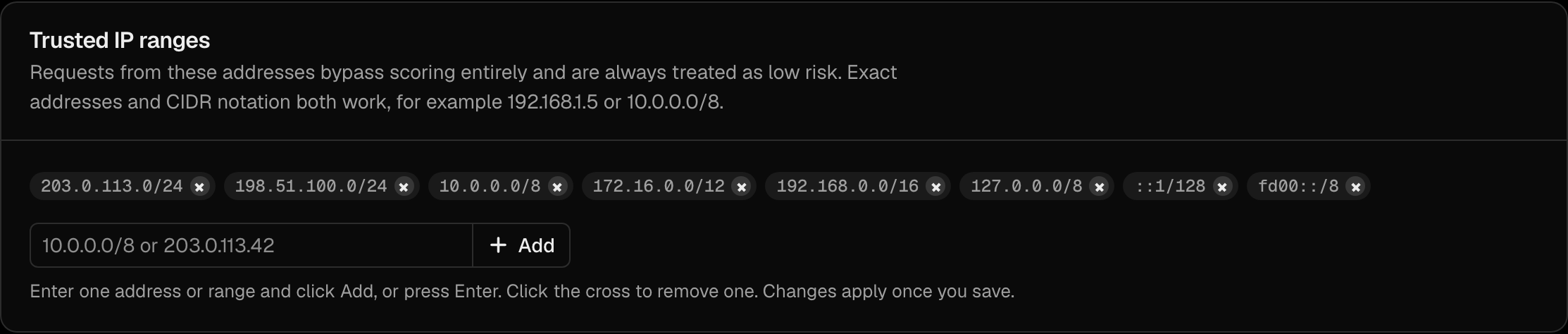
| Trusted IP ranges | Exempt specific IP ranges from adaptive risk scoring and network blocks (rate limits still apply) |
Configure trusted IPs in the Trusted IP ranges section of the Adaptive security page (/orgs/{orgId}/portal/settings/adaptive-auth): enter an address or a CIDR range, click Add, then Save changes.
Related Guides
- Security Overview - Full security features
- Adaptive MFA - Risk-based authentication
- Security Best Practices - Deployment recommendations