Multi-customer SaaS Track
Use this track when you are building a SaaS where each customer is its own organization with its own users, SSO, and roles. By the end you will have:
- An Organization model in your app, mapped to LumoAuth orgs
- Org-aware sign-in so users land in the right organization
- SAML or OIDC SSO (single sign-on through the customer's own identity provider) wired to your customer's IdP (one-click connection from a metadata URL)
- SCIM 2.0 directory sync (the standard provisioning protocol) so the customer's IT system provisions/deprovisions users automatically
- Org-scoped roles + permissions that gate what each member can do
- A branded login page per customer (logo, colors, allowed sign-in methods)
LumoAuth ships all of these primitives together: SAML SSO, SCIM, RBAC, per-customer branding and custom domains. Plan availability is listed in the pricing matrix.
1. Model your tenancy
Read Multi-Organization Overview. Decide:
- One LumoAuth org per customer (recommended for a true multi-customer SaaS — clean isolation, separate audit logs, separate signing keys, separate domain customization).
- One LumoAuth org with multiple Organizations inside it (use this if your "customers" are sub-organizations under your platform, e.g. agencies with sub-clients).
Most multi-customer SaaS goes with the first model. The rest of this track assumes that.
2. Provision the customer's organization
When a customer signs up:
curl -X POST "$LUMO_BASE_URL/orgs/$YOUR_PLATFORM_ORG/api/v1/admin/organizations" \
  -H "Authorization: Bearer $LUMO_ADMIN_TOKEN" \
  -H "Content-Type: application/json" \
  -d '{
    "name": "Acme Corp",
    "slug": "acme-corp"
  }'
The create endpoint accepts name (required) plus slug, displayName, description, logoUrl, metadata, and isActive. The response is { "data": { ... }, "message": "Organization created" }; the data.id (and data.slug) identify the new org — store one on your customer record. Every subsequent user / role / SSO config call uses this org id.
3. Wire customer SSO in one click (SAML)
SAML IdP connections are created from the organization Admin Portal, not a REST call. Embed the portal in your customer-facing admin UI (an iframe or one-click handover URL) so the customer can paste their own IdP metadata and you don't have to write the connector config yourself.
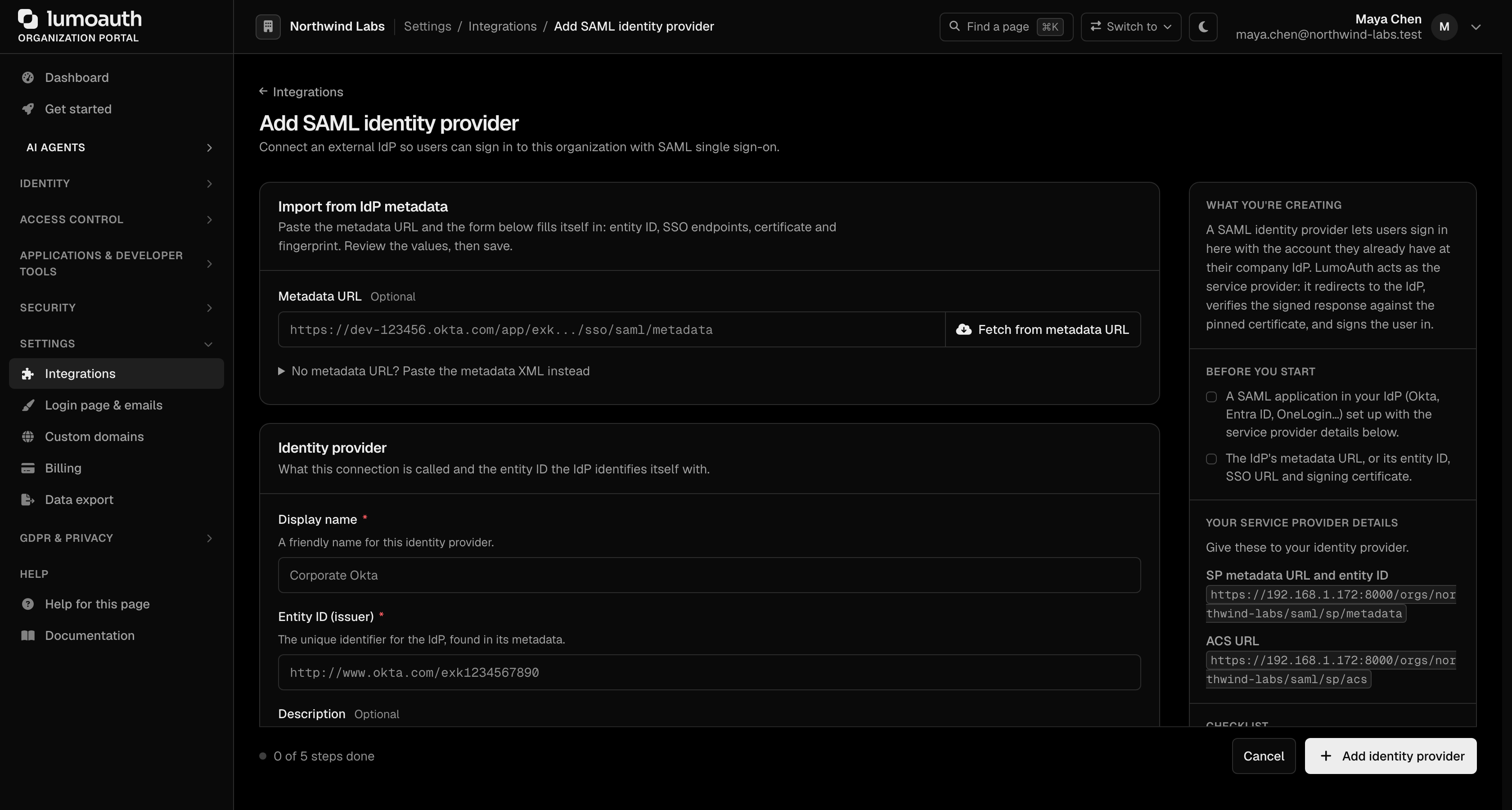
Send the customer to the Add SAML identity provider page:
https://app.lumoauth.dev/orgs/{their-org-slug}/portal/saml-idps/new
They paste their IdP metadata URL and click Fetch from metadata URL (or paste the metadata XML); LumoAuth fetches and parses the Entity ID, SSO URL, and signing certificate, then they click Add identity provider to create the connection. The connection list lives at /orgs/{their-org-slug}/portal/saml-idps.
OIDC IdP setup follows the same portal-driven pattern: see Enterprise SSO.
4. Direct users to the right org at sign-in
When a user lands on your sign-in page, you have two options:
Option A — Org-scoped sign-in URLs. Each customer's app uses a URL that includes their org slug:
// In your Next.js app for Acme:
<LumoAuthProvider
  domain={process.env.NEXT_PUBLIC_LUMOAUTH_DOMAIN}
  orgId="acme-corp"
  clientId={process.env.NEXT_PUBLIC_LUMOAUTH_CLIENT_ID}
>
Option B — Email-first sign-in. Once you know which org a user belongs to (from your own customer-to-org mapping, or by routing on the email domain in your app), call the org-scoped check-email endpoint to learn which sign-in methods are enabled for that user, then render the right next step:
const r = await fetch(`${domain}/orgs/${orgSlug}/check-email`, {
  method: 'POST',
  headers: { 'Content-Type': 'application/json' },
  body: JSON.stringify({ email }),
}).then(r => r.json());

// r => { exists, has_passkey, has_push_device,
//        magic_link_enabled, passkey_enabled, password_enabled, masked_email }
if (r.passkey_enabled && r.has_passkey) {
  // prompt for passkey
} else if (r.magic_link_enabled) {
  // send a magic link
} else {
  // fall back to password
}
The endpoint is POST /orgs/{orgSlug}/check-email (or the global POST /check-email); it returns the enabled auth methods, not an SSO redirect. To send a user straight into a SAML IdP, link them to that org's hosted login page or the SP-initiated SSO URL /orgs/{orgSlug}/saml/sp/login/{idpId}.
5. SCIM 2.0 — auto-provision users from the customer's IdP
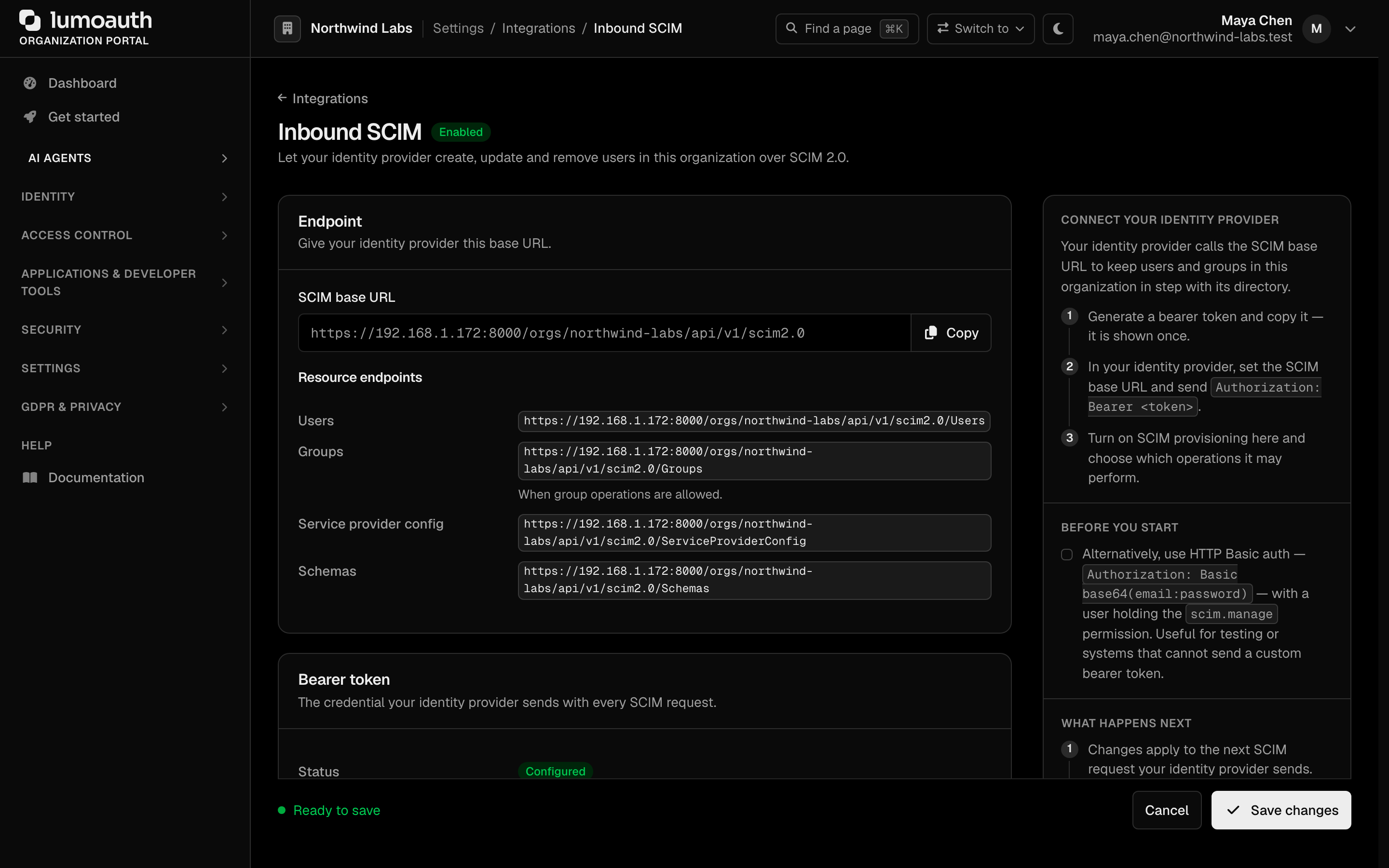
Generate a SCIM bearer token from the organization portal: Settings → Integrations → SCIM provisioning, then the Inbound SCIM page, using the Generate bearer token action:
https://app.lumoauth.dev/orgs/{their-org-slug}/portal/integrations/scim
(The portal posts to /orgs/{their-org-slug}/portal/integrations/scim/generate-token; Regenerate token posts to .../scim/regenerate-token to rotate it.) Turn on Enable SCIM provisioning on the same page and click Save changes. Then give the customer:
- SCIM 2.0 base URL:
https://app.lumoauth.dev/orgs/{their-org-slug}/api/v1/scim2.0 - Bearer token: the token shown after generating
Their IdP (Okta, Azure AD, Google Workspace, JumpCloud) syncs users + groups to LumoAuth automatically. Full SCIM reference →
6. Roles + permissions per org
Each org has its own role set. Seed canonical roles:
for role in admin member viewer; do
  curl -X POST "$LUMO_BASE_URL/orgs/$LUMO_ORG/api/v1/admin/roles" \
    -H "Authorization: Bearer $LUMO_ADMIN_TOKEN" \
    -H "Content-Type: application/json" \
    -d "{\"name\": \"$role\", \"slug\": \"$role\"}"
done
In your app, gate features with the React permission hooks. For a simple role/permission slug, use usePermission:
import { usePermission } from "@lumoauth/react";

const { allowed, isLoading } = usePermission("billing.manage");
if (isLoading) return null;
if (!allowed) return <Forbidden />;
For relationship-based checks (resource-level sharing, group inheritance), use useZanzibar, which takes a { object, relation, subject } tuple:
import { useZanzibar } from "@lumoauth/react";

const { allowed } = useZanzibar({
  object: `billing:${orgId}`,
  relation: "manage",
  subject: `user:${user.id}`,
});
if (!allowed) return <Forbidden />;
See Zanzibar tuples for the relationship model. For attribute-based rules ("only managers in EU can see EU customers"), use useAbac and ABAC policies.
7. Brand the login per customer
Each org's hosted login page can be re-skinned (logo, primary color, button text, allowed sign-in methods, optional self-registration). Drop the customer's logo URL + brand color into your provisioning flow:
curl -X PATCH "$LUMO_BASE_URL/orgs/$LUMO_ORG/api/v1/admin/settings/branding" \
  -H "Authorization: Bearer $LUMO_ADMIN_TOKEN" \
  -H "Content-Type: application/json" \
  -d '{"logo_url": "https://acme.com/logo.png", "primary_color": "#FF6B35"}'
Per-OAuth-client overrides also work: a customer's mobile app can have different branding than their web app within the same org.
8. Webhooks for org lifecycle
Subscribe to the events your app needs (canonical names from the event catalogue):
organization.created,organization.updated,organization.deletedorganization.member.added,organization.member.removed,organization.member.updateduser.created,user.deleted— fire for SCIM-driven provisioning and deprovisioning toogroup.member_added,group.member_removed