Attribute-Based Access Control (ABAC)
ABAC evaluates attributes of the subject (user), resource, action, and environment (time, IP, day of week) against declarative policies. Use it when access decisions depend on dynamic context — not just static role membership. For example: "engineering users can read internal APIs during business hours", or "documents classified secret require clearance level 3 and a completed background check".
Reach for ABAC when RBAC alone cannot express the rule because the answer depends on who is asking, what they are accessing, and the surrounding context.
ABAC (feature abac) is sold only as the Fine-grained authorization add-on — $99/month, available on the Pro and Business plans, together with Zanzibar ReBAC; see the pricing matrix. When billing is enforced (BILLING_ENFORCEMENT=enforce, the production default) and the organization doesn't have the add-on:
- Allow policies grant nothing: checks that only an ABAC allow policy would have allowed are denied (reason
feature_not_in_plan). - Deny policies you already created keep being enforced — losing the add-on can only narrow access, never widen it. Disable or delete them if you no longer want them.
- Creating or editing attributes and policies, and re-enabling a disabled policy, is refused with
403and{"error": "feature_not_in_plan", "feature": "abac", "upgrade": {"addon": "fine_grained_authz"}}(Admin API) or a redirect to the billing page (portal). Listing, reading, disabling and deleting still work. - The
/orgs/{orgId}/api/v1/abac/*check and attribute-value endpoints return403 feature_not_in_plan.
Under BILLING_ENFORCEMENT=log nothing is blocked (billing.would_deny is logged); an install with neither Stripe nor a license is not restricted.
Quick Start
Step 1: Define Attributes
Attributes are the building blocks of policies. Declare the attributes your policies will reference — for example a department on users.
curl -X POST "https://api.example.com/orgs/{orgId}/api/v1/abac/attributes" \
  -H "Authorization: Bearer {token}" \
  -H "Content-Type: application/json" \
  -d '{
    "name": "Department",
    "attributeType": "user",
    "dataType": "string",
    "description": "The department the user belongs to",
    "validationRules": {
      "enum": ["engineering", "sales", "marketing", "finance", "hr"]
    }
  }'
Step 2: Create a Policy
A policy has a target (resourceType + action), an effect (allow or deny), a priority, and a tree of conditions that evaluate attributes.
curl -X POST "https://api.example.com/orgs/{orgId}/api/v1/abac/policies" \
  -H "Authorization: Bearer {token}" \
  -H "Content-Type: application/json" \
  -d '{
    "name": "Engineering API Access",
    "resourceType": "api",
    "action": "read",
    "effect": "allow",
    "priority": 100,
    "conditions": {
      "operator": "AND",
      "conditions": [
        {
          "subject": "user.department",
          "operator": "equals",
          "value": "engineering"
        }
      ]
    }
  }'
Step 3: Check Access
Call the check endpoint to evaluate all policies for the authenticated user against a resource and action.
curl -X POST "https://api.example.com/orgs/{orgId}/api/v1/abac/check" \
  -H "Authorization: Bearer {token}" \
  -H "Content-Type: application/json" \
  -d '{
    "resourceType": "api",
    "resourceId": "internal-api-v1",
    "action": "read"
  }'
{
  "allowed": true,
  "reason": "Policy matched: Engineering API Access",
  "matchedPolicies": [
    {
      "id": "550e8400-e29b-41d4-a716-446655440010",
      "name": "Engineering API Access",
      "effect": "allow",
      "priority": 100
    }
  ],
  "user_id": "019d6190-9bba-7b5f-a0a5-07a6d10184d2",
  "resourceType": "api",
  "action": "read",
  "resourceId": "internal-api-v1"
}
The check evaluates against the stored attributes of the resource (set via
Set Resource Attribute) and the user. You cannot
pass resource attributes inline on the check call. Only environment attributes
may be supplied per-request (see Check Access).
Core Concepts
Attributes
Attributes come in three kinds:
| Type | Description | Examples |
|---|---|---|
user | Properties of the caller | department, clearance_level, location |
resource | Properties of the target | classification, owner_department, sensitivity |
environment | Properties of the request context | hour, dayOfWeek, ip |
Built-in User Attributes
These are always available without defining them:
user.id              # User's unique identifier
user.email           # User's email address
user.roles           # Array of role slugs ["admin", "developer"]
user.groups          # Array of group slugs
user.permissions     # Array of permission slugs
user.emailVerified   # Boolean - is email verified?
user.mfaEnabled      # Boolean - is MFA enabled?
user.{trait}         # Any custom user trait
Built-in Environment Attributes
environment.hour        # Current hour (0-23)
environment.dayOfWeek   # Day of week (1=Monday, 7=Sunday)
environment.isWeekend   # Boolean for Saturday/Sunday
environment.ip          # Client IP address
Policies
A policy is a rule that either allows or denies a given action on a given resource type when its conditions hold.
| Field | Description | Example |
|---|---|---|
name | Human-readable name | "Engineering API Access" |
resourceType | Type of resource (use * for all) | "document", "api", "*" |
action | Action being performed (use * for all) | "read", "write", "*" |
effect | Allow or deny access | "allow" or "deny" |
priority | Higher priority evaluated first (0-1000) | 100 |
conditions | Tree of attribute comparisons | See below |
Condition Operators
| Operator | Description | Example |
|---|---|---|
equals | Exact match | user.department equals "engineering" |
not_equals | Not equal | resource.status not_equals "archived" |
in | Value in array | user.role in ["admin", "manager"] |
not_in | Value not in array | user.country not_in ["restricted"] |
contains | Array contains value | user.roles contains "admin" |
not_contains | Array doesn't contain | user.roles not_contains "guest" |
gt / lt | Greater/less than | user.level gt 2 |
gte / lte | Greater/less or equal | environment.hour gte 9 |
matches | Regex match | user.email matches "@company\\.com$" |
exists | Attribute exists | user.department exists |
not_exists | Attribute doesn't exist | resource.restricted not_exists |
Combining Conditions
Use AND or OR to combine conditions. Trees can be nested arbitrarily.
{
  "operator": "AND",
  "conditions": [
    {"subject": "user.department", "operator": "equals", "value": "engineering"},
    {"subject": "user.level", "operator": "gte", "value": 2}
  ]
}
{
  "operator": "OR",
  "conditions": [
    {"subject": "user.roles", "operator": "contains", "value": "admin"},
    {"subject": "user.roles", "operator": "contains", "value": "super-admin"}
  ]
}
{
  "operator": "OR",
  "conditions": [
    {"subject": "user.roles", "operator": "contains", "value": "admin"},
    {
      "operator": "AND",
      "conditions": [
        {"subject": "user.department", "operator": "equals", "value": "engineering"},
        {"subject": "user.level", "operator": "gte", "value": 3}
      ]
    }
  ]
}
Policy Examples
Department-Based Access
Allow engineering department users to read internal or public APIs.
{
  "name": "Engineering API Access",
  "resourceType": "api",
  "action": "read",
  "effect": "allow",
  "priority": 100,
  "conditions": {
    "operator": "AND",
    "conditions": [
      {
        "subject": "user.department",
        "operator": "equals",
        "value": "engineering"
      },
      {
        "subject": "resource.classification",
        "operator": "in",
        "value": ["internal", "public"]
      }
    ]
  }
}
Clearance-Based Access
Users with clearance level 3 or higher, a passed background check, may read classified documents.
{
  "name": "Classified Document Access",
  "resourceType": "document",
  "action": "read",
  "effect": "allow",
  "priority": 100,
  "conditions": {
    "operator": "AND",
    "conditions": [
      {
        "subject": "user.clearance_level",
        "operator": "gte",
        "value": 3
      },
      {
        "subject": "resource.classification",
        "operator": "equals",
        "value": "classified"
      },
      {
        "subject": "user.background_check",
        "operator": "equals",
        "value": true
      }
    ]
  }
}
Business Hours Restriction
Deny access to sensitive data outside 9 AM – 5 PM on weekdays.
{
  "name": "Business Hours Only",
  "resourceType": "sensitive-data",
  "action": "*",
  "effect": "deny",
  "priority": 200,
  "conditions": {
    "operator": "OR",
    "conditions": [
      {
        "subject": "environment.hour",
        "operator": "lt",
        "value": 9
      },
      {
        "subject": "environment.hour",
        "operator": "gt",
        "value": 17
      },
      {
        "subject": "environment.isWeekend",
        "operator": "equals",
        "value": true
      }
    ]
  }
}
Under the deny-overrides combining algorithm, any matching deny wins
regardless of matching allows. Use higher priority values on deny
policies you want evaluated first.
Contractor Access Restrictions
Deny contractors any access outside business hours.
{
  "name": "No After-Hours Contractors",
  "resourceType": "*",
  "action": "*",
  "effect": "deny",
  "priority": 200,
  "conditions": {
    "operator": "AND",
    "conditions": [
      {
        "subject": "user.employment_type",
        "operator": "equals",
        "value": "contractor"
      },
      {
        "operator": "OR",
        "conditions": [
          {"subject": "environment.hour", "operator": "lt", "value": 9},
          {"subject": "environment.hour", "operator": "gt", "value": 17},
          {"subject": "environment.isWeekend", "operator": "equals", "value": true}
        ]
      }
    ]
  }
}
Admin Override
Allow admins access to everything, at the highest priority.
{
  "name": "Admin Full Access",
  "resourceType": "*",
  "action": "*",
  "effect": "allow",
  "priority": 1000,
  "conditions": {
    "operator": "OR",
    "conditions": [
      {"subject": "user.roles", "operator": "contains", "value": "admin"},
      {"subject": "user.roles", "operator": "contains", "value": "super-admin"}
    ]
  }
}
API Reference
Credentials and permissions. With an access token, every endpoint below needs an explicit
scope: abac:read for checks, bulk checks and reading attributes, abac:write for setting
user or resource attributes (a token with only openid profile gets 403). Setting
attributes also requires the abac.manage permission. Managing attribute definitions and
policies (/abac/attributes, /abac/policies) is the Admin API: it takes
admin:abac:read / admin:abac:write and the abac.view / abac.manage permissions; see
Required permissions. Bulk checks
count against the per-credential rate limit.
Check Access
POST /orgs/{orgId}/api/v1/abac/check
Evaluate ABAC policies for the current user against a resource and action.
curl -X POST "https://api.example.com/orgs/{orgId}/api/v1/abac/check" \
  -H "Authorization: Bearer {token}" \
  -H "Content-Type: application/json" \
  -d '{
    "resourceType": "document",
    "resourceId": "doc-123",
    "action": "read",
    "environment": {
      "department": "engineering"
    }
  }'
| Field | Type | Required | Description |
|---|---|---|---|
resourceType | string | Yes | Type of resource being accessed |
resourceId | string | No | Specific resource ID (optional for type-level checks) |
action | string | Yes | Action being performed (read, write, delete, etc.) |
environment | object | No | Environment attributes for this request. The server always adds ip, userAgent, and requestMethod. Resource and user attributes are read from stored values, not from this field. |
The response is { allowed, reason, matchedPolicies, user_id, resourceType, action, resourceId }. There is no separate evaluationContext block.
Bulk Check
POST /orgs/{orgId}/api/v1/abac/check-bulk
Check up to 100 resource/action pairs in one request. The array field is named checks.
curl -X POST "https://api.example.com/orgs/{orgId}/api/v1/abac/check-bulk" \
  -H "Authorization: Bearer {token}" \
  -H "Content-Type: application/json" \
  -d '{
    "checks": [
      {"resourceType": "document", "resourceId": "doc-1", "action": "read"},
      {"resourceType": "document", "resourceId": "doc-2", "action": "write"},
      {"resourceType": "api", "action": "execute"}
    ],
    "environment": {}
  }'
{
  "results": [
    {"index": 0, "resourceType": "document", "action": "read", "resourceId": "doc-1", "allowed": true, "reason": "Policy matched: ..."},
    {"index": 1, "resourceType": "document", "action": "write", "resourceId": "doc-2", "allowed": false, "reason": "No applicable ABAC policies found"},
    {"index": 2, "resourceType": "api", "action": "execute", "resourceId": null, "allowed": false, "reason": "No applicable ABAC policies found"}
  ],
  "user_id": "019d6190-9bba-7b5f-a0a5-07a6d10184d2"
}
Set Resource Attribute
PUT /orgs/{orgId}/api/v1/abac/resources/{resourceType}/{resourceId}/attributes/{attributeSlug}
Set one ABAC attribute value on a specific resource. Policies reference these at evaluation time. Requires the abac.manage permission. Call it once per attribute:
curl -X PUT "https://api.example.com/orgs/{orgId}/api/v1/abac/resources/document/doc-123/attributes/classification" \
  -H "Authorization: Bearer {token}" \
  -H "Content-Type: application/json" \
  -d '{"value": "confidential"}'
Get Resource Attributes
GET /orgs/{orgId}/api/v1/abac/resources/{resourceType}/{resourceId}/attributes
Return the stored ABAC attributes of a resource.
Get Current User Attributes
GET /orgs/{orgId}/api/v1/abac/my-attributes
Return all ABAC attributes for the currently authenticated user.
{
  "id": "user-123",
  "email": "developer@company.com",
  "roles": ["developer", "team-lead"],
  "groups": ["engineering-team"],
  "permissions": ["code.read", "code.write"],
  "emailVerified": true,
  "mfaEnabled": true,
  "department": "engineering",
  "clearance_level": 3,
  "location": "us-west"
}
Set User Attribute
PUT /orgs/{orgId}/api/v1/abac/users/{userId}/attributes/{attributeSlug}
Set one attribute value on a user. Requires the abac.manage permission.
curl -X PUT "https://api.example.com/orgs/{orgId}/api/v1/abac/users/{userId}/attributes/department" \
  -H "Authorization: Bearer {token}" \
  -H "Content-Type: application/json" \
  -d '{"value": "engineering"}'
Policy Evaluation
Combining Algorithm
LumoAuth evaluates ABAC using deny-overrides:
- Collect all policies matching the requested
resourceTypeandaction. - Evaluate the conditions of each matching policy.
- If any matching policy has
effect: deny→ access denied. - Otherwise, if at least one matching policy has
effect: allow→ access allowed. - If no policies match → access denied (default-deny).
If no policy explicitly grants access, the request is denied. Always create explicit allow policies for intended access paths.
Priority
Policies with higher priority are evaluated first. Priority does not change the deny-overrides outcome, but it controls ordering where it matters (for example, logging and short-circuiting).
| Priority Range | Recommended Use |
|---|---|
| 900-1000 | Admin overrides, emergency access |
| 200-300 | Deny policies, restrictions |
| 100 | Standard allow policies |
| 0-50 | Default/fallback policies |
Organization Portal
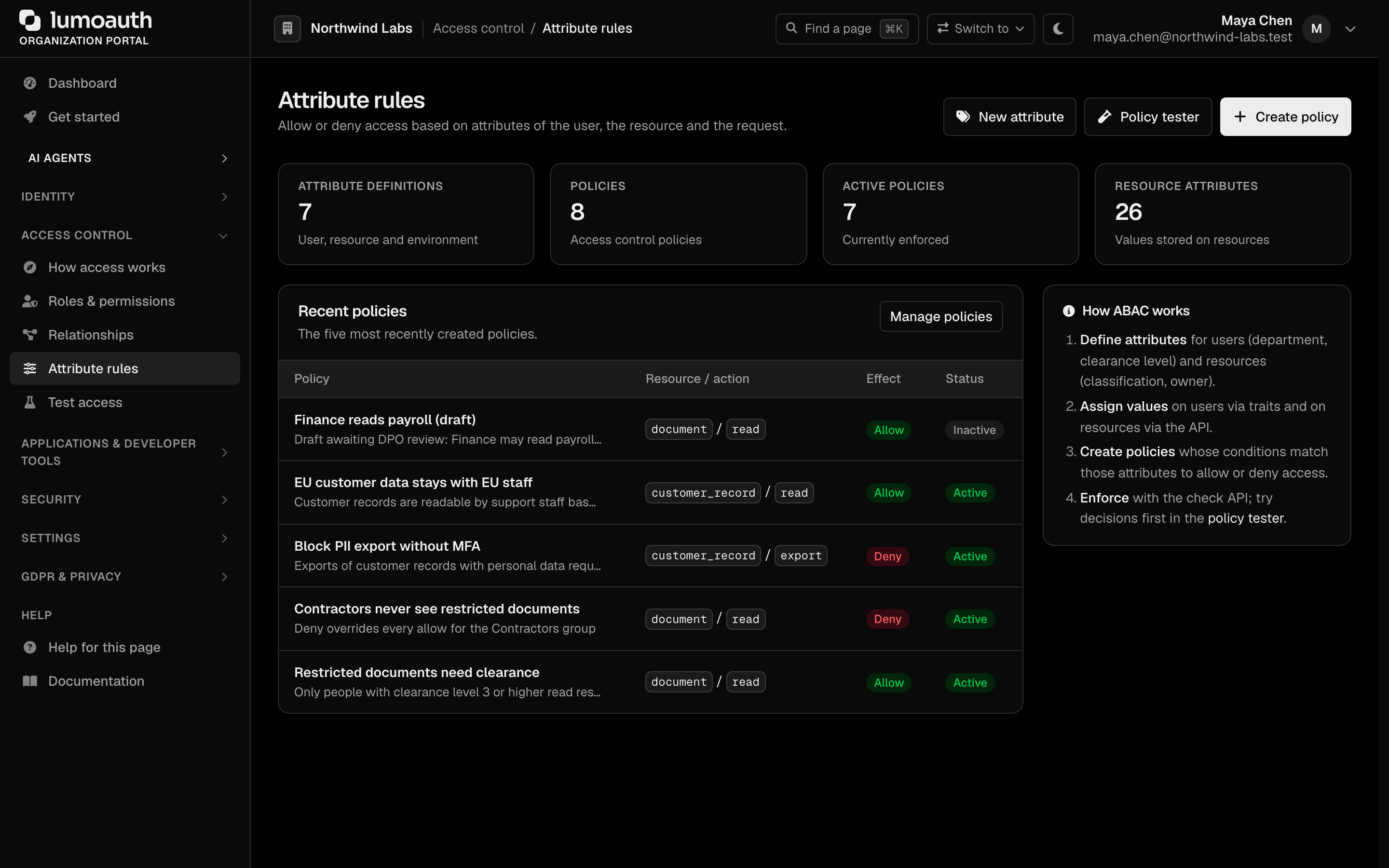
Administrators manage ABAC under Access control → Attribute rules:
- Dashboard — overview of policies and attributes, with the New attribute, Policy tester and Create policy buttons.
- Attribute definitions — define custom user, resource and environment attributes.
- Access policies — create and edit policies with a visual condition builder.
- Policy tester (also Test access → Attribute rules) — pick a user, describe the request, override attributes to ask "what if", and see which rules matched.
Test positive and negative cases in the Policy Tester before enabling a new policy in production.
Best Practices
- Use higher priorities for deny policies and admin overrides; keep standard allows at priority 100.
- Test positive and negative cases in the Policy Tester before deploying.
- Prefer specific
resourceTypevalues over*. Wildcards are convenient but broaden the policy's reach.
Related
- Attributes — manage attribute definitions.
- Policies — ABAC policy CRUD reference.
- Permission Checks — RBAC check endpoints.