Client ID Metadata Documents (CIMD)
Client ID Metadata Documents let an OAuth client identify itself with an HTTPS URL instead of a pre-registered client_id. The URL points at a JSON metadata document the client publishes about itself; LumoAuth fetches and validates the document at authorization time. The MCP (Model Context Protocol, the protocol AI applications use to call external tools) authorization specification (2025-11-25) adopts CIMD as the preferred client registration mechanism: MCP clients such as Claude no longer need dynamic client registration (registering themselves through the API) or manual setup before starting an OAuth flow.
LumoAuth implements draft-ietf-oauth-client-id-metadata-document-02 on the authorization-server side; the client.dev server guide is a good high-level companion.
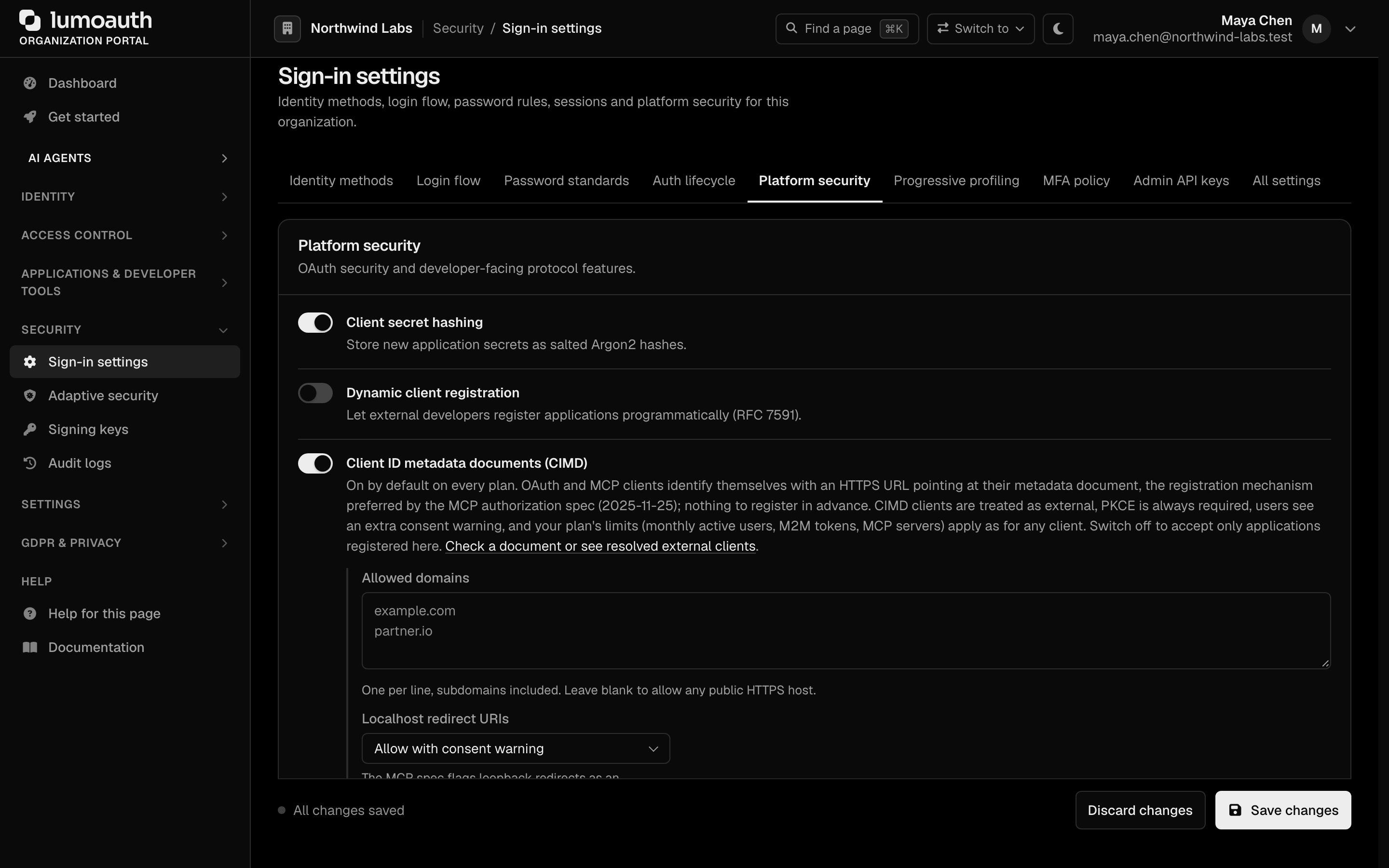
CIMD is enabled by default for every organization and included in every plan (Developer, Pro, Business), with no extra charge. Discovery advertises client_id_metadata_document_supported: true. Organization admins can switch it off under Security → Sign-in settings → Platform security → Client ID metadata documents (CIMD). Your plan's usage limits (monthly active users, machine-to-machine tokens, MCP servers) apply exactly as for registered clients; see Plans and limits.
For client developers: the 2-minute version
- Publish a JSON file at a stable
https://URL with a path, for examplehttps://client.example.com/oauth/metadata.json. Itsclient_idmember must be that exact URL. The sample has a complete file and a runnable client. - Serve it with
Content-Type: application/json(orapplication/…+json), status200, no redirects. AddCache-Control: max-age=…to control how long LumoAuth caches it (60 s to 1 hour). - Use that URL as
client_idin the authorization request, with PKCE (S256). That is all: no registration call, no secret. - Something wrong? The authorization error page and the token endpoint's
invalid_clienttell you the exact reason (client_id_mismatch,invalid_redirect_uri, …), and an organization admin can run the document through Applications → External clients (CIMD) → Check a metadata document or the check endpoint. Fixed documents are picked up on the very next request; failures are never cached.
Example metadata document
{
  "client_id": "https://client.example.com/oauth/metadata.json",
  "client_name": "Example MCP Client",
  "client_uri": "https://client.example.com",
  "logo_uri": "https://client.example.com/logo.png",
  "redirect_uris": ["https://client.example.com/callback", "http://127.0.0.1/callback"],
  "grant_types": ["authorization_code", "refresh_token"],
  "token_endpoint_auth_method": "none",
  "scope": "openid profile email mcp:read"
}
Authorization request
GET https://app.lumoauth.dev/orgs/acme-corp/api/v1/oauth/authorize
    ?response_type=code
    &client_id=https%3A%2F%2Fclient.example.com%2Foauth%2Fmetadata.json
    &redirect_uri=https%3A%2F%2Fclient.example.com%2Fcallback
    &scope=openid%20profile%20mcp%3Aread
    &code_challenge=<S256 challenge>&code_challenge_method=S256
    &state=<random>
How it works
- A client starts an authorization request with
client_id=https://client.example.com/oauth/metadata.json(any https URL with a path). - LumoAuth checks the organization's trust policy (switch, plan, domain allow-list, URL shape, SSRF rules) and fetches the URL: https only, public hosts, DNS pinned for the request, no redirects, 64 KB size cap, JSON content type required.
- The document's
client_idmember MUST byte-equal the URL itself, otherwise the client is rejected (client_id_mismatch). - The client metadata (
client_name,redirect_uris,logo_uri,token_endpoint_auth_method,grant_types,scope) is applied and the flow continues as with any registered client. Each organization keeps its own copy of the client, so the same metadata-document URL works in any number of organizations, and tokens issued in one organization are unknown (active: false) to another. - A valid document is cached honoring its
Cache-Control: max-age(default 300 s, clamped between 60 s and 1 hour). Error responses and invalid documents are never cached (draft §5.2); instead each URL gets at most 10 fetch attempts per minute (fetch_rate_limitedbeyond that).
Consent screen
CIMD-resolved clients are always badged on the consent screen as an external client together with the host they identify as (draft §8.5). When the redirect target is the loopback interface, the user additionally sees a warning that they are about to be redirected to an application on their own machine.
Validation rules
| Rule | Detail |
|---|---|
client_id match | The document's client_id member must exactly equal the fetched URL. |
| URL shape | Absolute https:// URL with a path (not just /), no query, no fragment, no userinfo, no ./.. path segments, publicly resolvable host, at most 191 characters. |
| Response | Status 200, Content-Type: application/json or application/*+json, at most 64 KB, no redirects. |
redirect_uris | Required for authorization-code clients. Each URI must be https, or http strictly on the loopback interface (localhost, 127.0.0.1, [::1]) as the OAuth for native apps best practice allows. No fragments. Custom schemes (myapp://…) and javascript:, data: or other non-web schemes are rejected; a single bad URI rejects the whole document (invalid_redirect_uri). |
token_endpoint_auth_method | none (default, public client) or private_key_jwt with jwks or an https jwks_uri in the document. Shared-secret methods are impossible for a self-published client (draft §4.1). |
grant_types | authorization_code and refresh_token; client_credentials additionally allowed for private_key_jwt clients. The client receives refresh tokens only if refresh_token is listed. |
client_name | Control characters, <, >, backticks and ${ are stripped and the name is cut to 100 characters; an empty result falls back to the URL's host. |
logo_uri, client_uri | Kept only when they are well-formed https URLs; otherwise dropped. |
| PKCE | Always required (S256) for CIMD clients, regardless of auth method. |
scope | Only identity scopes are taken from the document: openid, profile, email, phone, address and mcp:read, plus the scopes your active MCP servers advertise (never LumoAuth management scopes). Anything else the document asks for (admin, admin:*, scim, offline_access, *:write, …) is dropped silently. See Allowing more scopes. |
The OAuth for native apps best practice allows a native client to receive the authorization code on a loopback http listener, because that traffic never leaves the machine. What you must do: publish http://127.0.0.1/callback or http://localhost/callback in redirect_uris (any port matches at runtime) and use PKCE. Everything else must be https.
Check a document before you use it
Two tools show a document exactly as the authorization server sees it, without registering anything and even while CIMD is switched off for the organization (the result then says enabled: false).
Portal. Applications → External clients (CIMD) lists every metadata-document client that has connected to the organization and has a Check a metadata document form: paste the URL, optionally tick Ignore the cached copy, and read the verdict, the effective client (redirect URIs, grant types, scopes after policy, loopback warnings) and the document as fetched.
Admin API. Needs clients.view and the admin:clients:read key scope.
curl -X POST https://app.lumoauth.dev/orgs/acme-corp/api/v1/admin/clients/cimd/check \
  -H "Authorization: ApiKey lmk_..." \
  -H "Content-Type: application/json" \
  -d '{ "client_id": "https://client.example.com/oauth/metadata.json", "refresh": true }'
{
  "data": {
    "ok": false,
    "client_id": "https://client.example.com/oauth/metadata.json",
    "enabled": true,
    "reason": "client_id_mismatch",
    "message": "The \"client_id\" member of the document must be byte-for-byte equal to the URL it was fetched from (watch trailing slashes, \"www.\" and the port).",
    "warnings": [],
    "document": null,
    "effective": null,
    "shadow_client": null
  }
}
{
  "data": {
    "ok": true,
    "client_id": "https://client.example.com/oauth/metadata.json",
    "enabled": true,
    "reason": null,
    "message": null,
    "warnings": [],
    "document": { "client_id": "https://client.example.com/oauth/metadata.json", "client_name": "Example MCP Client", "...": "..." },
    "effective": {
      "client_name": "Example MCP Client",
      "application_type": "native",
      "token_endpoint_auth_method": "none",
      "public_client": true,
      "pkce_required": true,
      "redirect_uris": ["https://client.example.com/callback", "http://127.0.0.1/callback"],
      "dropped_redirect_uris": [],
      "grant_types": ["authorization_code", "refresh_token"],
      "scopes": ["openid", "profile", "email", "mcp:read"],
      "dropped_scopes": [],
      "logo_uri": "https://client.example.com/logo.png",
      "client_uri": "https://client.example.com",
      "has_loopback_redirect": true
    },
    "shadow_client": null
  }
}
refresh: true discards the cached copy first, so you can verify a change immediately even inside the cache window.
Why was my document rejected?
Every rejection carries a stable reason. The authorization error page shows it under Technical details, the token endpoint puts it in error_description, the check tools return it as reason, and the oauth.cimd_fetch_failed audit event records it.
reason | What to fix |
|---|---|
invalid_client_id_url | The client_id is not an absolute https:// URL with a path; or it has a query, fragment, userinfo or ./.. segment. |
cimd_disabled_for_tenant | The organization switched CIMD off. Ask its admin to enable it, or register the client. |
cimd_not_in_plan | Not expected on hosted plans (every plan includes CIMD); only possible with a custom contract or self-hosted license that removes it. |
client_id_too_long | More than 191 characters. Publish at a shorter URL. |
unsafe_url | The host is loopback, private, link-local or does not resolve. Use a public https host (for local development, see the sample). |
domain_not_allowed | The organization restricts CIMD to an allow-list of domains. |
fetch_rate_limited | More than 10 fetch attempts for this URL in the last minute. Fix the document, wait a moment, retry. |
fetch_failed | Connection, TLS or timeout error (10 s per request). Redirects are not followed, so a URL shortener or www. redirect fails here. |
http_status_NNN | The URL answered something other than 200. |
invalid_content_type | Serve application/json (or application/*+json). |
document_too_large | Larger than 64 KB. |
invalid_json | The body is not a JSON object. |
client_id_mismatch | The client_id member is not byte-for-byte the fetched URL (trailing slash, www., port, case). |
unsupported_token_endpoint_auth_method | Only none or private_key_jwt. |
private_key_jwt_requires_jwks | Publish jwks or an https jwks_uri. |
invalid_grant_types | grant_types must be an array of strings. |
missing_redirect_uris | Authorization-code clients need a non-empty redirect_uris. |
invalid_redirect_uri | Every redirect URI must be https, or http on loopback only; no fragments or custom schemes. A client that needs myapp:// must use Dynamic Client Registration instead. |
client_id_collision | A registered application in the organization already owns this client_id. |
Other common surprises:
- A scope in the document never appears on the consent screen. It is not an identity scope and not in
cimd_allowed_scopes, so it was dropped; the check tools list it underdropped_scopes. - Loopback redirect refused although the document is valid. The organization's loopback policy is
block; loopback URIs are dropped (dropped_redirect_uris) and the authorize request fails as unregistered. - No
refresh_tokenin the token response. The document'sgrant_typesdoes not listrefresh_token. - A change is not picked up. A valid document is cached per its
Cache-Control: max-age(60 s to 1 hour). Lower the max-age while iterating, or run a check withrefresh: true.
Trust policy (organization admins)
Because CIMD clients are self-declared, each organization controls a trust policy. All of it lives under Security → Sign-in settings → Platform security and in the settings/auth Admin API.
| Setting | Key | Default | Description |
|---|---|---|---|
| Client ID metadata documents (CIMD) | cimd_enabled | true | Master switch; also controls the discovery advertisement. Off means only applications registered in the organization can sign users in. |
| Allowed domains | cimd_allowed_domains | (empty: any public https host) | Restrict client_id URLs to a domain allow-list (subdomains included). The draft's §8.9 pattern for "treat *.example.com as a known operator". |
| Localhost redirect URIs | cimd_localhost_redirect_policy | warn | warn shows an extra consent warning when the redirect target is loopback; block rejects loopback redirect URIs entirely. The MCP spec calls out loopback redirects as an impersonation risk, because local malware can pose as a legitimate client. |
| Extra scopes | cimd_allowed_scopes | [] | Scopes beyond the identity set that CIMD clients may request (Admin API only). |
curl -X PATCH https://app.lumoauth.dev/orgs/acme-corp/api/v1/admin/settings/auth \
  -H "Authorization: ApiKey lmk_..." \
  -H "Content-Type: application/json" \
  -d '{ "cimd_enabled": false }'
Allowing more scopes
A metadata document is hosted by whoever controls the client_id URL, so it cannot widen its own client into privileged scopes. To let CIMD clients request a scope beyond the identity set, add it to the organization allow-list cimd_allowed_scopes:
curl -X PATCH https://app.lumoauth.dev/orgs/acme-corp/api/v1/admin/settings/auth \
  -H "Authorization: ApiKey lmk_..." \
  -H "Content-Type: application/json" \
  -d '{ "cimd_allowed_scopes": ["mcp:write"] }'
The call needs admin:settings:write and the settings.manage permission. Allow-list only what an unknown, self-declared client may safely hold; the user still sees and approves every scope on the consent screen.
Plans and limits
CIMD itself is free on every plan (catalog feature cimd), and there is no cap on how many distinct metadata-document clients may connect. The organization's plan limits apply to what those clients do, exactly as they do for registered clients:
| Limit | How CIMD traffic counts |
|---|---|
Monthly active users (mau) | A user who signs in through a CIMD client is an active user that month. On the Developer plan the MAU hard cap applies. |
Machine-to-machine tokens (m2m_tokens) | client_credentials tokens issued to private_key_jwt CIMD clients are M2M tokens. |
MCP servers (mcp_servers) | Unchanged: the limit is on servers you register, not on clients that connect to them. |
Active agents (active_agents) | Unchanged: a CIMD client is an OAuth client, not an agent, unless it also uses an agent identity. |
See the pricing matrix for the numbers per plan.
Token requests
- Public clients (
token_endpoint_auth_method: none) authenticate token requests withclient_id+ PKCEcode_verifieronly. private_key_jwtclients send a JWT client assertion (iss/sub= the metadata-document URL) signed with a key from the document'sjwks/jwks_uri; LumoAuth requires this authentication for every token request of such a client (draft §8.2).
curl -X POST https://app.lumoauth.dev/orgs/acme-corp/api/v1/oauth/token \
  -d grant_type=authorization_code \
  -d code=<AUTH_CODE> \
  -d redirect_uri=https://client.example.com/callback \
  -d client_id=https://client.example.com/oauth/metadata.json \
  -d code_verifier=<PKCE_VERIFIER>
A rejected document answers 401:
{
  "error": "invalid_client",
  "error_description": "Client ID Metadata Document rejected (invalid_redirect_uri): Every redirect URI must be an https:// URL, or http:// strictly on the loopback interface (localhost, 127.0.0.1, [::1]); no fragments, no custom schemes."
}
Auditing
| Event | When |
|---|---|
oauth.cimd_client_resolved | A metadata document was fetched and validated (once per cache window). |
oauth.cimd_fetch_failed | Resolution failed; includes the reason above for probing/SSRF visibility. |
oauth.cimd_document_checked | An admin ran a document through the portal check tool. |
Limitations
client_idURLs are limited to 191 characters.- Redirects from the metadata URL are not followed; URL shorteners cannot be Client Identifier URLs.
- Changes to a client's keys (
jwks/jwks_uri) do not revoke tokens already issued (draft §8.4.1 leaves this to the server); revoke them from the client's page if you need to. - The metadata document's
logo_uriis linked, not prefetched and cached (draft §8.8).
Related
- CIMD sample: publish a document and sign in, a runnable client
- MCP Authorization Flow, the end-to-end OAuth 2.1 flow
- MCP Server Registration, register your MCP server
- Dynamic Client Registration, the alternative for clients that register themselves
Standards used on this page
| Plain name | Standard |
|---|---|
| Client ID metadata documents | OAuth Client ID Metadata Document, draft 02 |
| Model Context Protocol (MCP) authorization | MCP Authorization specification |
| Dynamic client registration | RFC 7591 |
| OAuth for native apps | RFC 8252 |
| Proof Key for Code Exchange (PKCE) | RFC 7636 |
JWT client authentication (private_key_jwt) | RFC 7523 |
See the standards reference for what each one covers and how LumoAuth uses it.