MCP Server Registration
Registering an MCP (Model Context Protocol, the protocol AI applications use to call external tools) server in LumoAuth turns it into an OAuth 2.0 protected resource with its own discovery endpoints, supported scopes, and a Resource URI that becomes the aud claim on issued tokens. See the MCP authorization overview for how the pieces fit together.
Registration via Organization Portal
Register an MCP server through the Organization Portal. Registration and editing use the same three-step wizard, so a rule that holds when you register holds when you change the server later.
-
Navigate to AI Agents → MCP servers in the Organization Portal.
-
Click Register MCP server.
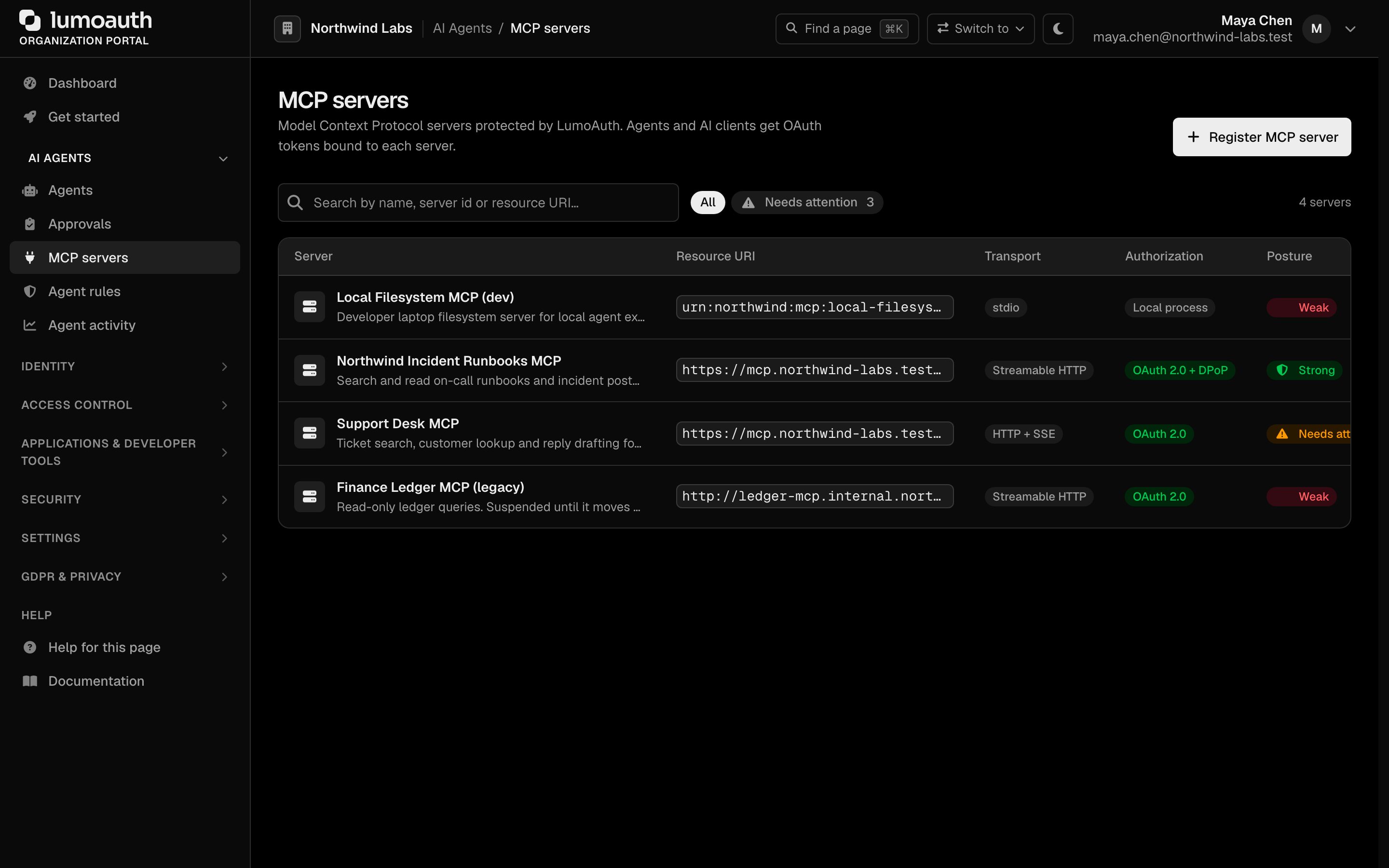
-
Step 1 — Describe the server. Fill in the Server name and the Resource URI (the canonical
https://URI of your MCP server, which clients send as theresourceindicator; it is validated as you type and cannot be changed after registration). Optionally add the MCP endpoint URL (where the server actually listens — the client snippets use it), pick the Transport and write a Description.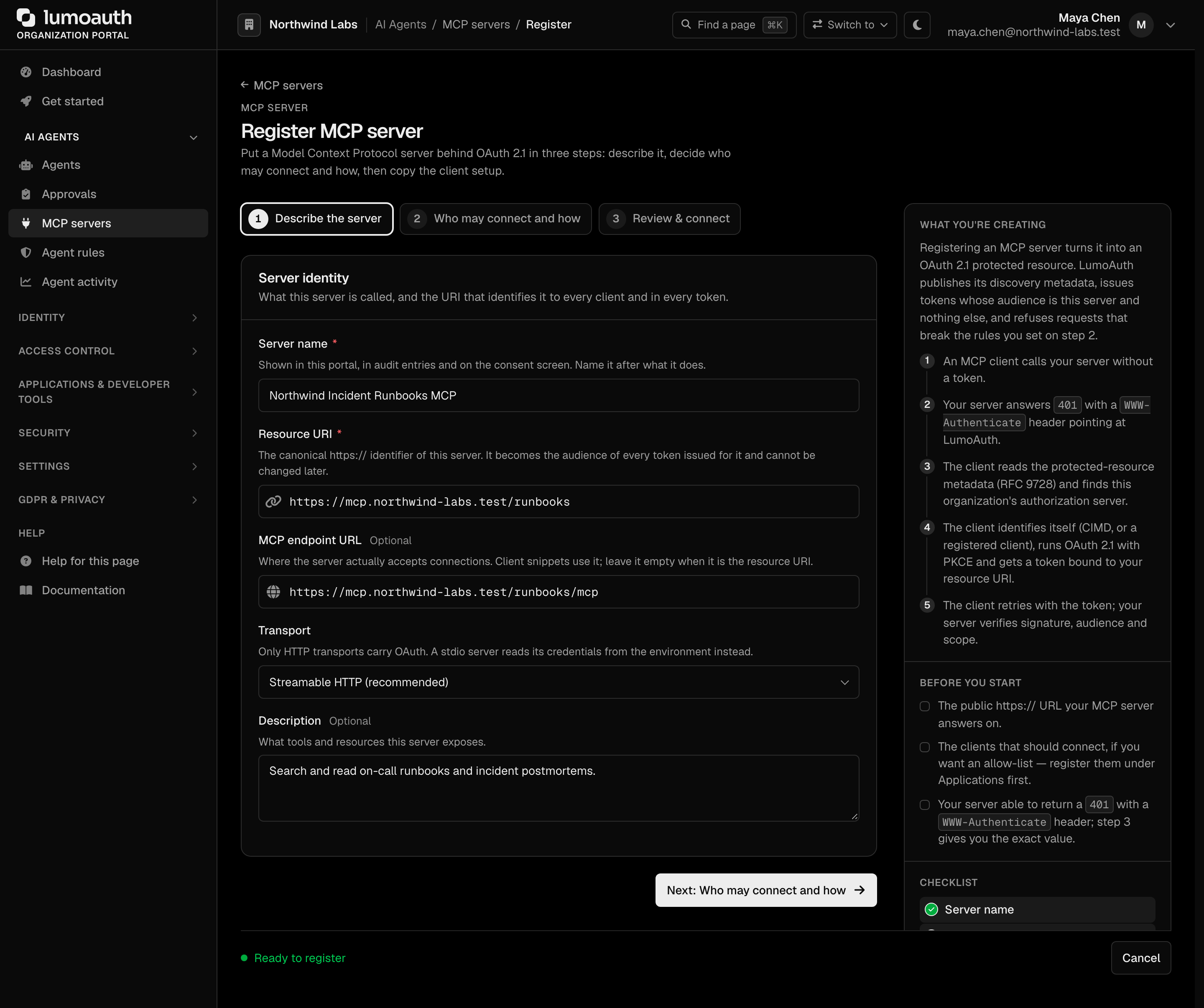
-
Step 2 — Who may connect and how.
- Authorization mode — OAuth 2.1 protected (recommended) or Public. Public checks no token at all, so the wizard asks you to confirm it in so many words before it accepts the form.
- Allowed clients — pick the organization's OAuth clients from a searchable list, or choose Any client in this organization (the wizard warns that this includes clients registered later through dynamic client registration (DCR, a client registering itself through the API) or Client ID Metadata Documents (CIMD, a client identifying itself with the URL of a metadata file)). Ids that are not clients of this organization are refused.
- Token protections — Require PKCE (on), Require the
resourceparameter (on) and Require DPoP sender-constrained tokens (on for new servers). Each switch says exactly when LumoAuth enforces it; see Security settings. - Scope vocabulary — rows of scope + description. Use defaults seeds
mcp:read,mcp:writeandmcp:tools:*. - Token lifetime — defaults to 3600 seconds; a warning appears above the field when you go higher.

-
Step 3 — Review & connect. A summary of what will be saved, the server's security posture after saving, and copy-paste snippets that already use your organization's real URLs and the reserved server id: the Protected Resource Metadata document (the discovery file clients fetch to find the authorization server), the
401challenge, and client setup for Claude (CIMD first, DCR as the legacy variant), ChatGPT, a genericmcp.jsonclient and a manualcurlwalk-through. Click Register MCP server.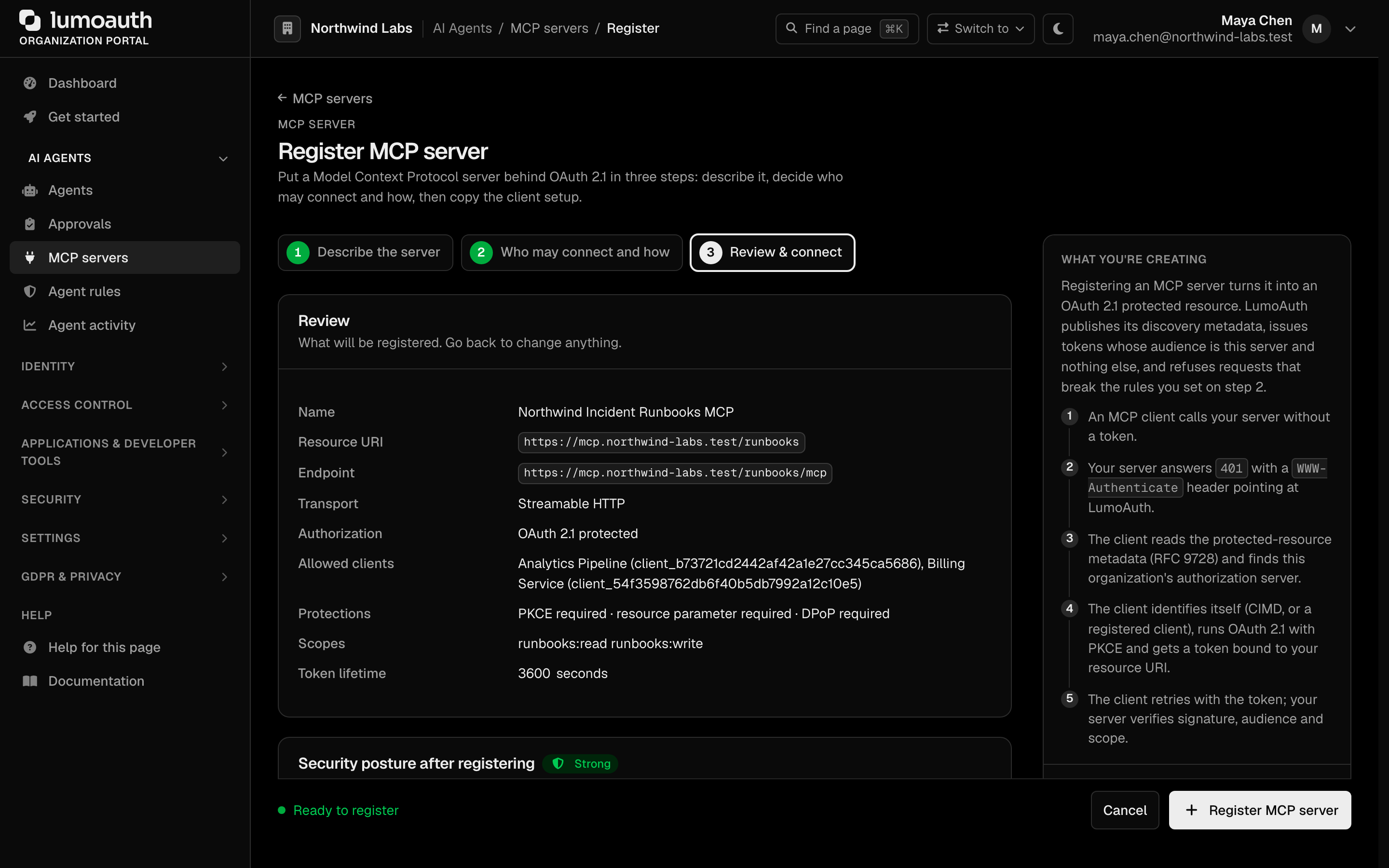
The wizard keeps ?step= in the URL, re-opens on the step that holds a validation error with everything you typed still in place, and works without JavaScript (the three steps then render in order on one page).
After registering you land on the server's detail page. It shows the security posture card, the settings you chose, and Discovery and client setup with the same snippets as step 3. Use Edit on this page to change the server later; each failing posture check links straight to the wizard step that fixes it.

Security posture
Every server carries a posture computed from its own settings — on the detail page, as a column on the list (with a Needs attention filter) and as posture in the admin API. The checks: status active, resource URI https://, endpoint URL set, OAuth protected (not Public), PKCE required, allowed clients set, scope vocabulary defined, resource parameter requirement effective (on and able to fire — see below), DPoP required, token lifetime ≤ 3600 s. Any failing check makes the server Weak; warnings only make it Needs attention; everything passing is Strong. Checks that do not apply (the OAuth settings of a stdio or Public server) are shown as not applicable and do not count.
Server configuration
Required fields
| Field | Description | Example |
|---|---|---|
name | Human-readable server name | Code Search MCP Server |
resource_uri | Canonical URI of the server. Used as the resource parameter in OAuth requests and for token audience binding. | https://mcp.example.com |
Optional fields
| Field | Default | Description |
|---|---|---|
endpoint_url | null | The URL where the MCP server accepts connections |
transport | http_streamable | Transport type: http_streamable, http_sse, or stdio |
auth_mode | oauth | oauth for protected servers, none for public |
scopes_supported | [] | Space-separated OAuth scopes this server supports. When non-empty this is the server's scope vocabulary: requests for this server's resource may only ask for these scopes (plus the standard OIDC identity scopes); anything else fails with invalid_scope. Also merged into scopes_supported of the organization's authorization-server metadata. |
token_lifetime | 3600 | Access token lifetime in seconds (60–86400). The posture check warns above 3600. |
allowed_client_ids | [] | Restrict access to specific OAuth client ids of this organization. Empty = all organization clients. The portal offers a picker; the admin API returns 422 for an id that is not a client of the organization. |
scope_descriptions | {} | Admin-written text per scope ({"mcp:read": "…"}), shown in the portal only — not part of any protocol document. |
require_pkce | true | Reject authorization requests (/authorize, PAR) and token issuance for this server's resource when the flow does not use PKCE. |
require_resource_param | true | The resource parameter is required whenever a request evidently targets this server: the client is listed in allowed_client_ids, or the request asks for a scope from this server's scopes_supported vocabulary. Checked at /authorize, PAR and the token endpoint (invalid_target, naming the expected resource). With neither an allow-list nor a vocabulary the switch has nothing to match and never fires — the posture check says so. |
require_dpop | false (API) / on in the portal wizard for new servers | Only DPoP sender-constrained access tokens (tied to the client's key so a stolen copy cannot be replayed) are issued for and accepted by this server. Token requests for the resource without a valid DPoP proof fail with invalid_dpop_proof; the challenge uses the DPoP scheme with algs, plain Bearer tokens are refused, and the Protected Resource Metadata announces dpop_bound_access_tokens_required. Servers registered before this setting existed have it off. |
include_scope_in_challenge | true | Deprecated (SEP-835): when the server has scopes_supported configured they are always advertised in the WWW-Authenticate challenge — scopes_supported doubles as the server's default-scope vocabulary that clients use in their initial authorization request. |
bearer_methods_supported | ["header"] | Accepted Bearer-token transports, advertised in Protected Resource Metadata. |
Resource URI requirements
The Resource URI is the canonical identifier of your MCP server. It is the value a client sends as the resource indicator to ask for a token bound to this specific server. The portal requires https:// (plain http:// is accepted only for localhost / 127.0.0.1 / [::1] during local development, and the posture check flags it); the admin API accepts http:// but the posture check marks such a server Weak. It is used as:
- The
resourceparameter in authorization and token requests. - The audience (
aud) claim in JWT access tokens. - The
resourcefield in Protected Resource Metadata.
Resource URIs must be valid HTTPS URLs that uniquely identify your MCP server.
Example: https://api.example.com/mcp/weather-service
List MCP servers
Returns all active MCP servers for the organization. The caller must hold the settings.manage permission in the organization (GET /mcp/servers/{serverId} too); an API key additionally needs the mcp:read scope. Other callers get 403.
curl -X GET https://app.lumoauth.dev/orgs/acme-corp/api/v1/mcp/servers \
  -H "Authorization: Bearer <ACCESS_TOKEN>"
{
  "servers": [
    {
      "id": 1,
      "server_id": "mcp_a1b2c3d4e5f6a1b2c3d4e5f6",
      "name": "Code Search MCP Server",
      "description": "Provides code search and analysis tools",
      "resource_uri": "https://mcp.example.com",
      "endpoint_url": "https://mcp.example.com/mcp",
      "transport": "http_streamable",
      "auth_mode": "oauth",
      "status": "active",
      "scopes_supported": ["mcp:read", "mcp:write"],
      "require_pkce": true,
      "require_resource_param": true,
      "require_dpop": true,
      "token_lifetime": 3600,
      "created_at": "2026-02-10T12:00:00+00:00"
    }
  ],
  "data": [ ...the same list... ],
  "pagination": { ... }
}
The list is returned twice: under servers (the historical key) and under data with a pagination object (the envelope every LumoAuth list endpoint uses).
Get MCP server details
GET /orgs/{orgId}/api/v1/mcp/servers/{serverId}
Returns detailed information about a specific MCP server, including discovery URLs and example headers.
{
  "id": 1,
  "server_id": "mcp_a1b2c3d4e5f6a1b2c3d4e5f6",
  "name": "Code Search MCP Server",
  "resource_uri": "https://mcp.example.com",
  "transport": "http_streamable",
  "auth_mode": "oauth",
  "status": "active",
  "scopes_supported": ["mcp:read", "mcp:write"],
  "allowed_client_ids": [],
  "bearer_methods_supported": ["header"],
  "require_pkce": true,
  "require_resource_param": true,
  "require_dpop": true,
  "token_lifetime": 3600,
  "discovery": {
    "authorization_server_metadata": "https://app.lumoauth.dev/orgs/acme-corp/api/v1/.well-known/oauth-authorization-server",
    "protected_resource_metadata": "https://app.lumoauth.dev/orgs/acme-corp/api/v1/.well-known/oauth-protected-resource/mcp/mcp_a1b2c3d4",
    "www_authenticate_example": "Bearer resource_metadata=\"https://...\", scope=\"mcp:read mcp:write\""
  }
}
Registration via the Admin API
The portal UI is backed by an admin REST API. Use it to create and delete MCP servers programmatically (requires an admin access token or an API key with the appropriate scope):
| Method | Path | Purpose |
|---|---|---|
GET | /orgs/{orgId}/api/v1/admin/mcp/servers | List all MCP servers (including inactive). |
POST | /orgs/{orgId}/api/v1/admin/mcp/servers | Create an MCP server. |
GET | /orgs/{orgId}/api/v1/admin/mcp/servers/{serverId} | Get a server's full configuration. |
DELETE | /orgs/{orgId}/api/v1/admin/mcp/servers/{serverId} | Delete a server. |
curl -X POST https://app.lumoauth.dev/orgs/acme-corp/api/v1/admin/mcp/servers \
  -H "Authorization: Bearer <ADMIN_ACCESS_TOKEN>" \
  -H "Content-Type: application/json" \
  -d '{
    "name": "Code Search MCP Server",
    "resource_uri": "https://mcp.example.com",
    "endpoint_url": "https://mcp.example.com/mcp",
    "scopes_supported": ["mcp:read", "mcp:write"],
    "allowed_client_ids": ["client_abc123"],
    "require_dpop": true,
    "token_lifetime": 3600
  }'
The response (and every admin GET) includes allowed_client_ids, require_pkce, require_resource_param, require_dpop, token_lifetime, scope_descriptions and a posture object (level, label, passes, applicable, checks[]) — the same checklist the portal shows. An entry of allowed_client_ids that is not a client of the organization is a 422 validation_error naming the id; nothing is stored.
/api/v1/mcp/servers (used in the examples above) is the read-only
list/detail API any Bearer-token holder can call. Create and delete live under
/api/v1/admin/mcp/servers and require admin privileges.
The two list endpoints return different envelopes — check which one you're calling before parsing:
- Protocol endpoint
GET /api/v1/mcp/servers→{ "servers": [...], "data": [...], "pagination": {...} }(active servers only;serversanddatahold the same list). - Admin endpoint
GET /api/v1/admin/mcp/servers→{ "data": [...] }(includes inactive servers).
Inspect servers from the CLI
The lumo CLI exposes the same data without writing curl:
lumo mcp servers                 # list registered MCP servers
lumo mcp discovery <server-id>   # fetch the RFC 9728 discovery document for a server
Both honor --org-id, --base-url, and --output table|json|yaml. Use --insecure against a self-signed local server.
Security settings
PKCE requirement
Per the MCP Authorization specification, MCP clients MUST implement PKCE with the S256 code challenge method. LumoAuth enforces this in two places:
- Authorization endpoint and PAR — public clients (all
token_endpoint_auth_method: "none"clients) and clients flagged PKCE required must sendcode_challenge; a non-S256method is always rejected. In addition, when the request'sresourcenames a registered MCP server withrequire_pkceon (the default), a missingcode_challengeis refused there withinvalid_request— the user is never sent through login and consent for a request the token endpoint would reject. - Token endpoint — when a token request names a registered MCP server's Resource URI and that server has
require_pkceon, the authorization code being exchanged must have been issued with a code challenge; otherwise the request fails withinvalid_grant. Refresh-token and other non-code grants are not re-checked.
Resource parameter
MCP clients MUST include the resource parameter (the resource indicator) in both authorization and token requests, set to the server's Resource URI. This binds the access token to the specific MCP server (aud claim), preventing token misuse across different services.
A request whose resource matches an active server's Resource URI is checked against that server's policy at /authorize, PAR and the token endpoint: allowed_client_ids (invalid_target if the client is not allowed), require_pkce (see above), the scope vocabulary (invalid_scope, see below) and token_lifetime (applied to the issued token). Resources that match no registered server are not affected by MCP policy.
When require_resource_param is on, a request that omits resource is refused with invalid_target whenever it evidently targets the server, that is when either
- the client is listed in the server's
allowed_client_ids, or - the request asks for any scope from the server's
scopes_supportedvocabulary (a client that learned the scopes from the server's 401 challenge or Protected Resource Metadata but dropped the resource indicator).
The error description names the expected value (send resource=https://…). A server with neither an allow-list nor a vocabulary cannot be matched without a resource and therefore never triggers this check.
Scope vocabulary (scopes_supported)
When a server defines scopes_supported, it is the authoritative list of scopes a token for that resource may carry. Requests bound to the server (by resource) that ask for a scope outside the vocabulary fail with invalid_scope — at /authorize, PAR and every token grant (authorization code, refresh, client credentials, token exchange, CIBA, device, ID-JAG redemption). The standard OIDC identity scopes (openid profile email phone address offline_access) describe the user at the authorization server, not the resource, and are always allowed alongside. Servers without a vocabulary impose no restriction (fail-closed only when a vocabulary exists).
The vocabularies of all active MCP servers are merged (deduplicated) into scopes_supported of the organization's OAuth authorization-server metadata and OpenID discovery document, so clients can see the resource scopes they may request.
DPoP requirement (require_dpop)
DPoP binds an access token to a key the client holds; every use of the token needs a fresh proof signed with that key, so a token copied from a log or a proxy is useless on its own. With require_dpop on for a server:
- Token endpoint — every grant whose
resourcenames the server (authorization code, client credentials, refresh, CIBA, device, token exchange, ID-JAG) must mint a key-bound token: the request carries a validDPoPproof header, or the refresh token being redeemed is already key-bound. Otherwise the request fails withinvalid_dpop_proofnaming the resource. Aclient_credentialsrequest with aDPoPproof now mints a bound token (token_type: "DPoP",cnf.jktin the JWT), which it did not before. - Challenge endpoint — the
WWW-Authenticateheader uses theDPoPscheme and lists the accepted proof algorithms inalgs. A token presented with theBearerscheme, or a token without acnf.jktbinding, is refused withDPoP error="invalid_token". Step-up (insufficient_scope) keeps theDPoPscheme. - Protected Resource Metadata —
dpop_bound_access_tokens_required: trueanddpop_signing_alg_values_supportedare added so clients know before their first request.
Not every client supports DPoP yet. ChatGPT's connectors do not send DPoP proofs today, so leave the requirement off for a server ChatGPT must reach; the wizard's ChatGPT snippet says so when DPoP is on.
Client restrictions
By default, all OAuth clients within an organization can request tokens for any MCP server. You can restrict access by setting Allowed clients — only listed clients will be permitted to obtain tokens for the server (invalid_target otherwise, at /authorize, PAR and the token endpoint). The portal offers a searchable picker of the organization's clients; the admin API validates each id and refuses one that is not a client of the organization. Being on the list also makes the resource-parameter requirement enforceable for that client.
Redirect URIs of MCP clients
MCP clients register themselves through dynamic client registration or identify themselves with a Client ID Metadata Document. In both cases LumoAuth validates every redirect_uri (and post_logout_redirect_uri) before storing it:
| URI | Dynamically registered client | CIMD client |
|---|---|---|
https://… with a host | Accepted for application_type: web (the default); rejected for native | Accepted |
http://localhost, http://127.0.0.1, http://[::1] (any port, any path) | Accepted for application_type: native; rejected for web | Accepted, subject to the organization's loopback policy (warn or block) |
http:// on any other host | Rejected (invalid_redirect_uri) | Rejected |
Custom scheme such as com.example.app:/callback | Accepted for application_type: native; rejected for web | Rejected |
javascript:, data:, vbscript:, blob:, file:, about: | Never accepted, on any write path | Never accepted |
| URI with a fragment, whitespace, quotes or control characters | Rejected | Rejected |
A desktop or CLI MCP client that listens on loopback must therefore register with application_type: "native".
The OAuth for native apps best practice solves the problem of a desktop or CLI client that has no stable HTTPS callback: it may listen on the loopback interface and receive the code over plain http, because the traffic never leaves the machine. What you must do: register http://127.0.0.1 or http://localhost (the port may vary at runtime), use PKCE, and never register plain http on a real hostname.
A registration whose redirect_uris contain a forbidden URI fails with invalid_redirect_uri; the other URIs are not stored either.
Related
- MCP Authorization Flow — end-to-end OAuth 2.1 flow
- Protected Resource Metadata — discovery document details
- Client ID Metadata Documents — URL-based client identity for MCP clients
Standards used on this page
| Plain name | Standard |
|---|---|
| Model Context Protocol (MCP) authorization | MCP Authorization specification |
| Resource indicators | RFC 8707 |
| Dynamic client registration | RFC 7591 |
| Client ID metadata documents | OAuth Client ID Metadata Document (draft) |
| Sender-constrained tokens (DPoP) | RFC 9449 |
| Protected resource metadata | RFC 9728 |
| Proof Key for Code Exchange (PKCE) | RFC 7636 |
| OAuth for native apps | RFC 8252 |
See the standards reference for what each one covers and how LumoAuth uses it.